

Airflow: Qlik Sense Cloud Provider
Qlik Sense Cloud Provider to reload application, automation from Airflow.
This repository provides basic qlik sense cloud hook and operators to trigger reloads of applications, automations, or tasks available in a Qlik Sense Cloud tenant.
Road Map
In development:
☑ Adding Qlik Talend Cloud Operator (Waiting new tenant to add it)
Test-Phase:
☑ Adding Report Operator (Added in production) ☑ Comptability with Airflow 3.0.1 (Added in production)
Warnings
For version superior to Airflow 3.0.0, please use version superior to 0.0.7 For version below to Airflow 3.0.0, please use version under 0.0.7
Requirements
The package has been tested with Python 3.9.
| Package | Version |
|---|---|
| apache-airflow | >2.10 |
| qlik-sdk | >= 0.14.0 |
You also need a Qlik Sense Cloud tenant with API key activated. To get more informations about how to activate API key on Qlik Sense Cloud Tenant, see this section.
How to install it ?
To install it, download and unzip source and launch the following pip install command:
By using Pypi
pip install airflow-provider-qlik-sense-cloud
By Local Install
pip install .
You can also use
python setup.py install
How to use it ?
To create connection, you need to get a API Token and your Qlik Cloud Tenant Activation
1. Generating API Keys
Follow these steps to get API Keys:
Step 1: Login to your Qlik Sense Cloud Tenant.
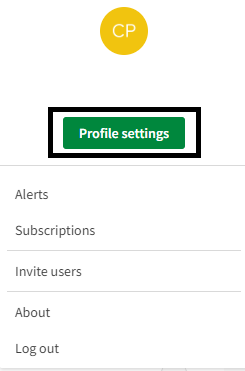
Step 2: Click on your account logo and go into Profile.
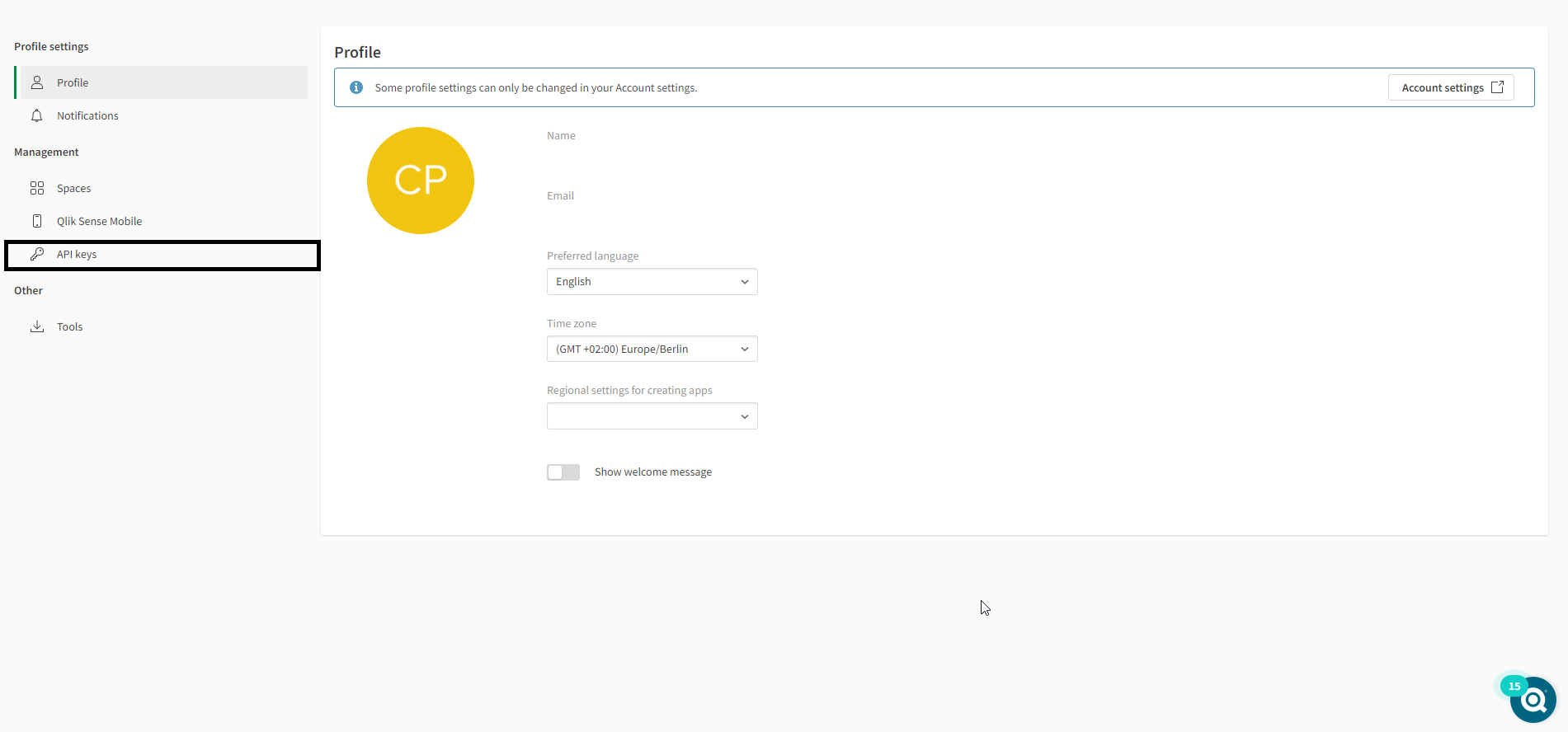
Step 3: Go into API keys section.
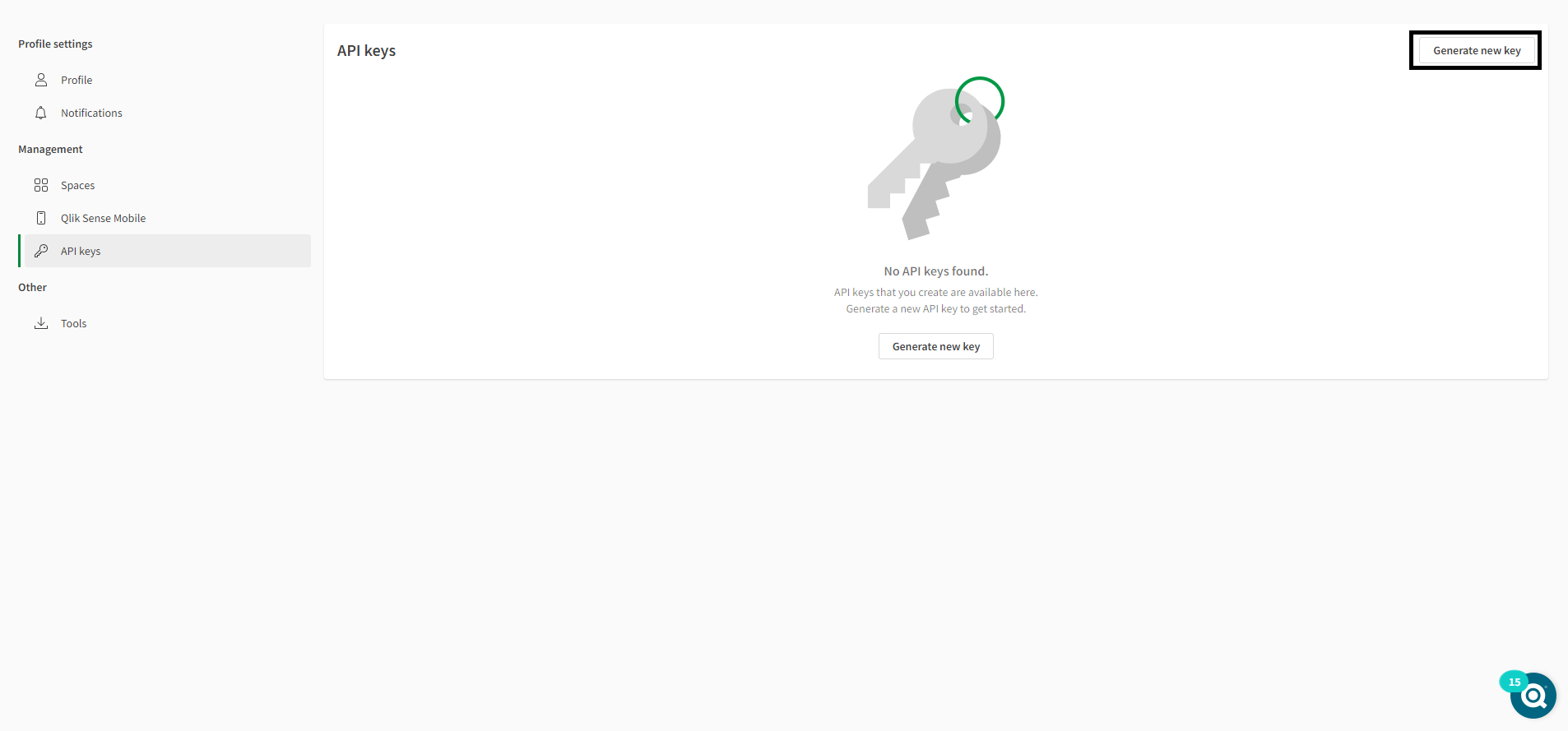
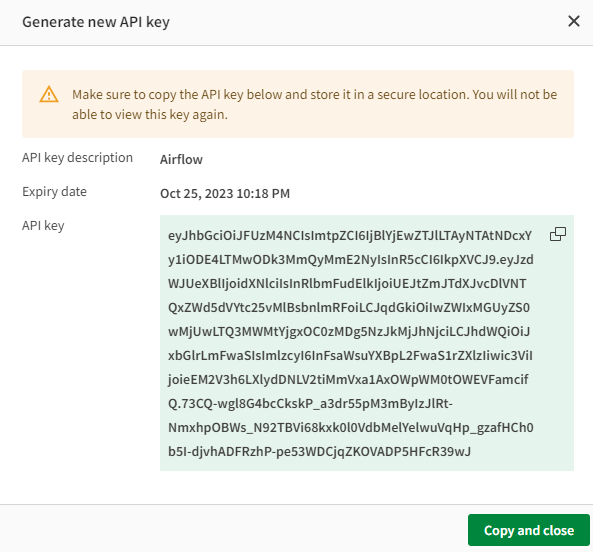
Step 4: Generate a new key.
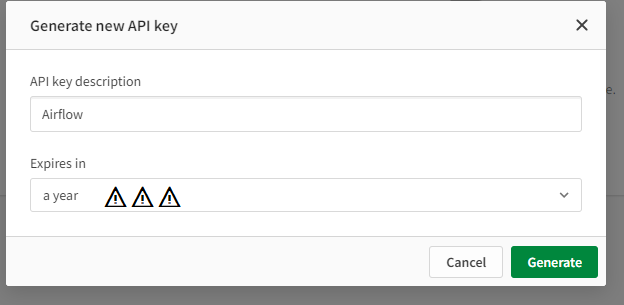
Step 5: Give a description and an expiration date ( ⚠️⚠️⚠️ Choose an expiration date with enough delay to avoid refresh all the time the token API ⚠️⚠️⚠️).
Step 6: The API key is displaying, copy it and save it.
2. Get tenant id
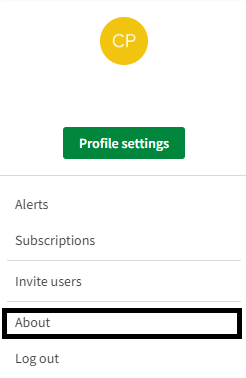
Step 1: Login to your Qlik Sense Cloud Tenant and go into About Section by clicking on your profile icon.
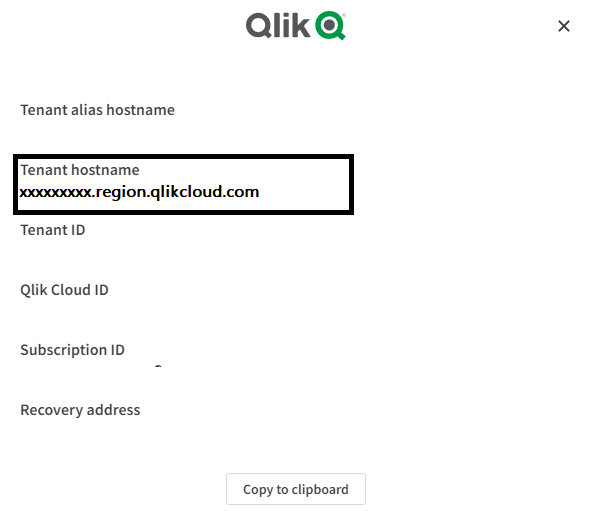
Step 2: Get the value of your tenant hostname
3. Creating Qlik Sense Cloud Connection in Airflow
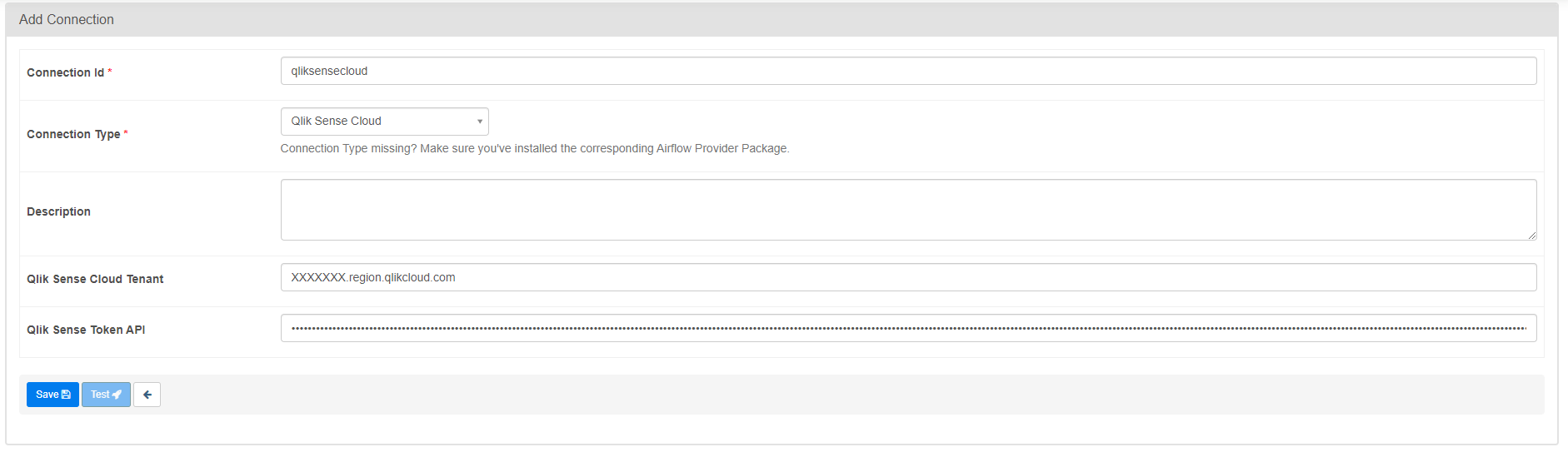
Step 1: Login to your Airflow Webserver. Go into Admin > Connection and creation a new connection by cliking on add icon.
Step 2: Give a name to your connection id and selection Qlik Sense Cloud in Connection Type. Add tenant id hostname (without https) and Token API Key that you copy in Section 1 and 2.
4. Example: Creating a DAG with Qlik Sense Cloud Operator to reload App
You can now use the operators in your dags to trigger action in Qlik Sense Cloud from Airflow
Example:
from airflow import DAG
from airflow.providers.qlik_sense_cloud.operators.qlik_sense_cloud_reload import QlikSenseCloudReloadOperator
from airflow.utils.dates import days_ago

from datetime import timedelta
from textwrap import dedent


# [START default_args]
# These args will get passed on to each operator
# You can override them on a per-task basis during operator initialization
default_args = {
    'owner': 'airflow',
    'depends_on_past': False,
    'email': ['airflow@example.com'],
    'email_on_failure': False,
    'email_on_retry': False,
    'retries': 1,
    'retry_delay': timedelta(minutes=5),
    # 'queue': 'bash_queue',
    # 'pool': 'backfill',
    # 'priority_weight': 10,
    # 'end_date': datetime(2016, 1, 1),
    # 'wait_for_downstream': False,
    # 'dag': dag,
    # 'sla': timedelta(hours=2),
    # 'execution_timeout': timedelta(seconds=300),
    # 'on_failure_callback': some_function,
    # 'on_success_callback': some_other_function,
    # 'on_retry_callback': another_function,
    # 'sla_miss_callback': yet_another_function,
    # 'trigger_rule': 'all_success'
}
# [END default_args]


# [START instantiate_dag]
with DAG('test-airflow',default_args=default_args,description='A simple tutorial DAG to try',schedule_interval=timedelta(days=1),start_date=days_ago(2),tags=['example'],) as dag:
        t1 = QlikSenseCloudReloadOperator(task_id='reload_app',appId='4d5ad6d0-92a1-47c3-b57d-5a07945377f8',qlik_sense_cloud_config_id='qliksensecloud')

        t1
# [END instantiate_dag]
5. Example: Creating a DAG with Qlik Sense Cloud Operator to reload Qlik Automation and to send a Qlik Report
Here's an example of DAG using operator to reload automation
from airflow import DAG
from airflow.providers.qlik_sense_cloud.operators.qlik_sense_cloud_automation import QlikSenseCloudAutomationOperator
from airflow.providers.qlik_sense_cloud.operators.qlik_sense_cloud_report import QlikSenseCloudReportOperator
from airflow.utils.dates import days_ago

from datetime import timedelta
from textwrap import dedent

# [START default_args]
# These args will get passed on to each operator
# You can override them on a per-task basis during operator initialization
default_args = {
    'owner': 'airflow',
    'depends_on_past': False,
    'email': ['airflow@example.com'],
    'email_on_failure': False,
    'email_on_retry': False,
    'retries': 1,
    'retry_delay': timedelta(minutes=5),
    # 'queue': 'bash_queue',
    # 'pool': 'backfill',
    # 'priority_weight': 10,
    # 'end_date': datetime(2016, 1, 1),
    # 'wait_for_downstream': False,
    # 'dag': dag,
    # 'sla': timedelta(hours=2),
    # 'execution_timeout': timedelta(seconds=300),
    # 'on_failure_callback': some_function,
    # 'on_success_callback': some_other_function,
    # 'on_retry_callback': another_function,
    # 'sla_miss_callback': yet_another_function,
    # 'trigger_rule': 'all_success'
}
# [END default_args]


# [START instantiate_dag]
with DAG('test-automation-report',default_args=default_args,description='A simple tutorial DAG to try',schedule_interval=timedelta(days=1),start_date=days_ago(2),tags=['example'],) as dag:
	t1 = QlikSenseCloudAutomationOperator(task_id='reload_automation',automationId='bab86470-578a-11ed-bee3-db20e15c9fd8',qlik_sense_cloud_config_id='qliksensecloud')

  	t2 = QlikSenseCloudReportOperator(task_id='reload_report',reportId='65f810a9e0f4697cb54b6e87',qlik_sense_cloud_config_id='qliksensecloud')

	t1 >> t2
6. (Appendix) Activate API Key on Qlik Sense Cloud Tenant
To get more informations about API Key in Qlik Sense Cloud, you can follow these topic:
1 maintainer

Metadata
1 maintainer
Release files for airflow-provider-qlik-sense-cloud 0.0.8
For a detailed explanation of source distributions (sdists) and built distributions (wheels), please see the package formats documentation.
Source distribution (sdist)
| File | Size | Uploaded | |
|---|---|---|---|
| airflow_provider_qlik_sense_cloud-0.0.8.tar.gz | 14.2 kB | Details |
Built distribution (wheel)
| File | Interpreter | ABI | Platform | Reset |
|---|---|---|---|---|
| airflow_provider_qlik_sense_cloud-0.0.8-py3-none-any.whl | Python 3 | none | any | Details |
Total release size: 28.7 kB
Release files / airflow_provider_qlik_sense_cloud-0.0.8.tar.gz
| Download URL | airflow_provider_qlik_sense_cloud-0.0.8.tar.gz |
|---|---|
| Size | 14.2 kB |
| Tags | Source |
|
SHA-256 checksum How to use checksums |
5dcf37a3693fac8bd76fc0983063a03905375c792838cb888190729ae7925e59
|
|
BLAKE2b-256 checksum How to use checksums |
803bbc202bb5d66ef0630ee56abeadce3f90be6933435367ad531323d34b9e4c
|
| Upload date | |
|
Uploaded using Trusted Publishing? What is trusted publishing? |
No |
| Uploaded via |
twine/6.1.0 CPython/3.12.10
|
Release files / airflow_provider_qlik_sense_cloud-0.0.8-py3-none-any.whl
| Download URL | airflow_provider_qlik_sense_cloud-0.0.8-py3-none-any.whl |
|---|---|
| Size | 14.6 kB |
| Tags | Python 3 |
|
SHA-256 checksum How to use checksums |
856af7db5f02cede89331b8405ffa4f20ca341550fc0bb75fefa1580625ec2b2
|
|
BLAKE2b-256 checksum How to use checksums |
8beb4b95734ff5f9e0f82f93d9010479ae6d89421e852bd60fb3637011a69a39
|
| Upload date | |
|
Uploaded using Trusted Publishing? What is trusted publishing? |
No |
| Uploaded via |
twine/6.1.0 CPython/3.12.10
|














