
Airflow Watcher 👁️
An Airflow plugin and standalone REST API for monitoring DAG failures, SLA misses, task health, and scheduling delays — with built-in alerting via Slack, Email, and PagerDuty.
Airflow Watcher ships two independent components that share the same monitors, notifiers, and metrics layer:
| Component | Runs in | Auth | Use case |
|---|---|---|---|
| Plugin | Airflow webserver process | Airflow session cookies + FAB RBAC | UI dashboards, internal API at /api/watcher |
| Standalone API | Separate FastAPI process | Bearer token + per-key RBAC | External integrations, CI/CD, dashboards, automation |
Table of Contents
- Features
- Installation
- Alerting & Monitoring
- Plugin
- Standalone API
- Common
Features
Plugin Features
- 📊 Dashboard View — 7 custom Airflow UI pages for monitoring
- 🔒 Airflow RBAC — DAG-level filtering via Airflow's FAB security manager
- 🔌 Zero Config — Auto-registers via Airflow's plugin entry point
- 📡 Internal REST API —
/api/watcher/*endpoints on the webserver
API Features
- 🚀 Standalone FastAPI — Runs outside the Airflow webserver
- 🔑 Bearer Token Auth — Constant-time token validation with key rotation
- 🗂️ Per-Key RBAC — Map API keys to specific DAGs
- 📄 Swagger UI — Interactive docs at
/docs - ⚡ Response Caching — Thread-safe TTL cache (default 60s)
/healthzLiveness Probe — No auth required, checks DB connectivity
Shared Features
- 🚨 DAG Failure Monitoring — Real-time tracking of DAG and task failures
- ⏰ SLA Miss Detection — Alerts when DAGs miss their SLA deadlines
- 📈 Trend Analysis — Historical failure and SLA miss trends
- 🔔 Multi-channel Notifications — Slack, Email, and PagerDuty alerts
- 📡 Metrics Export — StatsD/Datadog and Prometheus support
- ⚙️ Flexible Alert Rules — Pre-defined templates or custom rules
Installation
📖 See INSTALL.md for detailed installation and configuration instructions.
Alerting & Monitoring
📖 See ALERTING.md for complete alerting configuration:
- Slack — Rich notifications with blocks
- Email — SMTP-based alerts
- PagerDuty — Incident management with deduplication
- StatsD/Datadog — Real-time metrics
- Prometheus —
/metricsendpoint for scraping
Quick Alerting Setup
# Slack alerts
export AIRFLOW_WATCHER_SLACK_WEBHOOK_URL="https://hooks.slack.com/..."

# PagerDuty (optional)
export AIRFLOW_WATCHER_PAGERDUTY_ROUTING_KEY="your-key"

# Choose alert template
export AIRFLOW_WATCHER_ALERT_TEMPLATE="production_balanced"
Plugin (Airflow UI)
The plugin runs inside the Airflow webserver process. Once installed, it auto-registers with Airflow, adds a "Watcher" menu to the UI, and exposes REST endpoints at /api/watcher/*. No separate workers, message queues, or external databases are needed — it reads from the same metadata DB that Airflow already maintains.
Demo
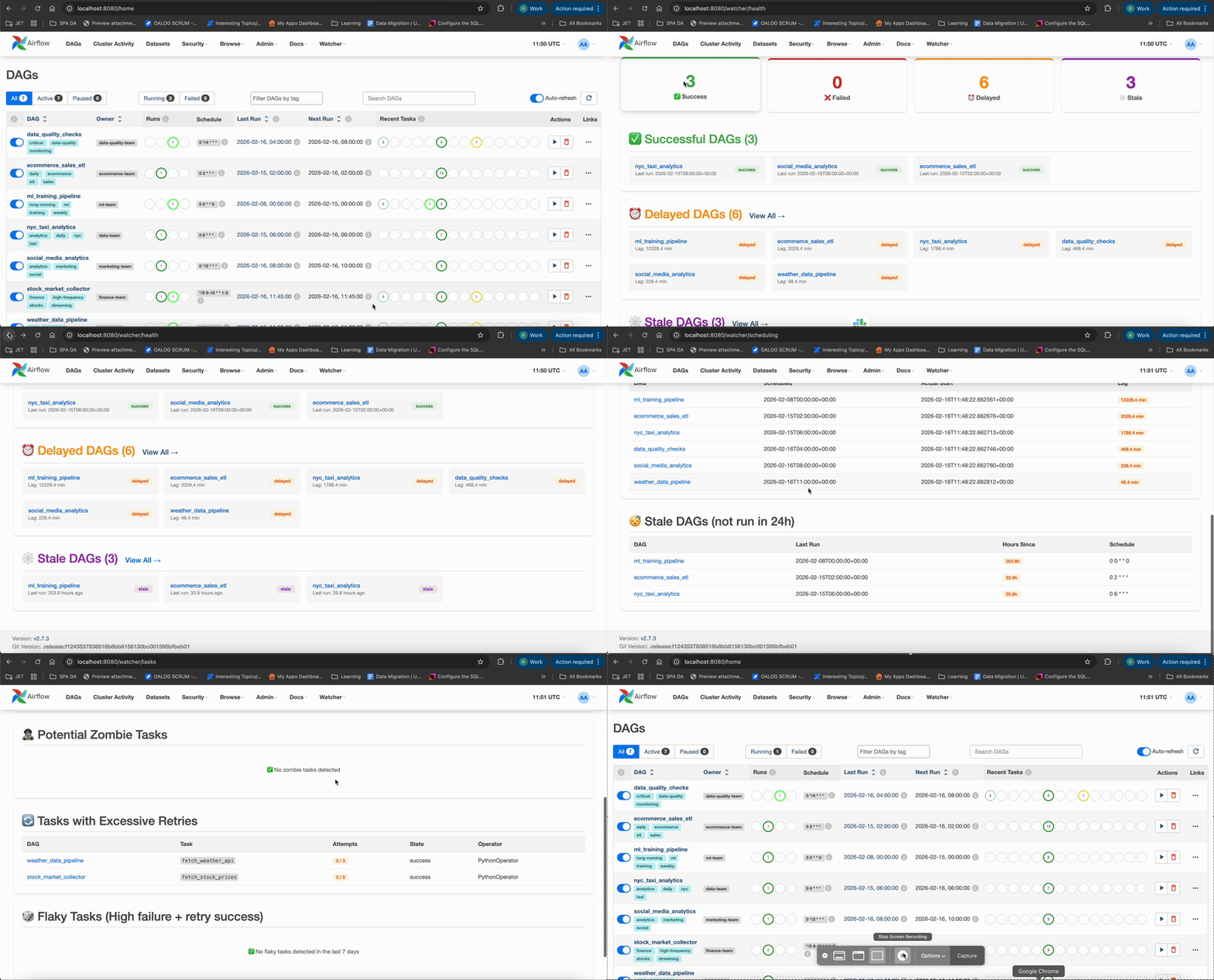
Plugin Architecture
+--------------------------------------------------------------+
|                   Airflow Webserver                          |
|                                                              |
|  +--------------------------------------------------------+  |
|  |              Airflow Watcher Plugin                    |  |
|  |                                                        |  |
|  |  +-------------+     +------------------------------+  |  |
|  |  | Flask Views  |    |        Monitors (6)          |  |  |
|  |  | (Dashboard)  |<---|  - DAG Failure Monitor       |  |  |
|  |  |              |    |  - SLA Monitor               |  |  |
|  |  | REST API     |    |  - Task Health Monitor       |  |  |
|  |  | /api/watcher |    |  - Scheduling Monitor        |  |  |
|  |  +-------------+     |  - Dependency Monitor        |  |  |
|  |         |            |  - DAG Health Monitor        |  |  |
|  |         |            +----------+-------------------+  |  |
|  |         |                      |                       |  |
|  |         |           +----------v-------------------+   |  |
|  |         |           |    Metrics Collector          |  |  |
|  |         |           |    (WatcherMetrics)           |  |  |
|  |         |           +----------+-------------------+   |  |
|  |         |                      |                       |  |
|  |         v                      v                       |  |
|  |  +-------------+     +------------------------------+  |  |
|  |  |  Notifiers   |    |        Emitters              |  |  |
|  |  |  - Slack     |    |  - StatsD / Datadog (UDP)    |  |  |
|  |  |  - Email     |    |  - Prometheus (/metrics)     |  |  |
|  |  |  - PagerDuty |    |                              |  |  |
|  |  +-------------+     +------------------------------+  |  |
|  +--------------------------------------------------------+  |
|                          |                                   |
|                          v                                   |
|              +-----------------------+                       |
|              |  Airflow Metadata DB  |                       |
|              |  (PostgreSQL/MySQL)   |                       |
|              +-----------------------+                       |
+--------------------------------------------------------------+
UI Views
Once installed, navigate to Watcher in the Airflow UI navigation to access:
| Menu Item | Description |
|---|---|
| Airflow Dashboard | Overview metrics |
| Airflow Health | DAG health status (success/failed/delayed/stale) |
| DAG Scheduling | Queue and pool utilization |
| DAG Failures | Recent failures with details |
| SLA Tracker | SLA misses and delays |
| Task Health | Long-running and zombie tasks |
| Dependencies | Cross-DAG dependency tracking |
Plugin RBAC
The plugin integrates with Airflow's built-in FAB security manager to enforce DAG-level access control. No separate configuration is needed — it reads directly from Airflow's role and permission system.
How It Works
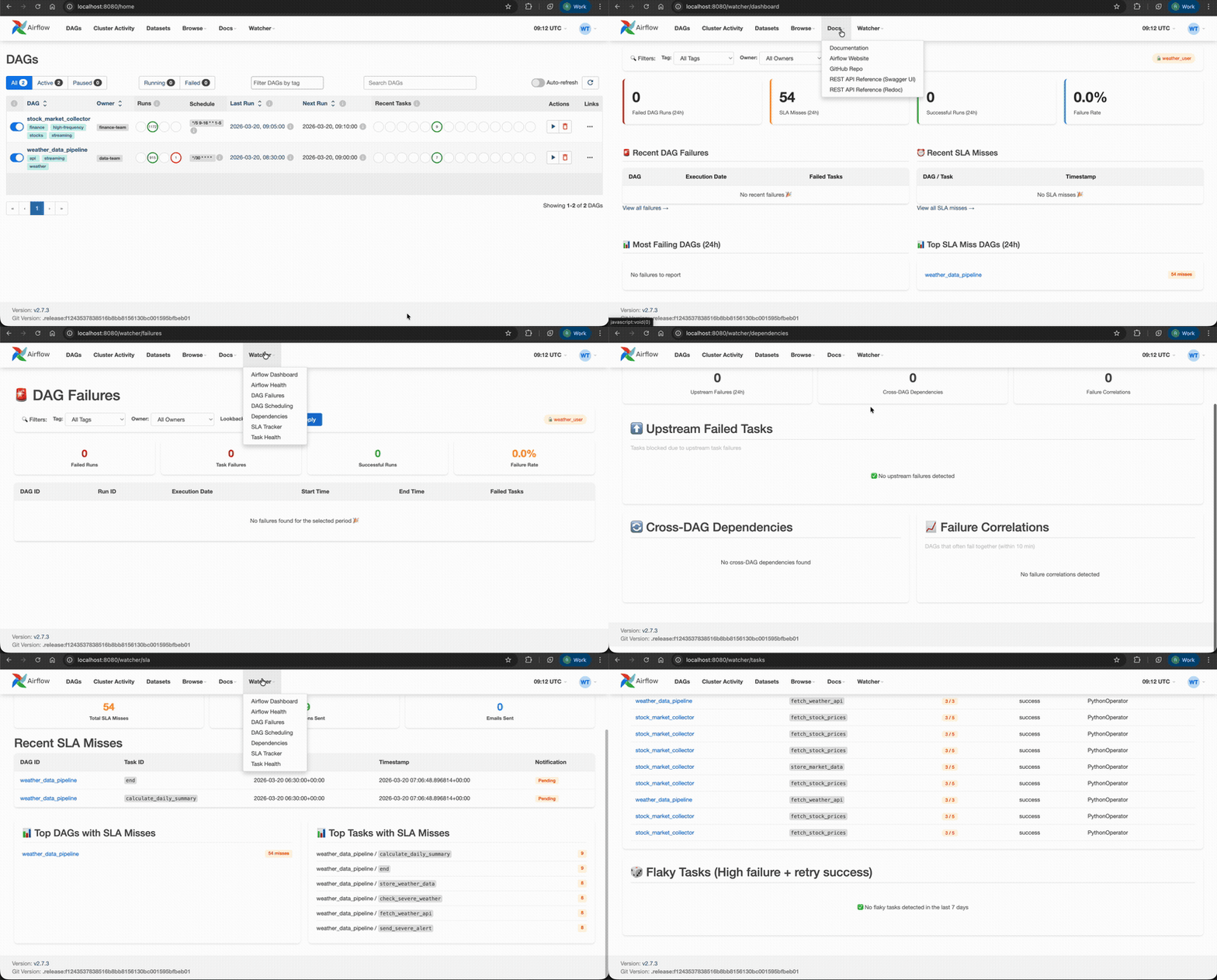
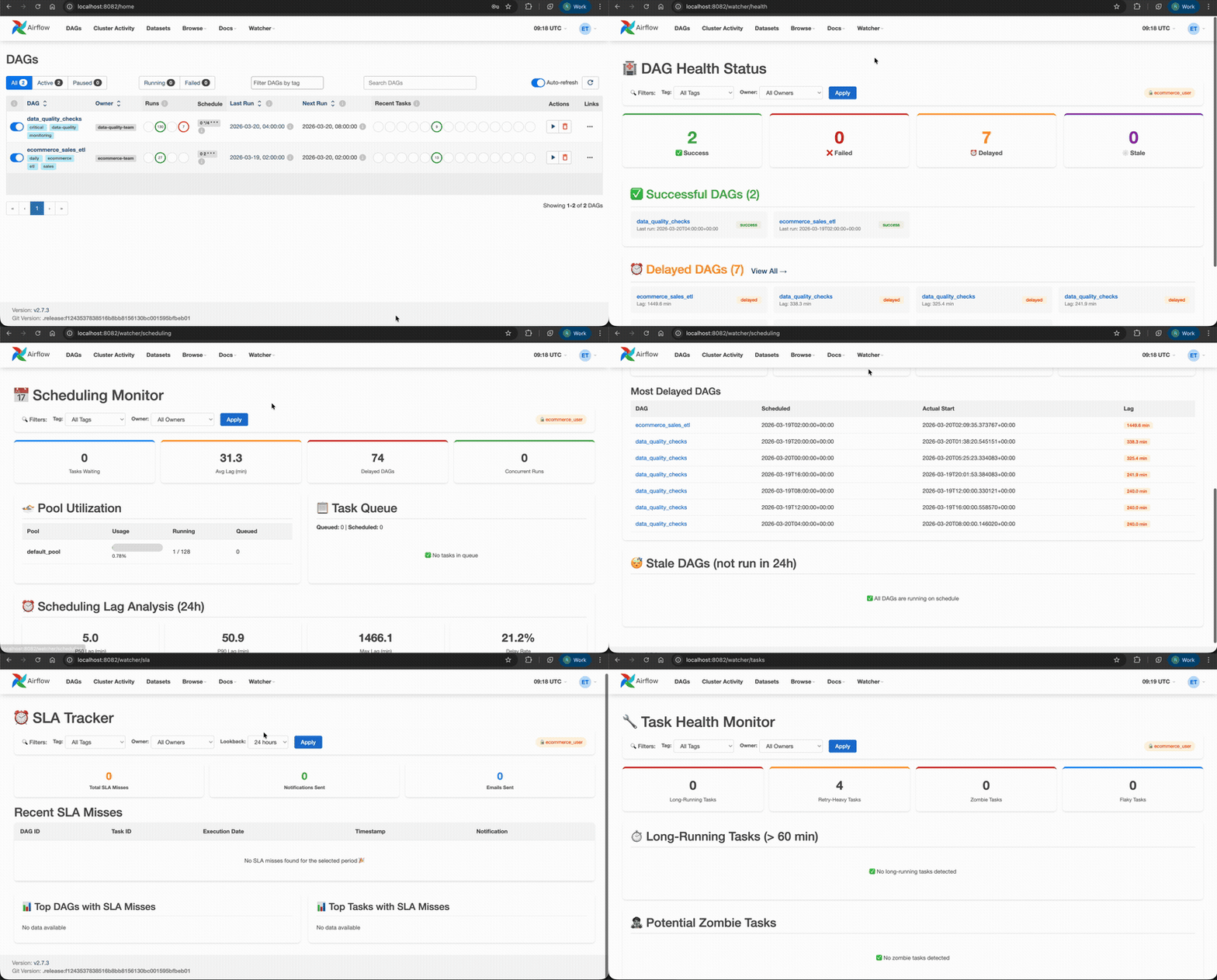
- Admin / Op roles see all DAGs across every Watcher page and API endpoint
- Custom roles only see DAGs they have
can_readpermission on - Filtering is mandatory and applied server-side — restricted users cannot bypass it
- Aggregate stats (failure counts, SLA misses, health scores) are recomputed per-user so no global data leaks
- A 🔒 badge appears in the filter bar for non-admin users
Setting Up DAG-Level Permissions
Add access_control to your DAG definitions to grant team-specific access:
from airflow import DAG

dag = DAG(
    dag_id="weather_data_pipeline",
    schedule_interval="@hourly",
    access_control={
        "team_weather": {"can_read", "can_edit"},
    },
)
Then create matching roles in Airflow (Admin → Security → List Roles) and assign users to them. The Watcher plugin will automatically pick up the permissions.
What Gets Filtered
| Area | Filtering |
|---|---|
| Dashboard stats | Failure count, SLA misses, health score — all scoped to user's DAGs |
| Failures page | Only failures from accessible DAGs |
| SLA page | Only SLA misses from accessible DAGs |
| Health page | Health status, stale DAGs, scheduling lag — filtered |
| Task health | Long-running tasks, zombies, retries — filtered |
| Scheduling | Concurrent runs, delayed DAGs — filtered |
| Dependencies | Cross-DAG deps, correlations — filtered |
All /api/watcher endpoints |
Same RBAC enforcement as UI pages |
RBAC Demo
Admin — sees all DAGs:

Weather user — sees only weather & stock DAGs:
Ecommerce user — sees only ecommerce & data quality DAGs:
Plugin API Endpoints — /api/watcher
/api/watcherThe plugin exposes a REST API at /api/watcher/* on the Airflow webserver. Authentication uses Airflow's session cookies (same login as the UI). All endpoints return JSON with a standard {status, data, timestamp} envelope.
Failures
| Method | Path | Params | Description |
|---|---|---|---|
| GET | /api/watcher/failures |
dag_id, hours, limit |
Recent DAG failures |
| GET | /api/watcher/failures/stats |
hours |
Failure rate statistics |
SLA
| Method | Path | Params | Description |
|---|---|---|---|
| GET | /api/watcher/sla/misses |
dag_id, hours, limit |
SLA miss events |
| GET | /api/watcher/sla/stats |
hours |
SLA miss statistics |
Health
| Method | Path | Params | Description |
|---|---|---|---|
| GET | /api/watcher/health |
— | System health summary (200 healthy, 503 degraded) |
| GET | /api/watcher/health/<dag_id> |
— | Health for a specific DAG |
Tasks
| Method | Path | Params | Description |
|---|---|---|---|
| GET | /api/watcher/tasks/long-running |
threshold_minutes |
Tasks exceeding duration threshold |
| GET | /api/watcher/tasks/retries |
hours, min_retries |
Tasks with excessive retries |
| GET | /api/watcher/tasks/zombies |
threshold_minutes |
Potential zombie tasks |
| GET | /api/watcher/tasks/failure-patterns |
hours |
Task failure pattern analysis |
Scheduling
| Method | Path | Params | Description |
|---|---|---|---|
| GET | /api/watcher/scheduling/lag |
hours, threshold_minutes |
Scheduling delay percentiles |
| GET | /api/watcher/scheduling/queue |
— | Current queue status |
| GET | /api/watcher/scheduling/pools |
— | Pool utilization |
| GET | /api/watcher/scheduling/stale-dags |
expected_interval_hours |
DAGs not running on schedule |
| GET | /api/watcher/scheduling/concurrent |
— | DAGs with multiple concurrent runs |
DAGs
| Method | Path | Params | Description |
|---|---|---|---|
| GET | /api/watcher/dags/import-errors |
— | DAG import errors |
| GET | /api/watcher/dags/status-summary |
— | DAG status summary with health score |
| GET | /api/watcher/dags/complexity |
— | DAG complexity analysis |
| GET | /api/watcher/dags/inactive |
days |
Inactive DAGs |
Dependencies
| Method | Path | Params | Description |
|---|---|---|---|
| GET | /api/watcher/dependencies/upstream-failures |
hours |
Upstream failure cascade analysis |
| GET | /api/watcher/dependencies/cross-dag |
— | Cross-DAG dependencies |
| GET | /api/watcher/dependencies/correlations |
hours |
Failure correlations |
| GET | /api/watcher/dependencies/impact/<dag_id>/<task_id> |
— | Downstream impact analysis |
Overview
| Method | Path | Params | Description |
|---|---|---|---|
| GET | /api/watcher/overview |
— | Combined overview of all monitoring data |
Demo Environment
To test the plugin locally with sample DAGs and pre-configured RBAC users:
cd demo
docker-compose up -d
Then visit http://localhost:8080 and navigate to the Watcher menu.
| User | Password | Role | Visible DAGs |
|---|---|---|---|
admin |
admin |
Admin | All 8 DAGs |
weather_user |
weather123 |
team_weather | weather_data_pipeline, stock_market_collector |
ecommerce_user |
ecommerce123 |
team_ecommerce | ecommerce_sales_etl, data_quality_checks |
See demo/README.md for more details.
Standalone API (FastAPI)
A lightweight, standalone REST API that runs outside the Airflow webserver. Use this when you want to call monitoring endpoints from external services, dashboards, or CI/CD pipelines without adding load to the Airflow webserver.
📖 Interactive API Docs (Swagger UI) — browse all 28 endpoints without running the server.
API Architecture
                                 ┌─────────────────┐
                                 │  External Client │
                                 │  (curl / app)    │
                                 └────────┬─────────┘
                                          │
                              Authorization: Bearer <key>
                                          │
                                          ▼
┌─────────────────────────────────────────────────────────────────┐
│                    Standalone FastAPI Service                   │
│                    http://localhost:8081                        │
│                                                                 │
│  ┌──────────┐   ┌──────────┐   ┌──────────┐   ┌────────────┐    │
│  │  Auth    │──▶│  RBAC    │──▶│  Cache   │──▶│  Monitors  │    │
│  │(Bearer)  │   │(dag map) │   │ (TTL 60s)│   │  (6 core)  │    │
│  └──────────┘   └──────────┘   └──────────┘   └──────┬─────┘    │
│                                                       │         │
│  ┌──────────────────────────────────────────────────┐ │         │
│  │              API Routers (11)                     │ │        │
│  │  /failures /sla /tasks /scheduling /dags          │◀┘        │
│  │  /dependencies /overview /health /alerts          │          │
│  │  /cache /metrics                                  │          │
│  └──────────────────────────────────────────────────┘           │
│                         │                                       │
│  ┌──────────────┐  ┌────▼──────┐  ┌─────────────────────────┐   │
│  │  Notifiers   │  │  Envelope │  │  Emitters               │   │
│  │  Slack/Email │  │  {status, │  │  StatsD / Prometheus    │   │
│  │  PagerDuty   │  │   data}   │  │  /metrics               │   │
│  └──────────────┘  └───────────┘  └─────────────────────────┘   │
└──────────────────────────┬──────────────────────────────────────┘
                           │
                           ▼
               ┌───────────────────────┐
               │  Airflow Metadata DB  │
               │  (PostgreSQL / MySQL) │
               └───────────────────────┘
Quick Start
# 1. Install standalone extras
pip install -e ".[standalone]"

# 2. Create .env file (already gitignored)
cat > .env << 'EOF'
AIRFLOW_WATCHER_DB_URI=postgresql://airflow:airflow@localhost:5432/airflow
AIRFLOW_WATCHER_API_KEYS=your-secret-api-key-here
EOF

# 3. Start the server
python src/airflow_watcher/api/main.py
# → Uvicorn running on http://0.0.0.0:8081

# 4. Test it
curl -H "Authorization: Bearer your-secret-api-key-here" \
     http://localhost:8081/api/v1/health/
Interactive API Docs
📖 Browse the full API spec online: Airflow Watcher API Docs (Swagger UI — no server required)
When running locally, the same docs are available at http://localhost:8081/docs.
Authentication
All /api/v1/* endpoints require a Bearer token when AIRFLOW_WATCHER_API_KEYS is set:
curl -H "Authorization: Bearer <key>" http://localhost:8081/api/v1/failures/
| Scenario | Behavior |
|---|---|
API_KEYS not set |
Auth disabled — all requests pass through (dev mode) |
API_KEYS set |
Every request needs Authorization: Bearer <key> header |
| Invalid/missing token | 401 Unauthorized |
| Multiple keys | Comma-separated — rotate independently per consumer |
Security: Tokens are compared using secrets.compare_digest() (constant-time) to prevent timing attacks.
API Configuration
| Variable | Required | Default | Description |
|---|---|---|---|
AIRFLOW_WATCHER_DB_URI |
Yes | — | Airflow metadata DB connection string |
AIRFLOW_WATCHER_API_KEYS |
No | (disabled) | Comma-separated API keys for auth |
AIRFLOW_WATCHER_API_HOST |
No | 0.0.0.0 |
Bind host |
AIRFLOW_WATCHER_API_PORT |
No | 8081 |
Bind port |
AIRFLOW_WATCHER_CACHE_TTL |
No | 60 |
Cache TTL in seconds |
AIRFLOW_WATCHER_RBAC_ENABLED |
No | false |
Enable per-key DAG filtering |
AIRFLOW_WATCHER_RBAC_KEY_DAG_MAPPING |
No | {} |
JSON mapping: {"key": ["dag1","dag2"]} |
AIRFLOW_WATCHER_SLACK_WEBHOOK_URL |
No | — | Slack alert webhook |
AIRFLOW_WATCHER_PAGERDUTY_ROUTING_KEY |
No | — | PagerDuty routing key |
AIRFLOW_WATCHER_PROMETHEUS_ENABLED |
No | false |
Enable /metrics endpoint |
AIRFLOW_WATCHER_STATSD_ENABLED |
No | false |
Enable StatsD emission |
API Endpoints
All endpoints return a standard JSON envelope:
{
  "status": "success",
  "data": { ... },
  "timestamp": "2026-03-27T12:34:56.789000Z"
}
Failures — /api/v1/failures
| Method | Path | Params | Description |
|---|---|---|---|
| GET | / |
dag_id, hours (1–8760, default 24), limit (1–500, default 50) |
Recent DAG failures |
| GET | /stats |
hours (1–8760, default 24) |
Failure rate statistics |
SLA — /api/v1/sla
| Method | Path | Params | Description |
|---|---|---|---|
| GET | /misses |
dag_id, hours (1–8760, default 24), limit (1–500, default 50) |
SLA miss events |
| GET | /stats |
hours (1–8760, default 24) |
SLA miss statistics |
Tasks — /api/v1/tasks
| Method | Path | Params | Description |
|---|---|---|---|
| GET | /long-running |
threshold_minutes (1–10080, default 60) |
Tasks exceeding duration threshold |
| GET | /retries |
hours (1–8760, default 24), min_retries (1–100, default 2) |
Tasks with excessive retries |
| GET | /zombies |
threshold_minutes (1–10080, default 120) |
Potential zombie tasks |
| GET | /failure-patterns |
hours (1–8760, default 168) |
Task failure pattern analysis |
Scheduling — /api/v1/scheduling
| Method | Path | Params | Description |
|---|---|---|---|
| GET | /lag |
hours (1–8760, default 24), threshold_minutes (1–10080, default 10) |
Scheduling delay percentiles |
| GET | /queue |
— | Current queue status |
| GET | /pools |
— | Pool utilization |
| GET | /stale-dags |
expected_interval_hours (1–720, default 24) |
DAGs not running on schedule |
| GET | /concurrent |
— | DAGs with multiple concurrent runs |
DAGs — /api/v1/dags
| Method | Path | Params | Description |
|---|---|---|---|
| GET | /import-errors |
— | DAG import/parse errors |
| GET | /status-summary |
— | Overall DAG counts and health score |
| GET | /complexity |
— | DAGs ranked by task count |
| GET | /inactive |
days (1–365, default 30) |
Active DAGs with no recent runs |
Dependencies — /api/v1/dependencies
| Method | Path | Params | Description |
|---|---|---|---|
| GET | /upstream-failures |
hours (1–8760, default 24) |
Tasks in upstream_failed state |
| GET | /cross-dag |
— | Cross-DAG dependency map |
| GET | /correlations |
hours (1–8760, default 24) |
Failure correlations between DAGs |
| GET | /impact/{dag_id}/{task_id} |
— | Downstream cascading failure impact |
Overview — /api/v1/overview
| Method | Path | Description |
|---|---|---|
| GET | / |
Combined snapshot of all monitors (cached 60s) |
Health — /api/v1/health
| Method | Path | HTTP Code | Description |
|---|---|---|---|
| GET | / |
200 if healthy, 503 if degraded | System health (score ≥ 70 & no import errors = healthy) |
| GET | /{dag_id} |
200 | Per-DAG health with recent failures and SLA misses |
Alerts — /api/v1/alerts
| Method | Path | Description |
|---|---|---|
| GET | /rules |
List all configured alert rules |
| POST | /evaluate |
Evaluate rules and dispatch notifications |
Cache — /api/v1/cache
| Method | Path | Description |
|---|---|---|
| POST | /invalidate |
Clear all cached metrics |
Metrics — /metrics (optional, root level)
| Method | Path | Description |
|---|---|---|
| GET | /metrics |
Prometheus exposition format (requires AIRFLOW_WATCHER_PROMETHEUS_ENABLED=true) |
Infrastructure — /healthz (no auth required)
| Method | Path | Description |
|---|---|---|
| GET | /healthz |
Liveness probe: {status: "ok"/"degraded", uptime_seconds, db_connected} |
API RBAC, Request Flow & Integration Examples
API RBAC (Role-Based Access Control)
When AIRFLOW_WATCHER_RBAC_ENABLED=true, each API key can only see its mapped DAGs:
export AIRFLOW_WATCHER_RBAC_ENABLED=true
export AIRFLOW_WATCHER_RBAC_KEY_DAG_MAPPING='{"team-a-key": ["weather_pipeline", "stock_collector"], "team-b-key": ["ecommerce_etl"]}'
export AIRFLOW_WATCHER_API_KEYS="team-a-key,team-b-key,admin-key"
| Key | Sees |
|---|---|
team-a-key |
Only weather_pipeline and stock_collector |
team-b-key |
Only ecommerce_etl |
admin-key |
Nothing (not in mapping — returns empty results) |
To grant full access, omit the key from the mapping or disable RBAC.
Request Flow
Client Request
  │
  ├─▶ Middleware: adds X-API-Version: 1.0 header
  │
  ├─▶ Auth Dependency: validates Bearer token (constant-time)
  │     └── 401 if invalid/missing
  │
  ├─▶ RBAC Dependency: resolves allowed DAG IDs for this key
  │     └── 403 if DAG not in allowed set
  │
  ├─▶ Cache Layer: check MetricsCache (thread-safe, TTL-based)
  │     ├── HIT  → return cached response
  │     └── MISS → call monitor
  │
  ├─▶ Monitor: queries Airflow metadata DB via SQLAlchemy
  │
  ├─▶ RBAC Filter: strips DAGs the caller isn't allowed to see
  │
  └─▶ Envelope: wraps in {status, data, timestamp} → HTTP 200
Integration Examples
curl:
# Health check (no auth)
curl http://localhost:8081/healthz

# Get failures (with auth)
curl -H "Authorization: Bearer $API_KEY" \
     "http://localhost:8081/api/v1/failures/?hours=24&limit=10"

# Get overview snapshot
curl -H "Authorization: Bearer $API_KEY" \
     http://localhost:8081/api/v1/overview/

# Evaluate and fire alerts
curl -X POST -H "Authorization: Bearer $API_KEY" \
     http://localhost:8081/api/v1/alerts/evaluate

# Clear cache
curl -X POST -H "Authorization: Bearer $API_KEY" \
     http://localhost:8081/api/v1/cache/invalidate
Python:
import requests

API_URL = "http://localhost:8081"
HEADERS = {"Authorization": "Bearer your-secret-key"}

# Get system health
resp = requests.get(f"{API_URL}/api/v1/health/", headers=HEADERS)
health = resp.json()["data"]
print(f"Score: {health['health_score']}, Status: {health['status']}")

# Get recent failures
resp = requests.get(f"{API_URL}/api/v1/failures/", headers=HEADERS,
                    params={"hours": 12, "limit": 20})
for failure in resp.json()["data"]["failures"]:
    print(f"  {failure['dag_id']} failed at {failure['execution_date']}")

# Get scheduling lag
resp = requests.get(f"{API_URL}/api/v1/scheduling/lag", headers=HEADERS)
lag = resp.json()["data"]
print(f"p95 lag: {lag['scheduling_lag']['p95']}s")
JavaScript (fetch):
const API_URL = "http://localhost:8081";
const headers = { Authorization: "Bearer your-secret-key" };

// Get overview
const resp = await fetch(`${API_URL}/api/v1/overview/`, { headers });
const { data } = await resp.json();
console.log(`Failures: ${data.failure_stats.failed_runs}`);
console.log(`Health: ${data.dag_summary.health_score}`);
Common
Plugin vs API Comparison
| Aspect | Plugin (/api/watcher) |
Standalone API (/api/v1) |
|---|---|---|
| Process | Inside Airflow webserver | Separate FastAPI process |
| Auth | Airflow session cookies | Bearer token |
| RBAC | Airflow FAB roles + access_control |
Per-key DAG mapping via env var |
| Install | pip install airflow-watcher |
pip install airflow-watcher[standalone] |
| Port | Same as Airflow (default 8080) | Separate (default 8081) |
| UI | 7 dashboard pages | Swagger UI at /docs |
| Caching | No built-in cache | TTL-based response cache |
| Liveness probe | /api/watcher/health |
/healthz (no auth) |
| Best for | Airflow operators using the UI | External tools, CI/CD, dashboards |
Project Structure
airflow-watcher/
├── src/
│   └── airflow_watcher/
│       ├── __init__.py
│       ├── plugins/           # Airflow plugin definitions          ← Plugin
│       ├── views/             # Flask Blueprint views (plugin UI)   ← Plugin
│       ├── templates/         # Jinja2 templates (plugin UI)        ← Plugin
│       ├── api/               # Standalone FastAPI service           ← API
│       │   ├── main.py        # App entry point & create_app()
│       │   ├── auth.py        # Bearer token authentication
│       │   ├── rbac_dep.py    # RBAC dependency (per-key DAG filtering)
│       │   ├── db.py          # SQLAlchemy session management
│       │   ├── envelope.py    # Standard JSON response wrapper
│       │   ├── standalone_config.py  # Env var config loading
│       │   └── routers/       # 11 API routers
│       │       ├── failures.py
│       │       ├── sla.py
│       │       ├── tasks.py
│       │       ├── scheduling.py
│       │       ├── dags.py
│       │       ├── dependencies.py
│       │       ├── overview.py
│       │       ├── health.py
│       │       ├── alerts.py
│       │       ├── cache.py
│       │       └── metrics.py
│       ├── monitors/          # DAG & SLA monitoring logic           ← Shared
│       ├── notifiers/         # Slack, Email, PagerDuty              ← Shared
│       ├── metrics/           # Prometheus, StatsD emitters          ← Shared
│       └── utils/             # Cache, helpers, RBAC utilities       ← Shared
├── tests/
│   ├── test_routers.py        # Router endpoint tests
│   ├── test_auth.py           # Authentication tests
│   ├── test_security.py       # Penetration & security tests
│   ├── test_load.py           # Load & stress tests
│   ├── ...                    # 17 unit test files total
│   └── live/                  # Live integration tests (need Docker)
│       ├── conftest.py        # Auto-skips when containers are down
│       ├── test_qa_deep.py    # Standalone API deep QA (334 tests)
│       ├── test_qa_plugin.py  # Flask plugin API deep QA (138 tests)
│       ├── test_live_comprehensive.py
│       ├── test_live_api.py
│       └── test_live_data.py
├── demo/                      # Local demo Airflow environment
├── .env                       # Local credentials (gitignored)
└── pyproject.toml
Testing
# Unit tests (302 pass)
pytest tests/ --ignore=tests/live -v --no-cov

# Security & penetration tests only
pytest tests/test_security.py -v

# Load & stress tests only
pytest tests/test_load.py -v

# Live integration tests (requires demo Docker environment)
python tests/live/test_qa_deep.py      # Standalone API deep QA (334 tests)
python tests/live/test_qa_plugin.py     # Flask plugin API deep QA (138 tests)
python tests/live/test_live_comprehensive.py  # End-to-end integration

# Skip the pre-existing DB connectivity test
pytest tests/ -k "not test_logs_error_on_unreachable_db"
Infrastructure Integration
This section covers integrating Airflow Watcher with various Airflow deployment platforms. Pick the section that matches your infrastructure.
AWS MWAA
Setup
- Add
airflow-watcherto your MWAArequirements.txt:
airflow-watcher==1.1.0
For Prometheus metrics support:
airflow-watcher[all]==1.1.0
- Upload
requirements.txtto your MWAA S3 bucket:
aws s3 cp requirements.txt s3://<your-mwaa-bucket>/requirements.txt
- Update your MWAA environment to pick up the new requirements (via AWS Console or CLI):
aws mwaa update-environment \
  --name <your-environment-name> \
  --requirements-s3-path requirements.txt \
  --requirements-s3-object-version <version-id>
Note: No
plugins.zipis needed. Airflow auto-discovers airflow-watcher via theairflow.pluginsentry point when installed via pip (Airflow 2.7+).
-
Wait for the environment to finish updating (takes a few minutes).
-
Verify at:
https://<your-mwaa-url>/api/watcher/health
Environment Variables (optional)
Configure via MWAA Airflow configuration overrides:
| Variable | Purpose |
|---|---|
AIRFLOW_WATCHER__SLACK_WEBHOOK_URL |
Slack notifications |
AIRFLOW_WATCHER__PAGERDUTY_API_KEY |
PagerDuty alerts |
AIRFLOW_WATCHER__ENABLE_PROMETHEUS |
Prometheus metrics |
Testing Locally with MWAA Local Runner
git clone https://github.com/aws/aws-mwaa-local-runner.git
cd aws-mwaa-local-runner
echo "airflow-watcher==1.1.0" >> requirements/requirements.txt
./mwaa-local-env build-image
./mwaa-local-env start
Visit http://localhost:8080/api/watcher/health to verify.
Note: If using Slack or PagerDuty notifications, ensure your MWAA VPC has a NAT gateway for outbound internet access.
Google Cloud Composer
Setup
- Install the plugin via Cloud Composer's PyPI packages:
gcloud composer environments update <your-environment> \
  --location <region> \
  --update-pypi-package airflow-watcher==1.1.0
For Prometheus metrics support:
gcloud composer environments update <your-environment> \
  --location <region> \
  --update-pypi-package "airflow-watcher[all]==1.1.0"
- Set environment variables (optional):
gcloud composer environments update <your-environment> \
  --location <region> \
  --update-env-variables \
    AIRFLOW_WATCHER_SLACK_WEBHOOK_URL=https://hooks.slack.com/services/xxx/yyy/zzz,\
    AIRFLOW_WATCHER_PAGERDUTY_ROUTING_KEY=your-key,\
    AIRFLOW_WATCHER_PROMETHEUS_ENABLED=true
- Override Airflow configuration (alternative to env vars):
gcloud composer environments update <your-environment> \
  --location <region> \
  --update-airflow-configs \
    watcher-slack_webhook_url=https://hooks.slack.com/services/xxx/yyy/zzz,\
    watcher-slack_channel=#airflow-alerts
- Verify the plugin is loaded:
https://<your-composer-url>/api/watcher/health
Networking
- Private IP Composer: Ensure the VPC has a Cloud NAT or proxy for outbound access to Slack/PagerDuty webhooks.
- Shared VPC: Firewall rules must allow egress on ports 443 (Slack, PagerDuty) and 8125 (StatsD, if applicable).
Composer 2 vs Composer 1
| Feature | Composer 2 | Composer 1 |
|---|---|---|
| Plugin auto-discovery | Yes (Airflow 2.7+ entry point) | Copy to plugins/ folder in GCS bucket |
| PyPI install | gcloud ... --update-pypi-package |
Same |
| Private IP networking | Cloud NAT required | Cloud NAT required |
For Composer 1, if auto-discovery doesn't work, upload the plugin manually:
gsutil cp -r src/airflow_watcher gs://<composer-bucket>/plugins/airflow_watcher
Kubernetes / Helm (Airflow Helm Chart)
Plugin Installation via Helm Values
Add airflow-watcher to the official Apache Airflow Helm chart configuration:
values.yaml:
# Install the plugin as a pip package
airflowHome: /opt/airflow

# Option 1: Extra pip packages (recommended)
extraPipPackages:
  - "airflow-watcher==1.1.0"

# Option 2: Custom image (for faster startup)
# Build a custom image with the plugin pre-installed
# images:
#   airflow:
#     repository: your-registry/airflow-watcher
#     tag: "2.7.3-watcher-1.1.0"

# Environment variables for the webserver
env:
  - name: AIRFLOW_WATCHER_SLACK_WEBHOOK_URL
    valueFrom:
      secretKeyRef:
        name: airflow-watcher-secrets
        key: slack-webhook-url
  - name: AIRFLOW_WATCHER_PAGERDUTY_ROUTING_KEY
    valueFrom:
      secretKeyRef:
        name: airflow-watcher-secrets
        key: pagerduty-routing-key
  - name: AIRFLOW_WATCHER_PROMETHEUS_ENABLED
    value: "true"

# Prometheus ServiceMonitor (if using Prometheus Operator)
extraObjects:
  - apiVersion: monitoring.coreos.com/v1
    kind: ServiceMonitor
    metadata:
      name: airflow-watcher
      labels:
        release: prometheus
    spec:
      selector:
        matchLabels:
          component: webserver
      endpoints:
        - port: airflow-ui
          path: /watcher/metrics
          interval: 30s
Secrets
Create a Kubernetes secret for sensitive values:
kubectl create secret generic airflow-watcher-secrets \
  --namespace airflow \
  --from-literal=slack-webhook-url='https://hooks.slack.com/services/xxx/yyy/zzz' \
  --from-literal=pagerduty-routing-key='your-key'
Custom Docker Image (recommended for production)
FROM apache/airflow:2.7.3-python3.10
RUN pip install --no-cache-dir airflow-watcher==1.1.0
docker build -t your-registry/airflow-watcher:2.7.3-1.1.0 .
docker push your-registry/airflow-watcher:2.7.3-1.1.0
Then reference it in values.yaml:
images:
  airflow:
    repository: your-registry/airflow-watcher
    tag: "2.7.3-1.1.0"
Deploying the Standalone API as a Sidecar or Separate Deployment
To run the standalone FastAPI service alongside Airflow on Kubernetes:
# standalone-api-deployment.yaml
apiVersion: apps/v1
kind: Deployment
metadata:
  name: airflow-watcher-api
  namespace: airflow
spec:
  replicas: 2
  selector:
    matchLabels:
      app: airflow-watcher-api
  template:
    metadata:
      labels:
        app: airflow-watcher-api
    spec:
      containers:
        - name: watcher-api
          image: your-registry/airflow-watcher:2.7.3-1.1.0
          command: ["python", "src/airflow_watcher/api/main.py"]
          ports:
            - containerPort: 8081
          env:
            - name: AIRFLOW_WATCHER_DB_URI
              valueFrom:
                secretKeyRef:
                  name: airflow-watcher-secrets
                  key: db-uri
            - name: AIRFLOW_WATCHER_API_KEYS
              valueFrom:
                secretKeyRef:
                  name: airflow-watcher-secrets
                  key: api-keys
            - name: AIRFLOW_WATCHER_PROMETHEUS_ENABLED
              value: "true"
          livenessProbe:
            httpGet:
              path: /healthz
              port: 8081
            initialDelaySeconds: 10
            periodSeconds: 30
          readinessProbe:
            httpGet:
              path: /healthz
              port: 8081
            initialDelaySeconds: 5
            periodSeconds: 10
          resources:
            requests:
              cpu: 100m
              memory: 256Mi
            limits:
              cpu: 500m
              memory: 512Mi
---
apiVersion: v1
kind: Service
metadata:
  name: airflow-watcher-api
  namespace: airflow
spec:
  selector:
    app: airflow-watcher-api
  ports:
    - port: 8081
      targetPort: 8081
Apply:
kubectl apply -f standalone-api-deployment.yaml
Production Deployment (Standalone API)
The standalone FastAPI service should not be run with python main.py in production. Use one of the following approaches.
Behind a Reverse Proxy (Nginx)
upstream watcher_api {
    server 127.0.0.1:8081;
    server 127.0.0.1:8082;  # optional: multiple workers
}

server {
    listen 443 ssl;
    server_name watcher.yourcompany.com;

    ssl_certificate     /etc/ssl/certs/watcher.crt;
    ssl_certificate_key /etc/ssl/private/watcher.key;

    location / {
        proxy_pass http://watcher_api;
        proxy_set_header Host $host;
        proxy_set_header X-Real-IP $remote_addr;
        proxy_set_header X-Forwarded-For $proxy_add_x_forwarded_for;
        proxy_set_header X-Forwarded-Proto $scheme;
    }
}
Gunicorn with Uvicorn Workers
pip install gunicorn

gunicorn src.airflow_watcher.api.main:app \
  --workers 4 \
  --worker-class uvicorn.workers.UvicornWorker \
  --bind 0.0.0.0:8081 \
  --access-logfile - \
  --timeout 120
systemd Service
# /etc/systemd/system/airflow-watcher-api.service
[Unit]
Description=Airflow Watcher Standalone API
After=network.target postgresql.service

[Service]
Type=simple
User=airflow
Group=airflow
WorkingDirectory=/opt/airflow-watcher
EnvironmentFile=/opt/airflow-watcher/.env
ExecStart=/opt/airflow-watcher/.venv/bin/gunicorn \
    src.airflow_watcher.api.main:app \
    --workers 4 \
    --worker-class uvicorn.workers.UvicornWorker \
    --bind 0.0.0.0:8081 \
    --access-logfile -
Restart=on-failure
RestartSec=5

[Install]
WantedBy=multi-user.target
sudo systemctl daemon-reload
sudo systemctl enable airflow-watcher-api
sudo systemctl start airflow-watcher-api
Docker Compose (Production)
services:
  watcher-api:
    image: your-registry/airflow-watcher:2.7.3-1.1.0
    command: >
      gunicorn src.airflow_watcher.api.main:app
      --workers 4
      --worker-class uvicorn.workers.UvicornWorker
      --bind 0.0.0.0:8081
      --access-logfile -
    ports:
      - "8081:8081"
    env_file:
      - .env
    restart: unless-stopped
    healthcheck:
      test: ["CMD", "curl", "-f", "http://localhost:8081/healthz"]
      interval: 30s
      timeout: 5s
      retries: 3
Production Checklist
| Item | Details |
|---|---|
| TLS | Terminate TLS at the reverse proxy or load balancer — never expose plain HTTP externally |
| API keys | Always set AIRFLOW_WATCHER_API_KEYS — do not run with auth disabled |
| RBAC | Enable AIRFLOW_WATCHER_RBAC_ENABLED and map keys to DAGs for multi-tenant setups |
| Workers | Run 2–4 Gunicorn workers per CPU core |
| Health checks | Use /healthz for liveness probes — it checks DB connectivity |
| Secrets | Store DB_URI and API_KEYS in a secret manager (Vault, AWS Secrets Manager, K8s secrets) |
| Logging | Pipe access logs to your centralized logging platform |
| Monitoring | Enable Prometheus (AIRFLOW_WATCHER_PROMETHEUS_ENABLED=true) and scrape /metrics |
CI/CD Integration
Add Airflow Watcher health checks and alert evaluation to your deployment pipelines.
GitHub Actions — Post-Deploy Health Check
# .github/workflows/deploy.yml
jobs:
  deploy:
    runs-on: ubuntu-latest
    steps:
      - name: Deploy Airflow
        run: |
          # ... your deployment steps ...

      - name: Verify Watcher Plugin
        run: |
          # Wait for webserver to be ready
          for i in $(seq 1 30); do
            if curl -sf "${{ secrets.AIRFLOW_URL }}/api/watcher/health"; then
              echo "Watcher plugin is healthy"
              exit 0
            fi
            echo "Waiting for webserver... ($i/30)"
            sleep 10
          done
          echo "Watcher health check failed"
          exit 1

      - name: Verify Standalone API
        if: ${{ vars.WATCHER_API_URL != '' }}
        run: |
          STATUS=$(curl -sf -o /dev/null -w "%{http_code}" \
            -H "Authorization: Bearer ${{ secrets.WATCHER_API_KEY }}" \
            "${{ vars.WATCHER_API_URL }}/api/v1/health/")
          if [ "$STATUS" = "200" ]; then
            echo "Standalone API healthy"
          else
            echo "Standalone API returned $STATUS"
            exit 1
          fi

      - name: Check DAG Import Errors
        run: |
          ERRORS=$(curl -sf \
            -H "Authorization: Bearer ${{ secrets.WATCHER_API_KEY }}" \
            "${{ vars.WATCHER_API_URL }}/api/v1/dags/import-errors" \
            | jq '.data.import_errors | length')
          if [ "$ERRORS" -gt 0 ]; then
            echo "WARNING: $ERRORS DAG import errors detected after deploy"
            curl -sf \
              -H "Authorization: Bearer ${{ secrets.WATCHER_API_KEY }}" \
              "${{ vars.WATCHER_API_URL }}/api/v1/dags/import-errors" | jq .
            exit 1
          fi
GitLab CI — Post-Deploy Validation
# .gitlab-ci.yml
validate-watcher:
  stage: post-deploy
  script:
    - |
      curl -sf -H "Authorization: Bearer $WATCHER_API_KEY" \
        "$WATCHER_API_URL/api/v1/health/" | jq .
    - |
      curl -sf -H "Authorization: Bearer $WATCHER_API_KEY" \
        "$WATCHER_API_URL/api/v1/dags/import-errors" \
        | jq -e '.data.import_errors | length == 0'
  rules:
    - if: $CI_COMMIT_BRANCH == "main"
Scheduled Alert Evaluation (cron)
Trigger alert evaluation periodically from a cron job or scheduled pipeline:
# crontab entry — evaluate alerts every 5 minutes
*/5 * * * * curl -sf -X POST \
  -H "Authorization: Bearer $WATCHER_API_KEY" \
  http://localhost:8081/api/v1/alerts/evaluate >> /var/log/watcher-alerts.log 2>&1
Pre-Deploy DAG Validation
Use the standalone API to check DAG health before deploying new DAG code:
#!/bin/bash
# pre-deploy-check.sh
set -euo pipefail

API_URL="${WATCHER_API_URL:-http://localhost:8081}"
API_KEY="${WATCHER_API_KEY}"

echo "Checking current DAG health..."
HEALTH=$(curl -sf -H "Authorization: Bearer $API_KEY" "$API_URL/api/v1/health/")
SCORE=$(echo "$HEALTH" | jq -r '.data.health_score')

if (( $(echo "$SCORE < 70" | bc -l) )); then
  echo "ERROR: Health score is $SCORE (threshold: 70). Aborting deploy."
  exit 1
fi

echo "Health score: $SCORE — proceeding with deploy."
Development
# Install dev dependencies
pip install -e ".[dev]"

# Run tests
pytest

# Run linting
ruff check src tests
black --check src tests

# Type checking
mypy src
License
Apache License 2.0 - See LICENSE for details.
Author
Ramanujam Solaimalai (@ram07eng)
Contributing
Contributions are welcome! Please feel free to submit a Pull Request.
- Fork the repository
- Create your feature branch (
git checkout -b feature/amazing-feature) - Commit your changes (
git commit -m 'Add some amazing feature') - Push to the branch (
git push origin feature/amazing-feature) - Open a Pull Request
1 maintainer

Metadata
1 maintainer
Release files for airflow-watcher 2.0.0
For a detailed explanation of source distributions (sdists) and built distributions (wheels), please see the package formats documentation.
Source distribution (sdist)
| File | Size | Uploaded | Provenance | |
|---|---|---|---|---|
| airflow_watcher-2.0.0.tar.gz | 123.8 kB | With provenance | Details |
Built distribution (wheel)
| File | Interpreter | ABI | Platform | Reset |
|---|---|---|---|---|
| airflow_watcher-2.0.0-py3-none-any.whl | Python 3 | none | any | Details |
Total release size: 224.5 kB
Release files / airflow_watcher-2.0.0.tar.gz
| Download URL | airflow_watcher-2.0.0.tar.gz |
|---|---|
| Size | 123.8 kB |
| Tags | Source |
|
SHA-256 checksum How to use checksums |
96477be479dff51569cf7c448721d933e6f4bca47c81bb85e6e4973db27d3b63
|
|
BLAKE2b-256 checksum How to use checksums |
06817776890c28bed3e630ad7bc57af13a53c5a29271799aa3e2f11942c25319
|
| Upload date | |
|
Uploaded using Trusted Publishing? What is trusted publishing? |
Yes |
| Uploaded via |
twine/6.1.0 CPython/3.13.7
|
Provenance
Provenance describes where a file came from. On PyPI, provenance is shared via attestations, which provide a verifiable record of the build or publishing details. View details, limitations and caveats.


PyPI Publish Attestation
PyPI verified that this artifact, at this checksum, originated from the publisher listed below.
Signed by GitHub Actions, verified by PyPI on Apr 4, 2026.
Transparency logRelease files / airflow_watcher-2.0.0-py3-none-any.whl
| Download URL | airflow_watcher-2.0.0-py3-none-any.whl |
|---|---|
| Size | 100.6 kB |
| Tags | Python 3 |
|
SHA-256 checksum How to use checksums |
7b9fba1da73e011da150f5ddf3050aa075264a7348bce4a47da595ea66f4d20f
|
|
BLAKE2b-256 checksum How to use checksums |
13dcf1955a45a6f2e1e7e5dbaffe5375855ed060978cbd6c63bf3c8b75eb299a
|
| Upload date | |
|
Uploaded using Trusted Publishing? What is trusted publishing? |
Yes |
| Uploaded via |
twine/6.1.0 CPython/3.13.7
|
Provenance
Provenance describes where a file came from. On PyPI, provenance is shared via attestations, which provide a verifiable record of the build or publishing details. View details, limitations and caveats.
PyPI Publish Attestation
PyPI verified that this artifact, at this checksum, originated from the publisher listed below.
Signed by GitHub Actions, verified by PyPI on Apr 4, 2026.
Transparency logSecurity for airflow-watcher 2.0.0
Provenance
Provenance describes where a file came from. On PyPI, provenance is shared via attestations, which provide a verifiable record of the build or publishing details. View details, limitations and caveats.
Full provenance
All 2 files in this release have been uploaded with provenance metadata.
Attestation for airflow_watcher-2.0.0.tar.gz
PyPI Publish Attestation
PyPI verified that this artifact, at this checksum, originated from the publisher listed below.
Signed by GitHub Actions, verified by PyPI on Apr 4, 2026.
Transparency logA note on package security
PyPI is a repository for distributing packages, not a service for auditing them. While third-party security researchers and our staff do their best to detect and remove malicious packages, PyPI cannot guarantee the quality, security or suitability of any given package.
To learn more about protecting yourself from malicious actors, visit our package security documentation.














