
Your local AI coding copilot — any model, any provider, zero cloud.

Project description






Your local AI coding assistant — any model, any provider. Your AI. Your Rules.
Airvo runs on your machine, connects to any AI model simultaneously, and integrates directly into VS Code via continue.dev. No cloud lock-in. No subscriptions. Your API keys stay local.
Table of Contents
- What is Airvo?
- Quick Start
- What's New in v0.8
- Features
- Supported Models
- Dashboard
- Multi-Model Modes
- VS Code Integration
- Configuration
- Use Cases
- Security
- FAQ
- Community
- License
What is Airvo?
Airvo is a local server that sits between your editor and any AI model. Install it once, configure your API keys in the dashboard, and start coding with AI — without changing your workflow.
Your Editor (VS Code)
       │
       │  OpenAI-compatible API
       ▼
  Airvo Server  ←─── runs on localhost:5000
       │
       ├── Groq (Llama 3.1, Llama 3.3)
       ├── OpenAI (GPT-4o, GPT-4o mini)
       ├── Anthropic (Claude Sonnet, Haiku)
       ├── Ollama (100% local, no API key)
       ├── LM Studio (100% local)
       └── Any LiteLLM-compatible provider
Why Airvo?
- ✅ Any model, any provider — no lock-in
- ✅ Up to 3 models simultaneously — parallel, race, vote or review
- ✅ 4 multi-model modes — Parallel, Race, Vote, Review
- ✅ Compare tab — compare any prompt across all models in real-time with word-level diff
- ✅ Benchmarks tab — standardized suites, radar chart, score history, custom suites
- ✅ Airvo Assistant — built-in chat to ask anything about Airvo: setup, features, troubleshooting
- ✅ Fallback Chains — if a model fails, automatically retries with the next active model; toast shows
⚡ Fallback: A → B - ✅ Model Health Monitor — ping all active models concurrently; live
✅ Xms/❌chips on every model card - ✅ Smart Router — classifies every prompt (code/debug/math/creative/explain/general) and picks the optimal model; 0ms latency, fully local
- ✅ Regenerate — ↺ button to resend the last prompt and get a fresh response from any model
- ✅ Privacy Mode — scans outgoing prompts for 18 categories of secrets (API keys, JWTs, AWS credentials…), blocks cloud routing if high-severity data detected
- ✅ Cost Tracking — real-time cost per response using LiteLLM pricing (2,708 models); monthly budget with alert threshold; savings vs GPT-4o
- ✅ Prompt Cache — SHA-256 cache of identical prompts; instant reply, zero tokens, zero cost on repeated questions
- ✅ Request History & Replay — every request persisted to
~/.airvo/request_history.json; search, audit, and counterfactual replay with one click - ✅ Confidence Score — 0–100 heuristic score after each response; detects uncertainty phrases, hedging, refusals, stale-knowledge markers
- ✅ Context Window Optimizer — dynamically trims history to 70% of the model's actual context window (LiteLLM DB + fallback table); no more fixed-10-message cap
- ✅ Smart Memory (RAG) — semantic search of your codebase, 100% local
- ✅ Memory Manager — real-time RAM/GPU usage, Ollama model rotation
- ✅ Model Discovery — browse and add Ollama + OpenRouter models in one click
- ✅ API key test — verify any key with one click directly from the dashboard
- ✅ Your API keys stored locally — never shared
- ✅ 100% local option — zero internet, zero cost
- ✅ Works with free tiers — Groq, Ollama, LM Studio
- ✅ No subscription required
- ✅ Works natively inside VS Code
Quick Start
1. Install Airvo
pip install airvo
2. Start the server
airvo start
That's it. Airvo will:
- Create your config at
~/.airvo/models.json - Auto-configure continue.dev at
~/.continue/config.yaml - Open the dashboard at
http://localhost:5000
3. Add your first model
Open the dashboard → Add Model → fill in the model details → Save.
Not sure where to start? Add Groq — it's free and fast:
- Model ID:
groq/llama-3.3-70b-versatile - Provider:
groq - API Key: get one free at console.groq.com — no credit card required
4. Install continue.dev in VS Code
Install the Continue extension from the VS Code marketplace. Airvo already configured it for you.
5. Start coding
Open VS Code → press Ctrl+L → ask anything.
What's New in v0.8
| Feature | What it does |
|---|---|
| 🔒 Privacy Mode | Scans every outgoing prompt for 18 secret categories (API keys, JWTs, AWS creds, DB URLs…). Blocks routing to cloud models when high-severity data is detected. Toggle in Config. |
| 💰 Cost Tracking | Per-response cost shown inline in chat. LiteLLM pricing database (2,708 models). Monthly budget with configurable alert threshold. Savings vs GPT-4o. |
| ⚡ Prompt Cache | SHA-256 cache of (model + messages). Instant reply on repeated prompts — no API call, no cost. Skipped for temperature > 0.1 or tool calls. TTL + max entries configurable. |
| 🕓 Request History | Every request persisted to ~/.airvo/request_history.json. Searchable by prompt or model. Survives restarts. Configurable limit (default 200). |
| ↺ Counterfactual Replay | In the History page, replay any past request through the current active model. Instantly compare how a model improvement changed the answer. |
| 🎯 Confidence Score | Heuristic 0–100 score based on 30+ uncertainty/hedging/refusal signal patterns. Shown as a colored ◈ badge under each chat message and in the History table. |
| 🧠 Context Window Optimizer | History trimmed dynamically to 70% of the model's actual context window (from LiteLLM DB or built-in table). Replaces the old fixed 10-message cap. |
Features
🤖 Any Model, Any Provider Add any model supported by LiteLLM — over 100 providers. Groq, OpenAI, Anthropic, Ollama, LM Studio, DeepSeek, Mistral, Gemini, and more.
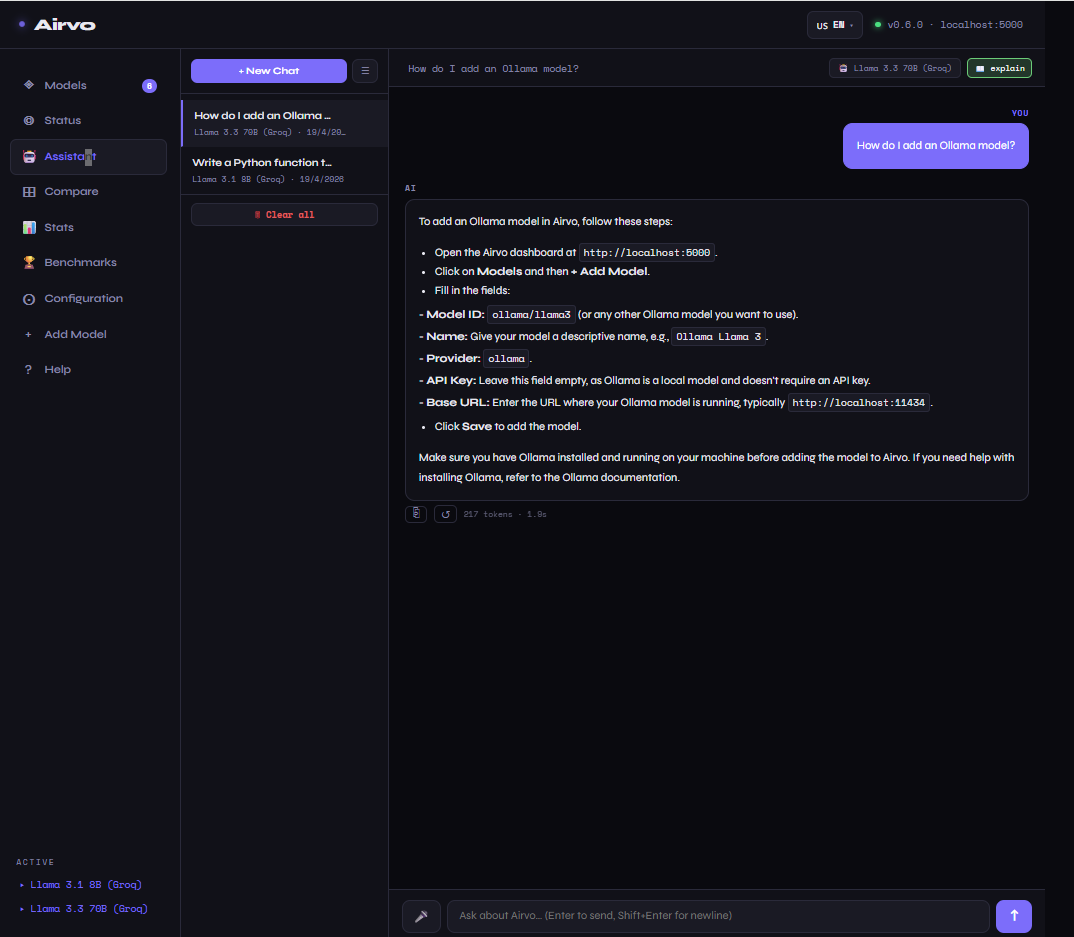
🤖 Airvo Assistant A built-in chat interface in the dashboard that knows everything about Airvo. Ask how to add models, configure RAG, troubleshoot errors, or understand any feature. Responses stream in real-time, history is saved locally, and the assistant sees your live configuration state — so answers are specific to your setup, not generic.
⚡ Multi-Model Modes Run up to 3 models simultaneously in 4 modes: Parallel (see all answers), Race (fastest wins), Vote (consensus), Review (one generates, others refine).
🔒 100% Local Option Use Ollama or LM Studio with no API key, no internet, no cost. Your code never leaves your machine.
🎛️ Visual Dashboard
Manage models, configure API keys, toggle models on/off — all from a clean dark UI at localhost:5000.
🧠 Project Context Write your stack, preferences and constraints once. Airvo injects it into every request so the model always knows your project — without you repeating yourself.
🔍 Smart Memory (RAG)
Airvo indexes your codebase locally using AI embeddings (all-MiniLM-L6-v2). Before each request, it automatically finds the most relevant files and injects them into the context — no copy-pasting. Runs 100% on your machine, nothing sent to the cloud. Enable it in Configuration → Smart Memory.
🖥️ Memory Manager Real-time RAM and GPU usage visible right in the Status page. See which Ollama models are currently loaded, get intelligent suggestions when memory is under pressure, and unload models with a single click — no terminal needed.
🔭 Model Discovery Browse a curated catalog of Ollama-compatible models filtered by what fits in your RAM. Explore OpenRouter's full model library (free models highlighted). Add any model to Airvo with one click.
🌡️ Tunable Behavior Adjust temperature (0.0 → 1.0) and max tokens per request directly from the dashboard. Precise and deterministic for code, creative for brainstorming.
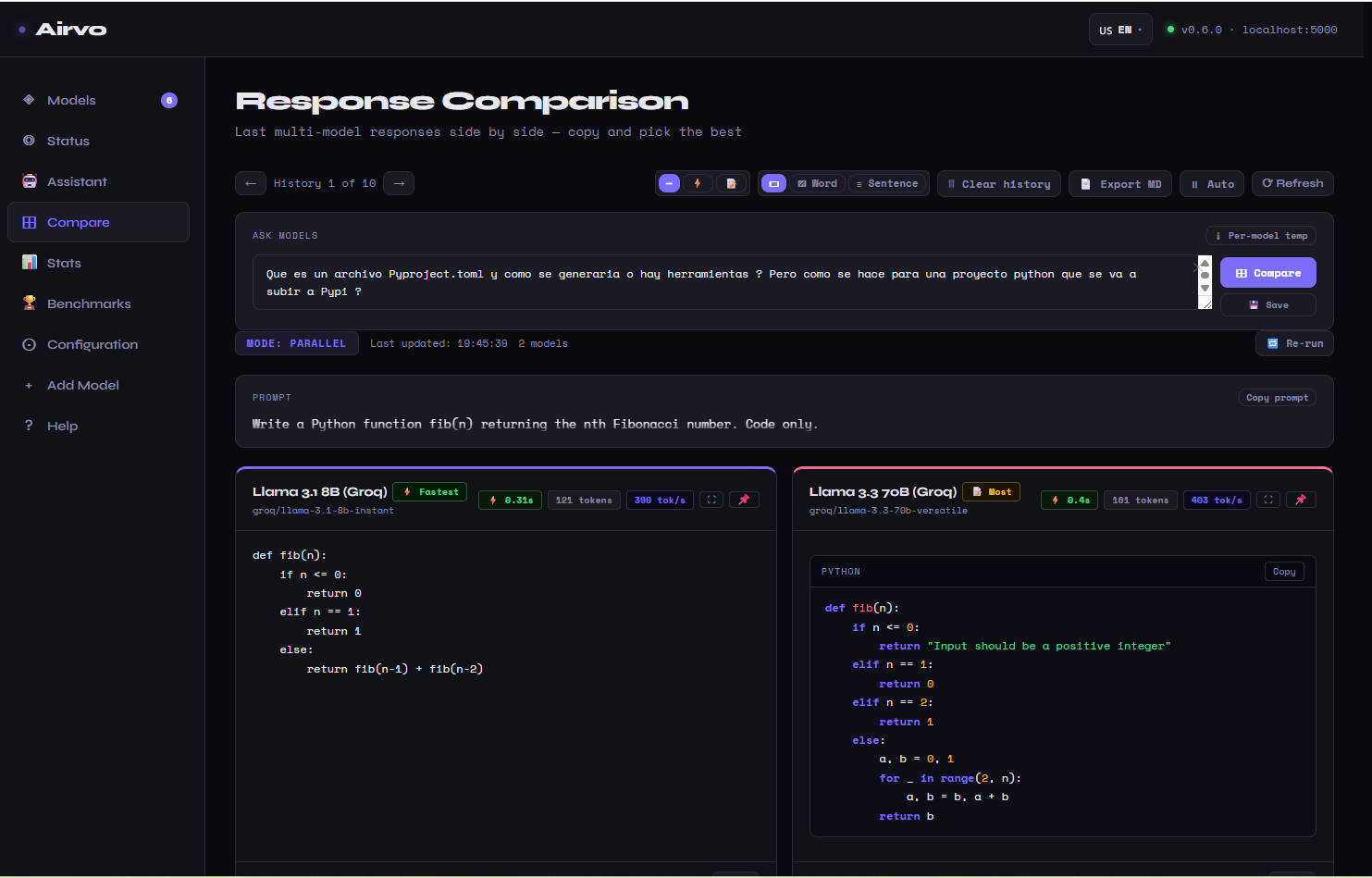
🆚 Compare Tab Send any prompt to all active models at once and see responses stream in real-time side by side. Word-level diff highlights exactly where answers differ. Sort by response time or token count, filter by model, annotate runs, and export comparisons as Markdown.
� Model Health Monitor
Ping all your active models at once with the 🏓 Ping All button. Each model card instantly shows ✅ Xms (green, responsive) or ❌ error (red, unreachable). Know which models are alive before you send a prompt.
🧠 Smart Router
Every prompt you send is silently classified into one of 6 categories — code, debug, math, creative, explain, general — using 50+ local regex patterns (0ms, no API call). Airvo then picks the model you’ve configured for that category. Assign your fastest model to code, your most powerful to debug, etc. A category badge in the chat toolbar shows what was detected.
⚡ Fallback Chains
If the selected model fails (timeout, rate limit, server error), Airvo automatically tries the next active model — transparently and without interrupting the UX. A toast ⚡ Fallback: ModelA → ModelB appears so you always know what happened.
↺ Regenerate Not happy with the last response? Click ↺ on any AI message to delete it and resend the exact same prompt, getting a fresh response. Works with Fallback Chains and Smart Router.
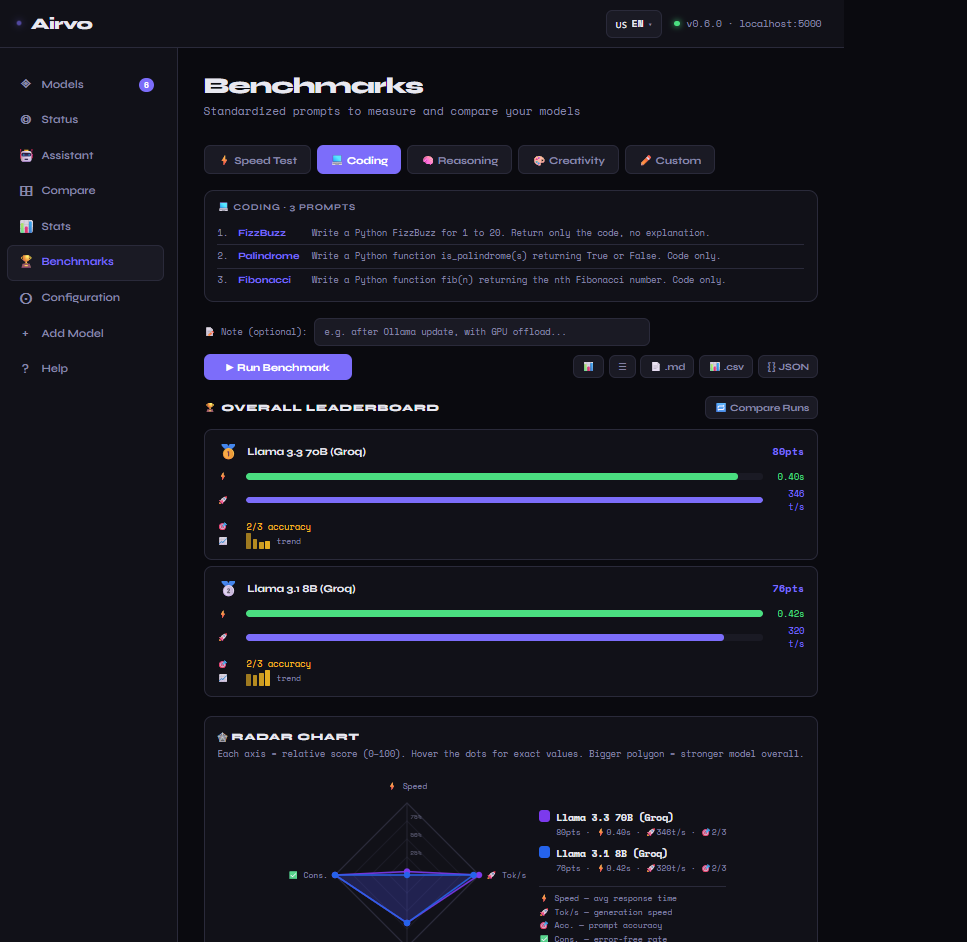
�🏆 Benchmarks Tab Run standardized suites (Speed, Coding, Reasoning, Creativity) or your own custom named suites against all active models. Automatic accuracy scoring for code and logic tasks. Results shown in a leaderboard, radar chart (4 axes: Speed, Tok/s, Accuracy, Consistency), and score history over time. Annotate runs to track what changed between sessions.
🔌 API Key Test Verify any model's API key with one click from the Models page. Airvo sends a minimal 5-token request and shows latency in ms or the exact error — without leaving the dashboard.
✎ Model Notes
Add personal notes to any model card — context limit, pricing tier, performance observations, best use cases. Saved locally to ~/.airvo/models.json.
📊 Usage Stats See requests and tokens used per model — all stored locally. Know exactly what you're using and reset anytime.
🔒 Privacy Mode Scans every outgoing prompt for 18 categories of sensitive data — API keys, Bearer tokens, AWS credentials, JWTs, DSNs, SSH private keys, private IP ranges, and more. When enabled and a high-severity secret is detected, the request is blocked with HTTP 400 before it reaches any cloud provider. Local models (Ollama, LM Studio) are unaffected.
💰 Cost Tracking & Budget After every response, Airvo calculates the exact cost using LiteLLM's pricing database (2,708 models). The cost appears inline in chat (💰 $0.00012 for cloud, ✦ free for local). Set a monthly USD budget in Config — Airvo alerts you when approaching the threshold and filters to free models if exceeded. The Stats page shows savings vs running the same tokens through GPT-4o.
⚡ Prompt Cache Identical prompts sent to the same model return instantly from an in-memory + persistent cache. The cache key is a SHA-256 hash of the model ID and normalized message list. Bypassed when temperature > 0.1 (non-deterministic) or tool calls are present. Configure TTL (default 1 h) and max entries (default 500) in Config. Hit/miss stats shown in the cache card.
🕓 Request History & Counterfactual Replay
Every AI request is persisted to ~/.airvo/request_history.json: timestamp, model, conversation, response, token count, cost, confidence label, and cache flag. Browse and search from the History tab. Click ↺ Replay on any entry to re-run the exact same messages through the current active model — instantly test whether a model update changed the answer.
🎯 Confidence Score After each response, Airvo scores the text on a 0–100 scale using 30+ heuristic patterns across four categories: uncertainty phrases (-4 to -20), hedging language (-4 to -8), stale knowledge markers (-6 to -12), and refusal patterns (-15). Confident, direct answers score higher. Shown as a colored ◈ badge in chat and in the History table.
🧠 Context Window Optimizer History is trimmed dynamically based on the model's actual context window size — from LiteLLM's database first, then a built-in fallback table. Targets 70% of the window, leaving headroom for the new prompt and response. The Chat History Limit slider still acts as a hard cap. Models with 200k+ context windows (Claude) now carry far more history than before.
🌍 7 Languages Dashboard available in English, Español, Français, Deutsch, 中文, 日本語, Português.
🔌 VS Code Native Works through continue.dev — chat, edit, and apply code changes without leaving your editor.
Supported Models
| Provider | Model ID | Free | Notes |
|---|---|---|---|
| Groq | groq/llama-3.1-8b-instant |
✅ | Fast, free tier |
| Groq | groq/llama-3.3-70b-versatile |
✅ | Powerful, free tier |
| OpenAI | openai/gpt-4o |
❌ | Requires API key |
| OpenAI | openai/gpt-4o-mini |
❌ | Cheaper option |
| Anthropic | anthropic/claude-sonnet-4-5 |
❌ | Requires API key |
| Anthropic | anthropic/claude-haiku-4-5 |
❌ | Fastest Claude |
| Ollama | ollama/llama3 |
✅ | 100% local |
| Ollama | ollama/codellama |
✅ | Code-optimized |
| LM Studio | lmstudio/local |
✅ | 100% local |
| DeepSeek | deepseek/deepseek-chat |
❌ | Very affordable |
| Mistral | mistral/mistral-large-latest |
❌ | Requires API key |
| Gemini | gemini/gemini-1.5-pro |
❌ | Requires API key |
Any model supported by LiteLLM works with Airvo.
Dashboard
The Airvo dashboard runs at http://localhost:5000 and lets you manage everything visually.
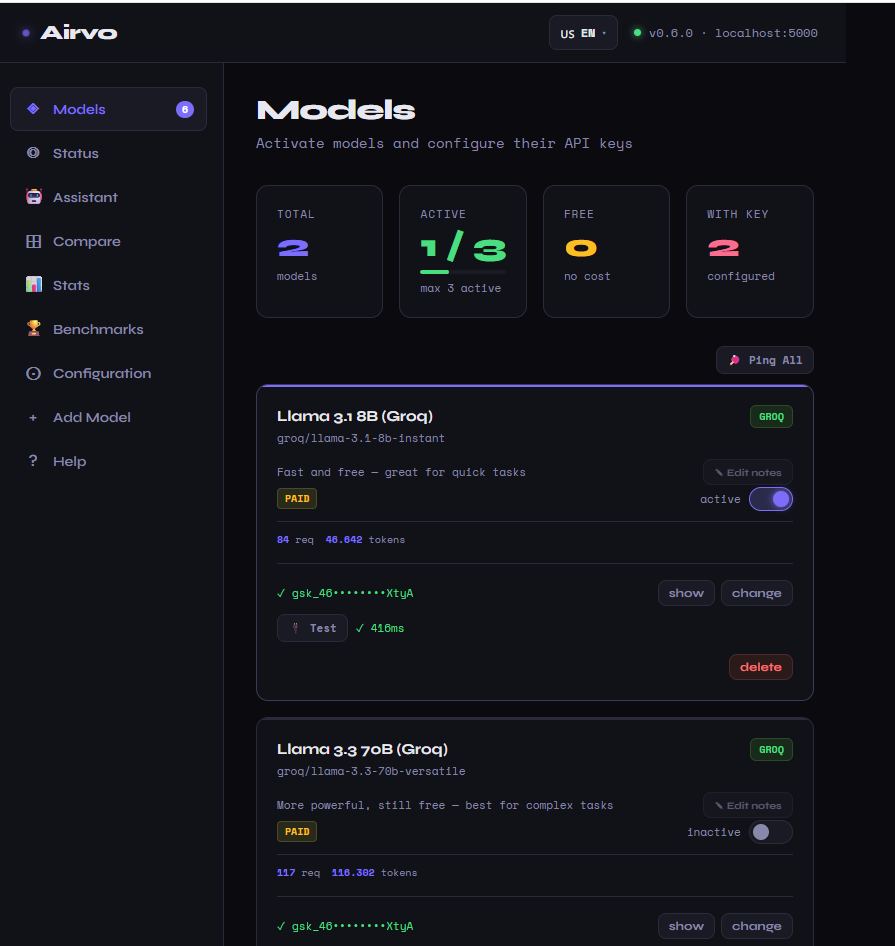
Models page — activate/deactivate models, save API keys, test keys with one click, add personal notes, see requests and tokens per model.
Compare tab — send a prompt to all active models simultaneously, stream responses in real-time, inspect word-level diffs, sort by speed or token count, export as Markdown.
Benchmarks tab — run Speed, Coding, Reasoning, Creativity, or custom suites against all models. Leaderboard + radar chart + score history over time. Annotate each run.
Stats page — per-model usage, daily sparklines, total token breakdown.
Configuration page — set multi-model mode, temperature, max tokens, project context, Smart Memory (RAG). v0.8 section: Privacy Mode, Cost Budget, Prompt Cache settings, Request History settings.
History page — searchable log of every AI request with cost, confidence, cached status, and one-click Counterfactual Replay.
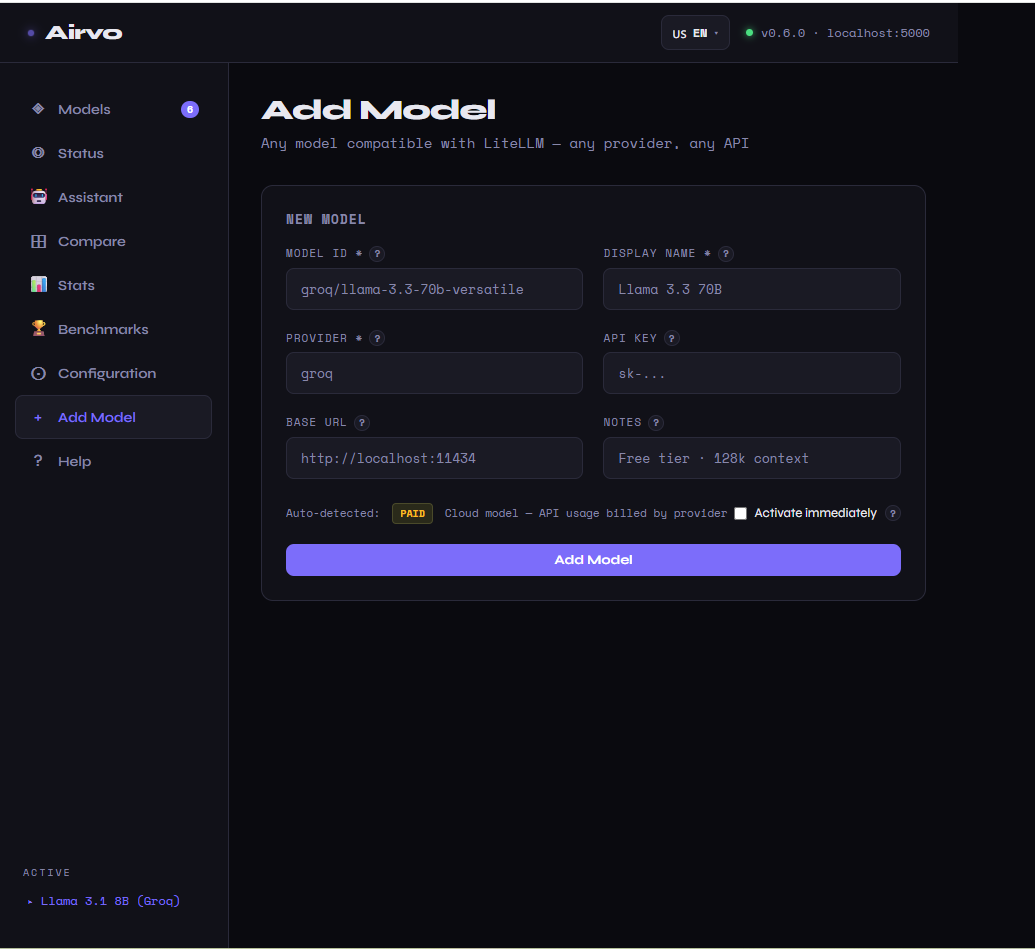
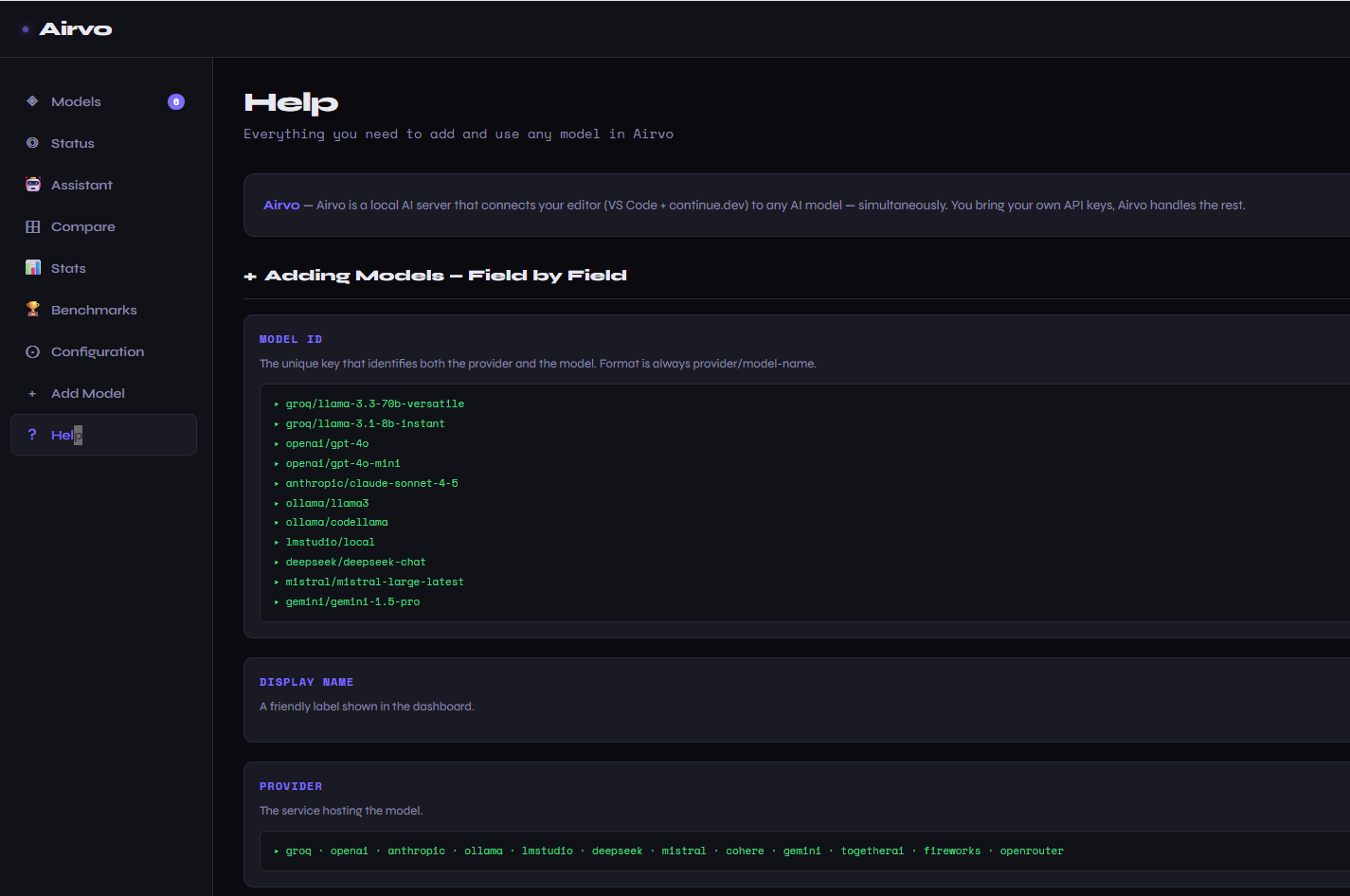
Add Model page — add any model with contextual tooltips on every field.
Help page — full reference guide including all v0.8 features, field-by-field documentation, FAQ extended to 14 entries (7 languages).
Assistant tab — built-in 🤖 chat for Airvo-specific questions. Streams responses, saves history locally, renders Markdown, shows token count and response time per message.
Multi-Model Modes
Airvo supports running multiple models at once. Configure the mode in the Configuration page.
Parallel (default) — All active models respond to every message. See all answers side by side. Best for comparing outputs.
Race — All models receive the message simultaneously. The first to finish wins. Best for speed.
Vote — Models generate responses and the consensus answer is shown. Best for accuracy.
Review — One model generates a response, another critiques it. Best for quality.
VS Code Integration
Airvo works through continue.dev — a VS Code extension for AI-assisted coding.
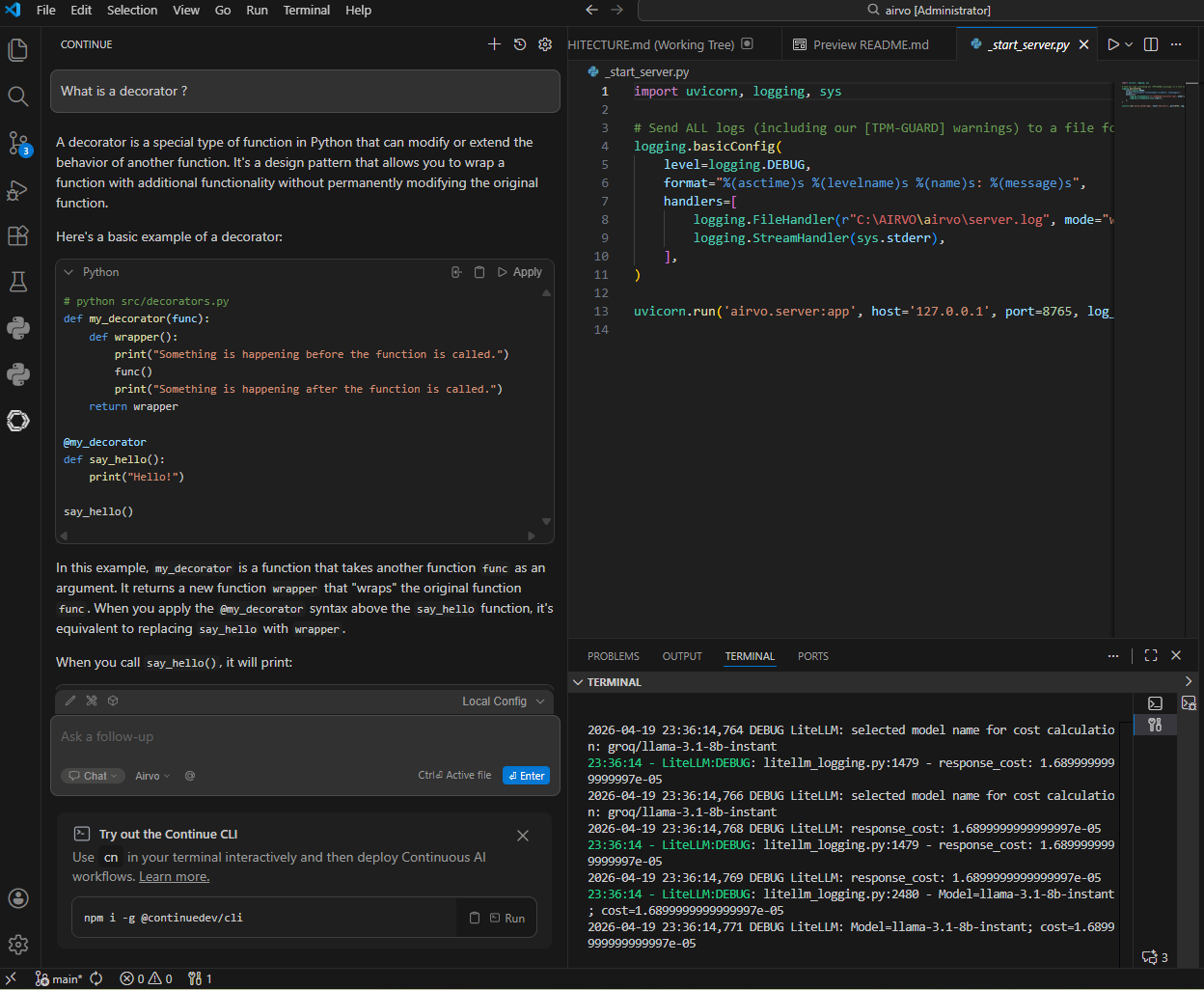
What you can do:
Chat     →  ask questions, get explanations, generate code
Edit     →  select code and ask Airvo to modify it
Apply    →  apply suggested changes directly in your file
The continue.dev config is created automatically by airvo start:
models:
  - name: Airvo
    provider: openai
    model: airvo-auto
    apiBase: http://localhost:5000/v1
    apiKey: local
    roles:
      - chat
      - edit
      - apply
Configuration
CLI options
airvo start                    # default: localhost:5000, opens browser
airvo start --port 9000        # custom port
airvo start --host 0.0.0.0     # accessible from local network
airvo start --no-browser       # don't open browser automatically
airvo start --reload           # hot reload (development)

airvo config --show            # show current config
airvo version                  # show version
Models config — stored at ~/.airvo/models.json
[
  {
    "id":       "groq/llama-3.3-70b-versatile",
    "name":     "Llama 3.3 70B (Groq)",
    "provider": "groq",
    "api_key":  "your-api-key",
    "base_url": null,
    "active":   true,
    "notes":    "More powerful, still free"
  }
]
Adding a local model (Ollama)
# 1. Install Ollama from ollama.com
# 2. Pull a model
ollama pull llama3

# 3. Add it in the Airvo dashboard
# Model ID:  ollama/llama3
# Provider:  ollama
# Base URL:  http://localhost:11434
# API Key:   (leave empty)
Use Cases
Generate a function
"create a Python function that validates an email address with regex"
→ Airvo generates the function with tests
→ click Apply to add it directly to your file
Explain legacy code
"explain what this function does and why it might be slow"
→ if you have two models active, both analyze in parallel
→ you see both perspectives and choose the best explanation
Refactor on the fly
select code → "refactor this to use async/await"
→ Airvo rewrites it
→ Apply the change with one click
100% offline workflow
add ollama/llama3 → no API key, no internet, no cost
→ full AI coding experience with zero data leaving your machine
Smart Memory — ask about your own code
enable Smart Memory → index your project folder
→ "how does the authentication flow work in this project?"
→ Airvo finds the relevant files automatically and answers with context
→ no copy-pasting, no manual file selection
Security
Airvo is designed with privacy and security in mind:
- API keys stay local — stored in
~/.airvo/models.jsonon your machine, never sent to Airvo servers - Privacy Mode — scans every prompt for 18 categories of secrets (API keys, JWTs, AWS credentials, DSNs…) and blocks routing to cloud models if high-severity data is detected. Enable in Config.
- Localhost only — the server listens on
localhost:5000by default, not accessible from the internet - Restricted CORS — only the dashboard and VS Code extensions can make requests to the server
- No telemetry — Airvo collects no usage data, no analytics, no crash reports
- Open source — the full source code is on GitHub, you can audit everything
FAQ
What is Smart Memory (RAG)? Smart Memory indexes your codebase locally using AI embeddings. Before each request, Airvo finds the most semantically relevant code chunks and injects them into the prompt automatically. Enable it in Configuration → Smart Memory, point it to your project folder, and click Index Now. The embedding model (~90 MB) downloads once and runs entirely on your machine.
Does Smart Memory send my code to the cloud?
Never. The embedding model (all-MiniLM-L6-v2) runs 100% on your machine. The index is stored in ~/.airvo/rag/ and your code never leaves your computer.
How do I add a model? Open the dashboard → Add Model → fill in the Model ID, Provider, and API Key → Save. Any model supported by LiteLLM works. Check the Supported Models table for examples.
How do I run multiple models? Add models in the dashboard and activate them. Airvo supports up to 3 active models simultaneously. Choose your mode in Configuration: Parallel, Race, Vote, or Review.
What is the Model ID format?
It follows LiteLLM's format: provider/model-name. For example: groq/llama-3.3-70b-versatile, openai/gpt-4o, ollama/llama3. Check the LiteLLM docs for the full list.
Do I need to pay for anything? Airvo itself is free. You only pay for the AI models you use. Groq, Ollama, and LM Studio all have free options.
Does my code get sent to the cloud? Only when you use cloud models (OpenAI, Anthropic, etc.) — and only the specific code you include in your message. When using local models (Ollama, LM Studio), nothing leaves your machine.
Where are my API keys stored?
Locally in ~/.airvo/models.json on your machine. They are never sent anywhere except to the model provider when making requests.
Can I use any model? Yes — any model supported by LiteLLM works with Airvo. Over 100 providers.
How do I get a free Groq API key? Go to console.groq.com, sign up, and create an API key. No credit card required.
How do I add a local model like Ollama?
Install Ollama, pull a model with ollama pull llama3, then add it in the dashboard with Model ID ollama/llama3, Provider ollama, Base URL http://localhost:11434, and leave the API Key empty.
Can I run Airvo on a local network?
Yes — run airvo start --host 0.0.0.0 and it will be accessible from any device on your network.
Airvo is not connecting to VS Code — what do I do?
Make sure continue.dev is installed in VS Code and that airvo start has run at least once to create the config. You can verify the config exists at ~/.continue/config.yaml.
Does Privacy Mode work with local models (Ollama)? Privacy Mode only blocks routing to cloud providers. Local models run entirely on your machine, so no data leaves — they always work regardless of the Privacy Mode setting.
How accurate is the cost estimate? Very accurate for models in LiteLLM's database (2,708 models in v0.8). For unknown models, Airvo falls back to a prefix-match table. Check Config → Cost Budget for running monthly totals and Config → Stats for per-model breakdowns.
Does the prompt cache affect response quality? No. The cache only activates for temperature ≤ 0.1 (deterministic mode). If you need a fresh response, change the wording slightly, set temperature > 0.1, or clear the cache from Config → Prompt Cache.
What does the Confidence Score actually mean? It measures how certain the model sounds, not how correct it is. A high score (80+) means the model answered directly without hedging. Always verify factual claims independently. The score is useful for triaging responses at a glance.
Changelog
v0.8.0 — Privacy Mode · Cost Tracking · Prompt Cache · Request History · Confidence Score · Context Window Optimizer
- Privacy Mode —
airvo/privacy/detector.pyscans every outgoing prompt for 18 secret categories (API keys, Bearer tokens, AWS creds, JWTs, DSNs, SSH keys…). Blocks cloud routing with HTTP 400 if high-severity data detected. Toggle in Config. - Cost Tracking —
airvo/cost/pricing.pyuses LiteLLMmodel_cost(2,708 models) as primary pricing source with a fallback prefix table.airvo_costSSE event emitted after every stream withcost_usd,cost_fmt,savings_usd. Monthly totals and savings vs GPT-4o shown in Config and Stats. - Cost Budget — set a monthly USD limit and alert threshold (%) in Config. When the budget alert fires, routing is filtered to free/local models only.
- Prompt Cache —
airvo/cache/prompt_cache.py. SHA-256 key of(model_id + normalized messages). Persisted to~/.airvo/prompt_cache.json. Skipped for temperature > 0.1 or tool calls. TTL + max entries configurable. - Request History —
airvo/history/store.py. Every request saved to~/.airvo/request_history.jsonwith timestamp, model, messages, response, tokens, cost, confidence label, cache flag. Max 200 entries (configurable). Searchable viaGET /api/history?search=.... - Counterfactual Replay —
POST /api/history/{id}/replayre-runs any past request through the current active model. History tab in dashboard with search + replay button. - Confidence Score —
airvo/confidence/scorer.py. 30+ regex patterns across 4 signal types (uncertainty, hedging, stale-knowledge, refusal). Base 85, clamped 0–100. Labels:high(≥80),medium(≥60),low(≥35),very_low.airvo_confidenceSSE event emitted after every stream. Colored ◈ badge in chat and History table. - Context Window Optimizer —
airvo/context/optimizer.py. Trims history to 70% of the model's context window (LiteLLM DB → built-in table → 8192 default). Replaces the old fixedmax_history_messages=10truncation. - Dashboard v0.8 — new History tab (search, replay, cost/confidence columns), Config v0.8 section (Privacy, Budget, Cache, History settings), inline cost and confidence badges per chat message, Help page extended with 7 new sections + 4 new FAQ entries.
- New endpoints —
GET/DELETE /api/history,GET /api/history/{id},POST /api/history/{id}/replay,GET/DELETE /api/cache/stats,GET/PUT /api/budget,GET /api/privacy/scan,GET/POST /api/privacy/status,GET /api/cost/monthly,GET /api/cost/estimate. - New modules —
airvo/privacy/,airvo/cost/,airvo/history/,airvo/confidence/,airvo/cache/,airvo/context/.
v0.7.0 — Smart Router + Fallback Chains + Health Monitor + Regenerate
- Smart Router — every prompt is silently classified into one of 6 categories (
code,debug,math,creative,explain,general) using 50+ local regex patterns (0ms latency, no API call). Airvo picks the user-configured preferred model for that category. Category badge shown in chat toolbar. - Fallback Chains — if the chosen model fails (timeout, rate limit, error), Airvo automatically retries with the next active model. SSE event
{"type":"fallback","from":"...","to":"..."}triggers a⚡ Fallback: A → Btoast in the UI. All models exhausted → clear error shown. - Model Health Monitor —
🏓 Ping Allbutton pings all active models concurrently (GET /api/health/providers). Each model card shows a chip:✅ Xmsor❌ error. Useful before a long session to verify availability. - Regenerate button — ↺ button on the last AI message (only visible when not streaming). Removes the AI reply and resends the user’s last prompt fresh, including fallback chain and smart routing.
- New endpoints —
GET /api/health/providers,GET /api/router/categories,POST /api/router/classify. - New module —
airvo/router/classifier.py— 6-category prompt classifier, pure Python, zero dependencies beyond stdlib.
v0.6.0 — Airvo Assistant
- Airvo Assistant tab (🤖) — built-in chat interface dedicated to answering questions about Airvo. Knows the full documentation (HELP.md + ARCHITECTURE.md) and your live configuration state (active models, RAG status, preferences).
- Streaming SSE — responses stream token by token with thinking animation while the model prepares the first token.
- Persistent history — conversations saved to
~/.airvo/chat_history.json(max 50). Rename, delete individual conversations, or clear all. - Markdown rendering — bold, italic, inline code, headings, bullet lists, numbered lists, links, horizontal rules, syntax-highlighted code blocks.
- Token count — each response shows token count + response time (e.g.
247 tokens · 1.3s). - Voice input — 🎤 microphone button using Web Speech API (Chrome/Edge).
- Auto-resize input — text box grows with multi-line messages.
- 7 languages — all UI strings and suggested questions translated.
- No active model warning — clear error state with link to Config if no models are active.
v0.5.7 — Benchmark suites backend persistence
- Custom benchmark suites now saved to
~/.airvo/bench_suites.jsonviaGET/PUT /api/bench/suites. Suites survive browser clears, browser changes, and reinstalls. - Automatic migration: existing suites in localStorage are moved to the backend on first load.
- Fallback to localStorage if server is unreachable.
v0.5.6 — API key test, model notes, help docs update
- API key test — click 🔌 Test on any model card with a configured key; Airvo makes a minimal call and shows ✓ latency ms or ✗ error message.
- Model notes — click ✎ Edit notes on any card to save freeform reminders (context limit, pricing, use case). Persisted to
~/.airvo/models.json. - Help section — full documentation for Models tab features and Benchmarks tab (7 languages), FAQ extended to 10 entries.
- Version metadata fix:
importlib.metadatanow correctly reports0.5.6afterpip install -e ..
v0.5.5 — Benchmarks: score history, radar chart, run annotation
- Score History — line chart tracking each model's composite score across runs (requires 3+ runs on the same suite). Hover dots for model, date, score, and annotation.
- Radar chart — 4-axis chart (Speed, Tok/s, Accuracy, Consistency) shown after any run with 2+ models.
- Run annotation — add a note before each run (e.g. "after Ollama update"); note saved with run and shown in history tooltips.
- Export — export last run as
.md,.csv, or copy raw JSON. History stores last 20 runs.
v0.5.4 — Benchmarks: custom suites, leaderboard accuracy
- Named custom suites — create multiple named suites with your own prompts; switch via dropdown; each suite stores prompts independently in the browser.
- Leaderboard scoring — composite score weighted by Speed (tok/s), Output length, Accuracy (✓/✗ validators — highest weight), Consistency (low variance). Max 100 pts.
- Per-prompt table — individual results with ✓/✗ accuracy badges per model per prompt.
- Built-in suite improvements — Coding (FizzBuzz, palindrome, Fibonacci) and Reasoning (syllogism, math, sequence) now have automatic answer validators.
v0.5.0 — Benchmarks tab (initial)
- New Benchmarks tab: run Speed, Coding, Reasoning, and Creativity suites against all active models.
- Ranked leaderboard with composite scoring. Results persist across sessions.
v0.4.2 — Compare tab: ask-from-tab, sort controls, tok/s badge
- Ask from Compare tab — prompt box directly in the Compare tab, no need to go through Chat.
- Sort controls — sort responses by arrival time or token count.
- Tok/s badge — tokens-per-second displayed on each response card.
- Word-level diff — highlighted diff between any two model responses.
v0.4.1 — Compare tab: SSE streaming + diff + persistence
- Real-time SSE streaming — model responses stream as they are generated.
- Word-level diff — compare any two responses with highlighted differences.
- JSON persistence — compare history saved to
~/.airvo/compare_history.json(not site-packages).
v0.4.0 — Compare tab (initial)
- New Compare tab: send a prompt to all active models simultaneously and see responses side by side.
v0.3.7 — README changelog fix
- Updated changelog on PyPI to include all releases from v0.3.3 onwards. No functional changes.
v0.3.6 \u2014 API docs, architecture rewrite
- OpenAPI docs — all 22 REST endpoints now have tags, summaries, and descriptions. Visit
http://127.0.0.1:8765/docsfor full interactive documentation. - ARCHITECTURE.md — complete rewrite covering system design, data flow, RAG pipeline, Memory Manager, Model Discovery, multi-model modes, and design decisions with code examples.
- FastAPI app description — rich server description with feature list, quickstart, and links shown in
/docs.
v0.3.5 — Models page: Configured vs Suggestions split
- Dashboard — Models page now separates your configured models from discovered suggestions. No more confusion between what's active and what's browsable.
- UI polish — cleaner layout, better empty states, discovery panel always accessible without clutter.
v0.3.4 — Groq rate-limit guard (TPM)
- 3-layer TPM defense — early token cap at request entry, per-message character trimming, and dynamic
max_tokensceiling for Groq free tier (6k–12k TPM). - Prevents
rate_limit_exceedederrors when using Groq's free API tier with long conversations or RAG context.
v0.3.3 — Groq rate-limit fix (initial)
- First-pass fix for Groq token-per-minute limits. Introduced
max_tokenscap and message length trimming.
v0.3.2 — Fix README image URLs for PyPI
- Fixed all image paths to absolute GitHub raw URLs so screenshots and logo display correctly on PyPI.
v0.3.1 — Agent/Plan model selector, IPv6 fix, UI improvements
- Agent/Plan Model selector — choose which active model handles Agent/Plan (tool call) requests from continue.dev. Configured in the Configuration page.
- Server IPv6 fix — server now binds to
127.0.0.1explicitly;.envPORT is correctly loaded on startup. - Dashboard — relative API URLs (no hardcoded host), CORS accepts any localhost port.
- UI — Agent/Plan mode badge in header, Discovery info boxes, RAM badge tooltips, step-by-step workflow, Chat History Limit config, expanded Help page (7 languages).
v0.3.0 — Smart Memory, Memory Manager, Model Discovery
- Smart Memory (RAG) — semantic codebase indexing with
sentence-transformers+ ChromaDB, 100% local. Enable in Configuration. - Memory Manager — real-time RAM/GPU monitoring via
psutil, Ollama model detection, intelligent unload suggestions and one-click model rotation in the Status page. - Model Discovery — curated Ollama catalog with RAM fit detection + full OpenRouter model browser (60 models, free-first sorting). Quick-add any model to Airvo from the Models page.
v0.2.0 — Multi-model modes, tool calling, continue.dev integration, 7-language dashboard
v0.1.0 — Initial release: single-model proxy, FastAPI server, basic dashboard
Community
Airvo is early. Your feedback shapes what comes next.
- 🐛 Found a bug? Open an issue
- 💡 Have an idea? Start a discussion
- ⭐ Liked Airvo? Star the repo — it helps a lot
License
MIT — see LICENSE for details.
Built for developers who want AI that works for them — not the other way around.
Your AI. Your Rules.
Release history Release notifications | RSS feed


Download files
Download the file for your platform. If you're not sure which to choose, learn more about installing packages.
Source Distribution
Built Distribution
Filter files by name, interpreter, ABI, and platform.
If you're not sure about the file name format, learn more about wheel file names.
Copy a direct link to the current filters
File details
Details for the file airvo-0.9.0.tar.gz.
File metadata
- Download URL: airvo-0.9.0.tar.gz
- Upload date:
- Size: 323.0 kB
- Tags: Source
- Uploaded using Trusted Publishing? No
- Uploaded via: twine/6.2.0 CPython/3.12.0
File hashes
| Algorithm | Hash digest | |
|---|---|---|
| SHA256 |
0275034511f6182a106b3df2de5b753fb8f15174b33bb393b9c3bd8abc997768
|
|
| MD5 |
808769e0c53e16c9b5f4b25c51d29e61
|
|
| BLAKE2b-256 |
74b98df50702c9f7164b0f5220946dcb050364e5493662af711776cd304c6c04
|
File details
Details for the file airvo-0.9.0-py3-none-any.whl.
File metadata
- Download URL: airvo-0.9.0-py3-none-any.whl
- Upload date:
- Size: 305.4 kB
- Tags: Python 3
- Uploaded using Trusted Publishing? No
- Uploaded via: twine/6.2.0 CPython/3.12.0
File hashes
| Algorithm | Hash digest | |
|---|---|---|
| SHA256 |
f4370c48763ba23f35c7721f28ea24f93e47b65bd1d17c041ca3567eaabc53de
|
|
| MD5 |
779030b23dd4c657a3bbc9751b521197
|
|
| BLAKE2b-256 |
aa28efc4fe5fb81cdbda94f10665002262b33875b25779989871ee17b6092f4d
|






