

aiscope
Local instruction intelligence for AI coding agents.
Inspect the files that guide your tools, find conflicts, and keep project guidance coherent.




What is AIScope? · Documentation · Agent setup · Features · Architecture · Privacy · Install
Set up with your agent
Copy this prompt into your coding agent:
Set up AIScope for this project using https://github.com/Jayanth-MKV/aiscope.
Read the README and skills/aiscope-setup/SKILL.md from that repository.
Detect my OS and architecture, reuse an existing installation, or install
a released binary after checking its SHA-256 checksum. Use Cargo if a
matching binary is unavailable. Install the aiscope-setup and aiscope
skills for the agent I am using, scoped to this project. Keep existing
agent configuration. Verify the version, run a noninteractive JSON scan
of this project, and explain any high-severity conflicts with file and
line references. Leave instruction files unchanged unless I ask for fixes.
Installation commands
With Node.js 22+ (downloads a checksum-verified native binary on first run):
npx --yes aiscope-cli@0.1.2 --version
npx --yes aiscope-cli@0.1.2 --specific --json .
Or install through Python, without Rust or Node.js:
uv tool install aiscope-cli==0.1.2
# Alternatively: pip install aiscope-cli==0.1.2
aiscope --version
If Rust and Cargo are installed:
cargo install aiscope --version 0.1.2 --locked
aiscope --version
aiscope --specific --json .
Without Rust, use the prebuilt release for your platform. See installation for checksum verification.
Install both skills for Codex in the current project:
npx --yes skills add Jayanth-MKV/aiscope --skill aiscope-setup aiscope --agent codex --copy --yes
Replace codex with claude-code, cursor, opencode, or your supported agent. Add --global only for installation across projects. Skills teach the agent how to use AIScope; the executable is installed separately. Plugin and manual setup.
In Claude Code 2.1.275+, install the plugin and both skills in one step:
/plugin install aiscope --marketplace Jayanth-MKV/aiscope --scope project
What is AIScope?
aiscope is a local audit tool for the instruction files that shape AI coding-agent workflows. It discovers guidance, prompts, agents, interaction modes, and reusable skills, then shows which instructions overlap or conflict.
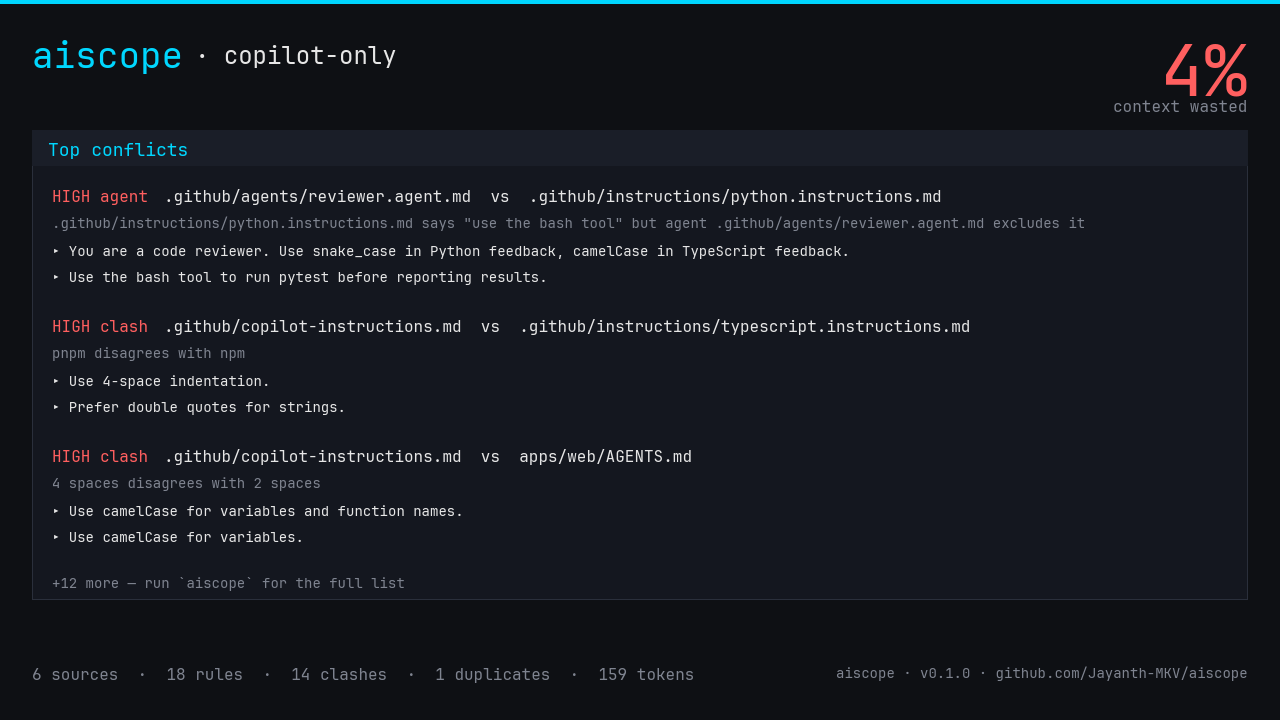
The analysis is deterministic and read-only: no LLM calls, network requests, telemetry, or account. Results are available as an interactive terminal UI, compiler-style diagnostics, JSON, text, CI exit codes, and a shareable PNG card.
Documentation
The AIScope user guide is the primary documentation for installation, workflows, configuration, and practical usage.
The API reference on docs.rs documents the published Rust crate. This README is embedded as the docs.rs landing page, so repository visitors and crate users begin from the same project overview.
The user guide tracks supported workflows as they evolve; the README keeps the project purpose and safe local-first model visible from the repository and crate entry points.
Quick start
cargo install aiscope
cd my-repo
aiscope
The problem
You probably run 1–3 AI coding tools side-by-side: Cursor, Claude Code, Copilot, Cline, Aider… Each one stores its memory in multiple private dotfiles that nobody ever opens after writing them:
GitHub Copilot:
  .github/copilot-instructions.md
  .github/instructions/*.md           (per-glob applyTo)
  .github/prompts/*.prompt.md         (slash commands)
  .github/chatmodes/*.chatmode.md
  .github/agents/*.md
  AGENTS.md                           (any depth, path-scoped)

Cursor:
  .cursorrules
  .cursor/rules/*.{md,mdc}
  .cursor/commands/*.md
  .cursor/agents/*.md
  .cursor/modes/*.md

Claude Code:
  CLAUDE.md                           (any depth, path-scoped)
  .claude/agents/*.md
  .claude/commands/*.md
  .claude/skills/*/SKILL.md
  ~/.claude/CLAUDE.md                 (with --user)
Even if you only use one tool, you have rules in 5 places. After six months you have stale rules, contradicting rules, scope-mismatched rules, and rules that silently override each other — and you can't see any of it.
aiscope reads them all, classifies them by subsystem (instructions / prompts / agents / chatmodes / skills), respects scope (applyTo, globs, alwaysApply, path-derived prefix), and flags conflicts with compiler-grade source spans.
Features
| Feature | Flag | What it gives you |
|---|---|---|
| Conflict detector | (default) | Points to exact file:line where rule X disagrees with rule Y |
| Subsystem-aware mode | --specific |
Drops false positives between prompts, instructions, agents, skills |
| User-scope memory | --user |
Also reads ~/.claude/CLAUDE.md and other cross-repo files |
| TUI | (default) | Two-pane terminal app: sources left, conflicts right |
| Compiler-grade diagnostics | --diag |
miette-style report with byte-precise spans for CI logs |
| Token-budget breakdown | (always) | "21% of your context window is stale" |
| Shareable PNG card | --card out.png |
Portable audit summary for issues, posts, and retrospectives |
| CI mode | aiscope check |
Exits 1 only on high-severity conflicts (no flapping) |
| Watch mode | aiscope watch |
Live re-scan on file change |
| Scriptable | --json, --text, --grep |
Pipeable into anything |
Architecture
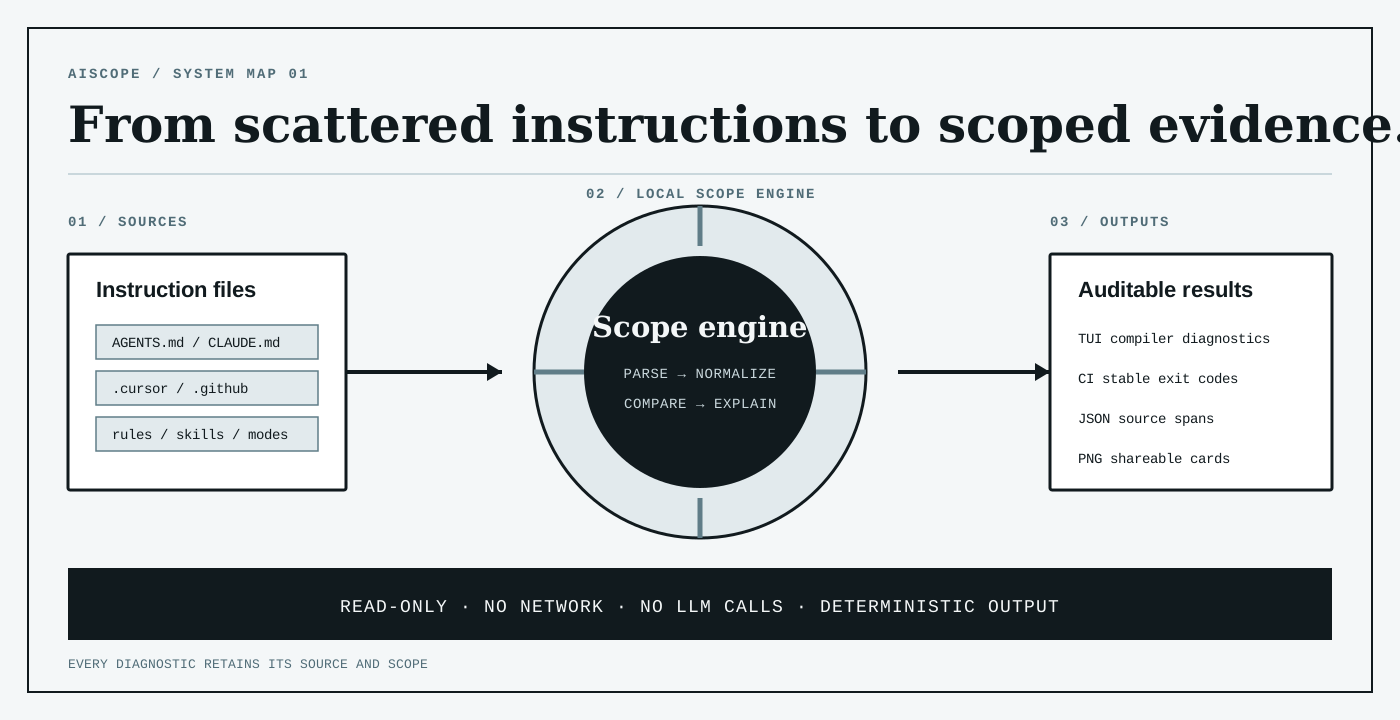
AIScope is a six-layer deterministic pipeline. No LLM calls. No network. ~5 MB binary.
Source files (3 tools × 5 subsystems)
   │
   ▼ Layer 0  scanner          → (Source, raw text)
   │   ├─ Copilot:  .github/{copilot-instructions, instructions/, prompts/,
   │   │            chatmodes/, agents/} + AGENTS.md (any depth, path-scoped)
   │   ├─ Cursor:   .cursorrules, .cursor/{rules,commands,agents,modes}/
   │   └─ Claude:   CLAUDE.md (any depth), .claude/{agents,commands,skills}/
   │
   ▼ Layer 0.5 frontmatter     → Scope { globs, alwaysApply, model, tools }
   │   ├─ Copilot applyTo:  "**/*.ts"
   │   ├─ Cursor  globs:    ["**/*.rs"]
   │   ├─ Cursor  alwaysApply: true
   │   └─ Path-derived:    apps/web/AGENTS.md → "apps/web/**"
   │
   ▼ Layer 1  parse            → Statement (one bullet/paragraph + byte span)
   │   pulldown-cmark CommonMark AST; skips code blocks, headings,
   │   blockquotes, HTML, YAML frontmatter; preserves inline code.
   │
   ▼ Layer 2  canonicalize     → CanonicalText
   │   NFKC + smart-quote/dash → ASCII + Unicode caseless fold +
   │   punctuation strip + Snowball stem (preserves snake_case identifiers).
   │
   ▼ Layer 3  pattern extract  → Assertion { axis, value, polarity, condition }
   │   Polarity (Forbid/Prefer/Allow) + clause splitter + condition extractor +
   │   10 axes with topic-gating. Confidence 0.85–0.97 per match.
   │
   ▼ Layer 4  reason           → Conflict { kind, severity, confidence }
   │   ├─ Duplicate (cross-source SHA-256 fingerprint)
   │   ├─ Clash (same axis, both Prefer, different values)
   │   ├─ PolarityConflict (same value, opposite polarity)
   │   └─ DuplicateName (agent/skill/chatmode `name:` collision)
   │   Severity = High iff cross-source AND conf≥0.85 AND scopes overlap.
   │
   ▼ Layer 5  render           → TUI / miette diag / JSON / PNG card
Two reasoning modes
-
Uniform (default): every cross-file pair is a candidate conflict. Subsystem boundaries are ignored. Best for "show me everything that could contradict".
-
Specific (
--specific): subsystem-aware. Prompts ↔ Instructions never conflict (different intent). Agents ↔ non-Agents never conflict (isolated runners). Skills/ChatModes only check duplicate names + tool allowlists. Best for low-noise CI.
Scope-aware severity
Two rules with non-overlapping applyTo globs (e.g. **/*.ts vs **/*.py) still surface as conflicts — but downgraded to Severity::Low with a (scopes don't overlap) note. aiscope check ignores them; the TUI shows them.
Privacy & safety
- Read-only. Never modifies your files.
- Local only. No telemetry, no network, no account, no API key.
- No session-log access. v0.1 will not open
~/.claude/projects/*.jsonl(chat history). Only rules and instruction files. Enforced by tests/privacy_guard.rs. - No TLS interception. Not a proxy. Just walks your dotfiles.
Install
cargo install aiscope # 5 MB self-contained binary
Prebuilt binaries are available through GitHub Releases. The npm and PyPI package name is aiscope-cli; both expose aiscope. npm supports macOS x64/ARM64, glibc Linux x64/ARM64 and Windows x64. Its first launch downloads and verifies SHA-256 for a native binary, then caches it; Python wheels bundle that binary. Audits themselves stay offline. AISCOPE_CACHE_DIR changes the npm cache location; AISCOPE_BINARY_PATH selects an explicitly trusted existing binary.
Usage
aiscope                          # TUI in current dir
aiscope --diag                   # compiler-grade report for CI logs
aiscope --card out.png           # 1280×720 PNG of the TUI for sharing
aiscope --json | jq              # scriptable
aiscope --grep "snake_case"      # filter rules
aiscope --specific               # subsystem-aware (low-noise mode)
aiscope --user                   # also read ~/.claude/CLAUDE.md
aiscope check                    # CI: exit 1 on high-severity conflicts
aiscope watch                    # live re-scan
CI
# .github/workflows/aiscope.yml
- run: cargo install aiscope
- run: aiscope check
Tech stack
| Crate | Role |
|---|---|
pulldown-cmark |
CommonMark AST with byte offsets |
unicode-normalization + caseless |
Unicode-correct fold (Turkish-safe) |
rust-stemmers |
Snowball stem for paraphrase-resistant fingerprinting |
regex |
Polarity / axis pattern matching |
globset |
applyTo / globs overlap test |
miette |
Compiler-grade diagnostics |
tiktoken-rs |
OpenAI BPE tokenizer for token-budget math |
tiny-skia + cosmic-text |
PNG card (pure Rust, no headless browser) |
| JetBrains Mono | Embedded monospace font (270 KB, Apache-2.0) |
ratatui + crossterm |
TUI |
clap |
CLI |
insta |
Snapshot determinism gate |
What to test
# 1. All unit + integration tests (42 tests across 5 binaries)
cargo test --all

# 2. Lint
cargo clippy --all-targets -- -D warnings

# 3. Release build
cargo build --release

# 4. Live demo against the bundled Copilot-only fixture
cargo run --release -- --diag .\tests\fixtures\copilot-only
cargo run --release -- --card demo.png .\tests\fixtures\copilot-only
cargo run --release -- check .\tests\fixtures\copilot-only; echo $LASTEXITCODE
cargo run --release -- --specific --diag .\tests\fixtures\copilot-only
Fixtures shipped in the repo
| Fixture | Tests |
|---|---|
tests/fixtures/{cursor,claude,copilot}/ |
Three-tool cross-conflict (smoke test) |
tests/fixtures/copilot-only/ |
Single-tool repo with all 5 subsystems |
tests/corpus/negation_clause.md |
"Don't X, prefer Y" → 2 clauses, no self-clash |
tests/corpus/historical_narrative.md |
"We migrated from npm to pnpm" → 0 false positives |
tests/corpus/conditional_clauses.md |
"snake_case in legacy, camelCase in new" |
tests/corpus/frontmatter_and_code.md |
YAML + code blocks + blockquotes all skipped |
tests/corpus/multi_axis.md |
Indentation + comments + imports in 3 lines |
Snapshots are pinned in tests/snapshots/. To accept intentional changes: cargo insta review.
Roadmap
- v0.2 —
semanticfeature: fastembed paraphrase recall, MCP server inventory, opt-in session-log scanning, git-aware memory diff - v0.3 —
aiscope trafficproxy mode (live cost monitoring) - v0.4 — hosted shareable snapshot URLs
- v0.5 — cross-tool memory port (
aiscope port cursor → claude)
License
MIT (aiscope source) · Apache-2.0 (embedded JetBrains Mono font)
1 maintainer

Metadata
1 maintainer
Release files for aiscope-cli 0.1.2
For a detailed explanation of source distributions (sdists) and built distributions (wheels), please see the package formats documentation.
Built distributions (wheels)
| File | Reset | |||
|---|---|---|---|---|
| aiscope_cli-0.1.2-py3-none-win_amd64.whl | Python 3 | none | Windows x86-64 | Details |
| aiscope_cli-0.1.2-py3-none-manylinux_2_28_x86_64.whl | Python 3 | none | Linux glibc 2.28+ x86-64 | Details |
| aiscope_cli-0.1.2-py3-none-manylinux_2_28_aarch64.whl | Python 3 | none | Linux glibc 2.28+ ARM64 | Details |
| aiscope_cli-0.1.2-py3-none-macosx_11_0_arm64.whl | Python 3 | none | macOS 11.0+ ARM64 | Details |
| aiscope_cli-0.1.2-py3-none-macosx_10_12_x86_64.whl | Python 3 | none | macOS 10.12+ x86-64 | Details |
Total release size: 17.1 MB
Release files / aiscope_cli-0.1.2-py3-none-win_amd64.whl
| Download URL | aiscope_cli-0.1.2-py3-none-win_amd64.whl |
|---|---|
| Size | 3.4 MB |
| Tags | Python 3 Windows x86-64 |
|
SHA-256 checksum How to use checksums |
96ae190ff99a3ecdd4d1ec454e80003e424fb2eda531933e7fc3afa61c3aadf5
|
|
BLAKE2b-256 checksum How to use checksums |
30e3669059c24f543c84419154c2686150d6c395e78e7c9b52f6e2108d75d726
|
| Upload date | |
|
Uploaded using Trusted Publishing? What is trusted publishing? |
Yes |
| Uploaded via |
twine/7.0.0 CPython/3.13.14
|
Provenance
Provenance describes where a file came from. On PyPI, provenance is shared via attestations, which provide a verifiable record of the build or publishing details. View details, limitations and caveats.


PyPI Publish Attestation
PyPI verified that this artifact, at this checksum, originated from the publisher listed below.
Signed by GitHub Actions, verified by PyPI on Oct 11, 2026.
Transparency logRelease files / aiscope_cli-0.1.2-py3-none-manylinux_2_28_x86_64.whl
| Download URL | aiscope_cli-0.1.2-py3-none-manylinux_2_28_x86_64.whl |
|---|---|
| Size | 3.6 MB |
| Tags | Linux glibc 2.28+ x86-64 Python 3 |
|
SHA-256 checksum How to use checksums |
dbf759f5d3e66606598e89d21e02762a430e5f3c54f56f9eef2965a32d6412e6
|
|
BLAKE2b-256 checksum How to use checksums |
dab69b78ad35ecb9a7518101b0220ad1ffaf0e49ff06c3c470e52eb6a8112c89
|
| Upload date | |
|
Uploaded using Trusted Publishing? What is trusted publishing? |
Yes |
| Uploaded via |
twine/7.0.0 CPython/3.13.14
|
Provenance
Provenance describes where a file came from. On PyPI, provenance is shared via attestations, which provide a verifiable record of the build or publishing details. View details, limitations and caveats.
PyPI Publish Attestation
PyPI verified that this artifact, at this checksum, originated from the publisher listed below.
Signed by GitHub Actions, verified by PyPI on Oct 11, 2026.
Transparency logRelease files / aiscope_cli-0.1.2-py3-none-manylinux_2_28_aarch64.whl
| Download URL | aiscope_cli-0.1.2-py3-none-manylinux_2_28_aarch64.whl |
|---|---|
| Size | 3.4 MB |
| Tags | Linux glibc 2.28+ ARM64 Python 3 |
|
SHA-256 checksum How to use checksums |
6a392974177185123f3fdb6d0a90a1e42949123c84e8c977e3f082e82460164a
|
|
BLAKE2b-256 checksum How to use checksums |
ad0e9cb559874a7e789908b945e328d5a6de529a48d47420d4f3a9ec82b59eb3
|
| Upload date | |
|
Uploaded using Trusted Publishing? What is trusted publishing? |
Yes |
| Uploaded via |
twine/7.0.0 CPython/3.13.14
|
Provenance
Provenance describes where a file came from. On PyPI, provenance is shared via attestations, which provide a verifiable record of the build or publishing details. View details, limitations and caveats.
PyPI Publish Attestation
PyPI verified that this artifact, at this checksum, originated from the publisher listed below.
Signed by GitHub Actions, verified by PyPI on Oct 11, 2026.
Transparency logRelease files / aiscope_cli-0.1.2-py3-none-macosx_11_0_arm64.whl
| Download URL | aiscope_cli-0.1.2-py3-none-macosx_11_0_arm64.whl |
|---|---|
| Size | 3.3 MB |
| Tags | Python 3 macOS 11.0+ ARM64 |
|
SHA-256 checksum How to use checksums |
0706781257621df08d825a90110b35596746e5880fd82a7fad9ac7aa2256ba23
|
|
BLAKE2b-256 checksum How to use checksums |
311bb486db5edb3a575fd5de60096f394338189df576fdd17fb2def72d7a6769
|
| Upload date | |
|
Uploaded using Trusted Publishing? What is trusted publishing? |
Yes |
| Uploaded via |
twine/7.0.0 CPython/3.13.14
|
Provenance
Provenance describes where a file came from. On PyPI, provenance is shared via attestations, which provide a verifiable record of the build or publishing details. View details, limitations and caveats.
PyPI Publish Attestation
PyPI verified that this artifact, at this checksum, originated from the publisher listed below.
Signed by GitHub Actions, verified by PyPI on Oct 11, 2026.
Transparency logRelease files / aiscope_cli-0.1.2-py3-none-macosx_10_12_x86_64.whl
| Download URL | aiscope_cli-0.1.2-py3-none-macosx_10_12_x86_64.whl |
|---|---|
| Size | 3.4 MB |
| Tags | Python 3 macOS 10.12+ x86-64 |
|
SHA-256 checksum How to use checksums |
880d596879b15fcda2ba36a73958c7bebff1b8ae56071e78fb819f8cdaaee075
|
|
BLAKE2b-256 checksum How to use checksums |
e35eff8c0a04cd5dfa02b41047512bd2ec68ac0eca2b3bd50a82711f6d87ae12
|
| Upload date | |
|
Uploaded using Trusted Publishing? What is trusted publishing? |
Yes |
| Uploaded via |
twine/7.0.0 CPython/3.13.14
|
Provenance
Provenance describes where a file came from. On PyPI, provenance is shared via attestations, which provide a verifiable record of the build or publishing details. View details, limitations and caveats.
PyPI Publish Attestation
PyPI verified that this artifact, at this checksum, originated from the publisher listed below.
Signed by GitHub Actions, verified by PyPI on Oct 11, 2026.
Transparency log












