
aishare
How much of the code you shipped did AI write? aishare looks at every line git blames on you this year that's still in your code, and works out which ones came from Claude Code, Codex, Gemini CLI, Copilot, Cursor and friends.
uvx aishare ~/code
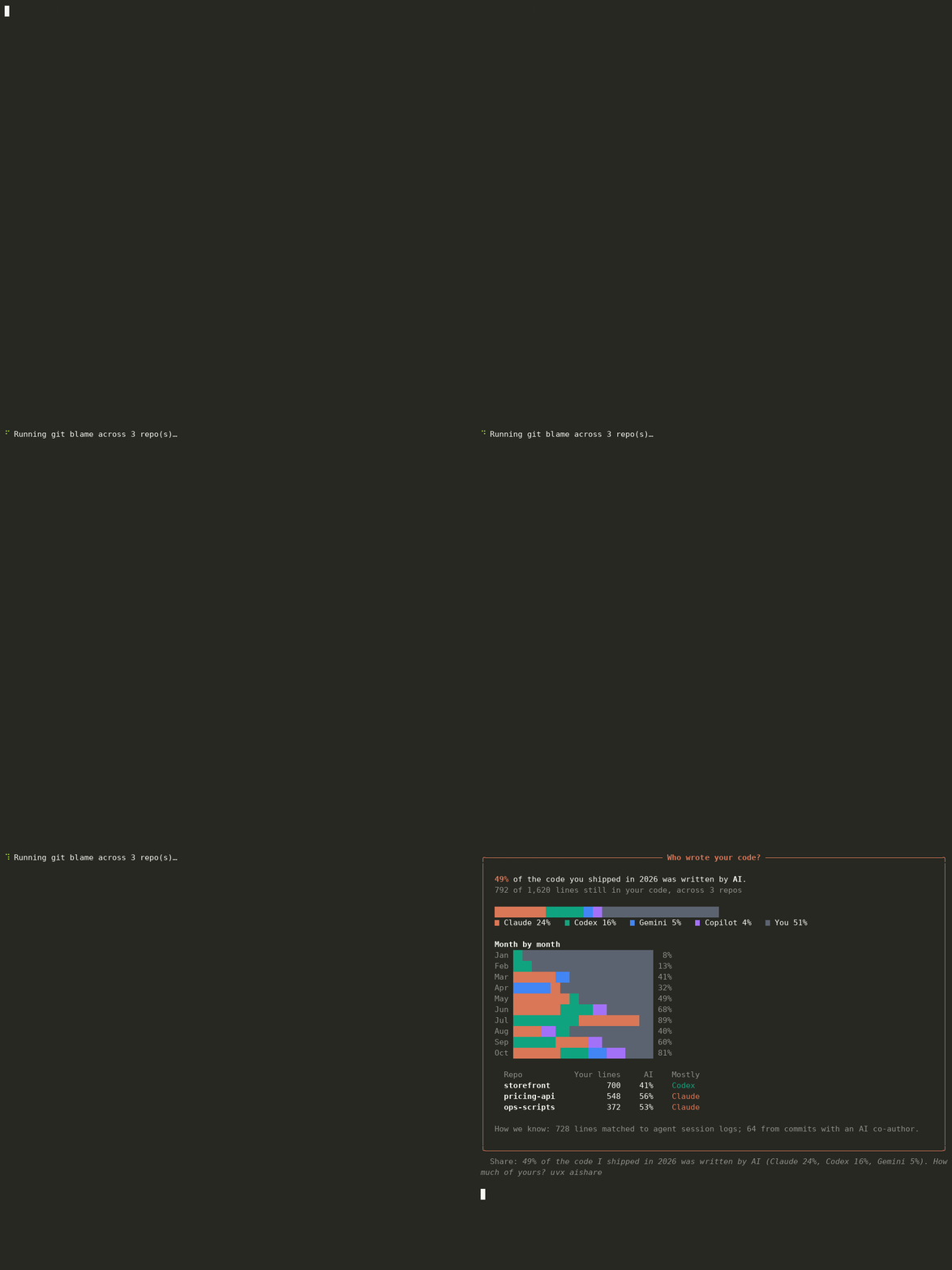
Demo on a made-up developer's year (three repos plus agent logs) generated by docs/demo.py. Run it on your own code to get your number.
How it knows
Two independent signals, both read locally:
-
Agent session logs. Coding agents keep a transcript of every file they write or edit. aishare reads them and records the exact lines each agent produced, per file, and when:
- Claude Code:
~/.claude/projects/*/*.jsonl(Write,Edit,MultiEdit) - Codex CLI:
~/.codex/sessions/**/rollout-*.jsonl(apply_patch) - Gemini CLI:
~/.gemini/tmp/*/chats/session-*(write_file,replace)
Then it runs
git blameon the files you changed in the period. A line counts as AI-written if an agent wrote that exact line (ignoring whitespace) into that file before the commit that introduced it. Lines you wrote earlier that an agent merely re-saved don't count, and lines you later rewrote by hand become yours. - Claude Code:
-
AI co-author trailers. Commits that say
Co-authored-by: Claude / Copilot / Cursor Agent / Codex / Gemini / Aider / Devin…or "Generated with Claude Code", plus commits authored by agent bots (Copilot coding agent, Devin, Jules).
Only substantive lines count: blank lines, lone braces and the like are skipped on both sides, and lockfiles, minified files and build output are ignored.
What it can't see
- Inline autocomplete (Copilot, Cursor Tab, Supermaven) leaves no log or trailer, so it's counted as yours. Real numbers are usually higher.
- Chat copy-paste from ChatGPT or Claude.ai in a browser.
- Agents that don't keep local logs. Cursor stores its history in a database, not supported yet.
So treat the result as a floor.
Options
aishare                          # the repo you're in
aishare ~/code                   # every repo under a folder
aishare --since 2026-06          # a different window (YYYY, YYYY-MM or YYYY-MM-DD)
aishare --email old@work.com     # also count commits under another email
aishare --json                   # numbers for scripts
It uses your global git config user.email and user.name to decide which lines are yours.
Privacy
Everything runs on your machine. aishare reads git and your agents' log files and sends nothing anywhere.
Install
uvx aishare           # run without installing
pipx install aishare  # or install it
Requires Python 3.9+ and git. The only dependency is rich.
License
MIT
1 maintainer

Metadata
1 maintainer
Release files for aishare 0.1.0
For a detailed explanation of source distributions (sdists) and built distributions (wheels), please see the package formats documentation.
Source distribution (sdist)
| File | Size | Uploaded | Provenance | Actions |
|---|---|---|---|---|
| aishare-0.1.0.tar.gz | 16.1 kB | With provenance | Details for aishare-0.1.0.tar.gz |
Built distribution (wheel)
| File | Interpreter | ABI | Platform | Actions Reset |
|---|---|---|---|---|
| aishare-0.1.0-py3-none-any.whl | Python 3 | none | any | Details for aishare-0.1.0-py3-none-any.whl |
Total release size: 31.8 kB
Release files / aishare-0.1.0.tar.gz
| Download URL | aishare-0.1.0.tar.gz |
|---|---|
| Size | 16.1 kB |
| Tags | Source |
|
SHA-256 checksum How to use checksums |
2d493addb39ab95d8c4cc9c048ac2496eafa9bd3419d50f60403d8c4e8b909c6
|
|
BLAKE2b-256 checksum How to use checksums |
5004e00c5a6c7a0b5c95cdf34e07bee0ce9c6df494afa09e1750263d24899ec4
|
| Upload date | |
|
Uploaded using Trusted Publishing? What is trusted publishing? |
Yes |
| Uploaded via |
twine/7.0.0 CPython/3.13.16
|
Provenance
Provenance describes where a file came from. On PyPI, provenance is shared via attestations, which provide a verifiable record of the build or publishing details. View details, limitations and caveats.


PyPI Publish Attestation
PyPI verified that this artifact, at this checksum, originated from the publisher listed below.
Signed by GitHub Actions, verified by PyPI on Nov 10, 2026.
Transparency logRelease files / aishare-0.1.0-py3-none-any.whl
| Download URL | aishare-0.1.0-py3-none-any.whl |
|---|---|
| Size | 15.7 kB |
| Tags | Python 3 |
|
SHA-256 checksum How to use checksums |
178e83e8fb0107b5d4e499cc46509c0d2c3eb4327bab6900a92fdb86af075f68
|
|
BLAKE2b-256 checksum How to use checksums |
928d35d899050804bf656fdba0f8f71edd81d07014bc647dc62257472e31fca3
|
| Upload date | |
|
Uploaded using Trusted Publishing? What is trusted publishing? |
Yes |
| Uploaded via |
twine/7.0.0 CPython/3.13.16
|
Provenance
Provenance describes where a file came from. On PyPI, provenance is shared via attestations, which provide a verifiable record of the build or publishing details. View details, limitations and caveats.
PyPI Publish Attestation
PyPI verified that this artifact, at this checksum, originated from the publisher listed below.
Signed by GitHub Actions, verified by PyPI on Nov 10, 2026.
Transparency logSecurity for aishare 0.1.0
Provenance
Provenance describes where a file came from. On PyPI, provenance is shared via attestations, which provide a verifiable record of the build or publishing details. View details, limitations and caveats.
Full provenance
Both files in this release have been uploaded with provenance metadata.
Attestation for aishare-0.1.0.tar.gz
PyPI Publish Attestation
PyPI verified that this artifact, at this checksum, originated from the publisher listed below.
Signed by GitHub Actions, verified by PyPI on Nov 10, 2026.
Transparency logA note on package security
PyPI is a repository for distributing packages, not a service for auditing them. While third-party security researchers and our staff do their best to detect and remove malicious packages, PyPI cannot guarantee the quality, security or suitability of any given package.
To learn more about protecting yourself from malicious actors, visit our package security documentation.













