
AIsketcher


Turn one sketch into traceable design directions—not disconnected files you can never reproduce.
AIsketcher is a model-independent Python toolkit for seed scouting, controlled variation, and replayable visual studies. It records the input, control, prompt provenance, actual seeds, selected parent, model revisions, lineage, and hashes around a local or hosted image backend.
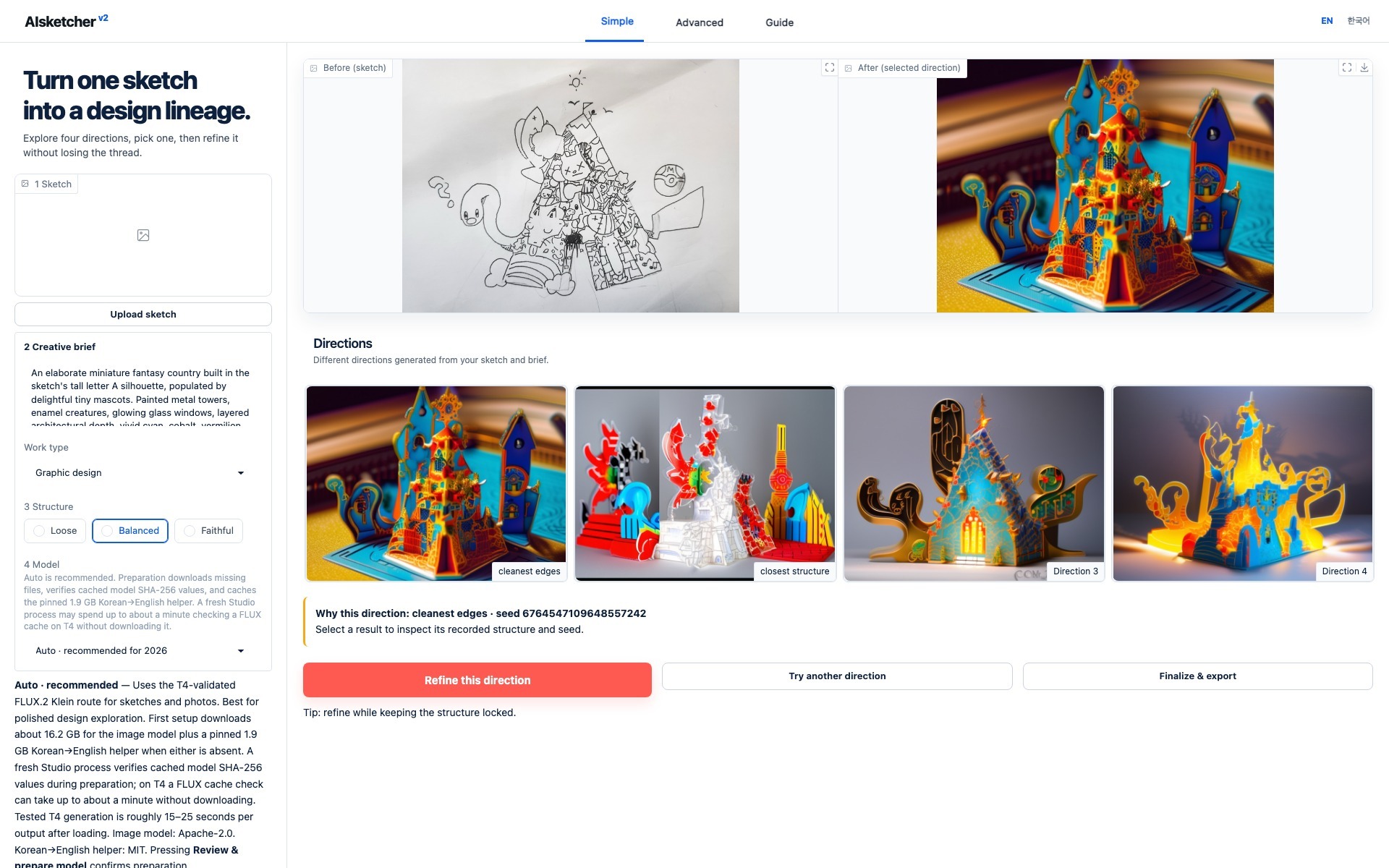
Actual local Studio with the bundled, hash-verified Guided Study · real source, four outputs, seeds, selection, and manifest · no model download
Documentation · 한국어 빠른 시작 · Model guide · PyPI · Feedback
Try the real workflow in seconds
pip install aisketcher
aisketcher try
This opens a bilingual, interactive tour of a real recorded study on
127.0.0.1. It installs no Torch, Gradio, Diffusers, or model weights, sends no
telemetry, and makes no external network request. Select each direction to inspect its
seed and evidence; press Ctrl+C in the terminal when finished.
That fast first run is deliberate. A 16–35 GB checkpoint download should not be the price of discovering what the package does.
What AIsketcher adds above a model
prepare → explore → pick → vary → export → replay
- Comparable directions: generate 1, 4, or 8 candidates from an explicit seed plan instead of repeatedly changing an undocumented random seed.
- A recorded decision: keep the chosen parent, variation strength, and structure locks as lineage rather than relying on filenames.
- Reproducible handoff: export images, recipe, exact seeds, model revisions, prompt provenance, runtime, and hashes in one portable study.
- Backend independence: use the built-in local adapters or implement the
small
Backendprotocol for a hosted, cloud, or in-house generator. - Local-first inspection: use the Studio without uploading sketches to an AIsketcher service. The packaged app binds to localhost and public sharing is disabled.
Choose the model by its job
There is no honest universal default. Version 0.4 makes the concrete role
visible instead of calling one model an intelligent Auto router.
| Studio choice | Best for | Limit |
|---|---|---|
| Fast Edit · FLUX.2 Klein | photo restyling, flexible sketch interpretation, instruction edits; about 15–25 s/output on the validated T4 after loading | reference-image editing, not Canny; exact line locking is not guaranteed |
| Structure Lock · SDXL Canny Lite | strict line/Canny studies and lower-memory legacy replay | older generation quality |
| Structure Lock+ · SDXL Canny | full legacy ControlNet when line structure matters most | larger and slower legacy path |
FLUX.2 Klein remains the fast local edit model because it is public, Apache-2.0, four-step, and T4-validated. It is no longer described as strict structure control. Z-Image Turbo + Union 2.1 Lite is the leading modern Structure candidate, and Qwen Image Edit 2509/2511 are Pro candidates. They will not become defaults until a published multi-input, four-seed benchmark beats the existing path on designer preference, structure, prompt adherence, failure rate, latency, VRAM, and cancellation. See the model decision guide.
Install only the layer you need
The install identifier, Python import, and CLI are lowercase aisketcher.
# Lightweight SDK + zero-download tour
python -m pip install "aisketcher==0.4.0"

# Local Gradio Studio + bundled Guided Study
python -m pip install "aisketcher[demo]==0.4.0"

# Studio plus local model runtimes
python -m pip install "aisketcher[local,demo]==0.4.0"
Initialize the versioned YAML settings ledger once, then launch Studio:
aisketcher init
aisketcher studio
Model downloads begin only after you choose a concrete model and review its size, immutable revisions, cache destination, and licenses. The packaged CLI checks device support, minimum VRAM, and free cache space before a multi-GB transfer. Unsupported CPU/MPS combinations fail before downloading. English setup no longer pulls the separate 1.9 GB Korean→English helper; Korean Studio prepares that pinned helper only for the Korean workflow.
Guided Study and aisketcher try work on CPU. Live FLUX.2 generation requires
CUDA; Apple Silicon MPS remains experimental for the legacy SDXL path. Use
Stop rather than refreshing during generation or model preparation.
Simple mode starts with Quick preview · 1 so a new user can validate one real result before paying for a four- or eight-seed search. Generation time grows roughly with the number of requested outputs.
Python workflow
from aisketcher import Intent, PresetManager, SeedPlan, Studio

preset = "flux2-klein-edit@1"
models = PresetManager()
plan = models.plan_install(preset)
print(plan.download_bytes, plan.items, plan.license_notice)

# Continue only after reviewing the immutable repositories and licenses.
if not plan.installed:
    models.install(preset, confirm=True)

studio = Studio.from_preset(preset, device="auto", preset_manager=models)
prepared = studio.prepare("sketch.jpg")

study = studio.explore(
    prepared,
    intent=Intent(
        prompt="A playful paper-cut fantasy kingdom",
        profile="graphic_design",
        structure="balanced",
    ),
    outputs=4,
    seed_plan=SeedPlan.scout(4),
)

selected = study.pick(1)
variations = studio.vary(
    selected,
    outputs=4,
    strength="subtle",
    locks=("structure",),
)

variations.export("design-study")
report = studio.replay("design-study/manifest.json", mode="strict")
For network- and model-free API tests, use
Studio(FakeBackend(), preset="sdxl-canny-lite@1"). The fake backend is a
deterministic test double, not a claim about creative quality.
The high-level workflow stays the same for a custom backend. Implement
name, capabilities, and generate(request), then pass the object to
Studio(your_backend, preset=...). Read the
complete SDK workflow
and export/replay contract.
Seeds are evidence, not a style preset
A seed is meaningful only with the same model revision, resolved recipe, prompt, input, and runtime. AIsketcher therefore recommends observable properties such as structure similarity, edge cleanliness, and diversity; it does not claim that one seed is universally beautiful. Human selection remains part of the manifest.
Korean prompts
Studio preserves the exact Korean brief and prepares separate model-facing English with a pinned local helper. The original, translated text, helper ID, immutable revision, and refinement history are recorded as prompt provenance. This improves consistency but is not a promise that every Korean phrase will translate perfectly.
Development
python -m pip install -e ".[dev,docs,demo]"
python -m pytest
python -m ruff check src examples tests
python -m mypy src/aisketcher
mkdocs build --strict
python -m build
python -m twine check dist/*
Normal CI and the browser suite are model-free and never download weights.
Actual model promotion requires the separate benchmark gate documented above.
Merging reviewed documentation to main automatically refreshes GitHub Pages;
publishing a versioned GitHub Release publishes the same immutable README to
PyPI through Trusted Publishing.
License
Source code and documentation text are licensed under the MIT License. Images, drawings, generated derivatives, and other artwork are excluded; read the artwork notice before reuse.
1 maintainer

Metadata
1 maintainer
Release files for AIsketcher 0.4.0
For a detailed explanation of source distributions (sdists) and built distributions (wheels), please see the package formats documentation.
Source distribution (sdist)
| File | Size | Uploaded | |
|---|---|---|---|
| aisketcher-0.4.0.tar.gz | 3.6 MB | Details |
Built distribution (wheel)
| File | Interpreter | ABI | Platform | Reset |
|---|---|---|---|---|
| aisketcher-0.4.0-py3-none-any.whl | Python 3 | none | any | Details |
Total release size: 7.3 MB
Release files / aisketcher-0.4.0.tar.gz
| Download URL | aisketcher-0.4.0.tar.gz |
|---|---|
| Size | 3.6 MB |
| Tags | Source |
|
SHA-256 checksum How to use checksums |
c23fa58748dc05724361161bbb5a493e4f329095b33b6ec734072e3151e2e920
|
|
BLAKE2b-256 checksum How to use checksums |
e2bfccf2ccf4442db745f496cc9212e1294d5194a5bb089809f6998aaf18ed21
|
| Upload date | |
|
Uploaded using Trusted Publishing? What is trusted publishing? |
Yes |
| Uploaded via |
twine/7.0.0 CPython/3.13.14
|
Provenance
Provenance describes where a file came from. On PyPI, provenance is shared via attestations, which provide a verifiable record of the build or publishing details. View details, limitations and caveats.


PyPI Publish Attestation
PyPI verified that this artifact, at this checksum, originated from the publisher listed below.
Signed by GitHub Actions, verified by PyPI on Aug 12, 2026.
Transparency logRelease files / aisketcher-0.4.0-py3-none-any.whl
| Download URL | aisketcher-0.4.0-py3-none-any.whl |
|---|---|
| Size | 3.6 MB |
| Tags | Python 3 |
|
SHA-256 checksum How to use checksums |
64ec7d5609bb557285d301f6aefc47493a2faff3ffea395e4597c2a5cc319d19
|
|
BLAKE2b-256 checksum How to use checksums |
a4b3cb435fb2a88d36767cff29bc1144d60910d1b73eaf26642ad2a4c8d8098c
|
| Upload date | |
|
Uploaded using Trusted Publishing? What is trusted publishing? |
Yes |
| Uploaded via |
twine/7.0.0 CPython/3.13.14
|
Provenance
Provenance describes where a file came from. On PyPI, provenance is shared via attestations, which provide a verifiable record of the build or publishing details. View details, limitations and caveats.
PyPI Publish Attestation
PyPI verified that this artifact, at this checksum, originated from the publisher listed below.
Signed by GitHub Actions, verified by PyPI on Aug 12, 2026.
Transparency log













