
MCP servers for media downloader with Plex, TMDB, and qBittorrent integration
Verified details
These details have been verified by PyPIProject links
GitHub Statistics
Maintainers

Project description
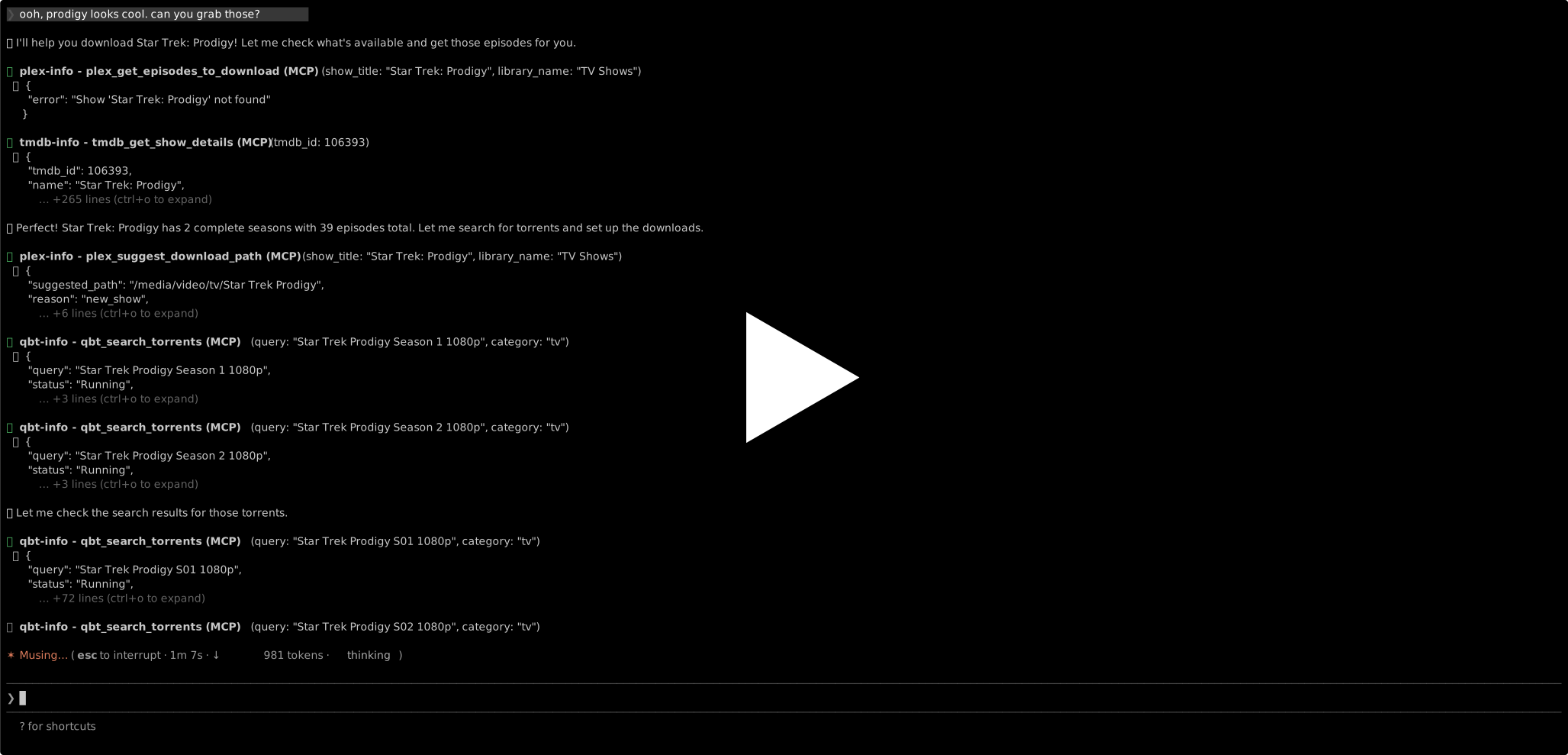
This a set of MCPs that can turn any LLM into a movie/tv downloading media-manager. It has access to your Plex library and qbittorrent client, so it knows what you have and what you want.
Setup
Configure credentials:
cp .env.example .env
# Edit .env with your Plex URL and token
Plex Token: Sign in at https://app.plex.tv, click any media item, click the three dots, select "Get Info", click "View XML" (bottom-left), and copy the X-Plex-Token value from the URL bar.
TMDB API Key (Optional): For finding missing episodes and searching for shows not in your library:
- Create a free account at https://www.themoviedb.org
- Go to Settings > API (https://www.themoviedb.org/settings/api)
- Click "Request an API Key" (if you haven't already)
- Choose "Developer" and fill out the form (you can use "Personal project" for the application type)
- Once approved, copy the API Key (v3 auth) value (NOT the "API Read Access Token")
- Add it to
.envasTMDB_API_KEY=your_key_here
Important: Use the "API Key (v3 auth)" field, which is a 32-character hexadecimal string. The "API Read Access Token" (JWT format starting with "eyJ") won't work with this tool.
qBittorrent: Make sure qBittorrent is running with Web UI enabled. Default credentials are admin/adminadmin, configured in Tools > Options > Web UI.
Tools
CLI Usage
You can run the CLI tools directly without installation using uvx:
# List your collection names
uvx --from aitorrent aitorrent-plex-cli list

# List all your shows (show/season/episode) in "TV Shows" collection
uvx --from aitorrent aitorrent-plex-cli list "TV Shows"

# List all your movies by collection in "Movies" collection
uvx --from aitorrent aitorrent-plex-cli list "Movies"

# List all your music by artist/album in "Music" collection
uvx --from aitorrent aitorrent-plex-cli list "Music"

# Show what you're currently watching (on-deck and in-progress shows with relative times)
uvx --from aitorrent aitorrent-plex-cli watching
The watching command shows:
- On Deck: Episodes/movies you're currently watching with progress percentage
- In Progress: TV shows you're partially through with completion stats and when you last watched (e.g., "2 days ago")
TMDB CLI
The tmdbinfo.py script searches The Movie Database (requires TMDB API key):
# Search for TV shows
uvx --from aitorrent aitorrent-tmdb-cli search-shows "Star Trek Lower Decks"

# Get detailed show information (seasons, episodes, air dates)
uvx --from aitorrent aitorrent-tmdb-cli show-details 85948

# Get specific season details
uvx --from aitorrent aitorrent-tmdb-cli season-details 85948 1

# Search for movies
uvx --from aitorrent aitorrent-tmdb-cli search-movies "The Matrix"

# Get detailed movie information
uvx --from aitorrent aitorrent-tmdb-cli movie-details 603
This tool is useful for finding shows/movies not in your Plex library and getting episode air dates.
qBittorrent CLI
The qbtinfo.py script manages torrent downloads and automation:
# List all torrents
uvx --from aitorrent aitorrent-qbt-cli list

# List only downloading torrents
uvx --from aitorrent aitorrent-qbt-cli list downloading

# Add a torrent by magnet link or URL
uvx --from aitorrent aitorrent-qbt-cli add "magnet:?xt=urn:btih:..." --path "/path/to/save" --category "TV Shows"

# List RSS feeds
uvx --from aitorrent aitorrent-qbt-cli rss list-feeds

# Add an RSS feed
uvx --from aitorrent aitorrent-qbt-cli rss add-feed "https://showrss.info/user/123456.rss?magnets=true&namespaces=true&name=null&quality=1080p" --folder "TV Shows"

# Refresh RSS feeds
uvx --from aitorrent aitorrent-qbt-cli rss refresh

# List RSS auto-download rules
uvx --from aitorrent aitorrent-qbt-cli rss list-rules

# Create RSS rule for a show (auto-downloads new episodes)
uvx --from aitorrent aitorrent-qbt-cli rss add-show "Star Trek: Strange New Worlds" --season 2 --quality 1080p --category "TV Shows" --feeds "TV Shows\ShowRSS"

# Attach an existing rule to specific feeds
uvx --from aitorrent aitorrent-qbt-cli rss attach-rule "Star Trek: Strange New Worlds S02" "TV Shows\ShowRSS,TV Shows\EZTV"
The RSS auto-download feature will automatically download new episodes as they appear in your RSS feeds, perfect for keeping up with currently airing shows. Important: Rules must be attached to specific feeds to trigger - use the --feeds parameter when creating rules or use attach-rule to attach existing rules.
MCP Server Usage
The same functionality is available as an MCP (Model Context Protocol) server for use with LLMs:
Add to your LLMs MCP settings (~/.claude.json):
{
  "mcpServers": {
    "plex-info": {
      "command": "uvx",
      "args": ["--from", "aitorrent", "aitorrent-plex"],
      "env": {
        "PLEX_URL": "http://localhost:32400",
        "PLEX_TOKEN": "your_plex_token_here",
        "TMDB_API_KEY": "your_tmdb_api_key_here"
      }
    },
    "tmdb-info": {
      "command": "uvx",
      "args": ["--from", "aitorrent", "aitorrent-tmdb"],
      "env": {
        "TMDB_API_KEY": "your_tmdb_api_key_here"
      }
    },
    "qbt-info": {
      "command": "uvx",
      "args": ["--from", "aitorrent", "aitorrent-qbt"],
      "env": {
        "QBT_URL": "http://localhost:8080",
        "QBT_USERNAME": "admin",
        "QBT_PASSWORD": "adminadmin"
      }
    }
  }
}
With Claude Code, you can do this, too:
claude mcp add plex-info --transport stdio \
  --env PLEX_URL=http://localhost:32400 \
  --env PLEX_TOKEN=your_plex_token_here \
  --env TMDB_API_KEY=your_tmdb_api_key_here \
  -- uvx --from aitorrent aitorrent-plex

claude mcp add tmdb-info --transport stdio \
  --env TMDB_API_KEY=your_tmdb_api_key_here \
  -- uvx --from aitorrent aitorrent-tmdb

claude mcp add qbt-info --transport stdio \
  --env QBT_URL=http://localhost:8080 \
  --env QBT_USERNAME=admin \
  --env QBT_PASSWORD=adminadmin \
  -- uvx --from aitorrent aitorrent-qbt
The LLM will have access to these tools:
Library & Content:
plex_list_libraries- List all Plex libraries with their typesplex_list_library_content- List all content from a specific library (TV shows with seasons/episodes, movies by collection, or music by artist/album)plex_search- Search for media by title across all libraries or in a specific library
Detailed Information:
plex_get_show_details- Get detailed information about a specific TV show including all seasons, episodes, and air dates (useful for finding missing episodes)plex_get_movie_details- Get detailed information about a specific movie including cast, genres, collections, and ratingsplex_get_artist_details- Get detailed information about a music artist including all albums and tracks
Viewing Status & Progress:
plex_get_on_deck- Get items currently "On Deck" (continue watching) - shows what the user is actively watchingplex_get_in_progress_shows- Get TV shows that are partially watched with completion percentage - excellent for finding shows the user is followingplex_get_show_watch_status- Get detailed watch status for a specific show (which episodes are watched/unwatched per season)plex_get_recently_added- Get recently added items
High-Level Download Helpers:
plex_get_episodes_to_download- HIGH-LEVEL: Get all episodes that need downloading with pre-formatted search queries and download paths (minimizes context usage)plex_find_missing_episodes- Compare TMDB episode list with Plex library to find missing episodes (requires TMDB_API_KEY)plex_get_next_episodes- Get next unwatched episodes after the last one watched (requires TMDB_API_KEY)plex_format_torrent_query- Format show info as a torrent search query (e.g., "Star Trek Strange New Worlds 2022 S02E05 1080p")
TMDB Tools (standalone tmdb-info MCP):
tmdb_search_shows- Search The Movie Database for TV shows by nametmdb_get_show_details- Get detailed show info including all seasons and episodestmdb_get_season_details- Get detailed information about a specific seasontmdb_search_movies- Search TMDB for movies by titletmdb_get_movie_details- Get detailed movie information
Filesystem & Download Path Management:
plex_get_show_path- Get the actual filesystem path where a show's episodes are stored (e.g.,/media/video/tv/Doctor Who)plex_suggest_download_path- Intelligently suggest where to download episodes (uses existing show path or library location for new shows)plex_list_library_subdirs- List all show folders in a library (useful for fuzzy matching or checking what exists)
qBittorrent Torrent Management:
qbt_get_torrents- Get list of torrents with optional status filter (downloading, completed, etc.)qbt_get_torrent_details- Get detailed information about a specific torrentqbt_add_torrent- Add a torrent by magnet link or URL with optional save path and categoryqbt_get_categories- Get all torrent categories with save pathsqbt_create_category- Create a new category (useful for organizing by show/collection)qbt_get_transfer_info- Get current download/upload speeds and stats
qBittorrent Search:
qbt_search_torrents- Search for torrents using qBittorrent's installed plugins (returns magnet links sorted by seeders)qbt_get_search_plugins- Get list of installed search pluginsqbt_get_downloading_episodes- HIGH-LEVEL: Parse currently downloading torrents to extract episode info (prevents duplicate downloads)
qBittorrent RSS Feed Management:
qbt_get_rss_feeds- Get all RSS feeds and folders (use this to see what feeds are configured)qbt_add_rss_feed- Add a new RSS feed URLqbt_remove_rss_feed- Remove an RSS feed or folderqbt_refresh_rss_feed- Manually refresh RSS feed(s) to check for new items
qBittorrent RSS Automation:
qbt_get_rss_rules- Get all RSS auto-download rules (shows which feeds they're attached to)qbt_create_show_rss_rule- Create RSS rule to auto-download new episodes of a show (can specify feeds to attach)qbt_attach_rule_to_feeds- Attach an existing rule to specific feeds (CRITICAL - rules won't trigger unless attached!)qbt_delete_rss_rule- Delete an RSS auto-download rule
Example MCP Usage Scenarios
With these tools, the LLM can help you with requests like:
Basic Library Management:
- "I like Breaking Bad" → Search for the show, get details, see what episodes you have
- "What shows am I currently watching?" → Get on-deck and in-progress shows to see what you're actively following
- "Find movies in the Marvel collection" → Search libraries and filter by collection
- "Show me all Tarantino movies" → Search and get details about movies in that collection
- "What albums do I have by The Beatles?" → Search artist and get full discography
- "What's new in my library?" → Get recently added content
Torrent Download Planning (with TMDB):
- "Download the next season of shows I'm watching" → Get in-progress shows → Find missing episodes → Format torrent queries
- "What episodes of The Office am I missing?" → Compare TMDB data with Plex → Generate list of missing episodes
- "I'd like to fill in my Doctor Who collection, but not the old ones" → Find missing episodes → Filter by year → Format torrent queries
- "Grab new episodes of Star Trek: Strange New Worlds" → Get next episodes → Check if aired → Format torrent query with "1080p"
- "Download S02E05-E10 of Breaking Bad in 1080p" → Format multiple torrent queries with preferred quality
Complete Workflow (Plex + qBittorrent + TMDB):
-
"I'm watching Star Trek: Strange New Worlds, automatically download new episodes when they come out" →
plex_get_in_progress_shows()- Verify you're watching SNWplex_get_next_episodes("Star Trek: Strange New Worlds")- Find S02E06 aired but missingplex_get_show_path("Star Trek: Strange New Worlds")- Get existing path:/media/video/tv/Star Trek Strange New Worldsplex_format_torrent_query("Star Trek Strange New Worlds", 2, 6, 2022, "1080p")- Create search query- [User would search for torrent and get magnet link]
qbt_add_torrent(magnet_link, save_path="/media/video/tv/Star Trek Strange New Worlds")- Download to correct folderqbt_get_rss_feeds()- Check which RSS feeds are configured (e.g., "TV Shows\ShowRSS")qbt_create_show_rss_rule("Star Trek Strange New Worlds", season=2, quality="1080p", save_path="/media/video/tv/Star Trek Strange New Worlds", feed_paths=["TV Shows\\ShowRSS"])- Auto-download future episodes from specific feed to same location
-
"Fill in my Doctor Who collection but skip the old episodes" →
plex_find_missing_episodes("Doctor Who")- Get all missing episodesplex_get_show_path("Doctor Who")- Get existing path:/media/video/tv/Doctor Who- Filter for episodes with air_date >= 2005 (modern Who)
- For each missing episode: format torrent query → search → add to qBittorrent with correct save_path
- Downloads automatically go to the existing Doctor Who folder in Plex
-
"Download new show not in my library yet" →
plex_search("The Expanse")- Show not found in Plexplex_list_library_subdirs("TV Shows")- Check existing show folders to avoid duplicatesplex_suggest_download_path("The Expanse", "TV Shows")- Suggests:/media/video/tv/The Expanse- Download episodes to suggested path
- Plex automatically picks them up in next library scan
Project details
Verified details
These details have been verified by PyPIProject links
GitHub Statistics
Maintainers
Release history Release notifications | RSS feed

Download files
Download the file for your platform. If you're not sure which to choose, learn more about installing packages.
Source Distribution
Built Distribution
Filter files by name, interpreter, ABI, and platform.
If you're not sure about the file name format, learn more about wheel file names.
Copy a direct link to the current filters
File details
Details for the file aitorrent-0.0.1.tar.gz.
File metadata
- Download URL: aitorrent-0.0.1.tar.gz
- Upload date:
- Size: 32.9 kB
- Tags: Source
- Uploaded using Trusted Publishing? Yes
- Uploaded via: twine/6.1.0 CPython/3.13.7
File hashes
| Algorithm | Hash digest | |
|---|---|---|
| SHA256 |
247082256620c93ec7d6140c22de54c1e86aab1f834d1562d9050993d91a7546
|
|
| MD5 |
5a9cc74f5dd97d6fdd178c164fc3fbed
|
|
| BLAKE2b-256 |
fb2a42c8cb164953f7792fc6d721ab0482825365aca33678bcbaef1007cd3e22
|
Provenance
The following attestation bundles were made for aitorrent-0.0.1.tar.gz:
Publisher:
publish.yml on konsumer/aitorrent
-
Statement:
-
Statement type:
https://in-toto.io/Statement/v1 -
Predicate type:
https://docs.pypi.org/attestations/publish/v1 -
Subject name:
aitorrent-0.0.1.tar.gz -
Subject digest:
247082256620c93ec7d6140c22de54c1e86aab1f834d1562d9050993d91a7546 - Sigstore transparency entry: 962619054
- Sigstore integration time:
-
Permalink:
konsumer/aitorrent@a407de5b7c81ad1e10c56d66c4f8f95021f91f77 -
Branch / Tag:
refs/tags/v0.0.1 - Owner: https://github.com/konsumer
-
Access:
public
-
Token Issuer:
https://token.actions.githubusercontent.com -
Runner Environment:
github-hosted -
Publication workflow:
publish.yml@a407de5b7c81ad1e10c56d66c4f8f95021f91f77 -
Trigger Event:
release
-
Statement type:
File details
Details for the file aitorrent-0.0.1-py3-none-any.whl.
File metadata
- Download URL: aitorrent-0.0.1-py3-none-any.whl
- Upload date:
- Size: 47.4 kB
- Tags: Python 3
- Uploaded using Trusted Publishing? Yes
- Uploaded via: twine/6.1.0 CPython/3.13.7
File hashes
| Algorithm | Hash digest | |
|---|---|---|
| SHA256 |
f08e232dbd077ac21b2d5a4c0b613ca10ef3d02eaced7a22933b1cd48b1fef3a
|
|
| MD5 |
a46b2a65a11fe17b14845a0df4d51cb6
|
|
| BLAKE2b-256 |
626c6523376543bfc08eecab61e2f10f5b01855db0b71bc3f79ea348260f4516
|
Provenance
The following attestation bundles were made for aitorrent-0.0.1-py3-none-any.whl:
Publisher:
publish.yml on konsumer/aitorrent
-
Statement:
-
Statement type:
https://in-toto.io/Statement/v1 -
Predicate type:
https://docs.pypi.org/attestations/publish/v1 -
Subject name:
aitorrent-0.0.1-py3-none-any.whl -
Subject digest:
f08e232dbd077ac21b2d5a4c0b613ca10ef3d02eaced7a22933b1cd48b1fef3a - Sigstore transparency entry: 962619070
- Sigstore integration time:
-
Permalink:
konsumer/aitorrent@a407de5b7c81ad1e10c56d66c4f8f95021f91f77 -
Branch / Tag:
refs/tags/v0.0.1 - Owner: https://github.com/konsumer
-
Access:
public
-
Token Issuer:
https://token.actions.githubusercontent.com -
Runner Environment:
github-hosted -
Publication workflow:
publish.yml@a407de5b7c81ad1e10c56d66c4f8f95021f91f77 -
Trigger Event:
release
-
Statement type:






