
AiTril - Multi-LLM orchestration CLI tool with specialized code/agent providers

Project description
🧬 AiTril
Pronounced: "8-real"
Multi-LLM Orchestration CLI Tool
AiTril is a neutral, open-source command-line interface that orchestrates multiple Large Language Model (LLM) providers through a single unified interface. Query OpenAI, Anthropic, and Google Gemini in parallel and compare their responses side-by-side.
Features
Core Capabilities
- 8-Provider Support: Integrate with multiple LLM providers
- OpenAI (GPT-5.1, GPT-4o, GPT-4-Turbo)
- Anthropic (Claude Opus 4.5, Sonnet 4.5, Haiku 4.5)
- Google Gemini (Gemini 3 Pro Preview, 2.0 Flash)
- Ollama (local models)
- Llama.cpp (local models)
- Custom providers (3 configurable slots)
- Parallel Queries: Send prompts to all providers simultaneously (tri-lam mode)
- Agent Coordination: Multiple collaboration modes (sequential, consensus, debate)
- Initial Planner Mode: Optional planning agent runs first to set strategy for other agents
- Code Building: Agents collaborate to plan, implement, and review code with consensus
- Real-Time Streaming: See responses as they're generated with visual progress indicators
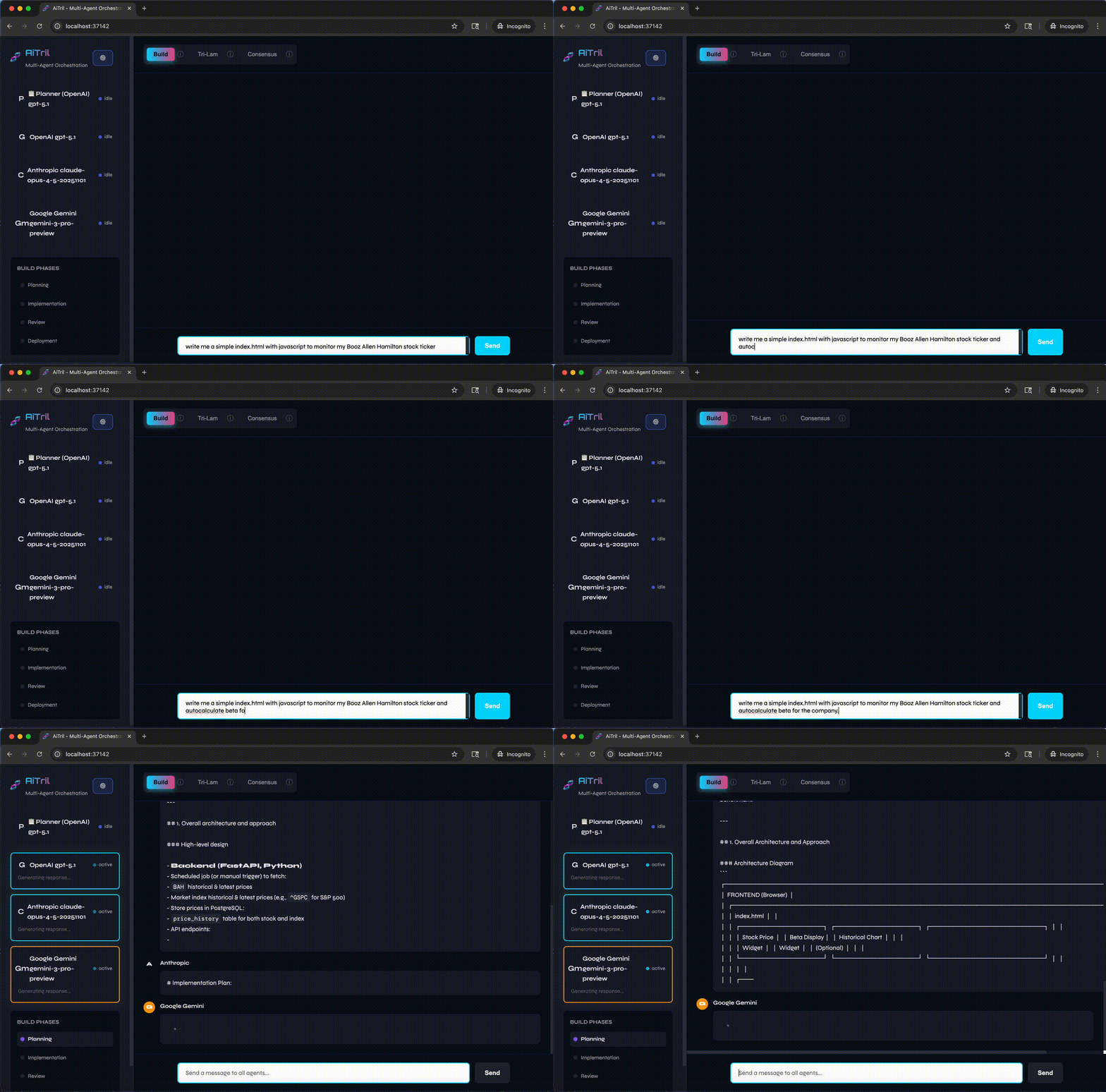
Web Interface (NEW in v0.0.31)
- Modern Web UI: Full-featured interface with FastAPI and WebSockets
- Live Agent Visualization: Watch agents collaborate in real-time
- Settings Management: Configure providers and deployment targets via UI
- Deployment Integration: Deploy builds to multiple targets
- Local file system
- GitHub Pages
- AWS EC2
- Docker containers
- Port 37142: Runs on dedicated port to avoid conflicts
Specialized Providers (NEW in v0.0.35)
AiTril now includes specialized provider implementations optimized for specific capabilities:
| Provider | Unique Strength | Best Use Cases |
|---|---|---|
| OpenAI Codex | Code generation, analysis, optimization | Writing production code, refactoring, algorithm optimization |
| Gemini ADK | Agent reasoning, planning, coordination | Multi-agent workflows, deployment planning, orchestration |
| Claude Code | CLI tools, file operations, bash execution | File management, system commands, development automation |
OpenAI Codex Provider
- Optimized for advanced code generation and completion
- Deep code understanding with complexity analysis
- Production-ready code with type hints and documentation
- Algorithmic optimization and refactoring
- Best for: Creating clean, well-documented code and optimizing existing implementations
Gemini ADK (Agent Development Kit) Provider
- Advanced agentic reasoning and planning capabilities
- Multi-step problem solving with risk assessment
- Multi-agent coordination and workflow design
- Strategic planning with rollback strategies
- Best for: Complex deployment planning, agent coordination, and architectural decision-making
Claude Code Provider (Hybrid)
- PRIMARY: Claude Code CLI for full code/agent capabilities (local development)
- FALLBACK: Anthropic API for Docker/headless environments
- File system operations (read, write, edit)
- Bash command execution
- Default coordinator for all multi-agent workflows
- Best for: Development tasks requiring file operations and system interaction
All specialized providers work seamlessly in tri-lam mode, consensus coordination, and code building workflows.
Configuration & Management
- Tech Stack Preferences: Configure your preferred languages, frameworks, and tools
- File Operations: Safe file management with automatic backups and diff tracking
- Session Management: Track conversations across chat and build sessions
- Smart Caching: Store history, preferences, and context for continuity
- Simple Configuration: Interactive setup wizard for easy provider configuration
- Environment Variables: Load settings from .env files
Technical
- Async-First Design: Built on Python asyncio for efficient concurrent operations
- Rich CLI Display: Visual feedback with thinking indicators, task progress, and timing stats
- Privacy-Focused: API keys and cache stored locally in your home directory
- Extensible: Clean provider abstraction for adding new LLM providers
- Docker Support: Run in containers for easy deployment
Installation
Using pip
pip install aitril
Using uv
uv pip install aitril
From Source
git clone https://github.com/professai/aitril.git
cd aitril
pip install -e .
Using Docker
Run AiTril in a Docker container without installing Python 3.14 locally:
# Quick start - show help
docker run -it collinparan/aitril:latest

# Query a single provider (requires API keys via env vars)
docker run -it \
  -e OPENAI_API_KEY="sk-..." \
  collinparan/aitril:latest \
  aitril ask -p gpt "your prompt"

# Tri-lam mode with all providers
docker run -it \
  -e OPENAI_API_KEY="sk-..." \
  -e ANTHROPIC_API_KEY="sk-ant-..." \
  -e GEMINI_API_KEY="..." \
  collinparan/aitril:latest \
  aitril tri "your prompt"

# Use .env file for API keys
docker run -it --env-file .env \
  collinparan/aitril:latest \
  aitril tri "your prompt"
Quick Start
1. Initialize Configuration
Run the interactive setup wizard to configure your LLM providers:
aitril init
You'll be prompted to enter API keys for each provider. You can configure one, two, or all three providers. For the best experience (tri-lam mode), configure at least two providers.
2. Query a Single Provider
Send a prompt to a specific provider:
aitril ask --provider gpt "Explain quantum computing in simple terms"
aitril ask --provider claude "Write a haiku about programming"
aitril ask --provider gemini "What are the benefits of async programming?"
3. Tri-Lam Mode (Parallel Queries)
Send the same prompt to all configured providers and compare responses:
aitril tri "Compare your strengths and weaknesses as an AI model"
This will query all enabled providers in parallel and display their responses in labeled sections.
4. Agent Coordination Modes
Leverage multi-agent collaboration for more sophisticated responses:
Sequential Mode - Each agent builds on previous responses:
aitril tri --coordinate sequential "Solve this problem step by step: What's the best way to learn Python?"
Consensus Mode - Get a synthesized agreement from all agents:
aitril tri --coordinate consensus "What is the best programming language for web development?"
Debate Mode - Agents debate over multiple rounds:
aitril tri --coordinate debate "Discuss the pros and cons of microservices architecture"
5. Session Management
Track conversations across named sessions:
# Start a project session
aitril ask --session "my-project" -p gpt "Help me design a REST API"

# Continue in the same session
aitril tri --session "my-project" "What authentication should I use?"

# View session history
aitril cache history

# Quick question without caching
aitril ask --no-cache -p claude "What's 2+2?"
6. Cache Management
Manage your conversation history and preferences:
# Show cache summary
aitril cache show

# List all sessions
aitril cache list

# View session history
aitril cache history

# Clear a specific session
aitril cache clear --session "old-project"

# Clear all cache (with confirmation)
aitril cache clear
7. Tech Stack Configuration
Configure your preferred technologies for code building:
# Set tech stack preferences (global)
aitril config set-stack --language python --framework fastapi

# Add database and tools
aitril config set-stack --database postgresql --tools docker,pytest,black

# Set style guide
aitril config set-stack --style-guide pep8

# Show current preferences
aitril config show-stack

# Set project context
aitril config set-project --path /path/to/project --project-type web_api
8. Code Building with Multi-Agent Consensus
Let agents collaborate to plan, build, and review code:
# Basic code building (uses cached tech stack)
aitril build "Create a REST API endpoint for user registration"

# Build with session tracking
aitril build "Add JWT authentication middleware" --session "auth-feature"

# Build and write to files with automatic backups
aitril build "Write unit tests for user model" --write-files

# Build with project context
aitril build "Create database migration" --project-root /path/to/project
Build Process:
- Planning Phase: All agents reach consensus on architecture and approach
- Implementation Phase: Agents build sequentially, seeing each other's code
- Review Phase: Agents review implementation and provide consensus feedback
Web Interface
AiTril now includes a full-featured web interface for visual collaboration and management.
Starting the Web Server
# Start with default settings (port 37142)
aitril web

# Or specify custom port
aitril web --port 8080

# With auto-reload for development
aitril web --reload
The web interface will be available at http://localhost:37142
Web UI Features
-
Multiple Collaboration Modes:
- Build (🏗️): Multi-phase with initial planner → planning → implementation → deployment
- Tri-lam (🧬): Parallel agents with optional initial planner
- Consensus (🤝): Agents debate to reach agreement
- Ask (💬): Single provider query
-
Real-Time Agent Visualization: Watch agents work in real-time with streaming responses
-
Settings Management:
- Configure all 8 LLM providers (enable/disable, set models, manage API keys)
- Set up deployment targets (GitHub Pages, AWS EC2, Docker, Local)
- Configure initial planner (runs first to set strategy)
- Manage general preferences (theme, default mode)
-
Deployment Integration: After build completion, deploy to:
- Local file system
- GitHub Pages (automatic git push)
- AWS EC2 (SSH deployment)
- Docker container
Configuration via Web UI
Access settings by clicking the ⚙️ button in the sidebar to:
- Configure Providers: Enable/disable providers, set model versions, manage API keys
- Set Initial Planner: Choose which provider runs first in multi-agent modes
- Configure Deployment: Set up deployment targets with credentials
- Customize UI: Theme, default mode, and display preferences
Settings are persisted to ~/.aitril/settings.json and sync with CLI configuration.
Configuration
AiTril stores configuration in ~/.aitril/settings.json with support for .env files.
Configuration Priority
Settings are loaded in this order (highest priority first):
~/.aitril/settings.json- User settings (managed via CLI or web UI).envfile in project root - Environment variablesaitril/settings.py- Default application settings
Settings File Structure
{
  "llm_providers": {
    "openai": {
      "name": "OpenAI",
      "enabled": true,
      "model": "gpt-5.1",
      "api_key_env": "OPENAI_API_KEY"
    },
    "anthropic": {
      "name": "Anthropic",
      "enabled": true,
      "model": "claude-opus-4.5-20251124",
      "api_key_env": "ANTHROPIC_API_KEY"
    },
    "gemini": {
      "name": "Google Gemini",
      "enabled": true,
      "model": "gemini-3-pro-preview",
      "api_key_env": "GOOGLE_API_KEY"
    },
    "ollama": {
      "name": "Ollama (Local)",
      "enabled": true,
      "model": "granite4:350m",
      "base_url": "http://localhost:11434"
    }
  },
  "general": {
    "theme": "dark",
    "default_mode": "build",
    "initial_planner": "openai"
  }
}
Environment Variables (.env file)
Create a .env file in your project root:
# API Keys
OPENAI_API_KEY=sk-...
ANTHROPIC_API_KEY=sk-ant-...
GOOGLE_API_KEY=...

# Model Selection (override defaults)
OPENAI_MODEL=gpt-5.1
ANTHROPIC_MODEL=claude-opus-4.5-20251124
GEMINI_MODEL=gemini-3-pro-preview

# Ollama Configuration (for local models)
OLLAMA_BASE_URL=http://localhost:11434
OLLAMA_MODEL=granite4:350m
The web server automatically loads .env files at startup.
Storage Locations
- Settings:
~/.aitril/settings.json- User preferences and provider configuration - Cache:
~/.cache/aitril/cache.json- Session history and conversation data
The cache includes:
- Session history: All prompts and responses organized by session
- Global preferences: Settings that persist across all sessions
- Session preferences: Settings specific to individual sessions
- Context data: Coordination context for multi-agent interactions
Requirements
- Python 3.14.0 or higher
- API keys for at least one provider:
- OpenAI: https://platform.openai.com/api-keys
- Anthropic: https://console.anthropic.com/
- Google AI: https://makersuite.google.com/app/apikey
For normal usage, at least two providers should be configured (the "tri-lam rule").
Development
Local Development Setup
# Clone the repository
git clone https://github.com/professai/aitril.git
cd aitril

# Install in editable mode with dev dependencies
pip install -e ".[dev]"

# Run tests
pytest
Docker Images
AiTril is available as a Docker image on DockerHub:
Production Image (from PyPI):
# Pull the latest version from DockerHub
docker pull collinparan/aitril:latest

# Or pull a specific version
docker pull collinparan/aitril:0.0.7

# Run with environment variables
docker run -it --env-file .env collinparan/aitril:latest aitril tri "your prompt"
Local Development with Docker Compose:
Build and run AiTril from source in a Docker container:
# 1. Copy the example environment file and add your API keys
cp .env.example .env
# Edit .env and add your actual API keys

# 2. Build and start the container
docker-compose up -d

# 3. Run aitril commands inside the container
docker-compose exec aitril aitril --help
docker-compose exec aitril aitril --version

# 4. Enter interactive shell
docker-compose exec aitril bash

# 5. Stop and remove the container
docker-compose down
Environment Setup:
The .env file should contain your API keys:
OPENAI_API_KEY=sk-your-key-here
ANTHROPIC_API_KEY=sk-ant-your-key-here
GEMINI_API_KEY=your-key-here
See .env.example for a template with links to get API keys.
Architecture
AiTril follows a modular architecture:
Core Modules
config.py: Configuration loading, saving, and interactive wizardsettings.py: Settings management with JSON persistence and environment variable loadingproviders.py: Provider abstraction and implementations for 8 LLM providersorchestrator.py: Multi-provider orchestration and parallel query coordinationcoordinator.py: Multi-agent coordination strategies (sequential, consensus, debate, code building)cache.py: Session management, history tracking, tech stack preferences, and artifact storagefiles.py: Safe file operations with automatic backups, diff tracking, and project structure creationdisplay.py: Rich CLI feedback with progress indicators and visual symbolscli.py: Command-line interface with build, config, ask, tri, web, and cache commands
Web Interface
web.py: FastAPI web server with WebSocket support for real-time agent collaborationstatic/app.js: Frontend JavaScript for chat interface and WebSocket handlingstatic/settings.js: Settings UI for provider and deployment configurationstatic/style.css: Modern dark theme UI stylingtemplates/index.html: Main web interface template
All provider calls are async-first using native async clients (AsyncOpenAI, AsyncAnthropic) for true concurrent streaming responses.
Roadmap
Completed (v0.0.1):
- Core multi-provider orchestration
- Interactive configuration wizard
- Parallel tri-lam queries
- Real-time streaming responses
- Multi-agent coordination (sequential, consensus, debate modes)
- Session management and caching
- Conversation history tracking
- Rich CLI display with progress indicators
- Environment variable configuration
- Native async client implementation
Completed (v0.0.3):
- Code building with multi-agent consensus (plan, implement, review)
- Tech stack preference management
- File operations with automatic backups
- Project context tracking
- Build artifact recording
- Code review coordination mode
Completed (v0.0.31):
- Web interface with FastAPI and WebSockets
- 8-provider support (OpenAI, Anthropic, Gemini, Ollama, Llama.cpp, Custom1-3)
- Initial planner mode (configurable planning agent)
- Settings management UI
- Deployment integrations (GitHub Pages, AWS EC2, Docker, Local)
- Environment variable loading in web server
- JSON-based settings persistence
- Configuration validation tools
Planned:
- Additional provider support (Cohere, Mistral, Groq)
- Plugin system for custom providers
- Advanced preference learning
- Database navigation tools
- Agentic daemon framework
- REST API mode for programmatic access
- Multi-user support with authentication
- Cloud deployment templates (Kubernetes, Terraform)
Contributing
Contributions are welcome! Please feel free to submit a Pull Request.
License
Copyright 2025 Collin Paran
Licensed under the Apache License, Version 2.0 (the "License"). You may not use this file except in compliance with the License. You may obtain a copy of the License at:
http://www.apache.org/licenses/LICENSE-2.0
Unless required by applicable law or agreed to in writing, software distributed under the License is distributed on an "AS IS" BASIS, WITHOUT WARRANTIES OR CONDITIONS OF ANY KIND, either express or implied. See the LICENSE file for the specific language governing permissions and limitations under the License.
Disclaimer
AiTril is an independent, neutral, open-source project. It is not affiliated with or endorsed by OpenAI, Anthropic, Google, or any other LLM provider.
Happy tri-lamming! 🧬
Release history Release notifications | RSS feed


Download files
Download the file for your platform. If you're not sure which to choose, learn more about installing packages.
Source Distribution
Built Distribution
Filter files by name, interpreter, ABI, and platform.
If you're not sure about the file name format, learn more about wheel file names.
Copy a direct link to the current filters
File details
Details for the file aitril-0.0.36.tar.gz.
File metadata
- Download URL: aitril-0.0.36.tar.gz
- Upload date:
- Size: 78.2 kB
- Tags: Source
- Uploaded using Trusted Publishing? No
- Uploaded via: twine/6.2.0 CPython/3.13.7
File hashes
| Algorithm | Hash digest | |
|---|---|---|
| SHA256 |
2fbc771f0242190282dd47fd7e65289b798f486493b596e4802806a89da12884
|
|
| MD5 |
dad967a049dc5b1ecde5c8ccc416f842
|
|
| BLAKE2b-256 |
4961eeb9ebda63ec857ebfc9f8d12f2e92f7e080a788f7f805bec19d4ee43fd3
|
File details
Details for the file aitril-0.0.36-py3-none-any.whl.
File metadata
- Download URL: aitril-0.0.36-py3-none-any.whl
- Upload date:
- Size: 78.6 kB
- Tags: Python 3
- Uploaded using Trusted Publishing? No
- Uploaded via: twine/6.2.0 CPython/3.13.7
File hashes
| Algorithm | Hash digest | |
|---|---|---|
| SHA256 |
4dabfb8d9c55ab79785c1bb22b7f76816f59bbe04b11a37ba856188d36777f5e
|
|
| MD5 |
5a3197554f125a1c2a5a0efd87558a23
|
|
| BLAKE2b-256 |
dbb84dee997991119c15307a15faae4e56bc1b4c5de13382e874ea1df593e764
|






