
Veritas Diagnosis tool for fairness & transparency assessment.

Project description
Veritas Toolkit

The purpose of this toolkit is to facilitate the adoption of Veritas Methodology on Fairness & Transparency Assessment and spur industry development. It will also benefit customers by improving the fairness and transparency of financial services delivered by AIDA systems.
As a AI Verify stock-plugin, this updates the existing Veritas Toolkit to be compatible with the AI Verify schema and plugin structure.
License
- Licensed under Apache Software License 2.0
Developers:
- AI Verify
- MAS Veritas
- Resaro
Plugin Content
- Algorithms
| Name | Description |
|---|---|
| Veritastool | Veritas Diagnosis tool for fairness & transparency assessment |
Installation
The easiest way to install veritastool is to download it from PyPI. It's going to install the library itself and its prerequisites as well. It is suggested to create virtual environment with requirements.txt file first.
pip install aiverify-veritastool
Migrating from the existing Veritas Toolkit
The existing Veritas Toolkit has been updated to be compatible with the AI Verify schema and plugin structure. Users with model artifact json files from the existing Veritas Toolkit can convert them to the new format using the convert_veritas_artifact_to_aiverify function.
from aiverify_veritastool.util.aiverify import convert_veritas_artifact_to_aiverify

convert_veritas_artifact_to_aiverify(model_artifact_path="old_model_artifact_path.json", output_dir="output")
The test results will be saved in the output directory and can subsequently be updated into the AI Verify API gateway and platform.
Using the Plugin in Jupyter Notebook
Similar to the existing veritastool library, the updated plugin can be used as part of a Jupyter Notebook development workflow.
You can now import the custom library that you would to use for diagnosis. In this example we will use the Credit Scoring custom library.
from veritastool.model.modelwrapper import ModelWrapper
from veritastool.model.model_container import ModelContainer
from veritastool.usecases.credit_scoring import CreditScoring
Once the relevant use case object (CreditScoring) and model container (ModelContainer) has been imported, you can upload your contents into the container and initialize the object for diagnosis.
import pickle
import numpy as np

#Load Credit Scoring Test Data
# NOTE: Assume that the stock_plugin/user_defined_files/veritas_data folder is copied to the current working directory
file = "./veritas_data/credit_score_dict.pickle"
input_file = open(file, "rb")
cs = pickle.load(input_file)

#Model Contariner Parameters
y_true = np.array(cs["y_test"])
y_pred = np.array(cs["y_pred"])
y_train = np.array(cs["y_train"])
p_grp = {'SEX': [1], 'MARRIAGE':[1]}
up_grp = {'SEX': [2], 'MARRIAGE':[2]}
x_train = cs["X_train"]
x_test = cs["X_test"]
model_name = "credit_scoring"
model_type = "classification"
y_prob = cs["y_prob"]
model_obj = LogisticRegression(C=0.1)
model_obj.fit(x_train, y_train) #fit the model as required for transparency analysis

#Create Model Container
container = ModelContainer(y_true, p_grp, model_type, model_name, y_pred, y_prob, y_train, x_train=x_train, \
                           x_test=x_test, model_object=model_obj, up_grp=up_grp)

#Create Use Case Object
cre_sco_obj= CreditScoring(model_params = [container], fair_threshold = 80, fair_concern = "eligible", \
                           fair_priority = "benefit", fair_impact = "normal", perf_metric_name="accuracy", \
                           tran_row_num = [20,40], tran_max_sample = 1000, tran_pdp_feature = ['LIMIT_BAL'], tran_max_display = 10)
ModelContainer
The ModelContainer class is a helper class that holds all the model parameters required for computations in all use cases. It acts as a data holder for model details, input data, and metadata.
ModelContainer Parameters
Here are the main parameters of the ModelContainer class:
| Parameter | Type | Required | Default | Description |
|---|---|---|---|---|
y_true |
list, np.ndarray, pd.Series | Yes | None | Ground truth target values |
p_grp |
dict of lists | Yes | None | Dictionary of privileged groups for protected variables |
model_type |
str | Yes | "classification" | Type of model: "classification", "regression", or "uplift" |
model_name |
str | No | "auto" | Name for the model artifact json file |
y_pred |
list, np.ndarray, pd.Series | No | None | Predicted targets as returned by classifier |
y_prob |
list, np.ndarray, pd.Series, pd.DataFrame | No | None | Predicted probabilities as returned by classifier |
y_train |
list, np.ndarray, pd.Series | No | None | Ground truth for training data |
x_train |
pd.DataFrame, str | No | None | Training dataset |
x_test |
pd.DataFrame, str | No | None | Testing dataset |
model_object |
object | No | None | Trained model object for feature importance |
up_grp |
dict | No | None | Dictionary of unprivileged groups for protected variables |
sample_weight |
list, np.ndarray | No | None | Weights for normalizing y_true & y_pred |
pos_label |
list | No | [1] | Label values considered favorable |
neg_label |
list | No | None | Label values considered unfavorable (required for uplift models) |
Use Cases
The Veritas Toolkit provides various use cases for different applications:
- Base Classification
- Base Regression
- Customer Marketing
- Credit Scoring
- Predictive Underwriting
Each use case is a wrapper around the Fairness and Transparency classes, which are responsible for computing the respective metrics and analyses. The use cases take in the model container as input using the model_params parameter. Here's an example of the parameters of a use case:
Fairness Parameters
| Parameter | Type | Required | Default | Description |
|---|---|---|---|---|
fair_threshold |
int, float | No | 80 | Fairness threshold value (0-100) |
perf_metric_name |
str | No | "balanced_acc" | Primary performance metric used in evaluate() and/or compile() functions |
fair_metric_name |
str | No | "auto" | Primary performance metric used in evaluate() and/or compile() functions |
fair_concern |
str | No | "eligible" | Fairness concern: "eligible", "inclusive", or "both" |
fair_priority |
str | No | "benefit" | Fairness priority: "benefit" or "harm" |
fair_impact |
str | No | "normal" | Fairness impact: "normal", "significant", or "selective" |
fair_metric_type |
str | No | "difference" | Fairness metric type: "difference" or "ratio" |
Performance Metrics (perf_metric_name)
The performance metrics available depend on the model type. Here are the supported metrics:
| Model Type | Available Metrics |
|---|---|
| Classification | "accuracy", "balanced_acc", "f1_score", "precision", "recall", "tnr", "fnr", "npv", "roc_auc", "log_loss", "selection_rate" |
| Regression | "rmse", "mape", "wape" |
| Uplift | "emp_lift", "expected_profit", "expected_selection_rate" |
Fairness Metrics (fair_metric_name)
When fair_metric_name is set to "auto", the toolkit uses the Fairness Tree methodology to determine the appropriate metric based on fair_concern, fair_priority, and fair_impact. You can also directly specify a fairness metric:
Difference-based Metrics
These metrics measure the arithmetic difference between privileged and unprivileged groups:
| Metric Name | Description |
|---|---|
demographic_parity |
Difference in approval rates |
equal_opportunity |
Difference in true positive rates |
fpr_parity |
Difference in false positive rates |
tnr_parity |
Difference in true negative rates |
fnr_parity |
Difference in false negative rates |
ppv_parity |
Difference in positive predictive values |
npv_parity |
Difference in negative predictive values |
fdr_parity |
Difference in false discovery rates |
for_parity |
Difference in false omission rates |
equal_odds |
Difference in equalized odds |
neg_equal_odds |
Difference in negative equalized odds |
calibration_by_group |
Difference in calibration by group |
auc_parity |
Difference in AUC |
log_loss_parity |
Difference in log loss |
rmse_parity |
Difference in root mean squared error (regression) |
mape_parity |
Difference in mean absolute percentage error (regression) |
wape_parity |
Difference in weighted absolute percentage error (regression) |
rejected_harm |
Difference in harm from rejection (uplift) |
acquire_benefit |
Difference in benefit from acquiring (uplift) |
Ratio-based Metrics
These metrics measure the ratio between unprivileged and privileged groups:
| Metric Name | Description |
|---|---|
disparate_impact |
Ratio of approval rates |
equal_opportunity_ratio |
Ratio of true positive rates |
fpr_ratio |
Ratio of false positive rates |
tnr_ratio |
Ratio of true negative rates |
fnr_ratio |
Ratio of false negative rates |
ppv_ratio |
Ratio of positive predictive values |
npv_ratio |
Ratio of negative predictive values |
fdr_ratio |
Ratio of false discovery rates |
for_ratio |
Ratio of false omission rates |
equal_odds_ratio |
Ratio of equalized odds |
neg_equal_odds_ratio |
Ratio of negative equalized odds |
calibration_by_group_ratio |
Ratio of calibration by group |
auc_ratio |
Ratio of AUC |
log_loss_ratio |
Ratio of log loss |
rmse_ratio |
Ratio of root mean squared error (regression) |
mape_ratio |
Ratio of mean absolute percentage error (regression) |
wape_ratio |
Ratio of weighted absolute percentage error (regression) |
Fairness Concern (fair_concern)
This parameter helps determine what type of fairness concern is being addressed:
| Value | Description |
|---|---|
| "eligible" | Focuses on whether individuals who are eligible for a given outcome are treated fairly |
| "inclusive" | Focuses on whether individuals who are not eligible for a given outcome (e.g. rejected applications) are treated fairly |
| "both" | Considers fairness for both accepted and rejected individuals |
Fairness Priority (fair_priority)
This parameter helps determine what should be prioritized in the fairness assessment:
| Value | Description |
|---|---|
| "benefit" | Prioritizes ensuring that benefits are distributed fairly |
| "harm" | Prioritizes ensuring that harms are distributed fairly |
Fairness Impact (fair_impact)
This parameter helps determine the context and severity of the fairness impact:
| Value | Description |
|---|---|
| "normal" | Standard impact context with no special considerations; selects for basic rate parity metrics |
| "significant" | Contexts where decisions have major consequences; selects metrics that focus on predictive value parity |
| "selective" | Identical as selecting significant |
Transparency Parameters
| Parameter | Type | Required | Default | Description |
|---|---|---|---|---|
tran_row_num |
list | No | [1] | Row indices for local interpretability |
tran_max_sample |
int, float | No | 1 | Number/percent of records to sample |
tran_pdp_feature |
list | No | [] | Features for partial dependence plots |
tran_max_display |
int | No | 10 | Number of features to display in output |
Special Parameters
Each use case has its own set of special parameters that are specific to the use case. For example, the CreditScoring use case takes in additional parameters for num_applicants and base_default_rate:
| Parameter | Type | Description |
|---|---|---|
num_applicants |
dict | Counts of rejected applicants for privileged/unprivileged groups |
base_default_rate |
dict | Base default rates for privileged/unprivileged groups |
while CustomerMarketing accepts the following parameters:
| Parameter | Type | Description |
|---|---|---|
treatment_cost |
int, float | Cost of the marketing treatment per customer |
revenue |
int, float | Revenue gained per customer |
For more information, refer to the docstrings of the respective classes and use cases.
API functions
Below are the API functions that the user can execute to obtain the fairness and transparency diagnosis of their use cases.
Evaluate
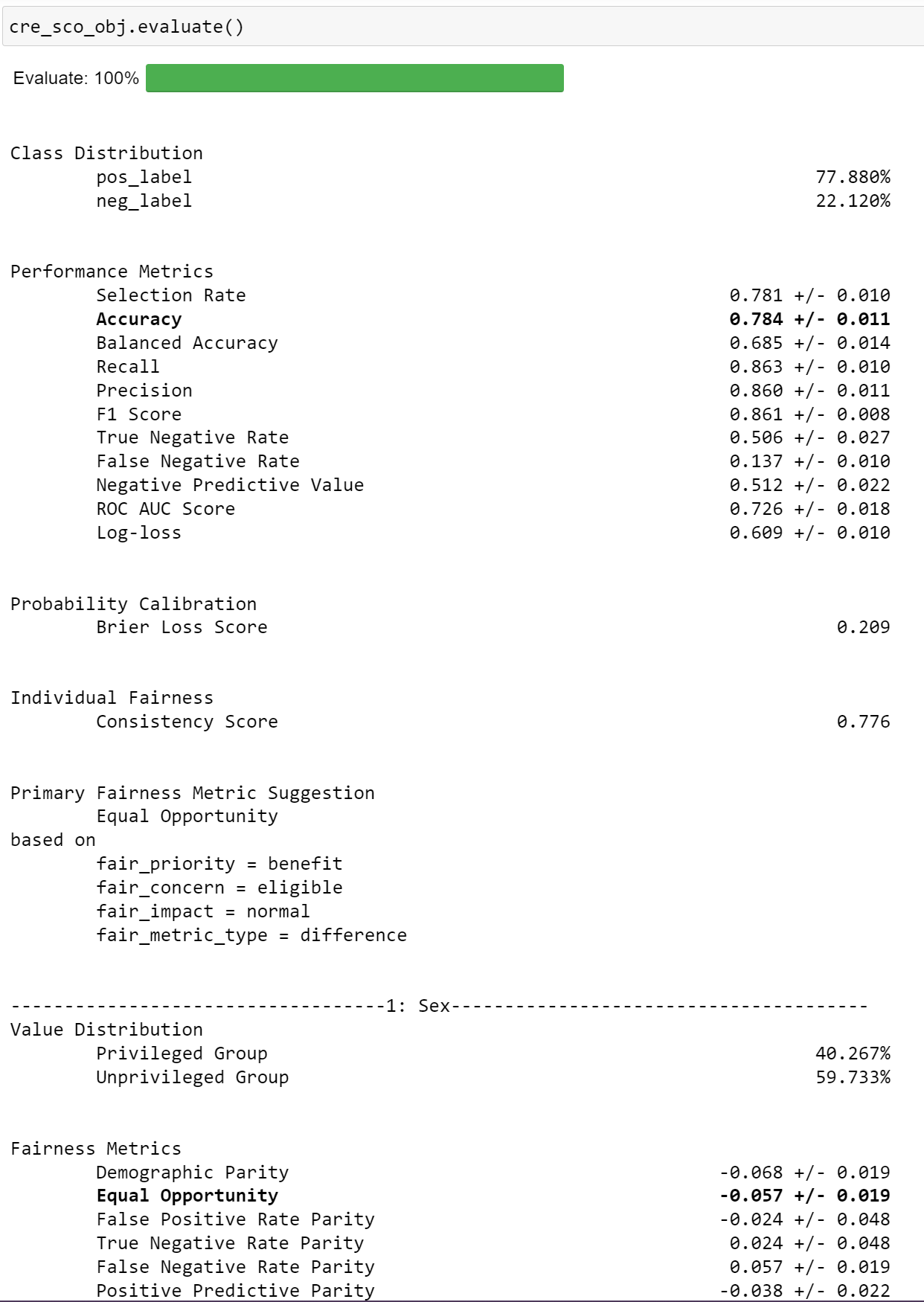
The evaluate API function computes all performance and fairness metrics and renders it in a table format (default). It also highlights the primary performance and fairness metrics (automatic if not specified by user).
cre_sco_obj.evaluate()
Output:
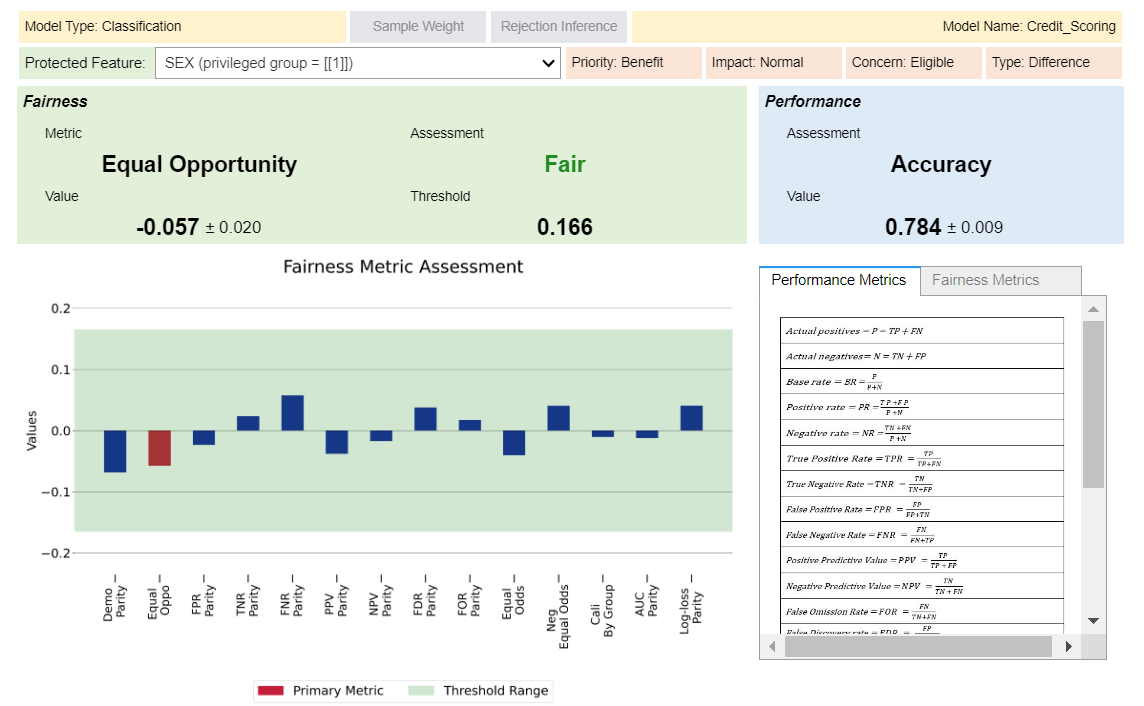
You can also toggle the widget to view your results in a interactive visualization format.
cre_sco_obj.evaluate(visualize = True)
Output:
Tradeoff
Computes trade-off between performance and fairness.
cre_sco_obj.tradeoff()
Output:
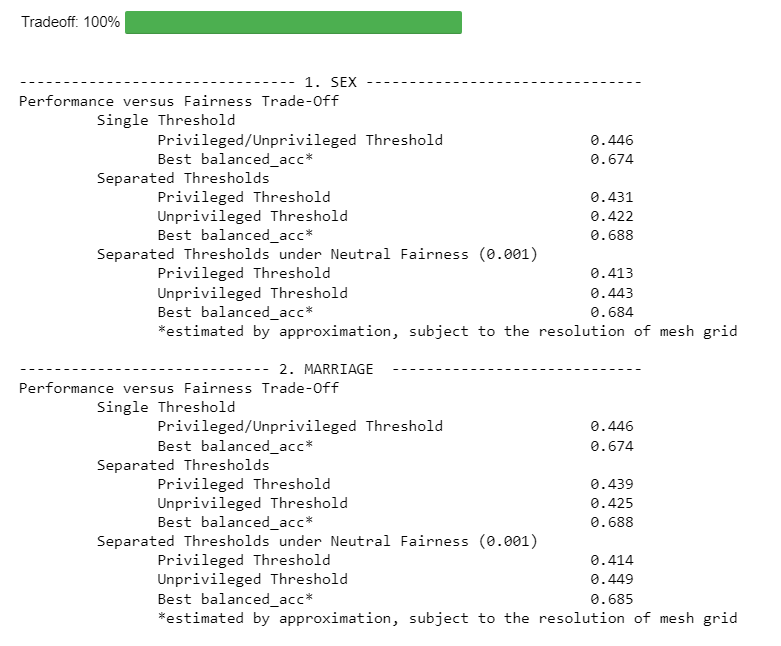
** Note: Replace {Balanced Accuracy} with the respective given metrics.
Feature Importance
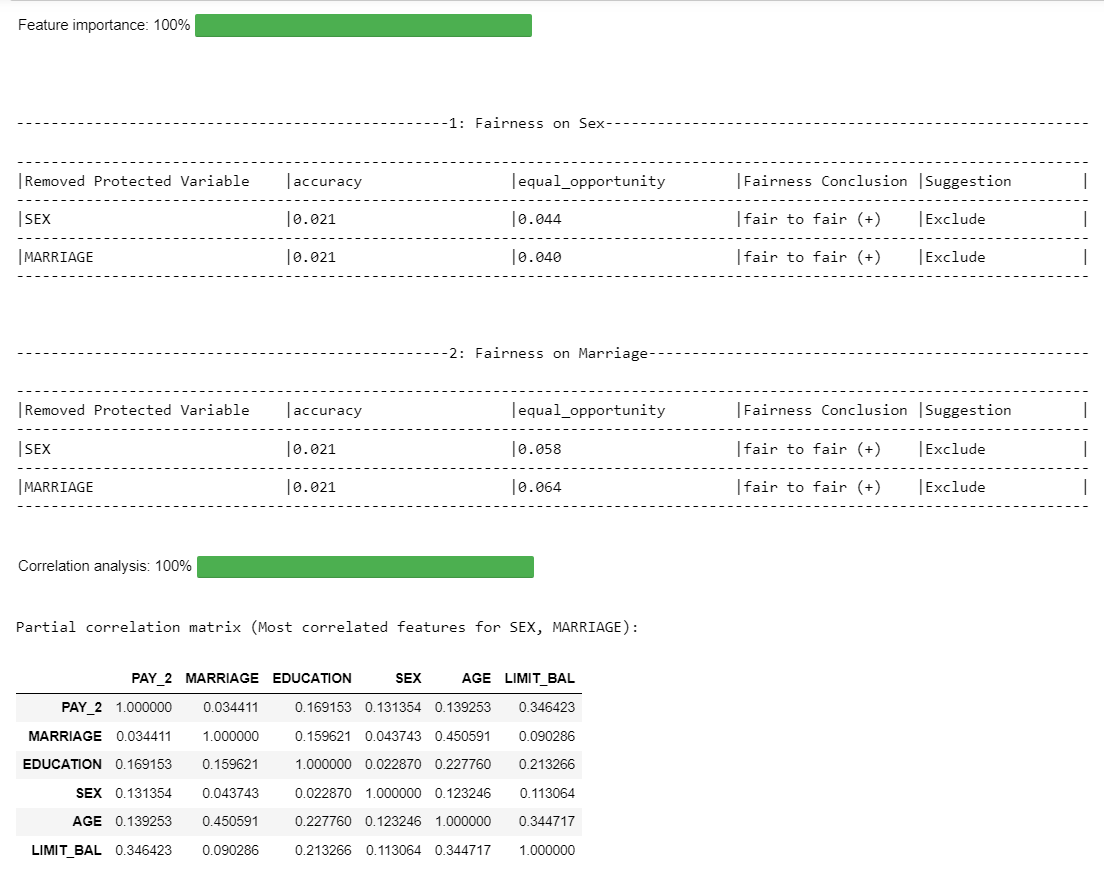
Computes feature importance of protected features using leave one out analysis.
cre_sco_obj.feature_importance()
Output:
Note
The fairness conclusion shows how removing a protected variable affects the fairness of the model:

The first part (e.g., "fair to fair") indicates the transition from:

The baseline fairness conclusion (with all variables)
To the new fairness conclusion after removing a specific protected variable
The symbols "(+)" or "(-)" provide additional information:

(+) means the model is now fairer after removing the variable
(-) means the model is now less fair after removing the variable

The "suggestion" field provides recommendations on whether to include or exclude a protected variable from the model, based on the tradeoff between fairness and performance:

- "include": The variable should be kept in the model. This is recommended when:
Removing the variable makes the model less fair and;
Removing hurts performance
-
"exclude": The variable should be removed from the model. This is recommended when: Removing the variable makes the model fairer and; Removing improves performance
-
"examine further": More analysis is needed. This happens when there's a tradeoff between fairness and performance i.e. removing a variable improves fairness but hurts performance, or vice versa.
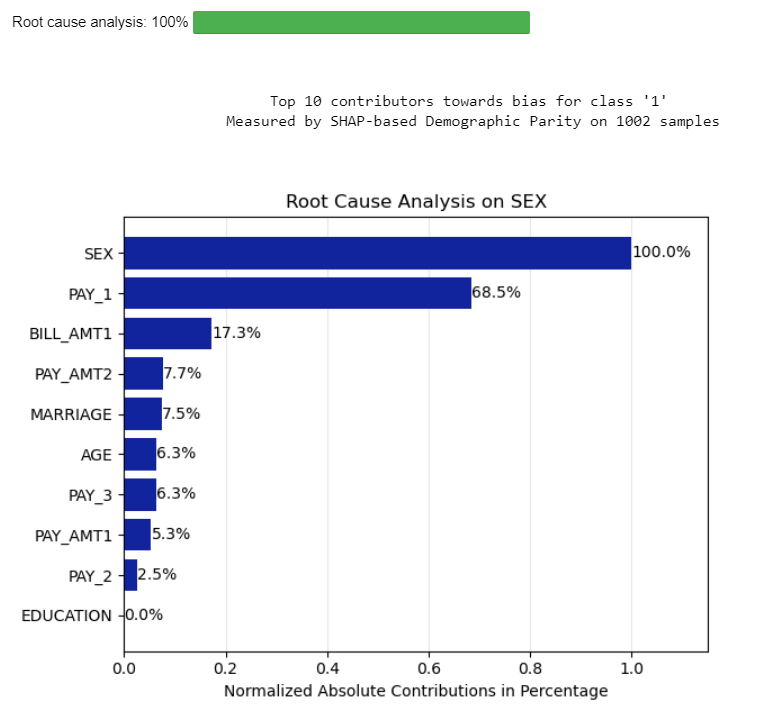
Root Cause
Computes the importance of variables contributing to the bias.
cre_sco_obj.root_cause()
Output:
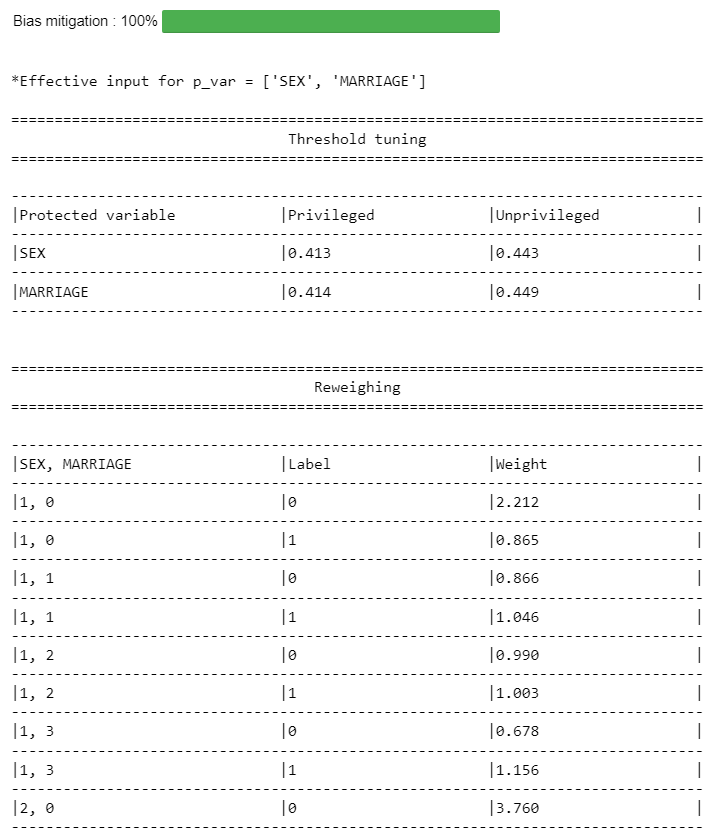
Mitigate
User can choose methods to mitigate the bias.
mitigated = cre_sco_obj.mitigate(p_var=[], method=['reweigh', 'correlation', 'threshold'])
Output:
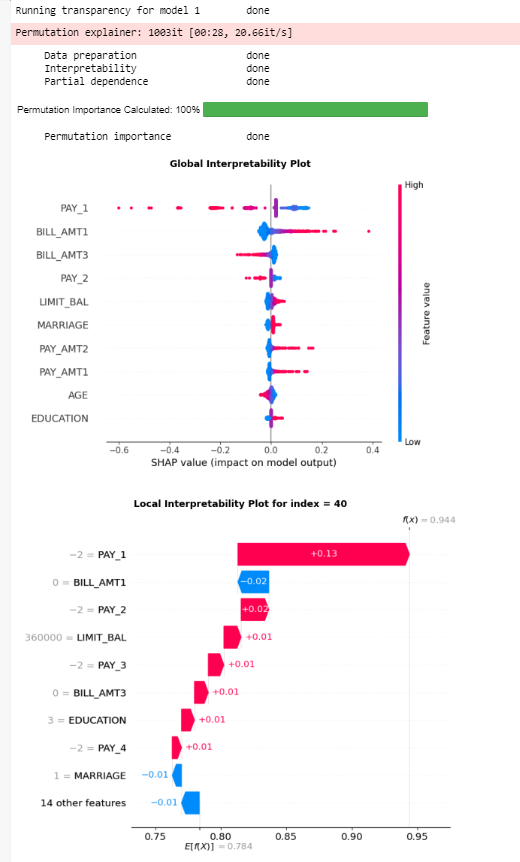
Explain
Runs the transparency analysis - global & local interpretability, partial dependence analysis and permutation importance
#run the entire transparency analysis
cre_sco_obj.explain()
Output:
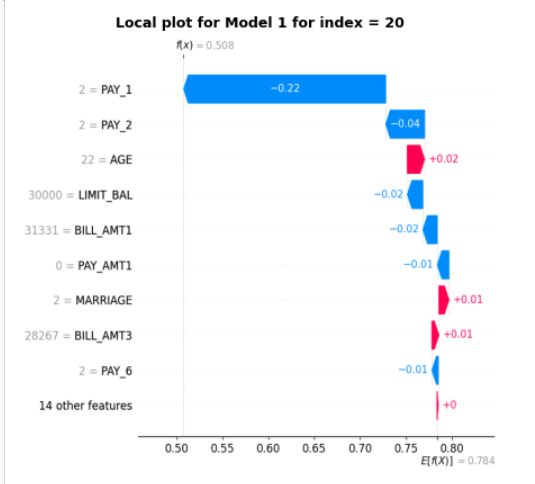
#get the local interpretability plot for specific row index and model
cre_sco_obj.explain(local_row_num = 20)
Output:
Compile
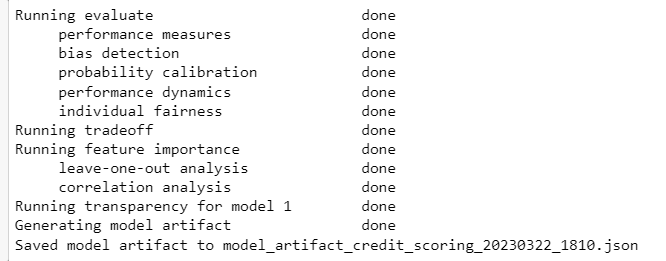
Generates model artifact file output. This function also runs all the API functions if it hasn't already been run.
output = cre_sco_obj.compile(save_artifact=False)
Output:
Model Artifact
In place of the previous model artifact file, users can now generate a test output that is compatible with the AI Verify schema.
from aiverify_veritastool.util.aiverify import convert_veritas_artifact_to_aiverify

output = cre_sco_obj.compile(save_artifact=False)
convert_veritas_artifact_to_aiverify(model_artifact_path=output, output_dir="output")
The test results will be saved in the output directory and can subsequently be updated into the AI Verify API gateway and platform.
Examples
You may refer to our example notebooks below to see how the toolkit can be applied:
| Filename | Description |
|---|---|
CS_Demo.ipynb |
Tutorial notebook to diagnose a credit scoring model for predicting customers' loan repayment. |
CM_Demo.ipynb |
Tutorial notebook to diagnose a customer marketing uplift model for selecting existing customers for a marketing call to increase the sales of loan product. |
BaseClassification_demo.ipynb |
Tutorial notebook for a multi-class propensity model |
BaseRegression_demo.ipynb |
Tutorial notebook for a prediciton of a continuous target variable |
PUW_demo.ipynb |
Tutorial notebook for a binary classification model to predict whether to award insurance policy by assessing risk |
Running the plugin via CLI
Once the finalised parameters are decided, one can validate the results and generate an output that is compatible with the AI Verify platform by running the plugin via CLI. Here's an example bash script to execute the plugin via CLI:
#!/bin/bash

root_path="<PATH_TO_FOLDER>/aiverify/stock-plugins/user_defined_files/veritas_data"

aiverify_veritastool \
  --data_path $root_path/cs_X_test.pkl \
  --model_path $root_path/cs_model.pkl \
  --ground_truth_path $root_path/cs_y_test.pkl \
  --ground_truth y_test \
  --training_data_path $root_path/cs_X_train.pkl \
  --training_ground_truth_path $root_path/cs_y_train.pkl \
  --training_ground_truth y_train \
  --use_case "base_regression" \
  --privileged_groups '{"SEX": [1], "MARRIAGE": [1]}' \
  --model_type CLASSIFICATION \
  --fair_threshold 80 \
  --fair_metric "auto" \
  --fair_concern "eligible" \
  --performance_metric "accuracy" \
  --transparency_rows 20 40 \
  --transparency_max_samples 1000 \
  --transparency_features LIMIT_BAL \
  --run_pipeline
If the algorithm runs successfully, the results of the test will be saved in an output folder.
Build Plugin
cd aiverify/stock-plugins/aiverify.stock.veritas/algorithms/veritastool
hatch build
Tests
Pytest is used as the testing framework.
Run the following steps to execute the unit and integration tests inside the tests/ folder
cd aiverify/stock-plugins/aiverify.stock.veritas/algorithms/veritastool
pytest tests/util tests/metrics tests/models tests/principles tests/usecases -p no:warnings
Run using Docker
In the aiverify root directory, run the following command to build the docker image
docker build -t aiverify-veritastool -f ./stock-plugins/aiverify.stock.veritas/algorithms/veritastool/Dockerfile .
Modify the parameters accordingly and run the example bash script:
#!/bin/bash
docker run \
  -v $(pwd)/stock-plugins/user_defined_files:/input \
  -v $(pwd)/stock-plugins/aiverify.stock.veritas/algorithms/veritastool/output:/app/aiverify/output \
  aiverify-veritastool \
  --data_path /input/veritas_data/cs_X_test.pkl \
  --model_path /input/veritas_data/cs_model.pkl \
  --ground_truth_path /input/veritas_data/cs_y_test.pkl \
  --ground_truth y_test \
  --training_data_path /input/veritas_data/cs_X_train.pkl \
  --training_ground_truth_path /input/veritas_data/cs_y_train.pkl \
  --training_ground_truth y_train \
  --use_case "base_regression" \
  --privileged_groups '{"SEX": [1], "MARRIAGE": [1]}' \
  --model_type CLASSIFICATION \
  --fair_threshold 80 \
  --fair_metric "auto" \
  --fair_concern "eligible" \
  --performance_metric "accuracy" \
  --transparency_rows 20 40 \
  --transparency_max_samples 1000 \
  --transparency_features LIMIT_BAL \
  --run_pipeline
If the algorithm runs successfully, the results of the test will be saved in an output folder in the algorithm directory.
Release history Release notifications | RSS feed


Download files
Download the file for your platform. If you're not sure which to choose, learn more about installing packages.
Source Distribution
Built Distribution
Filter files by name, interpreter, ABI, and platform.
If you're not sure about the file name format, learn more about wheel file names.
Copy a direct link to the current filters
File details
Details for the file aiverify_veritastool-2.2.0.tar.gz.
File metadata
- Download URL: aiverify_veritastool-2.2.0.tar.gz
- Upload date:
- Size: 3.4 MB
- Tags: Source
- Uploaded using Trusted Publishing? No
- Uploaded via: python-httpx/0.28.1
File hashes
| Algorithm | Hash digest | |
|---|---|---|
| SHA256 |
1adab28ef3fb7bdbe1f11d8fcafabf5752c955b21d404c912a4fee12b70d5ce9
|
|
| MD5 |
63602f23a75ceda167a63687ed62751c
|
|
| BLAKE2b-256 |
15d836d738b2ad0e512313060ed556269398ca5d5c47181b76560516ab1d470f
|
File details
Details for the file aiverify_veritastool-2.2.0-py3-none-any.whl.
File metadata
- Download URL: aiverify_veritastool-2.2.0-py3-none-any.whl
- Upload date:
- Size: 373.6 kB
- Tags: Python 3
- Uploaded using Trusted Publishing? No
- Uploaded via: python-httpx/0.28.1
File hashes
| Algorithm | Hash digest | |
|---|---|---|
| SHA256 |
7234aea5f18f1890a4b787d7b277c36d420f7913b57dfef24b01c264ca2a4240
|
|
| MD5 |
5e12bacf0ad6efd495139a1f51866702
|
|
| BLAKE2b-256 |
0a7710a69c9fee3d15bcaf67c56a172e042a6c9666c7902256a6cb2c44fe0485
|






