
Structured image analysis using LLMs. Define a Pydantic model, send an image, get structured data.
Verified details
These details have been verified by PyPIProject links
GitHub Statistics
Maintainers

Project description
Aiyer
Alpha – Functional demonstration. API may change.
Aiyer is a lightweight Python library for structured image analysis using LLMs. Define a Pydantic model, send an image, and get back structured data.
It works with any LLM provider through adapters (Ollama, Groq) and supports multiple analysis strategies with different speed/quality trade-offs.
Overview
This library is designed to support systems that integrate image analysis capabilities, such as inventory management, people tracking, kitchen monitoring, access control (turnstiles), and parking management.
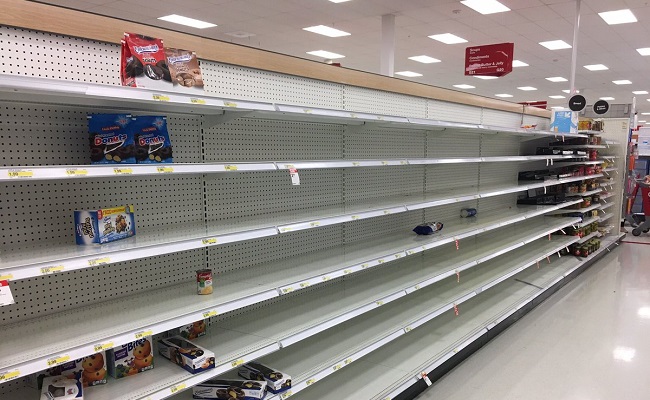
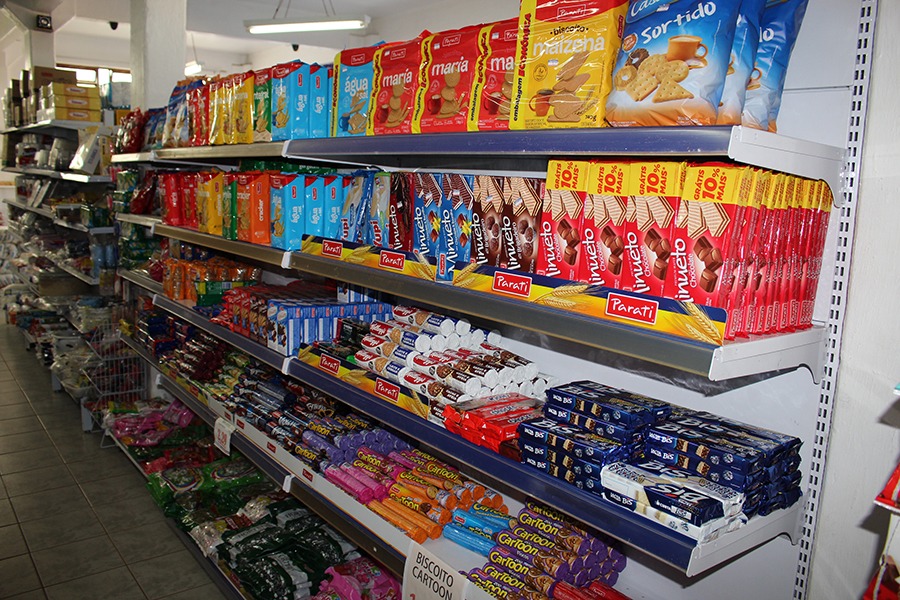
As illustrated in the example below, it can be used to analyze and estimate inventory quantities from visual data.
📦 Stock View
|
Stock Analysis: example1.jpgThe stock situation appears to be nearly depleted with many shelves empty or low on stock. Overall stock: 🔴 Critical Products
Restock Actions
|
|
Stock Analysis: example2.jpgThe image shows a well-stocked shelf with various snacks and biscuits. Overall stock: 🟢 Adequate Products
Restock Actions
|
Installation
pip install aiyer            # Core only
pip install aiyer[ollama]    # With Ollama support (local LLMs)
pip install aiyer[groq]      # With Groq support (cloud API)
pip install aiyer[all]       # All providers
Quick Start
import asyncio
from pydantic import BaseModel, Field
from typing import List, Optional, Literal

from aiyer.adapters.ollama import OllamaAdapter
from aiyer.modules import AiyerLite


# Define your schema
class SceneAnalysis(BaseModel):
    summary: str = Field(description="General description of the scene")
    objects: List[str] = Field(description="List of detected objects")
    environment: Optional[str] = Field(description="Environment type")
    danger_level: Literal["low", "medium", "high"] = Field(description="Danger level")


async def main():
    # Create an adapter
    model = OllamaAdapter(
        model="qwen3.5:4b",
        ollama_ip="localhost",
    )

    # Initialize the analyzer
    aiyer = AiyerLite(model=model)

    # Analyze an image
    with open("photo.jpg", "rb") as f:
        result = await aiyer.view(f.read(), SceneAnalysis)

    # result is a VisionResponse[SceneAnalysis]
    # result.image_bytes -> the original image as bytes
    # result.view        -> your SceneAnalysis instance with the LLM output

    print(result.view.summary)
    print(result.view.objects)
    print(result.view.danger_level)


asyncio.run(main())
VisionResponse
Every call to view() or get_result() returns a VisionResponse[T]:
class VisionResponse(BaseModel, Generic[T]):
    image_bytes: bytes   # The original image
    view: T              # Your typed Pydantic model with the LLM analysis
T is the schema you passed in. So if you call aiyer.view(img, SceneAnalysis), you get back a VisionResponse[SceneAnalysis] where result.view is a SceneAnalysis instance.
Adapters
Ollama (local):
from aiyer.adapters.ollama import OllamaAdapter

model = OllamaAdapter(
    model="qwen3.5:4b",
    ollama_ip="localhost",
    ollama_port=11434,       # optional, default 11434
    ollama_api_key=None,     # optional
    https=False,             # optional
)
Groq (cloud):
from aiyer.adapters.groq import GroqAdapter

model = GroqAdapter(
    model="meta-llama/llama-4-scout-17b-16e-instruct",
    api_key="your-api-key",
    timeout=30.0,            # optional
    max_retries=2,           # optional
    think=False,             # optional, enables reasoning
)
Analysis Modes
| Mode | LLM Calls | Speed | Quality | Use Case |
|---|---|---|---|---|
AiyerZero |
1 (resized image) | Fastest | Basic | Quick triage, real-time |
AiyerLite |
1 | Fast | Good | General use, best cost/benefit |
AiyerMedium |
2 (analysis + enrichment) | Slower | Best | When accuracy matters |
from aiyer.modules import AiyerZero, AiyerLite, AiyerMedium

# Fastest – resizes image before sending
aiyer = AiyerZero(model=model, max_image_size=384)

# Balanced – single LLM call, full resolution
aiyer = AiyerLite(model=model)

# Best quality – LLM analyzes, then reviews its own output
aiyer = AiyerMedium(model=model)

result = await aiyer.view(image_bytes, YourSchema)
ContextChat
Use view_chat to add context before getting results:
from pydantic import BaseModel, Field
from typing import Literal

class GateStatus(BaseModel):
    status: Literal["open", "closed", "partially_open"] = Field(description="Gate status")
    description: str = Field(description="Gate description")

result = await aiyer.view_chat(image_bytes, GateStatus) \
    .add("Focus on the gate in the center of the image.") \
    .add("Is it open or closed?") \
    .get_result()

# Same VisionResponse – result.view is a GateStatus
print(result.view.status)       # "partially_open"
print(result.view.description)
Schema Features
Aiyer generates smart examples from your Pydantic schema to guide the LLM:
class Report(BaseModel):
    weather: Literal["sunny", "cloudy", "rainy"] = Field(description="Weather condition")
    count: int = Field(description="Number of people")
    items: List[str] = Field(description="Detected items")
The LLM receives:
{
  "weather": "<one of: sunny, cloudy, rainy>",
  "count": "<Number of people>",
  "items": ["<Detected items>"]
}
Literal, Optional, Union, nested models, and all standard types are supported.
Custom Adapters
Implement ILLModel to add any LLM provider:
from aiyer.interfaces.models import ILLModel, Message

class MyAdapter(ILLModel):
    async def achat(self, messages: list[Message], **kwargs) -> Message:
        # Call your LLM here
        ...
        return Message(role="assistant", content=response_text)
Requirements
- Python >= 3.11
- pydantic >= 2.12
License
MIT
Project details
Verified details
These details have been verified by PyPIProject links
GitHub Statistics
Maintainers
Release history Release notifications | RSS feed


Download files
Download the file for your platform. If you're not sure which to choose, learn more about installing packages.
Source Distribution
Built Distribution
Filter files by name, interpreter, ABI, and platform.
If you're not sure about the file name format, learn more about wheel file names.
Copy a direct link to the current filters
File details
Details for the file aiyer-0.1.0a4.tar.gz.
File metadata
- Download URL: aiyer-0.1.0a4.tar.gz
- Upload date:
- Size: 58.3 kB
- Tags: Source
- Uploaded using Trusted Publishing? Yes
- Uploaded via: twine/6.1.0 CPython/3.13.12
File hashes
| Algorithm | Hash digest | |
|---|---|---|
| SHA256 |
f9ba71376b8761c54afe67013ab9ede4c583abf3bc6f1f52b3248224770f5cae
|
|
| MD5 |
9c09575d1417ac9b6752f0d963aa80e6
|
|
| BLAKE2b-256 |
4b1c5aca94d46204794b56a7ab9468471338c2ace5e491e6bc601e12ed4d0be8
|
Provenance
The following attestation bundles were made for aiyer-0.1.0a4.tar.gz:
Publisher:
publish.yml on ASCII125/aiyer-object-viewer
-
Statement:
-
Statement type:
https://in-toto.io/Statement/v1 -
Predicate type:
https://docs.pypi.org/attestations/publish/v1 -
Subject name:
aiyer-0.1.0a4.tar.gz -
Subject digest:
f9ba71376b8761c54afe67013ab9ede4c583abf3bc6f1f52b3248224770f5cae - Sigstore transparency entry: 1271216642
- Sigstore integration time:
-
Permalink:
ASCII125/aiyer-object-viewer@4f0cd96279a9fcc65188d3977160a08a86614c3b -
Branch / Tag:
refs/tags/0.1.0a4 - Owner: https://github.com/ASCII125
-
Access:
public
-
Token Issuer:
https://token.actions.githubusercontent.com -
Runner Environment:
github-hosted -
Publication workflow:
publish.yml@4f0cd96279a9fcc65188d3977160a08a86614c3b -
Trigger Event:
release
-
Statement type:
File details
Details for the file aiyer-0.1.0a4-py3-none-any.whl.
File metadata
- Download URL: aiyer-0.1.0a4-py3-none-any.whl
- Upload date:
- Size: 15.3 kB
- Tags: Python 3
- Uploaded using Trusted Publishing? Yes
- Uploaded via: twine/6.1.0 CPython/3.13.12
File hashes
| Algorithm | Hash digest | |
|---|---|---|
| SHA256 |
f32bb1d74c29e49d7e48e488855a199a91cc269e85c7b17f87cf50d8beaade79
|
|
| MD5 |
57a6a42eb52ff310ea4ee7f2422849f0
|
|
| BLAKE2b-256 |
9e40eaa7c01176f515872737851a1481d6ad7e09162716c0063783d1c16d3682
|
Provenance
The following attestation bundles were made for aiyer-0.1.0a4-py3-none-any.whl:
Publisher:
publish.yml on ASCII125/aiyer-object-viewer
-
Statement:
-
Statement type:
https://in-toto.io/Statement/v1 -
Predicate type:
https://docs.pypi.org/attestations/publish/v1 -
Subject name:
aiyer-0.1.0a4-py3-none-any.whl -
Subject digest:
f32bb1d74c29e49d7e48e488855a199a91cc269e85c7b17f87cf50d8beaade79 - Sigstore transparency entry: 1271216884
- Sigstore integration time:
-
Permalink:
ASCII125/aiyer-object-viewer@4f0cd96279a9fcc65188d3977160a08a86614c3b -
Branch / Tag:
refs/tags/0.1.0a4 - Owner: https://github.com/ASCII125
-
Access:
public
-
Token Issuer:
https://token.actions.githubusercontent.com -
Runner Environment:
github-hosted -
Publication workflow:
publish.yml@4f0cd96279a9fcc65188d3977160a08a86614c3b -
Trigger Event:
release
-
Statement type:






