
AK FDTD
version=0.2.2
author Alexander V. Korovin [a.v.korovin73@gmail.com], Homepage
Overview
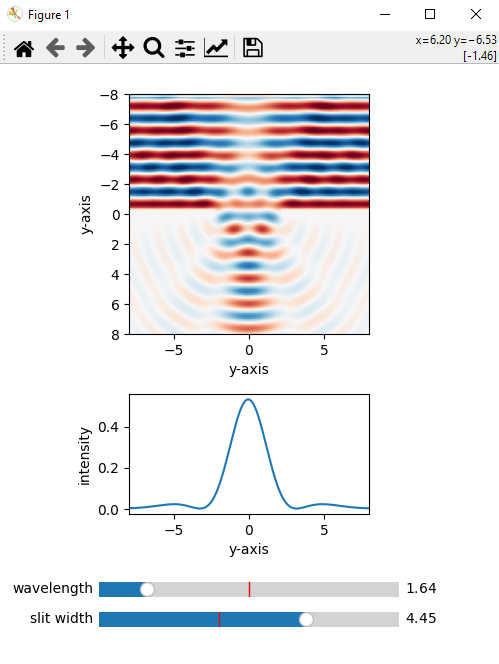
AK FDTD is a Python package designed for simple finite difference time domain (FDTD) simulation in open space. It allows you to test slit diffraction.
2D case
3D case
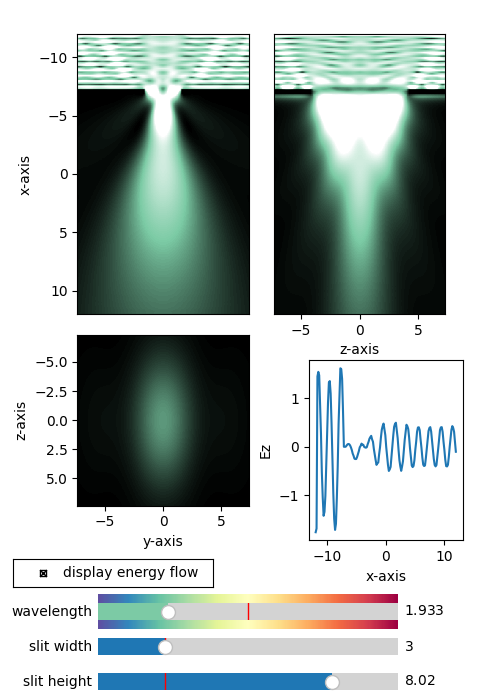
An example of light diffraction on a slit located in the center of the computational domain. Light falls on a screen with a slit from above (the speed of light is taken as unity). The intensity graph is a time-averaged square of the field.
Features
- PML: implementation of perfectly matched boundary layers.
Installation
You can install AKFDTD using pip. To install the latest version from PyPI, use:
pip install AKFDTD
Work with object in 2D case
-
EM2D(Lx, Ly, Nx, Ny, wavelength): initialization of the simulator object, where Lx is the x dimension of the simulation domain, Ly is the y dimension of the simulation domain, Nx is the number of sampling points along the x axis, Ny is the number of sampling points along the y axis, wavelength is the wavelength of the incoming plane wave.
-
.set_slit(condition_func)(optional): method to set slit(s) by condition function, condition_func is the function of two arguments (f(x,y)) to set zeros in the electric field (PEC).
-
.start_until(N_cycles)(optional): method for performing N_cycles simulation cycles necessary to avoid observing the wave start from above.
-
.update(): method of updating fields over time (one simulation cycle).
-
.get_x(show_PML): method to get x coordinates with or without PML region (default is show_PML=False).
-
.get_y(show_PML): method to get y coordinates with or without PML region (default is show_PML=False).
-
.get_Ez(show_PML): method for obtaining the z-component of the electric field with or without the PML region (default is show_PML=False).
Test in 2D
from FDTD.fdtd2D import EM2D
from FDTD.display_fields2D import DisplayFields2D


if __name__ == "__main__":
    # display PML region
    show_PML = False
    # show_PML = True

    # display absolute value of the Poynting vector
    show_Poynting = True
    # show_Poynting = False

    # display of the field distribution along the center of the calculation area
    show_xy = False
    # show_xy = True

    # incoming plane wave wavelength
    wavelength_init = 3
    wavelength_min = 1
    wavelength_max = 5

    # simulation domain
    Lx = 30
    Ly = 20
    Nx = 200
    Ny = 151

    # slit width
    slit_width_init = 3
    slit_width_min = 1
    slit_width_max = 10
    slit_position_init = -Lx/2 + 8
    slit_screen_thickness = 0.5

    # create FDTD domain and initialize fields3D
    fields = EM2D(Lx=Lx, Ly=Ly, Nx=Nx, Ny=Ny, wavelength=wavelength_init)

    # Initial condition
    N_cycles = 500
    N_cycles = 1

    display_fields = DisplayFields2D(
        fields,
        displayed_wavelengths=(wavelength_min, wavelength_init, wavelength_max),
        displayed_slit_widths=(slit_width_min, slit_width_init, slit_width_max),
        slit_position_init=slit_position_init,
        slit_screen_thickness=slit_screen_thickness,
        show_Poynting=show_Poynting, show_PML=show_PML, show_xy=show_xy)
    display_fields.N_cycles = N_cycles
    display_fields.show()
Test in 3D
from FDTD.fdtd3D import EM3D
from FDTD.display_fields import DisplayFields3D


if __name__ == "__main__":
    # display PML region
    show_PML = False
    # show_PML = True

    # display absolute value of the Poynting vector
    show_Poynting = True
    # show_Poynting = False

    # incoming plane wave wavelength
    wavelength_init = 3.
    wavelength_min = 1.
    wavelength_max = 5.

    # simulation domain
    Lx = 30
    Ly = 20
    Lz = 20
    Nx = 200
    Ny = 151
    Nz = 152

    # slit width
    slit_width_init = 3
    slit_width_min = 1
    slit_width_max = 10
    slit_position_init = -Lx/2 + 8
    slit_screen_thickness = 0.5

    # create FDTD domain and initialize fields3D
    fields = EM3D(Lx=Lx, Ly=Ly, Lz=Lz, Nx=Nx, Ny=Ny, Nz=Nz, wavelength=wavelength_init)

    # Initial condition
    N_cycles = 500
    # N_cycles = 1

    DisplayFields3D.N_cycles = N_cycles
    display_fields = DisplayFields3D(
        fields,
        displayed_wavelengths=(wavelength_min, wavelength_init, wavelength_max),
        displayed_slit_widths=(slit_width_min, slit_width_init, slit_width_max),
        slit_position_init=slit_position_init,
        slit_screen_thickness=slit_screen_thickness,
        show_Poynting=show_Poynting, show_PML=show_PML)
    display_fields.show()
1 maintainer

Metadata
1 maintainer
Release files for AKFDTD 0.2.4
For a detailed explanation of source distributions (sdists) and built distributions (wheels), please see the package formats documentation.
Source distribution (sdist)
| File | Size | Uploaded | |
|---|---|---|---|
| akfdtd-0.2.4.tar.gz | 190.1 kB | Details |
Built distribution (wheel)
| File | Interpreter | ABI | Platform | Reset |
|---|---|---|---|---|
| AKFDTD-0.2.4-py3-none-any.whl | Python 3 | none | any | Details |
Total release size: 212.4 kB
Release files / akfdtd-0.2.4.tar.gz
| Download URL | akfdtd-0.2.4.tar.gz |
|---|---|
| Size | 190.1 kB |
| Tags | Source |
|
SHA-256 checksum How to use checksums |
c27471226f422dd00b70ad44c137af13e68d356d114c0b2681a3ad8ee35fc16f
|
|
BLAKE2b-256 checksum How to use checksums |
5c119a8a3a988f9132d2cd75bfad4c07163300da5bd9720bcb36926387b68308
|
| Upload date | |
|
Uploaded using Trusted Publishing? What is trusted publishing? |
No |
| Uploaded via |
twine/5.1.1 CPython/3.8.10
|
Release files / AKFDTD-0.2.4-py3-none-any.whl
| Download URL | AKFDTD-0.2.4-py3-none-any.whl |
|---|---|
| Size | 22.4 kB |
| Tags | Python 3 |
|
SHA-256 checksum How to use checksums |
ea40108234854fb3fa7663fc188b320579848da0d7e02e065f8c05eea5562afa
|
|
BLAKE2b-256 checksum How to use checksums |
3f4bda54dd7df52452f18ab23c345ca70634ccb8f6f1ddcf7df50722b9834429
|
| Upload date | |
|
Uploaded using Trusted Publishing? What is trusted publishing? |
No |
| Uploaded via |
twine/5.1.1 CPython/3.8.10
|














