

Akita AI
Your command-line, context-aware chatbot for instant codebase insights.




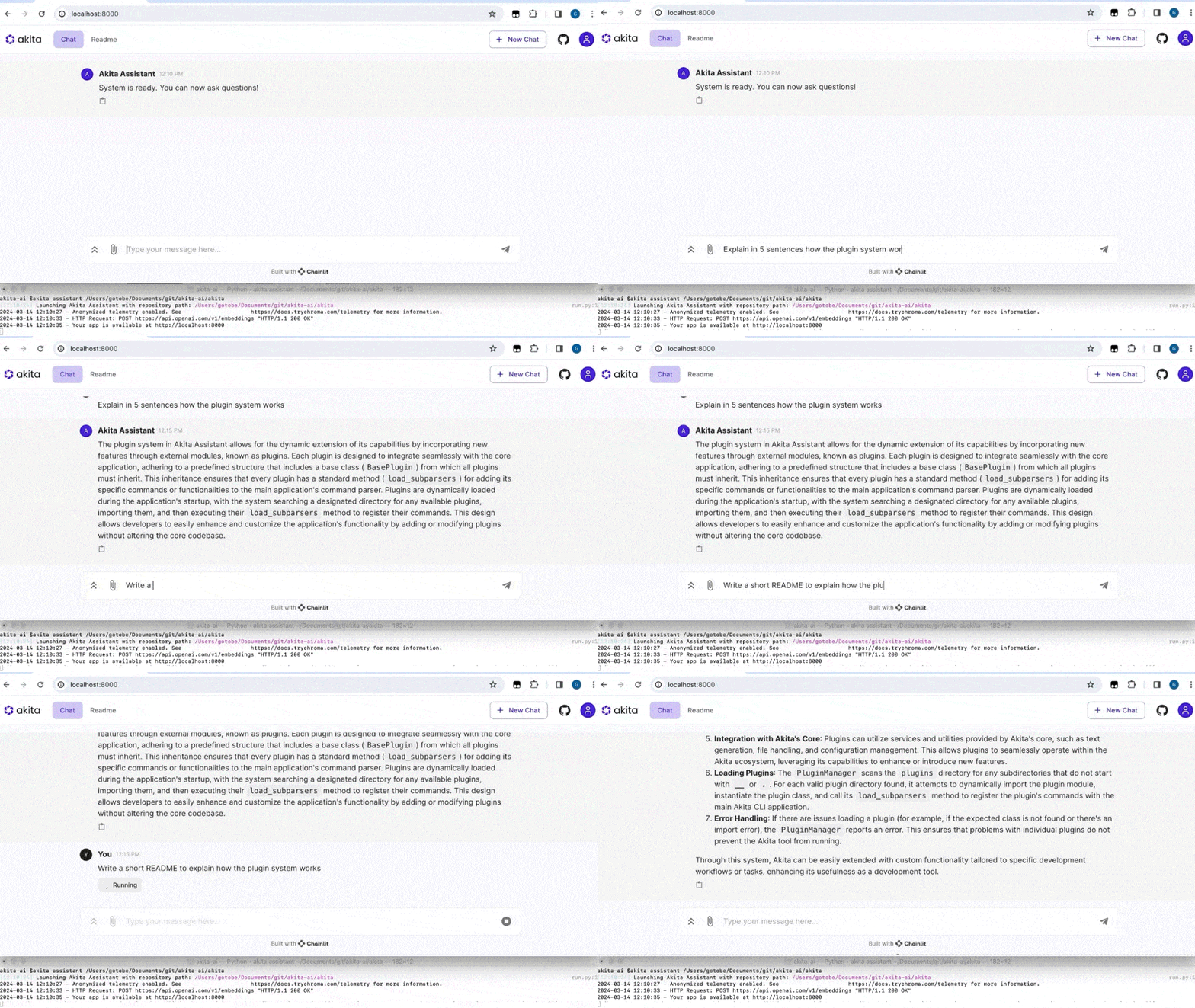
🌟 Key Features
- ✅ Personal Code Assistant: Engage with Akita directly from your terminal for real-time codebase insights.
- ✅ Automated Documentation: Instantly generate comprehensive documentation for your entire project.
- ✅ Tailored Code Reviews: Receive AI-powered suggestions to improve your code quality.
- ✅ Quick Code Explainer: Understand any piece of code with a simple command.
- ✅ Flexible Plugin System: Customize Akita AI to fit perfectly into your development workflow.
🚀 Getting Started
1. Installation
Ensure you have Python 3.9+. Open a terminal and run:
$ pip install akita-ai
Set up your provider API key (currently integrates with Gemini and ChatGPT):
$ export GOOGLE_API_KEY=<your-api-key>
Alternatively to use with ChatGPT
$ export OPENAI_API_KEY=<your-api-key>
2. Engage with Your Personal Code Assistant
Start interacting with Akita Assistant for insights:
$ cd path/to/your/project
$ akita assistant
Ask Akita anything about your codebase for instant assistance.
🔗 Integrations
Connect Akita AI with your preferred providers for enhanced coding assistance.

🔍 Explore More Features
Dive into the additional features, designed to streamline your development workflow.
File Selector
Effortlessly select files for Akita AI's analysis to focus enhancements where you need them.
- Initiate with Akita: Prepare your project.
$ akita init
- Choose Files for Analysis: Highlight specific files.
$ akita add <file_path>
- Exclude Files: Easily remove files from the queue.
$ akita rm <file_path>
Instant Code Understanding
Understand any piece of code with a simple command, enhancing readability and maintainability.
$ akita describe <file_path>
Targeted Code Reviews
Receive targeted, AI-driven feedback on your code to identify improvements quickly.
$ akita review <file_path>
Quick README Creation
Generate engaging READMEs effortlessly, making your projects more accessible and understandable.
$ akita readme <file_path>
See our detailed commands documentation for more details.
💡 Contributing
Join our community of contributors! Whether you're fixing bugs, adding features, or improving documentation, your contributions make Akita AI better for everyone. See our Contributors Guide for how to get started.
📢 Feedback and Support
Your feedback shapes the future of Akita AI. Encounter a bug or have a feature suggestion? Open an issue on our GitHub issues page. For more support, contact us through our homepage.
📜 License
Akita AI is open-source software licensed under the Apache 2.0 License. Feel free to use, modify, and distribute it as per the license.
1 maintainer

Metadata
1 maintainer
Release files for akita-ai 0.1.200
For a detailed explanation of source distributions (sdists) and built distributions (wheels), please see the package formats documentation.
Source distribution (sdist)
| File | Size | Uploaded | |
|---|---|---|---|
| akita_ai-0.1.200.tar.gz | 153.7 kB | Details |
Built distribution (wheel)
| File | Interpreter | ABI | Platform | Reset |
|---|---|---|---|---|
| akita_ai-0.1.200-py3-none-any.whl | Python 3 | none | any | Details |
Total release size: 305.9 kB
Release files / akita_ai-0.1.200.tar.gz
| Download URL | akita_ai-0.1.200.tar.gz |
|---|---|
| Size | 153.7 kB |
| Tags | Source |
|
SHA-256 checksum How to use checksums |
488072ebaeaa31e6971fa540b547e957e5316c16c6ceaff46a4349fc83920355
|
|
BLAKE2b-256 checksum How to use checksums |
96b7cbe555f238c8e2c47115c998ee65e76a031c5c44d4d6093e1c665e7549da
|
| Upload date | |
|
Uploaded using Trusted Publishing? What is trusted publishing? |
No |
| Uploaded via |
twine/5.0.0 CPython/3.12.3
|
Release files / akita_ai-0.1.200-py3-none-any.whl
| Download URL | akita_ai-0.1.200-py3-none-any.whl |
|---|---|
| Size | 152.1 kB |
| Tags | Python 3 |
|
SHA-256 checksum How to use checksums |
ed11605d5d253ec3b09feae88b55bd8deb332d80c87e6fc5507e5787bbaabc0b
|
|
BLAKE2b-256 checksum How to use checksums |
54cd0720cedb3bf67a01a0b1b61fc1ff18d6445f2dc9cbe208c293565635ac57
|
| Upload date | |
|
Uploaded using Trusted Publishing? What is trusted publishing? |
No |
| Uploaded via |
twine/5.0.0 CPython/3.12.3
|














