
akp02d




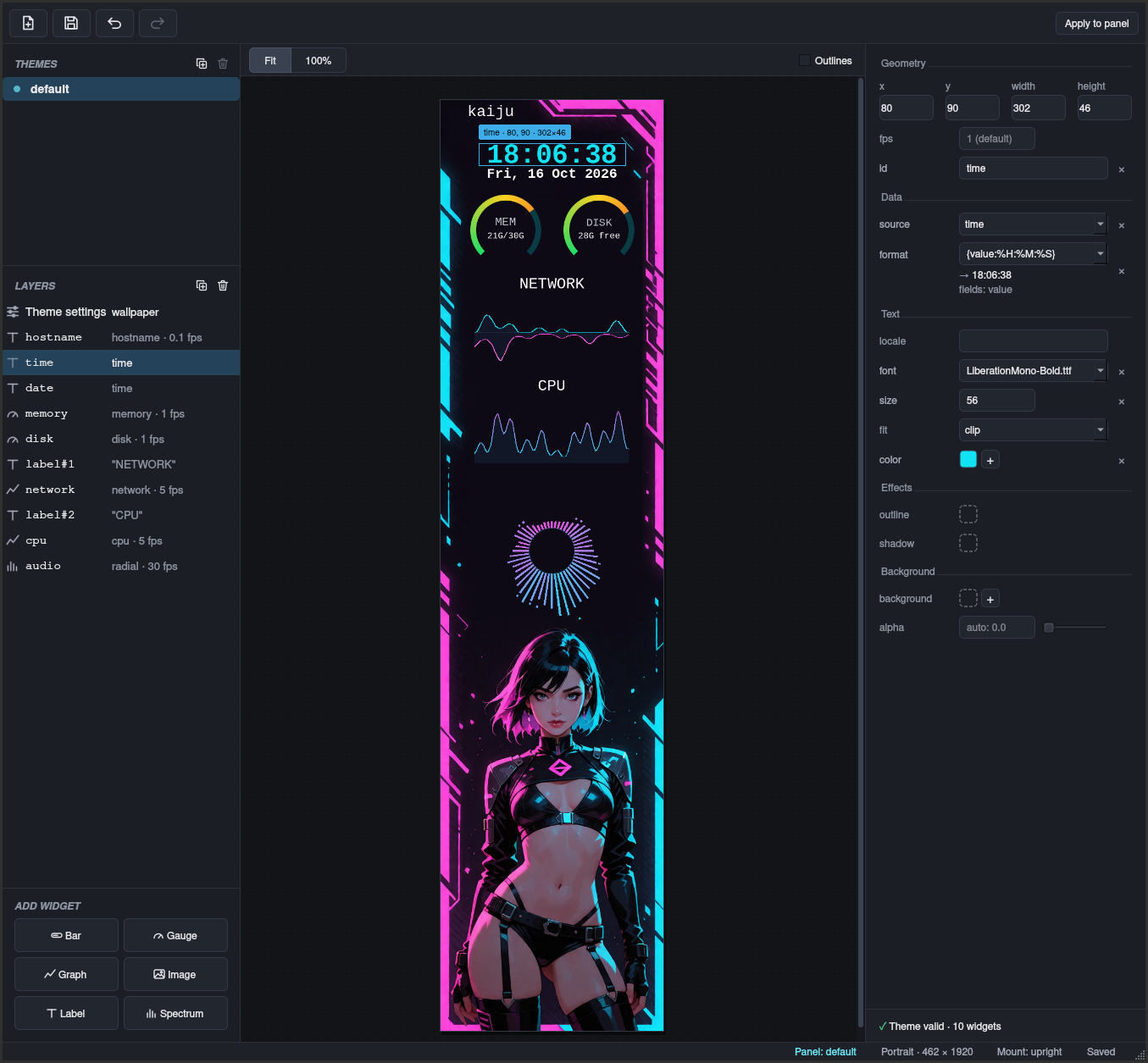
Turns the Ajazz AKP02 panel into a live system display: clock, CPU, memory, disk, network, temperatures, an audio visualiser, what's playing and more, in themes you design with a drag-and-drop editor.
Install
From the AUR (akp02d):
yay -S akp02d
Other distributions
With pipx and Python 3.13 or newer (add
--python 3.13 if your system Python is older):
pipx install 'akp02d[editor]'
Then install cava from your distribution (and playerctl and
pactl if you want them), and let your user open the panel:
sudo cp "$(akp02d --udev-rule)" /etc/udev/rules.d/
sudo udevadm control --reload-rules
Unplug the panel and plug it back in. To start akp02d with your session:
mkdir -p ~/.config/systemd/user
cat > ~/.config/systemd/user/akp02d.service <<'EOF'
[Unit]
Description=akp02d

[Service]
ExecStart=%h/.local/bin/akp02d
Restart=on-failure
RestartSec=5

[Install]
WantedBy=default.target
EOF
Start it
systemctl --user enable --now akp02d
The panel lights up with the default theme and starts again with your
session. To run it by hand instead, just run akp02d.
Make it yours
akp02d-edit
The editor shows a live preview of the panel, no panel needed. Drag widgets in from Add widget, move and resize them, and pick colours, fonts and data sources on the right. Apply to panel puts your theme on the panel straight away.
Themes live in ~/.config/akp02d/themes/, one folder each, so they are
easy to back up or share. The bundled ones are copied there on first
run and never overwritten; akp02d --restore-theme default brings back
the original, keeping yours as default.bak.
Control it
akp02d ctl status              # what's showing
akp02d ctl themes              # your themes
akp02d ctl theme neon --save   # switch, and keep it after a restart
akp02d ctl brightness 60       # 0-100
Settings for this machine, such as brightness and an upside-down panel
(inverted), are in ~/.config/akp02d/akp02d.toml.
If something is wrong
akp02d --check                 # checks the settings and theme, and says what is wrong
journalctl --user -u akp02d    # the service's log
If akp02d cannot open the panel, unplug it and plug it back in: the access rule installed with akp02d applies to newly connected devices.
Licence
GPL-3.0-or-later. See LICENSE.
1 maintainer

Metadata
1 maintainer
Release files for akp02d 1.0.0
For a detailed explanation of source distributions (sdists) and built distributions (wheels), please see the package formats documentation.
Source distribution (sdist)
| File | Size | Uploaded | |
|---|---|---|---|
| akp02d-1.0.0.tar.gz | 854.6 kB | Details |
Built distribution (wheel)
| File | Interpreter | ABI | Platform | Reset |
|---|---|---|---|---|
| akp02d-1.0.0-py3-none-any.whl | Python 3 | none | any | Details |
Total release size: 1.2 MB
Release files / akp02d-1.0.0.tar.gz
| Download URL | akp02d-1.0.0.tar.gz |
|---|---|
| Size | 854.6 kB |
| Tags | Source |
|
SHA-256 checksum How to use checksums |
b2dfee4ac52d8d8c9772c6b331936fa22e0b66f5450b8802e9b2246e6ae66c35
|
|
BLAKE2b-256 checksum How to use checksums |
3745df0877e61ea62898d0efaabc5780ae02604d7f39db7b71de955b749d19f0
|
| Upload date | |
|
Uploaded using Trusted Publishing? What is trusted publishing? |
Yes |
| Uploaded via |
twine/7.0.0 CPython/3.13.14
|
Provenance
Provenance describes where a file came from. On PyPI, provenance is shared via attestations, which provide a verifiable record of the build or publishing details. View details, limitations and caveats.


PyPI Publish Attestation
PyPI verified that this artifact, at this checksum, originated from the publisher listed below.
Signed by GitHub Actions, verified by PyPI on Oct 16, 2026.
Transparency logRelease files / akp02d-1.0.0-py3-none-any.whl
| Download URL | akp02d-1.0.0-py3-none-any.whl |
|---|---|
| Size | 373.6 kB |
| Tags | Python 3 |
|
SHA-256 checksum How to use checksums |
f8ad9dd91dec36c0a1005a0f9bdec56b57d63924d13d34a2b30085a969d23f59
|
|
BLAKE2b-256 checksum How to use checksums |
762dc412570f8eb804d19d8810d5c2ef330cdef9d06d6d99c4384761238f2e18
|
| Upload date | |
|
Uploaded using Trusted Publishing? What is trusted publishing? |
Yes |
| Uploaded via |
twine/7.0.0 CPython/3.13.14
|
Provenance
Provenance describes where a file came from. On PyPI, provenance is shared via attestations, which provide a verifiable record of the build or publishing details. View details, limitations and caveats.
PyPI Publish Attestation
PyPI verified that this artifact, at this checksum, originated from the publisher listed below.
Signed by GitHub Actions, verified by PyPI on Oct 16, 2026.
Transparency log












