
⚡ Aksara - AI-native async backend framework for Python

Project description

Aksara
One model definition → REST API, MCP tools for AI agents, interactive AI Console, built-in Studio UI, admin dashboard, launch diagnostics, and PostgreSQL migrations. Python. No glue code.





What is Aksara?
Aksara is an AI-native backend framework for building PostgreSQL-powered APIs with automatic REST endpoints, migrations, Studio UI, MCP tools, and system-level AI intelligence. The goal is simple: a new project should have a working API, inspectable data model, AI-facing tool catalog, and launch diagnostics before you start writing glue code.
Current release: v0.5.48 — Launch Hardening & Golden Path.
What Aksara Does
You define a model once. Aksara generates everything else from it:
from aksara import Aksara, Model, fields
from aksara.api import ModelViewSet, action

class Incident(Model):
    title = fields.String(
        max_length=200,
        ai_description="Short summary of the incident",
    )
    severity = fields.String(
        choices=["low", "medium", "high", "critical"],
        ai_description="Impact level for triage priority",
    )
    resolved = fields.Boolean(
        default=False,
        ai_agent_writable=False,  # AI agents can read this but not flip it
    )
    notes = fields.Text(
        ai_description="Internal investigation notes",
        ai_sensitive=True,        # Excluded from AI context by default
    )

class IncidentViewSet(ModelViewSet):
    model = Incident

    @action(detail=True, methods=["POST"], ai_exposed=True)
    async def escalate(self, pk: str, request):
        """
        Escalate incident to critical.
        This custom action is automatically exported as an MCP tool!
        """
        incident = await self.model.objects.get(id=pk)
        incident.severity = "critical"
        await incident.save()
        return {"status": "escalated"}

app = Aksara(database_url="postgresql://localhost/myapp")
app.include_viewset(IncidentViewSet, prefix="/incidents")
From this single definition, you get:
| What | Where |
|---|---|
| REST API | GET/POST/PATCH/DELETE /incidents/ |
| Real-time stream | GET /incidents/stream — subscribe to insert/update/delete events via SSE |
| MCP tool catalog | /ai/tools/mcp — any MCP-compatible agent (Claude, Cursor, etc.) can call your API |
| AI Console | /studio/ui → natural-language queries against your live backend |
| Studio dashboard | /studio/ui — models, routes, queries, migrations, diagnostics |
| Admin UI | /admin/ |
| Database table | aksara migrate |
The ai_description, ai_sensitive, and ai_agent_writable metadata you wrote on those fields flows through to the AI Console context and the MCP tool catalog automatically. No second schema. No adapter layer. Write it once.
Quickstart
10-Minute Quickstart
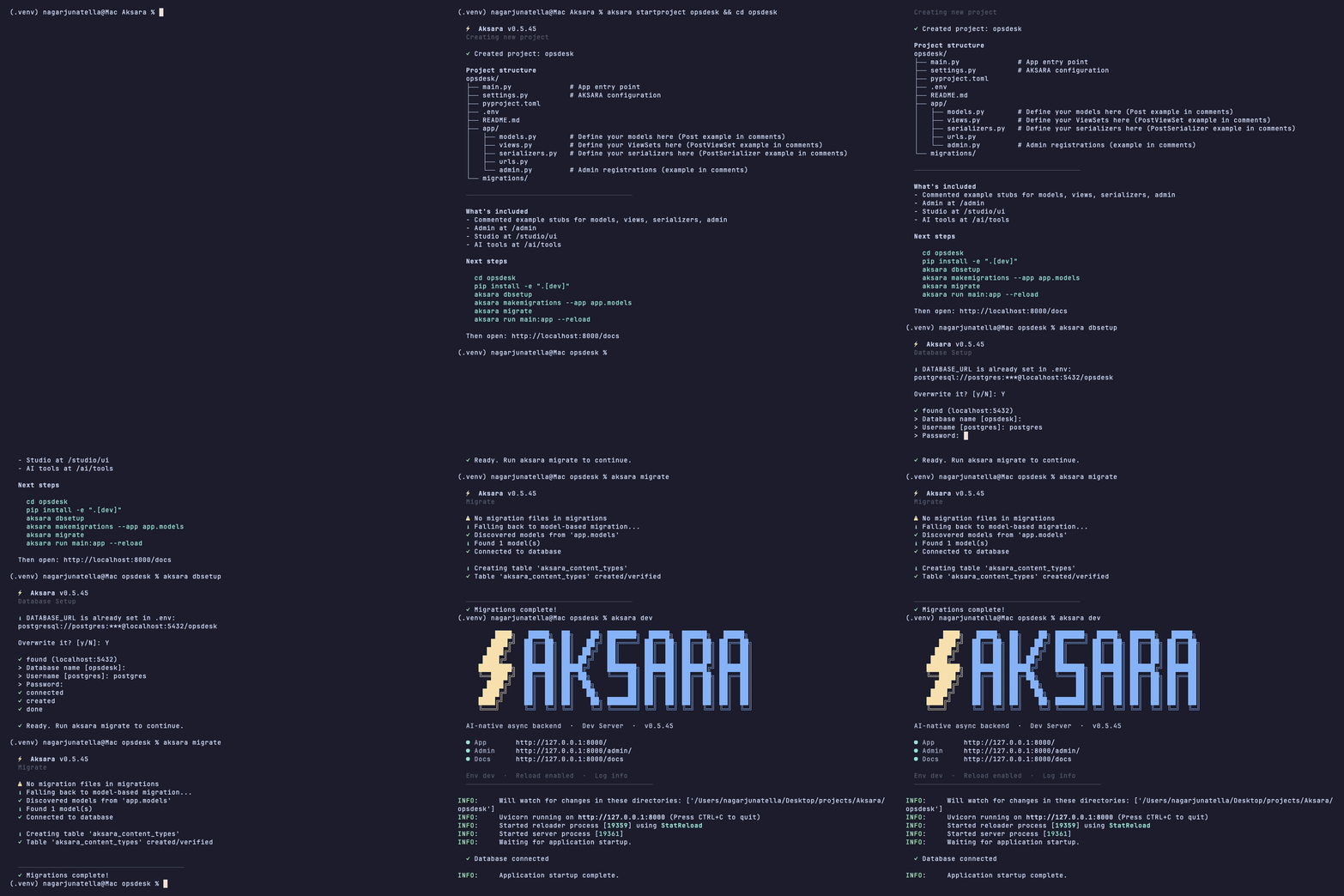
pip install aksara-framework
aksara startproject opsdesk && cd opsdesk
aksara dbsetup
aksara migrate
aksara doctor launch-check
aksara dev
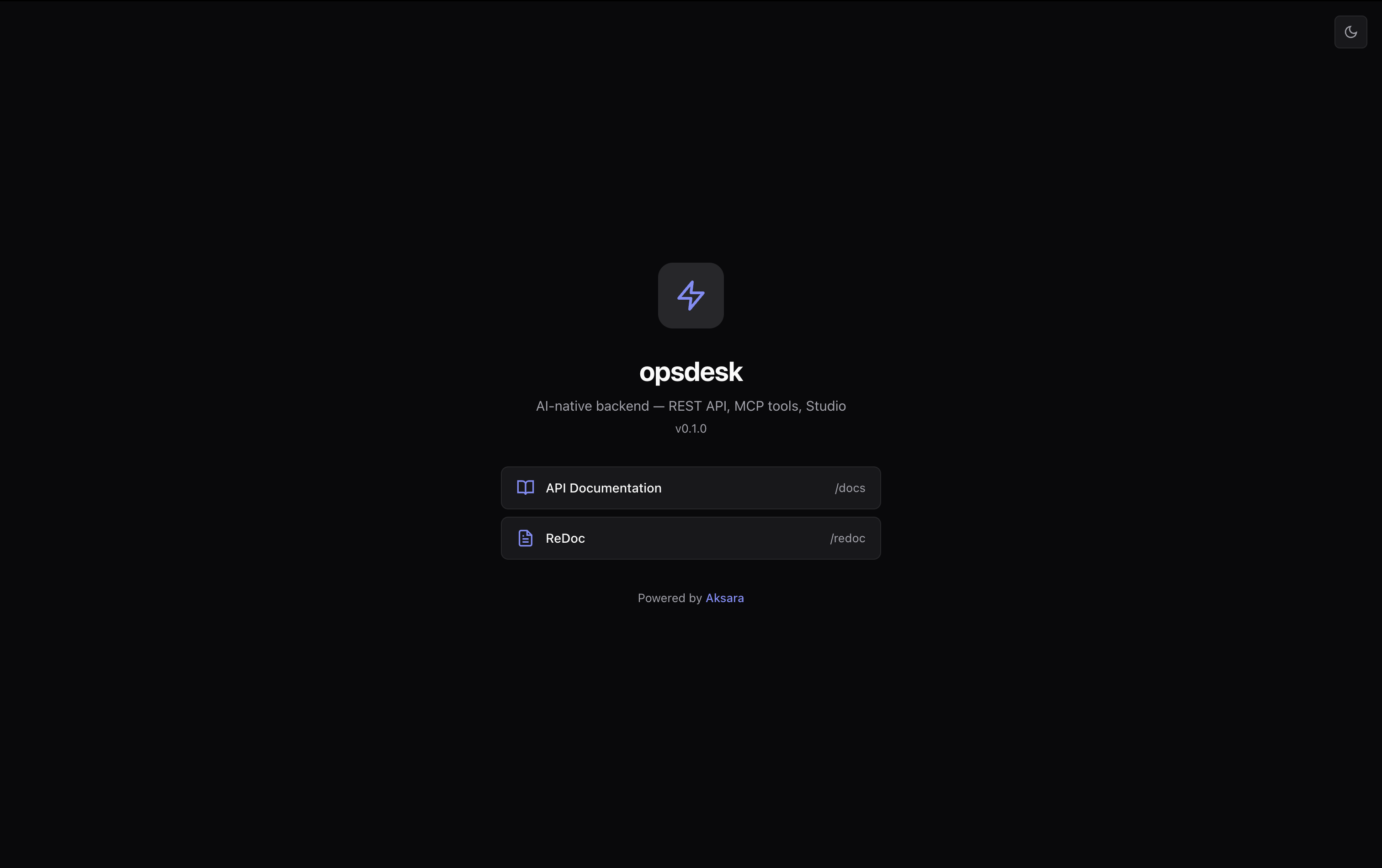
The auto-generated welcome page every new project starts with — API docs, ReDoc, and Studio links built in.
Now open three things:
| What to try | URL / Command |
|---|---|
| API docs | http://127.0.0.1:8000/docs — inspect generated OpenAPI |
| Studio + AI Console | http://127.0.0.1:8000/studio/ui — ask "explain the Incident model" |
| MCP tool catalog | http://127.0.0.1:8000/ai/tools/mcp — point any MCP client here |
| Launch check | aksara doctor launch-check — verify project, DB, Studio, MCP, AI, examples, and dev-mode readiness |
| Fix plan | aksara doctor fix-plan — diagnose and print the remediation path |
That's what makes Aksara different from pip install fastapi && pip install sqlalchemy && .... The AI and diagnostic surfaces exist from the first aksara dev.
Aksara is built on FastAPI, so you get its performance and full ecosystem out of the box. The rest — ORM, migrations, admin, Studio, MCP export, AI Console, doctor — is what you'd otherwise spend a sprint assembling yourself. I did that part for you.
Open Studio
Studio lives at http://127.0.0.1:8000/studio/ui. It gives you models, routes, query tools, migrations, diagnostics, AI Console, AI Inspector, Project Graph, Architecture Review, Performance Analyzer, Investigation Sessions, and Daily Briefing from the same running app.
If the first run is incomplete, Studio now surfaces clearer states for missing database configuration, pending migrations, missing AI provider setup, and project graph availability.
Use AI
AI features are optional on day one. You can run the framework, inspect Studio, browse API docs, and view MCP output without OpenAI, Anthropic, Azure, or Ollama.
When you want AI features:
aksara ai-hub status
aksara ai-hub configure
For a local-first path, use Ollama:
ollama serve
ollama pull llama3
Use MCP
Aksara exposes generated MCP-compatible tools at http://127.0.0.1:8000/ai/tools/mcp. ViewSets, model fields, custom @action endpoints, and AI metadata flow into the catalog so external agents can inspect and call your backend without a hand-written adapter.
Core Features
| Feature | What it does | |
|---|---|---|
| 🔌 | MCP tool export | Auto-generated tool catalog at /ai/tools/mcp from your model definitions |
| 💬 | AI Console | Natural-language queries against your live backend in Studio |
| 🩺 | Doctor & Fix Plans | aksara doctor fix-plan diagnoses DB, migrations, AI config, security — prints the fix sequence |
| 🐛 | AI Debugger | Root-cause analysis: issue clustering, heuristic patterns, confidence-ranked causes |
| 🏗️ | Architecture Review | Automated health scoring (A–F), coupling/schema/API findings |
| 📊 | Performance Analyzer | Detects slow queries, N+1, missing indexes, heavy joins |
| ⚡ | AI Flows | In-context AI actions for models, routes, queries, migrations with risk badges |
| 🗄️ | Async ORM | Postgres-first: models, typed fields, relations, migrations, asyncpg |
| 🔁 | Auto-REST | ModelViewSet → full CRUD endpoints, serializers, pagination |
| 🏢 | Native Multi-Tenancy | TenantModel + PostgreSQL RLS + tenant-aware connection context |
| 🗂️ | Media Storage | FileField / ImageField + FieldFile helpers + filesystem or S3-backed storage |
| ✉️ | Async Email | Console, locmem, and SMTP backends with send_mail() and send_mass_mail() |
| 🌐 | i18n & Timezones | LocaleMiddleware, TimezoneMiddleware, lazy _() strings, and UTC-normalized datetime storage |
| 🔗 | Generic Relations | fields.GenericForeignKey() with auto-managed ContentType resolution across registered models |
| ♻️ | Durable Workflows | DurableStep persists successful step results in PostgreSQL and reuses them on resume |
| 🧵 | Background Tasks | @task, enqueue_task(), and TaskWorker provide PostgreSQL-backed jobs with retries |
| 🧠 | JSONB + Vectors | Nested JSON path filters plus fields.Vector() and cosine/euclidean distance expressions |
| 📦 | TypeScript SDK | aksara generate sdk --language typescript builds a typed fetch client from your ViewSets |
| 📡 | Real-Time Streams | GET /<prefix>/stream emits model lifecycle events through tenant-safe SSE |
| 🖥️ | Studio | Built-in web UI at /studio/ui — inspect models, routes, queries, migrations |
| 🛡️ | Admin | Browse and edit data without extra setup |
| 🔎 | Semantic Search | ⌘K spotlight across models, routes, settings, playbooks |
Why Aksara?
Because the first ten minutes of a backend project should prove the system works, not force you to assemble the same stack again. Aksara gives you the database layer, API layer, Studio, AI context, MCP surface, diagnostics, and example paths together, while keeping the model definition as the source of truth.
The Aksara Difference
Most frameworks stop at the database and the HTTP layer. You define a model, you get a table and an endpoint. Aksara keeps going.
The same ai_description="Short summary of the incident" you put on a field:
- Describes the column for any developer reading the code
- Appears in the MCP tool catalog at
/ai/tools/mcpso Claude, Cursor, or any MCP-compatible agent knows what that field means before calling your API. (Note: Custom ViewSet endpoints using the@actiondecorator are also automatically exported as tools). - Populates the AI Console context so you can type "show me all critical unresolved incidents" in Studio and the AI knows which fields to query
- Drives the Schema Doctor which checks that your AI metadata is complete and consistent
ai_agent_writable=False on resolved means the MCP catalog marks that field read-only — an AI agent can see it but can't change it. ai_sensitive=True on notes excludes it from AI context entirely.
You write this metadata once, next to the field definition, and it propagates everywhere. No second schema, no separate MCP adapter, no context-building glue code.
Patterns & Examples
The bundled examples are the golden paths for learning and launch validation:
| Example | Use Case | Where to start |
|---|---|---|
| basic_app | Smallest working Aksara app | examples/basic_app/ |
| Blog | Posts, comments, publish workflow; models, relations, APIs, Studio, MCP | aksara startproject myblog --template blog |
| CRM | Customers, deals, pipeline stages; business data model and reporting patterns | aksara startproject mycrm --template crm |
| Multitenant | Tenant-aware SaaS apps and tenant-aware app structure | aksara startproject saas --template multitenant |
| AI Providers | BYO LLM wiring examples; local and remote AI setup with no secrets | examples/ai_providers/ |
Browse: examples/ | Docs: Patterns
Validate the examples in a source checkout:
aksara examples validate
aksara examples validate --format json
Documentation
| Section | Description |
|---|---|
| Quickstart | Build and deploy in 5 minutes |
| Getting Started | Install, first project, Studio, AI, MCP, examples |
| ORM Guide | Models, fields, relations, queries |
| API Guide | ViewSets, actions, serializers |
| Advanced Guide | Background tasks, media/email, i18n, generic relations |
| AI Mode | MCP, AI Console, Debugger, Architecture Review |
| Studio Guide | Visual inspector & debugging |
| Admin Guide | Admin site customization |
| CLI Reference | All CLI commands, including SDK generation |
Roadmap
Current stable: v0.5.48 — Launch Hardening & Golden Path.
Next planned milestones:
| Version | Focus |
|---|---|
| v0.5.49 | Durable AI Session Store |
| v0.5.50 | AI Memory Foundation |
| v0.5.51 | AI System Radar |
| v0.6.0 | Production Mode |
See the Roadmap for the full release path.
Status
Aksara is pre-1.0 and actively evolving. Current version: 0.5.48.
Latest validation with local PostgreSQL: 6744 passed, 3 skipped, 0 warnings.
Stable: ORM, migrations, ViewSets, serializers, permissions, Admin, Studio, CLI, MCP export, AI Console, Doctor, media/email, i18n/timezones, generic relations, background tasks, and JSONB/vector ORM support.
Evolving: AI Debugger, Architecture Review, Performance Analyzer, and long-running AI session surfaces.
See the Roadmap for what's next.
Contributing
- Check existing issues or open a new one
- Fork the repo and create a feature branch
- Run tests:
pytest - Submit a pull request
Community


License
A note from the author
Hello my fellow builder!
You didn't start any project because you wanted to spend a week wiring up an ORM, migrations, admin, AI adapters, and debugging surfaces. You started because you have something you want to build, and every hour spent on infrastructure is an hour further from that.
Aksara is my attempt to get you past that part faster. Not by hiding the complexity, but by making the right defaults obvious so you can spend your attention on what actually matters to you.
That said, a framework is a long chain of judgment calls. What should be automatic? What should stay explicit? When does "helpful" become too much magic? I've made those calls with care, but I can only see what I've seen. The gaps I don't know about yet are the ones that will cost you an hour when you hit them.
That's why your experience matters here. The rough edge you found. The docs that didn't explain the thing you needed. The feature that clicked immediately. The place where Aksara got out of your way and let you move. That signal is what makes this better.
So if you decide to build with it, I want to hear what you ran into:
- Open an issue on GitHub, even a rough one. "This didn't work and I'm not sure why" is more useful than a polished bug report.
- Show me what you're building. A link, a screenshot, a one line description, I read every one.
- Tell me what tipped the scale, if you started here and moved to something else. That kind of honesty is how good frameworks get made.
Aksara is pre-1.0 on purpose. I don't want 1.0 to be a monument to my assumptions, I want it to reflect the shape of what you actually tried to ship with it. If you're one of the people who tries, you're not just a user. You're a co-author of where this lands.
Thanks for taking the time to look.
Nagarjuna
Built with ❤️ by Nagarjuna Tella.
Release history Release notifications | RSS feed


Download files
Download the file for your platform. If you're not sure which to choose, learn more about installing packages.
Source Distribution
Built Distribution
Filter files by name, interpreter, ABI, and platform.
If you're not sure about the file name format, learn more about wheel file names.
Copy a direct link to the current filters
File details
Details for the file aksara_framework-0.5.48.tar.gz.
File metadata
- Download URL: aksara_framework-0.5.48.tar.gz
- Upload date:
- Size: 3.4 MB
- Tags: Source
- Uploaded using Trusted Publishing? No
- Uploaded via: twine/6.2.0 CPython/3.14.4
File hashes
| Algorithm | Hash digest | |
|---|---|---|
| SHA256 |
7727b0fba00442db8a1c90e8cc4362d8641a9ce35f503000f0a38ea14c522c2d
|
|
| MD5 |
8a4bf5b33a5268ec8a4adeec9b16b914
|
|
| BLAKE2b-256 |
ca9157ea0c16fcea6636668930c9004cdb66db77457c2f6f5b46c4041b1c85fb
|
File details
Details for the file aksara_framework-0.5.48-py3-none-any.whl.
File metadata
- Download URL: aksara_framework-0.5.48-py3-none-any.whl
- Upload date:
- Size: 835.7 kB
- Tags: Python 3
- Uploaded using Trusted Publishing? No
- Uploaded via: twine/6.2.0 CPython/3.14.4
File hashes
| Algorithm | Hash digest | |
|---|---|---|
| SHA256 |
b0e0947dac639e6be2685e49324b9a260d1d4b244388f2d455f68ec9c1fe6c09
|
|
| MD5 |
451e4fdb05f9b5416fe86d33286a30dc
|
|
| BLAKE2b-256 |
7e096933213e3a0e2cfabe0c17561f19bbd9fb26a2b668f44689f9823e59d4c9
|






