
pyALDIC-3D
Stereo / 3D Digital Image Correlation desktop application — full-field 3D shape, displacement, and surface strain from a synchronized two-camera setup.






What it is
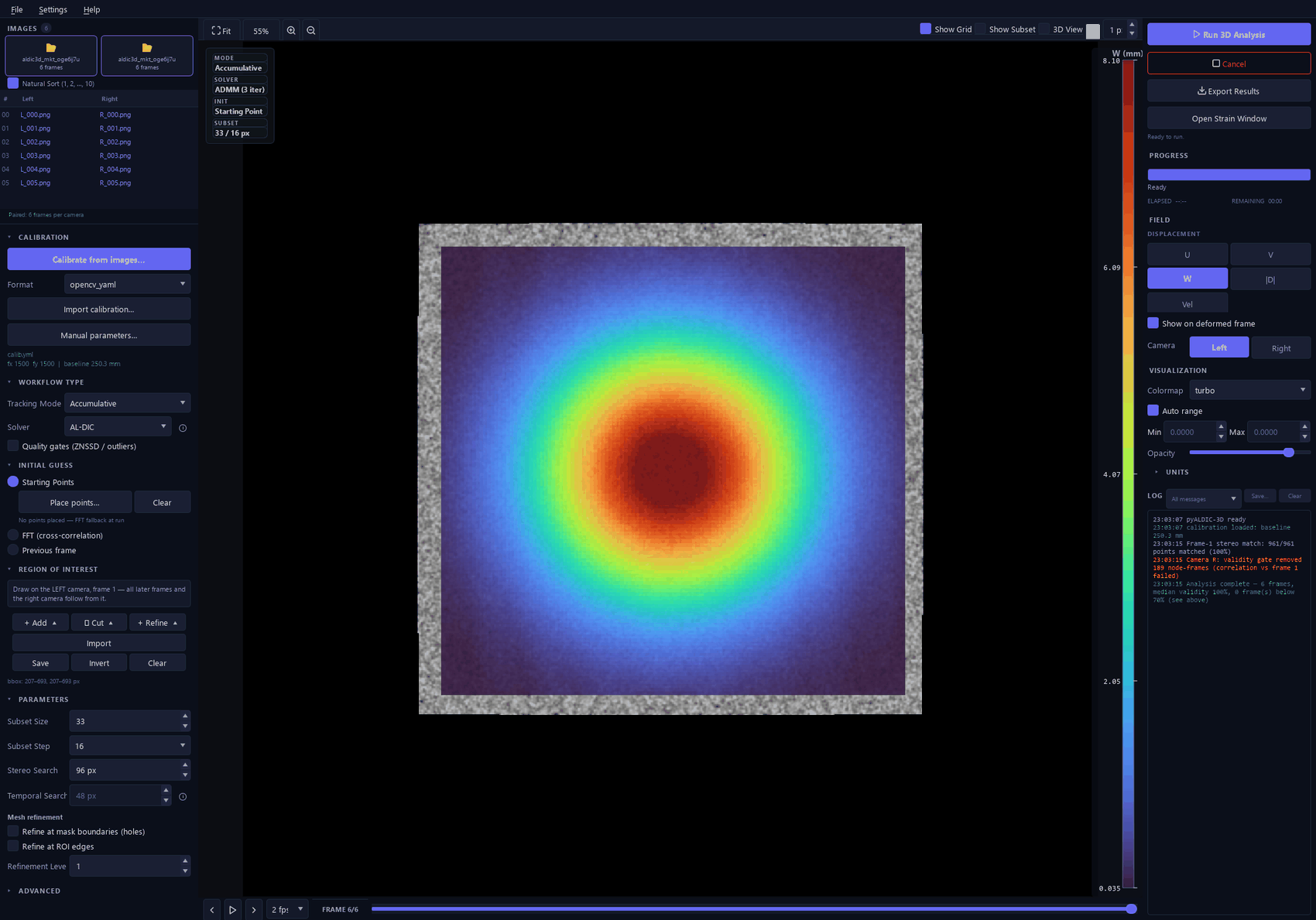
pyALDIC-3D is an independent, self-contained application for stereo (two-camera) Digital Image Correlation. Point it at two synchronized image sequences and a stereo calibration, and it reconstructs the specimen surface in 3D and tracks its displacement and Green–Lagrange surface strain through the sequence — all in millimetre-native world coordinates (the left camera is the world origin).
It is built on top of the pyALDIC-2D platform (arXiv:2607.22755, preprint under review), which it consumes as a pinned, read-only library for the underlying 2D correlation engine (Augmented-Lagrangian DIC: local IC-GN subproblems coupled to a global FEM regularizer). Everything above the 2D solver — stereo calibration, correspondence strategies, triangulation, 3D surface strain, the 3D visualization layer, the project format, and the workflow — is pyALDIC-3D's own.
The algorithm follows the MATLAB 3D-Stereo-ALDIC reference (Tong et al., Experimental Mechanics, 2025) as a mathematical model, ported into idiomatic, tested Python — not a literal translation.
Scope (honest): v1 supports a two-camera stereo rig. The data model is N-camera-ready, but N-camera (>2) support is planned for post-v1.
Key features
| Area | Highlights |
|---|---|
| Calibration | Built-in OpenCV stereo calibration (chessboard, ChArUco, circle-grid, and a self-developed coded circular-target detector) with per-image QC, worst-pair rejection, epipolar validation, and optional bundle adjustment — or import from 6 external formats. |
| Correspondence & tracking | Three pluggable strategies (track_both, stereo_each_frame, ref_direct); accumulative & incremental reference modes with Every-Frame / Every-N / Custom reference update; AL-DIC global step + local IC-GN; FFT, multi-seed Starting-Points propagation, or previous-frame initial guess; quadtree mesh refinement; ROI toolbox; quality + honesty gates. |
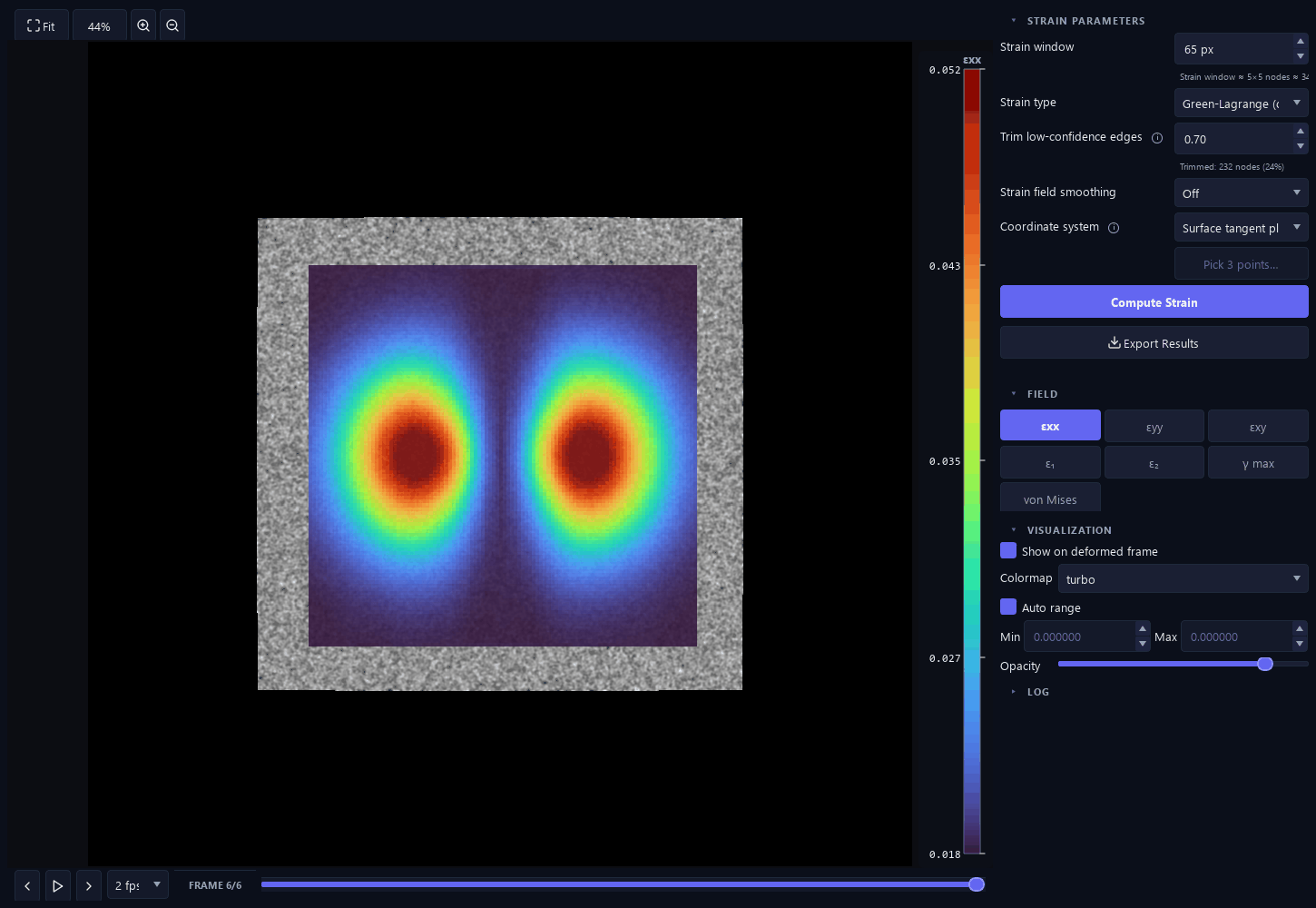
| 3D reconstruction & strain | DLT triangulation to a metric surface; surface strain via plane-fit + Green–Lagrange, with 3 strain types (Green–Lagrange / infinitesimal / Euler–Almansi), 3 coordinate systems (fitted-plane / left-camera / custom 3-point), edge-trim, and a Numba-accelerated kernel. |
| Crack-aware DIC | Detects a thin masked barrier in the ROI, cuts the mesh so the FEM/global step never bridges the crack, and applies crack-aware strain neighbour exclusion + trimming. |
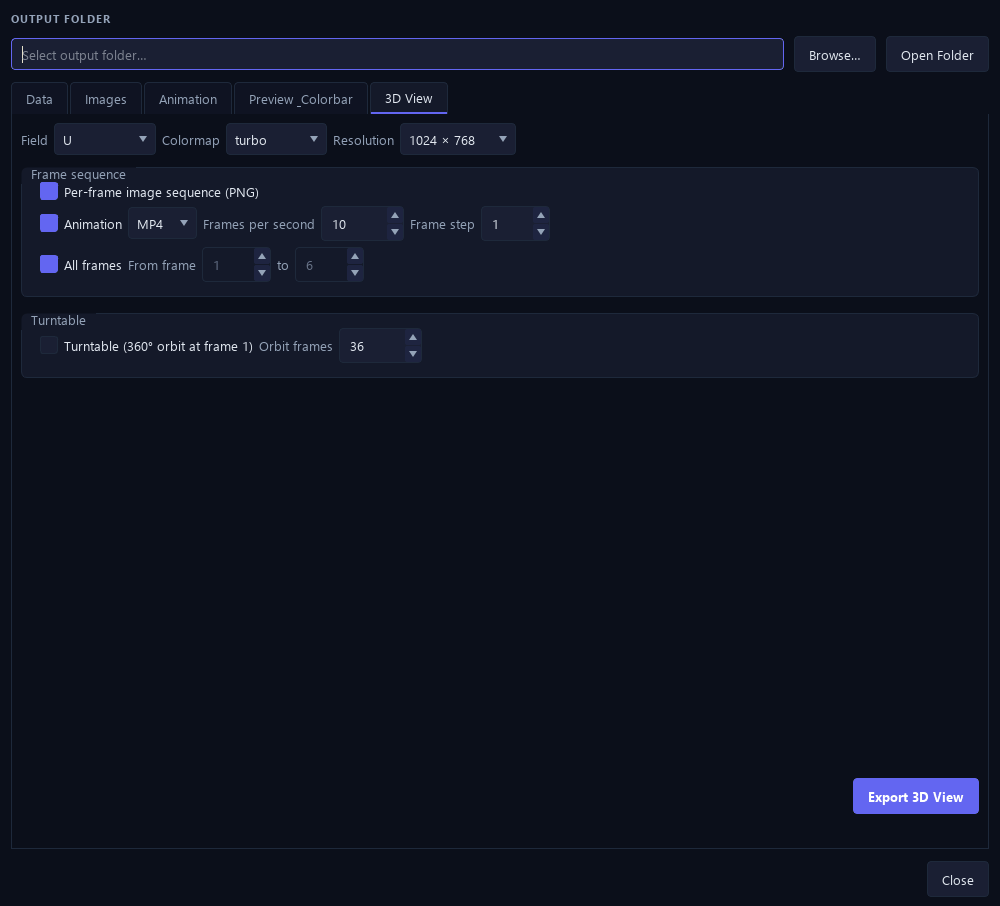
| Visualization & export | Interactive PyVista 3D view with camera frusta; dense continuous field rendering; display units (µm / mm / cm / m) and a velocity field; export to NPZ / MAT / CSV / PLY / VTU+PVD, per-frame field images, MP4/GIF animation, 3D-render sequences + 360° turntable, with a WYSIWYG Preview & Colorbar tab. |
| Workflow & sessions | Single-window three-column GUI; .aldic3d project sessions (config, view, and computed results) with source-image relocation and Windows file association; a headless TOML-driven CLI for batch/scripted runs. |
| i18n & robustness | GUI translated into 8 languages (en, zh_CN, zh_TW, ja, ko, de, fr, es); pre-run RAM check with fail-fast projection; partial-results-kept-on-cancel; per-frame validity diagnostics surfaced in the log. |
Install
pyALDIC-3D targets Python ≥ 3.10. All dependencies, including the 2D correlation engine it builds on, install automatically.
From PyPI — available from v1.0.0
Releases from v1.0.0 onward are published on PyPI as
al-dic-3d (see
docs/RELEASING.md for the release process):
# 1. Create an environment (conda shown; a venv works too)
conda create -n pyaldic3d python=3.12
conda activate pyaldic3d

# 2. Install (GUI and 3D view included)
pip install al-dic-3d
From source (development)
git clone https://github.com/zachtong/pyALDIC-3D.git
cd pyALDIC-3D
pip install -e ".[dev]"
A bare pip install al-dic-3d is full-featured: it ships the desktop GUI
(PySide6) and the interactive 3D view (pyvista/VTK) alongside the headless
compute stack (numpy, scipy, OpenCV, al-dic). GUI and 3D imports are lazy,
so al-dic-3d run / calibrate still work on headless servers where Qt or
OpenGL cannot initialize. The historical [gui] / [viz3d] extras remain as
no-op compatibility aliases; [dev] adds pytest, ruff, pre-commit, and
matplotlib for the test suite and report tooling.
Developing against the sibling 2D repo
The 2D platform is consumed as a pinned, read-only dependency. To develop against a
local checkout instead of the PyPI wheel, install the sibling repo editable first — it
satisfies the same al-dic version pin declared in pyproject.toml:
pip install -e ../pyALDIC     # 2D engine, editable (reports 0.7.x)
pip install -e ".[dev]"
pre-commit install            # optional hooks
pyALDIC-3D never modifies the 2D repo; docs/DEPENDS_ON_2D.md is the ledger of exactly
which al_dic symbols it uses.
Quickstart
The repo ships a tiny sample dataset under
examples/Images_Stereo_Sample3_images/ — three
synchronized left/right stereo pairs of a speckled D-specimen (Stereo-DIC Challenge 1.0
"Sample 3") plus a DICe-format calibration. It is small (3 frames), but enough to run the
full pipeline end to end.
GUI
al-dic-3d gui
Then follow examples/quickstart/README.md: load the
L/ and R/ folders as the left/right cameras, import cal.xml as the calibration, draw
an ROI, click Run 3D Analysis, and inspect the displacement/strain fields and the 3D
view.
CLI (headless)
A ready-to-run config lives at
examples/quickstart/config.toml:
al-dic-3d run examples/quickstart/config.toml -o examples/quickstart/out
This reconstructs the surface and computes surface strain for all three frames and writes,
under -o:
quickstart.npz/quickstart.mat— the unified result archive:points3D(n_frames, n_pts, 3), per-frame displacement stacksU/V/W/mag, strain stacksexx/eyy/exy/e1/e2/max_shear/von_mises, plus the raw correspondence (xL/xR/quality/reproj_error).quickstart_parameters_<timestamp>.json— the full run configuration (always written).
Verified run: 3 frames, ~1,300 nodes, median per-frame validity 100 %, completing in seconds on a laptop. The reconstructed surface sits ~377–390 mm from the left camera (world origin), consistent with the calibration.
CLI reference
al-dic-3d (equivalently python -m al_dic_3d) has three subcommands:
run — headless pipeline
al-dic-3d run CONFIG [-o DIR] [-q] [--formats LIST]
| Flag | Meaning |
|---|---|
CONFIG |
path to the run configuration (TOML) |
-o, --output DIR |
override [output].dir from the config |
-q, --quiet |
suppress per-frame progress output |
--formats LIST |
comma-separated: npz,mat,csv,ply,vtu (default npz,mat; a parameters JSON is always written) |
Config sections: [calibration] (file, format), [sequence] (left, right,
optional masks), [roi] (xmin/xmax/ymin/ymax, or an arbitrary-shape mask image),
[matching] (strategy, reference mode, subset/step, search ranges, initial guess, …),
[strain], [quality], [output], [advanced]. See the shipped
config.toml for a minimal example.
gui — desktop application
al-dic-3d gui [SESSION]
Launches the workflow GUI (included in every install). An optional .aldic3d project
path opens straight into that session.
calibrate — built-in stereo calibration
al-dic-3d calibrate --left GLOB --right GLOB --board {chessboard,charuco,circles,coded} \
                    --cols COLS --rows ROWS [--square MM | --spacing MM] [-o OUT.yaml] ...
Detects the board in synchronized L/R image sets, solves per-camera intrinsics + stereo
extrinsics with QC (worst-pair rejection, epipolar validation), and writes an OpenCV YAML
that run consumes as [calibration] file=... format=opencv_yaml. Options include
--marker/--dict (ChArUco), --spacing/--dot/--asymmetric (circle/coded boards),
--joint, --tangential, --fix-k3, --release-object, --bundle, and
--verify-left/--verify-right for independent known-distance verification. Run
al-dic-3d calibrate --help for the full list.
Calibration
Calibration is the accuracy-critical step in stereo-DIC. pyALDIC-3D gives you three paths, all converging on one internal stereo rig:
- Built-in calibration (recommended) — OpenCV-based, from board image pairs, with QC the MATLAB reference does not have (per-image error bars, threshold-based rejection + re-solve, coverage/pose diagnostics). Supports chessboard, ChArUco, circle grids, and a custom coded circular target (three concentric locator rings).
- Import an existing calibration from one of 6 formats — MATLAB/OpenCV
(
matlabcv), MatchID (matchid), MMC (mmc), DICe (dice), OpenCorr (opencorr), or OpenCV-YAML (opencv_yaml). - Manual entry of intrinsics/extrinsics as a fallback.
Correspondence is computed on raw (unrectified) images; distortion is removed on point coordinates only, immediately before triangulation, so the speckle is never resampled.
Positioning
pyALDIC-3D is the Python successor to the MATLAB 3D-Stereo-ALDIC code — the same AL-DIC stereo-DIC method, re-implemented as a tested, GUI-driven, self-contained application with a built-in calibration front end and a modern 3D visualization/export layer.
Relative to other open stereo-DIC tools: MATLAB-based MultiDIC offers N-camera (>2) support that pyALDIC-3D does not yet have (N-camera is planned post-v1); pyALDIC-3D's differentiators are the Augmented-Lagrangian global–local solver, adaptive quadtree refinement, built-in QC-instrumented calibration, and a Python/Qt stack with no MATLAB license requirement. No head-to-head accuracy benchmark is claimed here — see the validation reports in the architecture docs for measured results.
Documentation
- User guide —
docs/user-guide/(start atindex.md): overview, installation & launching, and task-oriented walkthroughs. - Architecture & decision baseline —
docs/architecture/(start at00_INDEX.md): technical baseline, correspondence- strategy study, decision log, and the full version changelog. - Reference notes —
docs/COORDINATES.md,docs/strain3d_math.md,docs/DEPENDS_ON_2D.md.
Support & contributing
- Bug reports — open an issue: the template asks for the version, OS, and the LOG panel's saved output.
- Questions & discussion — GitHub Discussions.
- User guide —
docs/user-guide/, including a troubleshooting chapter.
This is young software meeting real-world setups for the first time — reports of "it broke on my machine/data" are exactly what makes it robust, and small shareable datasets that reproduce a problem are the fastest path to a fix.
Citation
pyALDIC-3D has its own scholarly identity, independent of the 2D project. Citation
metadata ships in CITATION.cff — GitHub renders a "Cite this
repository" button from it. All versions are archived on Zenodo under the concept DOI
10.5281/zenodo.21696564, and a standalone
SoftwareX article ("Part 2") is forthcoming.
To cite the software itself:
@software{tong2026pyaldic3dsoftware,
  author  = {Tong, Zixiang},
  title   = {pyALDIC-3D: stereo / 3D Digital Image Correlation built on the
             pyALDIC platform},
  year    = {2026},
  url     = {https://github.com/zachtong/pyALDIC-3D},
  version = {1.0.0},
  doi     = {10.5281/zenodo.21696564}
}
Please also cite the underlying method, the MATLAB reference it ports, and the 2D software it is built on:
@article{tong2025stereoaldic,
  author  = {Tong, Zixiang and Yang, Jin},
  title   = {3D Stereo Adaptive Mesh Augmented Lagrangian Digital Image Correlation},
  journal = {Experimental Mechanics},
  year    = {2025},
  doi     = {10.1007/s11340-025-01225-7}
}

@article{yang2019aldic,
  author  = {Yang, Jin and Bhattacharya, Kaushik},
  title   = {Augmented Lagrangian Digital Image Correlation},
  journal = {Experimental Mechanics},
  volume  = {59},
  pages   = {187--205},
  year    = {2019},
  doi     = {10.1007/s11340-018-00457-0}
}

@article{tong2026pyaldic,
  author  = {Tong, Zixiang and Yang, Jin},
  title   = {pyALDIC: A Python Implementation of Augmented Lagrangian Digital
             Image Correlation with a GUI, Adaptive Meshing, and Mask-Aware
             Subset Splitting},
  journal = {arXiv preprint arXiv:2607.22755},
  year    = {2026},
  doi     = {10.48550/arXiv.2607.22755},
  url     = {https://arxiv.org/abs/2607.22755}
}
The last entry describes the 2D software this application builds on — its architecture, adaptive quadtree meshing and mask-aware subset splitting — and is a preprint under review, not peer-reviewed yet.
The SoftwareX "Part 2" article citation will be added here when available.
Releases & versioning
Package versions follow the single source of truth __version__ in
src/al_dic_3d/__init__.py (git tags vX.Y.Z, published to PyPI by CI). The "v1.x"
numbers in the docs/architecture/00_INDEX.md
changelog are internal documentation milestones, not package versions. The full
release runbook (PyPI Trusted Publishing, Zenodo DOI) lives in
docs/RELEASING.md.
License
BSD 3-Clause. See LICENSE. The al-dic 2D engine dependency is likewise
BSD-3-Clause-licensed.
Acknowledgements
pyALDIC-3D is built on the pyALDIC 2D platform
(the al-dic package, described in arXiv:2607.22755 —
preprint under review) and follows the MATLAB
3D-Stereo-ALDIC reference. Developed in
Dr. Jin Yang's group at The University of Texas at
Austin.
1 maintainer

Metadata
1 maintainer
Release files for al-dic-3d 1.1.0
For a detailed explanation of source distributions (sdists) and built distributions (wheels), please see the package formats documentation.
Source distribution (sdist)
| File | Size | Uploaded | |
|---|---|---|---|
| al_dic_3d-1.1.0.tar.gz | 1.0 MB | Details |
Built distribution (wheel)
| File | Interpreter | ABI | Platform | Reset |
|---|---|---|---|---|
| al_dic_3d-1.1.0-py3-none-any.whl | Python 3 | none | any | Details |
Total release size: 1.9 MB
Release files / al_dic_3d-1.1.0.tar.gz
| Download URL | al_dic_3d-1.1.0.tar.gz |
|---|---|
| Size | 1.0 MB |
| Tags | Source |
|
SHA-256 checksum How to use checksums |
6539d700262bb50d055a2f95fe60b770b566e350199b22a7dbba4117af85a622
|
|
BLAKE2b-256 checksum How to use checksums |
a4d8a82abea43cffaf737dbf77082a3bef2bf7365919cb19a6a01539f4bf33b7
|
| Upload date | |
|
Uploaded using Trusted Publishing? What is trusted publishing? |
Yes |
| Uploaded via |
twine/7.0.0 CPython/3.13.14
|
Provenance
Provenance describes where a file came from. On PyPI, provenance is shared via attestations, which provide a verifiable record of the build or publishing details. View details, limitations and caveats.


PyPI Publish Attestation
PyPI verified that this artifact, at this checksum, originated from the publisher listed below.
Signed by GitHub Actions, verified by PyPI on Jul 31, 2026.
Transparency logRelease files / al_dic_3d-1.1.0-py3-none-any.whl
| Download URL | al_dic_3d-1.1.0-py3-none-any.whl |
|---|---|
| Size | 866.4 kB |
| Tags | Python 3 |
|
SHA-256 checksum How to use checksums |
0f2b9ffbc1057ce0329baaa23f28e48e7c28408f8efaa6be7ed4dfa54b2a61f6
|
|
BLAKE2b-256 checksum How to use checksums |
530e928cb930e9ee8a2cb351e7b005b07fc15ea2a28b197a1994d64b24b45678
|
| Upload date | |
|
Uploaded using Trusted Publishing? What is trusted publishing? |
Yes |
| Uploaded via |
twine/7.0.0 CPython/3.13.14
|
Provenance
Provenance describes where a file came from. On PyPI, provenance is shared via attestations, which provide a verifiable record of the build or publishing details. View details, limitations and caveats.
PyPI Publish Attestation
PyPI verified that this artifact, at this checksum, originated from the publisher listed below.
Signed by GitHub Actions, verified by PyPI on Jul 31, 2026.
Transparency log













