
alarmkpi




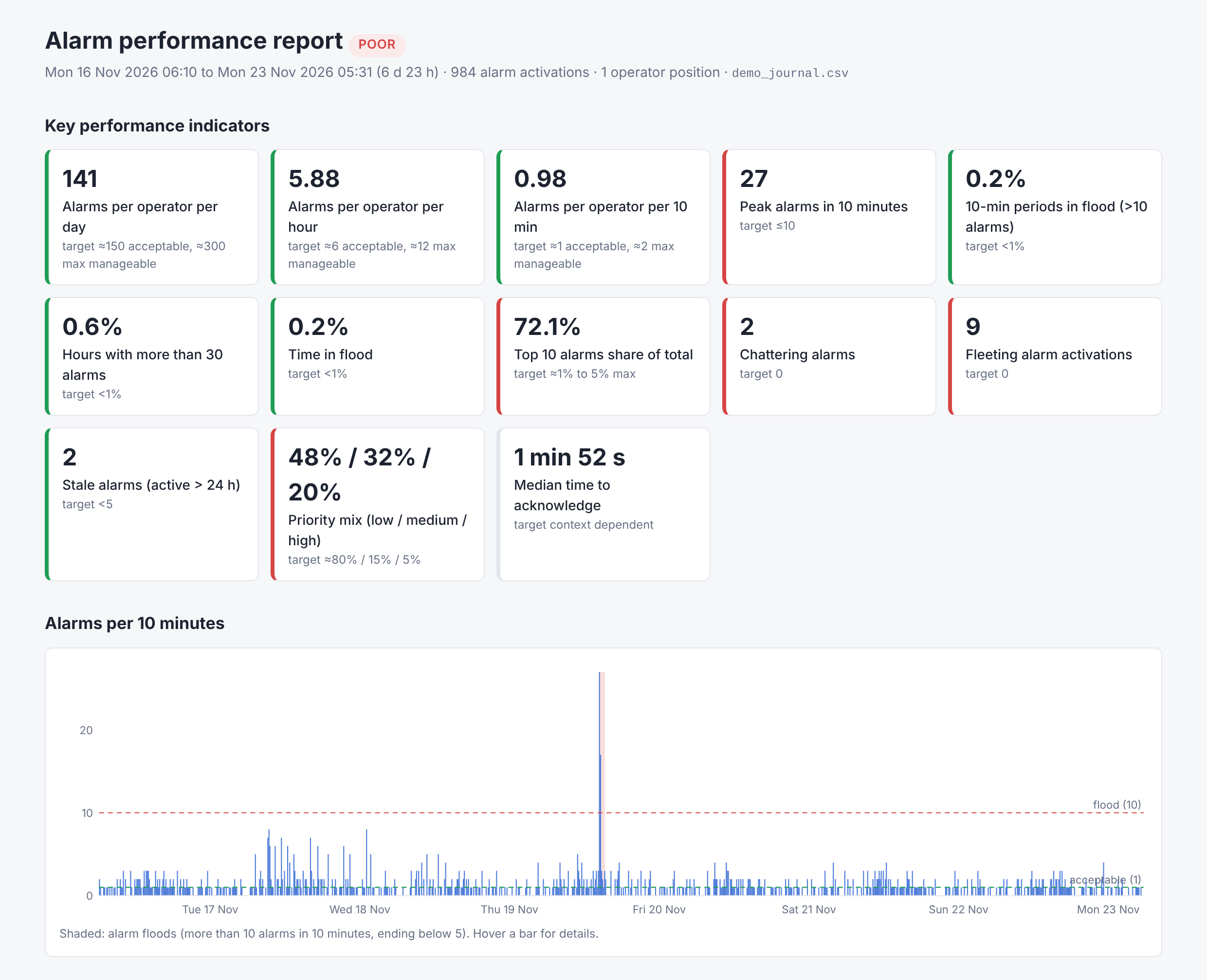
Alarm performance KPIs from your alarm journal, measured against ISA-18.2 and EEMUA 191. Point it at a CSV export from your SCADA, HMI or DCS and get the numbers an alarm rationalization starts with, plus a one-file HTML report you can email to the plant manager.
$ pip install alarmkpi
$ alarmkpi report alarm_journal.csv --html report.html
Alarm performance: 984 alarms, 2026-11-16 06:10 to 2026-11-23 05:31 (6 d 23 h)

  OK    Alarms per operator per day                        141   target ≈150 acceptable, ≈300 max manageable
  OK    Alarms per operator per 10 min                    0.98   target ≈1 acceptable, ≈2 max manageable
  BAD   Peak alarms in 10 minutes                           27   target ≤10
  BAD   Top 10 alarms share of total                     72.1%   target ≈1% to 5% max
  BAD   Chattering alarms                                    2   target 0
  ...
Overall: POOR
What it measures
| Metric | Target (one operator position) |
|---|---|
| Alarms per operator per day / hour / 10 minutes | ≈150 / ≈6 / ≈1 acceptable, ≈300 / ≈12 / ≈2 maximum manageable |
| Peak alarms in any 10 minutes | ≤10 |
| % of 10-minute periods in flood, % of hours with >30 alarms, % of time in flood | <1% |
| Alarm floods: start, duration, size, peak and main contributors | flood starts above 10 alarms / 10 min, ends below 5 |
| Bad actors: top 10 alarms and their share of the total load | ≈1% to 5% max |
| Chattering alarms (3+ activations within 60 s) | 0 |
| Fleeting alarms (active for less than 1 s) | 0 |
| Stale alarms (active more than 24 h) and alarms still standing | <5 |
| Priority distribution | ≈80% low / 15% medium / 5% high |
| Median time to acknowledge | reported when the journal has acknowledgements |
Every threshold is a command-line option (--operators, --chatter-count, --chatter-window,
--fleeting, --stale-hours, --top), because your alarm philosophy document has the final
say. The targets are the commonly published ISA-18.2 / EEMUA 191 figures and are guidance, not
a compliance verdict.
Try it without plant data
alarmkpi demo -o demo_journal.csv             # a realistic week: a flood, a chattering
alarmkpi report demo_journal.csv --html report.html  # level switch, stale alarms, ...
Or open the sample report
made from examples/demo_journal.csv.
Your alarm journal
Any CSV with one row per alarm event works. Columns are found by their usual names
(EventTime/Timestamp/Time, Source/Tag/Alarm, EventState/State/Type,
Priority/Severity, Message/Description, Area/Unit), comma, semicolon or tab
separated, UTF-8 or Windows-1252. When the names differ, say which is which:
alarmkpi report events.csv --time-col "Date/Time" --tag-col "Point" --state-col "Event" \
    --priority-col "Level" --time-format "%d/%m/%Y %H:%M:%S"
- State column values such as
Active,Alarm,Clear,RTN,Normal,Ack,Acknowledgedare recognised. Map codes with--state-map "0=active,1=clear,2=ack". Without a state column every row counts as one alarm activation (rates, floods, bad actors and chattering still work; durations need clear events). - Priorities: names (
Low,Medium,High,Critical/Urgent) or numbers (0 to 4 as in Ignition, or 1 to 1000 severities split in four bands). - Times: ISO 8601, common US and European formats, epoch seconds or milliseconds. Time-zone-aware stamps are converted to UTC.
- Ignition:
--preset ignitionreads the alarm journal export or thealarm_eventstable (eventtype0/1/2) and shortensprov:default:/tag:...:/alm:...paths.
Other useful options: --operators 3 for several consoles, --area Boiler to analyse one
area, --start/--end to cut the window, --markdown/--json FILE for other outputs, and
--fail-on poor to make a scheduled job fail when performance slips.
Python API
from alarmkpi import Settings, analyze, read_csv
from alarmkpi.report import html

a = analyze(read_csv("journal.csv"), Settings(operators=2))
print(a.per_day, a.max_10min, [f.start for f in a.floods])
open("report.html", "w").write(html(a))
Related tools
alarmkpi is part of a small set of open-source tools for automation engineers:
- tagscope: log OPC UA tags to a database, with a dashboard
- fakeplc: a fake PLC (OPC UA + Modbus TCP) for tests and demos
- tagbridge: Modbus / OPC UA to MQTT Sparkplug B gateway
- plcdiff: readable git diffs for PLC program exports
Contributing
Sample exports from other alarm systems (sanitized) are the most valuable contribution: they let us add presets. See CONTRIBUTING.md.
ISA-18.2 is a standard of the International Society of Automation; EEMUA 191 is published by EEMUA. This project is not affiliated with either.
License
MIT
1 maintainer

Metadata
1 maintainer
Release files for alarmkpi 0.1.0
For a detailed explanation of source distributions (sdists) and built distributions (wheels), please see the package formats documentation.
Source distribution (sdist)
| File | Size | Uploaded | Provenance | Actions |
|---|---|---|---|---|
| alarmkpi-0.1.0.tar.gz | 26.2 kB | With provenance | Details for alarmkpi-0.1.0.tar.gz |
Built distribution (wheel)
| File | Interpreter | ABI | Platform | Actions Reset |
|---|---|---|---|---|
| alarmkpi-0.1.0-py3-none-any.whl | Python 3 | none | any | Details for alarmkpi-0.1.0-py3-none-any.whl |
Total release size: 52.2 kB
Release files / alarmkpi-0.1.0.tar.gz
| Download URL | alarmkpi-0.1.0.tar.gz |
|---|---|
| Size | 26.2 kB |
| Tags | Source |
|
SHA-256 checksum How to use checksums |
3e8f4f0ddd57e2dddb8986919fade665cef6491f774e1ea47070489b43af980c
|
|
BLAKE2b-256 checksum How to use checksums |
8d441162811dc3905d04866fd931d99a50f77bb2dc47ad0c88e7c32a6de54a18
|
| Upload date | |
|
Uploaded using Trusted Publishing? What is trusted publishing? |
Yes |
| Uploaded via |
twine/7.0.0 CPython/3.13.16
|
Provenance
Provenance describes where a file came from. On PyPI, provenance is shared via attestations, which provide a verifiable record of the build or publishing details. View details, limitations and caveats.


PyPI Publish Attestation
PyPI verified that this artifact, at this checksum, originated from the publisher listed below.
Signed by GitHub Actions, verified by PyPI on Nov 23, 2026.
Transparency logRelease files / alarmkpi-0.1.0-py3-none-any.whl
| Download URL | alarmkpi-0.1.0-py3-none-any.whl |
|---|---|
| Size | 26.0 kB |
| Tags | Python 3 |
|
SHA-256 checksum How to use checksums |
3a3825b41538ce9f38594ce9aaf97609ca9d335ac49b5bd3a5b3b637a592284e
|
|
BLAKE2b-256 checksum How to use checksums |
9cbb701be3a50eb372137f4aad90922d44259a048ce61ad567ffdc50bef57c1b
|
| Upload date | |
|
Uploaded using Trusted Publishing? What is trusted publishing? |
Yes |
| Uploaded via |
twine/7.0.0 CPython/3.13.16
|
Provenance
Provenance describes where a file came from. On PyPI, provenance is shared via attestations, which provide a verifiable record of the build or publishing details. View details, limitations and caveats.
PyPI Publish Attestation
PyPI verified that this artifact, at this checksum, originated from the publisher listed below.
Signed by GitHub Actions, verified by PyPI on Nov 23, 2026.
Transparency logSecurity for alarmkpi 0.1.0
Provenance
Provenance describes where a file came from. On PyPI, provenance is shared via attestations, which provide a verifiable record of the build or publishing details. View details, limitations and caveats.
Full provenance
Both files in this release have been uploaded with provenance metadata.
Attestation for alarmkpi-0.1.0.tar.gz
PyPI Publish Attestation
PyPI verified that this artifact, at this checksum, originated from the publisher listed below.
Signed by GitHub Actions, verified by PyPI on Nov 23, 2026.
Transparency logA note on package security
PyPI is a repository for distributing packages, not a service for auditing them. While third-party security researchers and our staff do their best to detect and remove malicious packages, PyPI cannot guarantee the quality, security or suitability of any given package.
To learn more about protecting yourself from malicious actors, visit our package security documentation.













