
Custom matplotlib color palettes based on album covers.



To install:
cd ~

git clone git@github.com:avapolzin/albumpl.git

cd albumpl

sudo python3 setupy.py install
or
pip install albumpl
If you use this package or the scripts in this repository in a publication, please add a footnote linking to https://github.com/avapolzin/albumpl and/or consider adding this software to your acknowledgments. If you would like to cite albumpl, please use the Zenodo DOI linked here.
@software{ava_polzin_2023_8307551,
  author       = {Ava Polzin},
  title        = {albumpl},
  month        = sep,
  year         = 2023,
  publisher    = {Zenodo},
  version      = {v0.2.0},
  doi          = {10.5281/zenodo.8307551},
  url          = {https://doi.org/10.5281/zenodo.8307551}
}
I'd love to feature plots/figures that make use of these palettes in the wild, so should these palettes be of use, please send me a copy of that figure and/or a link to your paper or presentation and I will share it here.
Each of the included palettes has been checked with COBLIS, and should be legible for individuals with most common forms of color blindness. Best, though, is to check your specific figures' readability, too.
(Interested in university-inspired palettes and colormaps? Check out rahrah.)
The palette options (to now) are:
-
LondonCalling inspired by The Clash - London Calling (which, of course, technically means it was inspired by Elvis Presley's eponymous album)
-
Antisocialites inspired by Alvvays - Antisocialites
-
RhumbLine inspired by Ra Ra Riot - The Rhumb Line
-
Matangi inspired by M.I.A. - Matangi
-
MellonCollie inspired by the Smashing Pumpkins - Mellon Collie and the Infinite Sadness
-
MellonCollie2012 inspired by the Smashing Pumpkins - Mellon Collie and the Infinite Sadness (2012 Deluxe Edition)
-
Yoshimi inspired by the Flaming Lips - Yoshimi Battles the Pink Robots
-
Figure8 inspired by Elliott Smith - Figure 8
-
LiveThroughThis inspired by Hole - Live Through This
-
Post inspired by Björk - Post
-
VampireWeekend inspired by Vampire Weekend's self-titled debut
-
CopperBlue inspired by Sugar - Copper Blue
-
Dreamland inspired by Glass Animals - Dreamland
-
Garbage inspired by Garbage - Garbage
-
BlameItOnGravity inspired by Old 97's - Blame It On Gravity
-
ChutesTooNarrow inspired by the Shins - Chutes Too Narrow
















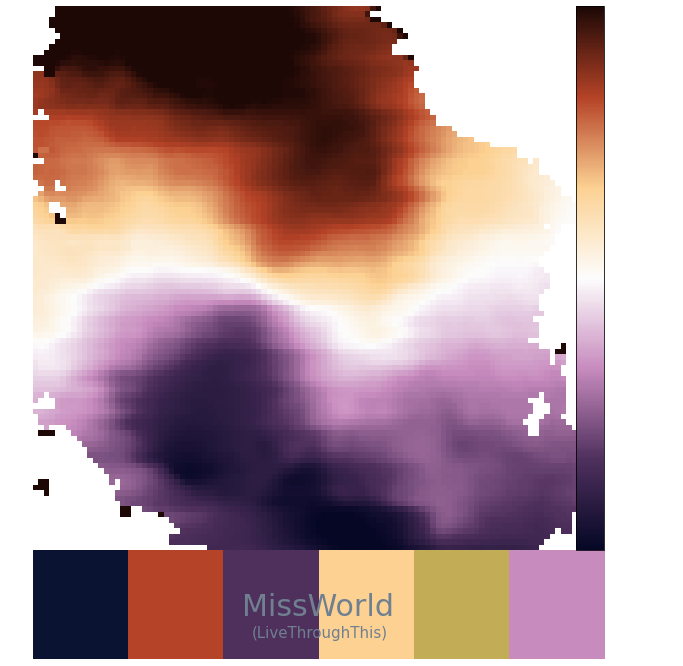
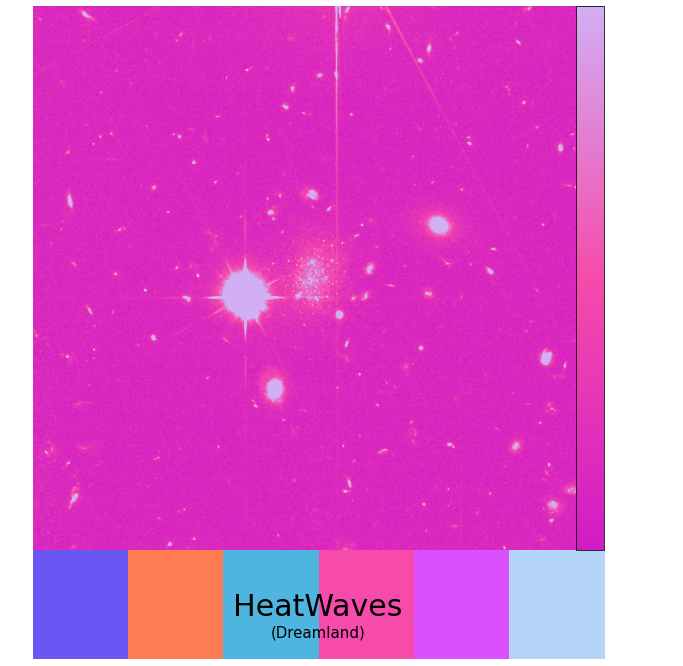
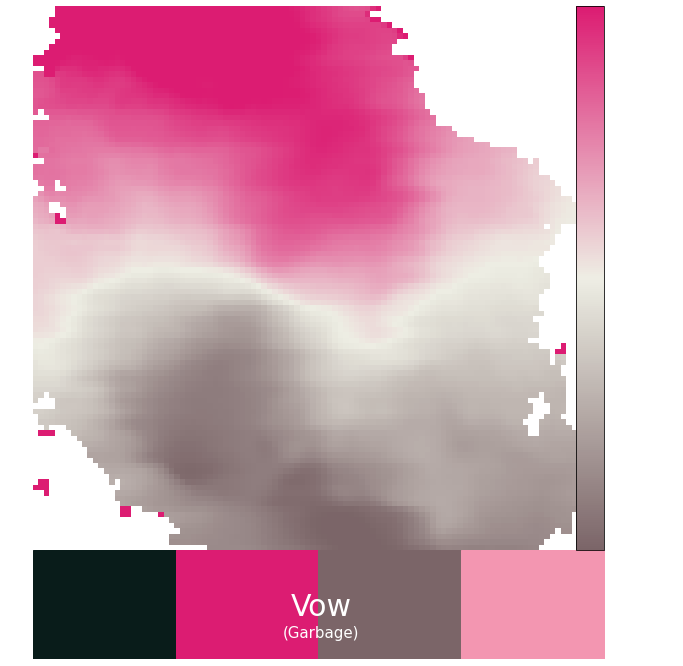
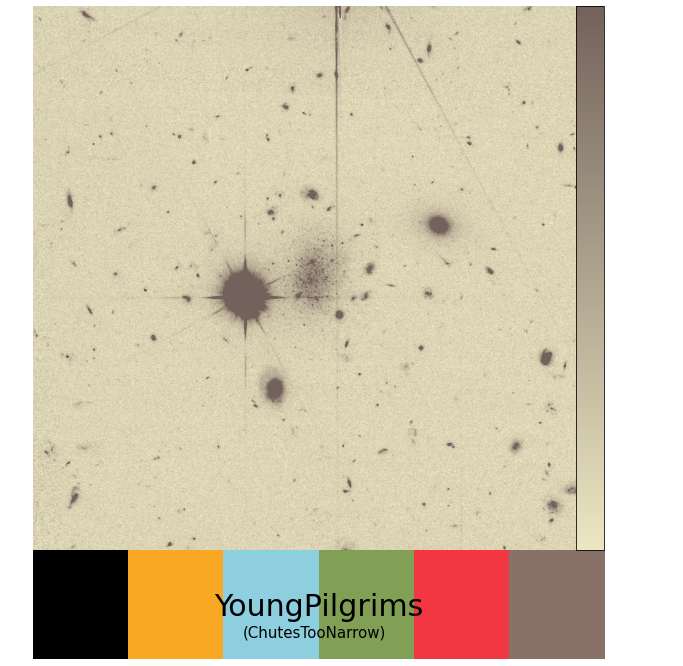
There are also a handful of alternative colormaps included in albumpl, which are not the default colormap associated with a particular palette, but can be accessed individually in the same way as any other colormap.
These standalone colormaps (named for songs on the album that inspired them) are:
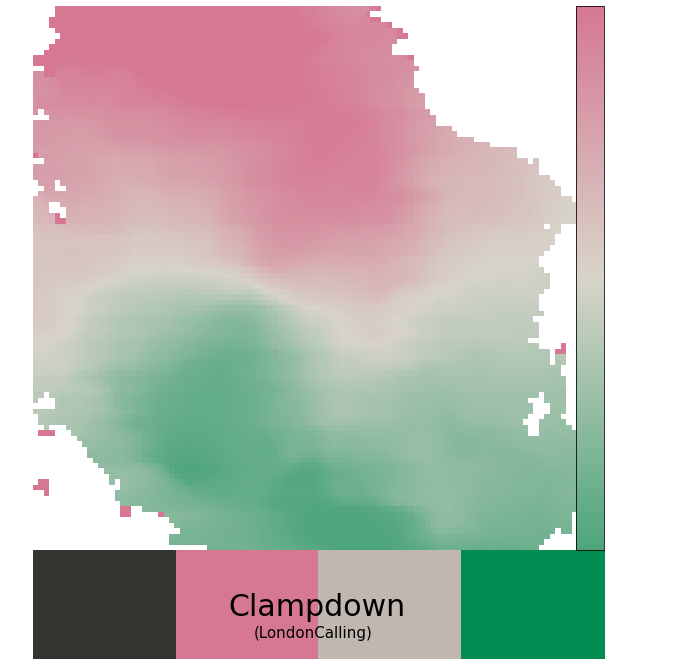
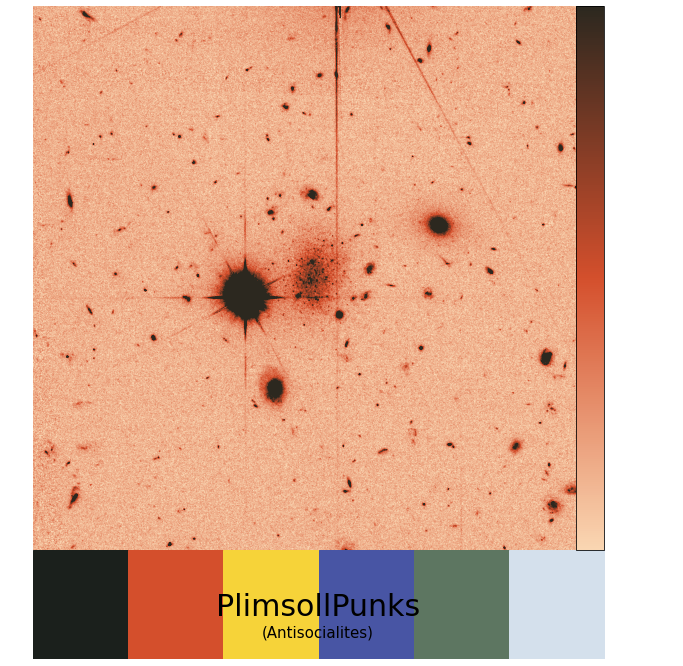
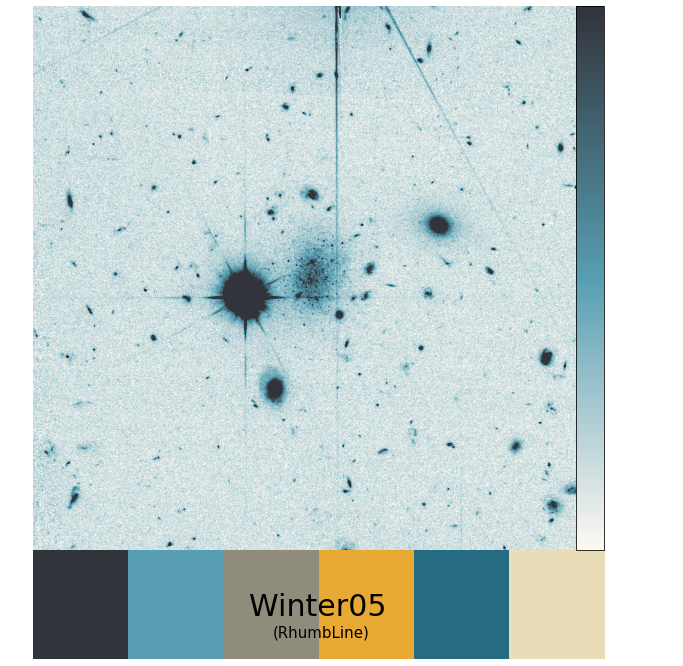
Additional palettes and colormaps will be added moving forward. Is there a specific album you want considered for a future palette? Please open an issue with the name of the album and artist and an image of the album cover.
About the sample images: For sequential colormaps, the sample image is photometric HST data of the dwarf galaxy COSMOS-dw1 in F814W. The sample image for diverging colormaps is an HI velocity map of the galaxy M33 from GALFA-HI.
And, though it should go without saying, I'll add: use of an artist's album cover to make a palette is not an endorsement of the artist or their (broadcast) personal views.
How to use albumpl:
Some quick recipes.
If you are using v0.2 or below, before doing anything you will need to register the new album-inspired colormaps. To do this:
from albumpl.cmap import register_all

register_all()
This is necessary for any of the albumpl.palette functions that use the colormaps, such as set_default and set_default_cmap. This is not necessary for versions >0.3.
- To list all palettes and their properties:
from albumpl.palette import list_palettes

list_palettes()
You can also filter for number of colors in the color cycle or type of colormap (sequential/diverging) with the arguments mincolors and maptype.
- To list all colormaps:
from albumpl.cmap import list_maps

list_maps()
- To set palette as default for both color cycle and colormap:
from albumpl.palette import set_default

set_default('LondonCalling')
- To set a palette as default for color cycle or colormap:
from alumpl.palette import set_default_ccyle, set_default_cmap

set_default_ccyle('Antisocialites')
or
set_default_cmap('RhumbLine')
- To access colormaps without setting them as default: You can access all of the colormaps using strings -- i.e., 'Matangi' or 'MellonCollie_r' for the reversed 'MellonCollie' map.
import matplotlib.pyplot as plt
from albumpl.cmap import * #yes, this is bad practice, but easiest in this case!

register_all() #should only be run one time at the beginning of a script
plt.imshow(image, cmap = 'Yoshimi')
or if you are using version 0.2 or older you can access the colormaps via functions (offered as an option since it can be kind of nice for things like easily toggling whether a map is reversed or not) -- this is deprecated in v0.3 and above:
import matplotlib.pyplot as plt
from albumpl.cmap import * #yes, this is bad practice, but easiest in this case!

plt.imshow(image, cmap = Yoshimi())
To reverse the colormap, use the argument reverse_cmap = True or just feed the colormap the string "reverse" or "_r".
plt.imshow(image, cmap = Figure8(reverse_cmap = True))
or
plt.imshow(image, cmap = LiveThroughThis('reverse'))
or
plt.imshow(image, cmap = Post('_r'))
- To access the colors in a color cycle/palette without setting a default:
from albumpl.palette import return_colors

return_colors('VampireWeekend')
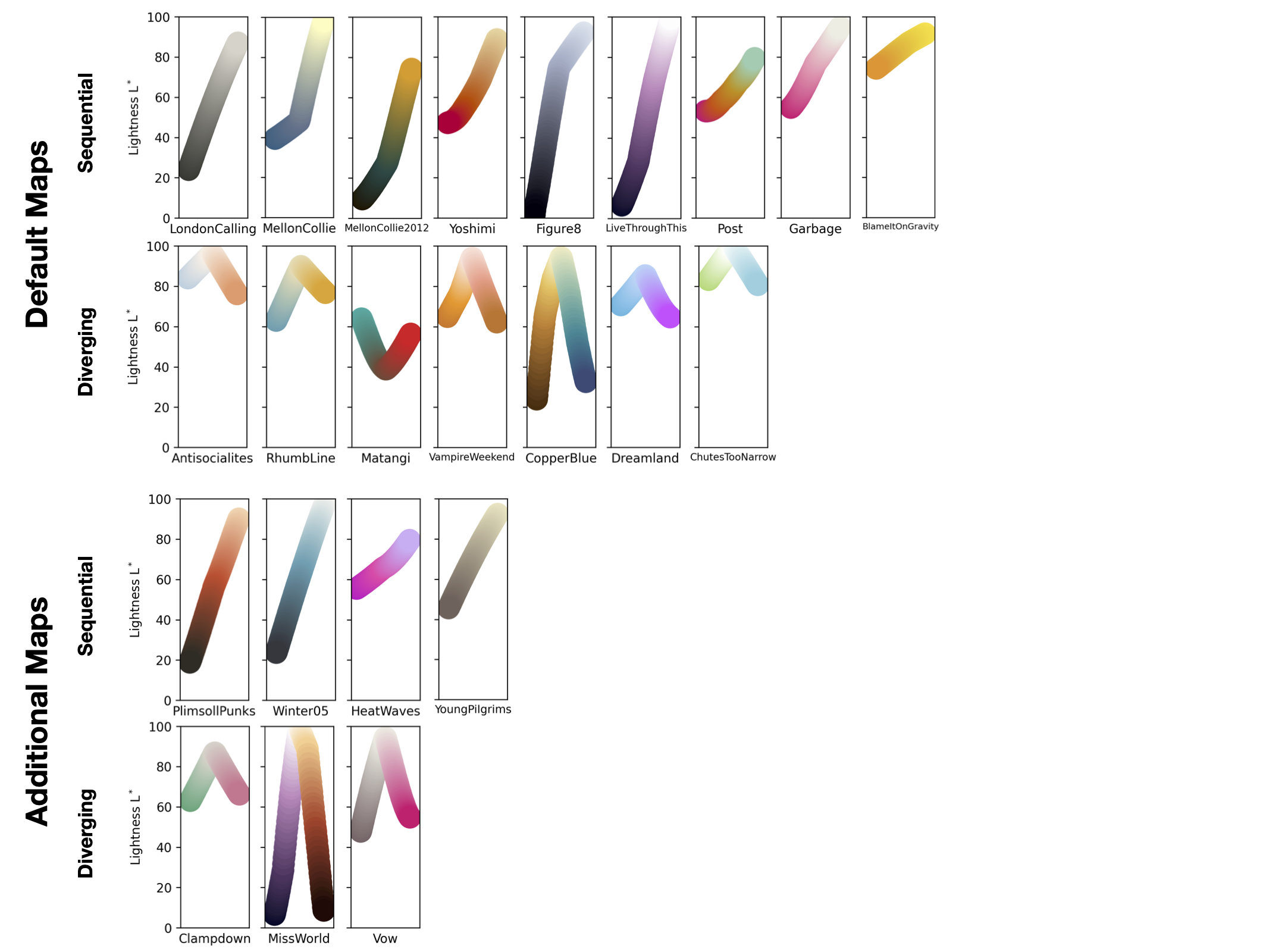
These palettes and colormaps are designed with a focus on remaining faithful to the appearance of the album covers instead of emphasizing perceptual uniformity. Most are still pretty good in this regard, but, just for everyone's peace of mind, following matplotlib, the lightness of each colormap as a function of index is shown below (all sequential maps are shown dark-to-light for easier comparison).
Papers that use albumpl:
1 maintainer

Metadata
1 maintainer
Release files for albumpl 0.3.7
For a detailed explanation of source distributions (sdists) and built distributions (wheels), please see the package formats documentation.
Source distribution (sdist)
| File | Size | Uploaded | Provenance | Actions |
|---|---|---|---|---|
| albumpl-0.3.7.tar.gz | 12.4 kB | Without provenance | Details for albumpl-0.3.7.tar.gz |
Built distribution (wheel)
| File | Interpreter | ABI | Platform | Actions Reset |
|---|---|---|---|---|
| albumpl-0.3.7-py3-none-any.whl | Python 3 | none | any | Details for albumpl-0.3.7-py3-none-any.whl |
Total release size: 22.0 kB
Release files / albumpl-0.3.7.tar.gz
| Download URL | albumpl-0.3.7.tar.gz |
|---|---|
| Size | 12.4 kB |
| Tags | Source |
|
SHA-256 checksum How to use checksums |
ccf67afddb7d4feac167b760f3a7c8fd44a8c030d0c74f798d9b885d0452372a
|
|
BLAKE2b-256 checksum How to use checksums |
718f25e7b645e870d37e5280ec29c5134a8acf2ca657b60bef52d26f76e1cf6c
|
| Upload date | |
|
Uploaded using Trusted Publishing? What is trusted publishing? |
No |
| Uploaded via |
twine/6.1.0 CPython/3.9.12
|
Release files / albumpl-0.3.7-py3-none-any.whl
| Download URL | albumpl-0.3.7-py3-none-any.whl |
|---|---|
| Size | 9.6 kB |
| Tags | Python 3 |
|
SHA-256 checksum How to use checksums |
91efb0da7562d4e827a16793f900ef0de9c6d319ceb9612ef9a6b945e8ed0562
|
|
BLAKE2b-256 checksum How to use checksums |
d91bed3a8790804892eaf64f34c421d54a0b5825a7e829129596757e9bf59c88
|
| Upload date | |
|
Uploaded using Trusted Publishing? What is trusted publishing? |
No |
| Uploaded via |
twine/6.1.0 CPython/3.9.12
|
Security for albumpl 0.3.7
Provenance
Provenance describes where a file came from. On PyPI, provenance is shared via attestations, which provide a verifiable record of the build or publishing details. View details, limitations and caveats.
No provenance found
None of the files in this release were uploaded with provenance metadata.
A note on package security
PyPI is a repository for distributing packages, not a service for auditing them. While third-party security researchers and our staff do their best to detect and remove malicious packages, PyPI cannot guarantee the quality, security or suitability of any given package.
To learn more about protecting yourself from malicious actors, visit our package security documentation.














