
CLI wrapper for yt-dlp & FFmpeg with cloud upload optionality

Project description
Alchemux
Magically intuitive CLI for yt-dlp & FFmpeg — download, convert, and optionally upload to S3 or GCP.
Interactive terminal alchemy for YouTube and 1,000+ media sources.











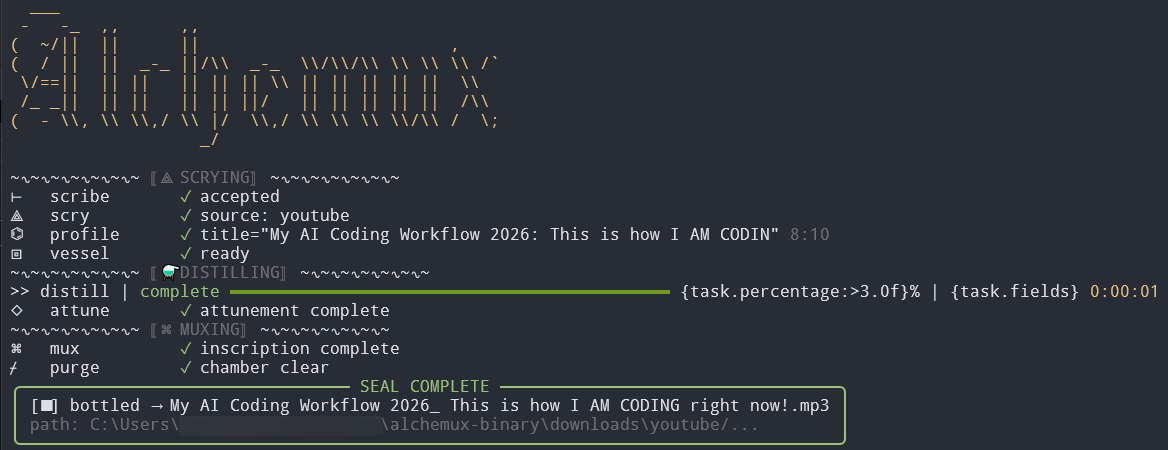
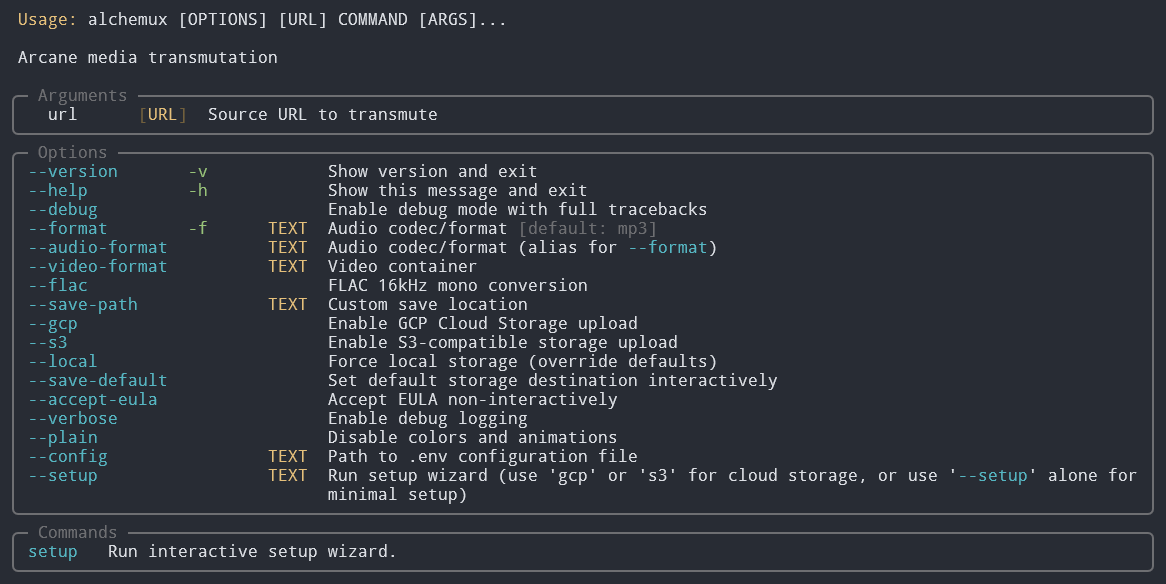
About
Alchemux is a terminal-first media CLI built on yt-dlp and system FFmpeg. It wraps complex download and conversion workflows in an interactive wizard, batch mode, optional cloud upload, and arcane (or plain) terminal output.
- Distribution: PyPI — install with uv (
uv tool install/uvx) - Platforms: macOS, Linux, Windows (shell + Python 3.12+)
- Config: Per-user TOML via
alchemux setup— no manual file editing required - Status: Pre-release — bugs and limitations are expected; see docs/known-issues.md
Features
- 🎵 Download & Convert Media: Extract audio or video from YouTube, Facebook, and other yt-dlp supported sources
- 🧙♂️ Interactive Simplicity: Delightfully easy terminal UI—just run and follow prompts; configure everything in seconds (including cloud storage and presets) interactively
- 📋 Batch Processing: Process many URLs from a YouTube playlist, TXT/CSV files, or pasted lists of URLs with automatic rate-limit mitigation logic built-in. See commands.md for batch mode details
- 🏷️ Metadata Embedding: Automatically embeds source URLs and metadata into media files
- ☁️ Cloud Storage: Upload media to S3 and GCP buckets after interactive setup (commands.md)
- 🎚️ Multiple Formats: Audio (MP3, AAC, FLAC, Opus, WAV, etc.) and video (MP4, MKV, WebM, etc.)
- 🤖 AI Agent Support: CLI guidance for agents like OpenClaw, Agent Zero, and Claude Skills — see backend/AGENTS.md
- 🛠️
configCommand: Interactive wizard for formats, cloud credentials, download folder, batch defaults, and more - 🩺
doctorCommand: Diagnose cloud misconfigurations, missing FFmpeg, permissions, and common failures - ✨ Arcane Interface: Optional stylized output (disable with
arcane_terms = "false"or during setup) - 🔄
updateCommand: Refresh the bundled yt-dlp dependency from the community release channel
Full command reference: docs/commands.md.
Quick Start
Prerequisites
- Shell: Terminal (macOS/Linux) or PowerShell (Windows)
- uv: Astral’s uv — one-time install below
- FFmpeg: Required for conversion — docs/install.md
Install from PyPI (recommended)
Installing with uv avoids macOS Gatekeeper and Windows SmartScreen prompts that often affect downloaded executables.
1) Install uv (one-time)
macOS/Linux:
curl -LsSf https://astral.sh/uv/install.sh | sh
Windows (PowerShell):
powershell -ExecutionPolicy ByPass -c "irm https://astral.sh/uv/install.ps1 | iex"
Verify: uv --version
2) Try without installing
uvx alchemux --help
uvx amx -h
uvx amx "https://youtu.be/…"
uvx amx --no-config --download-dir . "…"
3) Install as a persistent CLI tool
uv tool install alchemux
alchemux setup
alchemux "https://youtu.be/…"
amx "https://…"
4) Upgrade / uninstall
uv tool upgrade alchemux
uv tool uninstall alchemux
Run from source (development)
For unreleased or experimental features:
git clone https://github.com/bmurrtech/alchemux.git
cd alchemux
uv pip install -e .
uv run alchemux --help
uv run amx setup
See docs/install.md for platform-specific FFmpeg and config paths.
Arcane terms
Alchemux can use arcane-themed wording (transmute, distill, seal, etc.). Prefer plain terms? Set arcane_terms = "false" in config.toml or choose technical mode during alchemux setup. Legend: docs/legend.md.
Known issues
Alchemux is pre-release. Documented limitations, workarounds, and what to check before filing a report: docs/known-issues.md.
Troubleshooting
alchemux -h    # or: amx -h
alchemux doctor
| Problem | Solution |
|---|---|
| Config not found | Run alchemux setup or alchemux doctor — paths in docs/install.md |
| Downloads fail | Try audio-only or --flac; run alchemux update; see known-issues.md (KI-002, KI-003) |
ffmpeg not found |
Install system FFmpeg (brew install ffmpeg, apt install ffmpeg, etc.) — docs/install.md |
Contributing
Bug reports, feature requests, and feedback are welcome via GitHub Issues. Please read docs/known-issues.md first.
Maintainers: local tooling, tests, and CI — docs/contributors.md. Release process — docs/release.md.
Support open source
If Alchemux saves you time, consider:
- ⭐ Starring the repo —
- 🐛 Open a GitHub Issue — bugs, ideas, and feedback
- 📣 Sharing with others who download or archive media from the terminal
- ☕ Buy Me a Coffee or Ko-fi


Acknowledgements
- yt-dlp — core downloader
- FFmpeg — audio/video conversion (system install)
- uv — install and run via
uv tool install/uvx - prek — pre-commit hooks in CI and locally
- PyPI — package distribution
- Typer, Rich, InquirerPy — CLI UX
- pyperclip, mutagen, python-dotenv — clipboard, metadata, env helpers
License

This repository is licensed under the GNU Affero General Public License v3.0 (AGPL-3.0). The badge links to the official license text; the LICENSE file in this repo is the binding copy.
License permissions and restrictions
Keeping open-source open.
| Use case | Permitted | Notes / conditions |
|---|---|---|
| Private / internal use | ✅ | No obligation to publish changes if you do not distribute or offer the software as a network service to others. |
| Modify for own private use | ✅ | Obligations attach when you distribute or run modified code as a networked service for users. |
| Share / distribute (unmodified) | ✅ | Include AGPL license and corresponding source (or compliant written offer). |
| Distribute with modifications | ✅ | Modified source must be available under AGPL-3.0 to recipients. |
| Provide as SaaS / network service | ✅ | Users interacting with your modified version over a network must be able to obtain complete corresponding source. |
| Closed / proprietary redistribution | ❌ | Public distribution or SaaS without corresponding source under AGPL is not allowed. |
| Restricting source access for users you serve | ❌ | Network users must be able to get complete corresponding source as AGPL defines. |
| Sublicensing under more restrictive terms | ❌ | AGPL terms must flow through. |
Commercial / proprietary licensing
Need use without AGPL copyleft (closed-source distribution, SaaS without source-offer obligations, etc.)? Commercial licenses may be available. Open a GitHub Issue to discuss licensing and pricing.
Disclaimer
This software is provided as-is, without warranty of any kind. The author(s) are not liable for damages or losses from use of this project, including data loss, failed downloads, or cloud storage misconfiguration.
By using Alchemux you accept responsibility for:
- Complying with this license and the terms of service of sites you download from (e.g. YouTube)
- Ensuring yt-dlp, FFmpeg, and cloud provider usage comply with their respective licenses and policies
- Securing your own credentials for S3/GCP and local config files
Release history Release notifications | RSS feed


Download files
Download the file for your platform. If you're not sure which to choose, learn more about installing packages.
Source Distribution
Built Distribution
Filter files by name, interpreter, ABI, and platform.
If you're not sure about the file name format, learn more about wheel file names.
Copy a direct link to the current filters
File details
Details for the file alchemux-0.1.0.tar.gz.
File metadata
- Download URL: alchemux-0.1.0.tar.gz
- Upload date:
- Size: 101.3 kB
- Tags: Source
- Uploaded using Trusted Publishing? Yes
- Uploaded via: twine/6.1.0 CPython/3.13.12
File hashes
| Algorithm | Hash digest | |
|---|---|---|
| SHA256 |
5b4b81bca6d99ecc29234673604bbb8fd2d54491c61e8377c44009780fda9630
|
|
| MD5 |
856743b0f27a79c04f2c8f0cc5ee14b6
|
|
| BLAKE2b-256 |
28002a4447d38b316c418975af61249d9bcfc5dc6b250ce1c9d871fa8d3213f5
|
Provenance
The following attestation bundles were made for alchemux-0.1.0.tar.gz:
Publisher:
release.yml on bmurrtech/alchemux
-
Statement:
-
Statement type:
https://in-toto.io/Statement/v1 -
Predicate type:
https://docs.pypi.org/attestations/publish/v1 -
Subject name:
alchemux-0.1.0.tar.gz -
Subject digest:
5b4b81bca6d99ecc29234673604bbb8fd2d54491c61e8377c44009780fda9630 - Sigstore transparency entry: 1737695737
- Sigstore integration time:
-
Permalink:
bmurrtech/alchemux@f4fdfd2f30456a4d7a8901a994ef80682fa7ffca -
Branch / Tag:
refs/tags/v0.1.0 - Owner: https://github.com/bmurrtech
-
Access:
public
-
Token Issuer:
https://token.actions.githubusercontent.com -
Runner Environment:
github-hosted -
Publication workflow:
release.yml@f4fdfd2f30456a4d7a8901a994ef80682fa7ffca -
Trigger Event:
push
-
Statement type:
File details
Details for the file alchemux-0.1.0-py3-none-any.whl.
File metadata
- Download URL: alchemux-0.1.0-py3-none-any.whl
- Upload date:
- Size: 127.0 kB
- Tags: Python 3
- Uploaded using Trusted Publishing? Yes
- Uploaded via: twine/6.1.0 CPython/3.13.12
File hashes
| Algorithm | Hash digest | |
|---|---|---|
| SHA256 |
6781c045f499eef8e7d290eb3a139e41f782175426156afdc9248a3e48439ede
|
|
| MD5 |
7464e48f7668e745f3ac2291f4ec6af5
|
|
| BLAKE2b-256 |
41a195eccf7855f07a2ced69ad5e8b7b4d55c96384dc1a889a34055efec688c2
|
Provenance
The following attestation bundles were made for alchemux-0.1.0-py3-none-any.whl:
Publisher:
release.yml on bmurrtech/alchemux
-
Statement:
-
Statement type:
https://in-toto.io/Statement/v1 -
Predicate type:
https://docs.pypi.org/attestations/publish/v1 -
Subject name:
alchemux-0.1.0-py3-none-any.whl -
Subject digest:
6781c045f499eef8e7d290eb3a139e41f782175426156afdc9248a3e48439ede - Sigstore transparency entry: 1737695782
- Sigstore integration time:
-
Permalink:
bmurrtech/alchemux@f4fdfd2f30456a4d7a8901a994ef80682fa7ffca -
Branch / Tag:
refs/tags/v0.1.0 - Owner: https://github.com/bmurrtech
-
Access:
public
-
Token Issuer:
https://token.actions.githubusercontent.com -
Runner Environment:
github-hosted -
Publication workflow:
release.yml@f4fdfd2f30456a4d7a8901a994ef80682fa7ffca -
Trigger Event:
push
-
Statement type:






