
An advanced, all-in-one image processing and computer vision tool with a comprehensive GUI built in Python.
Verified details
These details have been verified by PyPIProject links
GitHub Statistics
Maintainers

Project description
AlchemyCV - Advanced Computer Vision Tool
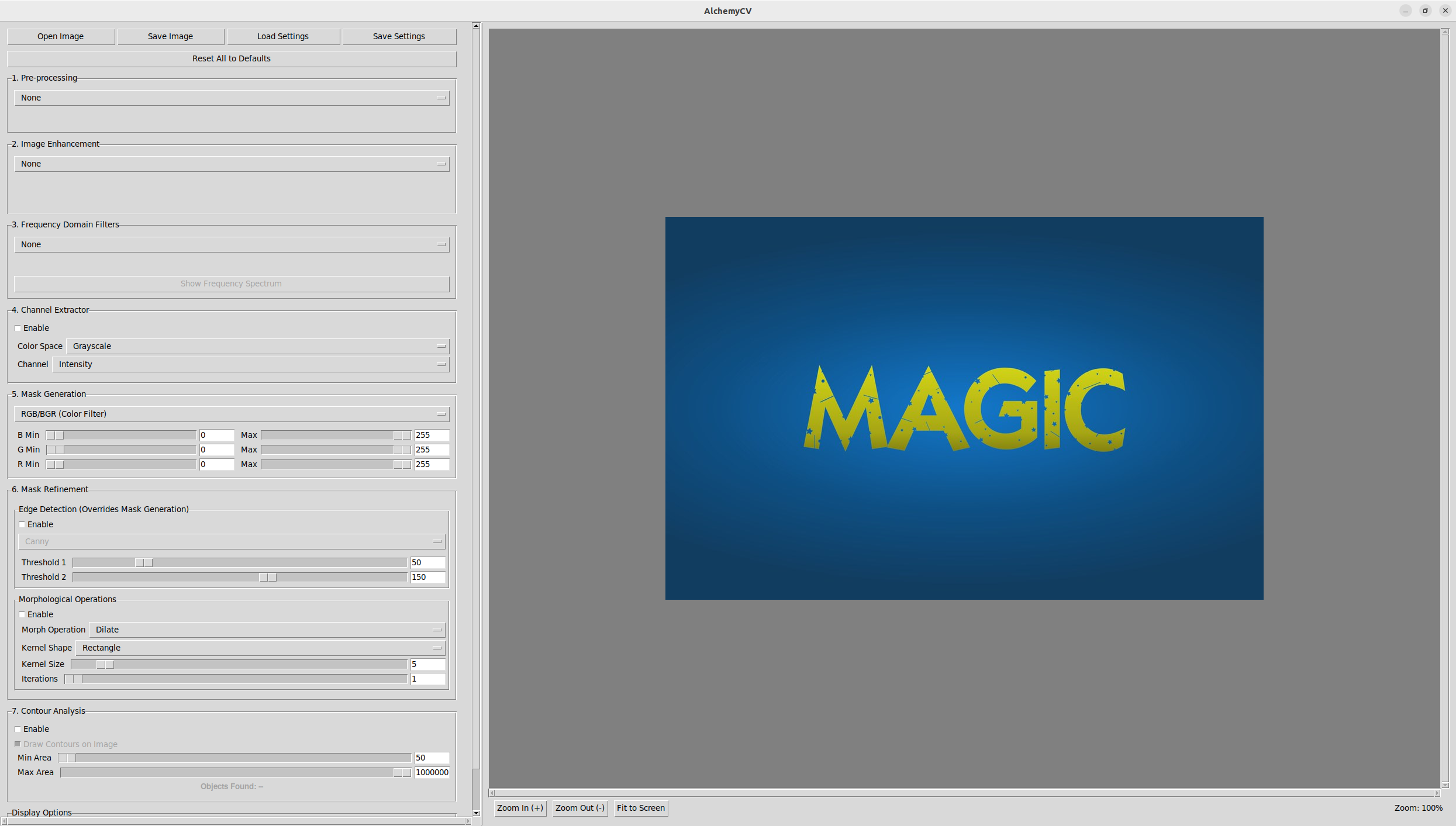
AlchemyCV is a powerful desktop application built with Python. It provides a comprehensive suite of tools for real-time image processing, enhancement, filtering, and analysis.
Features
- Multi-Stage Processing Pipeline: Apply filters in a logical order: Pre-processing, Enhancement, Frequency Filtering, Masking, and Refinement.
- Rich Filter Library: Includes Gaussian/Median/Bilateral blurs, Histogram Equalization, CLAHE, Fourier transforms (LPF/HPF), color space filtering (HSV, Lab), thresholding, and more.
- Advanced Masking: Generate binary masks from color or grayscale ranges, or use edge detection algorithms like Canny, Sobel, and Prewitt.
- Contour Analysis: Automatically detect, count, and draw contours on objects in the image based on area.
- Interactive UI:
- Real-time parameter adjustment with sliders and dropdowns.
- Zoom and Pan the image display with mouse controls.
- Status bar showing image dimensions and mouse coordinates.
- Informative tooltips for key controls.
- Session Management: Save and load your complex filter settings to a JSON file.
Installation
The easiest way to install AlchemyCV is with pip from the Python Package Index (PyPI).
pip install alchemycv
Usage
After installation, the application can be launched by simply running the following command in your terminal:
alchemycv
For Developers (Installation from Source)
If you wish to modify the code or contribute to the project, you can install it from source.
1. Clone the Repository:
git clone https://github.com/kouya-marino/AlchemyCV.git
cd AlchemyCV
2. Create and Activate a Virtual Environment:
It is highly recommended to create a virtual environment to manage dependencies.
# Create the environment
python -m venv venv

# Activate the environment
# On macOS/Linux:
source venv/bin/activate
# On Windows:
.\venv\Scripts\activate
3. Install Dependencies:
The required libraries are listed in the package configuration and can be installed with pip.
pip install -r requirements.txt
(Note: You will need to create a requirements.txt file from your pyproject.toml or install them manually if you choose this route).
4. Run the Application:
python -m src.alchemycv.app
Project details
Verified details
These details have been verified by PyPIProject links
GitHub Statistics
Maintainers
Release history Release notifications | RSS feed


Download files
Download the file for your platform. If you're not sure which to choose, learn more about installing packages.
Source Distribution
Built Distribution
Filter files by name, interpreter, ABI, and platform.
If you're not sure about the file name format, learn more about wheel file names.
Copy a direct link to the current filters
File details
Details for the file alchemycv-1.1.0.tar.gz.
File metadata
- Download URL: alchemycv-1.1.0.tar.gz
- Upload date:
- Size: 32.2 kB
- Tags: Source
- Uploaded using Trusted Publishing? Yes
- Uploaded via: twine/6.1.0 CPython/3.13.7
File hashes
| Algorithm | Hash digest | |
|---|---|---|
| SHA256 |
65e83aed85e5a332bb4bedc93be3f44628c45dba21bcaca4eb4688892b74c3d0
|
|
| MD5 |
8c954c196fd76a8efe8996e666a02a56
|
|
| BLAKE2b-256 |
4b9382f6288a2de517909554c9a6ab3ef9c7358cabe37c354efb5ff274fdc2ae
|
Provenance
The following attestation bundles were made for alchemycv-1.1.0.tar.gz:
Publisher:
publish.yml on kouya-marino/AlchemyCV
-
Statement:
-
Statement type:
https://in-toto.io/Statement/v1 -
Predicate type:
https://docs.pypi.org/attestations/publish/v1 -
Subject name:
alchemycv-1.1.0.tar.gz -
Subject digest:
65e83aed85e5a332bb4bedc93be3f44628c45dba21bcaca4eb4688892b74c3d0 - Sigstore transparency entry: 1225289286
- Sigstore integration time:
-
Permalink:
kouya-marino/AlchemyCV@8aebef05d847c0f8a0af03ed4ca868fadd050f2d -
Branch / Tag:
refs/tags/v1.1.0 - Owner: https://github.com/kouya-marino
-
Access:
public
-
Token Issuer:
https://token.actions.githubusercontent.com -
Runner Environment:
github-hosted -
Publication workflow:
publish.yml@8aebef05d847c0f8a0af03ed4ca868fadd050f2d -
Trigger Event:
push
-
Statement type:
File details
Details for the file alchemycv-1.1.0-py3-none-any.whl.
File metadata
- Download URL: alchemycv-1.1.0-py3-none-any.whl
- Upload date:
- Size: 31.3 kB
- Tags: Python 3
- Uploaded using Trusted Publishing? Yes
- Uploaded via: twine/6.1.0 CPython/3.13.7
File hashes
| Algorithm | Hash digest | |
|---|---|---|
| SHA256 |
3e66b13c21d9abcc8ba92f36a13cd330e8ae3e3656a528f472ca48a4b2a8e5e7
|
|
| MD5 |
218971e75921e09acd970a2ef7f34459
|
|
| BLAKE2b-256 |
bcb04204de492d929271b9198e038641265ef3c77b13bc178f90e56a4bb3dc30
|
Provenance
The following attestation bundles were made for alchemycv-1.1.0-py3-none-any.whl:
Publisher:
publish.yml on kouya-marino/AlchemyCV
-
Statement:
-
Statement type:
https://in-toto.io/Statement/v1 -
Predicate type:
https://docs.pypi.org/attestations/publish/v1 -
Subject name:
alchemycv-1.1.0-py3-none-any.whl -
Subject digest:
3e66b13c21d9abcc8ba92f36a13cd330e8ae3e3656a528f472ca48a4b2a8e5e7 - Sigstore transparency entry: 1225289597
- Sigstore integration time:
-
Permalink:
kouya-marino/AlchemyCV@8aebef05d847c0f8a0af03ed4ca868fadd050f2d -
Branch / Tag:
refs/tags/v1.1.0 - Owner: https://github.com/kouya-marino
-
Access:
public
-
Token Issuer:
https://token.actions.githubusercontent.com -
Runner Environment:
github-hosted -
Publication workflow:
publish.yml@8aebef05d847c0f8a0af03ed4ca868fadd050f2d -
Trigger Event:
push
-
Statement type:






