
Alert Exporter




Installation
Use the package manager pip to install alert-exporter.
pip install alert-exporter
Usage
❯ alert-exporter --help
Extract alerts configured in different sources (eg: Prometheus Rules, CloudWatch Alarms, Pingdom)

optional arguments:
  -h, --help            show this help message and exit
  -v, --version         show program's version number and exit
  --log-level {DEBUG,INFO,WARNING,ERROR}
  -o OUTPUT_FILE, --output-file OUTPUT_FILE
  --jinja-template [JINJA_TEMPLATE]
  -f {markdown,yaml,html}, --format {markdown,yaml,html}
  --prometheus
  --prometheus-filters PROMETHEUS_FILTERS
  --context [CONTEXT]
  --cloudwatch
  --aws-profile AWS_PROFILE
  --aws-region AWS_REGION
                        Specific region to target. Default: Iterate over all regions available.
  --pingdom
  --pingdom-api-key PINGDOM_API_KEY
  --pingdom-tags PINGDOM_TAGS
                        Comma separated list of tags. Eg: tag1,tag2
Multiple sources are available, one or many can be selected
Kubernetes / Prometheus
The current context is used unless you provide the --context flag.
alert-exporter -o minikube.html --prometheus --context minikube
You can filter prometheus rule to match specific labels using the '--prometheus-filters' flag.
alert-exporter -o minikube.html --prometheus --context minikube --prometheus-filters '{"severity": "critical"}'
AWS Cloudwatch
All available regions are parsed unless you provide the --aws-region flag.
You need to be authenticated before using this tool.
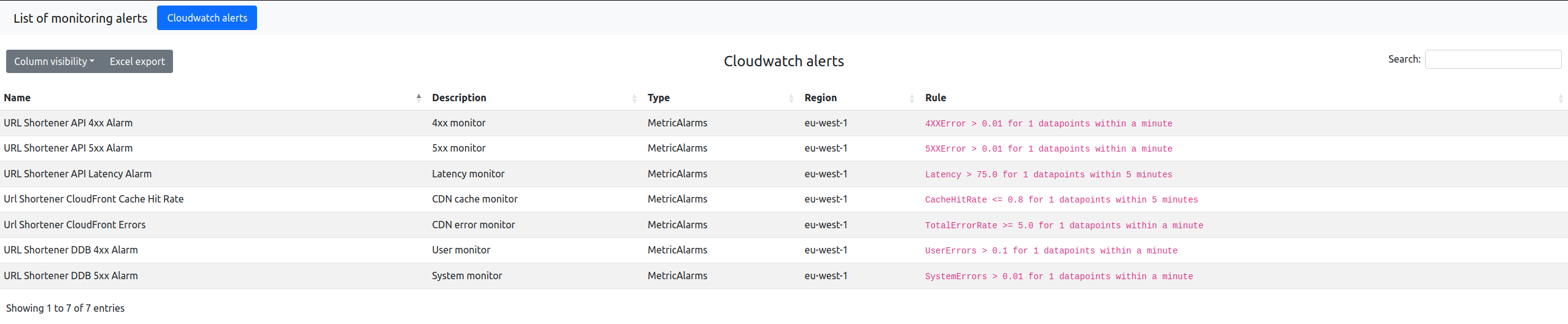
alert-exporter -o aws.html --cloudwatch --aws-region eu-west-1 --aws-profile profile
Pingdom
An API key with read only permission is required to fetch the checks. The key can be provided in the PINGDOM_API_KEY environment variable.
alert-exporter -o pingdom.html --pingdom --pingdom-tags example-tag
Multiple sources at once
alert-exporter -o combined.html --prometheus --cloudwatch --aws-region eu-west-1
Formats
Predefined formats are provided with this tool:
- HTML
- Markdown
- YAML
You can use a custom format by providing a Jinja2 file with the --jinja-template flag.
HTML output example
Contributing
Pull requests are welcome. For major changes, please open an issue first to discuss what you would like to change.
1 maintainer

Metadata
1 maintainer
Release files for alert-exporter 0.5.1
For a detailed explanation of source distributions (sdists) and built distributions (wheels), please see the package formats documentation.
Source distribution (sdist)
| File | Size | Uploaded | Provenance | Actions |
|---|---|---|---|---|
| alert_exporter-0.5.1.tar.gz | 147.9 kB | Without provenance | Details for alert_exporter-0.5.1.tar.gz |
Built distribution (wheel)
| File | Interpreter | ABI | Platform | Actions Reset |
|---|---|---|---|---|
| alert_exporter-0.5.1-py3-none-any.whl | Python 3 | none | any | Details for alert_exporter-0.5.1-py3-none-any.whl |
Total release size: 162.2 kB
Release files / alert_exporter-0.5.1.tar.gz
| Download URL | alert_exporter-0.5.1.tar.gz |
|---|---|
| Size | 147.9 kB |
| Tags | Source |
|
SHA-256 checksum How to use checksums |
b793cf354685ed8b3f1fc90eea7a4c124fc5472e710c3a19ada81ba1026b2b44
|
|
BLAKE2b-256 checksum How to use checksums |
93a2e761bdf2d7bc9446867c2bb58b1d8f3280f289de5c9a475b85696b981e98
|
| Upload date | |
|
Uploaded using Trusted Publishing? What is trusted publishing? |
No |
| Uploaded via |
twine/4.0.1 CPython/3.9.13
|
Release files / alert_exporter-0.5.1-py3-none-any.whl
| Download URL | alert_exporter-0.5.1-py3-none-any.whl |
|---|---|
| Size | 14.3 kB |
| Tags | Python 3 |
|
SHA-256 checksum How to use checksums |
228134c43657024f1e96f36d47c3dcd86f32c20f984d33de1ca065be25f7f615
|
|
BLAKE2b-256 checksum How to use checksums |
f5a22941f7745fbe82924caa1878e10511010faac33f5d3ee52516f846be1949
|
| Upload date | |
|
Uploaded using Trusted Publishing? What is trusted publishing? |
No |
| Uploaded via |
twine/4.0.1 CPython/3.9.13
|
Security for alert-exporter 0.5.1
Provenance
Provenance describes where a file came from. On PyPI, provenance is shared via attestations, which provide a verifiable record of the build or publishing details. View details, limitations and caveats.
No provenance found
None of the files in this release were uploaded with provenance metadata.
A note on package security
PyPI is a repository for distributing packages, not a service for auditing them. While third-party security researchers and our staff do their best to detect and remove malicious packages, PyPI cannot guarantee the quality, security or suitability of any given package.
To learn more about protecting yourself from malicious actors, visit our package security documentation.














