
Calculator
A small Python calculator library for basic arithmetic operations.
Features
- Basic arithmetic operations (+, -, *, /, **, %)
- Usage as a library in another file
- Three example/test scripts
- A CLI for simple and fast usage
Technologies
- Python
- Tkinter
- setuptools
- Python Packaging
Installation
- Install at least Python 3.9 (Python 3.14.7 Windows 64-bit installer | Windows 3.14.7 32-bit installer | Python 3.14.7 macOS installer | All releases)
- Run:
py -m pip install git+https://github.com/alessioiskuhl/Calculator.gitin the terminal of your choice
Library usage
CLI
- Open a terminal of your choice
- Make a calculation with the following format:
calculator <number> <operator> <number>
Example CLI:
calculator 10 + 5
calculator 10 * 5
calculator 2 ** 8
calculator 10 % 3
Inside a script
- Type
from calculator import Calculatorat the beginning of your script to import the library into your script or use one of the three test scripts - Assign an object to the class from the Calculator library
- Use the following format to perform a calculation: yourObject.calc(float(firstNumber), mathExpressionAsString, float(secondNumber))
Example Use:
from calculator import Calculator    # Import the library

calc = Calculator()                  # Create an object for the Calculator class

result = calc.calc(10, "+", 5)       # Calculates the result

print(result)                        # Prints out the result (should be 15 in this case)
or for a calculator with text input:
from calculator import Calculator                                                                         # Importing the library

calc = Calculator()                                                                                       # Create an object for the Calculator class

calculation = input("Enter your calculation in the format: num1 operation num2 (e.g., 5 + 3): ")          # Asking for user input and saving it in a variable

num1, types, num2 = calculation.split()                                                                   # Splits the user input into 3 different variables to put into the calculation function

print(calc.calc(float(num1), types, float(num2)))                                                         # Calculates and prints the result
Test usage
automated test
Running the file should output something like in the following picture if you have installed the library correctly:
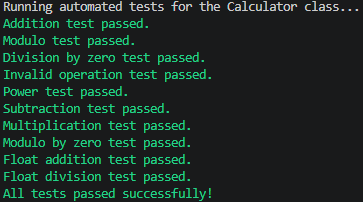
simple text test
When running the simple text test it should work like a simple command line calculator if you have installed everything correctly
test with UI
When running this file, a simple window should open letting you type in the numbers, select a math operation and press a button to calculate and show the result. If you have Python installed (Which you need for this calculator) you should not need to install anything additional to be able to use the test with UI.
What I learned
- You can import a class from another python file into your script basically turning it into a library
- When importing a class into your script yoou need to make sure every function inside the class has self as the first expression to avoid problems at usage
- Proper file organization on GitHub
- Turning a Python file into a proper installable Python package
- Creating a CLI
Status
Completed – v1.0.0
1 maintainer

Metadata
1 maintainer
Release files for alessio-calculator 1.0.0
For a detailed explanation of source distributions (sdists) and built distributions (wheels), please see the package formats documentation.
Source distribution (sdist)
| File | Size | Uploaded | Provenance | Actions |
|---|---|---|---|---|
| alessio_calculator-1.0.0.tar.gz | 5.0 kB | Without provenance | Details for alessio_calculator-1.0.0.tar.gz |
Built distribution (wheel)
| File | Interpreter | ABI | Platform | Actions Reset |
|---|---|---|---|---|
| alessio_calculator-1.0.0-py3-none-any.whl | Python 3 | none | any | Details for alessio_calculator-1.0.0-py3-none-any.whl |
Total release size: 10.2 kB
Release files / alessio_calculator-1.0.0.tar.gz
| Download URL | alessio_calculator-1.0.0.tar.gz |
|---|---|
| Size | 5.0 kB |
| Tags | Source |
|
SHA-256 checksum How to use checksums |
f96416f88b02c3554f0ba188128609d06209d13d33aa78f2c5fa4b622fe36e07
|
|
BLAKE2b-256 checksum How to use checksums |
79cbfb176f56542a47d5a364f8adb087c4d6c1301e6ee9efae1ef277d01c0c30
|
| Upload date | |
|
Uploaded using Trusted Publishing? What is trusted publishing? |
No |
| Uploaded via |
twine/7.0.0 CPython/3.14.7
|
Release files / alessio_calculator-1.0.0-py3-none-any.whl
| Download URL | alessio_calculator-1.0.0-py3-none-any.whl |
|---|---|
| Size | 5.2 kB |
| Tags | Python 3 |
|
SHA-256 checksum How to use checksums |
ac92e448e2707c628e89fc569ad6dada3ac38ce4fdc1a3b68621e1cb7350780f
|
|
BLAKE2b-256 checksum How to use checksums |
ddf275d28788706eeadd7daa45dba9d6e924d3e82c9fd919cc30d443f913b4e3
|
| Upload date | |
|
Uploaded using Trusted Publishing? What is trusted publishing? |
No |
| Uploaded via |
twine/7.0.0 CPython/3.14.7
|
Security for alessio-calculator 1.0.0
Provenance
Provenance describes where a file came from. On PyPI, provenance is shared via attestations, which provide a verifiable record of the build or publishing details. View details, limitations and caveats.
No provenance found
None of the files in this release were uploaded with provenance metadata.
A note on package security
PyPI is a repository for distributing packages, not a service for auditing them. While third-party security researchers and our staff do their best to detect and remove malicious packages, PyPI cannot guarantee the quality, security or suitability of any given package.
To learn more about protecting yourself from malicious actors, visit our package security documentation.













