
 alf-tools




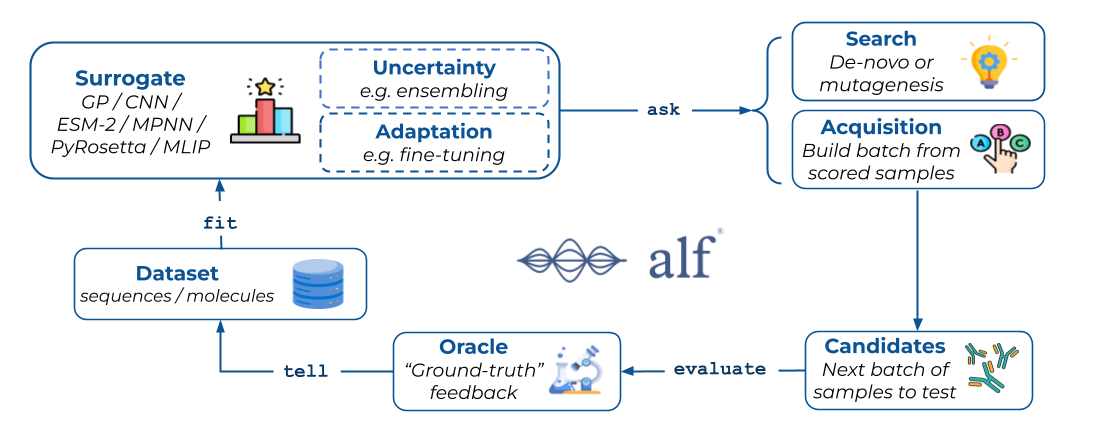
Ready-to-use models, datasets, and acquisition functions for ALF (Active Learning Framework).
alf-tools builds on alf-core
to give you everything needed to run active-learning experiments out of the box — example
datasets (GFP, ProteinGym, FLIP, GuacaMol), models (CNN, Gaussian Process, ESM-2, Chemprop),
acquisition functions, and search strategies. Use it for quick-start and prototyping; reach for
alf-core alone when you want the lightweight framework with no ML-framework dependencies.
Installation
pip install alf-tools
This installs PyTorch and the core dependencies. Some models need additional dependencies — see Optional Extras below.
Optional Extras
Some models require additional dependencies. Append one or more extras to the package name.
Per-model extras (esm2, esmfold, chemprop, guacamol) install exactly one model's
dependencies; workflow umbrellas (protein, molecule) group the extras you are likely to use
together.
pip install "alf-tools[esm2]"      # ESM-2 protein language model (ESM2Model)
pip install "alf-tools[esmfold]"   # ESMFold structure-prediction oracle (ESMFoldModel)
pip install "alf-tools[chemprop]"  # Chemprop small-molecule MPNN (ChempropModel)
pip install "alf-tools[guacamol]"  # GuacaMol RDKit-based dataset/scoring
pip install "alf-tools[protein]"   # umbrella: esm2 + esmfold
pip install "alf-tools[molecule]"  # umbrella: chemprop + guacamol
Documentation
- Full documentation: instadeepai.github.io/alf
- API reference: alf-tools API
- Installation guide: instadeepai.github.io/alf/installation.html
- Core framework: alf-core
- Tutorials: tutorials/
What's included
alf-tools bundles example datasets (GFP, ProteinGym, FLIP, GuacaMol), surrogate and oracle
models (CNN, Gaussian Process, ESM-2, ESMFold, Chemprop, PyRosetta, plus an ensemble wrapper),
acquisition functions (Greedy, UCB, Expected Improvement, Thompson Sampling, CoreSet, and a
BoTorch wrapper), and search strategies. See the
API reference for the full
catalogue and configuration options.
Quick example
from alf_core import (
    BaseDatasetConfig,
    DatasetSearch,
    DesignTask,
    Optimizer,
    Oracle,
    Surrogate,
    TerminalStateLogger,
)
from alf_tools.datasets import GFP
from alf_tools.models import CNNModel
from alf_tools.optimizer.acquisition_functions import Greedy

# Configure and load the dataset
config = BaseDatasetConfig(
    name="gfp",
    modality="sequence",
    seed=42,
    train_ratio=0.1,
    validation_frac=0.5,
    test_ratio=0.2,
    split_type="random",
    problem_type="regression",
)
dataset = GFP(config)
surrogate = Surrogate(model=CNNModel())
optimizer = Optimizer(acquisition_fn=Greedy(), search_fn=DatasetSearch())
oracle = Oracle(scorer=dataset)

# Run active learning
task = DesignTask(num_acq_rounds=5, acq_batch_size=100)
state = task.setup(dataset=dataset, surrogate=surrogate)
task.run(
    state=state,
    state_loggers=[TerminalStateLogger()],
    optimizer=optimizer,
    oracle=oracle,
)
Normalisation
Models support input normalisation and output standardisation through their train configs
(BaseTrainConfig). GPModel enables both by default (minmax inputs, standardised outputs);
the other models default to neither. See the
API reference for per-model
defaults and configuration.
Creating custom components
All components subclass the alf_core base classes (BaseDataset, BaseModel,
AcquisitionFunction, BaseSearch). See the
how-to guides for step-by-step instructions.
License
Apache License 2.0 — see LICENSE.
Metadata
Release files for alf_tools 0.1.0
For a detailed explanation of source distributions (sdists) and built distributions (wheels), please see the package formats documentation.
Source distribution (sdist)
| File | Size | Uploaded | Provenance | Actions |
|---|---|---|---|---|
| alf_tools-0.1.0.tar.gz | 115.6 kB | Without provenance | Details for alf_tools-0.1.0.tar.gz |
Built distribution (wheel)
| File | Interpreter | ABI | Platform | Actions Reset |
|---|---|---|---|---|
| alf_tools-0.1.0-py3-none-any.whl | Python 3 | none | any | Details for alf_tools-0.1.0-py3-none-any.whl |
Total release size: 271.7 kB
Release files / alf_tools-0.1.0.tar.gz
| Download URL | alf_tools-0.1.0.tar.gz |
|---|---|
| Size | 115.6 kB |
| Tags | Source |
|
SHA-256 checksum How to use checksums |
4d9907fca96612cb8e0ed38c4b38cd68d05a577a0d460faf7e2e405aec52755c
|
|
BLAKE2b-256 checksum How to use checksums |
a97be46a521bf8e3fbe6ab3f387c734f5e54f8863de8e2764d5f5f7b6115b90a
|
| Upload date | |
|
Uploaded using Trusted Publishing? What is trusted publishing? |
Yes |
| Uploaded via |
uv/0.12.20 {"installer":{"name":"uv","version":"0.12.20","subcommand":["publish"]},"python":null,"implementation":{"name":null,"version":null},"distro":{"name":"Ubuntu","version":"26.04","id":"resolute","libc":null},"system":{"name":null,"release":null},"cpu":null,"openssl_version":null,"setuptools_version":null,"rustc_version":null,"ci":true}
|
Release files / alf_tools-0.1.0-py3-none-any.whl
| Download URL | alf_tools-0.1.0-py3-none-any.whl |
|---|---|
| Size | 156.1 kB |
| Tags | Python 3 |
|
SHA-256 checksum How to use checksums |
91617fcb1819578addb042a9b51c083ba7b81a01bfef97ef85d2dcf41e530bac
|
|
BLAKE2b-256 checksum How to use checksums |
cf1b6570415020afa826ab7ba2eb396dd7bb004890f5f58bdf6bb773c5422fb3
|
| Upload date | |
|
Uploaded using Trusted Publishing? What is trusted publishing? |
Yes |
| Uploaded via |
uv/0.12.20 {"installer":{"name":"uv","version":"0.12.20","subcommand":["publish"]},"python":null,"implementation":{"name":null,"version":null},"distro":{"name":"Ubuntu","version":"26.04","id":"resolute","libc":null},"system":{"name":null,"release":null},"cpu":null,"openssl_version":null,"setuptools_version":null,"rustc_version":null,"ci":true}
|
Security for alf_tools 0.1.0
Provenance
Provenance describes where a file came from. On PyPI, provenance is shared via attestations, which provide a verifiable record of the build or publishing details. View details, limitations and caveats.
No provenance found
None of the files in this release were uploaded with provenance metadata.
A note on package security
PyPI is a repository for distributing packages, not a service for auditing them. While third-party security researchers and our staff do their best to detect and remove malicious packages, PyPI cannot guarantee the quality, security or suitability of any given package.
To learn more about protecting yourself from malicious actors, visit our package security documentation.














