
 alf-tools





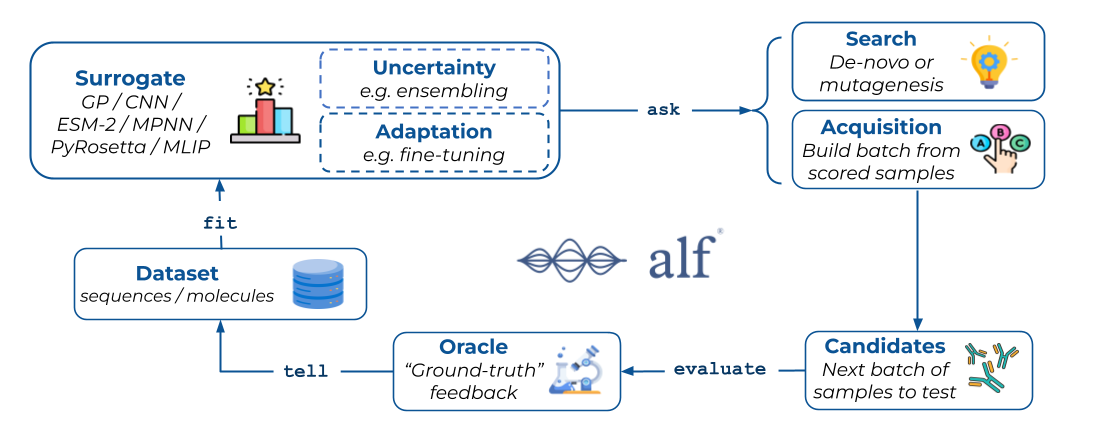
Ready-to-use models, datasets, and acquisition functions for ALF (Active Learning Framework).
alf-tools builds on alf-core
to give you everything needed to run active-learning experiments out of the box — example
datasets (GFP, ProteinGym, FLIP, GuacaMol), models (CNN, Gaussian Process, ESM-2, Chemprop),
acquisition functions, and search strategies. Use it for quick-start and prototyping; reach for
alf-core alone when you want the lightweight framework with no ML-framework dependencies.
Installation
pip install alf-tools
This installs PyTorch and the core dependencies. Some models need additional dependencies — see Optional Extras below.
Optional Extras
Some models require additional dependencies. Append one or more extras to the package name.
Per-model extras (esm2, esmfold, chemprop, guacamol) install exactly one model's
dependencies; workflow umbrellas (protein, molecule) group the extras you are likely to use
together.
pip install "alf-tools[esm2]"      # ESM-2 protein language model (ESM2Model)
pip install "alf-tools[esmfold]"   # ESMFold structure-prediction oracle (ESMFoldModel)
pip install "alf-tools[chemprop]"  # Chemprop small-molecule MPNN (ChempropModel)
pip install "alf-tools[guacamol]"  # GuacaMol RDKit-based dataset/scoring
pip install "alf-tools[protein]"   # umbrella: esm2 + esmfold
pip install "alf-tools[molecule]"  # umbrella: chemprop + guacamol
Documentation
- Full documentation: instadeepai.github.io/alf
- API reference: alf-tools API
- Installation guide: instadeepai.github.io/alf/installation.html
- Core framework: alf-core
- Tutorials: tutorials/
What's included
alf-tools bundles example datasets (GFP, ProteinGym, FLIP, GuacaMol), surrogate and oracle
models (CNN, Gaussian Process, ESM-2, ESMFold, Chemprop, PyRosetta, plus an ensemble wrapper),
acquisition functions (Greedy, UCB, Expected Improvement, Thompson Sampling, CoreSet, and a
BoTorch wrapper), and search strategies. See the
API reference for the full
catalogue and configuration options.
Quick example
from alf_core import (
    BaseDatasetConfig,
    DatasetSearch,
    DesignTask,
    Optimizer,
    Oracle,
    Surrogate,
    TerminalStateLogger,
)
from alf_tools.datasets import GFP
from alf_tools.models import CNNModel
from alf_tools.optimizer.acquisition_functions import Greedy

# Configure and load the dataset
config = BaseDatasetConfig(
    name="gfp",
    modality="sequence",
    seed=42,
    train_ratio=0.1,
    validation_frac=0.5,
    test_ratio=0.2,
    split_type="random",
    problem_type="regression",
)
dataset = GFP(config)
surrogate = Surrogate(model=CNNModel())
optimizer = Optimizer(acquisition_fn=Greedy(), search_fn=DatasetSearch())
oracle = Oracle(scorer=dataset)

# Run active learning
task = DesignTask(num_acq_rounds=5, acq_batch_size=100)
state = task.setup(dataset=dataset, surrogate=surrogate)
task.run(
    state=state,
    state_loggers=[TerminalStateLogger()],
    optimizer=optimizer,
    oracle=oracle,
)
Normalisation
Models support input normalisation and output standardisation through their train configs
(BaseTrainConfig). GPModel enables both by default (minmax inputs, standardised outputs);
the other models default to neither. See the
API reference for per-model
defaults and configuration.
Creating custom components
All components subclass the alf_core base classes (BaseDataset, BaseModel,
AcquisitionFunction, BaseSearch). See the
how-to guides for step-by-step instructions.
License
Apache License 2.0 — see LICENSE.
Metadata
Release files for alf_tools 0.1.0
For a detailed explanation of source distributions (sdists) and built distributions (wheels), please see the package formats documentation.
Source distribution (sdist)
| File | Size | Uploaded | |
|---|---|---|---|
| alf_tools-0.1.0.tar.gz | 115.6 kB | Details |
Built distribution (wheel)
| File | Interpreter | ABI | Platform | Reset |
|---|---|---|---|---|
| alf_tools-0.1.0-py3-none-any.whl | Python 3 | none | any | Details |
Total release size: 271.7 kB
Release files / alf_tools-0.1.0.tar.gz
| Download URL | alf_tools-0.1.0.tar.gz |
|---|---|
| Size | 115.6 kB |
| Tags | Source |
|
SHA-256 checksum How to use checksums |
4d9907fca96612cb8e0ed38c4b38cd68d05a577a0d460faf7e2e405aec52755c
|
|
BLAKE2b-256 checksum How to use checksums |
a97be46a521bf8e3fbe6ab3f387c734f5e54f8863de8e2764d5f5f7b6115b90a
|
| Upload date | |
|
Uploaded using Trusted Publishing? What is trusted publishing? |
Yes |
| Uploaded via |
uv/0.12.20 {"installer":{"name":"uv","version":"0.12.20","subcommand":["publish"]},"python":null,"implementation":{"name":null,"version":null},"distro":{"name":"Ubuntu","version":"26.04","id":"resolute","libc":null},"system":{"name":null,"release":null},"cpu":null,"openssl_version":null,"setuptools_version":null,"rustc_version":null,"ci":true}
|
Release files / alf_tools-0.1.0-py3-none-any.whl
| Download URL | alf_tools-0.1.0-py3-none-any.whl |
|---|---|
| Size | 156.1 kB |
| Tags | Python 3 |
|
SHA-256 checksum How to use checksums |
91617fcb1819578addb042a9b51c083ba7b81a01bfef97ef85d2dcf41e530bac
|
|
BLAKE2b-256 checksum How to use checksums |
cf1b6570415020afa826ab7ba2eb396dd7bb004890f5f58bdf6bb773c5422fb3
|
| Upload date | |
|
Uploaded using Trusted Publishing? What is trusted publishing? |
Yes |
| Uploaded via |
uv/0.12.20 {"installer":{"name":"uv","version":"0.12.20","subcommand":["publish"]},"python":null,"implementation":{"name":null,"version":null},"distro":{"name":"Ubuntu","version":"26.04","id":"resolute","libc":null},"system":{"name":null,"release":null},"cpu":null,"openssl_version":null,"setuptools_version":null,"rustc_version":null,"ci":true}
|














