









Algovis is a python library made for visualizing algorithms. Refer to the documentation for more info.
Currently the library has these algorithms
Sorting
- Bubble Sort
- Insertion Sort
- Selection Sort
- Merge Sort
- Quick Sort
Searching
- Linear Search
- Binary Search
Getting Started
Prerequisites
I would highly suggest making a virtual environment. The main purpose of a Python virtual environments is to create an isolated environment for Python projects. You can read more about them here.
# making a test folder

$mkdir test_algovis

# make it the current directory

$cd test_algovis

# making a virtual environment (you can replace envname with whatever name you like)

$python3 -m venv envname

# activating it

$source envname/bin/activate
You can only access algovis inside this virtual environment. To leave this virtual env when you're done trying out the library, type
$deactivate
Installing
$pip3 install algovis
Using the sorting package
Visualize method
# import the sorting package from library
from algovis import sorting

# importing random module to shuffle the list
import random

# Making a list of 100 integers from 1-100
# using list comprehension
my_list = [i+1 for i in range(100)]

# shuffling the list
random.shuffle(my_list)

# making a BubbleSort class object by passing the shuffled list
bs_object = sorting.BubbleSort(my_list)

# calling the visualize method
bs_object.visualize(interval= 100)
Output
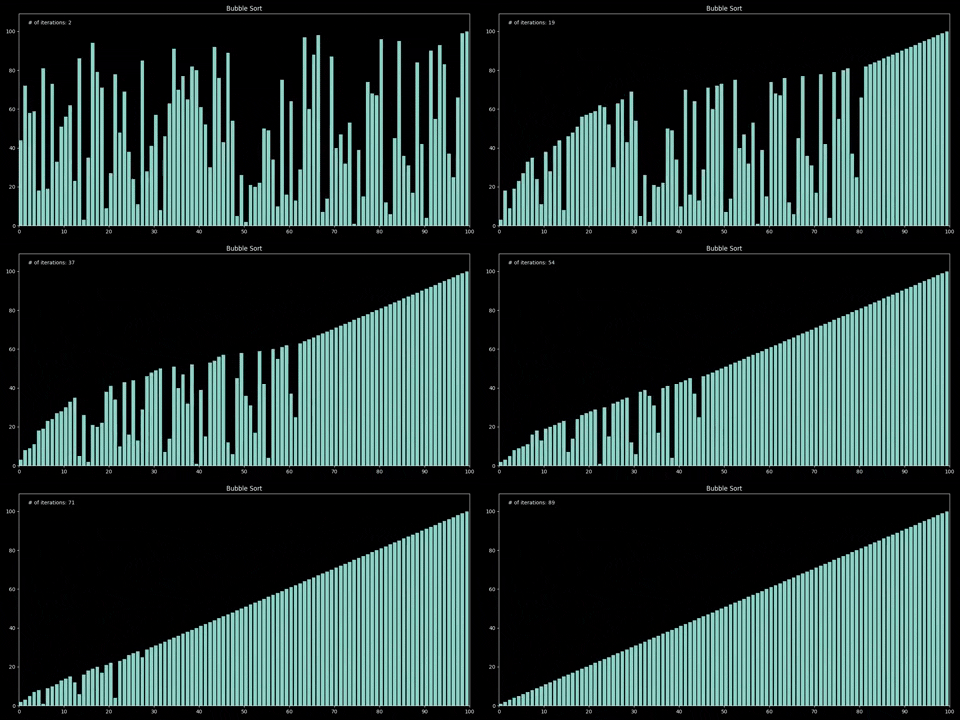
sort method
# lets work on a shorter example now
my_list = [i + 1 for i in range(10)]

# shuffling the list using random module
random.shuffle(my_list)

#making a quicksort object
qs_object = sorting.QuickSort(my_list)

#sorting in reverse with steps
qs_object.sort(pivot = "first", steps = True, reverse = True)
evaluate method
# calling the evaluate method and passing the optional parameter 'iterations'
# the list is sorted 'iterations' number of times and the min, max and average time taken
#to sort the list is returned in form of a formatted table
bs_object.evaluate(iterations = 100)
info method
# This method gives us information about the algorithm
bs_object.info()
code method
# It prints out the function for the algorithm
bs_object.code()
My terminal config is iTerm2 + ohmyzsh + powerlevel10k with dark backgroud. Colors may appear different in your terminal output. It's recommended to change the terminal color to something darker
Using the searching package
The searching package has the same methods as sorting, just instead of 'sort' you have 'search' Refer to the documentation for more info
search method
#importing searching package
from algovis import searching

# making a list of integers from 1 to 100
# using list comprehension
my_list = [i+1 for i in range(100)]

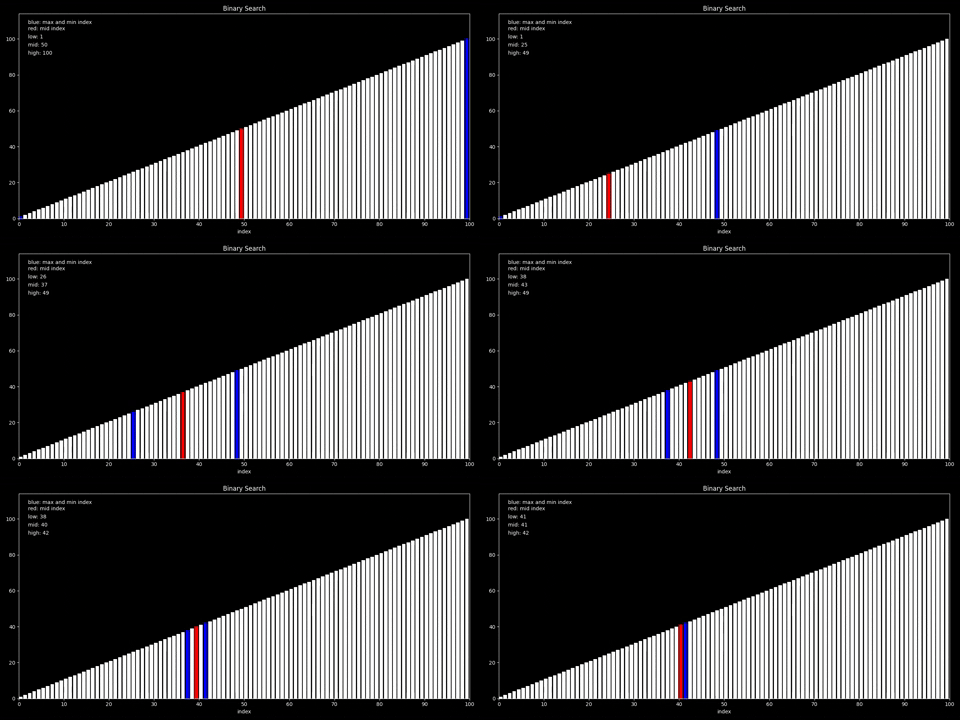
#making binary search object
bin_search = searching.BinarySearch(my_list)

#calling the search method
bin_search.search(42, steps = True)
visualize method
# calling the visualize method
# interval is the time between two different frames of the animation
bin_search.visualize(42, interval = 1000)
# or if you want to linear search 42
lin_search = searching.LinearSearch(my_list)

# setting a less interval to make a much faster animation
lin_search.visualize(42, interval = 100)
Doumentation
The documentation is built with MKdocs using material theme and is hosted on netlify. You can read it here
Author
- Mayank Arora (hotshot07)
License
This project is licensed under the GNU Affero General Public License v3 (AGPL-3.0) - see the LICENSE file for details
1 maintainer

Release files for algovis 0.1.6
For a detailed explanation of source distributions (sdists) and built distributions (wheels), please see the package formats documentation.
Source distribution (sdist)
| File | Size | Uploaded | |
|---|---|---|---|
| algovis-0.1.6.tar.gz | 37.2 kB | Details |
Built distribution (wheel)
| File | Interpreter | ABI | Platform | Reset |
|---|---|---|---|---|
| algovis-0.1.6-py3-none-any.whl | Python 3 | none | any | Details |
Total release size:86.5 kB
Release files / algovis-0.1.6.tar.gz
| Download URL | algovis-0.1.6.tar.gz |
|---|---|
| Size | 37.2 kB |
| Tags | Source |
|
SHA-256 checksum How to use checksums |
d28da95261314f09e190abcbdf43308dd91d4784fd9c2b0b46ba067be56695c2
|
|
BLAKE2b-256 checksum How to use checksums |
2a82b636a4de1e9762c7c326497e54e8b654384e811583d091768cdf555348cc
|
| Upload date | |
|
Uploaded using Trusted Publishing? What is trusted publishing? |
No |
| Uploaded via |
poetry/1.0.9 CPython/3.7.8 Darwin/19.6.0
|
Release files / algovis-0.1.6-py3-none-any.whl
| Download URL | algovis-0.1.6-py3-none-any.whl |
|---|---|
| Size | 49.3 kB |
| Tags | Python 3 |
|
SHA-256 checksum How to use checksums |
03c7645c0b57a24c14a95b9fee8017b5937845ac120aa4693fd22bc91907cf8a
|
|
BLAKE2b-256 checksum How to use checksums |
830479aa1500f9c3a60181552c98988c1908f0c7c3b3de1289185594002e65cb
|
| Upload date | |
|
Uploaded using Trusted Publishing? What is trusted publishing? |
No |
| Uploaded via |
poetry/1.0.9 CPython/3.7.8 Darwin/19.6.0
|














