
Generate bash/zsh/fish shell aliases automatically.

Project description
ALIAS-GEN 𑗊
Shell aliases are shortcuts or abbreviations for commands that are used in a Unix/Linux shell. They can save you time if you have very long or complex commands that you frequently use. ALIAS-GEN is a script that will create bash/zsh/fish shell aliases automatically to simplify your command-line tasks.
This script will create bash/zsh/fish shell aliases automatically. You can generate a new alias file by following the prompts, or use the --stdout option to print results directly in your terminal.
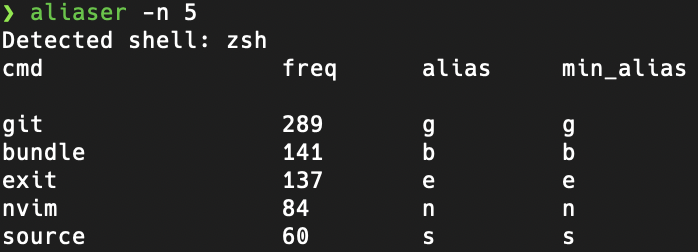
Two types of aliases are suggested, the default algorithm matches all characters incrementally for each command, while the --use_min_alias algorithm aims to minimize the total length of characters per command.
Additionally, --use_min_alias does not necessarily match all characters in the command.
The freq (frequency) column shows how often each command was used. For now, this script only generates aliases for the first word in a command. NOTE: Two character commands or less are not processed.
By default, fish shell generates abbr (abbreviations) rather than aliases.
Requirements
- Python 3.6 or higher.
- No dependences required for installation.
Install from pypi
pip install alias-gen
https://pypi.org/project/alias-gen/
CLI Usage
Full Help Menu:
aliaser -h
Example usage to generate the top 40 aliases:
aliaser -n 40
With stdout and min_alias:
aliaser --stdout --use_min_alias
The -s argument specifies the shell type. In this example, fish shell is used.
aliaser -s fish
The -f argument allows you to specify a custom history file path.
aliaser -s zsh -f ~/.custom_zsh_history
How does it work?
The alias column is generated by first sorting the most common commands found
in the history file, then aliases are generated for commands more than two
characters. These aliases just try to match character per character the given
command and will continue with more characters if there is a previous common
alias.
The min_alias column tries to minimize the total length of chars disregarding
the rule of matching the command character per character. It is generated using
the first char of the command always, followed by easy to reach keyboard characters
defined as QUERTY layout middle row, top row, then bottom row.
Misc
I recommend using this script along with other shell plugins that help you remember your alias or abbreviation. One example for fish shell is fish-abbreviation-tips.
Buy me a coffee
Hope you found this project helpful, consider buying a coffee to show your support.



Download files
Download the file for your platform. If you're not sure which to choose, learn more about installing packages.
Source Distribution
Built Distribution
Filter files by name, interpreter, ABI, and platform.
If you're not sure about the file name format, learn more about wheel file names.
Copy a direct link to the current filters
File details
Details for the file alias_gen-0.6.7.tar.gz.
File metadata
- Download URL: alias_gen-0.6.7.tar.gz
- Upload date:
- Size: 8.8 kB
- Tags: Source
- Uploaded using Trusted Publishing? No
- Uploaded via: twine/4.0.2 CPython/3.11.4
File hashes
| Algorithm | Hash digest | |
|---|---|---|
| SHA256 |
5b40e4beb6647007ad4b20dadda289eadebe3299db01b37913268202fd55bb2c
|
|
| MD5 |
e67d517c560ef1fe4d7db06aafb4edf6
|
|
| BLAKE2b-256 |
5a1c3585d86bb11267b3762ceab118cbe76ea63a5197c4cdadfc83b264e7afad
|
File details
Details for the file alias_gen-0.6.7-py2.py3-none-any.whl.
File metadata
- Download URL: alias_gen-0.6.7-py2.py3-none-any.whl
- Upload date:
- Size: 9.5 kB
- Tags: Python 2, Python 3
- Uploaded using Trusted Publishing? No
- Uploaded via: twine/4.0.2 CPython/3.11.4
File hashes
| Algorithm | Hash digest | |
|---|---|---|
| SHA256 |
bc3fde849cc0e4c6aa4aacf34b4ccd2a4f69add19d6af426f6f612580a09d5b1
|
|
| MD5 |
f061598aa4fed952ca037b78b3cfb884
|
|
| BLAKE2b-256 |
7b4aad43f6f70f9642e36c9d294c3b8abb476ed8e85a49a4ee400158029dbc5d
|






