
allianceauth-pve

PvE tool for AllianceAuth
Free software: GNU General Public License v3
Features
This package aims at helping groups of people manage PvE sessions, centralized loot management and loot taxes.
Create a rotation
Rotations are a sort of containers for entries. When created, they have some options to customize the behavior of the tool with the entries, such as tax rate, count of setups of the system before ratting etc.
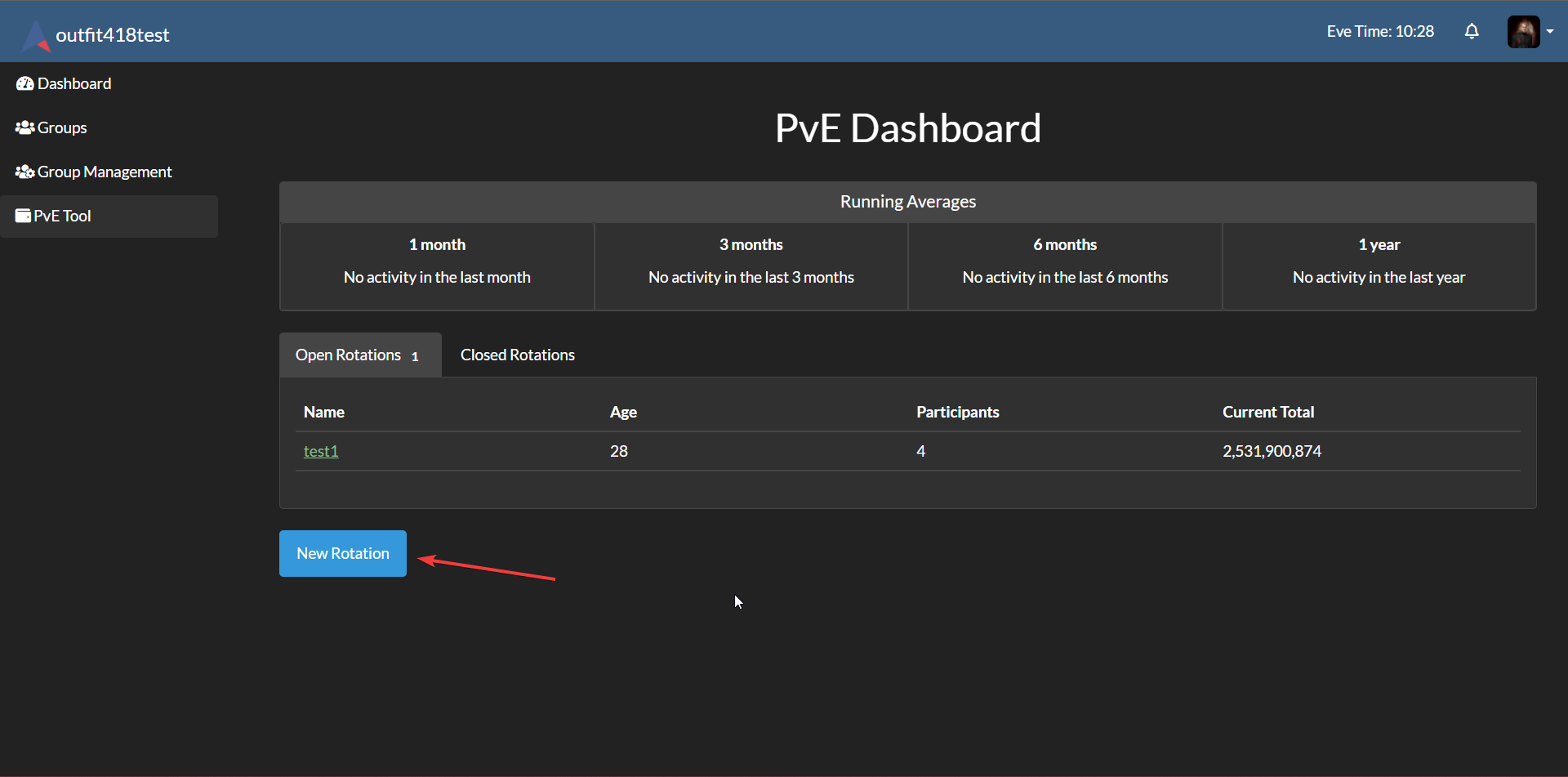
They can be created by the people with the right permission (see below). For them, a button will be avaiable in the main page. It'll lead to a form for creating a rotation.
| Field | Description |
|---|---|
| Name | |
| Priority | The priority for the rotation in the list of active rotations. Rotations are displayed in descending order of priority. |
| Tax rate | Tax rate in percentage. 0 for disabling taxes. |
| Max daily setups | The maximum number of helped setups a user can get per day. This option is thought for wormholes where you should setup a system before ratting in it. Set to 0 for disabling tracking setups. Defaults to 1. |
| Min people share setup | The minimum number of users in an entry for considering the setups valid. Defaults to 3 |
| Entry buttons | Custom buttons to be shown in the Entry forms. You can select them by holding Ctrl and left-clicking. The package comes with buttons for the main C5 and C6 wormhole. sites. |
| Roles setups | Roles presets for Entry forms. You can select them by holding Ctrl and left-clicking. |
Add Entries
Entries are the corrisponding of an actual PvE fleet. They consist in an estimated total loot value and a set of shares. When an Entry is submitted to a rotation, all the rules of tax rate and setups are applied and the loot value is split between the participants according to their share weight. To add an entry to a rotation, click on the plus button on the bottom left of the screen.
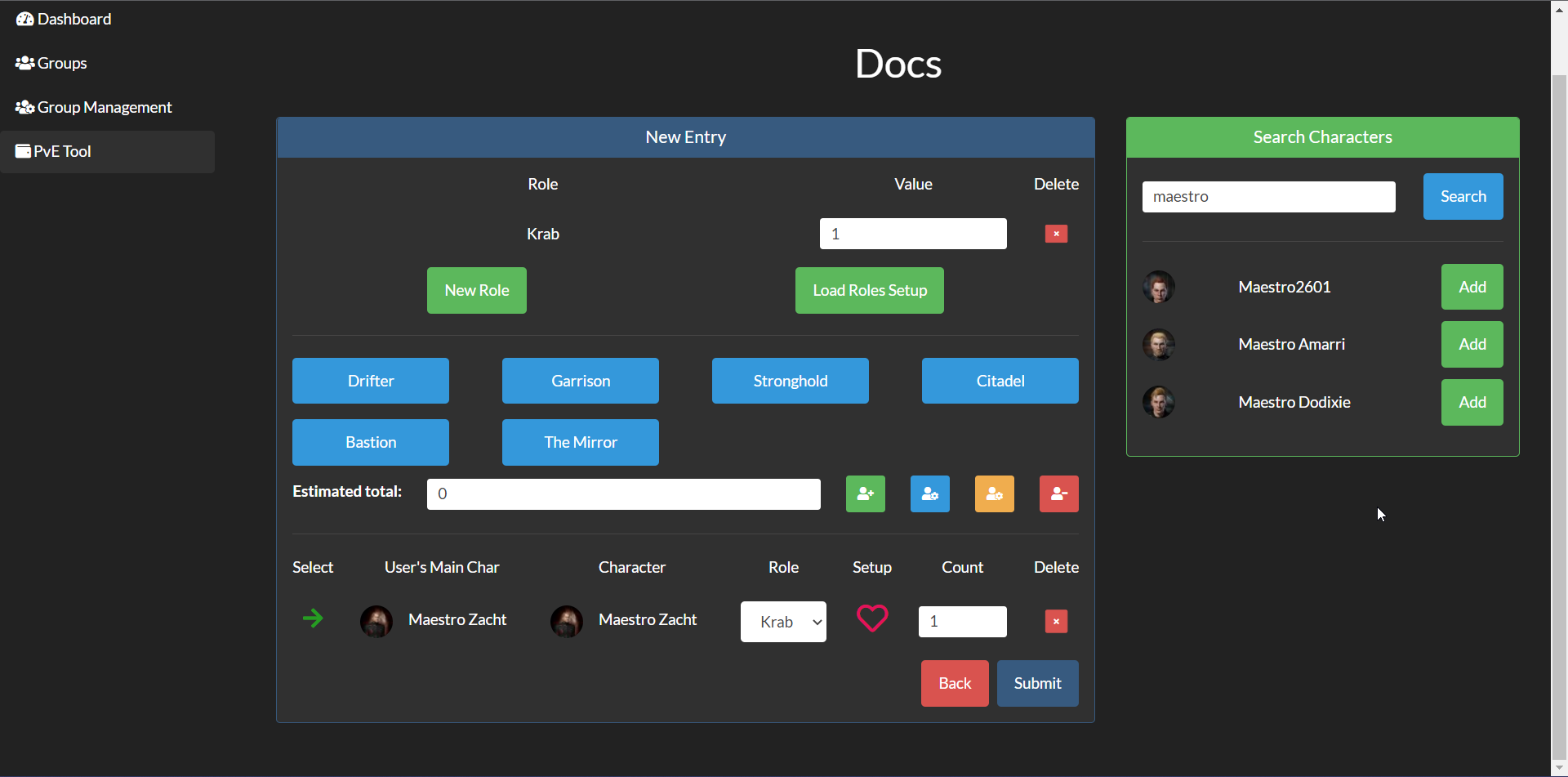
Every entry has a list of shares. To add a share, search for the character you want to add in the panel on the right and click the add button.
A share will be added with the first role in the list, 1 site count and no setup. Setups are helpful in wormholes when you want to track who helped setting up a system before ratting. Roles defines how loot will be split between the shares: for example, if someone has 1 site count and a role with a value of 1 and someone else has 1 site count and a role with a value of 2, this last person will receive double the amount of money of the first one.
In order to add a role, you can click on the New Role button and create one from scratch or load a roles setup, if you chose at least one in the rotation form, by clicking on the Load Roles Setup button.
When you have a role loaded, you can choose it from the dropdown select on the shares.
On the center of the right panel there is the Estimated total section. There is a numeric field and a list of buttons if you selected at least one in the rotation form. you can either input the estimated total by hand or click on the buttons while you are running the sites.
On the right of the Estimated total field there are 4 buttons for incrementing the site count of the shares. If you hover each of them there'll be a tooltip telling what each button does. The ones that change selected chars only edit the shares with the green arrow. This is helpful if you are doing the form while you are running the sites: if a person leaves, you can click on the arrow and it'll be unselected.

Once you have submitted the entry, you'll see updating the summary and the entry list on the rotation page. You can edit an entry by clicking the arrow on the right of the row in the entry list and then click on the edit button.
NEW: From version 2.0, the entry form is saved into local storage every time you change something. This means that if you accidentally close the page while you are filling the form, your progress won't be lost. When you open the form again you'll find all the data you inputted before.
Funding Projects
In the dashboard, there is a section for funding projects. People with the appropriate permission (see below) can create projects and add them to the list. When adding entries, an active funding project can be selected with a percentage of the entry to be added to the project. The money will be added to the project total once the rotation is closed.
In each project page, there is a list of the people who have contributed to the project and the total amount of money they have contributed and the current completion percentage of the project.
Projects need to be closed manually by people with the appropriate permission and they will not appear during entry creation.
Closed Rotation
When the loot is sold, a person with the right permission (see below) can close the rotation and insert the sales value in the form. Then the closed rotation page will be shown with the right amount of money to send to each person, calculated on the sales value.
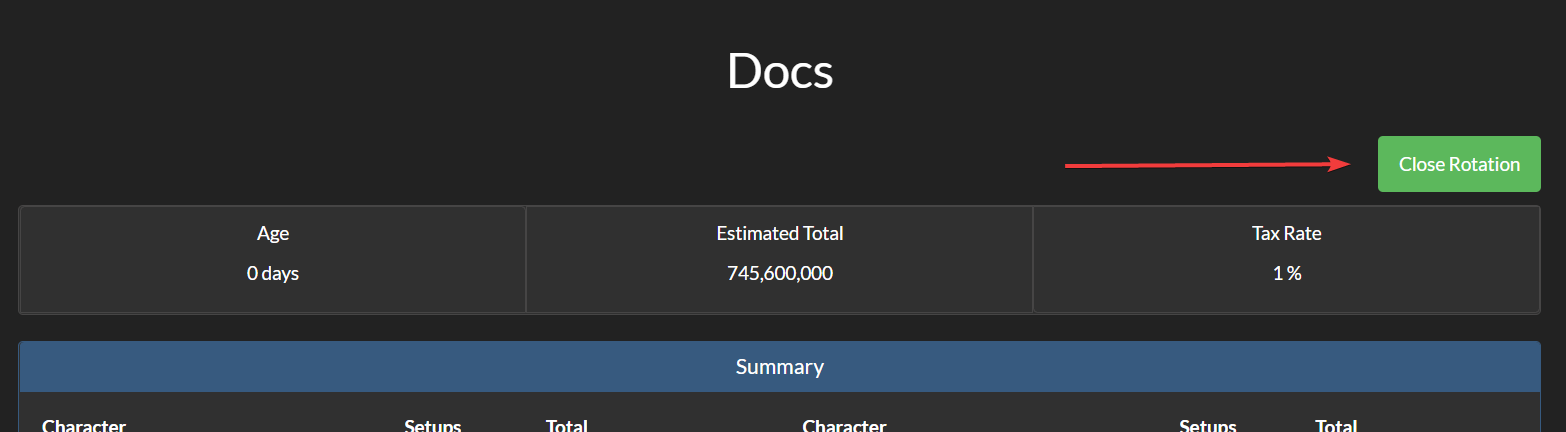
You can see all the closed rotations from the dashboard.
In a closed rotation summary, you can click on a character name and on an actual total to copy their value. Once you do so, the corresponding row in the table will be of a different color to help tracking down who is already being copied. To reset a row color, click on the X button on the right of the row.
Buttons and Roles Setups
Buttons and roles setups can be created in the admin page by people who have access.
Rotation Presets
Rotation presets can be created in the admin page by people who have access. They can be used to ensure a rotation with a certain name is always open with the specified settings.
Settings
| Setting | Default | Description |
|---|---|---|
PVE_ONLY_MAINS |
False |
When set to True, only main characters are shown in search bar |
PVE_IGNORED_ITEM_GROUPS |
[] |
List of item group ids to ignore in the entry form. This is useful for cases such as blue loot, where in game estimates can be added manually to the total |
PVE_IGNORED_ITEM_IDS |
[] |
Same as PVE_IGNORED_ITEM_GROUPS, but with individual item ids |
Help wanted
This modeling is based on how whormoles fleets and loot are managed. If you have some feature requests for other types of environment, pls join AllianceAuth discord and give me a shout in the allianceauth-pve community forum channel. I don't have any experience in anything except whormholes so any help is appriciated.
Installation
This app depends on Allianceauth and requires a functioning installation. It also depends on the django-eveonline-sde package, so make sure to follow its installation instructions before installing this package.
pip install allianceauth-pve- Add
allianceauth_pve(note the underscore) to yourINSTALLED_APPS - Run migrations
- Run collectstatic
- Restart AllianceAuth
Updating
pip install -U allianceauth-pve- Run migrations
- Run collectstatic
- Restart AllianceAuth
Permissions
The following permissions are provided:
access_pve: only users with this permission can see the tool and be added in entries.manage_entries: only users with this permissions can create entries.manage_rotations: only users with this permissions can create and close rotations.manage_funding_projects: only users with this permissions can create and close funding projects.
You'll have to assign this permissions to desired groups/states to make the tool work.
Management commands
The command pve_clear_cache can be used to clear the Redis cache of this app.
Credits
From an original idea of iRBlue.
This package was created with Cookiecutter and the audreyr/cookiecutter-pypackage project template.
1 maintainer

Metadata
1 maintainer
Release files for allianceauth-pve 2.0.0
For a detailed explanation of source distributions (sdists) and built distributions (wheels), please see the package formats documentation.
Source distribution (sdist)
| File | Size | Uploaded | |
|---|---|---|---|
| allianceauth_pve-2.0.0.tar.gz | 1.2 MB | Details |
Built distribution (wheel)
| File | Interpreter | ABI | Platform | Reset |
|---|---|---|---|---|
| allianceauth_pve-2.0.0-py3-none-any.whl | Python 3 | none | any | Details |
Total release size: 2.4 MB
Release files / allianceauth_pve-2.0.0.tar.gz
| Download URL | allianceauth_pve-2.0.0.tar.gz |
|---|---|
| Size | 1.2 MB |
| Tags | Source |
|
SHA-256 checksum How to use checksums |
5947eeb86214725b4ac1b6ba40413c6f96638da9558051609711ec96706738dc
|
|
BLAKE2b-256 checksum How to use checksums |
3053ea2bb98dcdc48bccbbab325606134c390ffd5d906f71b980d42820199cd7
|
| Upload date | |
|
Uploaded using Trusted Publishing? What is trusted publishing? |
Yes |
| Uploaded via |
twine/7.0.0 CPython/3.13.14
|
Provenance
Provenance describes where a file came from. On PyPI, provenance is shared via attestations, which provide a verifiable record of the build or publishing details. View details, limitations and caveats.


PyPI Publish Attestation
PyPI verified that this artifact, at this checksum, originated from the publisher listed below.
Signed by GitHub Actions, verified by PyPI on Aug 29, 2026.
Transparency logRelease files / allianceauth_pve-2.0.0-py3-none-any.whl
| Download URL | allianceauth_pve-2.0.0-py3-none-any.whl |
|---|---|
| Size | 1.2 MB |
| Tags | Python 3 |
|
SHA-256 checksum How to use checksums |
f85db9a08b7664fe5fdb5f8bc92f7f080c9eb959795bd061e8873dd611807df9
|
|
BLAKE2b-256 checksum How to use checksums |
5cc5b5e0ad66424cac61e4c03166e33fc5d9f9dcb796bb208a225f52a3856ed9
|
| Upload date | |
|
Uploaded using Trusted Publishing? What is trusted publishing? |
Yes |
| Uploaded via |
twine/7.0.0 CPython/3.13.14
|
Provenance
Provenance describes where a file came from. On PyPI, provenance is shared via attestations, which provide a verifiable record of the build or publishing details. View details, limitations and caveats.
PyPI Publish Attestation
PyPI verified that this artifact, at this checksum, originated from the publisher listed below.
Signed by GitHub Actions, verified by PyPI on Aug 29, 2026.
Transparency log













