
Allure AI Failure Analyzer
An intelligent CLI tool that transforms raw Allure test results into an interactive dashboard featuring a powerful AI analyst. Get visual insights, proactive summaries, and ask complex questions about your test failures in natural language.
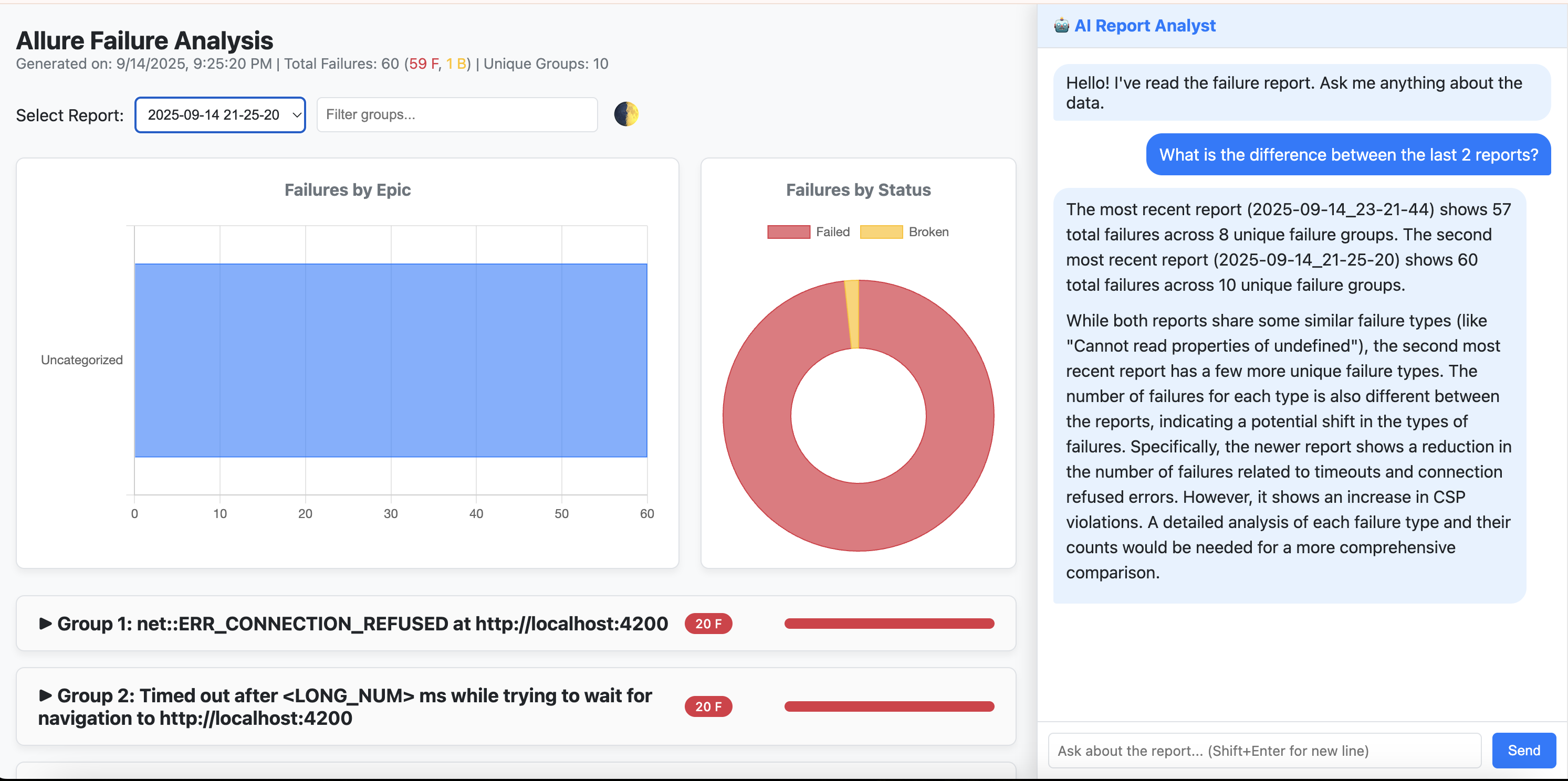
Features
✨ Interactive HTML Dashboard: Displays grouped failures with expandable details, including stack traces and examples.
🤖 Integrated AI Analyst (Powered by Gemini):
- Conversational memory for follow-up questions.
- Autonomous use of analysis tools (historical trends, bug frequency, etc.).
- Natural language queries: “What’s the difference between the last two reports?”
🚀 Proactive Executive Summary: Automatic summary of the latest run (configurable).
📊 Visual Data Dashboard: Failures by epic, status breakdown, trends.
📈 Historical Trend Analysis: Identify patterns and track bug recurrence over time.
Prerequisites
- Python 3.11+
- pip
- An Allure results directory from your test runs.
macOS tip (Homebrew):
brew install python@3.11
Installation
pip install allure-ai-analyzer
Quickstart
-
Create a virtual environment (recommended):
python3.11 -m venv .venv
source .venv/bin/activate
-
Install the CLI:
pip install allure-ai-analyzer
-
Configure your API key:
Create a.envfile in your automation project root:GEMINI_API_KEY="your-api-key-here"
-
Generate a report:
Run from the folder containingallure-results:allure-analyze generate -
View the dashboard + AI analyst:
allure-analyze viewDefault server: http://127.0.0.1:8000
Configuration
Override defaults with allure-analyzer-config.yaml in your project root.
Default config (src/allure_analyzer/config/default_config.yaml):
top_n_groups_to_report: -1
include_broken: true
proactive_summary_on_load: true
CLI flags:
--path /path/to/results--config /path/to/config.yaml--top-n 10--exclude-broken--port 8001--no-proactive-summary
Usage Examples
- Generate a report:
allure-analyze generate --top-n 10
- View the dashboard:
allure-analyze view --port 9000
Troubleshooting
- Command not found: Activate your venv and check
pip show allure-ai-analyzer. - No matching distribution: Ensure you’re on Python ≥3.11.
- Assets not found: Make sure you installed from PyPI, not a local copy missing
static/ortemplates/.
Using the AI Analyst
Example queries:
- “What is the difference between the last two reports?”
- “Analyze failure trends for the last 30 days.”
- “What was the most impacted epic in the latest run?”
- “Summarize the key issues in the latest report.”
License
1 maintainer

Metadata
1 maintainer
Release files for allure-ai-analyzer 1.0.8
For a detailed explanation of source distributions (sdists) and built distributions (wheels), please see the package formats documentation.
Source distribution (sdist)
| File | Size | Uploaded | |
|---|---|---|---|
| allure_ai_analyzer-1.0.8.tar.gz | 19.7 kB | Details |
Built distribution (wheel)
| File | Interpreter | ABI | Platform | Reset |
|---|---|---|---|---|
| allure_ai_analyzer-1.0.8-py3-none-any.whl | Python 3 | none | any | Details |
Total release size: 43.1 kB
Release files / allure_ai_analyzer-1.0.8.tar.gz
| Download URL | allure_ai_analyzer-1.0.8.tar.gz |
|---|---|
| Size | 19.7 kB |
| Tags | Source |
|
SHA-256 checksum How to use checksums |
cf195ba6b14310c6d0929717e1dad140bdf628a7b0e8e8e03c98b6396ab6857b
|
|
BLAKE2b-256 checksum How to use checksums |
fd503f635483d849ffbb091992dd486bb041e2bcf0ab01565426742148e64635
|
| Upload date | |
|
Uploaded using Trusted Publishing? What is trusted publishing? |
No |
| Uploaded via |
twine/6.2.0 CPython/3.11.13
|
Release files / allure_ai_analyzer-1.0.8-py3-none-any.whl
| Download URL | allure_ai_analyzer-1.0.8-py3-none-any.whl |
|---|---|
| Size | 23.4 kB |
| Tags | Python 3 |
|
SHA-256 checksum How to use checksums |
4811e637c73e53281732060d23c4a6fe74518db06659dd6028c8d4e93e6cc516
|
|
BLAKE2b-256 checksum How to use checksums |
7dbe7f2b7e43ed1f58c3326166ec82d53cc5c3e614fdb827ae3fe86b9d8c5963
|
| Upload date | |
|
Uploaded using Trusted Publishing? What is trusted publishing? |
No |
| Uploaded via |
twine/6.2.0 CPython/3.11.13
|














