
allure-pytest-auto
Timestamped Allure reports, automatic environment.properties copy-paste, and auto-open — zero boilerplate, works locally and in CI/CD.




Status: Feature-complete and actively maintained — bug reports and pytest/Allure compatibility issues are addressed promptly. See issues.
The problem
Allure reports overwrite the previous run by default — no history to fall back on. In addition you are stuck repeating 3 manual steps every run: hand-copying an environment.properties file into the results directory, running allure generate, and running allure open yourself just to see the result.
The fix
allure-pytest-auto generates timestamped reports for each run locally (fixed path in CI/CD) — no wrapper scripts needed. It also handles the remaining manual steps automatically: environment.properties generated from config with no copy-pasting, and the report opened for you.
✨ Features
- ✅ Timestamped reports — no overwrites, full run history
- ✅ Automatic
environment.propertiesfrom config — no manual copy-pasting - ✅ Optional auto-open
- ✅ Same behavior locally and in CI/CD
- ✅ Zero boilerplate
📸 See it in action
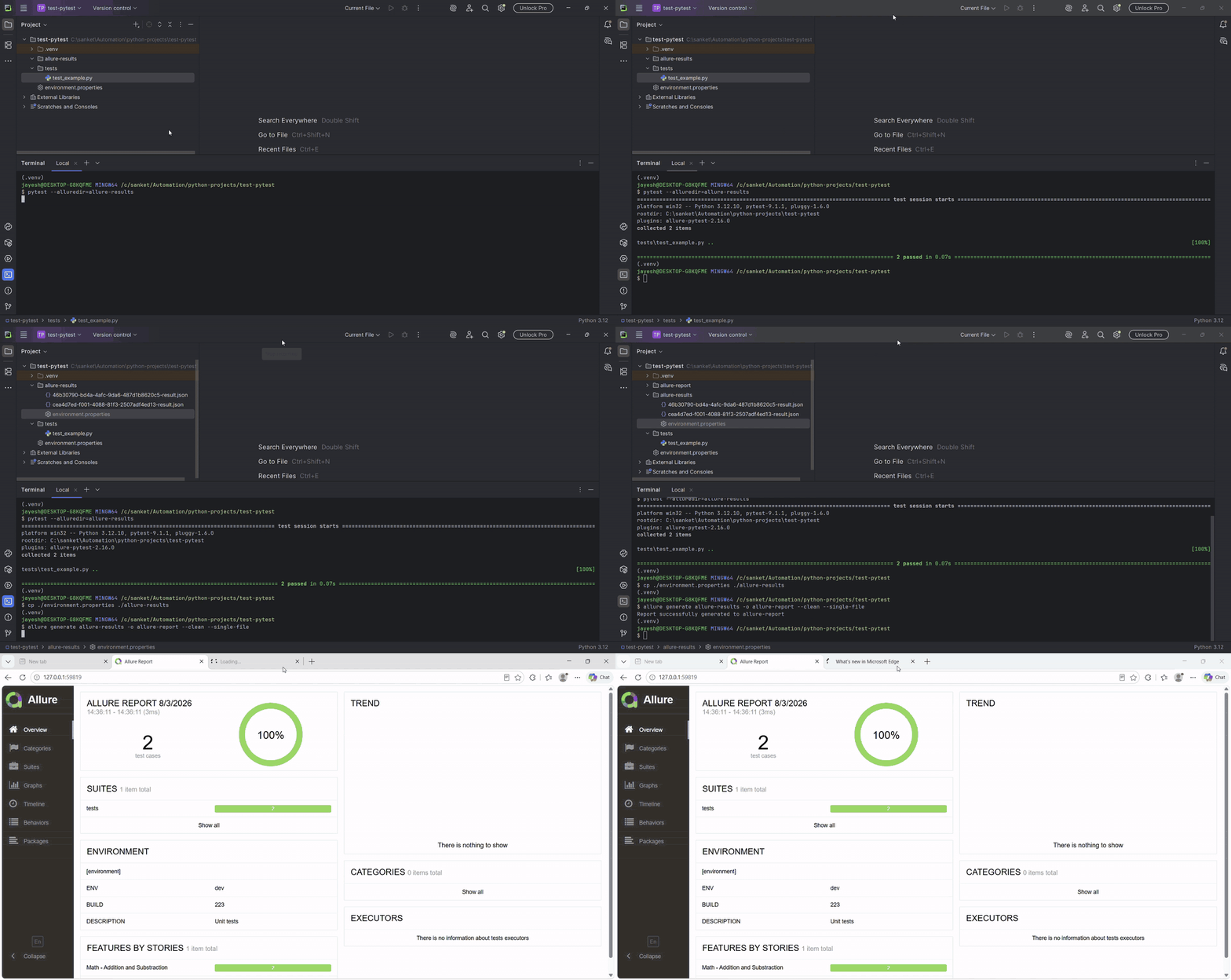
Without allure-pytest-auto — 3 manual steps after every run: copying environment.properties in by hand, running allure generate, and running allure open yourself - with the report overwritten on every subsequent run:
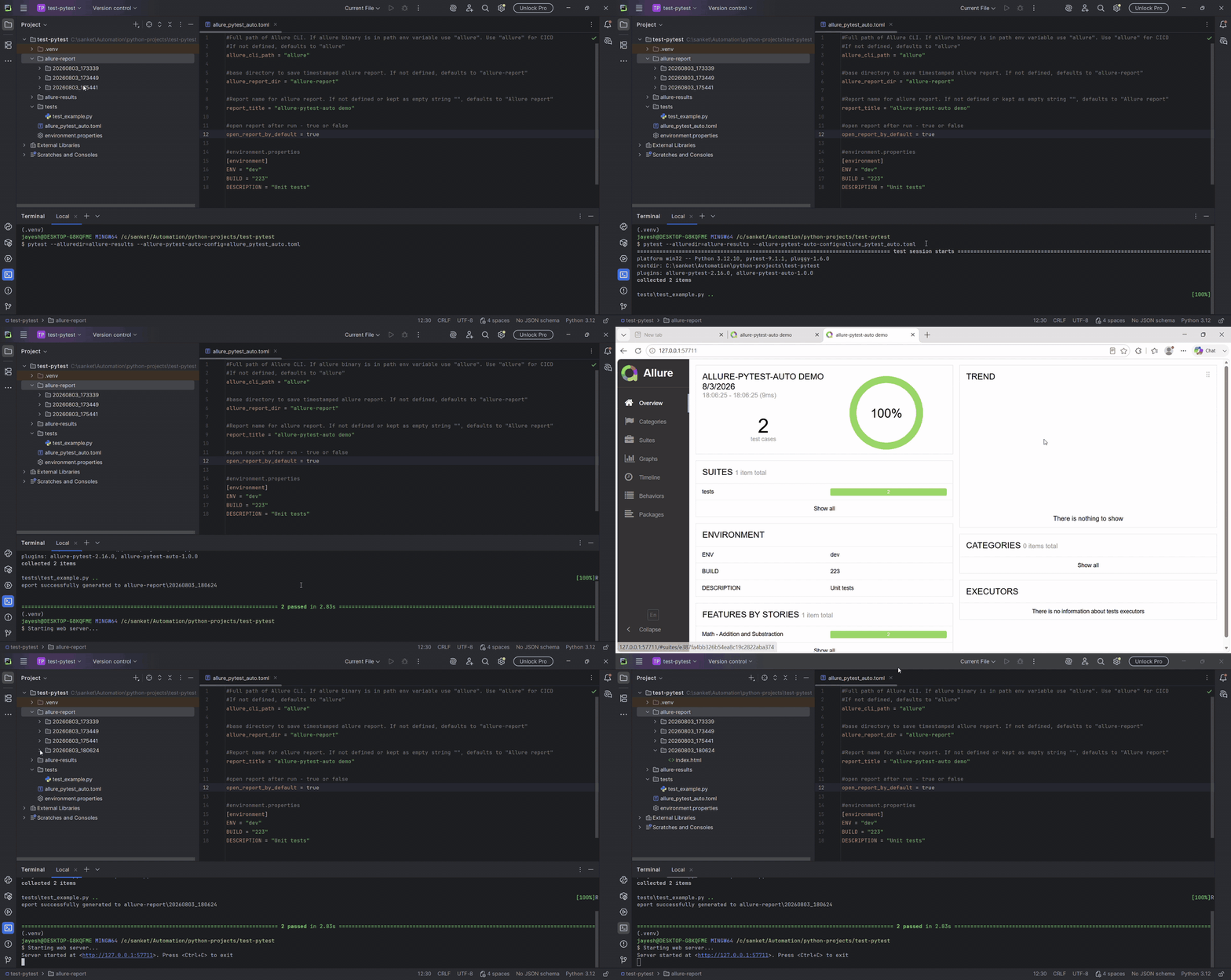
With allure-pytest-auto — just run your tests as usual: a fresh timestamped folder every time, environment.properties generated from your config, report opened for you, all handled automatically. In CI/CD, the same automation applies, just with a fixed path instead of a timestamped one.
⚙️ Requirements
System
- Python >= 3.8
- Allure CLI >= 2.24.0
Python dependencies (installed automatically)
- pytest >= 7.0
- allure-pytest >= 2.13
📥 Installation
pip install allure-pytest-auto
🚀 Quick Start
1. Create a config file allure_pytest_auto.toml at your project root (see Configuration).
2. Run pytest with both flags:
pytest --alluredir=allure-results --allure-pytest-auto-config=allure_pytest_auto.toml
⚙️ Configuration
Recommended location: project root.
allure_pytest_auto.toml
# Full path to Allure CLI. If "allure" is in your PATH, just use "allure" (recommended for CI/CD).
# Defaults to "allure" if not set.
allure_cli_path = "allure"

# Base directory for timestamped allure reports.
# Defaults to "allure-report" if not set.
allure_report_dir = "allure-report"

# Title shown in the generated Allure report.
# Defaults to "Allure Report" if not set or empty.
report_title = "allure-pytest-auto demo"

# Open the report automatically after a local run (ignored in CI/CD).
open_report_by_default = true

# Written to environment.properties in the report.
[environment]
ENV = "dev"
BUILD = "223"
DESCRIPTION = "Unit tests"
| Config | Description | Default |
|---|---|---|
allure_cli_path |
Full path to the Allure CLI (e.g. /opt/allure/bin/allure or C:/Allure/bin/allure.bat). Use "allure" if it's on your PATH, or for CI/CD. |
allure |
allure_report_dir |
Base directory in which timestamped report folders are created. | allure-report |
report_title |
Title shown in the generated report. | Allure Report |
open_report_by_default |
Auto-opens the report after a local run if true (ignored in CI/CD). |
True |
[environment] |
Key/value pairs written to environment.properties. |
N/A |
🧩 CLI Options
| Flag | Description |
|---|---|
--alluredir |
Allure results directory (required) |
--allure-pytest-auto-config |
Path to your allure_pytest_auto.toml config file (required) |
❓ FAQ
See FAQ.md for common questions.
🤝 Contributing
Contributions, bug reports, and feature requests are welcome — see CONTRIBUTING.md to get started.
📜 License
MIT — see LICENSE.
✉️ Contact
- GitHub: @sjvaidya
- Issues & feature requests: open an issue
If this plugin saved you a wiped-out report, a manually copy-pasted environment.properties, or one too many allure open commands, a ⭐ on the repo helps other people find it.
1 maintainer

Release files for allure-pytest-auto 1.0.1
For a detailed explanation of source distributions (sdists) and built distributions (wheels), please see the package formats documentation.
Source distribution (sdist)
| File | Size | Uploaded | |
|---|---|---|---|
| allure_pytest_auto-1.0.1.tar.gz | 10.7 kB | Details |
Built distribution (wheel)
| File | Interpreter | ABI | Platform | Reset |
|---|---|---|---|---|
| allure_pytest_auto-1.0.1-py3-none-any.whl | Python 3 | none | any | Details |
Total release size: 21.0 kB
Release files / allure_pytest_auto-1.0.1.tar.gz
| Download URL | allure_pytest_auto-1.0.1.tar.gz |
|---|---|
| Size | 10.7 kB |
| Tags | Source |
|
SHA-256 checksum How to use checksums |
7f8b859bfdd674056c2b5c9f49932d87db72fd97161c60d32219952be4fcf29d
|
|
BLAKE2b-256 checksum How to use checksums |
2cd04cd7fa90316bdba3c480f1645ff00295649261b95ec9dd870a0a7001f230
|
| Upload date | |
|
Uploaded using Trusted Publishing? What is trusted publishing? |
No |
| Uploaded via |
twine/7.0.0 CPython/3.12.10
|
Release files / allure_pytest_auto-1.0.1-py3-none-any.whl
| Download URL | allure_pytest_auto-1.0.1-py3-none-any.whl |
|---|---|
| Size | 10.3 kB |
| Tags | Python 3 |
|
SHA-256 checksum How to use checksums |
b43eb9dd8398524abd7a968311f3c05d123a603b02a0902696169763999bb9df
|
|
BLAKE2b-256 checksum How to use checksums |
dc6b4c390bf1f042c9666e5e76ca8204f029be05a8dc7fd2d6770cbf360f8bb3
|
| Upload date | |
|
Uploaded using Trusted Publishing? What is trusted publishing? |
No |
| Uploaded via |
twine/7.0.0 CPython/3.12.10
|














