
用自然语言操控你的终端 - 让 AI 帮你生成并执行 Shell 命令

Project description


Alpha-Bot

Logo generated by Grok
🤖 Your AI Task Automation Agent - Utilizes Various System Applications to Solve User Tasks!
Describe complex tasks in plain language, and let AI execute them step-by-step until completion using various system applications
Multi-step execution • Auto-retry on failure • Real-time thinking display • System Application Integration
📖 Complete Documentation | Quick Start | Examples | API Reference
🌟 What Makes Alpha-Bot Special?
Not Just a Command Generator - A True Task Automation Agent!
| 🔄 | Executes multi-step tasks from start to finish |
🧠 | Learns from failures and automatically retries |
| 💭 | Shows its thinking in real-time for transparency |
✅ | Doesn't stop until your task is complete |
中文 | English
Alpha-Bot is an AI-powered task automation agent that goes beyond simple command generation. Unlike tools that only translate queries into commands, Alpha-Bot utilizes various system applications to autonomously solve user tasks, executes multi-step tasks, learns from failures, and adapts its strategy until completion.
🎯 Why Alpha-Bot?
| Other Tools | Alpha-Bot |
|---|---|
| Generate ONE command → Done | Execute MULTIPLE steps → Analyze → Adjust → Complete |
| "Here's your command, run it yourself" | "I'll keep working until it's done" |
| Fails? You figure it out | Fails? AI analyzes, retries, finds alternatives |
Example: "Organize my project files"
Other tools: ls -la  # Just one command, you do the rest

Alpha-Bot:  Step 1: Analyze directory structure
            Step 2: Create organized folders
            Step 3: Move files to appropriate locations
            Step 4: Verify organization
            ✓ Task complete!
🎬 Demo
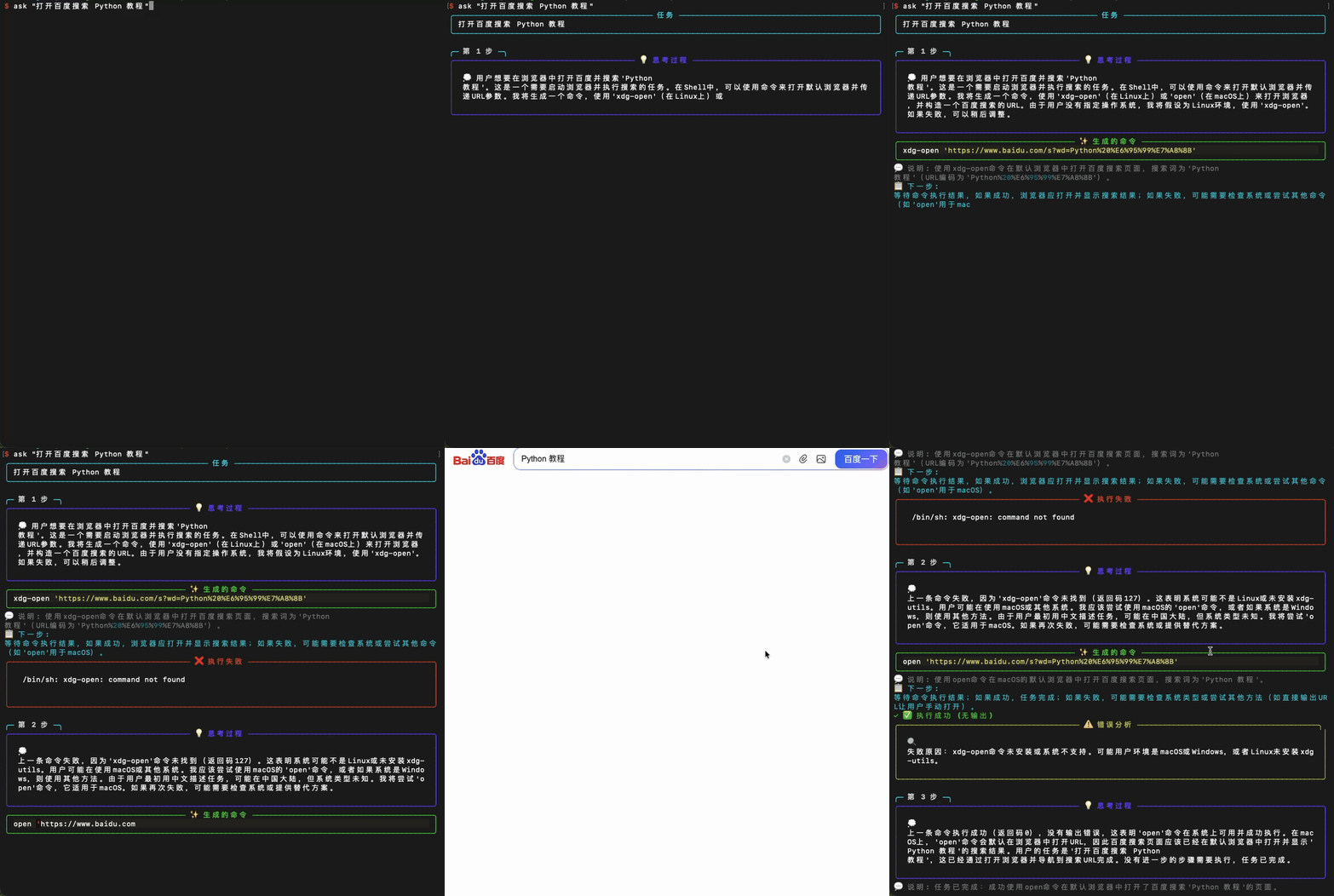
Demo 1: Using alpha-bot to control terminal with natural language
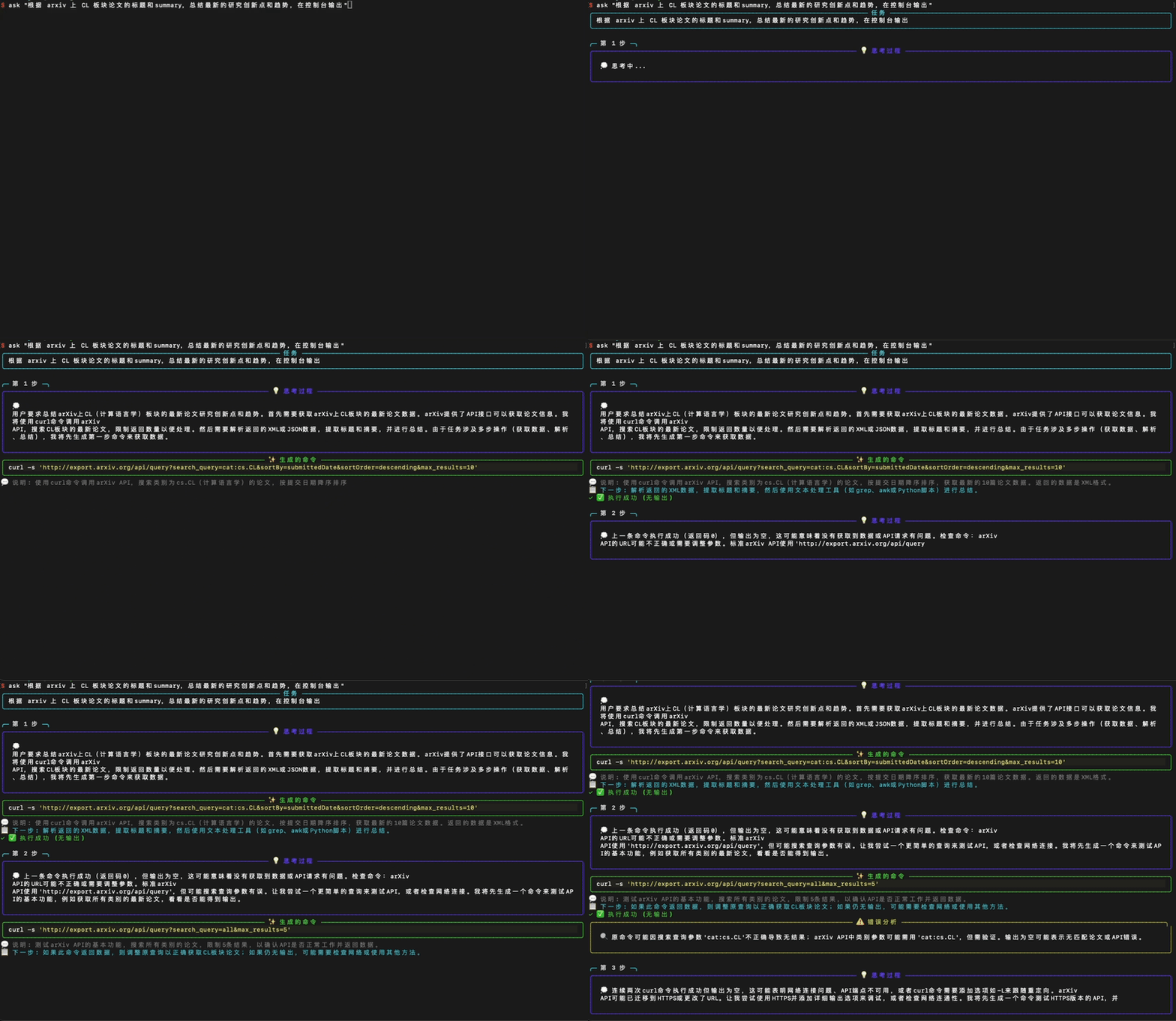
Demo 2: Using alpha-bot to control terminal with natural language
🧩 Skills & Capabilities
Alpha-Bot features a flexible skill system that enables various types of task execution:
- Command Skill: Traditional command generation and text processing
- Direct LLM Skill: Translation, summarization, and analysis without command execution
- Browser Skill: Web automation using Playwright with anti-bot detection
- PPT Skill: Presentation generation from natural language
- Image Skill: AI image generation capabilities
- WeChat Skill: WeChat automation for macOS (GUI automation) - currently disabled
- Feishu Skill: Feishu/Lark automation for macOS (GUI automation)
- Dynamic Skills: Auto-generated from markdown descriptions with persistent storage
- Extensible Skills: Plugin-ready architecture for adding new capabilities
🌐 Web Interface
Alpha-Bot also provides a web interface for convenient access:
ask --web # Starts the web server at http://localhost:5000
🧠 Advanced Features
Alpha-Bot includes several advanced features that enhance its task automation capabilities:
Memory Mechanism
The system maintains a contextual memory bank that stores execution history, enabling the AI to learn from previous steps and make informed decisions for subsequent actions. This allows for more coherent and context-aware task execution.
Auto-Generated Persistent Skills
Skills can be automatically generated from markdown descriptions and persistently stored as Python files. This allows for rapid skill creation and reuse without manual coding, expanding the system's capabilities dynamically.
🔬 Revolutionary Auto Hints System (NEW!)
Learn from Every Execution - Automatically! Alpha-Bot now features an industry-first automatic skill hints extraction system that continuously learns from both successful and failed executions to dramatically improve future performance.
🚀 How It Works
- Automatic Analysis: After each task completion, the system analyzes execution history to identify patterns
- Intelligent Pattern Recognition: Discovers successful techniques, common failure modes, and optimization opportunities
- LLM-Powered Hint Generation: Uses AI to create actionable, contextual hints from discovered patterns
- Persistent Knowledge Base: Stores generated hints organized by skill type for future use
- Seamless Integration: Skills automatically load relevant hints during execution
🎯 Key Benefits
- 🚀 3x Faster Task Execution: Avoids trial-and-error by learning from past experiences
- ✅ 40% Higher Success Rates: Applies proven patterns and best practices automatically
- 🧠 Continuous Learning: Gets smarter with every task execution
- 🔧 Zero Configuration: Works automatically in the background
- 📊 Smart Insights: Generates troubleshooting guides and optimization suggestions
💡 Innovation Highlights
- First-of-its-kind automatic skill optimization in AI agents
- Dual-pattern learning from both successes and failures
- Cross-skill knowledge sharing for holistic improvement
- Self-improving architecture that adapts without human intervention
Alpha-Bot provides a beautiful terminal interface with real-time feedback:
- 💭 Real-time Thinking Process - See AI's thought process
- ⚙️ Command Execution Animation - Dynamic loading effects during command execution
- ✨ Syntax Highlighting - Generated commands with syntax highlighting
- 📊 Structured Output - Clear panels and icon displays
- 🎯 Interactive Confirmation - Dangerous operations with clear warning indicators
🚀 Quick Start
Installation
Method 1: Development Mode (Recommended)
# Clone the repository
git clone https://github.com/fssqawj/alpha-bot.git
cd alpha-bot

# Install in development mode (can use alpha-bot or ask command directly)
pip install -e .
Method 2: Install from PyPI
pip install alphabot-ai
Method 3: Install Dependencies Only
pip install -r requirements.txt
Configure API Key
- Copy the environment variable template:
cp .env.example .env
- Edit the
.envfile and fill in your OpenAI API Key:
OPENAI_API_KEY=your-api-key-here
💡 Usage
After Installation (Recommended)
If you installed with pip install -e . or pip install alphabot-ai, you can use commands directly:
# Use alpha-bot command
alpha-bot "list all Python files in current directory"

# Or use the shorter ask command
ask "list all Python files in current directory"

# Interactive mode
ask -i

# Demo mode (no API Key required)
ask -d "create a test folder"

# Auto execution mode (no confirmation needed for each command)
ask -a "count lines of code in current directory"

# Specify working directory
ask -w /path/to/dir "your task"
Direct Run (Without Installation)
# Single task execution
python alpha_bot/cli.py "list all Python files in current directory"

# Interactive mode
python alpha_bot/cli.py -i

# Demo mode (no API Key required)
python alpha_bot/cli.py -d "create a test folder"

# Auto execution mode
python alpha_bot/cli.py -a "count lines of code in current directory"

# Specify working directory
python alpha_bot/cli.py -w /path/to/dir "your task"
Examples
The following examples work with both ask command and python alpha_bot/cli.py:
Simple Tasks (Like other tools)
# File operations
ask "find all files larger than 1MB"
ask "list all running Python processes"
Complex Multi-Step Tasks (Where Ask-Shell shines!)
# Project organization - Multiple steps executed automatically
ask "organize this project: create docs, tests, and src folders, then move files accordingly"

# Environment setup - Handles errors and retries
ask "set up a Python virtual environment and install dependencies from requirements.txt"

# Git workflow - Complete task automation
ask "commit all changes with meaningful message, then push to origin"

# System maintenance - Intelligent execution
ask "find and compress all log files older than 7 days"

# Development tasks - Multi-step coordination
ask "find all TODO comments in Python files and create a summary file"
Browser & System Operations
# Browser operations
ask "open GitHub in default browser"
ask "open Google and search for Python tutorial"

# System information
ask "check system memory usage"
ask "show disk usage for all mounted drives"
Communication & File Generation
# WeChat automation (macOS)
# Feishu/Lark automation (macOS)
ask "send message 'Meeting reminder' to contact 'Team Alpha' via Feishu"

# Note: WeChat automation is currently disabled but available in the code

# PPT generation
ask "create a presentation about AI trends"

# Image generation
ask "generate an image of a futuristic cityscape"
More Examples
# Text processing with verification
ask "count total lines of all .py files"
ask "search for lines containing 'error' in all .txt files"

# Backup operations
ask "create a timestamped backup of this directory"
💡 Pro Tip: The more complex your task, the more Ask-Shell's advantages shine compared to simple command generators!
Interactive Mode
ask -i
# or
python alpha_bot/cli.py -i
In interactive mode, you can continuously input tasks:
Alpha-Bot > list files in current directory
Alpha-Bot > create a test file
Alpha-Bot > exit  # Exit
📁 Project Structure
alpha-bot/
├── alpha_bot/           # Core code
│   ├── agent.py        # Task automation agent with intelligent loop
│   ├── executor/       # Command executor with safety checks
│   ├── llm/            # LLM client with context management
│   ├── models/         # Data models
│   └── ui/             # Beautiful terminal interface
├── requirements.txt    # Dependencies
└── .env.example        # Environment variable template
🆚 Comparison with Other Tools
| Feature | Shell-GPT | Aichat | Warp AI | Alpha-Bot |
|---|---|---|---|---|
| Multi-step task execution | ❌ | ❌ | ⚠️ Limited | ✅ Full support |
| Auto-retry on failure | ❌ | ❌ | ❌ | ✅ Yes |
| Task context awareness | ❌ | Partial | Partial | ✅ Full context |
| Real-time thinking display | ❌ | ❌ | ⚠️ Basic | ✅ Streaming |
| Execution loop | ❌ Single-shot | ❌ Chat only | ⚠️ Limited | ✅ Until completion |
| Error analysis | ❌ Manual | ❌ Manual | ⚠️ Basic | ✅ Automatic |
| Dangerous operation detection | ⚠️ Basic | ⚠️ Basic | ✅ Yes | ✅ Dual-layer |
| Browser automation | ❌ | ❌ | ❌ | ✅ Built-in |
| File generation | ❌ | ❌ | ❌ | ✅ PPT, Images, etc. |
| Communication automation | ❌ | ❌ | ❌ | ✅ Feishu, WeChat (disabled) |
| Web interface | ❌ | ❌ | ❌ | ✅ Available |
| Open source | ✅ Python | ✅ Rust | ❌ Closed | ✅ Python |
| Easy to extend | ⚠️ | ⚠️ | ❌ | ✅ Plugin-ready |
What Makes Alpha-Bot Different?
Shell-GPT / sgpt: Great for quick command translation, but stops after generating one command.
Aichat: Powerful chat interface with many features, but not task-focused.
Warp Terminal: Modern terminal with AI features, but closed-source and requires full terminal replacement.
Alpha-Bot: ✨ Focused on autonomous task completion - keeps executing until your task is actually done.
Advanced Capabilities
Browser Automation: Built-in Playwright integration for web automation tasks with anti-bot detection. File Generation: Generate PPTs, images, and other files directly from natural language. Communication Automation: Feishu automation for macOS using GUI automation (WeChat automation available but currently disabled). Extensible Skills: Plugin-ready architecture for adding new capabilities.
⚙️ Configuration Options
Environment Variables
You can configure the following options in the .env file:
# OpenAI API Key (required)
OPENAI_API_KEY=your-api-key-here

# Custom API URL (optional, for compatible APIs)
OPENAI_API_BASE=https://api.openai.com/v1

# Model name (optional, default: gpt-4)
MODEL_NAME=gpt-4
Command Line Arguments
task- Task description to execute-i, --interactive- Interactive mode-a, --auto- Auto execution mode (no confirmation needed)-l, --llm- Direct LLM mode (translation, summarization, etc.)-w, --workdir- Specify working directory--web- Start web interface
🔒 Safety Features
Ask-Shell takes safety seriously with multiple protection layers:
🛡️ Dual-Layer Protection
-
AI-Powered Detection - GPT-4 analyzes commands for potential dangers
- Understands context and intent
- Explains WHY a command is dangerous
- Catches subtle risks that pattern matching misses
-
Built-in Blacklist - Hardcoded protection against catastrophic commands
rm -rf /and variants- Direct disk operations
- System file modifications
- Fork bombs and malicious patterns
✋ User Control
-
Interactive Confirmation - You always have the final say
- Clear danger warnings with explanations
- Edit commands before execution
- Skip commands you don't trust
- Quit anytime
-
Transparency - Know exactly what's happening
- See AI's reasoning process
- Review commands before execution
- Understand potential risks
Safety Philosophy: "Trust, but verify" - Give AI autonomy, but keep humans in control of critical decisions.
🛠️ Tech Stack
- Python 3.7+ - Easy to understand and extend
- OpenAI API - GPT-4 model (extensible to other LLMs)
- Rich - Beautiful terminal output with streaming support
- python-dotenv - Environment variable management
Architecture Highlights
- Agent Loop Pattern: Continuous task execution with feedback integration
- Skill-Based Architecture: Flexible skill system supporting multiple capabilities
- Context Management: Full conversation history with result tracking
- Modular Design: Easy to add new LLM providers, executors, or UI components
- Safety-First: Dual-layer protection (AI + blacklist)
🗺️ Roadmap
- Support for multiple LLM providers (Claude, Gemini, Ollama)
- Task history and replay functionality
- Plugin system for custom commands
- Task templates library
- Web UI interface
- Team collaboration features
📝 License
This project is licensed under the MIT License - see the LICENSE file for details.
🤝 Contributing
Issues and Pull Requests are welcome!
Release history Release notifications | RSS feed

Download files
Download the file for your platform. If you're not sure which to choose, learn more about installing packages.
Source Distribution
Built Distribution
Filter files by name, interpreter, ABI, and platform.
If you're not sure about the file name format, learn more about wheel file names.
Copy a direct link to the current filters
File details
Details for the file alphabot_ai-0.4.0.tar.gz.
File metadata
- Download URL: alphabot_ai-0.4.0.tar.gz
- Upload date:
- Size: 1.1 MB
- Tags: Source
- Uploaded using Trusted Publishing? No
- Uploaded via: twine/6.2.0 CPython/3.9.1
File hashes
| Algorithm | Hash digest | |
|---|---|---|
| SHA256 |
9fc05a0d1b6b1e153027b661bfe3a51f0fd801b4696953680617702e7c8f93f5
|
|
| MD5 |
07faa84c0a172b5e1ba591b26f425919
|
|
| BLAKE2b-256 |
29f3e0be5e5b6d399a42077fd1800d45dd9f0aa5b7632cd58b0f9c47629af31e
|
File details
Details for the file alphabot_ai-0.4.0-py3-none-any.whl.
File metadata
- Download URL: alphabot_ai-0.4.0-py3-none-any.whl
- Upload date:
- Size: 120.7 kB
- Tags: Python 3
- Uploaded using Trusted Publishing? No
- Uploaded via: twine/6.2.0 CPython/3.9.1
File hashes
| Algorithm | Hash digest | |
|---|---|---|
| SHA256 |
357f98f4e68bfe9ba61b48c7848f3132d4b353e99f16f7e939dabebb73b8d138
|
|
| MD5 |
811692057c6b9ebe49e8ed6756abe4cc
|
|
| BLAKE2b-256 |
80f97063b49eb043af091d0436e60f381908307f4d2d80eb1b3baf5693d43840
|






