
alphafold3_tools
Toolkit for alphafold3 input generation and output analysis



How do I reference this work?
- Moriwaki Y et al. High-throughput prediction of protein–protein interactions uncovers hidden molecular networks in biosynthetic gene clusters, Comput. Struct. Biol. J; doi: 10.34133/csbj.0149
Installation
Requirements:
- Python 3.12 or later
# install from PyPI
python3 -m pip install alphafold3-tools
Alternatively, uv is recommended to install and develop the package. See the instructions of installation:
# For Linux or macOS
curl -LsSf https://astral.sh/uv/install.sh | sh
# For macOS (Homebrew)
brew install uv
Then, install the package with uv:
git clone git@github.com:cddlab/alphafold3_tools.git
cd alphafold3_tools
uv sync
Usage
All tools are provided as subcommands of a single af3tools command, e.g. af3tools msatojson -i input.a3m. Run af3tools --help to list all subcommands, af3tools <subcommand> -h for subcommand-specific help, and af3tools --version to print the version (or af3tools <subcommand> -v for an individual subcommand's version).
msatojson
msatojson is a command to convert an a3m-formatted multiple sequence alignment (MSA) file to JSON format. The input name can be specified with the -n option.
af3tools msatojson -i input.a3m -o input.json -n inputname
The input a3m MSA file can be generated by MMSeqs2 webserver (or ColabFold). colabfold_batch --msa-only option is useful to generate a3m MSA files only.
msatojson can accept a directory containing multiple a3m files. In this case, the output JSON files will be saved in the specified output directory.
af3tools msatojson -i /path/to/a3m_containing/directory -o /path/to/output/directory
Writing MSA as separate files (--write_msapath)
By default, msatojson embeds MSA sequences directly in the output JSON under the unpairedMsa and pairedMsa keys. Use --write_msapath to write the MSA content to separate .a3m files instead and reference them via unpairedMsaPath and pairedMsaPath keys. This keeps the JSON compact when working with large MSAs.
af3tools msatojson -i input.a3m -o output.json --write_msapath
The behavior depends on whether the input a3m contains a paired MSA (i.e. multi-chain complex):
| Input type | unpairedMsaPath |
pairedMsaPath |
|---|---|---|
| Single-chain (no paired MSA) | Path to the original -i file (no new file written) |
"" |
| Multi-chain (paired MSA present) | {output_dir}/{name}_unpaired_{chain_id}.a3m |
{output_dir}/{name}_paired_{chain_id}.a3m |
For example, processing a two-chain complex testcomplex.a3m with -o /path/to/output/testcomplex.json produces:
/path/to/output/
  testcomplex.json                # JSON with unpairedMsaPath / pairedMsaPath
  testcomplex_unpaired_A.a3m     # unpaired MSA for chain A/B
  testcomplex_paired_A.a3m       # paired MSA for chain A/B
  testcomplex_unpaired_C.a3m     # unpaired MSA for chain C/D/E
  testcomplex_paired_C.a3m       # paired MSA for chain C/D/E
Template search (--include_templates)
From version 0.2.0, templates can be also added to the output JSON file. Use the --include_templates option to include templates. The directory path /path/to/mmcif_files containing mmCIF files and the corresponding pdb_seqres.txt file can be specified with the --pdb_database_path and --seqres_database_path options, respectively. If they are omitted, only the files that are needed are downloaded from the wwPDB (see Downloading the databases automatically).
--max_template_dateoption can be used to set the maximum template date. The default value is2099-09-30, which means no filtering based on template date. If you want to the same results as AlphaFold3, set this value to2021-09-30.--max_subsequence_ratiooption can be used to set the maximum subsequence ratio for template filtering. The default value is0.95(same as the default value of AlphaFold3), or1.0with--custom_template. However, if you want to include all templates regardless of the subsequence ratio, set this option to1.0.-doption can be used to enable debug mode, which will print debug information during the template search process.
# Example command to include templates in the output JSON file
af3tools msatojson -i input.a3m -o output.json \
    --include_templates \
    --pdb_database_path /path/to/mmcif_files \
    --seqres_database_path /path/to/pdb_seqres.txt \
    --max_template_date 2099-09-30 \
    --hmmbuild_binary_path /path/to/hmmbuild \
    --hmmsearch_binary_path /path/to/hmmsearch \
    --save_hmmsto \
    --max_subsequence_ratio 1.0 \
    -d
Downloading the databases automatically
--pdb_database_path and --seqres_database_path are optional. When either of them is omitted, the required files are downloaded from the wwPDB:
--seqres_database_pathomitted:pdb_seqres.txtis downloaded (about 68 MB compressed) into the user cache directory,$XDG_CACHE_HOME/alphafold3tools/(~/.cache/alphafold3tools/by default), and reused by later runs. It is downloaded again when the cached copy is older than 7 days; if that fails, the existing copy is used with a warning. If there is no cached copy and the download fails, the command exits with an error.--pdb_database_pathomitted: the mmCIF files of the template candidates are downloaded one by one, in the order of the hmmsearch hits, until four templates pass the filters (the same templates as with a local database). They are saved intemplates/<input name>/in the same directory as the output JSON file (e.g.templates/foo/forfoo.a3m). Downloaded candidates that are not used as templates are removed, so at most four mmCIF files per protein chain are kept. At most 20 mmCIF files are downloaded per chain. Entries that do not exist on the server are skipped, but if an mmCIF file cannot be downloaded for another reason (e.g. a network problem), processing of that input stops with an error instead of producing a JSON file without templates.
# Only HMMER is required locally; pdb_seqres.txt and the template mmCIF files are downloaded.
af3tools msatojson -i foo.a3m -o out/foo.json --include_templates
# -> out/foo.json, out/templates/foo/*.cif
Using your own structures as templates (--custom_template)
--custom_template /path/to/dir uses only the structures in the given directory as templates instead of searching the PDB, so that unpublished structures or predicted models (e.g. AlphaFold models) can be used as templates. It implies --include_templates.
- PDB (
*.pdb) and mmCIF (*.cif) files directly under the directory are used, and gzip-compressed files (*.pdb.gz,*.cif.gz) are also accepted. Suffixes are case-insensitive, and subdirectories are not searched. - A PDB file is first converted to an mmCIF file with
pdbtocif, which is saved in the same directory under the name with the suffix replaced by.cif(e.g.AAAAAA.pdborAAAAAA.pdb.gz→AAAAAA.cif). The directory must therefore be writable when it contains PDB files. The converted file is saved only when the structure can be used as a template, and an existing file is never replaced. - Files whose names differ only in the suffix are the same structure, and only one of them is used, in the order
.cif,.cif.gz,.pdb,.pdb.gz(the others are reported with a warning). In particular, a PDB file is not converted again once the.ciffile converted from it exists; delete the.ciffile to convert it again (the warning also tells you when the PDB file is newer than the.ciffile). - A
pdb_seqres.txt-like sequence file is built from these structures only, and the template search withhmmbuild/hmmsearchthen runs as with--include_templates. For this, each structure is copied into a temporary directory (removed when the command finishes; the template structures are embedded in the output JSON) under an ID made from its file name (lowercased, with non-alphanumeric characters removed, e.g.P9WIC5_v6.cif→p9wic5v6), and the fields that predicted models lack are filled in: the canonical one-letter sequence, and the release date, which is set to1970-01-01so that--max_template_datenever excludes such structures. - Files that cannot be used as templates (e.g. broken files or structures without a protein chain) are skipped with a warning. The command exits with an error if none of them can be used.
--max_subsequence_ratiodefaults to1.0(no subsequence-ratio filtering) with--custom_template, so that a template identical to the query sequence is kept, and a warning tells you that this default was applied. Give--max_subsequence_ratio 0.95explicitly to filter such templates out as usual.--custom_templatecannot be combined with--pdb_database_pathor--seqres_database_path.- As with
--include_templates, at most four templates are added per protein chain, and templates with the same sequence are deduplicated (only the first of several models of the same sequence is used).
# my_templates/ contains e.g. model_1.pdb and unpublished.cif.gz
af3tools msatojson -i foo.a3m -o out/foo.json --custom_template my_templates/
# -> out/foo.json; my_templates/model_1.cif is created by the PDB-to-mmCIF conversion
Guessing the homo-oligomer count from templates (--guess_copies)
By default, the number of copies of each protein chain in the output JSON (the length of the id list) is taken from the stoichiometry recorded in the a3m header. Use the --guess_copies option to instead infer the homo-oligomer count from the biological assembly of each chain's first template.
For each protein sequence, msatojson looks up the first template hit (PDB ID + chain ID), reads that structure's biological assembly information from the mmCIF file, and counts how many copies of the same polymer entity it contains. That count becomes the number of chain IDs assigned to the sequence, overriding the a3m header stoichiometry. For example, if the first template of a chain is the homohexamer 1BJP, that chain is assigned six IDs ("id": ["A", "B", "C", "D", "E", "F"]). When there are multiple protein sequences, the chain-ID letters are shifted so that IDs never overlap between sequences. If no template is found, or the structure has no usable biological assembly information, the count falls back to 1 (monomer).
--guess_copiesperforms a template search, so it requires--include_templates(or--custom_template); the command exits with an error if it is missing. When--pdb_database_pathis omitted, the first template's mmCIF file is read from the downloadedtemplates/<input name>/directory.
# Example command to guess the number of chain copies from templates
af3tools msatojson -i input.a3m -o output.json \
    --include_templates \
    --pdb_database_path /path/to/mmcif_files \
    --seqres_database_path /path/to/pdb_seqres.txt \
    --max_template_date 2099-09-30 \
    --guess_copies \
    -d
fastatojson
fastatojson is a command to convert a FASTA file to JSON format compatible with AlphaFold3.
af3tools fastatojson -i input.fasta [-s 1 2 3 ...] [-d]
-i: Input FASTA file. Mandatory.-s: Model seeds to be used. Optional. Default is1. Multiple seeds can be specified.-d: Debug mode. Optional. If specified, the command will print debug information.
For example, if you have a FASTA file containing two sequences, input.fasta:
>P12345
KAKDLSKCLS
>Q67890
KADFILCSLK
>I23L45_I3PLS2
LAKDCL:KKALS
You will obtain three JSON files, p12345.json, q67890.json, and i23l45_i3pls2.json. The last one contains two sequences, LAKDCL and KKALS, which are separated by a colon (:). The output JSON files will look like this:
{
  "name": "i23l45_i3pls2",
  "dialect": "alphafold3",
  "version": 1,
  "sequences": [
    {
      "protein": {
        "id": ["A"],
        "sequence": "LAKDCL"
      },
      "protein": {
        "id": ["B"],
        "sequence": "KKALS"
      }
    }
  ],
  "modelSeeds": [1],
}
modjson
modjson is a command to modify an existing AlphaFold3 input json file. This tool is useful to add/modify the ligand entities and User-provided CCD string in an input json file.
af3tools modjson -i input.json -o output.json [-n jobname] [-p] \
       [-a smiles "CCOCCC" 1 -a ccdCodes PRD 2] \
       [-u userccd1.cif userccd2.cif]
-i: Input json file. Mandatory.-o: Output json file. Mandatory.-n: Job name. Optional. Sets the job name in the input JSON file.-p: Purge all ligand entities from the input JSON file at first.-a: Add ligand to the input JSON file. Provide 'ligand type', 'ligand name', and 'number of the ligand molecule'. The 'ligand type' must be either 'smiles' or 'ccdCodes'. Multiple ligands can be added.- Example:
-a smiles "CCOCCC" 1 -a ccdCodes PRD 2 -a ...
- Example:
-u: Add user provided ccdCodes to the input JSON file. Multiple files can be provided.- Example:
-u userccd1.cif userccd2.cif
- Example:
Template search (--include_templates)
modjson can also add template information to an existing JSON file (for example one produced by msatojson without templates, or an AlphaFold3 *_data.json). This runs the same template-search pipeline as msatojson --include_templates on each protein chain's MSA (read from its unpairedMsa, or from unpairedMsaPath), and stores the result in that chain's templates field. The template options are identical to msatojson, and the ligand options (-a/-u) work independently of template search.
af3tools modjson \
    -i A6VX99_2.json \
    -o A6VX99_2_templates.json \
    --include_templates \
    --pdb_database_path /path/to/mmcif_files \
    --seqres_database_path /path/to/pdb_seqres.txt \
    --max_template_date 2099-12-31 \
    --max_subsequence_ratio 1.0 \
    --hmmbuild_binary_path /path/to/hmmbuild \
    --hmmsearch_binary_path /path/to/hmmsearch \
    [--guess_copies] [--save_hmmsto] [-O/--overwrite-templates]
--include_templates: Search and add template information to each protein chain. Requires the HMMER binaries (--hmmbuild_binary_path/--hmmsearch_binary_path, defaulting to the ones onPATH).--pdb_database_pathand--seqres_database_pathare optional: when omitted, the files are downloaded from the wwPDB exactly as inmsatojson(see Downloading the databases automatically); the template mmCIF files are saved intemplates/<input name>/next to the output JSON file, where<input name>is the input JSON file name without its extension.--custom_template: Use only the PDB/mmCIF files (optionally gzip-compressed) in the given directory as templates, exactly as inmsatojson(see Using your own structures as templates). Implies--include_templates, and cannot be combined with--pdb_database_path/--seqres_database_path.--max_template_date/--max_subsequence_ratio: Same as inmsatojson. Setting--max_subsequence_ratio 1.0disables subsequence-ratio filtering, which is the default with--custom_template.-O/--overwrite-templates: Overwrite existing template information. By default, a protein chain that already has a non-emptytemplateslist is preserved (skipped); only chains with empty/absent templates are searched. With-O, every protein chain is re-searched and its templates replaced. This option only affects template overwriting; other entities are unaffected.--save_hmmsto: Save the intermediate hmmsearch Stockholm (.sto) file per chain, named{name}_{chain_id}.hmmsearch.sto, in the output JSON's directory.--guess_copies: Infer the homo-oligomer count of each protein chain from its first template's biological assembly and set the chain's copy count (idlist length) accordingly, overriding the existing count. Requires--include_templates(or--custom_template). Chain ids are renumbered contiguously afterwards.
paeplot
paeplot is a command to plot the predicted aligned error (PAE). The color map can be specified with the -c option. The default color map is bwr (ColabFold-like), but Greens_r is also available for AlphaFold Structure Database (AFDB)-like coloring.
af3tools paeplot -i /path/to/alphafold3_output/directory [-c {Greens_r,bwr}] [--dpi 300] [-n foo] [-f {png,svg}] [-a] [-t "PAE Plot"] [--chain-cmap {pymol,unhcr,<matplotlib_colormap_name>}]
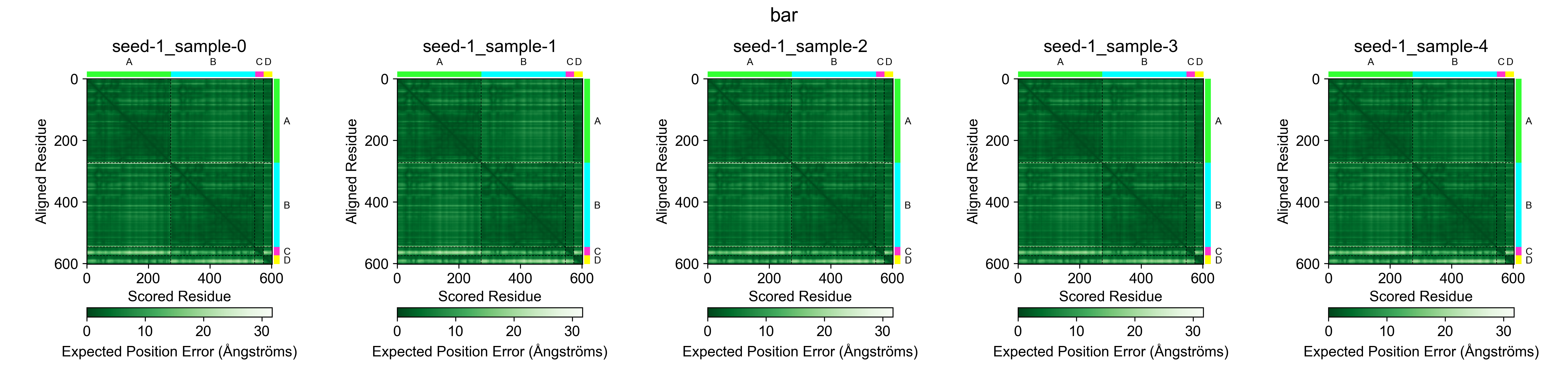
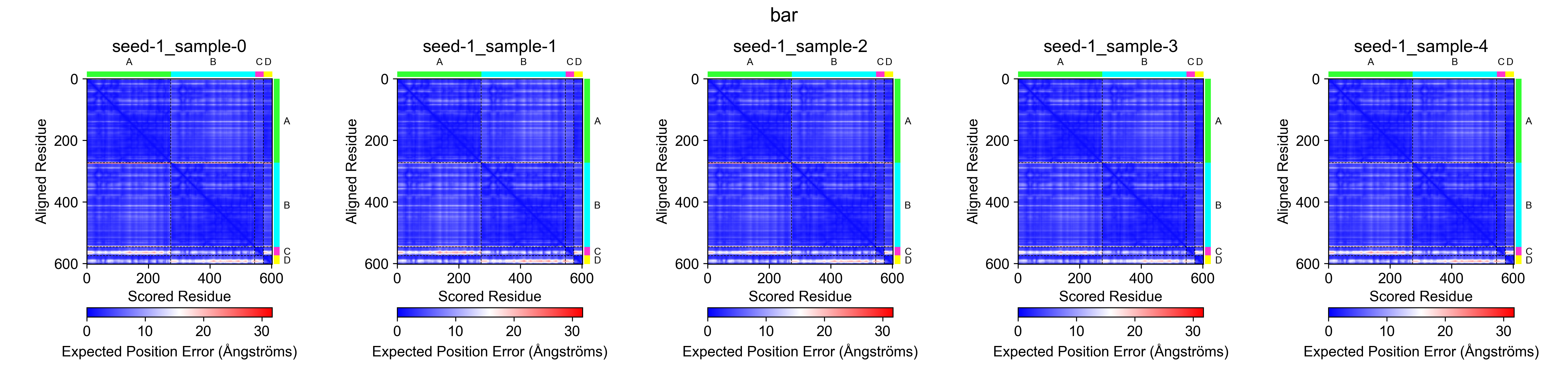
arguments:
-i: Input directory containing the AlphaFold3 output files. Mandatory.-c: Color map for the PAE plot. Optional. Default isbwr. Choose eitherGreens_rorbwr.--dpi: DPI of the output image. Optional. Default is100, but300is recommended for publication-quality images.-n: Name prefix for the output image file. Optional.-f: Output image file format. Optional. Choose eitherpngorsvg. Default ispng.-a: If specified, the plot will include all models in the output directory.-t: Title of the plot. Optional.--chain-cmap: Color map for chain coloring on top and right. Optional. Choose eitherpymol,unhcr, or any valid matplotlib colormap name. (e.g.tab20) Default ispymol.
superpose_ciffiles
superpose_ciffiles is a command to superpose the output mmCIF files. The command creates a multi-model mmCIF file containing all the predicted model.cif subdirectories. The output file name can be specified with the -o option. By default, the output file will be saved as foo_superposed.cif in the input directory.
-c option can be used to specify the chain ID to be superposed.
Each model in the output file is named <objectname>_seed-*_sample-* (e.g. data_foo_seed-1_sample-0). By default, <objectname> is the name of the input directory; use the -t option to override it.
af3tools superpose_ciffiles -i /path/to/alphafold3_output/directory [-o /path/to/output/directory/foo_superposed.cif] [-c A] [-t objectname]
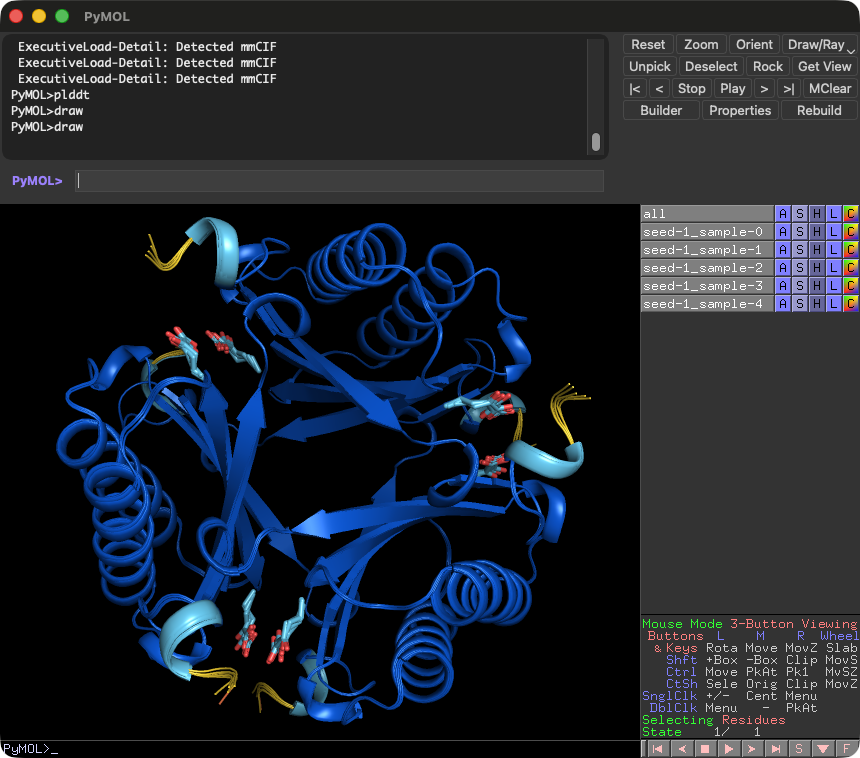
In PyMOL, the following command will be useful to visualize the plDDT values.
color 0x0053D6, b < 100
color 0x65CBF3, b < 90
color 0xFFDB13, b < 70
color 0xFF7D45, b < 50
util.cnc
sdftoccd
sdftoccd is a command to convert sdf or mol2 file to ccd format. Please refer to the AlphaFold3's input document for the detail of User-provided CCD format.
af3tools sdftoccd -i input.sdf -o userccd.cif -n STR
af3tools sdftoccd -i input.mol2 -o userccd.cif -n STR
- The input format is chosen by the file extension (
.mol2or otherwise SDF). Both SYBYL and GAFF (antechamber) atom types are supported in mol2 files. - For mol2 files, the atom names, coordinates, atom order and bond order are kept in the output.
- Hydrogens are removed.
- If the bond orders in the input file are not chemically valid (e.g. carboxylates written as
C(=O)=Oby GaussView, or with two single bonds in mol2 files), they are re-assigned from the connectivity. All hydrogens must be included in the input file in this case. - Singly bonded oxygens with a charge of -1 (e.g. carboxylates) are written as neutral OH.
jsontomsa
jsontomsa is a command to extract MSA from the AlphaFold3 input JSON file. The output file name can be specified with the -o option.
af3tools jsontomsa -i /path/to/alphafold3_data.json -o /path/to/out.a3m
pdbtocif
pdbtocif is a command to convert a PDB file to mmCIF format. The output file name can be specified with the -o option. A gzip-compressed input file (input.pdb.gz) is also accepted.
af3tools pdbtocif -i input.pdb -o output.cif [--pdb_id XXXX]
This tool is useful for converting legacy PDB-formatted files into mmCIF format, which is required for template search in msatojson as well as for input to AlphaFold 3.
The --pdb_id option allows users to specify the PDB ID assigned to the output mmCIF file. This is particularly useful when using predicted structures (e.g., from the AlphaFold Structure Database) as templates, because such structures often have nonstandard identifiers (e.g., AF-P12345-F1-model_v1) that are not suitable for template search. By default, the PDB ID in the output mmCIF file is set to xxxx. The PDB ID must be a four-character string consisting of lowercase letters and/or digits, as the template search in msatojson is case-sensitive and the template database uses lowercase PDB IDs.
Other tools are being developed and will be added.
metrics
metrics calculates ipSAE and related interaction scores (ipTM, pDockQ, pDockQ2, LIS) for protein–protein (and protein–nucleic acid) complexes predicted by AlphaFold3, ColabFold, or Boltz. It is a reimplementation of ipsae.py (MIT License) by Roland L. Dunbrack Jr., extended with JSON output and batch processing support.
Basic usage — explicit file paths
Specify PAE and structure files directly, equivalent to the original ipsae.py interface:
af3tools metrics -p model_scores_rank_001.json -s model_relaxed_rank_001.pdb [-pc 10 -dc 10]
Options:
-p / --pae_file: PAE file (.jsonfor AF2/AF3,.npzfor Boltz)-s / --struct_file: Structure file (.pdbfor AF2/Boltz,.ciffor AF3/Boltz)-pc / --pae_cutoff: PAE threshold in Å for ipSAE / pDockQ / ipTM (default:10.0)-dc / --dist_cutoff: Cβ distance threshold in Å for ipSAE (default:10.0)--lis_pae_cutoff: PAE threshold in Å used by the LIS-family metrics (default:12.0)--lis_cb_cutoff: Cβ contact threshold in Å used by the LIS-family metrics (default:8.0)
Directory mode — automatic input detection
af3tools metrics -i /path/to/output_directory
When a directory is passed with -i, metrics auto-detects the prediction format:
| Format | PAE file | Structure file |
|---|---|---|
| AlphaFold3 | *_confidences.json |
*_model.cif |
| ColabFold | *_scores_rank_001_alphafold2_multimer_v3_model_*_seed_*.json |
*_relaxed_rank_001_*.pdb (falls back to *_unrelaxed_* if absent) |
Batch processing for ColabFold outputs
When the directory contains multiple ColabFold predictions, metrics automatically processes all of them in one run. A prediction with prefix foobar is considered complete when both foobar.done.txt and foobar_coverage.png exist in the same directory. Prefix validation runs in parallel across all available CPU cores.
# Process all completed predictions in a ColabFold output directory
af3tools metrics -i /path/to/colabfold_output_dir
Output files
Three files are written next to each structure file:
| File | Description |
|---|---|
{stem}_{pae}_{dist}.txt |
Summary score table |
{stem}_{pae}_{dist}_byres.txt |
Per-residue score table |
{stem}_{pae}_{dist}.pml |
PyMOL script for interface visualisation |
JSON output with ipSAE_min / ipSAE_max
af3tools metrics -i /path/to/output_directory --json
The --json flag replaces the .txt summary with a .json file. The JSON format extends the original ipSAE output by providing, for each chain pair, the asymmetric score for each direction as well as max and min values across the two asymmetric directions (ipSAE_max and ipSAE_min):
{
  "model_name": {
    "pae_cutoff": 10,
    "dist_cutoff": 10,
    "lis_pae_cutoff": 12,
    "lis_cb_cutoff": 8,
    "A-B": {
      "asym": [
        {"chain1": "A", "chain2": "B", "ipSAE": 0.382, "ipSAE_d0chn": 0.412, "ipSAE_d0dom": 0.401, "ipTM_af": 0.65, "pDockQ": 0.731, "pDockQ2": 0.612, "LIS": 0.524, "...": "..."},
        {"chain1": "B", "chain2": "A", "ipSAE": 0.315, "ipSAE_d0chn": 0.298, "ipSAE_d0dom": 0.307, "ipTM_af": 0.65, "pDockQ": 0.731, "pDockQ2": 0.589, "LIS": 0.511, "...": "..."}
      ],
      "max": {"chain1": "A", "chain2": "B", "ipSAE": 0.382, "...": "..."},
      "min": {"chain1": "A", "chain2": "B", "ipSAE": 0.315, "...": "..."},
      "lis_metrics": {"LIS": 0.743, "cLIS": 0.910, "LIA": 36298, "cLIA": 178, "iLIS": 0.822, "iLIA": 2541.9, "iLISA": 2089.7, "actifpTM": 0.979}
    }
  }
}
LIS-family metrics (AFM-LIS)
For every chain pair, the lis_metrics block carries the symmetric pair-level
Local Interaction Score (LIS)
family of scores, computed identically to AFM-LIS / lis.py:
| Metric | Definition |
|---|---|
LIS |
mean of 1 − PAE/cutoff over residue pairs with PAE < lis_pae_cutoff, averaged over the two asymmetric directions |
cLIS |
same as LIS but restricted to residue pairs in CB-CB contact (≤ lis_cb_cutoff) |
LIA |
count of residue pairs with PAE < lis_pae_cutoff (both directions combined) |
cLIA |
count of contacts with PAE < lis_pae_cutoff AND CB ≤ lis_cb_cutoff |
iLIS |
√(LIS × cLIS) |
iLIA |
√(LIA × cLIA) |
iLISA |
iLIS × iLIA |
actifpTM |
approximate actifpTM — per-residue contact-weighted TM-score, max over both directions |
The defaults (lis_pae_cutoff=12, lis_cb_cutoff=8) match AFM-LIS exactly and can be overridden from the CLI:
af3tools metrics -i /path/to/output --json --lis_pae_cutoff 10 --lis_cb_cutoff 6
All usage examples
# AF2/ColabFold — explicit file paths (original ipsae.py interface)
af3tools metrics -p foo_scores_rank_001_alphafold2_multimer_v3_model_1_seed_000.json \
                 -s foo_relaxed_rank_001_alphafold2_multimer_v3_model_1_seed_000.pdb

# AlphaFold3 — directory auto-detection
af3tools metrics -i /path/to/af3_seed-1_sample-0

# ColabFold — batch processing of an entire output directory
af3tools metrics -i /path/to/colabfold_output_dir

# Custom cutoffs
af3tools metrics -i /path/to/af3_seed-1_sample-0 -pc 15 -dc 15

# JSON output (includes ipSAE_min/ipSAE_max and the LIS-family metrics per chain pair)
af3tools metrics -i /path/to/af3_seed-1_sample-0 --json

# Override LIS-family cutoffs (defaults match AFM-LIS: 12 / 8)
af3tools metrics -i /path/to/af3_seed-1_sample-0 --json --lis_pae_cutoff 12 --lis_cb_cutoff 8

# ColabFold batch with JSON output
af3tools metrics -i /path/to/colabfold_output_dir --json
Acknowledgements
This tool uses the following libraries and tools:
- RDKit
- matplotlib
- numpy
- gemmi
- loguru
- IPSAE
- AFM-LIS (LIS / cLIS / iLIS / LIA / cLIA / iLIA / iLISA / actifpTM)
PDBeurope/ccdutils is used for the conversion of sdf to ccd. RCSB PDB's MAXIT v11.400 is used as a reference for the conversion of PDB to mmCIF.
1 maintainer

Metadata
1 maintainer
Release files for alphafold3-tools 0.6.0
For a detailed explanation of source distributions (sdists) and built distributions (wheels), please see the package formats documentation.
Source distribution (sdist)
| File | Size | Uploaded | Provenance | Actions |
|---|---|---|---|---|
| alphafold3_tools-0.6.0.tar.gz | 25.0 MB | Without provenance | Details for alphafold3_tools-0.6.0.tar.gz |
Built distribution (wheel)
| File | Interpreter | ABI | Platform | Actions Reset |
|---|---|---|---|---|
| alphafold3_tools-0.6.0-py3-none-any.whl | Python 3 | none | any | Details for alphafold3_tools-0.6.0-py3-none-any.whl |
Total release size: 25.1 MB
Release files / alphafold3_tools-0.6.0.tar.gz
| Download URL | alphafold3_tools-0.6.0.tar.gz |
|---|---|
| Size | 25.0 MB |
| Tags | Source |
|
SHA-256 checksum How to use checksums |
7eaff5fb97583a143edd92bb0d45ccf3c396310b8e4144a96d62bc47a320e30f
|
|
BLAKE2b-256 checksum How to use checksums |
8e94a949a03fab6ac5c5017ac87864f4554a9afbe57e84096bd32b16bb78423c
|
| Upload date | |
|
Uploaded using Trusted Publishing? What is trusted publishing? |
No |
| Uploaded via |
twine/7.0.0 CPython/3.12.15
|
Release files / alphafold3_tools-0.6.0-py3-none-any.whl
| Download URL | alphafold3_tools-0.6.0-py3-none-any.whl |
|---|---|
| Size | 131.5 kB |
| Tags | Python 3 |
|
SHA-256 checksum How to use checksums |
1a1e9d7c4a69423c4909cc86b712ba792bcba53988fff99c69aa5d7fb46a56ca
|
|
BLAKE2b-256 checksum How to use checksums |
8e28e03986c05be8db31ff3c1d126a3a4060add83f32a3119c67182b64ba8119
|
| Upload date | |
|
Uploaded using Trusted Publishing? What is trusted publishing? |
No |
| Uploaded via |
twine/7.0.0 CPython/3.12.15
|
Security for alphafold3-tools 0.6.0
Provenance
Provenance describes where a file came from. On PyPI, provenance is shared via attestations, which provide a verifiable record of the build or publishing details. View details, limitations and caveats.
No provenance found
None of the files in this release were uploaded with provenance metadata.
A note on package security
PyPI is a repository for distributing packages, not a service for auditing them. While third-party security researchers and our staff do their best to detect and remove malicious packages, PyPI cannot guarantee the quality, security or suitability of any given package.
To learn more about protecting yourself from malicious actors, visit our package security documentation.














