
AI-powered accessibility text generation and labeling tools for markdown content
Verified details
These details have been verified by PyPIProject links
GitHub Statistics
Maintainers

Project description
alt-text-llm
AI-powered alt text generation and labeling tools for markdown content. Originally developed for my website (repo).
Features
- Intelligent scanning - Detects images/videos missing meaningful alt text (ignores empty
alt="") - AI-powered generation - Uses LLM of your choice to create context-aware alt text suggestions
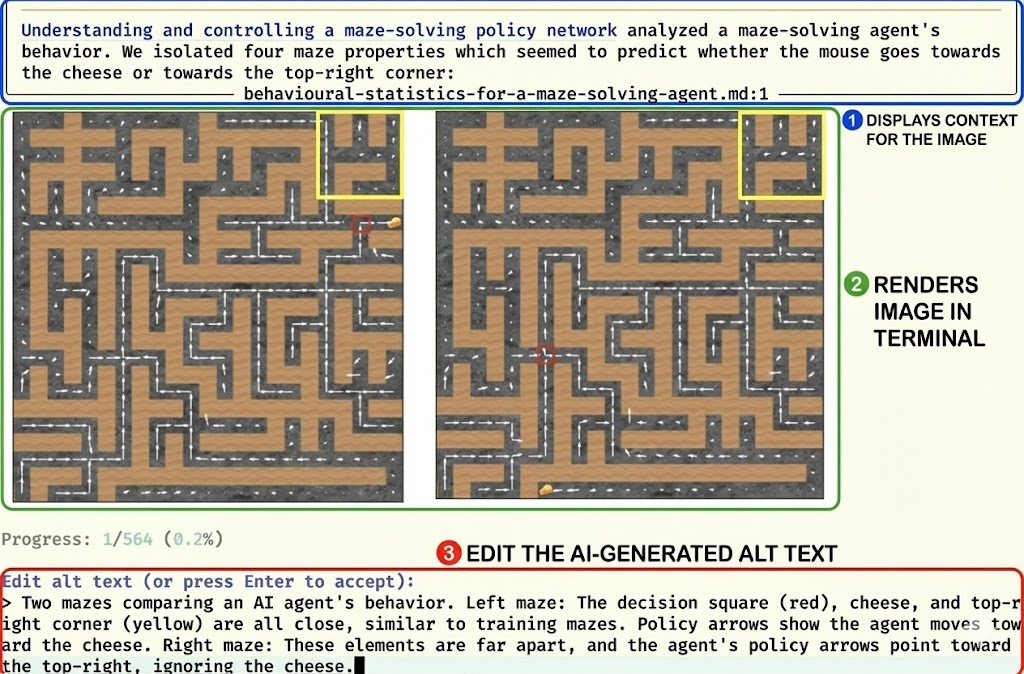
- Interactive labeling - Manually review and edit LLM suggestions. Images display directly in your terminal
- Automatic application - Apply approved captions back to your markdown files
Installation
From PyPI
pip install alt-text-llm
Automated setup (includes system dependencies)
git clone https://github.com/alexander-turner/alt-text-llm.git
cd alt-text-llm
./setup.sh
Prerequisites
macOS:
brew install imagemagick ffmpeg imgcat
Linux:
sudo apt-get install imagemagick ffmpeg
# imgcat: curl -sL https://iterm2.com/utilities/imgcat -o ~/.local/bin/imgcat && chmod +x ~/.local/bin/imgcat
Alt text is generated through OpenRouter. Get an API
key at https://openrouter.ai/keys and export it before running generate:
export OPENROUTER_API_KEY=sk-or-...
Usage
The tool provides four main commands: scan, generate, label, and apply.
1. Scan for missing alt text
Scan your markdown files to find images without meaningful alt text:
alt-text-llm scan --root /path/to/markdown/files
This creates asset_queue.json with all assets needing alt text. --root
defaults to the current directory.
2. Generate AI suggestions
Generate alt text suggestions using an LLM:
alt-text-llm generate \
  --root /path/to/markdown/files \
  --model google/gemini-3.1-flash-lite \
  --suggestions-file suggested_alts.json
Available options:
--model- OpenRouter model id of the formprovider/model-slug(default:google/gemini-3.1-flash-lite, a cheap, current, video-capable model ~6x cheaper thangemini-2.5-pro). Other options:google/gemini-3-flash-preview(higher quality),google/gemini-2.5-pro(highest quality),anthropic/claude-sonnet-4.5(strong vision, no video). Pass the fullprovider/slugform — a bare slug yields "Unknown model". Browse all available ids at https://openrouter.ai/models.--root- Markdown root directory (default: current directory)--max-chars- Maximum characters for alt text (default: 300)--timeout- LLM timeout in seconds (default: 120)--captions- Existing/final captions JSON path used to skip already-captioned assets (default:asset_captions.json)--suggestions-file- Path to read/write suggestions JSON (default:suggested_alts.json)--estimate-only- Only show cost estimate without generating--process-existing- Also process assets that already have captions
Note: Video alt text generation requires a model that accepts video input (the Google Gemini models).
Cost estimation:
Cost estimates are pulled live from OpenRouter's model catalogue
(https://openrouter.ai/api/v1/models), so --estimate-only works for any
model OpenRouter prices. After a real run, the tool also prints the actual
total cost reported by OpenRouter per request.
alt-text-llm generate \
  --root /path/to/markdown/files \
  --model google/gemini-3.1-flash-lite \
  --estimate-only
3. Label and approve suggestions
Interactively review and approve the AI-generated suggestions:
alt-text-llm label \
  --suggestions-file suggested_alts.json \
  --output asset_captions.json
Interactive commands:
- Edit the suggested alt text (pass
--vi-modefor vim keybindings) - Press Enter to accept the suggestion as-is
- Submit
undooruto go back to the previous item - Images display in your terminal (requires
imgcat) - Pass
--no-skip-existingto relabel assets already present in the output file
4. Apply approved captions
Apply the approved captions back to your markdown files:
alt-text-llm apply \
  --captions-file asset_captions.json
Available options:
--captions-file- Path to the captions JSON file withfinal_altpopulated (default:asset_captions.json)--dry-run- Preview changes without modifying files
What it does:
- Reads approved captions from the captions file
- Locates corresponding images/videos in markdown files
- Updates alt text for all supported formats:
- Markdown images:
 - HTML img tags:
<img src="path" alt="alt"> - Wikilink images:
![[path|alt]]
- Markdown images:
- Preserves file formatting and handles special characters
Example workflow
# 1. Scan markdown files for missing alt text
alt-text-llm scan --root ./content

# 2. Estimate the cost
alt-text-llm generate \
  --root ./content \
  --model google/gemini-3.1-flash-lite \
  --estimate-only

# 3. Generate suggestions (if cost is acceptable)
alt-text-llm generate \
  --root ./content \
  --model google/gemini-3.1-flash-lite

# 4. Review and approve suggestions
alt-text-llm label

# 5. Apply approved captions to markdown files
alt-text-llm apply
Configuration
LLM Integration
This tool calls OpenRouter directly over HTTPS to generate alt text, which provides access to many models from many providers through a single API key.
Setting up your model
-
Create an OpenRouter API key at https://openrouter.ai/keys.
-
Export it in your shell:
export OPENROUTER_API_KEY=sk-or-...
-
Pass an OpenRouter model id of the form
provider/model-slugto--model, for example:google/gemini-3.1-flash-lite(default — cheap, current, video-capable)google/gemini-3-flash-preview(higher quality, still cheap)google/gemini-2.5-pro(highest quality, most expensive)anthropic/claude-sonnet-4.5(strong vision, but no video support)
Browse the full catalogue of available model ids at https://openrouter.ai/models. Note that only video-capable models (the Google Gemini models) can generate alt text for videos.
Shell completion
Tab-completion is provided through
argcomplete. Completing the
--model flag suggests live OpenRouter model ids (this needs network access;
the public model list does not require an API key).
Enable it globally for bash (one-time, then restart your shell):
activate-global-python-argcomplete
Or enable it per-shell.
bash:
eval "$(register-python-argcomplete alt-text-llm)"
zsh:
autoload -U bashcompinit && bashcompinit
eval "$(register-python-argcomplete alt-text-llm)"
For zsh's native completion system you can instead use
register-python-argcomplete --shell zsh alt-text-llm.
Output files
asset_queue.json- Queue of assets needing alt text (fromscan)suggested_alts.json- AI-generated suggestions (fromgenerate)asset_captions.json- Approved final captions (fromlabel)
Project details
Verified details
These details have been verified by PyPIProject links
GitHub Statistics
Maintainers
Release history Release notifications | RSS feed


Download files
Download the file for your platform. If you're not sure which to choose, learn more about installing packages.
Source Distribution
Built Distribution
Filter files by name, interpreter, ABI, and platform.
If you're not sure about the file name format, learn more about wheel file names.
Copy a direct link to the current filters
File details
Details for the file alt_text_llm-1.5.1.tar.gz.
File metadata
- Download URL: alt_text_llm-1.5.1.tar.gz
- Upload date:
- Size: 75.8 kB
- Tags: Source
- Uploaded using Trusted Publishing? Yes
- Uploaded via: twine/6.1.0 CPython/3.13.12
File hashes
| Algorithm | Hash digest | |
|---|---|---|
| SHA256 |
7111deb050e63f89c1704b20e5f9afcc826db461b5af5d6bd122d655d3d80180
|
|
| MD5 |
dfc8fcecd2f4f98478d8643ec35841fc
|
|
| BLAKE2b-256 |
aa5677ef09e7fbac8002f0b39163e91e2d69a4d67d0b7fd77dac360c2d6a66c8
|
Provenance
The following attestation bundles were made for alt_text_llm-1.5.1.tar.gz:
Publisher:
publish.yml on alexander-turner/alt-text-llm
-
Statement:
-
Statement type:
https://in-toto.io/Statement/v1 -
Predicate type:
https://docs.pypi.org/attestations/publish/v1 -
Subject name:
alt_text_llm-1.5.1.tar.gz -
Subject digest:
7111deb050e63f89c1704b20e5f9afcc826db461b5af5d6bd122d655d3d80180 - Sigstore transparency entry: 1969966871
- Sigstore integration time:
-
Permalink:
alexander-turner/alt-text-llm@b78e22a66917dfd28fd77ab678d798a2eeb72afe -
Branch / Tag:
refs/heads/main - Owner: https://github.com/alexander-turner
-
Access:
public
-
Token Issuer:
https://token.actions.githubusercontent.com -
Runner Environment:
github-hosted -
Publication workflow:
publish.yml@b78e22a66917dfd28fd77ab678d798a2eeb72afe -
Trigger Event:
push
-
Statement type:
File details
Details for the file alt_text_llm-1.5.1-py3-none-any.whl.
File metadata
- Download URL: alt_text_llm-1.5.1-py3-none-any.whl
- Upload date:
- Size: 34.5 kB
- Tags: Python 3
- Uploaded using Trusted Publishing? Yes
- Uploaded via: twine/6.1.0 CPython/3.13.12
File hashes
| Algorithm | Hash digest | |
|---|---|---|
| SHA256 |
d052136a4d4a47f822c8f456ffbe6f69c2d7e3550d8544480ea27467aad4d0ec
|
|
| MD5 |
58308635d841b1c6445a98e0c926ec2f
|
|
| BLAKE2b-256 |
952f0e474b90b9fccc315cd5210cb183fa63ff0f535a82bf5bf7318b41c6b710
|
Provenance
The following attestation bundles were made for alt_text_llm-1.5.1-py3-none-any.whl:
Publisher:
publish.yml on alexander-turner/alt-text-llm
-
Statement:
-
Statement type:
https://in-toto.io/Statement/v1 -
Predicate type:
https://docs.pypi.org/attestations/publish/v1 -
Subject name:
alt_text_llm-1.5.1-py3-none-any.whl -
Subject digest:
d052136a4d4a47f822c8f456ffbe6f69c2d7e3550d8544480ea27467aad4d0ec - Sigstore transparency entry: 1969967015
- Sigstore integration time:
-
Permalink:
alexander-turner/alt-text-llm@b78e22a66917dfd28fd77ab678d798a2eeb72afe -
Branch / Tag:
refs/heads/main - Owner: https://github.com/alexander-turner
-
Access:
public
-
Token Issuer:
https://token.actions.githubusercontent.com -
Runner Environment:
github-hosted -
Publication workflow:
publish.yml@b78e22a66917dfd28fd77ab678d798a2eeb72afe -
Trigger Event:
push
-
Statement type:






