
Create interactive UpSet plots using Altair
Verified details
These details have been verified by PyPIProject links
GitHub Statistics
Maintainers

Project description
Altair UpSet




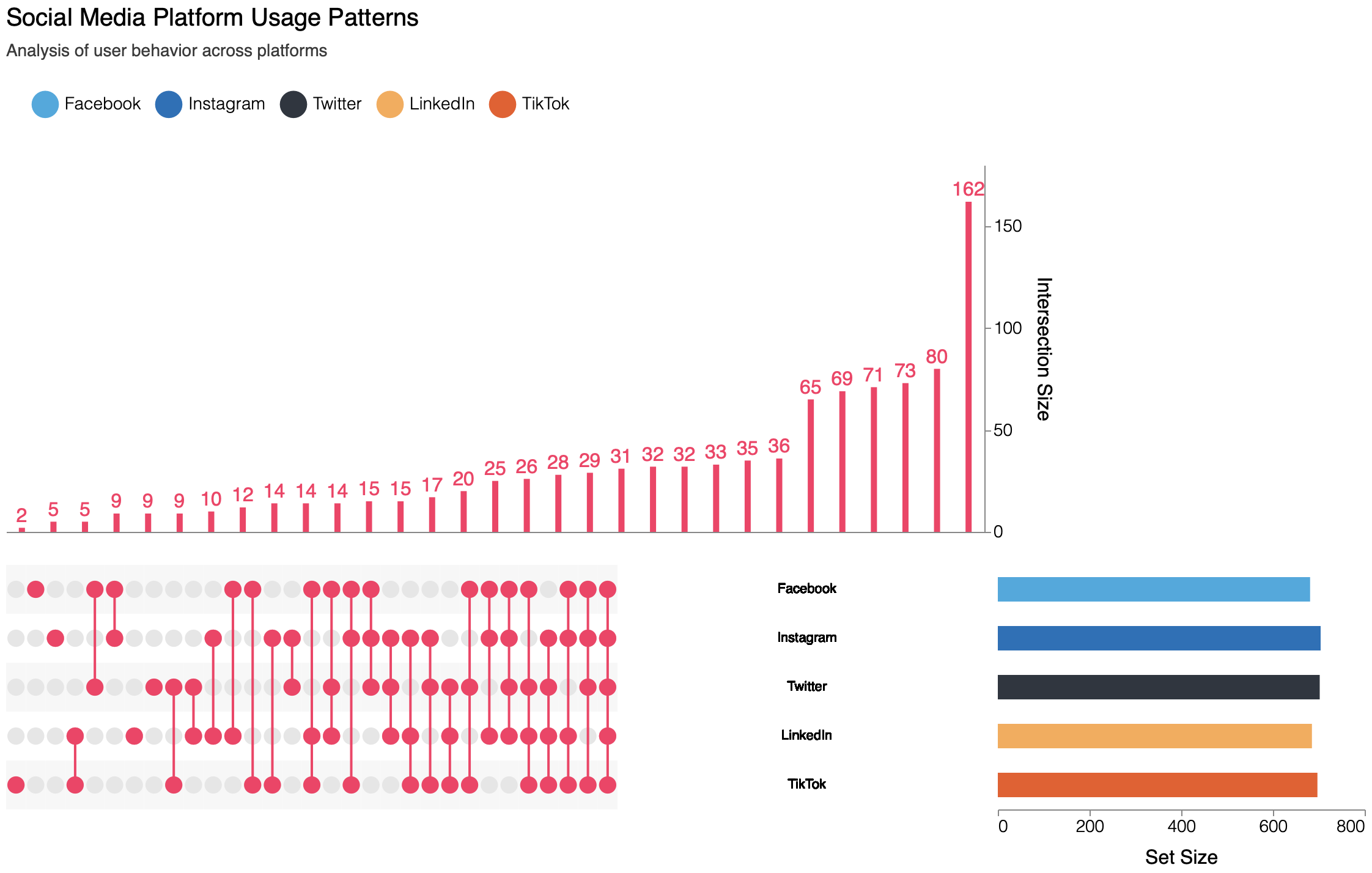
Create beautiful and interactive UpSet plots using Altair. UpSet plots are a powerful alternative to Venn diagrams for visualizing set intersections, especially when dealing with many sets.
Features
- 🎨 Beautiful, interactive visualizations powered by Altair/Vega-Lite
- 🔄 Dynamic sorting by frequency or degree
- 🎯 Interactive highlighting and filtering
- 📱 Responsive design that works in Jupyter notebooks and web browsers
- 🎨 Customizable colors, sizes, and themes
- 🔍 Tooltips with detailed intersection information
- 🚀 Support for both Pandas and Polars DataFrames
- 📐 Horizontal and vertical layout orientations for different use cases
Installation
pip install altair-upset
Or with conda:
conda install -c conda-forge altair-upset
Quick Start
import altair_upset as au
import pandas as pd
# Or use Polars
import polars as pl

# Create sample data with Pandas
data = pd.DataFrame({
    'set1': [1, 0, 1, 1],
    'set2': [1, 1, 0, 1],
    'set3': [0, 1, 1, 0]
})

# Create UpSet plot
chart = au.UpSetAltair(
    data=data,  # or data_pl.to_pandas()
    sets=["set1", "set2", "set3"],
    title="Sample UpSet Plot"
)

# Display the chart
chart.show()
Example Gallery
The package includes a comprehensive gallery of examples demonstrating various features and use cases:
Basic Examples
- Basic UpSet Plot: Simple visualization of streaming service subscriptions
- Sorting and Filtering: Different ways to organize and present set intersections
- Custom Styling: Examples of color schemes, themes, and layout customization
Real-World Examples
- Gene Set Analysis: Visualizing intersections of biological pathways
- Survey Response Analysis: Understanding multiple-choice survey patterns
- Social Media Usage: Exploring platform usage overlaps with demographics
- Movie Genre Analysis: Investigating genre combinations in film datasets
Advanced Features
- Interactive Selection: Enhanced interaction and filtering capabilities
- Custom Tooltips: Rich tooltips with additional information
- Responsive Design: Adapting to different display sizes
- Theme Examples: Using built-in and custom themes
To run the examples:
git clone https://github.com/edmundmiller/altair-upset.git
cd altair-upset
pip install -e ".[examples]"
python examples/basic_upset.py
Each example includes:
- Sample data generation or loading
- Plot creation with different features
- Analysis and statistics
- Detailed comments explaining each step
Advanced Usage
Sorting and Filtering
# Sort by degree (number of sets in intersection)
chart = au.UpSetAltair(
    data=data,
    sets=["set1", "set2", "set3"],
    sort_by="degree",
    sort_order="descending"
)
Customizing Appearance
# Custom colors and sizes
chart = au.UpSetAltair(
    data=data,
    sets=["set1", "set2", "set3"],
    color_range=["#1f77b4", "#ff7f0e", "#2ca02c"],
    highlight_color="#d62728",
    width=800,
    height=500
)
Using Abbreviations
# Use abbreviations for long set names
chart = au.UpSetAltair(
    data=data,
    sets=["Very Long Set Name 1", "Very Long Set Name 2", "Very Long Set Name 3"],
    abbre=["S1", "S2", "S3"]
)
Vertical Orientation
# Use vertical orientation for interactive plots that can be scrolled
# Vertical layouts display cardinality horizontally (on the left)
# and set sizes vertically (on top)
chart = au.UpSetAltair(
    data=data,
    sets=["set1", "set2", "set3"],
    orientation="vertical"  # Default is "horizontal"
)
The matrix can be sorted in various ways - by cardinality (size), degree, or sets. UpSet works well in both orientations:
- Vertical layouts are better for interactive UpSet plots that can be scrolled
- Horizontal layouts (default) are best for figures in papers
Development
- Clone the repository:
git clone https://github.com/edmundmiller/altair-upset.git
cd altair-upset
- Create a virtual environment and install dependencies:
python -m venv venv
source venv/bin/activate  # On Windows: venv\Scripts\activate
pip install -e ".[dev,test,docs]"
- Install pre-commit hooks:
pre-commit install
- Run tests:
pytest
Contributing
Contributions are welcome! Please feel free to submit a Pull Request. For major changes, please open an issue first to discuss what you would like to change.
- Fork the repository
- Create your feature branch (
git checkout -b feature/amazing-feature) - Commit your changes (
git commit -m 'Add some amazing feature') - Push to the branch (
git push origin feature/amazing-feature) - Open a Pull Request
Credits
This package is based on the UpSet: Visualization of Intersecting Sets technique. If you use an UpSet figure in a publication, please cite the original paper:
Alexander Lex, Nils Gehlenborg, Hendrik Strobelt, Romain Vuillemot, Hanspeter Pfister, UpSet: Visualization of Intersecting Sets, IEEE Transactions on Visualization and Computer Graphics (InfoVis '14), vol. 20, no. 12, pp. 1983–1992, 2014. doi: 10.1109/TVCG.2014.2346248
The original function was from hms-dbmi/upset-altair-notebook. The following updates from that are:
- Turning it into a package
- Snapshoting the functionality with Altair 4
- Porting to Altair 5
- Adding additional advanced features
Project details
Verified details
These details have been verified by PyPIProject links
GitHub Statistics
Maintainers


Download files
Download the file for your platform. If you're not sure which to choose, learn more about installing packages.
Source Distribution
Built Distribution
Filter files by name, interpreter, ABI, and platform.
If you're not sure about the file name format, learn more about wheel file names.
Copy a direct link to the current filters
File details
Details for the file altair_upset-0.5.0.tar.gz.
File metadata
- Download URL: altair_upset-0.5.0.tar.gz
- Upload date:
- Size: 671.8 kB
- Tags: Source
- Uploaded using Trusted Publishing? Yes
- Uploaded via: twine/6.1.0 CPython/3.13.7
File hashes
| Algorithm | Hash digest | |
|---|---|---|
| SHA256 |
0ddd0b3ef70b519a6655b98c3495323ddc76b9f150b8d851ed1f4758140df5db
|
|
| MD5 |
3a7ba7cbbb13f4a355dc6e6a5682f238
|
|
| BLAKE2b-256 |
544d30f34b642b97755658a4814dc7fc9d8176a8a56658175b5c040f84b48849
|
Provenance
The following attestation bundles were made for altair_upset-0.5.0.tar.gz:
Publisher:
publish.yml on edmundmiller/altair-upset
-
Statement:
-
Statement type:
https://in-toto.io/Statement/v1 -
Predicate type:
https://docs.pypi.org/attestations/publish/v1 -
Subject name:
altair_upset-0.5.0.tar.gz -
Subject digest:
0ddd0b3ef70b519a6655b98c3495323ddc76b9f150b8d851ed1f4758140df5db - Sigstore transparency entry: 706970259
- Sigstore integration time:
-
Permalink:
edmundmiller/altair-upset@373b1f029dffe010c07af35522c8fb668d28013c -
Branch / Tag:
refs/tags/v0.5.0 - Owner: https://github.com/edmundmiller
-
Access:
public
-
Token Issuer:
https://token.actions.githubusercontent.com -
Runner Environment:
github-hosted -
Publication workflow:
publish.yml@373b1f029dffe010c07af35522c8fb668d28013c -
Trigger Event:
push
-
Statement type:
File details
Details for the file altair_upset-0.5.0-py3-none-any.whl.
File metadata
- Download URL: altair_upset-0.5.0-py3-none-any.whl
- Upload date:
- Size: 14.1 kB
- Tags: Python 3
- Uploaded using Trusted Publishing? Yes
- Uploaded via: twine/6.1.0 CPython/3.13.7
File hashes
| Algorithm | Hash digest | |
|---|---|---|
| SHA256 |
f3a6e0ca9d0a36651ae6bcdfaf78a7ca2cc1a7fa461af29da25dbc47dbb14a5a
|
|
| MD5 |
bcb88c479bdd8e1fab26d38e2b22b355
|
|
| BLAKE2b-256 |
b34755096be74a6c46058670939c925afc5a8ab7b77e925ca0db4e887d2fac47
|
Provenance
The following attestation bundles were made for altair_upset-0.5.0-py3-none-any.whl:
Publisher:
publish.yml on edmundmiller/altair-upset
-
Statement:
-
Statement type:
https://in-toto.io/Statement/v1 -
Predicate type:
https://docs.pypi.org/attestations/publish/v1 -
Subject name:
altair_upset-0.5.0-py3-none-any.whl -
Subject digest:
f3a6e0ca9d0a36651ae6bcdfaf78a7ca2cc1a7fa461af29da25dbc47dbb14a5a - Sigstore transparency entry: 706970260
- Sigstore integration time:
-
Permalink:
edmundmiller/altair-upset@373b1f029dffe010c07af35522c8fb668d28013c -
Branch / Tag:
refs/tags/v0.5.0 - Owner: https://github.com/edmundmiller
-
Access:
public
-
Token Issuer:
https://token.actions.githubusercontent.com -
Runner Environment:
github-hosted -
Publication workflow:
publish.yml@373b1f029dffe010c07af35522c8fb668d28013c -
Trigger Event:
push
-
Statement type:






