





What is ~alter?
A login is true for the instant it is checked, and it says nothing at all about the hours on either side of it. Identity that exists only while somebody is looking is not identity, it is a permission, granted for one moment and then forgotten by the thing that granted it.
~Alter is the record that holds between the checks. What sits under your
~handle was read from work you actually did rather than typed into a form, so
it holds when the host changes, when the stack changes, and when the job does.
You are the gate on it. Nothing is readable until you have said so, in advance and by category rather than one request at a time, and a reader who wants more than your name pays you for the rest.
I want to know more
Your friends do not know you from a login. Neither does your family, or the people you work with, or your sports team. They know who you are from how you have shown up, over years. You may look and sound nothing like you did ten years ago and it is still you.
Software still asks the narrow question. A password at the login screen. A token in the app. Each one checks whether this is the right person, right now, at this exact spot, and then looks away. Everything in between is invisible to it, and that is almost all of your life. The AI tools made it worse, because one of them writes in your name now, and when somebody asks who allowed it, there is no answer anywhere on this machine.
One name, and the record under it is yours. ~yourname works at every tool that speaks the protocol, so nothing is set up twice and there is no key to paste, at any point. What is in the record was read from what you did, not typed into a box by you or guessed at by a model. You can cut off access to any of it with one command. No form, no review.
Being read pays you. Anyone can check for free that your handle exists. Reading further, past the fact of you, costs the reader money, that money goes to you, and you decide who gets to read what. Collectives hold a record on the same terms, because it is one record at every scale and the same form holds you, your team, and your country. A union, a club, a trade body, or a group of people who have never met can vouch for their own members and be read the same way you are.
Threads are how you get somewhere. A thread is something you are working towards. You take one on yourself, or ~Alter plants one from what it can already see, or a collective confers one on you. What gets read is the trail you leave while you are doing it, never a certificate at the end.
All of that is the short version of an argument set out properly, in eight chapters at truealter.com/origin. Its seventy-six predictions were each written so the data could come back and say no. Five of them did, and those five are still published alongside the rest.
I want to check it myself
None of it needs taking on trust. Hand this to the AI you already use and let it take you through in your own words.
Go to truealter.com, find the genesis and the origin papers, and read all of
them. Then start a discussion with me in my own language, no jargon.

Ask me one question at a time and wait for my answer. Follow what I am curious
about, not the order the site is written in.

Do not only read the pages. Connect to their interface directly and call
get_started. That tells you where I am and what comes next, and we work the
rest of this from there.

If I have a ~handle I will give it to you. If I do not and I decide I want
one, set it up with me here.

What I want to understand is what ~Alter is, how it applies to me, and what it
means for everyone else. Find me somewhere in it, and not the version written
for people who work in technology. Find the life nearest mine and walk me
through it, including what it would cost me.

Try to prove them wrong. Go and find where they show their working, and if
something is unclear or does not hold up, say so.
What is ~alter Runtime?
A daemon on your own machine that stays awake so the record under your ~handle
is continuous rather than a series of moments when a command happened to be
typed. A thing observed only when it is polled has no history, it has samples,
and everything falling between two samples is a gap nobody can account for
afterwards.
The runtime closes that gap. It watches the ref files in your repositories, so a commit is observed as it lands rather than reconstructed from a log later. It watches the working tree, so a save registers even in an editor that offers no hook. It subscribes to your own identity field over a long-lived stream, and when that stream goes quiet it polls instead, without your surfaces ever knowing which path served them.
It comes back on its own. The service unit starts it at login and restarts it on failure, and inside it a supervisor restarts any component that dies, backing off as it goes. It keeps the last state it saw on disk, so the shell prompt, the status bar and the editor hook have something to draw the moment they ask, with no network and no waiting.
This is the part nobody thinks to ask for. The command line is the front door and what most people install, and this is the process running underneath while nothing is being asked of it.
The rest of this page is the install, and running it.
Install
You need Python 3.10 or newer. Nothing else, and nothing to configure.
pipx install alter-runtime
PyPI is the only channel this daemon is published on, and that is every platform. The Homebrew tap and the AUR package both carry the command line and not the runtime, so on macOS and on Arch this is still the way in.
pipx is the recommendation rather than a preference. It installs into an
isolated environment and puts the alter-runtime command on your PATH for
you, and on Debian and Ubuntu a bare pip install is refused outright by the
system Python under PEP 668.
Installing with pip instead
pip install alter-runtime inside an activated virtual environment works, and
so does pip install --user alter-runtime on a system that allows it. The
console script then lands in whatever scripts directory that Python is
configured to use, and that directory is not guaranteed to be on your PATH.
Debian and Ubuntu put it in ~/.local/bin, which they do not add to PATH by
default, so a command not found error for alter-runtime immediately after a
successful install means exactly this and nothing worse.
# Bash, add once to ~/.bashrc, then open a new shell
export PATH="$HOME/.local/bin:$PATH"

# Zsh, add once to ~/.zshrc, then open a new shell
export PATH="$HOME/.local/bin:$PATH"

# Fish
fish_add_path ~/.local/bin
Or skip PATH altogether and call the module, which works whatever your shell
is configured to do.
python3 -m alter_runtime.cli init
The optional extras
pipx install 'alter-runtime[dbus]'puts your handle on the session bus, which is what the GNOME, KDE and Waybar modules read.pipx install 'alter-runtime[systemd]'for the Linux service unit.pipx install 'alter-runtime[windows]'pulls the Windows service dependencies. The service itself is not wired yet.pipx install 'alter-runtime[ebpf]'for the kernel attestation subscriber.pipx install 'alter-runtime[all]'takes the lot.
Running it, start to stop
This daemon keeps a ~handle known on your machine, so it assumes you already
hold one. If you do not, the first five
minutes in the command
line walks it, starting with alter audit, which shows what is readable about
you before you have an account at all.
1. Set it up
Run alter-runtime init.
It generates the device keypair, makes the directories it needs, and checks the session the command line left behind. Nothing leaves the machine.
2. Start it
Run alter-runtime start.
It installs and enables the host service unit, systemd on Linux and launchd on
macOS. It shows you every artefact it is about to write, with sizes and digests,
and waits for your yes. Add --dry-run to see the unit file and the commands
without touching anything, or --yes to skip the prompt in a script.
alter-runtime daemon runs it in the foreground instead, which is what you want
while you are debugging.
3. See where it stands
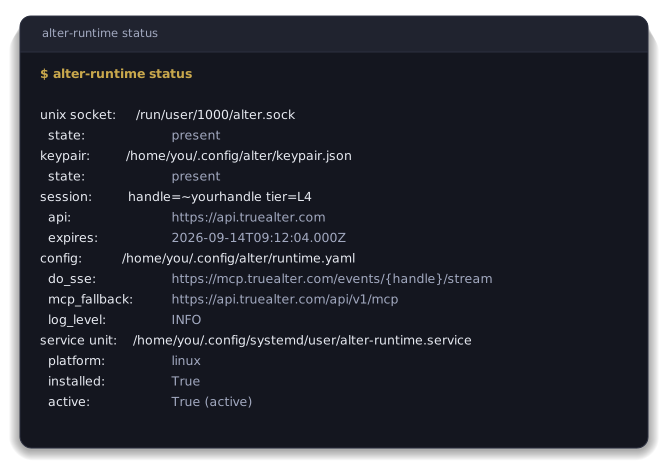
Run alter-runtime status.
The socket, the keypair, the session and its expiry, the config it loaded, and whether the service unit is installed and active. It is the one command to come back to.
4. Read your own field
Run alter-runtime query.
It answers from the materialised view the daemon is holding, so it answers with no network when the edge is away.
5. Stop it
Run alter-runtime stop.
Disables and stops the unit. The keypair and the config stay where they are.
What it does while it runs
- Subscribes to your own handle's event stream at
https://mcp.truealter.com/events/<yourhandle>/stream, over Server-Sent Events. - Falls back to polling
https://api.truealter.com/api/v1/mcpwhen that stream has been silent for seventy-five seconds, three times the server's keepalive interval. Your surfaces never know which path served them. - Exposes two local transports. A Unix socket carrying line-delimited JSON
at
/run/user/$UID/alter.sockon Linux or~/Library/Application Support/alter/runtime.sockon macOS, which is what editor hooks and shell scripts read. D-Bus, theorg.alter.Identity1interface on the session bus, which is what the GNOME, KDE and Waybar modules read. - Collects ambient signals. Commits and branch switches, read from the ref files as they change. Working-tree saves, for editors that offer no hook. Exec attestations from the kernel over eBPF, on Linux, filtered to your own uid before the daemon sees them.
- Keeps a local cache of the last good state, so your surfaces stay continuous across restarts and dropouts rather than blanking out.
Where your key is kept
On the first alter-runtime init the device key file is written to
~/.config/alter/keypair.json, or $XDG_CONFIG_HOME/alter/keypair.json when
that variable is set. It is opened at 0600 from the first byte rather than
written and then tightened, so no local process gets a window in which to read
it. It never leaves the device.
Generation is a scaffold in this alpha. The file lands at the right path, at the right mode, in the right shape, and the Ed25519 material is not yet generated into it, so nothing here signs with a device key today. Wiring that generation, and binding it to a device passkey, is the work this shape is being held for.
The filesystem rather than an OS keychain is deliberate. It keeps the daemon
self-contained on any POSIX host without a hard dependency on a distro-specific
secret store while this is being tested. Linux libsecret and kwallet, macOS
Keychain and Windows Credential Manager come later behind a config knob, and the
filesystem stays the documented fallback.
If you are running this somewhere a compromised device would mean a compromised identity, pair it with hardware-attested passkey registration through the claim flow in the browser. The device key on disk then covers ambient signal collection and nothing else, and anything of consequence asks for the passkey again.
This is an alpha
The public surface can change in ways that break you before the stable release. That is the CLI flags, the Unix-socket JSON schema, the D-Bus interface and the Python SDK signatures. Pin an exact version in anything downstream before you upgrade.
Security reports go to security@truealter.com, never a public issue. Anything
else is support@truealter.com.
Reading it from your own code
import asyncio
from alter_runtime import AlterClient


async def main():
    # Returns a direct MCP client. Preferring the local daemon's socket
    # is the intent of this constructor and is not wired yet.
    client = AlterClient.auto_discover()

    async with client:
        response = await client.whoami()
        print(response.extract_text())

        attunement = await client.attunement()
        print(attunement.extract_text())


asyncio.run(main())
alter-runtime send ~peer "..." sends a message through the running daemon,
which holds the session and does the authenticated send itself. alter-runtime ingest --kind <kind> --payload '<json>' prints the envelope it would send and
stops there, because the shell path into the daemon is not wired yet.
The protocols underneath it
The record formats are open Internet-Drafts, so somebody else's implementation reads and writes the same records this one does without asking us. These are the drafts this repository actually rests on.
| Draft | What it specifies |
|---|---|
mcp-dns-discovery |
The DNS records that publish a ~handle, the server that answers for it, and the signed envelope bound to it. |
alter-uri-scheme |
The alter: URI, so a ~handle reference resolves, verifies and dispatches to a handler on the machine. |
agent-channel-fan-out |
The frame several concurrent agent sessions of one principal use to exchange short structured messages. |
binding-moment-envelope |
The wire structure an agent uses to put a consequential decision to the person it acts for, and how they answer. |
substrate-observation |
Why cross-session coordination is observed from substrate rather than negotiated as a wire format. |
Eighteen drafts make up the whole stack. The rest are on the IETF datatracker.
The rest of it
~alter is one identity rail with several ways in, and this daemon is the part
that runs on your own machine.
| Name | What it is |
|---|---|
| cli | The command line, and the front door for a person. |
| homebrew-tap | That command line, packaged for macOS and Linux. |
| runtime | The daemon that keeps your ~handle known on your own machine. You are here. |
| sdk | Reading identity from your own code. |
| obsidian | ~Alter inside an Obsidian vault, on-device. |
| mcp-ollama | Local models, for work that should stay on the machine it runs on. |
| Where to read more | |
|---|---|
| Website | truealter.com |
| The reasoning behind it | truealter.com/origin |
| Getting started | truealter.com/build |
| What the tools do | truealter.com/docs/mcp/tools |
| The open specifications | the draft stack |
Apache-2.0, see LICENSE.
~alter is identity infrastructure. Your name is ~yourname and claiming one is free.
1 maintainer

Metadata
1 maintainer
Release files for alter-runtime 0.4.16
For a detailed explanation of source distributions (sdists) and built distributions (wheels), please see the package formats documentation.
Source distribution (sdist)
| File | Size | Uploaded | |
|---|---|---|---|
| alter_runtime-0.4.16.tar.gz | 281.5 kB | Details |
Built distribution (wheel)
| File | Interpreter | ABI | Platform | Reset |
|---|---|---|---|---|
| alter_runtime-0.4.16-py3-none-any.whl | Python 3 | none | any | Details |
Total release size: 598.7 kB
Release files / alter_runtime-0.4.16.tar.gz
| Download URL | alter_runtime-0.4.16.tar.gz |
|---|---|
| Size | 281.5 kB |
| Tags | Source |
|
SHA-256 checksum How to use checksums |
a083bf2ef0ec0a8cfafd29254f19b9d2b0ceaf2e458b982b28f0a3e406c46c27
|
|
BLAKE2b-256 checksum How to use checksums |
440ca743c98c3b6c736f4d0bbc333f60428eaf0e19e7e3a850bd69f8a494fe88
|
| Upload date | |
|
Uploaded using Trusted Publishing? What is trusted publishing? |
Yes |
| Uploaded via |
twine/7.0.0 CPython/3.13.14
|
Provenance
Provenance describes where a file came from. On PyPI, provenance is shared via attestations, which provide a verifiable record of the build or publishing details. View details, limitations and caveats.


PyPI Publish Attestation
PyPI verified that this artifact, at this checksum, originated from the publisher listed below.
Signed by GitHub Actions, verified by PyPI on Sep 24, 2026.
Transparency logRelease files / alter_runtime-0.4.16-py3-none-any.whl
| Download URL | alter_runtime-0.4.16-py3-none-any.whl |
|---|---|
| Size | 317.2 kB |
| Tags | Python 3 |
|
SHA-256 checksum How to use checksums |
0fe93ada89d965ed51c66d99e81bd1f6825a773710ee98153412fc49b99114f8
|
|
BLAKE2b-256 checksum How to use checksums |
bdf87f413cd9a4820e90d5db4147df0e984a6f0f3fa318a6abd13cf4ff6aee18
|
| Upload date | |
|
Uploaded using Trusted Publishing? What is trusted publishing? |
Yes |
| Uploaded via |
twine/7.0.0 CPython/3.13.14
|
Provenance
Provenance describes where a file came from. On PyPI, provenance is shared via attestations, which provide a verifiable record of the build or publishing details. View details, limitations and caveats.
PyPI Publish Attestation
PyPI verified that this artifact, at this checksum, originated from the publisher listed below.
Signed by GitHub Actions, verified by PyPI on Sep 24, 2026.
Transparency log













