

The open-source AI agent for your terminal and desktop. Built from scratch, with free web search and computer use built in.





Website · Docs · Download · Changelog · Discord · X

Installation
# macOS, Linux and WSL
curl -LsSf https://raw.githubusercontent.com/AlysisAi/AlysisCode/main/scripts/install.sh | sh

# Windows (PowerShell)
irm https://raw.githubusercontent.com/AlysisAi/AlysisCode/main/scripts/install.ps1 | iex

# Package managers (Python 3.11+)
uv tool install alysis-code
pipx install alysis-code
The installers set up uv and their own Python, so you don't need Python or admin rights. Run alysis update to upgrade. Both alysis and alysis-code start the CLI.
Desktop App
Alysis Code is also a desktop app for macOS and Windows. It ships with its own copy of the engine in this repo, so there is no Python or CLI to install.
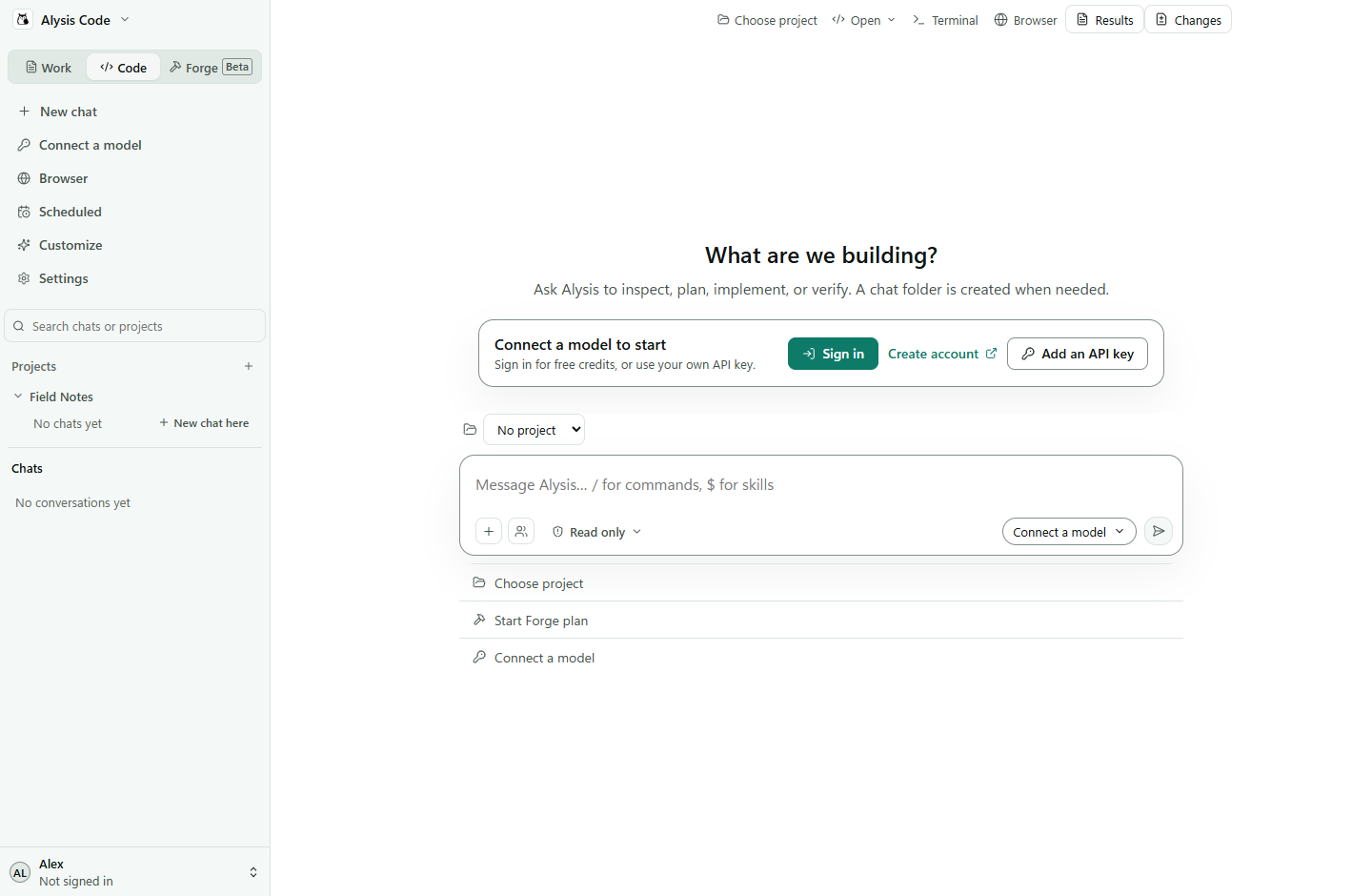 |
- Work for documents: attach notes or a CSV and get back a Word file, spreadsheet, presentation or PDF. Results are versioned, and you can mark part of a preview and ask for a change.
- Code for repositories: chat about the code, read the diff in Changes, run commands in the built-in Terminal, and roll back to a checkpoint.
- Projects keep chats, folders and saved instructions together. You can import projects and history from other coding agents.
- Browser opens pages next to the chat, and an optional Chrome extension lets Alysis work in your own tabs.
- Scheduled runs recurring tasks (daily, weekdays, weekly or hourly) while the app is open.
- Customize adds skills, plugins, MCP servers and hooks. Forge plans larger coding changes as reviewed tasks.
| Platform | Installer | Architecture |
|---|---|---|
| macOS | .dmg |
Apple silicon (M-series) |
| Windows | .exe |
64-bit (x64) |
Get the installer for your computer from the download section on alysiscode.com. The app checks for updates when it starts and while it runs; choose Restart to update when one is ready. There is no Linux build yet; use the CLI there.
Desktop docs · Install and update · Your first task
Getting started
cd your-project
alysis
The first run walks you through connecting a model, picking a workspace and checking the sandbox. Run alysis setup to go through it again.
Choosing a model
Your own key or a local model. No Alysis account needed. Pick a provider in setup (OpenAI, Anthropic, Gemini, DeepSeek, OpenRouter, xAI and others), or point it at any OpenAI-compatible endpoint such as Ollama, LM Studio or vLLM. A supported AI subscription works too. You pay your provider directly, or nothing for a local model.
An Alysis account. Run alysis login and approve the code in your browser. Every account gets 50 free credits every 30 days, no card required. See pricing for paid plans.
In the desktop app, both paths live under Models & keys in the account menu.
What makes it different
- Built from scratch. Not a fork. Our own engine, tools and desktop app.
- Free web search. Works with any model, no API key needed.
- Computer use. Our own, built in. The agent can operate apps you allow.
- Sandboxed by default. Shell commands run in a sandbox enforced outside the model: Seatbelt on macOS, Bubblewrap or Docker on Linux and WSL, a native sandbox on Windows x64. Check yours with
alysis sandbox doctor --smoke. Sandbox modes Verification commands also default to strict sandboxing. Strict mode refuses execution when no backend is available. Shell sandbox - Any model. Switch providers per task, mix in local models, or route roles to different models. Models and providers
- Permissions you choose.
readonly,review,autoorfullaccess, switched with Shift+Tab. A persona (code,architect,ask,debug) can narrow what the agent does but never widen it. Permissions · Personas - Forge. Turns a goal into a reviewed plan of dependent tasks, each with its own checks, so you get verified changes instead of one long chat. It uses a lot of tokens, so start small. Forge guide
- Not only code. Optional document tools for PDFs, Word, spreadsheets and slides. Work guides
Documentation
Everything else, from config and MCP to server mode, is at alysiscode.com/docs. The same docs are in docs/. Editor integrations for VS Code and JetBrains (preview) live in extensions/.
Contributing
Read the contributing guide before opening a pull request. Report security issues privately through the security policy, not public issues.
License
Apache-2.0. You can use, modify and distribute the code, including commercially, as long as you keep the attribution and license notices. See LICENSE and NOTICE. The shared editor sidebar includes MIT-licensed adaptations from Kilo Code and OpenCode; keep its third-party notices.
Join the community Discord | X | LinkedIn | GitHub Issues
1 maintainer

Metadata
1 maintainer
Release files for alysis-code 0.16.3
For a detailed explanation of source distributions (sdists) and built distributions (wheels), please see the package formats documentation.
Source distribution (sdist)
| File | Size | Uploaded | Provenance | Actions |
|---|---|---|---|---|
| alysis_code-0.16.3.tar.gz | 43.5 MB | With provenance | Details for alysis_code-0.16.3.tar.gz |
Built distribution (wheel)
| File | Interpreter | ABI | Platform | Actions Reset |
|---|---|---|---|---|
| alysis_code-0.16.3-py3-none-any.whl | Python 3 | none | any | Details for alysis_code-0.16.3-py3-none-any.whl |
Total release size: 87.8 MB
Release files / alysis_code-0.16.3.tar.gz
| Download URL | alysis_code-0.16.3.tar.gz |
|---|---|
| Size | 43.5 MB |
| Tags | Source |
|
SHA-256 checksum How to use checksums |
2098e98a2091e43f2392a81b357a216047091ab0f173c8e5d2a61a426edc1914
|
|
BLAKE2b-256 checksum How to use checksums |
1d8f001756bad3ead6988297c1059c0ccf3de390e3e0d6fc3a1d0ae476eb0742
|
| Upload date | |
|
Uploaded using Trusted Publishing? What is trusted publishing? |
Yes |
| Uploaded via |
twine/7.0.0 CPython/3.13.14
|
Provenance
Provenance describes where a file came from. On PyPI, provenance is shared via attestations, which provide a verifiable record of the build or publishing details. View details, limitations and caveats.


PyPI Publish Attestation
PyPI verified that this artifact, at this checksum, originated from the publisher listed below.
Signed by GitHub Actions, verified by PyPI on Nov 9, 2026.
Transparency logRelease files / alysis_code-0.16.3-py3-none-any.whl
| Download URL | alysis_code-0.16.3-py3-none-any.whl |
|---|---|
| Size | 44.2 MB |
| Tags | Python 3 |
|
SHA-256 checksum How to use checksums |
723d6c3abc1a63976b0b9db1e89a518ad2305f53f0525a09228897badcc6af78
|
|
BLAKE2b-256 checksum How to use checksums |
13c0047b0ccc2ff787b0af0b5405f2852e17fd8611141dea71521dff9899353c
|
| Upload date | |
|
Uploaded using Trusted Publishing? What is trusted publishing? |
Yes |
| Uploaded via |
twine/7.0.0 CPython/3.13.14
|
Provenance
Provenance describes where a file came from. On PyPI, provenance is shared via attestations, which provide a verifiable record of the build or publishing details. View details, limitations and caveats.
PyPI Publish Attestation
PyPI verified that this artifact, at this checksum, originated from the publisher listed below.
Signed by GitHub Actions, verified by PyPI on Nov 9, 2026.
Transparency logSecurity for alysis-code 0.16.3
Provenance
Provenance describes where a file came from. On PyPI, provenance is shared via attestations, which provide a verifiable record of the build or publishing details. View details, limitations and caveats.
Full provenance
Both files in this release have been uploaded with provenance metadata.
Attestation for alysis_code-0.16.3.tar.gz
PyPI Publish Attestation
PyPI verified that this artifact, at this checksum, originated from the publisher listed below.
Signed by GitHub Actions, verified by PyPI on Nov 9, 2026.
Transparency logA note on package security
PyPI is a repository for distributing packages, not a service for auditing them. While third-party security researchers and our staff do their best to detect and remove malicious packages, PyPI cannot guarantee the quality, security or suitability of any given package.
To learn more about protecting yourself from malicious actors, visit our package security documentation.














