
amaran-mcp
A Model Context Protocol server and CLI through which an AI assistant drives an amaran light from a Mac, built for two uses of equal weight. It works with Claude Code, Cursor, GrokBot and any other MCP client that runs a local server.
| Studio lighting from a prompt | Music mode |
|---|---|
| Describe the shot (a talking head, a corporate interview) or show Claude a photo of the set; it sets colour temperature, tint and level, and a saved scene brings the look back. | The light follows what the Mac plays by the structure of the track rather than its beat: it drifts through the groove, pales when the kick drops out, blooms when a breakdown's chords lift, and opens out at the drop. |
Underneath, Apple's on-device sound classifier separates singing from speech, and a 50/50 blend of gradient-boosted trees and a log-mel CNN, trained on 402 expert-labelled Creative Commons EDM tracks, names the section once a second in 3 ms of numpy: balanced accuracy 0.49 on held-out tracks, against 0.36 for hand-written rules. Everything runs on the Mac.
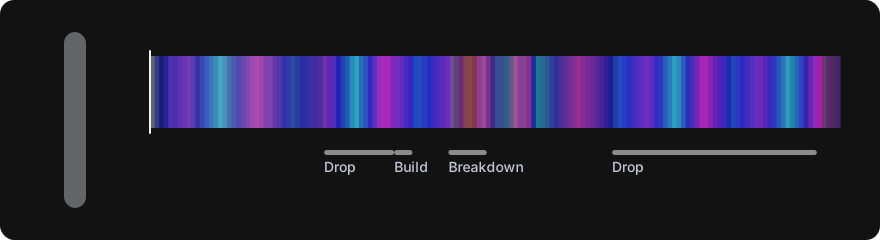
Play a breakdown: press play on a vocal trance track and watch what music mode does, second by second, in step with the music, next to an expert's reading of the same track.
So what · When to use this · How to use this · Music mode · Studio lighting · Tools · What's next · How it reaches the light · Research
So what
Most music-reactive lights flash on every beat. It looks like a club toy, and in a room you work or listen in it wears thin in minutes. Music mode listens the way a musician does instead: it hears the tempo, the chords, the singing and the sections of a track, so the light drifts through the groove, pales when the kick drops out and blooms when a breakdown's chords lift, then opens out at the drop. It never flashes; colour can only change so fast.
Lighting a talking head well is fiddly in the other direction: white balance, tint and level, set by hand and lost by the next call. Here you describe the shot, or show Claude a photo of the set, and it sets the light; a scene brings the same look back tomorrow. Alone in frame, you can say the change out loud instead of getting up to make it.
Everything runs on the Mac: the audio never leaves it, and the light is reached through amaran Desktop or directly over Bluetooth.
When to use this
| You are | Use | Why |
|---|---|---|
| Listening to a trance or house set at your desk, with the light in view | Music mode (ethereal, deep or dawn) |
The room moves with the track's sections, not its kick drum |
| Streaming or recording with music playing on the Mac | Music mode | It follows whatever the Mac plays, AirPlay from an iPhone included |
| On a video call, recording a talking head or a corporate interview | Studio lighting from a prompt | White light matched to the camera, no colour on the face |
| Hosting a show or recording alone, in frame at the Mac | Voice commands to Claude | Look at the monitor, say the change, stay in your seat |
| Setting up the same shot again | save_scene, then recall_scene |
One name brings back colour temperature, tint and level |
| Wanting it to learn your music | The background listener and mark |
Your own sessions become training data, kept on your Mac |
It is not for stage or club lighting: it drives one light, it is slow by design, and it speaks to amaran lights, not DMX.
How to use this
Set it up once
You need a Mac, uv, Xcode's command line tools
(xcode-select --install; music mode compiles its audio helper on first run),
and amaran Desktop with the light paired in it.
-
Install the command from PyPI (later,
uv tool upgrade amaran-mcpupdates it):uv tool install amaran-mcp
Without uv,
pip install amaran-mcp(Python 3.11 or newer) works too;pip install --upgrade amaran-mcpupdates it. For the newest code before a release, install from GitHub instead:uv tool install git+https://github.com/jtannahill/amaran-mcp. -
Quit amaran Desktop fully (it keeps running after its window closes, and holds the light), then import the light:
amaran-mcp import
amaran-mcp status
-
Connect your assistant.
-
Claude Code, as a plugin that updates with
/plugin update:/plugin install amaran --marketplace jtannahill/amaran-mcpOn older versions,
/plugin marketplace add jtannahill/amaran-mcpand then/plugin install amaran@amaran-mcp. Or register the command directly:claude mcp add -s user amaran -- amaran-mcp serve. -
Cursor, in
~/.cursor/mcp.json, with the full path thatwhich amaran-mcpprints (apps opened from the Dock do not see your shell's PATH):{ "mcpServers": { "amaran": { "command": "/Users/you/.local/bin/amaran-mcp", "args": ["serve"] } } }
-
GrokBot or any other MCP client: the same command,
amaran-mcp serve, by its full path.
-
-
Ask for something: "warm white at 40 percent", "a slow violet", "start music mode, deep".
To work on the code instead, clone the repo and put uv run before each
command.
import writes ~/.config/amaran-mcp/light.json (mode 600; it holds the mesh
keys). The first Bluetooth use asks for permission for the app running the
command. If the light was paired with the amaran phone app instead,
amaran-mcp import --account you@example.com fetches the keys from the
amaran account (the password is asked for and never stored; untested).
Then ask for what you want
| Say to Claude | What happens |
|---|---|
| "Start music mode" or "start music mode, deep" | The light follows what the Mac plays, in that mood |
| "Stop music mode" | The light goes back to how it was |
| "Corporate interview, camera at 5600K, soft and a touch warm" | White light at the right temperature and level |
| "Here's a photo of my set, light my face for a webcam talk" | Claude reads the photo and sets white balance and level |
| "Save this as interview A" / "recall interview A" | The look is kept and brought back |
| "Warmer, and down ten percent", said aloud while on camera | The same tools, by voice (hands free) |
| "Warm white at 40 percent" or "a slow violet" | Direct control, as with any light |
The same works from the terminal (amaran-mcp music --mood deep, and
the other commands under Tools).
Music mode
amaran-mcp music --mood ethereal # or ask Claude: "start music mode"
The light follows whatever this Mac plays, AirPlay from an iPhone included. It listens to the Mac's own audio output, not a microphone, so headphones are fine. Everything runs on the Mac.
Built for vocal trance
It was tuned on the euphoric, vocal end of trance, the sound of Armin van Buuren's A State of Trance, Find Your Harmony and Future Sound of Egypt, and the genre's habits are built in:
| The music | Music mode |
|---|---|
| 138 BPM, a bar every 1.74 s, phrases of 8 and 32 bars | Counts in bars at the tempo it hears; the model looks at about one 8-bar phrase at a time |
| A rolling offbeat bass that never stops | Hears the kick by its beat, not by the bass level |
| The long breakdown: pads, piano, a reverb-soaked vocal | Pale first, then the chords set the colour |
| Euphoria from minor-key progressions lifting onto major chords | The bloom is tied to that lift and nothing else |
| Snare rolls, risers and filter sweeps in the build | Tension from noise and density, so the colour deepens |
| The drop: the kick back under the supersaw anthem | Opens out to full on a real drop, not on a bass swell |
| A radio host talking over the mix | Apple's classifier tells speech from singing: talk never blooms |
Why this matters for the model, and what the training data lacks: Vocal trance at 138 BPM.
What listens
| Stage | What runs | Where |
|---|---|---|
| Capture | A Core Audio process tap on the system output | Swift helper, macOS 14.2+ |
| Voices | Apple SoundAnalysis, the built-in on-device sound classifier: singing, choir, speech, rapping, crowd | Apple's model, no network |
| Tempo and chords | Kick-band onset tracking for the beat; chroma matched to 24 chords for the harmony and the minor-to-major lift | numpy |
| Sections | A machine-learned model names intro, groove, breakdown, build or drop once a second | numpy, 3 ms a second |
| Light | A renderer turns sections, chords and voice into one slow colour | numpy |
Apple's classifier is how music mode tells a vocal from a DJ talking over the mix: singing makes a bloom bigger, speech never blooms.
The section model
Two models, blended 50/50:
- Gradient-boosted trees on a 16-second summary of what music mode hears: energy, bass, kick, tempo, harmony, tension, Apple's singing and speech readings, and 11 spectral readings.
- A spectrogram CNN, a small convolutional network that reads the last 16 seconds as a log-mel spectrogram (64 bands, 10 frames a second).
Both learned from SSME: 402 Creative Commons EDM
tracks with drops, builds and breaks marked by experts. Training uses
scikit-learn and PyTorch; the shipped model is plain numpy arrays
(src/amaran_mcp/music/sections.npz), so music mode needs neither. Scored on
tracks held out from each model's training (five-fold cross-validation):
| Sections | Breakdowns | Builds | Drops | |
|---|---|---|---|---|
| Rules | 0.36 | 0.02 | 0.00 | 0.10 |
| Trees | 0.48 | 0.05 | 0.08 | 0.19 |
| CNN | 0.44 | 0.11 | 0.07 | 0.15 |
| Blend (shipped) | 0.49 | 0.09 | 0.07 | 0.20 |
Sections is balanced accuracy, the share of seconds called right averaged over the four sections the model names; the others are F scores for finding a start within a few seconds. Rules are the hand-written logic the model replaced. Trance breakdowns are the weakest spot, which is why it also learns from your own listening (below). The full research, every measurement and how to retrain: docs/research.md.
What the light does
| Section | The light |
|---|---|
| Intro | Restrained, in the lower third of the brightness range |
| Groove | Drifts slowly through the mood's colours and breathes with the energy |
| Breakdown | Pale for its first bars, then each chord sets the colour: minor cool, major warm |
| Lift | The chords rise from minor to major: the light warms, swells and turns luminous, more with a vocal |
| Build | The drift stops, the colour deepens, brightness holds |
| Drop | Opens out to full |
Trance gets full colour: saturated blues, violets and orchids that only turn paler at the start of a breakdown, and never grey. Hue turns at most 30 degrees a second, so it never flashes or pulses on the beat.
| Mood | Colours |
|---|---|
ethereal |
Deep blue, violet, teal, orchid |
deep |
Indigo, navy, magenta-violet |
dawn |
Lavender, peach, gold, rose |
The same song twice
The sections repeat; the colours do not, on purpose.
| Same on a second play? | |
|---|---|
| Sections, blooms and when they land | Yes, within about a second. The section calls have no randomness and keep time by the audio itself, but live capture lands on a slightly different grid each play, so a call that sits right at a threshold (the 2 s hold, the 4-bar kick test, a bloom) can occasionally flip |
| The colours | No. When the Music app names a new song, the light starts it on a palette stop picked at random from those not showing; from any other source (AirPlay, a browser, SoundCloud, YouTube) the groove's drift carries on from where the last track left it. Either way the same sections come in different colours |
| The first 10 to 30 seconds | Yes, after a gap of 3 s or more: tempo, chord and sound tracking start fresh for each song, as training heard every track. In a gapless mix they carry on from the track before |
| The demo page | Always. It replays one fixed capture, so the light is identical on every play |
Any other light command stops music mode, except brightness, which moves its range. Needs Xcode's command line tools (the audio helper is compiled on first run); macOS asks once for permission to record system audio.
Teaching it your music
amaran-mcp install-listener   # record listening sessions at login
amaran-mcp mark lift          # or breakdown, vocal, build, drop
amaran-mcp uninstall-listener
The listener records while music plays (FLAC, a feature log and your marks, in
~/.config/amaran-mcp/recordings), so a model can be trained on what you
actually listen to. It never touches the light, needs ffmpeg, stops at 30 GB,
and nothing leaves the Mac. Delete the folder to remove the recordings.
Music mode records the same way when the listener is not running. Either one keeps only the music: a session starts when music is recognised (with the ten seconds before it) and ends two minutes after it stops, so a call or a video afterwards is not kept, and the microphone is never recorded. The folder is readable by your user only.
Studio lighting from a prompt
Interviews and talking heads are mostly white light: the right colour temperature, the right level, no cast on the face, and colour, if any, only on the background. Say what the shot is and Claude sets the light with the same tools:
"Corporate interview, daylight from a window on the left, camera at 5600K. Soft key, a touch warm, not too bright."
"Here's a photo of my set. Light my face for a webcam talk."
| What you need | How it is set |
|---|---|
| Match the camera's white balance | set_white in kelvin, such as 3200 tungsten or 5600 daylight (get_light shows the light's range) |
| Cancel a green or magenta cast from windows or office lights | set_white tint, -10 to +10 |
| Exposure for the face | set_brightness in percent |
| A background accent, when the look wants one | set_color, hue, saturation and brightness |
| The same look tomorrow, or per shot | save_scene "interview A", then recall_scene |
Claude reads a photo of the set the way it reads any picture, so it can see the window, the room's colour and where the light sits, and pick the white balance and level from that. Today that is one light; a key, fill and back light setup is planned as more amaran lights join.
Hands free, on camera
Working solo, the light is out of reach once you are in frame: hosting a show alone, or recording a video from the Mac in front of you. Speak to Claude instead, through the Mac's Dictation or the voice input of the Claude app you use, and the light changes while you keep your eyes on the monitor and stay in place:
"Warmer, and down ten percent."
"The sun's gone in. Bring the level up to match."
"Recall interview A."
Each command is an ordinary tool call, so it takes the moment Claude needs to reply: call changes between takes or segments rather than mid-sentence. On a live show the microphone hears the command too, so mute it for the cue or keep cues to the breaks.
Tools
| Tool | Does |
|---|---|
get_light |
Power, brightness, mode and, over Bluetooth, battery |
set_power, set_brightness |
On or off; brightness in percent |
set_white |
Colour temperature in kelvin, with optional green or magenta tint |
set_color |
Hue, saturation and brightness |
set_effect, stop_effect |
Built-in effects such as fire, TV and lightning, and the pixel effects through Desktop |
save_scene, recall_scene |
Name the current look and bring it back |
start_music_mode, stop_music_mode |
Follow what the Mac plays, in a mood |
mark_music_moment |
Flag a lift, vocal, build or drop for training |
The same from the terminal:
amaran-mcp on | off | status
amaran-mcp brightness 40
amaran-mcp white 3200 60      # kelvin, brightness, optional tint
amaran-mcp color 30 100 50    # hue, saturation, brightness
amaran-mcp effect fire 70
amaran-mcp music --mood deep
Next
Neither of these is built yet.
| Plan | What it would do |
|---|---|
| The body as well as the music | Layer health wearable data on top of music mode: heart rate from an Apple Watch, strain and recovery from WHOOP. The music still sets the sections and the colour; the body modulates them to some degree, for example a calmer, lower drift as your heart rate settles, or a fuller drop when you are moving |
| More lights | Several amaran lights at once: a key, fill and back light for interviews, set together from one prompt |
| Keep the shot lit | Watch the camera through a take and hold the face's exposure and skin tone steady, nudging brightness and colour temperature as daylight shifts or the speaker moves |
How it reaches the light
AMARAN_BACKEND=auto (the default) picks one on every call:
| amaran Desktop running | Desktop closed | |
|---|---|---|
| Path | Desktop's local OpenAPI WebSocket, ws://127.0.0.1:33782/ws |
Bluetooth Mesh, directly |
| Speed | Tens of milliseconds | A second or more |
| Effects | Desktop's full list, pixel effects included | The light's built-in effects |
| Battery | Not available | Available, with the light's own status reports |
Set AMARAN_BACKEND=desktop or bluetooth to force one.
The Desktop API key
The Desktop API wants a token in each request, signed with the key from an
approved amaran OpenAPI application (apply in amaran Desktop's User Center).
Put it in ~/.config/amaran-mcp/openapi_key (mode 600) or
AMARAN_OPENAPI_KEY. Without one the server signs with a random key, as the
Bitfocus Companion module does. amaran Desktop 1.1 accepts any token, so
whether an approved key is used exactly as intended cannot be verified yet.
Bluetooth Mesh, directly
The light acts as a Bluetooth Mesh proxy. The server connects when a tool
runs, sends encrypted mesh messages (Sidus opcode 0x26), reads the light's
status and battery replies, then disconnects after 30 seconds idle so the
amaran apps can reach the light again.
The mesh keys come from amaran Desktop's local database. The server sends from
its own mesh address and stores its message counter, which only goes up, in
~/.config/amaran-mcp/state.json. Lights ignore any message whose counter is
not higher than the last one they saw from that address, so the counter must
never go back.
Tested on a PT2c: status, brightness, white, tint, colour, the fire effect and power were each confirmed by the light's own status reports.
Limits
- One light. Custom per-pixel patterns are not supported; the built-in effects are, including the pixel effects through amaran Desktop.
- The light accepts one Bluetooth connection at a time. The auto backend avoids fighting amaran Desktop over it, but a phone app holding it still blocks the Bluetooth backend.
- Through amaran Desktop, the active mode is the last one this server set; a change made in the amaran apps shows only its power and brightness.
- Re-pairing the light in amaran Desktop changes the keys: run
importagain.
Credits
src/amaran_mcp/sidus/ is vendored unmodified from
neyako/amaran-hacs (MIT), which builds
on wesbos/amaran-BLE-control.
The amaran Desktop message and token format follow
bitfocus/companion-module-amaran-desktop (MIT)
and the amaran OpenAPI docs.
The section model learns from the SSME dataset
(Yadati, Larson, Liem and Hanjalic). The demo tracks stream from SoundCloud.
1 maintainer

Metadata
1 maintainer
Release files for amaran-mcp 0.1.1
For a detailed explanation of source distributions (sdists) and built distributions (wheels), please see the package formats documentation.
Source distribution (sdist)
| File | Size | Uploaded | Provenance | |
|---|---|---|---|---|
| amaran_mcp-0.1.1.tar.gz | 1.1 MB | Without provenance | Details |
Built distribution (wheel)
| File | Interpreter | ABI | Platform | Reset |
|---|---|---|---|---|
| amaran_mcp-0.1.1-py3-none-any.whl | Python 3 | none | any | Details |
Total release size: 2.2 MB
Release files / amaran_mcp-0.1.1.tar.gz
| Download URL | amaran_mcp-0.1.1.tar.gz |
|---|---|
| Size | 1.1 MB |
| Tags | Source |
|
SHA-256 checksum How to use checksums |
6773996ef71112ae6156f59a2a08bb4bcff8cdb22add4fe3ca539c63474a3e79
|
|
BLAKE2b-256 checksum How to use checksums |
8f2786f1a8b765357f6ca7a341f51c269b6ebc36ba0f5be820ee0d633c3d7527
|
| Upload date | |
|
Uploaded using Trusted Publishing? What is trusted publishing? |
Yes |
| Uploaded via |
uv/0.13.6 {"installer":{"name":"uv","version":"0.13.6","subcommand":["publish"]},"python":null,"implementation":{"name":null,"version":null},"distro":{"name":"Ubuntu","version":"24.04","id":"noble","libc":null},"system":{"name":null,"release":null},"cpu":null,"openssl_version":null,"setuptools_version":null,"rustc_version":null,"ci":true}
|
Release files / amaran_mcp-0.1.1-py3-none-any.whl
| Download URL | amaran_mcp-0.1.1-py3-none-any.whl |
|---|---|
| Size | 1.1 MB |
| Tags | Python 3 |
|
SHA-256 checksum How to use checksums |
45e05168a8d4a915bb98d4af870900c49219e3669aa691daac4f0992aa24568f
|
|
BLAKE2b-256 checksum How to use checksums |
d84248b92aaf8694f9d325e663eeee9d6942950801c1fd8722fc4e7f68edf1af
|
| Upload date | |
|
Uploaded using Trusted Publishing? What is trusted publishing? |
Yes |
| Uploaded via |
uv/0.13.6 {"installer":{"name":"uv","version":"0.13.6","subcommand":["publish"]},"python":null,"implementation":{"name":null,"version":null},"distro":{"name":"Ubuntu","version":"24.04","id":"noble","libc":null},"system":{"name":null,"release":null},"cpu":null,"openssl_version":null,"setuptools_version":null,"rustc_version":null,"ci":true}
|
Security for amaran-mcp 0.1.1
Provenance
Provenance describes where a file came from. On PyPI, provenance is shared via attestations, which provide a verifiable record of the build or publishing details. View details, limitations and caveats.
No provenance found
None of the files in this release were uploaded with provenance metadata.
A note on package security
PyPI is a repository for distributing packages, not a service for auditing them. While third-party security researchers and our staff do their best to detect and remove malicious packages, PyPI cannot guarantee the quality, security or suitability of any given package.
To learn more about protecting yourself from malicious actors, visit our package security documentation.














