
AMaze






A lightweight maze navigation task generator for sighted AI agents.
Mazes
AMaze is primarily a maze generator: its goal is to provide an easy way to generate arbitrarily complex (or simple) mazes for agents to navigate in.
Every maze can be described by a unique, human-readable string:
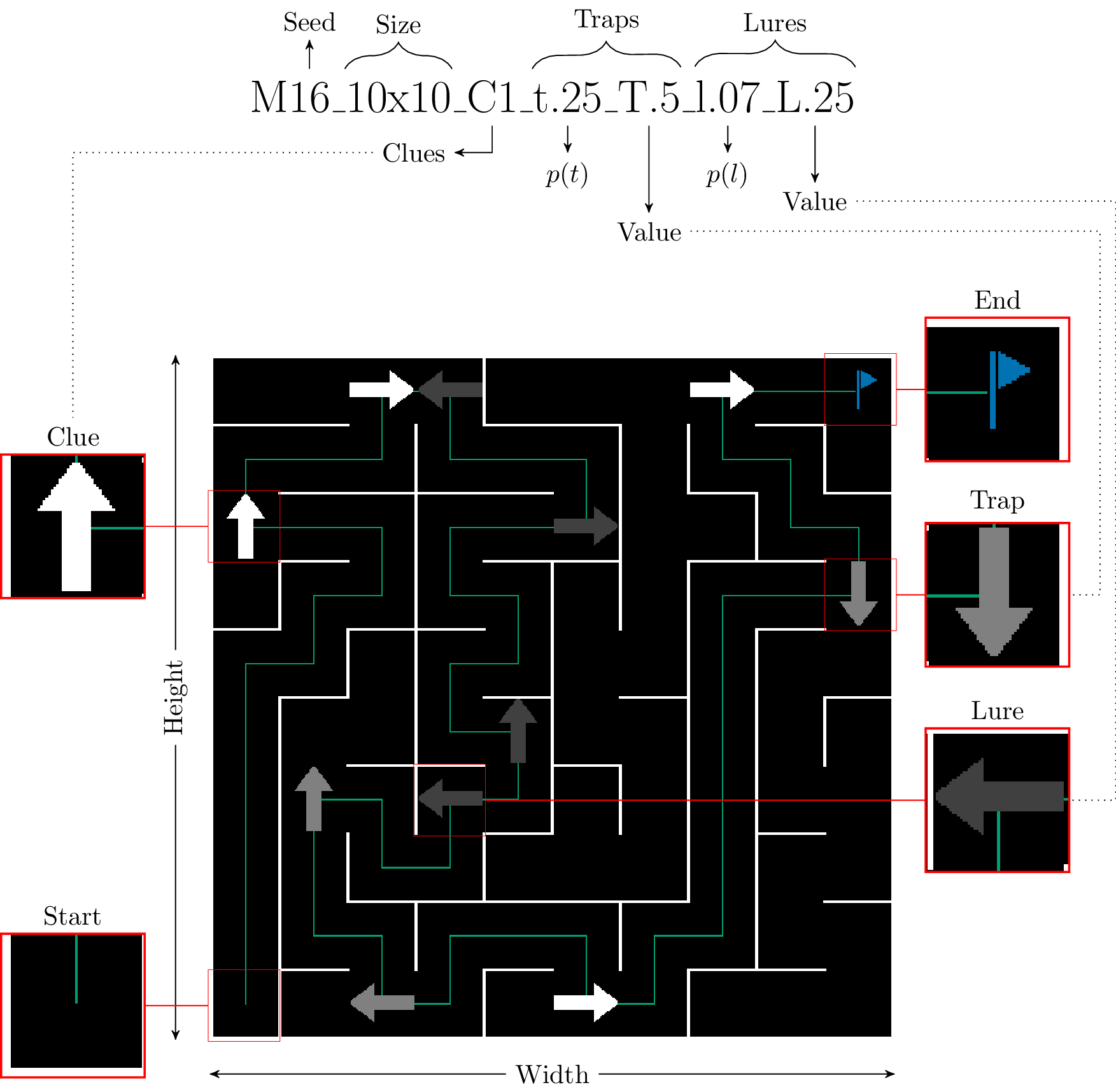
Clues point agents towards the correct direction, which is required for them to solve intersections. Traps serve the opposite purpose and are meant to provide more challenge to the maze navigation tasks. Finally, Lures are low-danger traps that can be detected using local information only (i.e. go into a wall).
NOTE: The path to solution as well as the finish flag are only visible to the human
Agents
Agents in AMaze are loosely embodied with only access to local physical information (the current cell) and one step-removed temporal information (direction of the previous cell, if any). The input and output spaces can either be discrete or continuous.
Discrete inputs

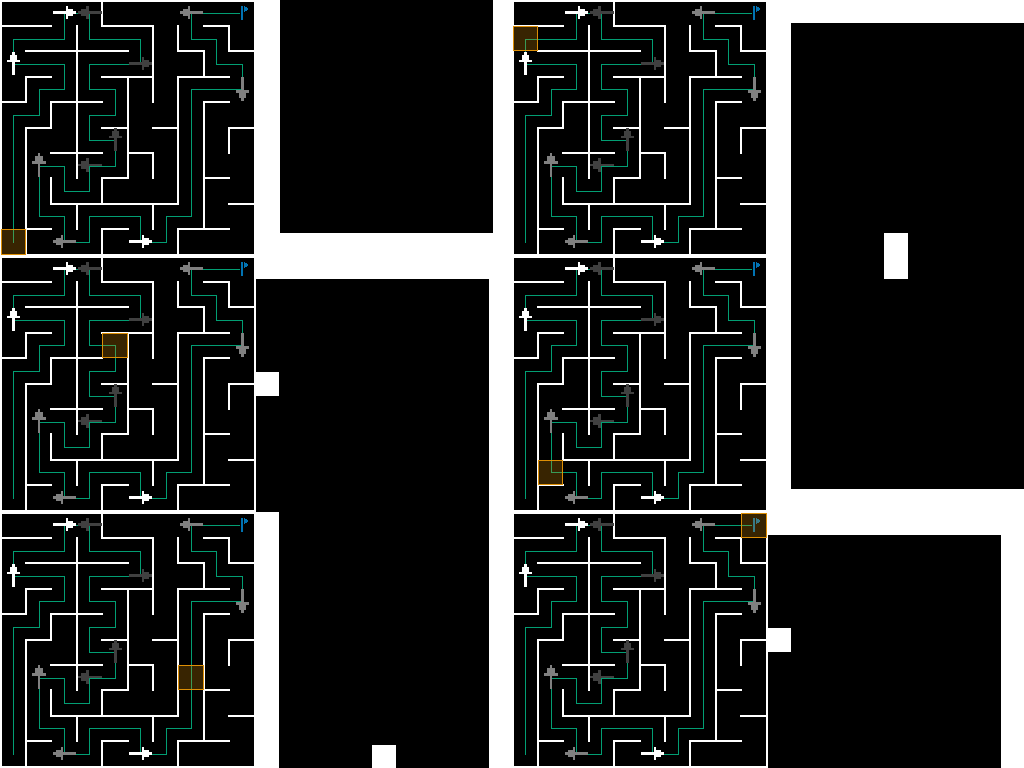
In the discrete input case, information is provided in an easily intelligible format of fixed size. According to the cell highlighted in the previous example, an agent following the optimal trajectory would receive the following inputs:
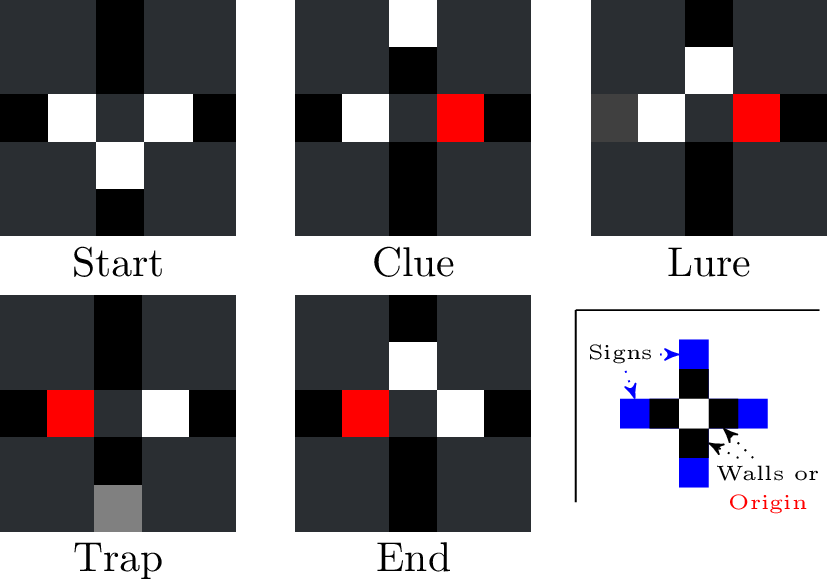
Data is provided in direct order. Input vectors for the example above translate to:
- Start: [1 0 1 1 0 0 0 0] (3 walls at E W S and no sign)
- Clue: [.5 0 1 0 0 1 0 0] (1 wall east, coming from the east, sign pointing upwards)
- Lure: [.5 1 1 0 0 0 .25 1] (still coming from east, walls at N E and sign pointing east with magnitude .25)
- Trap: [1 0 .5 0 0 0 0 .5] (coming from west, wall on east, sign pointing down with magnitude .5)
- End: [1 1 .5 0 0 0 0 0] (coming from west, walls at E N)
Continuous inputs
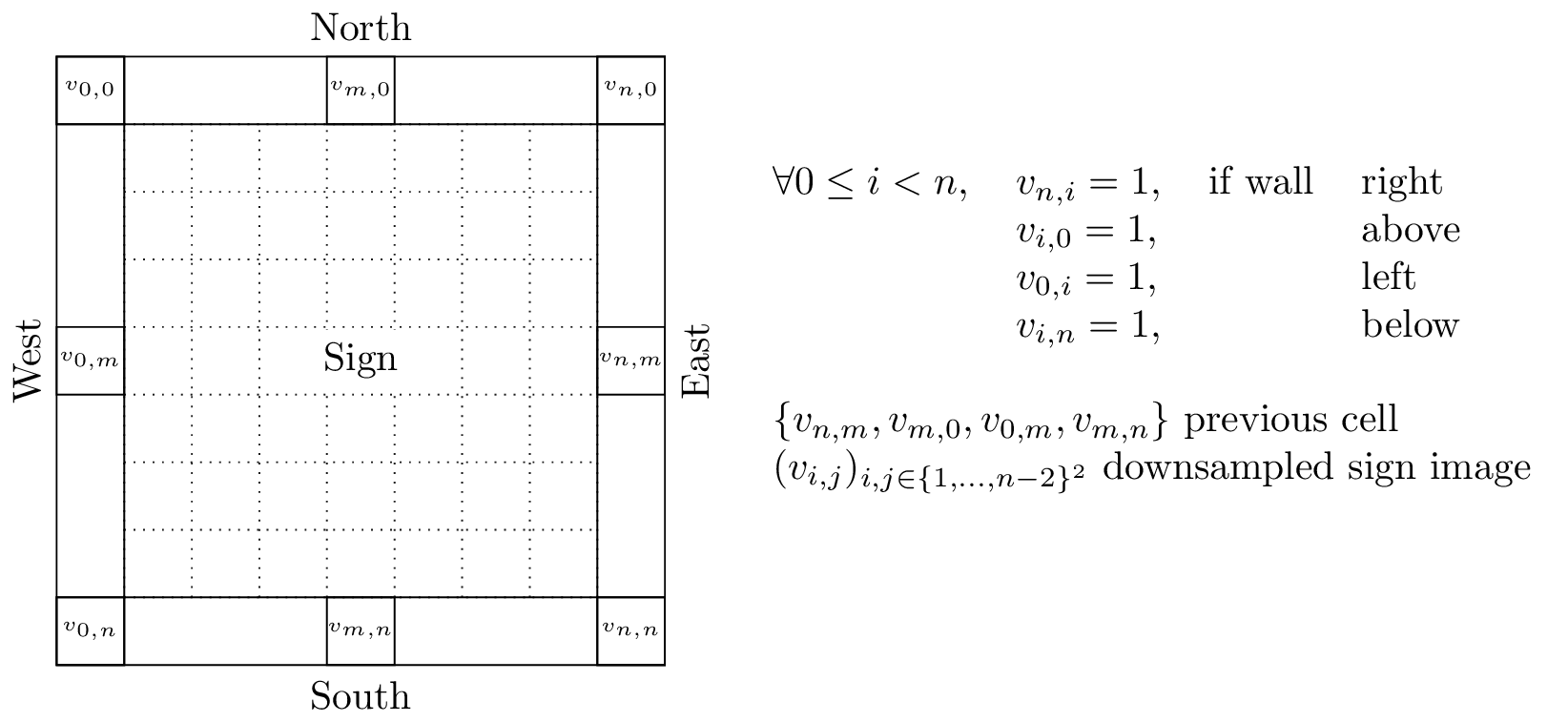
For continuous inputs, a raw grayscale image is directly provided to the agent. It contains wall information on the outer edge, as well as the same temporal information as with the discrete case (centered pixel on the corresponding border). The sign, if any, is thus provided as a potentially complex image that the agent must parse and understand:
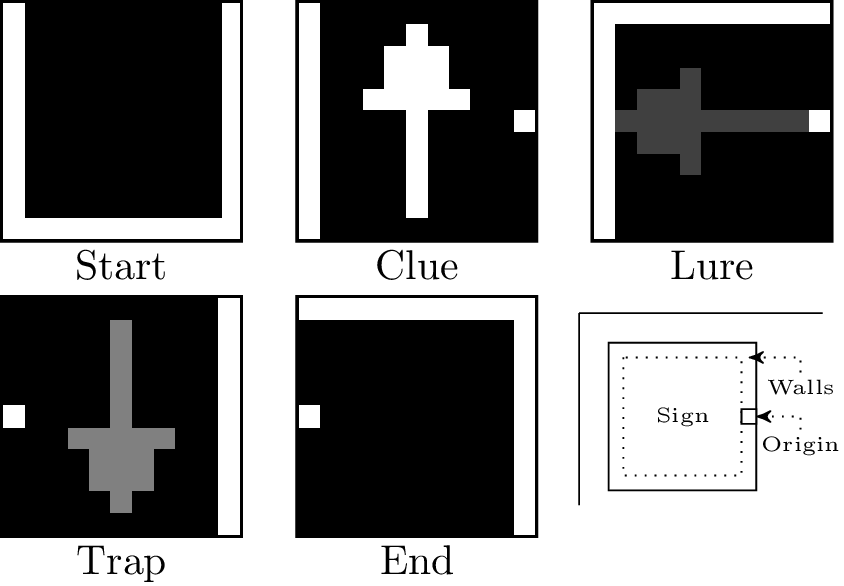
While the term continuous is a bit of stretch for coarse-grain grayscale images, it highlights the difference with the discrete case where every possible input is easily enumerable.
In this case, the input buffer is filled first by columns starting in the upper left corner (as depicted in the image). Thus console output of the input buffer is identical to what is displayed in the interface.
Examples
According to the combinations of input and output spaces, the library can work in one of three ways.
Fully discrete

Hybrid (continuous inputs, discrete outputs)
Fully continuous

Maze space complexity
To properly correlate mazes that may look very different, AMaze provides two complementary complexity metrics $S_M$ and $D_M$. The former measures the "surprisingness" of the maze, defined as the entropy over every input state. The latter corresponds to the deceptiveness which, similarly, is an entropy measure but focused on the odds of seeing the same state with different cues. More details can be found in the companion article.
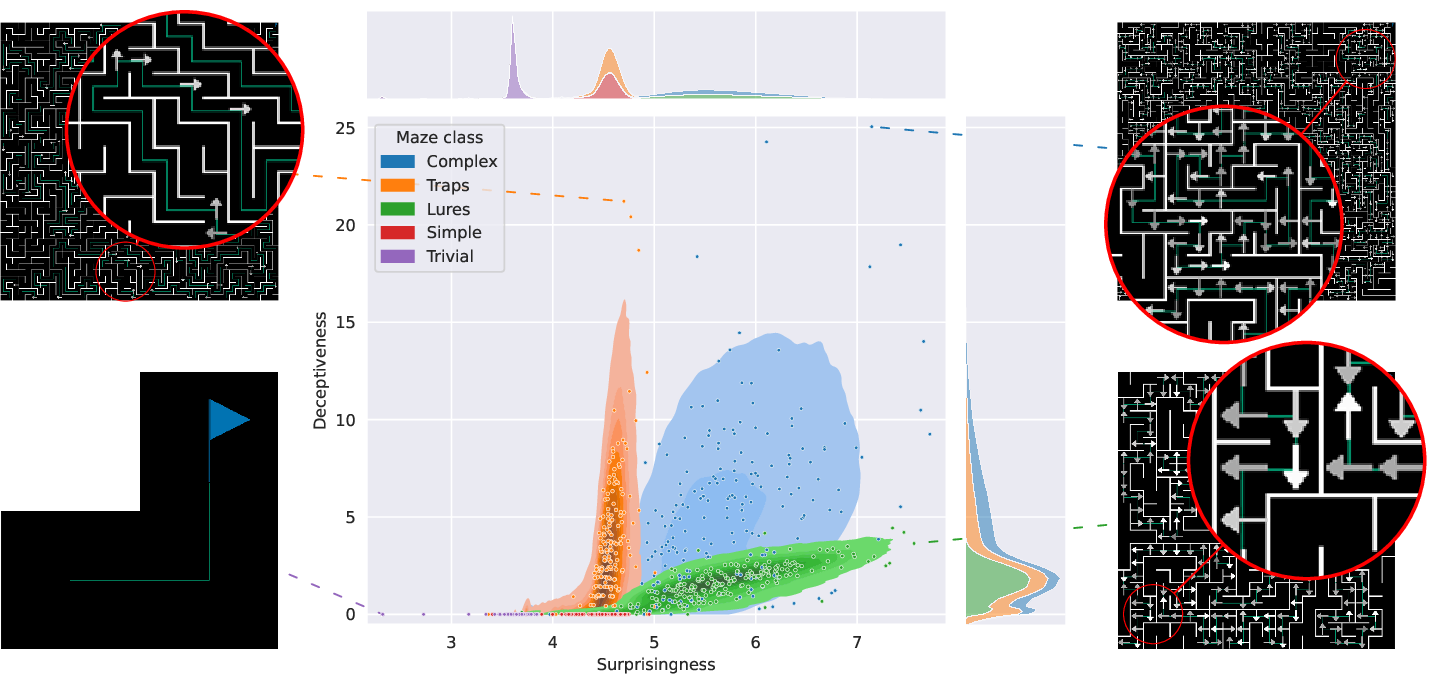
The graph above illustrates the respective distribution of five classes of mazes according to these two metrics. There, one can see that complex mazes (with clues, lures and traps) are very diverse while solely using traps or lures generates mazes with a bias towards Deceptiveness and Surprisingness, respectively.
Further reading
The documentation is available at (https://amaze.readthedocs.io/) including installation instruction (pip) and detailed examples.
Contributing
Contributions to the library increasing its ease of use in both the scientific and students communities are more than welcome. Any such contribution can be made via a pull request while bugs (in the code or the documentation) should be reported in the dedicated tracker.
As a rule of thumb, you should attempt not to add any additional dependencies. Currently, the library uses:
numpyandpandasfor data processing and formattingPyQt5for the interface
Continuous integration and deployment is handled by github directly through the
test_and_deploy.yml workflow file.
While not directly runnable, the commands used therein are encapsulated in the
generalist script commands.sh.
Call it with -h to get a list of available instructions.
Before performing a pull request, make sure to run the deployment tests first either through commands.sh before-deploy or by calling the dedicated script (deploy_tests.sh) directly.
It will install the package under a temporary folder in multiple configurations (user, test, ...) and check for formatting and pep8 compliance.
Acknowledgement
The lead (and currently sole) developer for this library is K. Godin-Dubois. K. Miras and A. V. Kononova have contributed in an advisory and management capacity.
This research was funded by the Hybrid Intelligence Center, a 10-year programme funded by the Dutch Ministry of Education, Culture and Science through the Netherlands Organisation for Scientific Research, https://hybrid-intelligence-centre.nl, grant number 024.004.022.
1 maintainer

Release files for amaze-benchmarker 1.0
For a detailed explanation of source distributions (sdists) and built distributions (wheels), please see the package formats documentation.
Source distribution (sdist)
| File | Size | Uploaded | |
|---|---|---|---|
| amaze_benchmarker-1.0.tar.gz | 19.0 MB | Details |
Built distribution (wheel)
| File | Interpreter | ABI | Platform | Reset |
|---|---|---|---|---|
| amaze_benchmarker-1.0-py3-none-any.whl | Python 3 | none | any | Details |
Total release size:19.1 MB
Release files / amaze_benchmarker-1.0.tar.gz
| Download URL | amaze_benchmarker-1.0.tar.gz |
|---|---|
| Size | 19.0 MB |
| Tags | Source |
|
SHA-256 checksum How to use checksums |
c36b3285f884a7ea7ababe91607c1f37ae12ec7670761e3d112fdd525047cc28
|
|
BLAKE2b-256 checksum How to use checksums |
987467d0223d24dd3fa60089780fc7855dfe70abc9621a33e8cb55c52edd03e4
|
| Upload date | |
|
Uploaded using Trusted Publishing? What is trusted publishing? |
Yes |
| Uploaded via |
twine/6.1.0 CPython/3.13.7
|
Provenance
Provenance describes where a file came from. On PyPI, provenance is shared via attestations, which provide a verifiable record of the build or publishing details. View details, limitations and caveats.


PyPI Publish Attestation
PyPI verified that this artifact, at this checksum, originated from the publisher listed below.
Signed by GitHub Actions, verified by PyPI on Nov 10, 2025.
Transparency logRelease files / amaze_benchmarker-1.0-py3-none-any.whl
| Download URL | amaze_benchmarker-1.0-py3-none-any.whl |
|---|---|
| Size | 89.8 kB |
| Tags | Python 3 |
|
SHA-256 checksum How to use checksums |
6307a2fa1a49ae35086be84d890e7228cdb50fc97ee37f47571e6ea70bc83997
|
|
BLAKE2b-256 checksum How to use checksums |
f6e6280824a71ede22877daa267839d01e369cde0c80e3a2f9fd5980b6ff9fdc
|
| Upload date | |
|
Uploaded using Trusted Publishing? What is trusted publishing? |
Yes |
| Uploaded via |
twine/6.1.0 CPython/3.13.7
|
Provenance
Provenance describes where a file came from. On PyPI, provenance is shared via attestations, which provide a verifiable record of the build or publishing details. View details, limitations and caveats.
PyPI Publish Attestation
PyPI verified that this artifact, at this checksum, originated from the publisher listed below.
Signed by GitHub Actions, verified by PyPI on Nov 10, 2025.
Transparency log













