
Amazon Bedrock Knowledge Base MCP Server





A powerful MCP server for querying Amazon Bedrock Knowledge Bases. Retrieve semantically relevant passages with metadata filtering, reranking, and multi-transport support.
Features
- Dual Transport - STDIO for Claude Desktop, Streamable HTTP for ChatGPT
- Smart Filtering - Schema-driven
whereconstraints + raw Bedrock filters + implicit filtering - Reranking - Optional AMAZON or COHERE reranking for improved relevance
- Auto Schema Discovery - Automatically infer metadata schemas from retrieval results
- OAuth Support - Auth0 integration for secure ChatGPT connections
- Read-Only - Safe by design; no write operations to your knowledge bases
Architecture
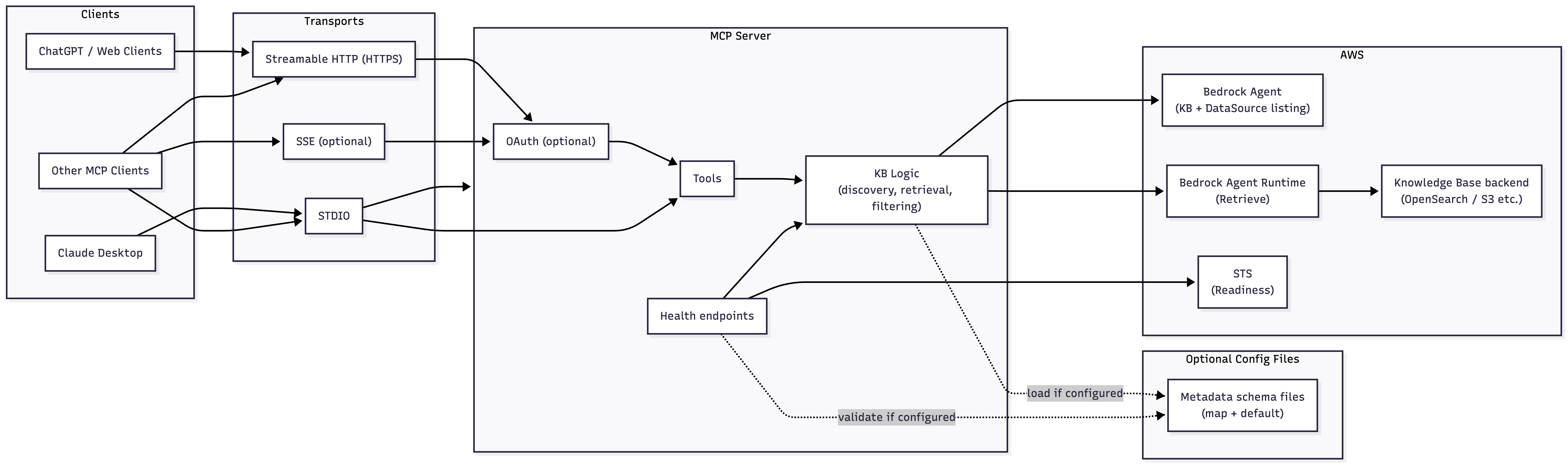
Quick Start
Claude Desktop (STDIO)
Add to your Claude Desktop config:
| Platform | Config Location |
|---|---|
| macOS | ~/Library/Application Support/Claude/claude_desktop_config.json |
| Windows | %APPDATA%/Claude/claude_desktop_config.json |
{
  "mcpServers": {
    "bedrock-kb": {
      "command": "uvx",
      "args": ["amazon-bedrock-knowledge-base-mcp"],
      "env": {
        "AWS_PROFILE": "your-profile",
        "AWS_REGION": "us-west-2"
      }
    }
  }
}
ChatGPT (Streamable HTTP)
AWS_PROFILE=your-profile \
AWS_REGION=us-west-2 \
MCP_TRANSPORT=streamable-http \
uvx amazon-bedrock-knowledge-base-mcp
Then configure ChatGPT to connect to https://your-domain.example.com/mcp.
Note: ChatGPT requires HTTPS. Use a tunnel (ngrok, Cloudflare Tunnel) for local testing.
Available Tools
Discovery Tools
| Tool | Description |
|---|---|
ListKnowledgeBases |
List available knowledge bases and their data sources. Filters by tag. |
DescribeMetadataSchema |
Show the resolved metadata schema for filtering (static or auto-discovered). |
Query Tools
| Tool | Description |
|---|---|
QueryKnowledgeBases |
Retrieve relevant passages. Content-focused, minimal output. |
QueryKnowledgeBasesWithMetadata |
Retrieve passages + full metadata. Ideal for exploration and filter tuning. |
Recommended Workflow
- List - Call
ListKnowledgeBasesto find available knowledge bases - Explore - Use
QueryKnowledgeBasesWithMetadatato discover metadata keys/values - Schema - Call
DescribeMetadataSchemato see available filter fields - Query - Use
QueryKnowledgeBaseswithwherefilters for precise retrieval
Environment Variables
AWS Configuration
| Variable | Required | Default | Description |
|---|---|---|---|
AWS_PROFILE |
Yes* | - | AWS profile name (recommended) |
AWS_REGION |
Yes* | - | AWS region (e.g., us-west-2) |
*Either AWS_PROFILE or IAM role credentials are required.
Knowledge Base Discovery
| Variable | Default | Description |
|---|---|---|
KB_INCLUSION_TAG_KEY |
mcp-multirag-kb |
Only include KBs tagged with <key>=true |
Retrieval Defaults
| Variable | Default | Description |
|---|---|---|
BEDROCK_KB_RERANKING_ENABLED |
false |
Enable reranking by default |
BEDROCK_KB_SEARCH_TYPE |
DEFAULT |
DEFAULT, HYBRID, or SEMANTIC |
Filtering
| Variable | Default | Description |
|---|---|---|
BEDROCK_KB_FILTER_MODE |
explicit_then_implicit |
How to combine explicit and implicit filters |
BEDROCK_KB_ALLOW_RAW_FILTER |
false |
Allow raw Bedrock RetrievalFilter passthrough |
BEDROCK_KB_SCHEMA_MAP_JSON |
- | Path to KB ID → schema-path mapping (JSON) |
BEDROCK_KB_SCHEMA_DEFAULT_PATH |
- | Default schema file path (JSON) |
BEDROCK_KB_IMPLICIT_FILTER_MODEL_ARN |
- | Model ARN for implicit filtering |
HTTP Server (Streamable HTTP only)
| Variable | Default | Description |
|---|---|---|
MCP_TRANSPORT |
stdio |
Transport mode: stdio, sse, or streamable-http |
MCP_HOST |
127.0.0.1 |
HTTP server bind address |
PORT |
8000 |
HTTP server port |
MCP_STATELESS |
true |
Stateless mode (recommended for production) |
MCP_ALLOWED_ORIGINS |
- | Comma-separated allowed CORS origins (* for any) |
MCP_ALLOWED_HOSTS |
- | Comma-separated allowed Host headers |
OAuth (Auth0)
| Variable | Required | Description |
|---|---|---|
MCP_AUTH_MODE |
No | Set to oauth to enable Auth0 authentication |
AUTH0_DOMAIN |
Yes* | Auth0 tenant domain (e.g., tenant.us.auth0.com) |
AUTH0_AUDIENCE |
Yes* | Auth0 API identifier / audience |
MCP_RESOURCE_URL |
Yes* | Public URL clients connect to |
*Required when MCP_AUTH_MODE=oauth
Logging
| Variable | Default | Description |
|---|---|---|
FASTMCP_LOG_LEVEL |
INFO |
Log level (DEBUG, INFO, WARNING, ERROR) |
Documentation
| Guide | Description |
|---|---|
| STDIO Setup | Claude Desktop and local development |
| Streamable HTTP | HTTP server setup and configuration |
| Server Setup | Deploy to production with nginx and SSL |
| ChatGPT Setup | Complete Auth0 OAuth setup for ChatGPT |
Docker
# Build the image
docker build -t amazon-bedrock-knowledge-base-mcp:local .

# Run with AWS credentials
docker run --rm \
  -v "$HOME/.aws:/home/app/.aws:ro" \
  -e AWS_PROFILE=your-profile \
  -e AWS_REGION=us-west-2 \
  amazon-bedrock-knowledge-base-mcp:local

# Run as HTTP server
docker run --rm \
  -p 8000:8000 \
  -v "$HOME/.aws:/home/app/.aws:ro" \
  -e AWS_PROFILE=your-profile \
  -e AWS_REGION=us-west-2 \
  -e MCP_TRANSPORT=streamable-http \
  -e MCP_HOST=0.0.0.0 \
  amazon-bedrock-knowledge-base-mcp:local
Health Endpoints
| Endpoint | Description |
|---|---|
GET /health |
Basic health check (always returns 200 if running) |
GET /health/ready |
Readiness check (validates AWS credentials via STS) |
Development
# Clone and install
git clone https://github.com/Zlash65/amazon-bedrock-knowledge-base-mcp.git
cd amazon-bedrock-knowledge-base-mcp
uv sync --group dev

# Run tests
uv run pytest -q

# Type check
uv run pyright

# Lint
uv run ruff check .

# Format
uv run ruff format .
Metadata Schema
Schema files define available metadata fields for filtering. See schemas/README.md for examples.
Example schema:
{
  "fields": [
    {
      "key": "x-amz-bedrock-kb-source-uri",
      "type": "string",
      "description": "Source document URI",
      "alias": "source"
    },
    {
      "key": "category",
      "type": "string",
      "description": "Document category",
      "filterable": true
    }
  ]
}
Use in queries:
# Using alias
{"where": {"source": "s3://bucket/doc.pdf"}}

# Using direct key
{"where": {"category": ["finance", "legal"]}}
Limitations
- Results with
IMAGEcontent type are not included in query responses - Reranking requires additional IAM permissions and is only available in specific regions
- Knowledge bases must be tagged with
KB_INCLUSION_TAG_KEY=trueto be discoverable
License
1 maintainer

Metadata
1 maintainer
Release files for amazon-bedrock-knowledge-base-mcp 0.1.1
For a detailed explanation of source distributions (sdists) and built distributions (wheels), please see the package formats documentation.
Source distribution (sdist)
| File | Size | Uploaded | Provenance | |
|---|---|---|---|---|
| amazon_bedrock_knowledge_base_mcp-0.1.1.tar.gz | 8.1 MB | With provenance | Details |
Built distribution (wheel)
| File | Interpreter | ABI | Platform | Reset |
|---|---|---|---|---|
| amazon_bedrock_knowledge_base_mcp-0.1.1-py3-none-any.whl | Python 3 | none | any | Details |
Total release size: 8.1 MB
Release files / amazon_bedrock_knowledge_base_mcp-0.1.1.tar.gz
| Download URL | amazon_bedrock_knowledge_base_mcp-0.1.1.tar.gz |
|---|---|
| Size | 8.1 MB |
| Tags | Source |
|
SHA-256 checksum How to use checksums |
d5f06e848ef3f26d27a402caf15a27de6d6556c9d5f0d511d9bd91e0936ebed2
|
|
BLAKE2b-256 checksum How to use checksums |
e86aed64e351aa132db106b2b9b7ecee3009f09e10dd68937635e77b7e511bdb
|
| Upload date | |
|
Uploaded using Trusted Publishing? What is trusted publishing? |
Yes |
| Uploaded via |
twine/6.1.0 CPython/3.13.7
|
Provenance
Provenance describes where a file came from. On PyPI, provenance is shared via attestations, which provide a verifiable record of the build or publishing details. View details, limitations and caveats.


PyPI Publish Attestation
PyPI verified that this artifact, at this checksum, originated from the publisher listed below.
Signed by GitHub Actions, verified by PyPI on Jan 10, 2026.
Transparency logRelease files / amazon_bedrock_knowledge_base_mcp-0.1.1-py3-none-any.whl
| Download URL | amazon_bedrock_knowledge_base_mcp-0.1.1-py3-none-any.whl |
|---|---|
| Size | 37.3 kB |
| Tags | Python 3 |
|
SHA-256 checksum How to use checksums |
527ec484a0743b2b4a6c15c6ed7071f6c4023a73124254b863d18267958bb66f
|
|
BLAKE2b-256 checksum How to use checksums |
90c147866049bd448957f0cff18f7566410126bc69e927025b84882fe3283bc5
|
| Upload date | |
|
Uploaded using Trusted Publishing? What is trusted publishing? |
Yes |
| Uploaded via |
twine/6.1.0 CPython/3.13.7
|
Provenance
Provenance describes where a file came from. On PyPI, provenance is shared via attestations, which provide a verifiable record of the build or publishing details. View details, limitations and caveats.
PyPI Publish Attestation
PyPI verified that this artifact, at this checksum, originated from the publisher listed below.
Signed by GitHub Actions, verified by PyPI on Jan 10, 2026.
Transparency logSecurity for amazon-bedrock-knowledge-base-mcp 0.1.1
Provenance
Provenance describes where a file came from. On PyPI, provenance is shared via attestations, which provide a verifiable record of the build or publishing details. View details, limitations and caveats.
Full provenance
All 2 files in this release have been uploaded with provenance metadata.
Attestation for amazon_bedrock_knowledge_base_mcp-0.1.1.tar.gz
PyPI Publish Attestation
PyPI verified that this artifact, at this checksum, originated from the publisher listed below.
Signed by GitHub Actions, verified by PyPI on Jan 10, 2026.
Transparency logA note on package security
PyPI is a repository for distributing packages, not a service for auditing them. While third-party security researchers and our staff do their best to detect and remove malicious packages, PyPI cannot guarantee the quality, security or suitability of any given package.
To learn more about protecting yourself from malicious actors, visit our package security documentation.














