
Amber
Your agent figured the workflow out once. Stop paying for it every run.
Record Claude Code doing a task a few times. Amber compiles the recordings into a readable Python
program that does the same job on the next input: plain code for the mechanical steps, one small
llm() call where judgment is needed, replay tests generated from the recordings, and guards
that stop the run when the world changes. When it breaks, the agent takes over from the failed
step and Amber recompiles.



A real session on the weekly-report example, replayed with long waits shortened: compile three agent recordings, run on a week nobody recorded, rename a field in the shop API, watch the guard stop the run, the doctor recommend a fallback, the agent resume from the failed step, and the recompiled v2 verify 4/4.
Contents
- Why Amber · Measured results
- Install · Try it in two minutes
- Use it with Claude: how Amber uses Claude · record headless runs · import an interactive session · Agent SDK · Claude Desktop and other MCP clients · the Claude Code plugin
- Compile your own workflow, step by step
- How it works · What comes out · Safety model
- Commands · Configuration · Troubleshooting
- Limitations · Roadmap · Related work · FAQ
Why Amber
- Agents re-derive everything, every time. Our weekly-report agent spends ~170k tokens per run rediscovering the same seven tool calls: list the orders, take two RFM snapshots, pick the top products, post a summary.
- Most of that work is mechanical. Only the summary needs judgment. Amber keeps the judgment
as a small, schema-validated
llm()call and turns the rest into code. - It is a compiler, not a cache. Arguments are explained by provenance (an input, an earlier result, a template, a constant), so the program generalises to inputs nobody recorded. Holes the model fills are checked against the recordings before they are accepted.
- It knows when it is wrong. Every live call is guarded. When the world drifts, the doctor says what changed and the agent resumes from the failed step; its new run is folded into the next version.
The idea comes from FlashScript (arXiv 2610.33876), which compiled agent trajectories into neuro-symbolic programs with ~70× fewer input tokens and released no code. Amber is an open, harness-agnostic implementation with the operating loop around it.
Measured results
Live run on 2026-11-02 (bench/results.md): claude CLI 2.1.316 on a claude.ai
subscription, agent claude-sonnet-5-5, compiled judgments claude-haiku-5-5, three recordings
and three compiled runs per example, synthetic mock servers.
| example | agent tokens / run | compiled tokens / run | fewer tokens | agent $ | compiled $ | agent turns | tool-call fidelity |
|---|---|---|---|---|---|---|---|
| issue-triage | 153,944 | 11,892 | 12.9× | 0.087 | 0.003 | 0 | 100% core · 67% exact |
| price-watch | 165,225 | 14,862 | 11.1× | 0.071 | 0.003 | 0 | 100% core · 100% exact |
| weekly-report | 174,076 | 29,472 | 5.9× | 0.170 | 0.008 | 0 | 100% core · 0% exact |
Medians. $ is the API-equivalent cost the CLI reports; a subscription is not billed per call,
and part of the cost gap is Haiku versus Sonnet. Core fidelity compares the program's tool calls
with the recording minus the agent's exploratory reads, which the compiler prunes; exact
compares everything. weekly-report's compiled run is not faster (its judgment thinks ~25 s while
counting 240 RFM rows, correctly). FlashScript's 70× is the paper's number, not ours.
Install
uv tool install git+https://github.com/enestanerr/Amber        # or: pipx install git+https://github.com/enestanerr/Amber
amber --version                                                 # amber 0.1.1
Optional extras: [ui] for the local web panel and [sdk] for the Claude Agent SDK recorder:
uv tool install "amber-compiler[ui,sdk] @ git+https://github.com/enestanerr/Amber"
You need Python 3.12+ (uv installs it for you) and one way to reach
Claude: a logged-in Claude Code CLI (a Pro or Max subscription
is enough, no API key) or ANTHROPIC_API_KEY. The price-watch example also needs Node 18+.
A PyPI package (amber-compiler) is next.
Try it in two minutes
No Claude needed: the offline demo uses the synthetic recordings and recorded model answers.
git clone https://github.com/enestanerr/Amber && cd Amber
uv sync --all-extras
cd examples/weekly-report
make demo-offline          # seed recordings → compile → verify 3/3 → dry-run against mock servers
Then do it live with your own Claude login (inside the checkout, amber is uv run amber):
make record                                                   # 3 real claude -p runs on Sonnet
uv run amber align weekly-report --show                       # the skeleton the runs share
uv run amber compile weekly-report                            # program + replay tests, verified
uv run amber run weekly-report --input week=2026-W40 --allow-writes   # 0 agent turns, 1 llm() call
make drift && uv run amber run weekly-report --input week=2026-W41 --allow-writes   # guard stops it
uv run amber doctor weekly-report                             # degraded → recommendation: fallback
make heal                                                     # agent resumes → compile --refresh → verify
docs/user/quickstart.md shows the real output of every step. On
Windows, run make from Git Bash or type the commands from each example's Makefile.
Use it with Claude
How Amber uses Claude
Amber talks to Claude in three places, and you choose the model for each:
| phase | what runs | default model | set it with |
|---|---|---|---|
| record | your agent doing the task, start to finish | whatever you pass | -- claude -p "..." --model claude-sonnet-5-5 |
| compile | filling the typed holes: transform code, judgment prompts and schemas | claude-sonnet-5-5 |
[models] synthesis in amber.toml |
| run | only the judgment steps of the compiled program | claude-haiku-5-5 |
[models] judgment |
[models] backend = "auto" uses the Anthropic API when ANTHROPIC_API_KEY is set and otherwise
the logged-in claude CLI (claude -p --json-schema, stripped of tools and session files, at low
effort for judgments). Both are first-class: everything in Measured results
ran on a subscription with no API key.
There are five ways to bring Claude into Amber:
A. Record headless Claude Code runs
The recommended way. amber record wraps claude -p and turns its stream into a trace:
amber record weekly-report --input week=2026-W42 --mcp mcp.json \
  --allow 'mcp__shop__*' --allow 'mcp__slack__*' --permission-mode acceptEdits \
  -- claude -p "Pull the orders for week 2026-W42, ... post a summary to #eng." \
     --model claude-sonnet-5-5 --setting-sources user
| flag | why |
|---|---|
--input k=v |
declares what varies between runs; the compiler explains arguments in terms of it |
--mcp mcp.json |
the MCP servers the agent may use; Amber adds --strict-mcp-config so your account-level connectors stay out, and reads the real tool schemas for drift detection |
--allow PATTERN |
pre-approves tools: a recording runs unattended, and a permission prompt aborts it |
--model ... |
always explicit, so recordings never run on your default (maybe most expensive) model; the fallback reuses it |
--setting-sources user |
keeps the project's CLAUDE.md out of the recorded context |
--disallowedTools Read,Glob,Grep |
optional: stops the agent reading files when it should use tools |
Record two or three runs with different inputs: identical runs give the compiler nothing to generalise from.
B. Import an interactive Claude Code session
Did the task by hand in Claude Code? Import the session afterwards from the same directory:
amber import weekly-report --latest --input week=2026-W42     # newest transcript for this directory
amber import weekly-report ~/.claude/projects/<dir>/<session>.jsonl --input week=2026-W43
C. The Claude Agent SDK
amber record weekly-report --sdk --input week=2026-W42 --mcp mcp.json -- claude -p "<task>"
Runs claude_agent_sdk.query in-process (install the [sdk] extra); the trace format is the same.
D. Claude Desktop or any MCP client
Put amber proxy in front of each server in the client's MCP config. It forwards everything
unchanged and logs each call:
{
  "mcpServers": {
    "shop": {
      "command": "amber",
      "args": ["proxy", "--name", "shop", "--trace-dir", "/abs/path/my-project/.amber/proxy",
               "--", "uv", "run", "/abs/path/my-project/server_shop.py"]
    }
  }
}
Do the task in the client, then fold the logged calls into a trace:
amber import weekly-report --proxy .amber/proxy --input week=2026-W42 --since 2026-11-02T10:00:00
E. Let Claude Code drive Amber: the plugin
This repository is a Claude Code plugin marketplace. Install the Amber plugin once:
/plugin install amber --marketplace enestanerr/Amber
From a terminal it is claude plugin install amber --marketplace enestanerr/Amber. On Claude
Code before 2.1.275, add the marketplace first (/plugin marketplace add enestanerr/Amber), then
/plugin install amber@amber-compiler. It adds two skills:
| skill | what Claude Code does with it |
|---|---|
/amber:compile [workflow] |
sets up the project, writes the task prompt, records three runs (asking before each costs tokens), reads the skeleton with you, compiles, verifies, dry-runs, then runs with your consent and schedules it |
/amber:heal [workflow] |
runs the doctor, explains the findings, picks recompile, fallback or re-record, and verifies the new version |
You can also just ask: "compile this weekly report workflow with Amber" or "the Amber run stopped, fix it". The skills load from their descriptions.
Run compiled programs anywhere
A compiled program is a CLI call, so Claude Code (through Bash), a script, cron or CI can run it:
amber run weekly-report --input week=2026-W40 --allow-writes
For inputs that never change, Amber's own scheduler is enough:
amber schedule add price-watch --cron "0 9 * * *" --input product=all && amber scheduler
Schedules store fixed inputs. For a date-relative input such as "last week", let cron compute it
(% is escaped in crontab):
0 9 * * 1 cd ~/weekly-report && amber run weekly-report --input week=$(date -d 'last week' +\%G-W\%V) --allow-writes
Compile your own workflow, step by step
- Pick a workflow that repeats, uses MCP tools (any MCP server works), takes one to three inputs and ideally ends with a write (a post, a label, a report).
- Create a project:
amber initwritesamber.tomland.amber/. Add each MCP server under[servers.<name>](see Configuration) and put the same servers inmcp.jsonfor the agent. - Write the task in
task.mdwith{input}placeholders. Keep it tight: name the tools, say what the output is, end with "Use the shop and slack tools only." - Record three runs with different inputs (A, B, C or D).
- Inspect
amber align <workflow> --show. Every step should bedeterministicor carry a hole (transform-needed,judgment). An inferred input you did not expect, or a step present in only some runs, usually means the task let the agent improvise: tighten it and re-record. - Compile with
amber compile <workflow>. Readprograms/<workflow>/v1/REPORT.mdandprogram.py; the program is ordinary Python you can review and edit. - Verify with
amber verify <workflow>: free, no model calls, exit 3 on divergence. - Run with
amber run <workflow> --input .... Write tools are dry-run until you add--allow-writes. - Operate:
amber schedule add/amber scheduler,amber doctorfor drift,amber uifor the local panel. When a guard stops a run,amber run ... --fallback agentthenamber compile --refresh, or let/amber:healwalk you through it.
Tips that make programs sharper: annotate read-only tools (read_only_hint=True), return JSON
rather than prose from tools, prefer batch tools over one call per item, and keep inputs explicit.
More in docs/user/servers.md.
How it works
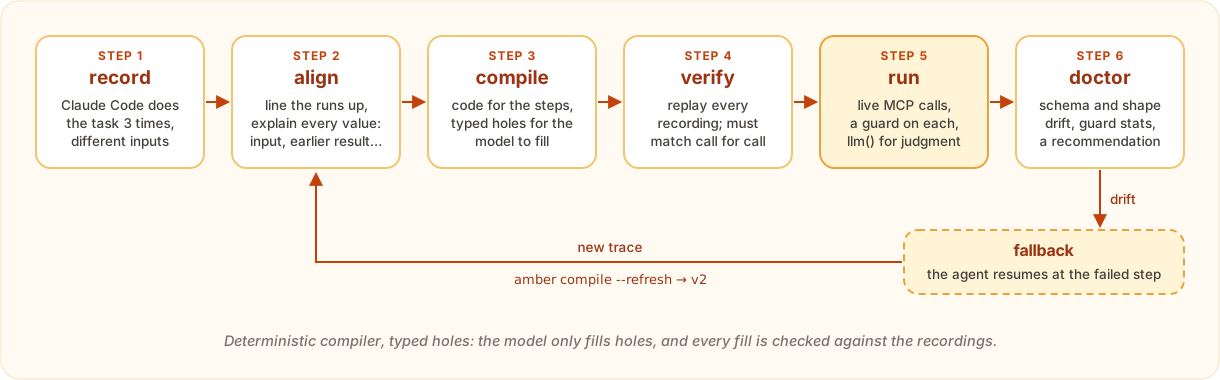
- record: adapters turn Claude Code stream-json, transcripts, Agent SDK messages or proxied MCP traffic into one canonical trace format.
- align: sequence alignment lines the runs up; provenance mining explains every argument
(
Input,Refto an earlier result,Template,Const, orUnknown); exploratory reads nobody used are pruned. - compile: code generation writes the program skeleton deterministically. The model only fills typed holes: transforms (Python that must reproduce the recorded values exactly, run in a sandbox), judgments (a prompt plus a Pydantic schema every recorded value must satisfy) and gates (whether a conditional step runs). A transform the model cannot write becomes a judgment.
- verify: a cassette backend replays every recording; every call must match in order and arguments. A program that fails replay is not usable.
- run: live MCP calls with an allowlist, budgets, result-shape checks against the
recordings and a write-effect policy;
llm()runs only at judgment steps. - doctor and fallback: schema and result-shape drift, guard statistics and staleness give a
verdict and a recommendation. On fallback the agent resumes from the failed step with the
completed results as context;
compile --refreshfolds its run into the next version.
What comes out
programs/weekly-report/v2/program.py, compiled from three live recordings plus one fallback run
(trimmed: the prompt constant and the Output model are left out):
# AMBER-HOLE:transform_step1 — transform for shop.week_range (week)
def transform_step1(inputs: dict[str, Any], r0: Any) -> dict[str, Any]:
    m = re.match(r"^(\d{4})-W(\d{1,2})$", str(inputs["week"]).strip())
    y, w = int(m.group(1)), int(m.group(2))
    monday = datetime.date.fromisocalendar(y, w, 1) - datetime.timedelta(days=7)
    iy, iw, _ = monday.isocalendar()
    return {"week": f"{iy}-W{iw:02d}"}

# AMBER-HOLE:judgment_step6 — judgment for slack.post_message (channel, text)
class Step6Out(BaseModel):
    channel: str = Field(description="Slack channel to post to, default 'eng'")
    text: str = Field(description="The weekly report paragraph")
    confidence: float = Field(description="Confidence 0..1")

@program(workflow="weekly-report", version=2)
def run(inputs: Inputs, ctx: Context) -> Output:
    r0 = ctx.tool("shop.week_range", week=inputs.week)  # step 1
    t1 = transform_step1(inputs.model_dump(), r0)  # transform hole
    r1 = ctx.tool("shop.week_range", week=t1["week"])  # step 2
    r2 = ctx.tool("shop.list_orders", since=r0["start"], until=r0["end"])  # step 3
    r3 = ctx.tool("shop.rfm_snapshot", as_of=r0["end"])  # step 4
    r4 = ctx.tool("shop.rfm_snapshot", as_of=r1["end"])  # step 5
    r5 = ctx.tool("shop.top_products", n=5, since=r0["start"], until=r0["end"])  # step 6
    s6 = ctx.llm("step6", Step6Out, PROMPT_step6, context={"inputs": ..., "r2": r2, "r3": r3, "r4": r4, "r5": r5})
    r6 = ctx.tool("slack.post_message", channel=s6.channel, text=s6.text)  # step 7  # effect: write
    return Output(ok=r6["ok"], ts=r6["ts"], channel=s6.channel, text=s6.text)
Next to it: manifest.json (tool schemas and hashes, result-shape schemas, budgets),
tests/test_replay.py (replays the source recordings with pytest) and REPORT.md (the skeleton,
every hole fill with the model's rationale, the verify table).
Safety model
- Writes are dry-run by default. A tool that is not annotated read-only is treated as a write
and returns a placeholder until you pass
--allow-writes. - Guards on every live call: tool allowlist, call/token/wall-clock budgets, result-shape checks against the recordings, judgment output validation, and a confidence floor that flags weak judgments. A hard guard stops the run with exit code 4; nothing after the failed step runs.
- The model never writes the program. It fills typed holes; transforms run in an AST-checked sandbox with a small import allow-list and a timeout.
- Fallback has vetoes: a daily budget, no re-running when writes already happened, no handing pending writes to the agent when the run was not allowed to write.
- Local by design. Recordings, programs and the ledger stay in your project (
.amber/,programs/). No telemetry.amber.tomlis linted for secrets; keys belong in the environment.
Commands
| command | what it does |
|---|---|
amber init |
create amber.toml and .amber/ in the current directory |
amber record <wf> -- claude -p "..." |
record one agent run as a trace (--sdk for the Agent SDK) |
amber import <wf> --latest / <file> / --proxy DIR |
import a Claude Code transcript or proxy logs |
amber proxy --name <server> -- <cmd> |
recording MCP proxy for any MCP client |
amber traces ls|show|rm |
inspect recordings |
amber align <wf> --show |
merge the recordings into a skeleton |
amber compile <wf> [--refresh] |
generate, fill holes, verify; a new program version |
amber verify <wf> |
replay the program against every recording |
amber run <wf> --input k=v [--allow-writes] [--fallback agent] |
run live with guards |
amber doctor <wf> |
drift report and recommendation |
amber programs ls|show|diff |
inspect program versions |
amber schedule add|ls|rm · amber scheduler |
cron-style schedules and the loop that runs them |
amber ui |
local web panel at http://127.0.0.1:8787 ([ui] extra) |
amber bench <example> |
agent vs compiled measurement (from a checkout) |
Inspection and pipeline commands take --json. Exit codes: 0 ok · 1 error · 2 usage · 3 verify failed ·
4 a guard stopped the run · 5 the doctor found drift. Full reference:
docs/user/cli.md.
Configuration
amber init writes amber.toml; every key has a default:
[project]
name = "weekly-report"

[models]
backend = "auto"                # auto | anthropic | cli | recorded
synthesis = "claude-sonnet-5-5" # fills holes at compile time
judgment = "claude-haiku-5-5"   # runs llm() steps at run time

[servers.shop]                  # one table per MCP server the program calls
command = "uv"
args = ["run", "python", "server_shop.py"]
env = { SHOP_REGION = "eu" }

[servers.slack]
url = "http://127.0.0.1:9000/mcp"   # streamable HTTP servers work too

[budgets]                       # applied at run time; changing them needs no recompile
max_calls_factor = 2.0          # × the most calls any recording made
max_llm_tokens = 40000          # per run
wall_clock_s = 600

[guards]
min_confidence = 0.5            # judgments below this are flagged for the doctor

[fallback]
daily_budget = 3                # agent fallbacks per workflow per day

[builtins]
read_roots = ["./data"]         # where the compiled Read/Glob/Grep builtins may look
Troubleshooting
| symptom | fix |
|---|---|
no model backend available |
log in the claude CLI or set ANTHROPIC_API_KEY |
| a recording stops at a permission prompt | add --allow 'mcp__<server>__*' and --permission-mode acceptEdits |
amber align shows steps in only some runs |
the agent improvised; tighten task.md, remove the odd recording (amber traces rm), re-record |
llm token budget exceeded |
raise [budgets] max_llm_tokens; it applies on the next run |
amber run exits 4 |
a guard stopped it: amber doctor <wf>, then follow the recommendation (or /amber:heal) |
amber verify exits 3 |
the program and the recordings disagree; the diff shows the first divergent call |
make not found on Windows |
use Git Bash, or run the commands from the example's Makefile |
Limitations
- Loops and pagination are not collapsed: one call per item stays one step per call and cannot serve a different count. Batch tools work: a list argument whose length varies is filled by one hole.
- Judgment holes produce strings, numbers, booleans and string lists; a structured batch value must come from a transform.
- Alternative routes to the same data (navigate-and-snapshot in one run, a JavaScript fetch in another) become separate conditional steps. Keep recording tasks tight.
- No parallel steps; no multi-agent traces (sidechains are skipped).
- Only a safe subset of Claude Code builtins compiles (
Read,Write,Glob,Grep,WebFetch, a template-lockedBash). - Browser navigation counts as a write, so a Playwright workflow needs
--allow-writesto read. - Programs are Python; the live runs so far were on Windows 11, CI runs on Ubuntu and macOS.
Roadmap
- Loop and pagination collapsing (per-item calls into
forloops with per-item holes) - Recorders for the OpenAI Agents SDK and OpenTelemetry GenAI spans
- Schedules with computed inputs ("last week", "yesterday"); today a schedule stores fixed inputs
- An approval step for writes, and a hosted runner
- TypeScript program output
- Idea: expose compiled programs to Claude Code as MCP tools, so the agent can call a compiled workflow instead of redoing it
Related work
- FlashScript: the research result Amber implements in the open, with adapters and an operating loop.
- muscle-mem: a behaviour cache that replays one
recorded path; Amber compiles several runs into a parameterised program with typed
llm()steps, replay tests and a drift loop, without instrumenting your agent. - taprun: records browser workflows and replays them (closed, browser-only); Amber works on any MCP tool and emits code you own.
- Codex "Record and Replay": drafts a SKILL.md from a session; Amber emits an executable program with tests and guards.
- Claude Code skills and hooks: complementary. A skill tells the agent how; Amber takes the agent out of the loop for the repeatable part, and its plugin is itself a pair of skills.
- VCR-style cassette libraries: the same idea applied to MCP tool calls, plus volatility masking
and recorded
llm()values.
FAQ
Is this a cache? No. A cache replays one recorded path; Amber explains every argument and emits a program that works for new inputs, with typed holes for the parts that need judgment.
Do I need an API key? No. A logged-in claude CLI is enough for recording, compiling and
running. With ANTHROPIC_API_KEY set, compile and run use the API instead.
Can I edit program.py? Yes, it is ordinary Python. amber verify must still pass, and the
doctor lints it against the manifest.
Does it send my data anywhere? Only to the model you configure, only at compile time (hole synthesis) and at judgment steps. Everything else stays on your machine.
More in docs/user/faq.md.
Documentation
Quickstart · Concepts ·
CLI reference · Adapters ·
Writing MCP servers Amber can compile · FAQ ·
Examples · Benchmark protocol.
docs/ also holds the design specs and opens as an Obsidian vault
(docs/index.md); PROGRESS.md is the build log, including every
bug the live runs found.
Contributing · License
Issues and pull requests are welcome: see CONTRIBUTING.md. Examples use synthetic data only, specs win over assumptions, and tests are part of every change. Apache-2.0, see LICENSE.
1 maintainer

Metadata
1 maintainer
Release files for amber-compiler 0.1.1
For a detailed explanation of source distributions (sdists) and built distributions (wheels), please see the package formats documentation.
Source distribution (sdist)
| File | Size | Uploaded | Provenance | Actions |
|---|---|---|---|---|
| amber_compiler-0.1.1.tar.gz | 176.5 kB | With provenance | Details for amber_compiler-0.1.1.tar.gz |
Built distribution (wheel)
| File | Interpreter | ABI | Platform | Actions Reset |
|---|---|---|---|---|
| amber_compiler-0.1.1-py3-none-any.whl | Python 3 | none | any | Details for amber_compiler-0.1.1-py3-none-any.whl |
Total release size: 391.0 kB
Release files / amber_compiler-0.1.1.tar.gz
| Download URL | amber_compiler-0.1.1.tar.gz |
|---|---|
| Size | 176.5 kB |
| Tags | Source |
|
SHA-256 checksum How to use checksums |
87728ceebd8a4afbaad966cc59b6e253c7df932317bc304fabbfea69c0f61aae
|
|
BLAKE2b-256 checksum How to use checksums |
51cf8f4c052e96f613468fa2bcd9609946afbb368d8aedbc02cfe29b87d426c4
|
| Upload date | |
|
Uploaded using Trusted Publishing? What is trusted publishing? |
Yes |
| Uploaded via |
twine/7.0.0 CPython/3.13.16
|
Provenance
Provenance describes where a file came from. On PyPI, provenance is shared via attestations, which provide a verifiable record of the build or publishing details. View details, limitations and caveats.


PyPI Publish Attestation
PyPI verified that this artifact, at this checksum, originated from the publisher listed below.
Signed by GitHub Actions, verified by PyPI on Nov 3, 2026.
Transparency logRelease files / amber_compiler-0.1.1-py3-none-any.whl
| Download URL | amber_compiler-0.1.1-py3-none-any.whl |
|---|---|
| Size | 214.5 kB |
| Tags | Python 3 |
|
SHA-256 checksum How to use checksums |
9e1a588bfdc8fc945c6068a6181349cc6c7603f52d77faff0f853f75c491eadf
|
|
BLAKE2b-256 checksum How to use checksums |
a5535c98900a86fda493449071ecdf96f92b2d32c9927c1fecde1f49bdbfbd1b
|
| Upload date | |
|
Uploaded using Trusted Publishing? What is trusted publishing? |
Yes |
| Uploaded via |
twine/7.0.0 CPython/3.13.16
|
Provenance
Provenance describes where a file came from. On PyPI, provenance is shared via attestations, which provide a verifiable record of the build or publishing details. View details, limitations and caveats.
PyPI Publish Attestation
PyPI verified that this artifact, at this checksum, originated from the publisher listed below.
Signed by GitHub Actions, verified by PyPI on Nov 3, 2026.
Transparency logSecurity for amber-compiler 0.1.1
Provenance
Provenance describes where a file came from. On PyPI, provenance is shared via attestations, which provide a verifiable record of the build or publishing details. View details, limitations and caveats.
Full provenance
All 2 files in this release have been uploaded with provenance metadata.
Attestation for amber_compiler-0.1.1.tar.gz
PyPI Publish Attestation
PyPI verified that this artifact, at this checksum, originated from the publisher listed below.
Signed by GitHub Actions, verified by PyPI on Nov 3, 2026.
Transparency logA note on package security
PyPI is a repository for distributing packages, not a service for auditing them. While third-party security researchers and our staff do their best to detect and remove malicious packages, PyPI cannot guarantee the quality, security or suitability of any given package.
To learn more about protecting yourself from malicious actors, visit our package security documentation.














