
AMD Quark is a comprehensive cross-platform toolkit designed to simplify and enhance the quantization of deep learning models. Supporting both PyTorch and ONNX models, AMD Quark empowers developers to optimize their models for deployment on a wide range of hardware backends, achieving significant performance gains without compromising accuracy.
Project description




AMD Quark is a comprehensive cross-platform toolkit designed to simplify and enhance the quantization of deep learning models. Supporting both PyTorch and ONNX models, AMD Quark empowers developers to optimize their models for deployment on a wide range of hardware backends, achieving significant performance gains without compromising accuracy.
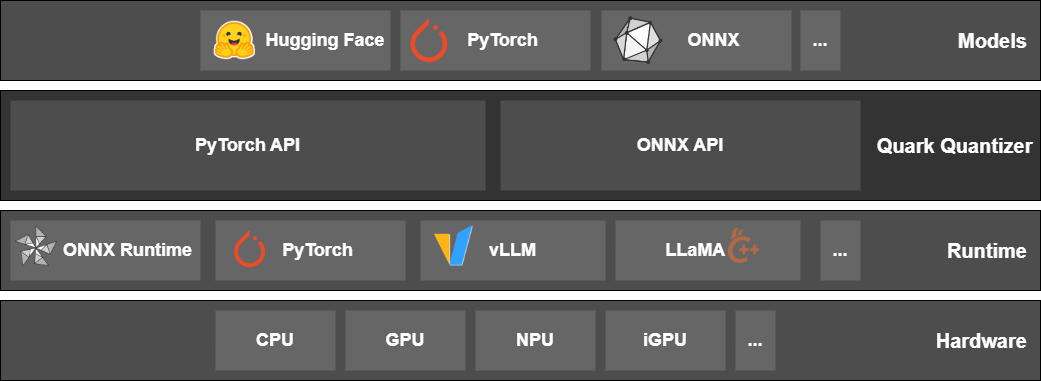
Features
| Feature Set | PyTorch backend | ONNX backend |
|---|---|---|
| Data Types | int4, uint4, int8, uint8, float16, bfloat16, OCP FP8 E4M3/E5M2, OCP MX INT8, OCP MX FP4, OCP MX FP6 E3M2/E2M3, OCP MX FP8 E4M3/E5M2 | int4, uint4, int8, uint8, int16, uint16, int32, uint32, float16, bfloat16, BFP16, MX4/MX6/MX9, OCP MX INT8, OCP MX FP4, OCP MX FP6 E3M2/E2M3, OCP MX FP8 E4M3/E5M2 |
| Quant Mode | eager mode, FX graph mode | ONNX graph mode |
| Quant Strategy | static quant, dynamic quant, weight-only | static quant, dynamic quant, weight-only |
| Quant Scheme | per-tensor, per-channel, per-group | per-tensor, per-channel |
| Symmetric | symmetric, asymmetric | symmetric, asymmetric |
| Calibration Method | MinMax, Percentile, MSE | MinMax, Percentile, MinMSE, Entropy, NonOverflow |
| Scale Type | float16, float32 | float16, float32 |
| KV-Cache Quant | FP8 KV-Cache Quant | N/A |
| Supported Ops. | nn.Linear, nn.Conv2d, nn.ConvTranspose2d, nn.Embedding, nn.EmbeddingBag, |
Almost all ONNX ops, |
nn.BatchNorm2d, nn.BatchNorm3d, nn.LeakyReLU, nn.AvgPool2d, nn.AdaptiveAvgPool2d |
see Full List | |
| Pre-Quant Optimization | SmoothQuant, QuaRot | QuaRot, SmoothQuant, CLE |
| Quantization Algorithm | AWQ, GPTQ, Qronos | AdaQuant, AdaRound, GPTQ, Bias Correction |
| Export Format | ONNX, JSON-Safetensors, GGUF(Q4_1) | N/A |
| Operating Systems | Linux {ROCm, CUDA, CPU}, Windows {CPU} | Linux {ROCm, CUDA, CPU}, Windows {CUDA, CPU} |
Model Support Table
| Quantization Technique | Supported Models |
|---|---|
| LLM Pruning | Model Support |
| LLM Post Training Quantization (PTQ) | Model Support |
| LLM Quantization Aware Training (QAT) | Model Support |
| Vision Model Quantization | Model Support |
| Quark for ONNX | Model Support |
Installation
Official releases of AMD Quark are available on PyPI https://pypi.org/project/amd-quark/, and can be installed with pip:
pip install amd-quark
[!NOTE]
For full instructions to install AMD Quark from Python wheels or ZIP files, refer to our 🛠️Installation Guide. The Installation Guide also contains verification steps that apply to building from source.
Installing from Source
- Clone or download this repository.
- Follow the steps from the PyTorch website to install the appropriate PyTorch package for your system.
- You can then build and install AMD Quark, and its dependencies, which are detailed in requirements.txt, by running:
git clone --recursive https://github.com/AMD/Quark
cd Quark

# [Optional] run git submodule if you are updating an existing Quark repository
git submodule sync
git submodule update --init --recursive

# Recommended: install torch first matching your accelerator
# (https://pytorch.org/get-started/locally/), then:
pip install --no-build-isolation .

# Without --no-build-isolation, pip pulls torch from PyPI for the isolated
# build env (defaults to CUDA on Linux); set PIP_EXTRA_INDEX_URL to override.
# QUARK_ACCELERATOR=cpu|cuda|rocm forces a specific build type.
# See CONTRIBUTING.md for details.
Resources
AMD Quark's documentation site contains Getting Started, API documentation for both PyTorch and ONNX backends, and other detailed information. The Installation Guide includes our Recommended First Time User Installation guide, to get set up with Quark quickly. Check out our Frequently Asked Questions for both PyTorch and ONNX for more details.
AMD Quark provides examples of Language Model and Image Classification model quantization, which can be found under examples/torch/ and examples/onnx/. These examples are documented here:
The examples folder also contain integrations of other quantizers under examples/torch/extensions/. You can read about those here:
Agent Skills
This repo ships a Claude Code skill system for Quark quantization workflows (PTQ planning, environment preflight, install, debug, export, and more).
- Skill overview, layering rules, and full skill list:
.claude/skills-impl/README.md - How to add or modify a skill:
.claude/skills-impl/CONTRIBUTING.md - Architecture, contracts, and governance docs:
docs/agent_skills/ - Example prompts:
examples/agent_skills/prompts/
User-facing skills are auto-discovered by Claude Code from .claude/skills/ — launch claude from the repo root and ask things like "quantize Qwen3-8B to FP8" or "check my environment".
Contributing
AMD Quark is not set up to accept community contributions (bug reports, feature requests, or Pull Requests) just yet. Please watch this space!
License and Copyright
Copyright (C) 2025, Advanced Micro Devices, Inc. All rights reserved. SPDX-License-Identifier: MIT. See LICENSE file for detail.
Project details
Release history Release notifications | RSS feed


Download files
Download the file for your platform. If you're not sure which to choose, learn more about installing packages.
Source Distributions
Built Distribution
Filter files by name, interpreter, ABI, and platform.
If you're not sure about the file name format, learn more about wheel file names.
Copy a direct link to the current filters
File details
Details for the file amd_quark-0.12rc3-py3-none-any.whl.
File metadata
- Download URL: amd_quark-0.12rc3-py3-none-any.whl
- Upload date:
- Size: 1.5 MB
- Tags: Python 3
- Uploaded using Trusted Publishing? No
- Uploaded via: twine/6.2.0 CPython/3.11.15
File hashes
| Algorithm | Hash digest | |
|---|---|---|
| SHA256 |
cbffd6e856ff476e217382026d5937f7348ca1edc1619ba6de45320caafd5c53
|
|
| MD5 |
c59d53f2732f27c14746c32a2d24e149
|
|
| BLAKE2b-256 |
558778f7423abd60b10da5dbe904a4de888b17e828d6c119525292d360e88f28
|






