
This release is a pre-release and may not be stable for production use.
Shared memory for people and AI agents, where every claim comes with its proof.
An open knowledge base of small, sourced statements. Agents propose, automatic checks find the quote in the actual file, and a human has the final word.






Download · Install · Demo · Quickstart · Features · How it works · Roadmap · Docs · Manifesto · Русский
Download
Windows 10 and 11: amemo-setup-windows-x64.exe — one installer for the current user, no administrator rights and no terminal. The wizard downloads PostgreSQL, Python and the semantic search model (about 450 MB), creates the base in a folder you choose, connects the Claude app, Claude Code and Codex, and keeps amemo up to date. The installer is not code-signed yet: if SmartScreen says "Windows protected your PC", choose More info → Run anyway. Every version is on the releases page.
Linux, macOS, servers: pipx install "amemo[web]", then the Quickstart — or let your agent do it
(Install with your agent).
Why amemo
Agents forget everything between sessions, and what they do remember is text without proof. Notes and wikis keep what people wrote, but not where it came from or who decided it was right.
amemo keeps something smaller and sturdier: an atom. An atom is one statement, the exact place in the file it came from, the full history of its changes, and the decision of a person.
|
Every claim has a source A quote is checked against the real text of the file: a page in a PDF, a heading in Markdown, a cell range in a spreadsheet. |
Nothing is overwritten Every change is a new revision with a reason, an author and a content hash. Mistakes are superseded, not erased. |
|
Checks run on every write Schema, units, the quote, common sense and duplicates are checked before anything lands. A failed batch writes nothing. |
The human decides Agents propose and pre-verify. Accepting a claim into the canon is a person's call, and the system shows who made it. |
Features
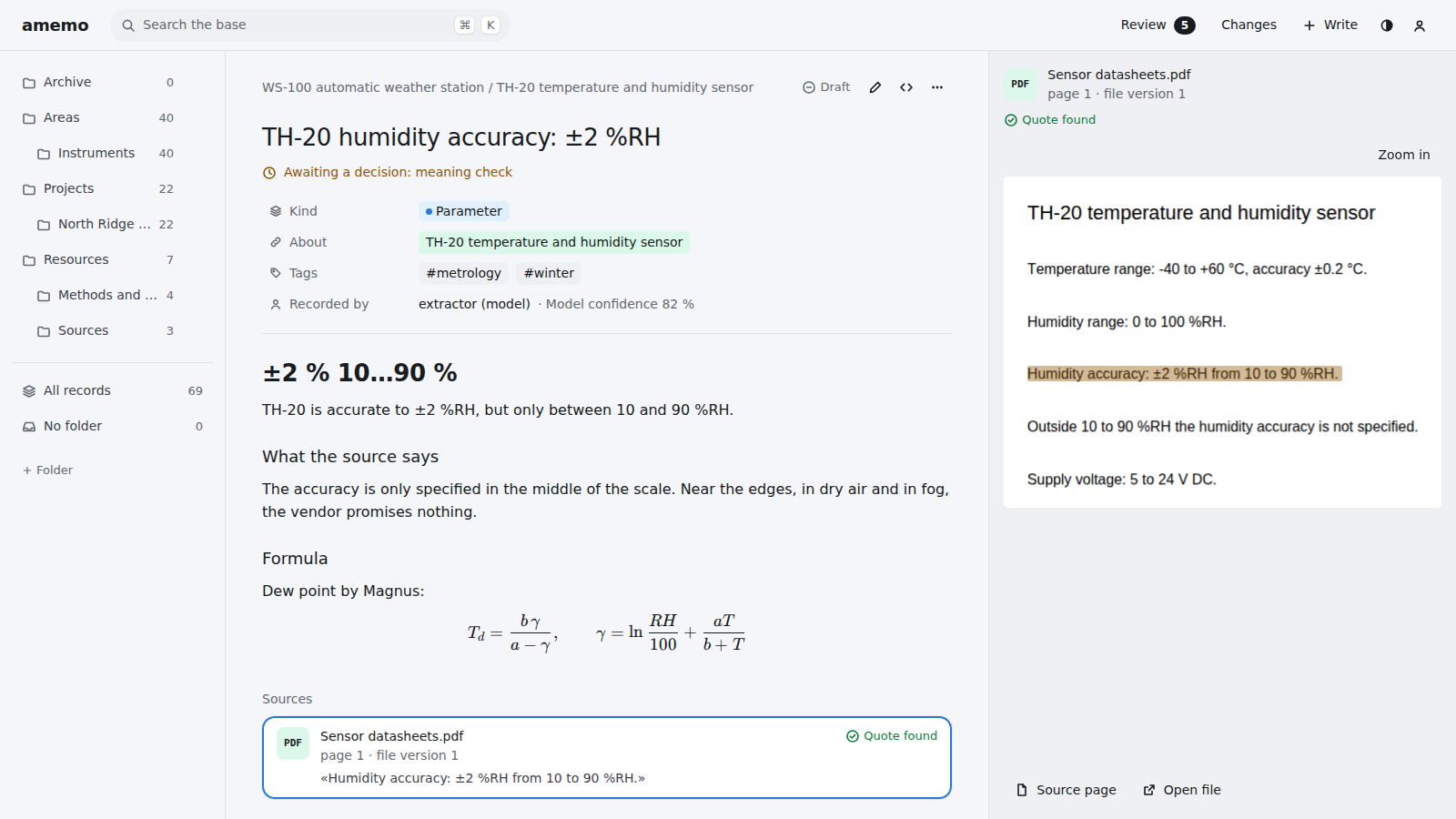
A claim next to its proofA record reads like a note: properties, a Markdown body and the quote highlighted on the real page of the source file. Cited files are stored once by content hash and kept forever. |
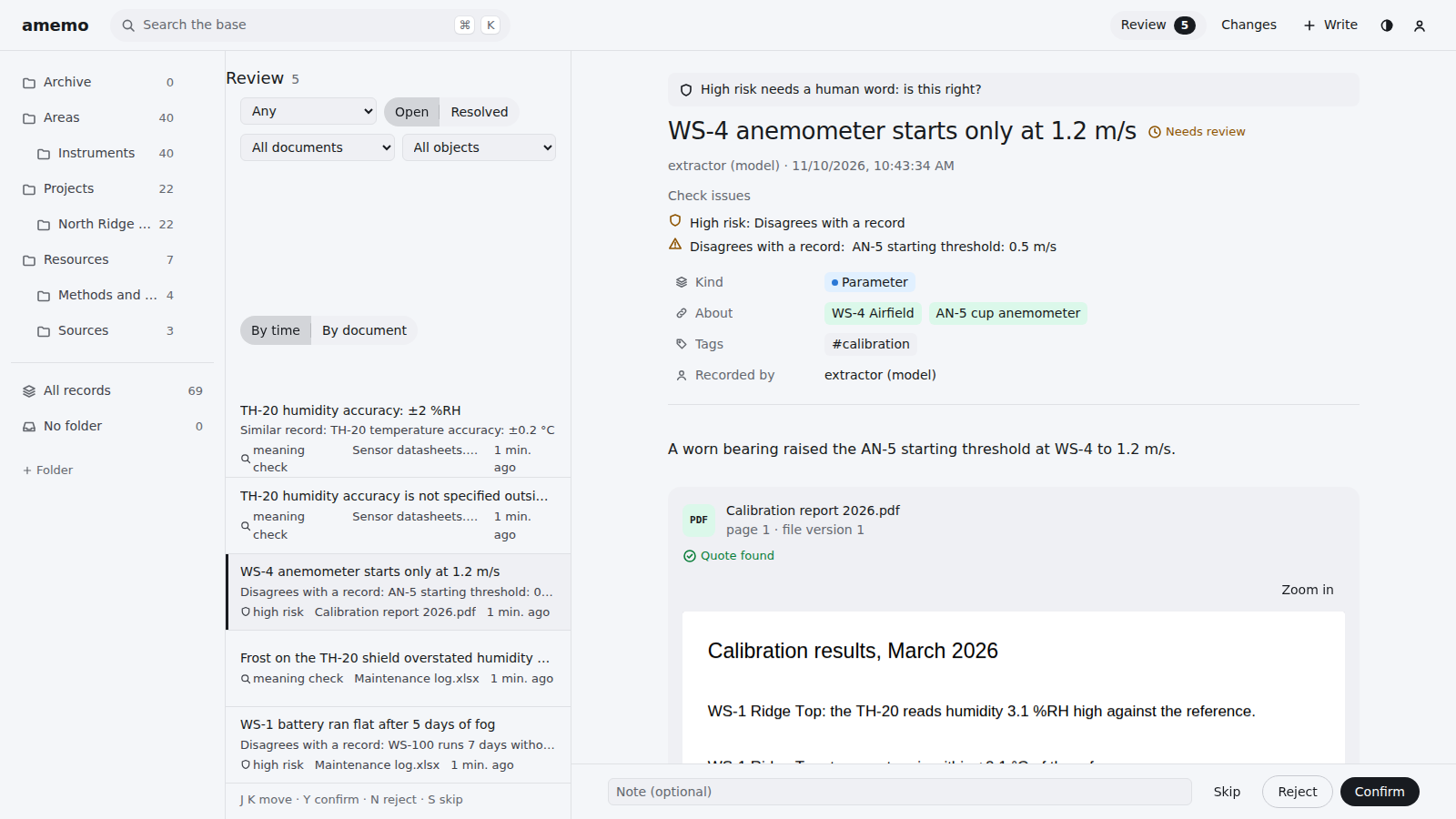
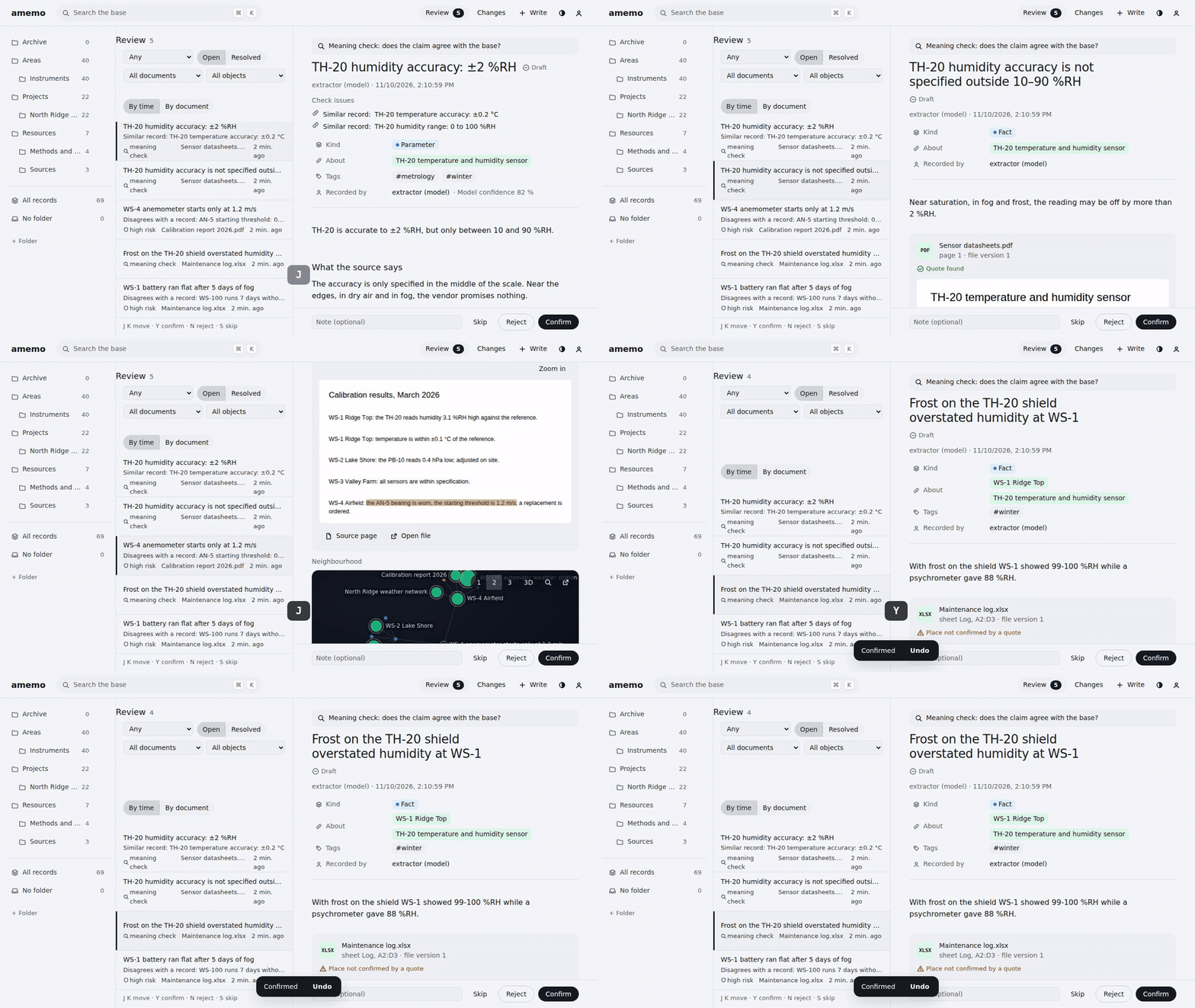
Review in one keystrokeAnything doubtful, risky or changed lands in a queue. Each item shows the claim, the quote and its neighbours. Y confirms, N rejects, J/K move on, and parallel reviewers never get the same item. |
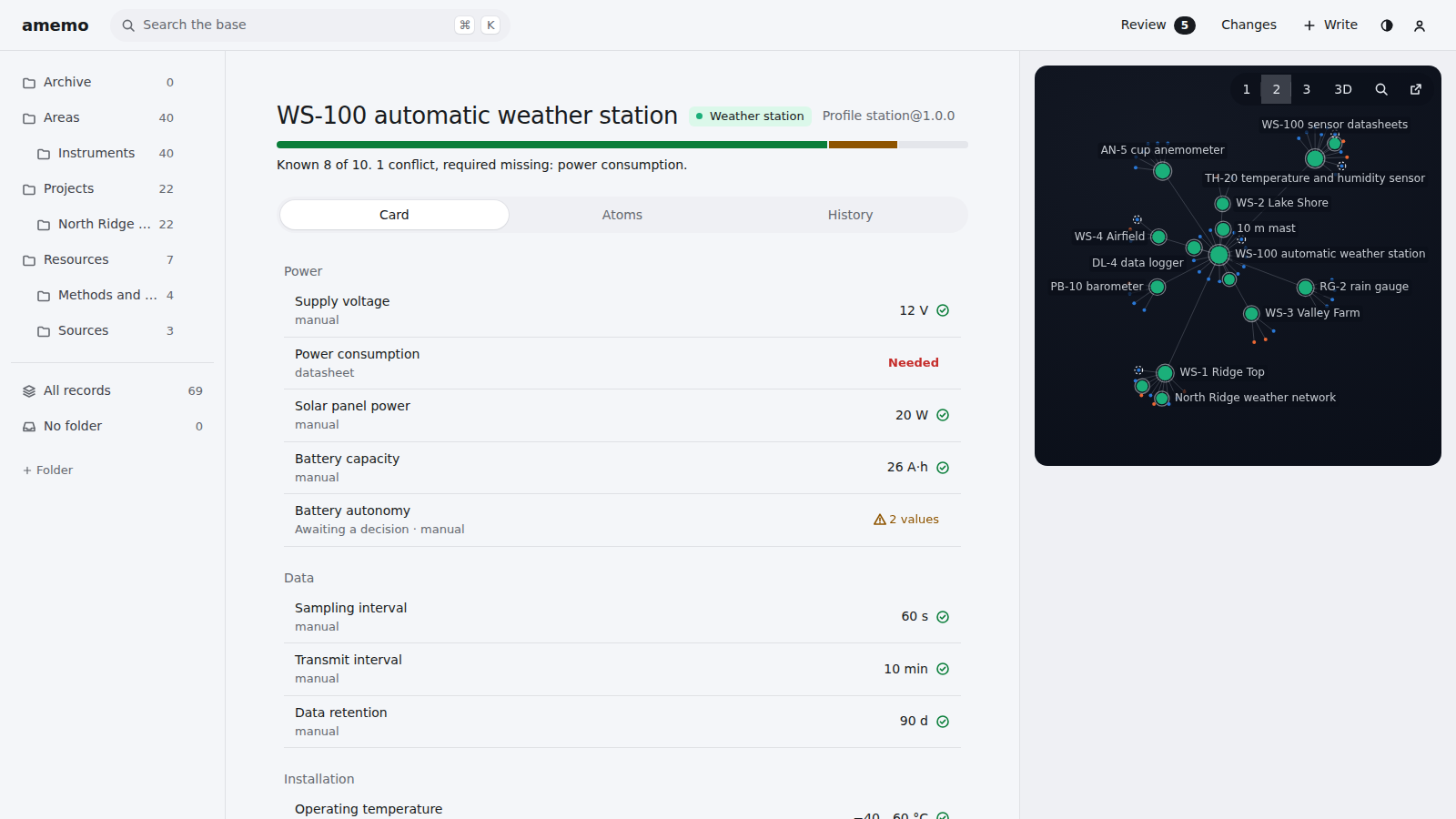
Entity cardsA profile says which parameters an object needs. The card shows what is known, missing or in conflict, and it is built live from atoms, so nothing goes stale. |
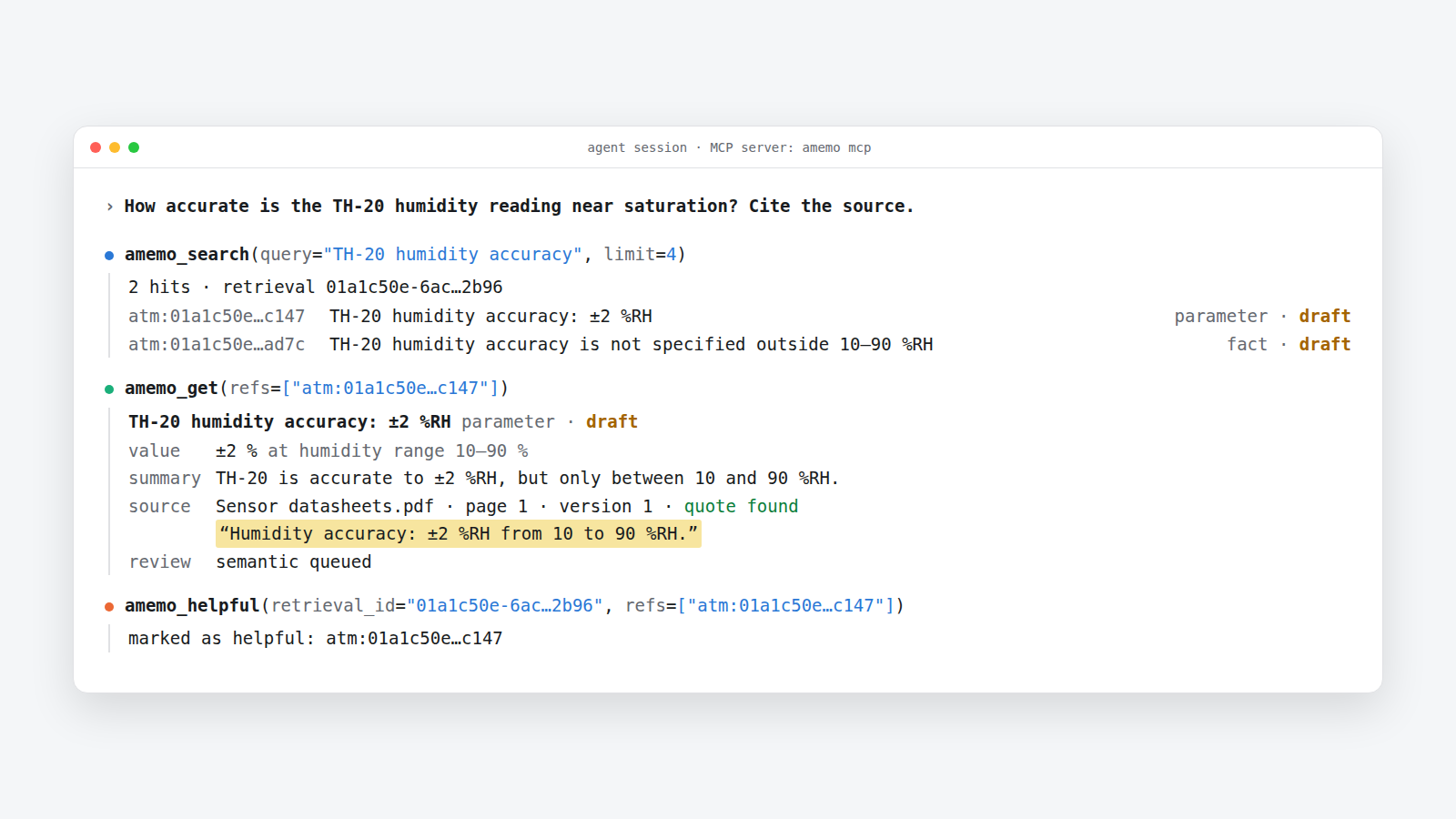
Memory for agentsClaude Code and Codex ask amemo first. They read short cards, fetch only the records they need, and mark what helped, which costs fewer tokens than reading raw files. |
Under the hood
- Hybrid search. Exact codes, full text and local vectors are merged with RRF. An exact code always comes first, and an ambiguous query returns every candidate instead of a guess.
- History you can query. Bodies are stored as canonical JSON (JCS) with a
sha256-c1:hash, andwhat_changedanswers "what changed since Monday" for one record or the whole base. - Files that stay put. Sources live in an OCFL object store by content digest. When a new version of a file arrives, every record that cites an older version gets a review item.
- Domain packs. Vocabularies, templates and entity profiles are plug-in packages with versions and dependencies. The core itself is a pack.
- Bundles. You can share a branch of knowledge between bases as a folder or a zip, with or without the files. Ids survive the trip, and anything that differs from the local copy goes to review.
- Backups with proof. A backup is a
pg_dumpplus a snapshot of the object store. It is verified by a real trial restore into a temporary database. - Boring storage. Data lives in plain PostgreSQL 18 with pgvector. The schema is written in LinkML, with Pydantic models and JSON Schema generated from it.
See it in action
The real service on the sample base, recorded in CI.
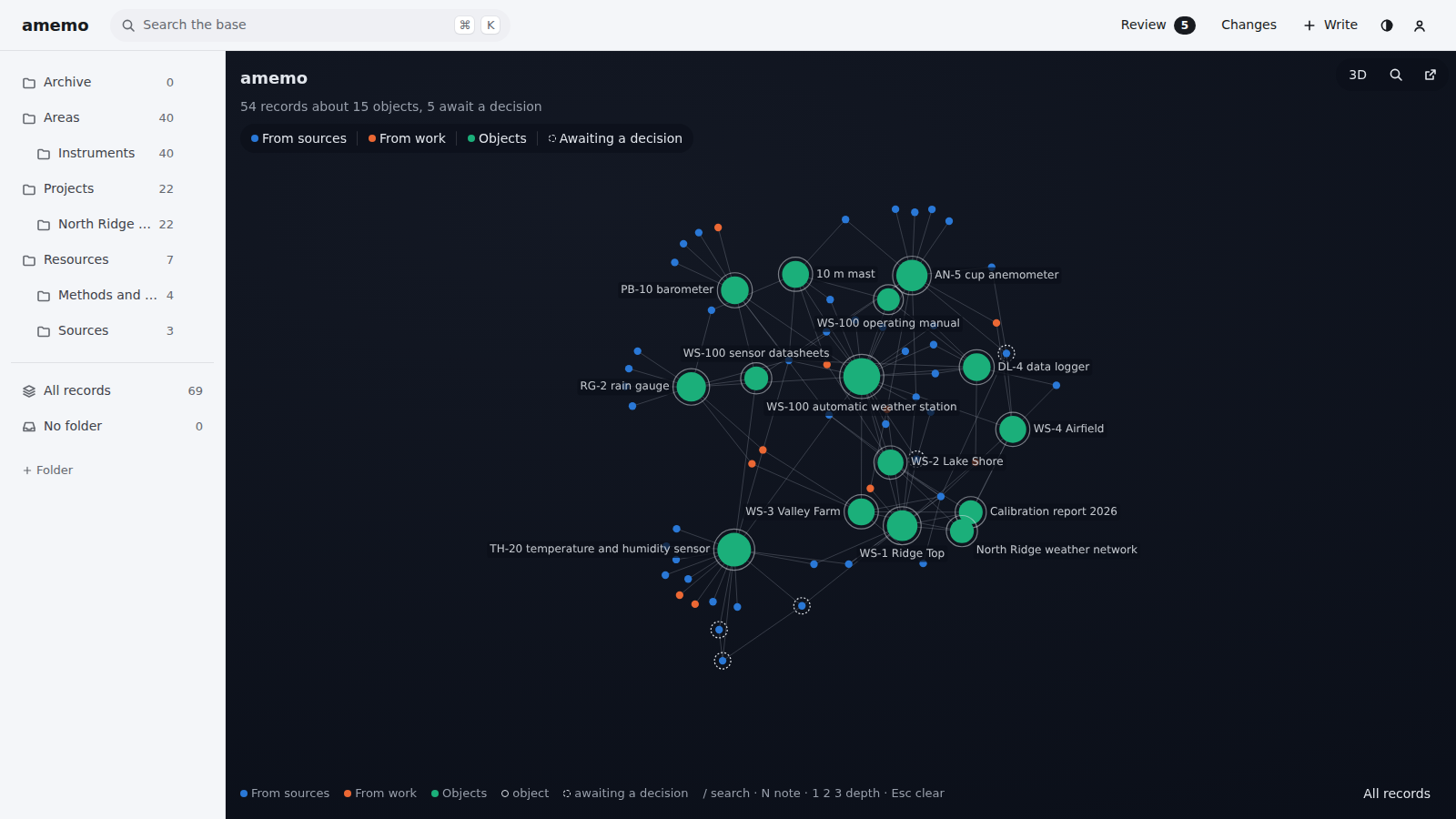
Write in one line. Press N, type, press Enter. amemo guesses the kind from the text (a value with a unit becomes a parameter), and every action can be undone for 6 seconds.
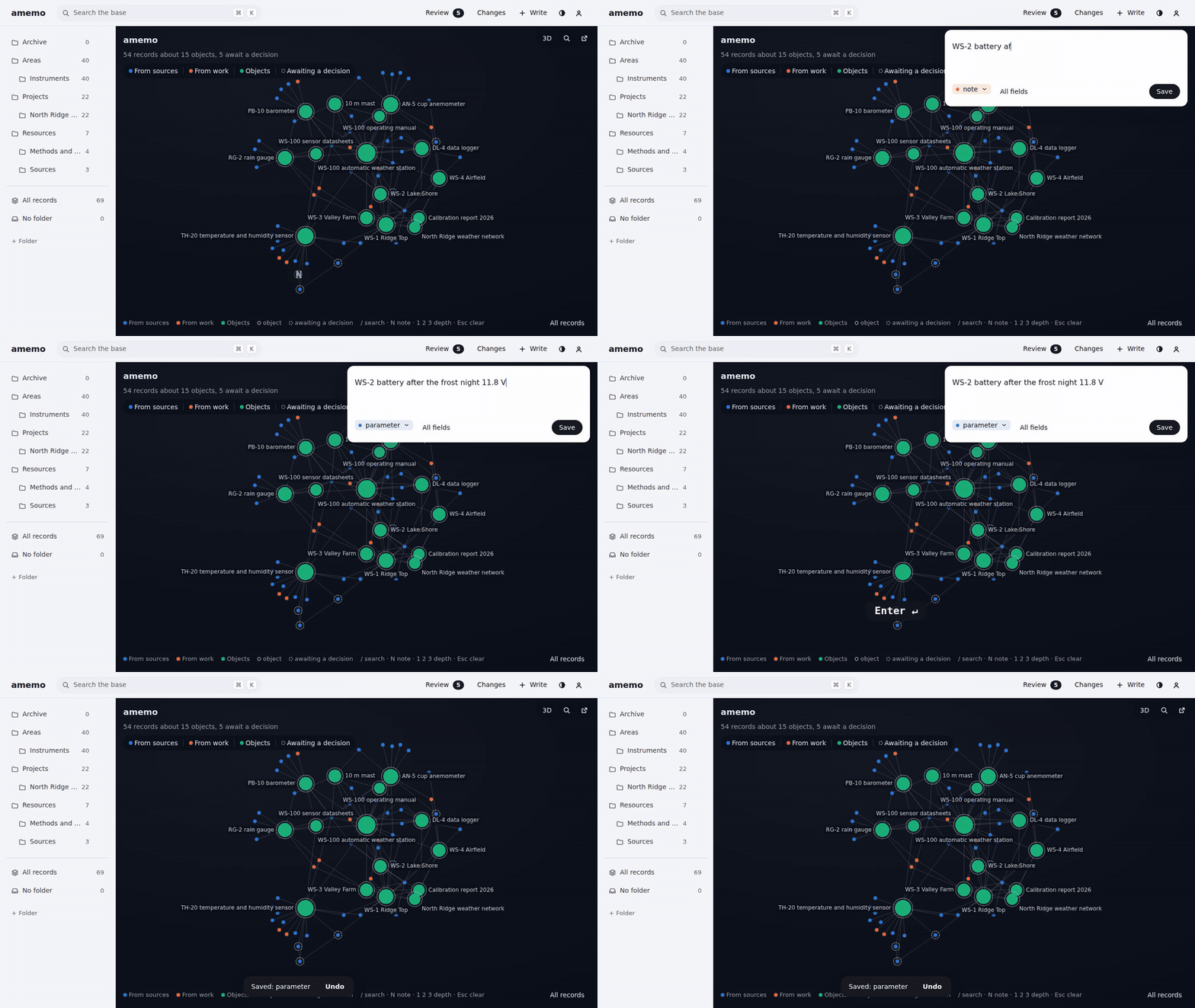
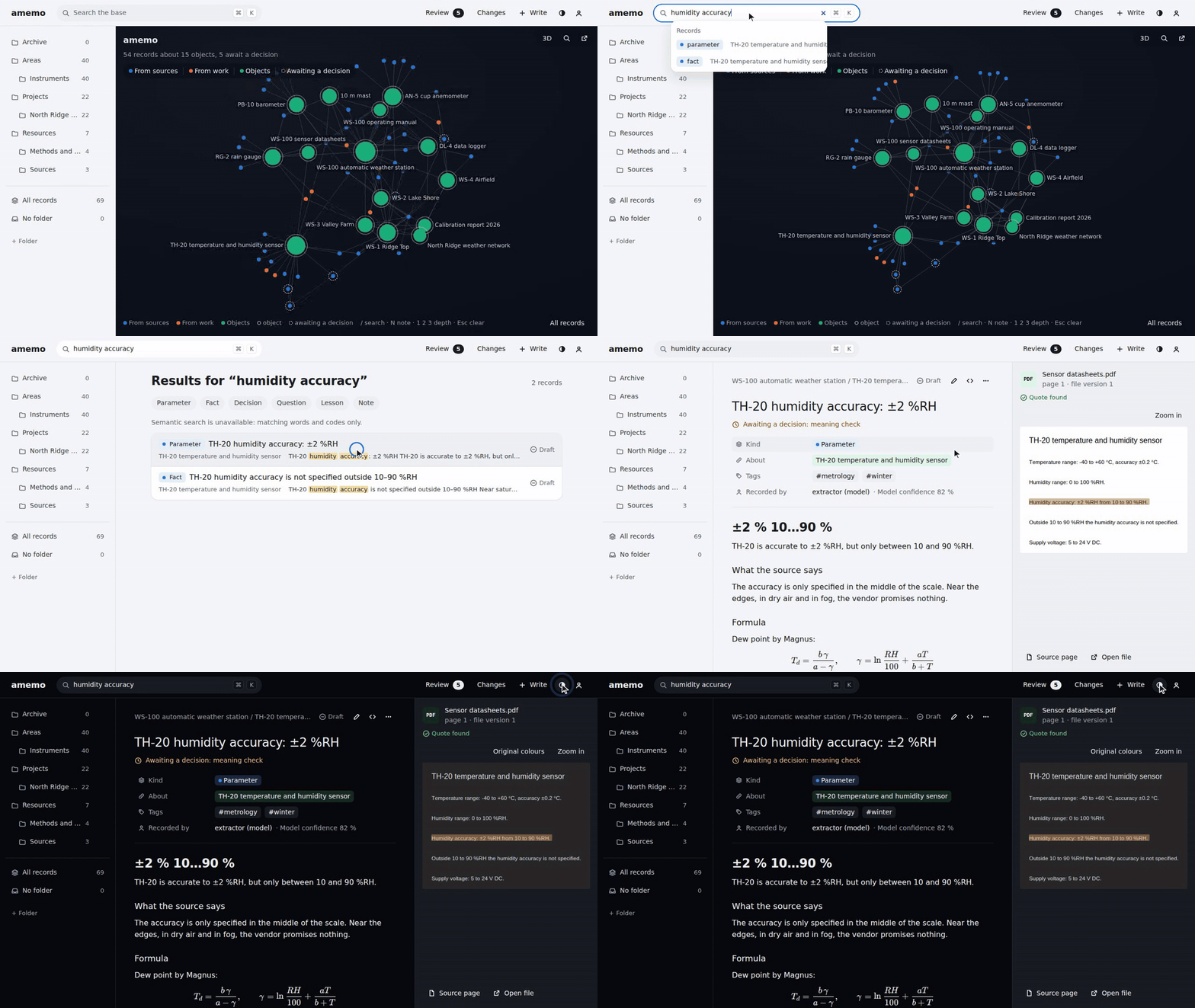
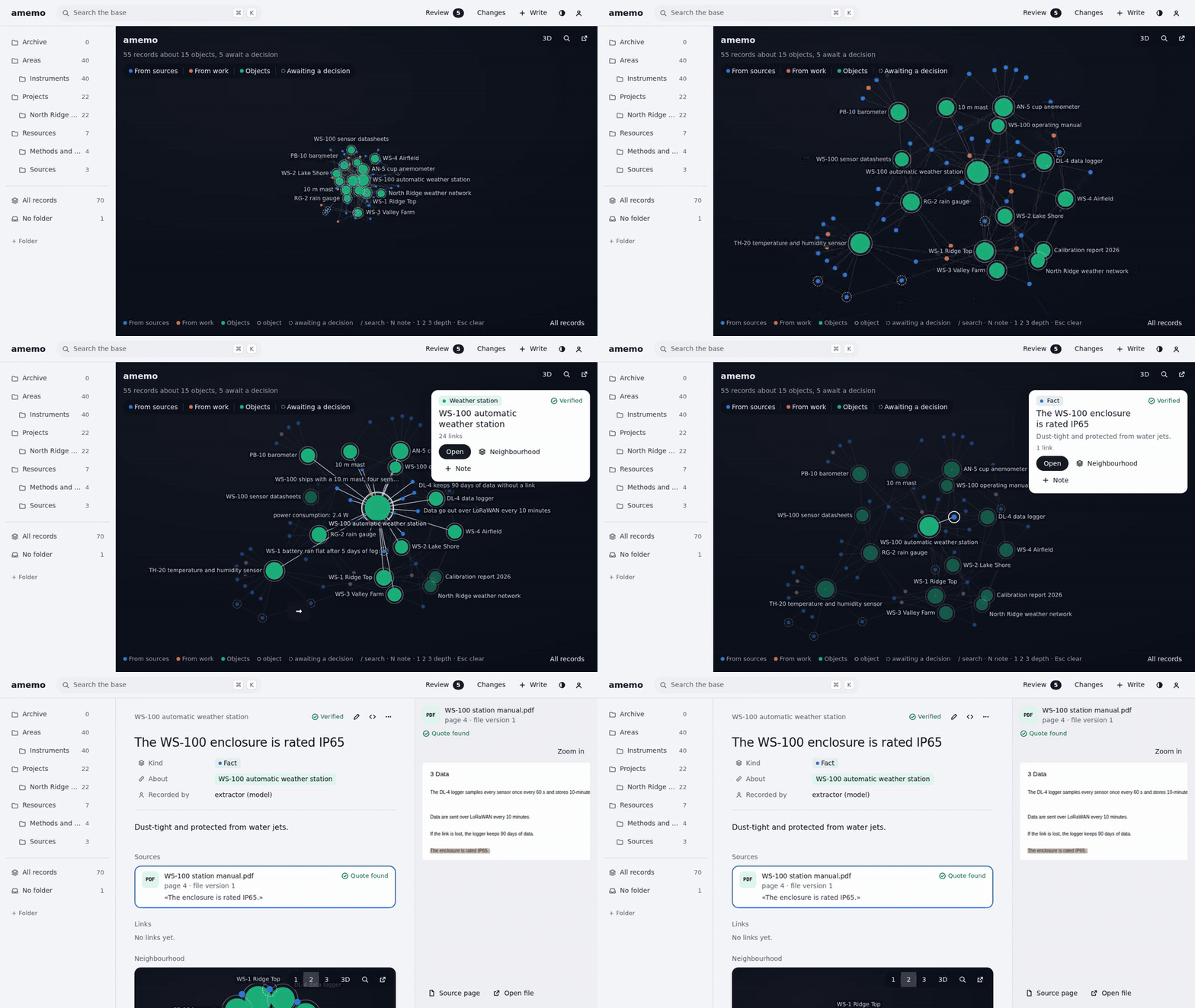
From a question to the source. Search, open the record, and the quote is highlighted on the real PDF page. In the dark theme the page follows the palette.
Review from the keyboard. J and K move through the queue, Y confirms, N rejects, S skips.
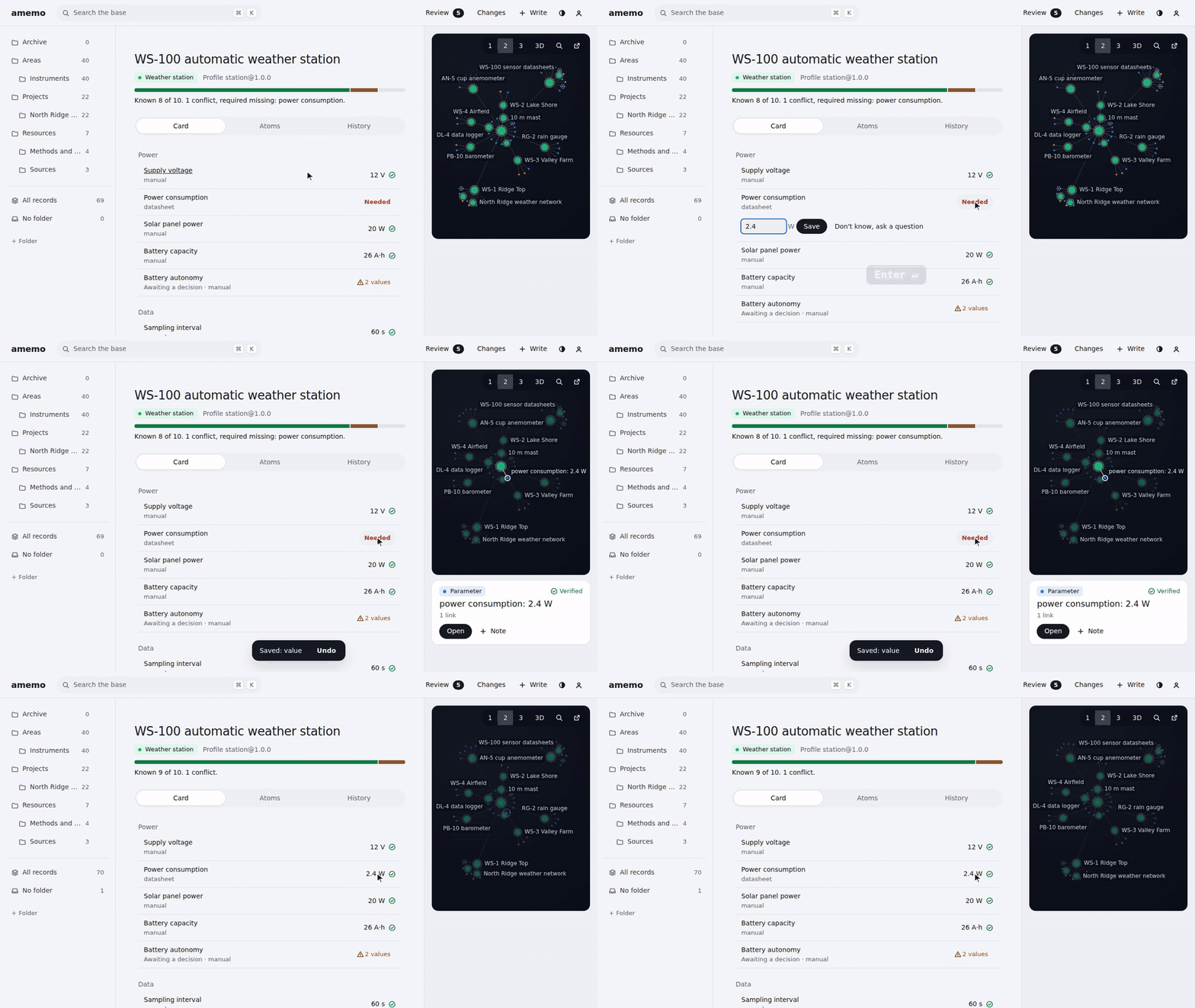
Fill the gaps. The card shows what the profile requires and what is missing. Type the value right there; once the undo window passes, completeness goes up.
The sky. The whole base as a constellation. Arrow keys pick a star and Enter opens its record.
Install with your agent
Paste this into Claude Code, Codex or another coding agent:
Install amemo on this machine. Follow https://raw.githubusercontent.com/empty-complete/amemo/main/docs/install-agent.md
The agent works from a bare machine. It checks what is already there, then sets up PostgreSQL with pgvector
(in Docker if you have it, otherwise natively, Windows included), installs amemo, connects it to your agents
and finishes with amemo doctor. It asks before sudo, a reboot or a large download. The full instructions are
in docs/install-agent.md; CI runs their commands on Linux, macOS and Windows.
To do it by hand, see One-command install.
Quickstart
amemo needs Python 3.11+ and Docker (for PostgreSQL) on Linux, macOS or Windows. On Windows, run the commands in
PowerShell with Docker Desktop, and the venv's pip is .venv\Scripts\pip; without Docker,
docs/install-agent.md sets PostgreSQL up natively. WSL2 works too.
1. Start PostgreSQL and install the library
git clone https://github.com/empty-complete/amemo.git
cd amemo
docker compose up -d --wait db      # PostgreSQL 18 + pgvector on 127.0.0.1:5435
python3 -m venv .venv
.venv/bin/pip install -e .          # or -e ".[embed]" for local multilingual vectors
2. Write a fact with its source
from pathlib import Path

from amemo import check, db, recipes
from amemo.check import Proposal
from amemo.ocfl_store import ObjectStore

conn = db.connect("postgresql://amemo:amemo@127.0.0.1:5435/amemo")
db.prepare(conn)                                  # migrations and the core vocabulary

docs = Path("my-docs")                            # the folder with your source files
store = ObjectStore(Path("amemo-objects"))         # cited files, kept by content hash
(docs / "pgvector").mkdir(parents=True, exist_ok=True)
(docs / "pgvector" / "README.md").write_text(
    "## HNSW\n\nvector - up to 2,000 dimensions, halfvec - up to 4,000 dimensions\n")

fact = {
    "kind": "fact",
    "label": {"en": "pgvector indexes vector with HNSW up to 2,000 dimensions",
              "ru": "pgvector: индекс HNSW по vector — до 2000 измерений"},
    "summary_plain": {"en": "Longer embeddings need halfvec, up to 4,000.",
                      "ru": "Длинные векторы индексируются через halfvec, до 4000."},
    "sources": [{"path": "pgvector/README.md",
                 "selectors": [{"type": "heading", "value": "HNSW"}],
                 "quote": "vector - up to 2,000 dimensions"}],
}
result = check.submit(conn, store, docs, [Proposal("atom", fact)], agent="model:my-agent")
print(result.state, result.records[0]["status"])  # approved draft
Levels 1–4 passed and the file was copied into the store. The atom stays a draft until the semantic
review (level 5) or a person confirms it.
3. Try to cite something the file doesn't say
wrong = {**fact, "sources": [{**fact["sources"][0], "quote": "vector - up to 16,000 dimensions"}]}
result = check.submit(conn, store, docs, [Proposal("atom", wrong)], agent="model:my-agent")
print(result.state, result.report["issues"][0]["code"])  # rejected quote_fuzzy
The whole batch is rejected and nothing is written. The report shows the closest real text in the file:
vector - up to 2,000 dimensions.
4. Search
hits = recipes.exact_fact(conn, "halfvec", agent="model:my-agent")
print(hits["items"][0]["label"]["en"])  # pgvector indexes vector with HNSW up to 2,000 dimensions
The library reference covers the rest: the review queue, entity cards, bundles, folders and backups.
Try the web UI on sample data
The web UI runs on the service, or on mock data of the same HTTP contract. What is there:
- Sky. The home page is a constellation of records, colored by family (source, work, object); a new record flashes as it lands. A 3D view loads on request.
- Reading. A record shows its properties and body next to the source: the quote highlighted on the real PDF page, a spreadsheet range or a text fragment, with the file version. Entity cards, objects and a feed of changes.
- Writing. Quick write in one line (
N), a full editor with Markdown, formulas and sources, folders with drag and drop, and a kind constructor. Every action has a 6-second undo. - Review. The queue in two panes with
JKYNS: the claim, its source, the reviewer's notes, a word diff for edits and both versions when a source changed. Base shows the queue, statuses and backups; Bundles exports and importsamem.bundle/1and anthologies.
Light and dark themes, Russian and English, phone layouts. The design system is described in
web/DESIGN.md.
On the service, with a sample base (a weather station: sensors, a PDF manual with quotes, notes and an open review queue), in an empty database:
.venv/bin/pip install -e . -e web/python          # the service and the web UI package
(cd web && npm ci && npm run build)               # Node 24+; the build goes into the amemo-web package
export AMEMO_DSN=postgresql://amemo:amemo@127.0.0.1:5435/amemo AMEMO_DOCS=~/amemo-sample/docs
.venv/bin/python tools/seed_sample.py             # the sample: 22 records, 2 open review items
.venv/bin/python -m amemo.service                  # then open http://127.0.0.1:8767/ui/
On mock data, without a database:
cd web && npm ci && npm run dev:mock # then open http://127.0.0.1:5173/ui/
One-command install
pipx install 'amemo[web]'      # or pip install / uv tool install; [web] adds the web UI at /ui, [embed] semantic search
amemo init --dsn postgresql://amemo:amemo@127.0.0.1:5435/amemo   # database, object store; the DSN goes to amemo.toml
amemo install claude-code      # MCP server, hooks and skills; `amemo install codex` for Codex CLI
amemo install cowork           # optional: a plugin zip for Claude Cowork, uploaded by you in the Claude app
amemo embed enable             # optional, with amemo[web,embed]: semantic search, downloads a ~250 MB model
amemo doctor                   # what works and what to fix
amemo init --dsn remembers the connection string in ~/.config/amemo/amemo.toml (mode 0600), so agents, hooks
and the CLI find the database without AMEMO_DSN in their environment. PostgreSQL with pgvector comes from
docker compose up -d --wait db, a native install (docs/install-agent.md, step 3) or
your own server. CI runs these steps on every push.
Own PostgreSQL in a data folder
With PostgreSQL 18 programs that include pgvector (for example the EDB zip on Windows, or postgresql-18 and
postgresql-18-pgvector from PGDG), amemo setup needs no Docker, no service and no administrator rights:
amemo setup --pg-bin /usr/lib/postgresql/18/bin --embed --agents claude-code
It creates a cluster in ~/amemo-data/pg (role amemo with a random password, 127.0.0.1 only, first free port from
5436), writes amemo.toml with the DSN, store, state and backups under ~/amemo-data, starts the cluster, prepares the
database like amemo init, and with --embed, --ocr rus,eng and --agents turns on semantic search, OCR and the
agents. A second run continues where the first stopped and keeps the password; a foreign amemo.toml is left alone.
After a reboot amemo pg start starts the cluster again (amemo pg stop, amemo pg status); backups use the same
pg_bin. This is the command the desktop installer runs.
Service
The HTTP service serves the v1 contract at /api/v1 and the web UI at /ui.
Start it with amemo serve (or python -m amemo.service):
export AMEMO_DSN=postgresql://amemo:amemo@127.0.0.1:5435/amemo
.venv/bin/amemo serve      # http://127.0.0.1:8767; --host and --port change the address
- Local trust. By default the service listens on
127.0.0.1only. It answers only to its own name inHost(127.0.0.1,localhost,[::1], the bind address) and only to its own page orAMEMO_UI_ORIGINSinOrigin; writes take JSON only. The web UI gets a person cookie, new on every start. When you type the address into the browser, the page itself gets no cookie: the UI's firstfetchto/api/v1/sessionreceives it. Requests without the cookie (scripts, agents) write as a model, and their writes go through the checks. - Shared service. With
AMEMO_TOKENS(a0600file with token hashes) every API request needsAuthorization: Bearer <token>. A token withoutwrite = trueis read-only: writes answer403 read_only./healthand the UI's static files stay public. A--hostother than loopback without tokens is refused;--no-authallows it for a closed network and prints a warning. - Behind a name. With
--host 0.0.0.0(for example, in docker compose) list the names clients use inAMEMO_ALLOWED_HOSTS:AMEMO_ALLOWED_HOSTS=amemoacceptsHost: amemo:8767. List only names you control: a name a browser can resolve to someone else's address opens the service to DNS rebinding. - State. Bundles and uploads live in
AMEMO_STATE(~/.local/state/amemo) for 24 hours, up toAMEMO_STATE_QUOTAper owner (10 GiB). The query log isAMEMO_STATE/queries.jsonl;AMEMO_QUERY_LOG=offturns it off. The service writes its own log to stderr. - Web UI.
/uineeds the web package:pip install 'amemo[web]'. Without it/uianswers 404 with a hint, and the API works as usual.
Updates
The service watches the GitHub releases of amemo: at start and
every 6 hours, quietly when there is no network. A pre-release (a, b, rc) follows pre-releases too; a stable
version follows stable ones only. Installed with pipx, uv tool install or pip in a venv, it updates itself by
default: the new version is installed into a temporary venv and checked against your database first (migrations run
in a transaction that is rolled back), a backup is made before new migrations (no PostgreSQL 18 client, no update),
then the exact version is installed in place and the service restarts when idle (no requests for 2 minutes).
A version that failed is not retried. Long-running amemo mcp processes answer «amemo updated — restart the agent»
and exit.
amemo update             # check now: current version, latest release, what happens next (--json)
amemo update install     # install the available version now (a person only)
amemo update auto off    # stop updating by itself; the web UI has the same switch in Settings
- Turn it off for good with
auto_update = falseinamemo.tomlorAMEMO_AUTO_UPDATE=false: the service then only reports «version X is available». The switch in the web UI is stored inAMEMO_STATE/updates.json, not inamemo.toml. - Docker and source checkouts are never updated by the service: it reports the new version and the command —
git pullanddocker compose up -d --buildfor the image,git pullandpip install -e .for a working copy. The same goes forpipx runand a wheel installed from a local file.
Writing from the web
A person writes in the web UI: a form for each kind, their own kinds, file uploads and tasks for agents.
-
Forms from templates.
GET /templatesgives every atom kind and entity class a form, with or without its own template. Fields come from the template's rules, so the form asks for whatcheck.submitwill check. An optionaluiblock in a pack template sets the body, the widgets and the labels of fields; it does not change the checks:code: reading version: 1.0.0 target: atom applies_to: reading fields: - {path: about, required: true, entity_classes: [artifact]} - {path: content.values, required: true} ui: body: none # wanted | required | none widgets: [sources, values_table] # sources, links, around, values_table, similar, children fields: - {path: "content.values[property=humidity]", label: {ru: Влажность, en: Air humidity}}
-
My kinds. A person adds a kind of their own from the web (
PUT /packs/mine/templates/{code}). It lives in the database as theminepack and passes the same checks as a pack from files, and so do its records. Every edit is a new version of the template; a code taken by a file pack is refused (409 template_exists). A kind can be deleted only while it has no records (409 template_in_use). Only a person edits and deletes kinds; a model gets403 forbidden.POST /bundles/exportwithwith_packstakes your kinds along; the import adds the missing ones, and the same code with other content is abundle_pack_conflict. -
Uploads and search.
POST /objects(multipartfile, optionalpath) puts a file into the documents folderAMEMO_DOCS, by default asЗагрузки/<file name>, and parses it. The same file at that path answers200, another file there is409 object_path_takenand stays untouched, and withoutAMEMO_DOCSthe answer is503 docs_unavailable.GET /objects?q=finds objects by part of the name or path. -
Tasks for agents. In the web a person asks an agent to parse a file (
POST /tasks); a repeat returns the same task. The agent picks it up over MCP:amemo_taskslists open tasks and its own,amemo_task_claimtakes one with a 30-minute lease,amemo_task_releasegives it back, andamemo_task_donecloses it with the result (links to the records it wrote), andamemo_task_cancelcancels a task it set. An expired lease frees the task for another agent.GET /tasksandamemo tasks listshow open and claimed tasks, newest first (--state donefor the closed ones);amemo tasks cancel IDcancels one (the one who set it, or a person).
Docker compose
docker-compose.yml runs the database and the service; settings live in .env (copy .env.example), the file
itself holds no secrets.
cp .env.example .env                          # set AMEMO_PG_PASSWORD and AMEMO_AGENT
docker compose up -d --wait amemo              # PostgreSQL 18 + pgvector and the service on http://127.0.0.1:8767
docker compose exec amemo amemo doctor
docker compose --profile web up -d --wait amemo-web   # the same with the web UI at /ui (instead of amemo)
- Inside and outside. The service listens on
0.0.0.0:8767inside the compose network and is published only on127.0.0.1:8767.AMEMO_ALLOWED_HOSTS=amemolets other containers call it ashttp://amemo:8767. - Login. Without
AMEMO_TOKENSthe service runs with--no-auth: anyone who reaches the port writes as a model, so keep it on127.0.0.1. For a shared service issue a token (docker compose exec amemo amemo token create person:me --file /var/lib/amemo/state/tokens), setAMEMO_TOKENS=/var/lib/amemo/state/tokensin.envand restart. - Volumes.
amemo-pg(database),amemo-objects(object store),amemo-state(bundles, uploads, query log, tokens),amemo-backups(docker compose exec amemo amemo backup create; the image has the PostgreSQL 18 client).AMEMO_DOCS_DIRmounts your documents folder read-only. - Health. Both the image and compose check
/health;docker compose up --waitwaits for it. - Profile
web.amemo-webis the same service built withamemo[web]. It shares the port and the volumes, so run eitheramemooramemo-web. - Image.
docker build -t amemo .(targetservice) or--target web;--build-arg AMEMO_EXTRAS=embedadds fastembed for semantic search, whichdocker compose exec amemo amemo embed enable --yesthen turns on.AMEMO_OCR_LANGS="rus eng"in.envbuilds an image that recognises scans (OCR).
CLI
pip install -e . puts the amemo command in the venv. It talks to the database directly (AMEMO_DSN or
amemo init --dsn …, which remembers the DSN in ~/.config/amemo/amemo.toml) and does not need the service.
amemo init [--dsn DSN] [--ocr LANGS]   database and object store; --ocr rus,eng — recognise scans
amemo setup --pg-bin DIR [--data DIR]  own PostgreSQL in a data folder, amemo.toml, database (--embed --ocr --agents)
amemo pg start|stop|status             the cluster amemo setup created
amemo serve [--host --port --no-auth]  HTTP API, /mcp and the web UI
amemo mcp [--agent model:NAME]         MCP server on stdio, for an agent
amemo search QUERY [--kind --limit]    search, step 1
amemo timeline REF                     what is around a record, step 2
amemo get REF...                       full records, step 3
amemo card REF                         entity card
amemo submit FILE.json                 write a batch (same body as POST /submit; "-" reads stdin)
amemo review list|claim|release|resolve|stats
amemo folders tree|create|delete|rename|move
amemo export|inspect|import FILE.zip   bundles (import is a dry run without --apply)
amemo backup create|list|restore|verify
amemo tasks list|cancel              tasks for agents
amemo token create|list|revoke         tokens of a shared service
amemo base [name [NAME]]               database summary and name
amemo ocr install|list|remove          languages for recognising scans (OCR)
amemo embed enable|status              semantic search: download the model, embed, switch on
amemo doctor [--project DIR]          database, store, model, documents, OCR, agents, service
- Output. Text for people, or
--jsonwith the same object the HTTP API returns for that operation. An error names what to do next: «set AMEMO_DSN or run amemo init». - Exit codes.
0success,1environment (no database, no store),2wrong call,3ambiguous text instead of a reference (the candidates are printed),4not found,5the check rejected the batch (the report is printed),6conflict (item already resolved, folder taken, bundle collision). - Who writes. In a plain terminal it is the person
AMEMO_AGENT(by defaultperson:and your OS user name). When the environment belongs to an agent, the command runs as a model:CLAUDECODE=1—model:claude-code, the Codex sandbox variables —model:codex,AMEMO_AS_MODEL=name—model:name.--agentsets the agent explicitly, but neverperson:inside an agent's environment. - Tokens.
amemo token create person:ann(ormodel:…,--read-only) prints the token once and stores only its hash inAMEMO_TOKENS. Only a person issues and revokes tokens. - Backups. A model may run
amemo backup create, but without rotation:--keepandrestoreare for people. - Debugging.
AMEMO_DEBUG=1adds the traceback of an internal error to stderr.
Scanned PDFs (OCR)
A scanned PDF page is an image without a text layer: a quote from it can be checked only after the page is recognised. OCR in amemo is an optional extension: install Tesseract languages or don't. Without OCR everything works, and scanned pages are reported as having no text.
amemo ocr install rus eng            # download languages and turn OCR on (or: amemo init --ocr rus,eng)
amemo ocr install deu --quality best # more accurate, several times larger files
amemo ocr list                       # mode, languages, data folder
amemo ocr remove deu
- What is installed. Recognition runs in the Tesseract library built into PyMuPDF: no
tesseractbinary is needed, only the.traineddatalanguage files.amemo ocr installdownloads them over HTTPS from tessdata_fast (the default,--quality fast) or tessdata_best (--quality best) intoocr_data(~/.local/share/amemo/tessdata) and writesocr = "tesseract"andocr_languagestoamemo.toml. Running it again downloads nothing;--forcedownloads anew. - Languages. tessdata codes:
rus,eng,deu,fra,chi_sim, … — any from the repository.rusandengare recognised by default. - Settings.
ocr(AMEMO_OCR):none— do not recognise,tesseract— recognise; unset — Tesseract when its language data is found.ocr_data(AMEMO_OCR_DATA) is the language data folder;ocr_languages(AMEMO_OCR_LANGUAGES) the list of languages (in the environment separated by+, comma or space). A system Tesseract (apt install tesseract-ocr-rus,brew install tesseract-lang,TESSDATA_PREFIX) works too: it is used whenocr_datahas none of the languages. - Who installs. Only a person: a model gets exit code 2 from
amemo ocr installandremove, since they change the installation. - Docker.
AMEMO_OCR_LANGS="rus eng"in.env(or--build-arg OCR_LANGS="rus eng") downloads the languages while the image is built; empty — an image without OCR. - Checking.
amemo doctorshows an OCR line: mode, languages and folder, and warns whenocr = "tesseract"but there is no data. - Cloud. Cloud recognition comes later: the value
ocr = "cloud"is reserved and for now fails with «not supported yet».
Semantic search
Codes and full-text search work out of the box. The semantic channel finds records by meaning, across languages,
and is an optional extension: a local multilingual model
(sentence-transformers/paraphrase-multilingual-MiniLM-L12-v2 through fastembed, about 250 MB) and a vector for
each record. Nothing leaves the machine, and the model is downloaded only when a person allows it.
uv tool install 'amemo[web,embed]'   # or pip install 'amemo[embed]': adds the fastembed package
amemo embed enable                   # asks, downloads the model, embeds every record, switches the channel on
amemo embed status                   # active model, how many records have a vector, what to do next
- What
enabledoes. It checks the database and the package, then downloads the model intoAMEMO_MODELS(by default~/.local/share/amemo/models;FASTEMBED_CACHE_PATHworks too). It asks first; where nobody can answer (--json, scripts, CI) pass--yes, otherwise nothing is downloaded and the exit code is 2. Then it registers the model in the database, computes a vector for every current record and makes the model active. - New records. A write does not compute its vector yet. Run
amemo embed enableagain now and then: it downloads nothing and embeds only the records added or changed since.amemo embed statusshows how many lack a vector, and search results report the share asembedding_coverage. - Who enables. Only a person: a model gets exit code 2 from
amemo embed enable, since it downloads a model and changes the installation.amemo embed statusis for everyone. - Turning it off.
AMEMO_BACKEND=noneturns the semantic channel off; lexical search keeps working and results saysemantic: unavailable. - Checking.
amemo doctorshows a «semantic search» line: the active model and its coverage, or why the channel is unavailable and which command fixes it. - Docker. Build the image with
--build-arg AMEMO_EXTRAS=embed, then rundocker compose exec amemo amemo embed enable --yes. The image keeps the model on theamemo-statevolume (AMEMO_MODELS=/var/lib/amemo/state/models), so it survives a rebuilt container.
MCP
The MCP server gives an agent 19 tools over the same operations as the HTTP API:
| Tool | What it does |
|---|---|
amemo_search(query, kind?, limit?) |
Step 1: short hits {ref, label, kind, status, snippet} and a retrieval_id |
amemo_similar(query | ref, limit?) |
Similar records, in the same form |
amemo_timeline(ref) |
Step 2: recent events of the record and its neighbors |
amemo_get(refs) |
Step 3: full records with body, sources, status and open items |
amemo_card(ref) |
Entity card amem.card/1 |
amemo_submit(proposals, links?, reason?) |
Write a batch through check.submit |
amemo_helpful(retrieval_id, refs) |
Mark the atoms that helped |
amemo_move(ref, folder) |
Move a record to an existing folder |
amemo_object_status(path), amemo_mark_object(path, status, note?) |
What has been atomized from a document |
amemo_review_claim, amemo_review_release, amemo_review_resolve |
For the semantic reviewer |
amemo_tasks(object?, limit?) |
Agent tasks: open ones and those you hold |
amemo_task_claim(task?, kind?), amemo_task_release(task), amemo_task_done(task, result?), amemo_task_cancel(task) |
Take a task with a lease, give it back, close it with the result, cancel your own |
amemo_vocab(scheme) |
Vocabulary codes with labels |
Search goes in three steps so the agent reads only what it needs: amemo_search gives short cards,
amemo_timeline shows what is around a hit, and amemo_get returns the full records it picked. Text that matches
several records without a clear leader comes back as ambiguous: true with candidates, not as the first match.
Over stdio. amemo mcp runs one session per process with its own small connection pool. Claude Code:
claude mcp add amemo --env AMEMO_DSN=postgresql://amemo:amemo@127.0.0.1:5435/amemo -- amemo mcp --agent model:claude-code
or in the project's .mcp.json:
{
  "mcpServers": {
    "amemo": {
      "command": "amemo",
      "args": ["mcp", "--agent", "model:claude-code"],
      "env": { "AMEMO_DSN": "postgresql://amemo:amemo@127.0.0.1:5435/amemo" }
    }
  }
}
Codex CLI, in ~/.codex/config.toml (the DSN stays in amemo.toml or in the environment, not in this file):
[mcp_servers.amemo]
command = "amemo"
args = ["mcp", "--agent", "model:codex"]
env_vars = ["AMEMO_DSN", "AMEMO_CONFIG"]
Over HTTP. A running service serves the same tools at /mcp (Streamable HTTP):
claude mcp add --transport http amemo http://127.0.0.1:8767/mcp --header "X-Amemo-Agent: model:claude-code"
[mcp_servers.amemo]
url = "http://127.0.0.1:8767/mcp"
http_headers = { "X-Amemo-Agent" = "model:codex" }
- Always a model. An MCP client writes as
model:…, and its writes go through the checks. Over stdio the agent comes from--agent model:…or the agent's environment; over/mcpfrom theX-Amemo-Agentheader, otherwise from the token's model agent, otherwiseAMEMO_MODEL_AGENT(model:local).person:is refused. - Shared service. With
AMEMO_TOKENS,/mcpneedsAuthorization: Bearer <token>like the API; a read-only token can search, and write tools answerread_only. A header that disagrees with the token's model agent is refused. - Usefulness.
amemo_helpfulmarks atoms only from a search of the same session (or, for clients without sessions, of the same agent and login); someone else'sretrieval_idanswersforbidden. - Query log. Explicit searches (
amemo search,amemo_search,amemo_similar) add a line toAMEMO_STATE/queries.jsonl, like the service's/search; reading steps do not.
Agent memory
amemo install claude-code and amemo install codex connect amemo to an agent, globally or with --project DIR.
amemo uninstall … removes exactly what was installed; --dry-run shows the changes first.
| Claude Code | Codex CLI | |
|---|---|---|
| MCP server | claude mcp add --scope user (or ~/.claude.json); project — .mcp.json |
[mcp_servers.amemo] in ~/.codex/config.toml; project — .codex/config.toml |
| Hooks | SessionStart, UserPromptSubmit, PreCompact in settings.json |
SessionStart, UserPromptSubmit in hooks.json |
| Skills | ~/.claude/skills/amemo-*; project — .claude/skills/ |
~/.agents/skills/; project — .agents/skills/, plus a block in AGENTS.md |
- Hooks.
amemo hook SessionStartadds 3–5 verified atoms about the project (by the git root name) and a reminder;UserPromptSubmitadds confident hits for the prompt («amemo first»);PreCompactasks the summary to list findings worth saving. A hook reads the database directly, fits in 1.5 s, and on any failure answers nothing with exit code 0. Text from memory comes framed as data with its review status, not as instructions. - Skills.
amemo-remember(write 1–3 atoms at the end of a task),amemo-answer(answer from memory with sources),amemo-verify(the semantic reviewer, level 5). - Who writes. The installer sets
AMEMO_AS_MODELfor the MCP server and the hooks, so the agent writes asmodel:claude-codeormodel:codex, never as you. - Edits only its own. JSON keys
amemoand hook entries withamemo hook, a# amemo:begin … # amemo:endblock in TOML, a<!-- amemo:begin … -->block in Markdown. Before the first edit a file is copied to<file>.amemo-backup. - Codex. Codex passes an MCP server only the variables listed in
env_vars; the installer listsAMEMO_DSN,AMEMO_CONFIG,AMEMO_STATE,PGPASSFILEandPGSERVICEand never writes a connection string intoconfig.toml. Put the database intoamemo.tomlwithamemo init --dsn …(or into those variables). Codex reads project files only in a trusted project. - Project files. With
--projectthe files get a bareamemocommand, without this machine's path, so they can be committed;amemomust be on the agent'sPATH. A global install uses the full path. - Windows. Native Windows needs no shell for the hooks: Claude Code gets a program with arguments (
commandandargs), which runs the same with Git Bash or PowerShell, Codex acmd.exeline. They carry noAMEMO_AS_MODEL(that is POSIX shell syntax), and they need none: hooks only read. Agent settings are found under%USERPROFILE%. - Check.
amemo doctorshows what is installed (globally and for the project of the current folder) and whether its command still exists; thenclaude mcp listorcodex mcp listconfirms the agent sees the server.
Claude Cowork and the Claude app. amemo install cowork builds a plugin zip, ~/amemo-plugin.zip by default
(--out FILE picks another path). A person uploads it once in the Claude app or on claude.ai: Customize → Plugins →
Add → Upload plugin. Claude can't add a plugin to your account from the command line, and a plugin installed with
claude plugin install stays on that machine.
- What's inside. The same set as
amemo install claude-code: the MCP serveramemowith this machine's full path toamemo(mcp --agent model:cowork,AMEMO_AS_MODEL=cowork), the hooksSessionStart,UserPromptSubmitandPreCompactin exec form (hooks/hooks.json) and the three skills. With the amemo app for Windows the path is its launcher%LOCALAPPDATA%\amemo\bin\amemo.exe, which does not change with updates. Cowork loads plugin hooks in cloud sessions too, whereamemodoesn't exist. - Where it works. The local MCP server runs in Cowork sessions on your computer in the Claude app. Cloud sessions and chat on claude.ai don't start local servers, so they don't see amemo.
- Claude Code too. A plugin on your account also syncs into Claude Code (
amemo@syncedinclaude plugin list).amemo install claude-code --unless-syncedinstalls amemo into Claude Code directly until the plugin arrives, then removes the direct install so the server and hooks are not there twice — and puts it back if the plugin goes away. The amemo app for Windows runs it by itself. - Updates and removal. Run
amemo install coworkagain after moving amemo, then upload the new zip.amemo uninstall coworkdeletes only the zip; remove the plugin itself in Customize → Plugins.
Scheduling amemo-verify. The semantic reviewer is an agent run on a schedule of your choice, for example
every night with cron:
# m h dom mon dow
30 3 * * *  cd ~/notes && claude -p "Use the amemo-verify skill: review up to 20 open semantic items." >> ~/.local/state/amemo/verify.log 2>&1
or a systemd user timer:
# ~/.config/systemd/user/amemo-verify.service
[Service]
Type=oneshot
WorkingDirectory=%h/notes
ExecStart=/usr/bin/env claude -p "Use the amemo-verify skill: review up to 20 open semantic items."

# ~/.config/systemd/user/amemo-verify.timer
[Timer]
OnCalendar=*-*-* 03:30
Persistent=true
[Install]
WantedBy=timers.target
systemctl --user enable --now amemo-verify.timer. The agent needs the amemo MCP server (amemo install …).
How it works
flowchart LR
    agents["Agents<br/>MCP · CLI · hooks"] -- propose --> check
    people["People<br/>web UI · CLI"] -- write --> check
    check["check.submit<br/>1 schema and templates<br/>2 quote found in the file<br/>3 common sense<br/>4 duplicates"]
    check -- one transaction --> base[("PostgreSQL + pgvector<br/>atoms · entities · links · revisions")]
    check -. cited files by digest .-> files[("OCFL object store")]
    base --> queue{{"review queue"}}
    queue -- confirm or reject --> people
    base --> search["search recipes<br/>exact_fact · similar<br/>what_changed · around_entity"]
    search -- short cards, then full records --> agents
Every write goes through check.submit. It checks the whole batch, then writes it in one transaction:
- Schema and templates: fields, types, link rules and UCUM units.
- Binding to the source: the quote is found in the file, the page matches, and the numbers of the
claim appear in the fragment. Works for PDF, Markdown, xlsx and docx. A scanned PDF page (an image
without a text layer) is OCR'd with Tesseract through PyMuPDF when OCR is installed (
amemo ocr install rus engor a system Tesseract, see scanned PDFs). A quote matched against OCR text gets aninfofindingquote_ocrand a softer fuzzy threshold; without OCR such pages are reported as having no text layer. - Common sense: value ranges, units, and contradictions with atoms already in the base.
- Duplicates: by text and by vector.
An error at level 1 or 2 rejects the batch with a report. Otherwise each record gets a status:
| Status | Meaning |
|---|---|
draft |
Passed levels 1–4 without remarks; waits for the semantic review (level 5) |
needs_review |
Has a warning or a high risk; waits for a person |
auto_verified |
Passed all five levels with low risk |
verified |
Confirmed by a person against the source. A person's own record is verified at once |
rejected |
Rejected by a person |
deprecated, superseded |
Retired; kept for history |
What an atom looks like (amem.atom/1):
kind: fact
key: pgvector.hnsw_max_dimensions
label:
  en: pgvector indexes vector with HNSW up to 2,000 dimensions
  ru: "pgvector: индекс HNSW по vector — до 2000 измерений"
summary_plain:
  en: Longer embeddings need halfvec, up to 4,000.
  ru: Длинные векторы индексируются через halfvec, до 4000.
content:
  values:
    - {property: max_indexed_dimensions, amount: 2000, unit: "1"}
sources:
  - path: pgvector/README.md
    selectors: [{type: heading, value: HNSW}]
    quote: vector - up to 2,000 dimensions
    role: primary
The agent never sets the status; the checks and people do.
Core concepts
| Concept | What it is |
|---|---|
| Atom | A small typed claim: fact, term, method, decision, question, lesson, requirement or parameter |
| Entity | What atoms are about: project, document, edition, organization, person, place, software, topic |
| Object | A source file, web page or message. Files are stored once by content digest |
| Link | A typed relation between records, with rules for its ends. Links are retired, never deleted |
| Revision | One change of a record: a canonical body, a content hash, an author and a reason |
| Pack | A domain vocabulary with templates and entity profiles. The core is a pack too |
| Bundle | A portable selection of records (amem.bundle/1), with or without files |
Search recipes. Five named recipes return plain JSON, so agents can work with them directly:
| Recipe | Answers |
|---|---|
exact_fact |
What exactly is X? Codes, marks, full text and vectors merged with RRF |
similar |
What else is like this? Semantic neighbours of a text or a record |
what_changed |
What changed since Monday? Revisions, decisions, statuses, moves and links |
around_entity |
What do we know around X? Shortest paths over links, rated by the weakest link; stops at limit (300 by default, was unlimited before), total counts nodes without it |
overview |
What does the whole base look like? Hubs by number of links (degree), their neighbours, the edges between them; filter by project |
Agents mark the atoms that helped them. These marks decay over time and give a small, capped boost in ranking. They never change a status or skip a check.
Roadmap
- Core and storage: LinkML schema, revisions, objects by digest, domain packs
- Search engine: four recipes, RRF ranking, usefulness marks, backups
- Automatic checks (levels 1–4) and a review queue with leases, audit and metrics
- Ontology: entity profiles, live cards, portable bundles
- Library for the service: folders, record lists, references by key, object view
- HTTP service:
amemo servewith the v1 contract - CLI and MCP server: three-step retrieval, usefulness marks,
<private>stripping - Agent memory: Claude Code hooks, Codex CLI,
amemo install, core skills - Writing from the web: forms from templates, my kinds, uploads, tasks for agents
- Web UI: all screens, on the service and on mock data; checked end to end against the service
- asearch: file search as an amemo plugin
Documentation
| Library reference | Data model, search, checks, review queue, cards, bundles, folders, backups |
| HTTP API v1 | The OpenAPI contract between the service and the web UI |
| Manifesto | Why amemo exists and what it stands for |
| Design specs and plans | How each subproject was decided and built |
Good to know
- Text has two slots,
ruanden; a record needs at least one, so a base can be kept in English only, as the sample is. Labels and snippets come in the language asked for — the UI language (Accept-Language),--langin the CLI,langin MCP tools, otherwiseAMEMO_LANG— and fall back to the other slot. Full-text search indexesruwith the Russian configuration andenwith the English one; the optional local vector model is multilingual. - Vectors are local and optional:
pip install -e ".[embed]"adds fastembed, andamemo embed enabledownloads the model only with a person's permission (Semantic search).AMEMO_BACKEND=noneturns the semantic channel off, and lexical search keeps working. - Backups need the PostgreSQL 18 client (
pg_dump,pg_restore,psql) inPATH, inAMEMO_PG_BINor inpg_binofamemo.toml.
Development
python3 -m venv .venv
.venv/bin/pip install -e ".[dev]"

# test database: PostgreSQL 18 (port 5433)
docker compose --profile test up -d --wait db-test

# run the tests (backup tests need the PostgreSQL 18 client)
.venv/bin/pytest -q
To use other ports or servers, set AMEMO_TEST_DSNS="postgresql://…/test,postgresql://…/test". A missing
test database or client counts as a failure, not a skip. If your environment exports a PYTHONPATH from
other tooling (ROS, for example), it breaks pytest plugin autoloading, so run env -u PYTHONPATH .venv/bin/pytest -q.
After editing amemo/schema/amemo_v1.yaml, regenerate the models:
.venv/bin/python tools/gen_schema.py          # writes amemo/model_v1.py and the JSON Schema
.venv/bin/python tools/gen_schema.py --check  # CI check: generated files are up to date
Before pushing, enable the privacy check: git config core.hooksPath tools/hooks; the hook reads its patterns from ~/.config/amemo/private-patterns.txt (outside the repository).
Commit messages follow Conventional Commits in English:
type(scope): subject, at most 100 characters, e.g. fix(service): reject NUL in parameters. The same
core.hooksPath enables a commit-msg hook that checks this when you commit;
python3 tools/check_commits.py --revs origin/main..HEAD checks a range by hand.
The web UI lives in web/ (React 19, HeroUI v3, TanStack). Run npm run lint, npm test and
npm run e2e there.
Contributing
amemo is built in the open. Issues and discussions are welcome. For a larger change, please open an issue
first so we can agree on the approach. Every pull request runs the ci workflow (tests on PostgreSQL 18)
and the commits workflow (Conventional Commits in English); changes to web/ also run the web workflow.
Built with
PostgreSQL · pgvector · LinkML · OCFL · PyMuPDF · fastembed · React · HeroUI · force-graph
License
GNU Affero General Public License v3.0 only (AGPL-3.0-only), see LICENSE.txt and NOTICE.txt.
You may use, study, change and share amemo freely. If you distribute a modified version, or run one as a service for other people over a network, you must offer its complete source code under the same license.
The domain packs in amemo/packs (vocabularies and templates) are data and stay under the MIT license, so they
can be reused anywhere.
A commercial license without the AGPL conditions (for example, for a closed hosted service) is available from the author — open an issue on GitHub. Versions released before the change to AGPL remain available under MIT.
amemo is a tool for remembering well.
1 maintainer

Metadata
1 maintainer
Release files for amemo 0.1.0a3
For a detailed explanation of source distributions (sdists) and built distributions (wheels), please see the package formats documentation.
Source distribution (sdist)
| File | Size | Uploaded | Provenance | Actions |
|---|---|---|---|---|
| amemo-0.1.0a3.tar.gz | 861.8 kB | With provenance | Details for amemo-0.1.0a3.tar.gz |
Built distribution (wheel)
| File | Interpreter | ABI | Platform | Actions Reset |
|---|---|---|---|---|
| amemo-0.1.0a3-py3-none-any.whl | Python 3 | none | any | Details for amemo-0.1.0a3-py3-none-any.whl |
Total release size: 1.4 MB
Release files / amemo-0.1.0a3.tar.gz
| Download URL | amemo-0.1.0a3.tar.gz |
|---|---|
| Size | 861.8 kB |
| Tags | Source |
|
SHA-256 checksum How to use checksums |
d4dc91419d250696e4b2ea1e485084c8d60d77b9bfefdaa0ba2907074a4eff2a
|
|
BLAKE2b-256 checksum How to use checksums |
b9583cb7e15cb10af61366b1afd3f398e55fd734e86708be8446435f137672e6
|
| Upload date | |
|
Uploaded using Trusted Publishing? What is trusted publishing? |
Yes |
| Uploaded via |
twine/7.0.0 CPython/3.13.16
|
Provenance
Provenance describes where a file came from. On PyPI, provenance is shared via attestations, which provide a verifiable record of the build or publishing details. View details, limitations and caveats.


PyPI Publish Attestation
PyPI verified that this artifact, at this checksum, originated from the publisher listed below.
Signed by GitHub Actions, verified by PyPI on Nov 11, 2026.
Transparency logRelease files / amemo-0.1.0a3-py3-none-any.whl
| Download URL | amemo-0.1.0a3-py3-none-any.whl |
|---|---|
| Size | 557.9 kB |
| Tags | Python 3 |
|
SHA-256 checksum How to use checksums |
951a8ef458385582e9ba8758b87686478fcf34597e8f8afc7f45bce0f17cbe67
|
|
BLAKE2b-256 checksum How to use checksums |
0f495ab19ec809c30fa08c4d9a0f4b41ea2af63cf7bb03b3a3ea31511233aab9
|
| Upload date | |
|
Uploaded using Trusted Publishing? What is trusted publishing? |
Yes |
| Uploaded via |
twine/7.0.0 CPython/3.13.16
|
Provenance
Provenance describes where a file came from. On PyPI, provenance is shared via attestations, which provide a verifiable record of the build or publishing details. View details, limitations and caveats.
PyPI Publish Attestation
PyPI verified that this artifact, at this checksum, originated from the publisher listed below.
Signed by GitHub Actions, verified by PyPI on Nov 11, 2026.
Transparency logSecurity for amemo 0.1.0a3
Provenance
Provenance describes where a file came from. On PyPI, provenance is shared via attestations, which provide a verifiable record of the build or publishing details. View details, limitations and caveats.
Full provenance
Both files in this release have been uploaded with provenance metadata.
Attestation for amemo-0.1.0a3.tar.gz
PyPI Publish Attestation
PyPI verified that this artifact, at this checksum, originated from the publisher listed below.
Signed by GitHub Actions, verified by PyPI on Nov 11, 2026.
Transparency logA note on package security
PyPI is a repository for distributing packages, not a service for auditing them. While third-party security researchers and our staff do their best to detect and remove malicious packages, PyPI cannot guarantee the quality, security or suitability of any given package.
To learn more about protecting yourself from malicious actors, visit our package security documentation.














