
amos
| Version |   |
| Status |    |
| Documentation |  |
| Tools |         |
| Compatibility |     |
| Stats |      |
What is amos?

Automated Modeling for Open Scholarship. Like the Rocinante's
mechanic in The Expanse, amos handles the dirty jobs of a data science
project: cleaning, describing, splitting, preprocessing, modeling, evaluating,
and drawing. It is designed for academic research, where a result has to be
explained, defended, and reproduced by someone else.
You describe a study in a plain settings file (or a Python dict). amos
builds the workflow with chrisjen,
runs it on your data, compares every combination of the methods you list, and
records everything needed to reproduce the result.
import sklearn.datasets

import amos

cancer = sklearn.datasets.load_breast_cancer(as_frame = True)
settings = {
    "general": {"seed": 43},
    "cancer_project": {"cancer_workers": "analyst, critic"},
    "analyst": {
        "design": "experiment",
        "criterion": "roc_auc",
        "steps": "split, scale, model",
        "split_techniques": "stratified",
        "scale_techniques": "standard, min_max",
        "model_techniques": "baseline, logit",
    },
    "critic": {"techniques": "scorecard, confusion"},
}
project = amos.Project.create(settings, item = cancer)
print(project.result)
# Dataset(rows=569, columns=31, label='target', task='classify', train=426, test=143, model=LogisticRegression)
That project split the data, tried four combinations of scaling and models, kept the one with the best ROC AUC on the test rows, and scored it. The comparison of all four is a table, ready for a paper:
table = project.result.tables["analyst_comparison"]
print(list(table.columns))
# ['rank', 'score', 'roc_auc']
print(table["roc_auc"].iloc[-1])
# 0.5
Why use amos?

Intuitive
amos avoids programming jargon and uses one vocabulary for every stage of a
project. A project is made of workers (its stages), which use
techniques (the actual methods), sometimes organized in steps. The
settings file only names things, so it doubles as a readable description of
your methods:
| Stage | What it does | Techniques |
|---|---|---|
| wrangler | Cleans the data. | drop_duplicates, drop_missing, filter_rows, auto_categorize, ... |
| explorer | Describes the data in tables. | summarize, frequencies, correlations, missing_values, ... |
| analyst | Splits, preprocesses, and models the data. | stratified, median_impute, standard, one_hot, smote, k_best, logit, random_forest, ols, ... |
| critic | Evaluates the model. | scorecard, roc_auc, confusion, permutation_importance, shap_importance, ... |
| artist | Draws figures. | roc_curve, confusion_heatmap, importance_plot, histograms, ... |
The stages are only a convention: any technique can be used in any worker, and you can name your workers whatever you like.
Reproducible

Open scholarship means that others can check your work. amos helps by:
- Passing one seed to every tool that takes a
random_state, so a project gives the same result every time. - Applying a project to a copy of your data, so running it twice gives the same answer and your data is never changed.
- Keeping a history of every technique that was applied, with the exact tool and parameters it used.
- Learning only from the training rows. Every scaler, encoder, imputer, and sampler is fitted to the training rows and then applied to the test rows, so nothing leaks from the test set.
- Exporting the settings, the versions of Python and every package, the
history, the predictions, and every table and figure with one call to
export.
Comprehensive
amos wraps the major Python data science packages behind one interface, so
you can compare their methods side by side without learning each package's
quirks:
| Package | What amos uses it for |
|---|---|
| scikit-learn | Splitting, imputing, scaling, feature selection, models, metrics, and permutation importance. |
| category_encoders | Target, weight of evidence, James-Stein, and a dozen other encoders. |
| imbalanced-learn | SMOTE and other ways to balance the classes of the training rows. |
| xgboost and lightgbm | Gradient boosting. |
| statsmodels | Regressions with standard errors, p-values, and confidence intervals. |
| shap | Explaining models with SHAP values. |
| matplotlib and seaborn | Figures. |
Unlike scikit-learn, every technique keeps your data in a pandas.DataFrame
with named columns, can be limited to some columns, and is given the label
when it is fitted (which target encoders need). Most models work for both
classification and regression: random_forest is a classifier or a regressor
depending on your label.
Transparent
A result that depends on one arbitrary choice of preprocessing or model is
fragile. The experiment design tries every combination of the techniques
you list for each step and reports how each one did, so readers can see that
your conclusions are robust (or not). Any step can include none, which tests
whether a technique helps at all.
Extensible
Every technique is a small Python class that is added to a library as soon as
it is defined, so it can be named in settings right away. To wrap a tool that
amos does not include, name its import path:
transformer = amos.Transformer(
    name = "yeo_johnson", contents = "sklearn.preprocessing.PowerTransformer")
print(transformer.name)
# yeo_johnson
Getting started
Requirements
amos requires Python 3.11 or later. It runs on Linux, macOS, and Windows. It
is built on chrisjen, numpy,
pandas, and scikit-learn, which are installed automatically.
Installation
To install amos, use pip:
pip install amos
The other packages that amos wraps are optional. A technique imports its
package only when it is used, and tells you which extra to install if the
package is missing. Install them all with pip install amos[all], or choose:
| Extra | Installs | For |
|---|---|---|
encoders |
category_encoders | Target and other encoders. |
sampling |
imbalanced-learn | Samplers such as smote. |
boosting |
xgboost, lightgbm | xgboost and lightgbm models. |
statistics |
statsmodels | ols and glm models with inference. |
explain |
shap | shap_importance. |
plots |
matplotlib, seaborn | The artist's figures. |
Usage

Describe your study
Most users describe a study in a settings file. This is the Wisconsin breast cancer study from above, with every stage, as an ini file:
[general]
seed = 43
label = target

[cancer_project]
cancer_workers = wrangler, explorer, analyst, critic, artist

[wrangler]
techniques = drop_duplicates, drop_constant

[explorer]
techniques = summarize, missing_values, label_balance

[analyst]
design = experiment
criterion = roc_auc
steps = split, scale, sample, model
split_techniques = stratified
scale_techniques = standard, min_max
sample_techniques = none, smote
model_techniques = logit, random_forest

[critic]
techniques = scorecard, confusion, permutation_importance

[artist]
techniques = roc_curve, importance_plot

[random_forest_parameters]
n_estimators = 100

[roc_curve_parameters]
title = How well the best model separates the classes

[importance_plot_parameters]
title = The ten features that matter most
limit = 10
The "general" section names the label (the column that models predict) and
the seed. The project section lists the workers. In the "analyst", each
{step}_techniques setting lists alternatives, and the experiment design
tries every combination: 2 scalers, 2 samplers, and 2 models make 8
combinations. Parameters for any technique go in a {technique}_parameters
section.
Run it
Pass the settings and the data (a pandas.DataFrame, a path to a data file,
or a scikit-learn dataset) to Project.create:
project = amos.Project.create("cancer.ini", item = cancer, id = "first_run")
result = project.result
print(result.metrics["roc_auc"] > 0.95)
# True
print(sorted(result.figures))
# ['importance_plot', 'roc_curve']
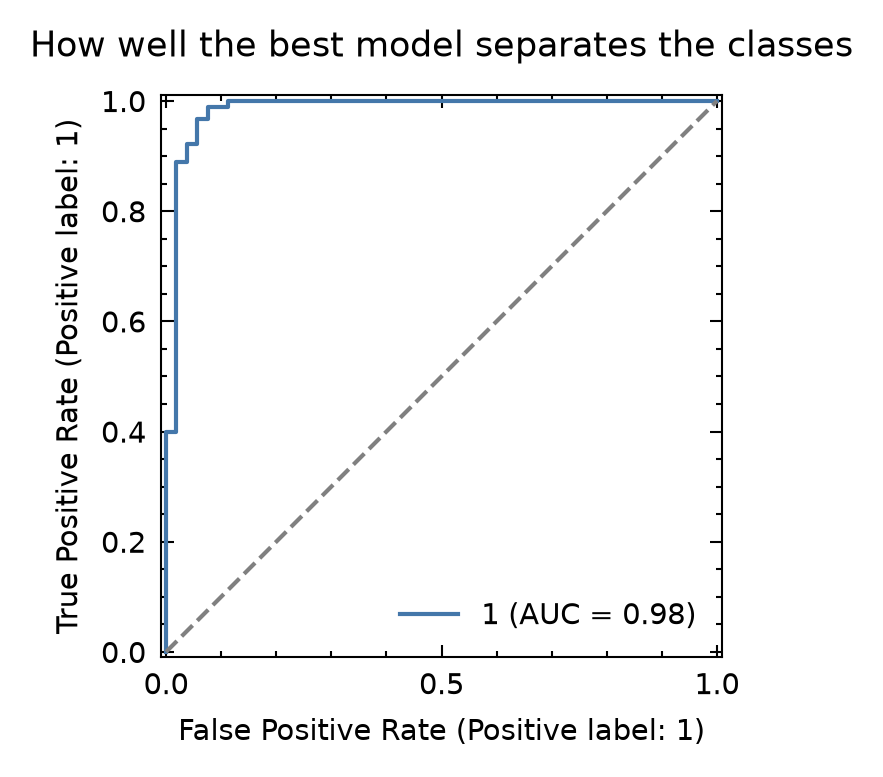
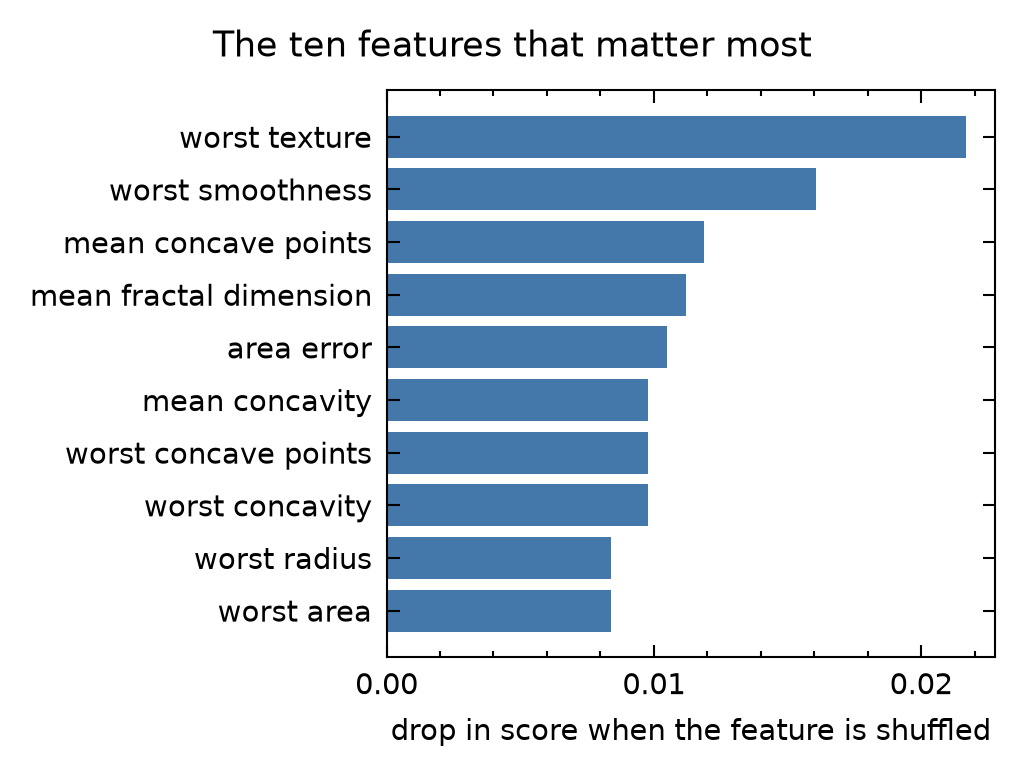
The artist drew two figures, titled by the roc_curve_parameters and
importance_plot_parameters sections. The ROC curve shows how well the best
combination tells the two kinds of tumors apart on the test rows it never
learned from. The importance plot shows how much its score drops when each
feature is shuffled, which works for any model:
The result is a Dataset: the data, the fitted model, its predictions,
metrics, tables, figures, and the history of every technique. The
report summarizes the run:
print(project.report.contents.splitlines()[:5])
# ['project: cancer', 'id: first_run', 'workflow: wrangler > explorer > analyst > critic > artist', 'data: 569 rows and 31 columns', 'label: target (classify)']
Export the results
export saves everything needed to report and reproduce the results in a
folder named for the run:
folder = project.export()
print(sorted(path.name for path in folder.iterdir()))
# ['environment.json', 'figures', 'history.json', 'metrics.csv', 'predictions.csv', 'report.txt', 'settings.json', 'tables']
There is much more to amos, including hyperparameter searches, statistical
inference with statsmodels, every technique and its parameters, and how to
write your own. See the documentation,
especially the tutorial, the
advanced user guide, and the
recipes.
Contributing
Contributors are always welcome. Feel free to grab an issue to work on or make a suggested improvement. If you wish to contribute, please read the Contribution Guide and Code of Conduct.
Similar Projects

- scikit-learn: its
PipelineandGridSearchCVcombine preprocessing and models and search over hyperparameters.amosuses scikit-learn throughout, and adds named columns, supervised encoders, samplers, comparisons of whole combinations of methods, and settings files. - PyCaret: a low-code library that compares many
models with a few function calls. It automates more choices for you, while
amosasks you to list your methods so that they can be reported. - Kedro: a framework for reproducible data pipelines, with more structure for large, long-running projects.
- MLflow and DVC: track experiments,
data, and models over time. They work well alongside
amos.
Acknowledgments
amos grew out of simplify, an earlier project with the same goals.
License
Use of this repository is authorized under the Apache Software License 2.0.
1 maintainer

Metadata
1 maintainer
Release files for amos 0.2.0
For a detailed explanation of source distributions (sdists) and built distributions (wheels), please see the package formats documentation.
Source distribution (sdist)
| File | Size | Uploaded | |
|---|---|---|---|
| amos-0.2.0.tar.gz | 374.7 kB | Details |
Built distribution (wheel)
| File | Interpreter | ABI | Platform | Reset |
|---|---|---|---|---|
| amos-0.2.0-py3-none-any.whl | Python 3 | none | any | Details |
Total release size: 433.2 kB
Release files / amos-0.2.0.tar.gz
| Download URL | amos-0.2.0.tar.gz |
|---|---|
| Size | 374.7 kB |
| Tags | Source |
|
SHA-256 checksum How to use checksums |
114b7e7c5656c4e53e2071e1a15512c5e7dee6b8812da06a7891c9059cafd406
|
|
BLAKE2b-256 checksum How to use checksums |
bdc074c58f113da2704642d6a657cb40ac67e177c49a50ca01aa16a273cc235f
|
| Upload date | |
|
Uploaded using Trusted Publishing? What is trusted publishing? |
Yes |
| Uploaded via |
uv/0.12.23 {"installer":{"name":"uv","version":"0.12.23","subcommand":["publish"]},"python":null,"implementation":{"name":null,"version":null},"distro":{"name":"Ubuntu","version":"24.04","id":"noble","libc":null},"system":{"name":null,"release":null},"cpu":null,"openssl_version":null,"setuptools_version":null,"rustc_version":null,"ci":true}
|
Release files / amos-0.2.0-py3-none-any.whl
| Download URL | amos-0.2.0-py3-none-any.whl |
|---|---|
| Size | 58.5 kB |
| Tags | Python 3 |
|
SHA-256 checksum How to use checksums |
a7a682375d78e0e53a72a8ae79236eba25974beb3ca584cf089e799b6c23ac66
|
|
BLAKE2b-256 checksum How to use checksums |
07148aba520789b6cab0e2e546659e825ed20f9278ccdd6398d14ec3b4629162
|
| Upload date | |
|
Uploaded using Trusted Publishing? What is trusted publishing? |
Yes |
| Uploaded via |
uv/0.12.23 {"installer":{"name":"uv","version":"0.12.23","subcommand":["publish"]},"python":null,"implementation":{"name":null,"version":null},"distro":{"name":"Ubuntu","version":"24.04","id":"noble","libc":null},"system":{"name":null,"release":null},"cpu":null,"openssl_version":null,"setuptools_version":null,"rustc_version":null,"ci":true}
|














