
Anchor-based amplicon demultiplexer for tetra/octa-nucleotide barcodes

Project description

ampliscan
Anchor-based amplicon demultiplexer — sort sequencing reads into per-sample bins by their barcodes.




ampliscan splits pooled sequencing reads into per-sample files by matching short
barcodes that sit immediately next to user-defined constant anchor sequences
(e.g. gctt and acag). Using the anchor + barcode together — an
octanucleotide in the common 4+4 case — gives much better discrimination than
the barcode alone, because the constant anchor pins the alignment even when the
barcode region has a sequencing error.
[adapter]  ANCHOR5  [F-barcode]  TARGET  [R-barcode]  ANCHOR3  [adapter]
           └──── octanucleotide ────┘              └──── octanucleotide ────┘
It's built for the second, inner level of demultiplexing that your sequencing facility's i5/i7 index demux does not do — separating samples tagged by barcodes carried on your custom PCR primers.
Features
- Two interfaces, one engine — a scriptable CLI for pipelines and a modern desktop GUI for bench scientists (zero extra dependencies).
- Fully configurable panel — anchor sequences, barcode length, barcode lists, and mismatch policy are all user-defined; nothing is hard-coded.
- Robust matching — Hamming (default) or Levenshtein matching, configurable mismatch budget, and paired-end reconciliation that refuses to guess.
- Transparent failures — unassigned reads are counted by reason
(
no_anchor,barcode_unmatched,barcode_ambiguous,paired_end_disagreement). - Flexible I/O — FASTQ and/or FASTA output, gzip-aware, optional per-strand
(
_fwd/_rev) splitting, streaming writes for bounded memory. - Fast — optional
isalacceleration; validated on real 6.6 M-read libraries.
Install
pip install ampliscan[fast,excel] # 'fast' = isal (2–5× faster gzip)
Or from source:
git clone https://github.com/Ayushmania2002/ampliscan
cd ampliscan
pip install -e .[fast,excel]
Workflow
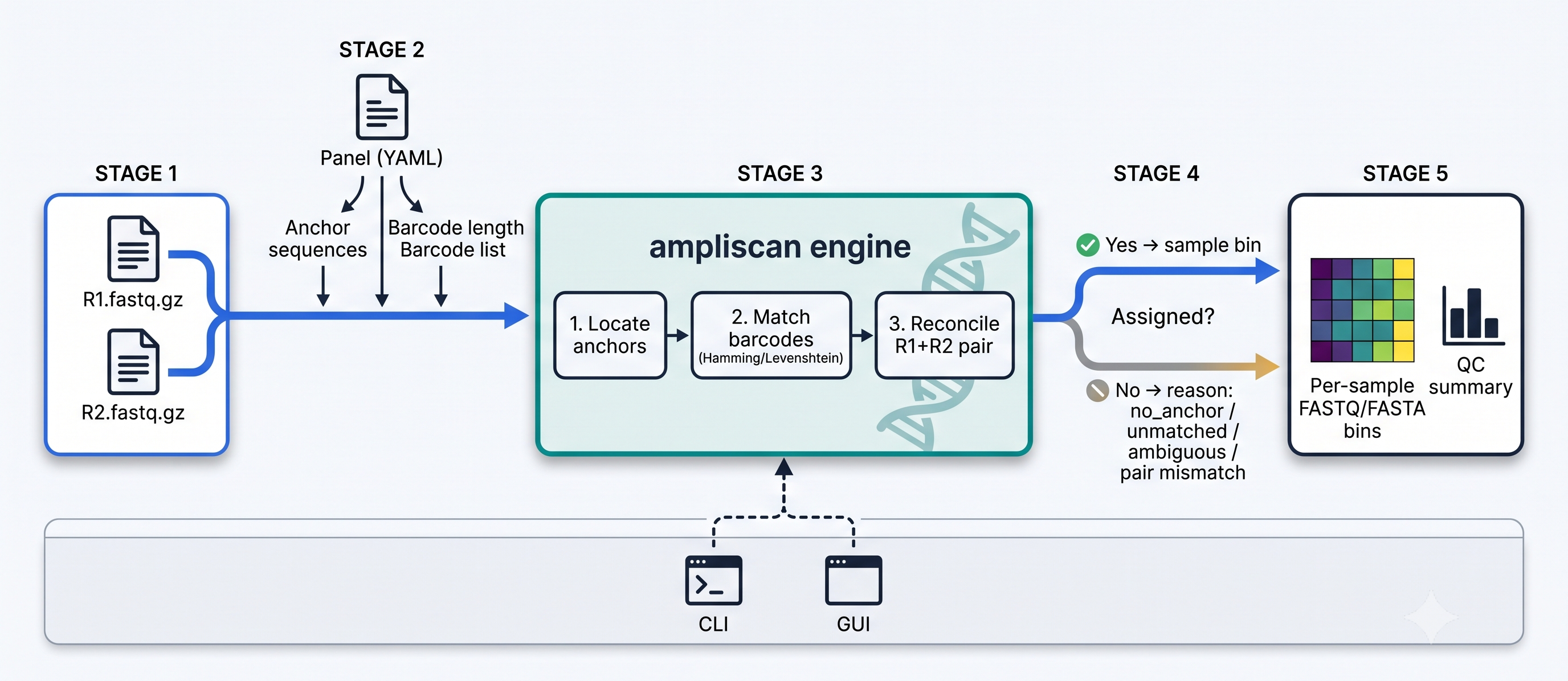
- Input — paired-end (or single-end) FASTQ/FASTA, gzip or plain.
- Panel — a YAML file (or the GUI form) declaring the anchor sequences, barcode length, and forward/reverse barcode lists.
- Engine — for each read: locate the anchors, match the adjacent barcodes (Hamming or Levenshtein), then reconcile the R1/R2 assignment.
- Decision — assigned reads go to their sample bin; unassigned reads are
kept with an explicit reason (
no_anchor,barcode_unmatched,barcode_ambiguous, orpaired_end_disagreement). - Output — one FASTQ/FASTA file per sample, plus a QC summary (heatmap of reads per bin + the unassigned-reason breakdown).
Drive the same engine from either the CLI (scripting/pipelines) or the GUI (point-and-click) — see below.
Usage
Desktop GUI (no terminal needed)
ampliscan gui # or just: ampliscan
Configure the panel (or load it from YAML/Excel), pick your R1/R2 files and an output folder, set options, and run — with a live progress bar, two side-by-side reads-per-bin heatmaps (R1's independent assignment vs R2's) for a quick visual QC check that both mates agree, and an "open output folder" button.
On Windows,
ampliscan-gui(and double-clicking it) opens with no console window. On Debian/Ubuntu, tkinter may needsudo apt install python3-tk.
Command line
ampliscan panel  Data.xlsx --out panel.yaml          # Excel -> panel YAML
ampliscan validate panel.yaml                        # lint it
ampliscan sniff  --r1 R1.fq.gz --r2 R2.fq.gz --config panel.yaml   # quick preview
ampliscan demux  --r1 R1.fq.gz --r2 R2.fq.gz --config panel.yaml --out bins/ --format both
Useful demux flags: --format {fastq,fasta,both}, --split-by-strand
(separate _fwd/_rev files), --workers N (CPU cores; see the speed note).
Python API
from ampliscan import Panel, MatchPolicy, demux_to_bins

panel = Panel.from_yaml("panel.yaml")
stats = demux_to_bins("R1.fq.gz", panel, out_dir="bins/",
                      r2_path="R2.fq.gz",
                      policy=MatchPolicy(barcode_mismatch=1),
                      output_format="both")
print(f"{stats.assigned_fraction:.1%} assigned")
See examples/ampliscan_demo.ipynb for an
interactive walkthrough.
A note on speed
For gzipped Illumina input the job is I/O-bound, not CPU-bound: gzip (de)compression dominates and the barcode matching is cheap.
- Installing
isal(pip install ampliscan[fast]) is the real speedup (~1.7× on a full pool) — used automatically when present. --workers > 1does not help gzipped input; raise it only for uncompressed input,--indelsmatching, or very large panels.
How it works
See the accompanying paper, PAPER.md, for the method, the
octanucleotide rationale, validation, and benchmarks.
Citing ampliscan
If you use ampliscan in your research, please cite it (see CITATION.cff):
Ayushman Mallick (2026). ampliscan: an anchor-based amplicon demultiplexer with a desktop GUI for barcode-tagged sequencing reads (Version 1.0.0) [Software]. Zenodo. https://doi.org/10.5281/zenodo.21505581
License
MIT © 2026 Ayushman Mallick.


Download files
Download the file for your platform. If you're not sure which to choose, learn more about installing packages.
Source Distribution
Built Distribution
Filter files by name, interpreter, ABI, and platform.
If you're not sure about the file name format, learn more about wheel file names.
Copy a direct link to the current filters
File details
Details for the file ampliscan-1.1.0.tar.gz.
File metadata
- Download URL: ampliscan-1.1.0.tar.gz
- Upload date:
- Size: 140.7 kB
- Tags: Source
- Uploaded using Trusted Publishing? No
- Uploaded via: twine/6.2.0 CPython/3.14.2
File hashes
| Algorithm | Hash digest | |
|---|---|---|
| SHA256 |
e13f4e0667163c1f2410053f7254eadd19f72d3f95f40c3f19455b5ea3ddfa02
|
|
| MD5 |
c5e9c892c5ab58fec51b68f381bafe95
|
|
| BLAKE2b-256 |
91629c9f369ad25347a3289559a6a8e6e83079eea792d9629c301a920e5d7e4f
|
File details
Details for the file ampliscan-1.1.0-py3-none-any.whl.
File metadata
- Download URL: ampliscan-1.1.0-py3-none-any.whl
- Upload date:
- Size: 81.4 kB
- Tags: Python 3
- Uploaded using Trusted Publishing? No
- Uploaded via: twine/6.2.0 CPython/3.14.2
File hashes
| Algorithm | Hash digest | |
|---|---|---|
| SHA256 |
96b8045f9da8ecca16e97fe32a2da4fa95bd3d21cbbb29558ef55ff5afd78947
|
|
| MD5 |
33a1af93b29ae4a43b6725ee2d452deb
|
|
| BLAKE2b-256 |
7f4d9476f83849204db5ab5b8a1e51d2bc2fd73504cc3381bf784b3d29bb6cfd
|






