
Agentic Metadata Extractor — AI-powered CLI to infer and manage database metadata
Verified details
These details have been verified by PyPIProject links
GitHub Statistics
Maintainers

Project description

Cryptic columns, reviewed comments.
AMX walks your database, reads your codebase and docs, then drafts a
COMMENT for every table, view, and column — with confidence
scores and a human review before anything lands in the live database.
Documentation · Quickstart · Changelog · Issues
AMX is in early development — expect breaking changes between releases. Stay current with pip install --upgrade amx-cli.
Three independent sub-agents — Profile (schema, stats, sample values), RAG (ingested docs), and Code (references mined from your repos) — gather evidence in parallel. An orchestrator merges and ranks them, you accept / edit / skip each suggestion, and AMX writes the approved text back as native COMMENT statements on the engine.
Five minutes from pip install to your first reviewed comment. Ten database engines, seven LLM providers.
Install
pip install amx-cli
The PyPI distribution is amx-cli; the import package is amx (import amx). Requires Python 3.10+. See the installation guide for prerequisites, source builds, and where AMX writes config / history / logs.
Quick start
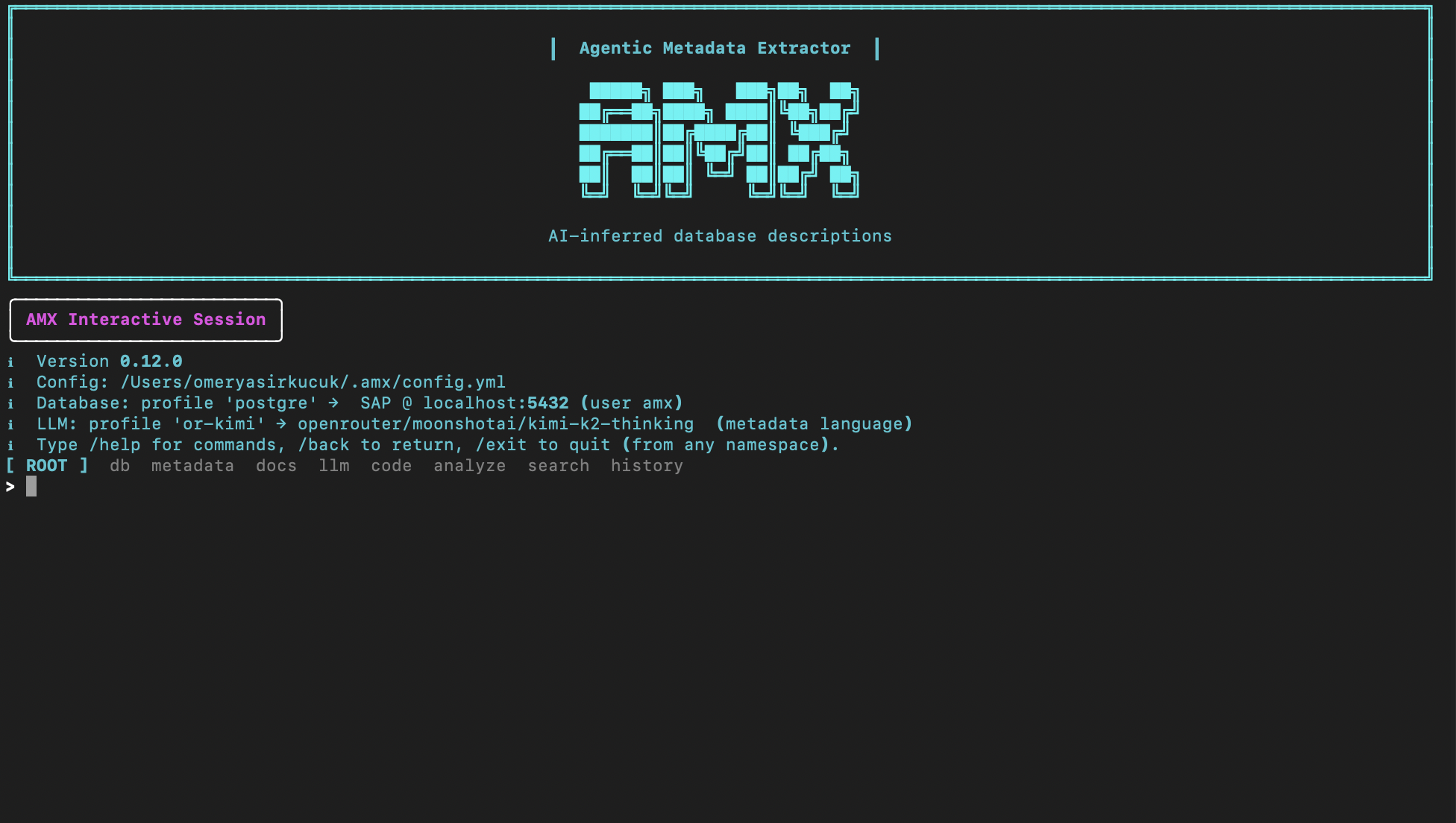
amx                       # open the interactive session (the AMX REPL)
/setup                    # one-time wizard: DB profile + LLM profile
/connect                  # sanity-check the active connection
/run sales.orders         # generate suggestions, review, accept
/apply                    # write approved descriptions back to the database
/run without an argument opens a scope picker (Database / Schema / Asset). /run-apply short-circuits review-and-apply when you already trust the model. If anything misbehaves, amx doctor runs from any shell — even when AMX itself can't start — and prints actionable hints next to each ✗.
The full guided walkthrough is at the 5-minute quickstart and first-run walkthrough.
AMX CLI
A typical session — running /run, inspecting ranked suggestions inline, accepting or editing each one before it lands in the database.
AMX Studio (/studio) — same workflow on a local web UI
From inside the REPL, /studio boots AMX Studio, a token-protected web UI on 127.0.0.1, and opens your browser. Same review-and-apply workflow as the REPL — runs, results, the pending queue, the /ask chat, and full DB / LLM / Docs / Code profile management — but on a denser surface. Browse any database / schema / table to inline-edit comments or hit per-asset Generate to draft just one comment through the same human-in-the-loop queue. The SPA bundle ships inside amx-cli; no Node toolchain or extra install needed.
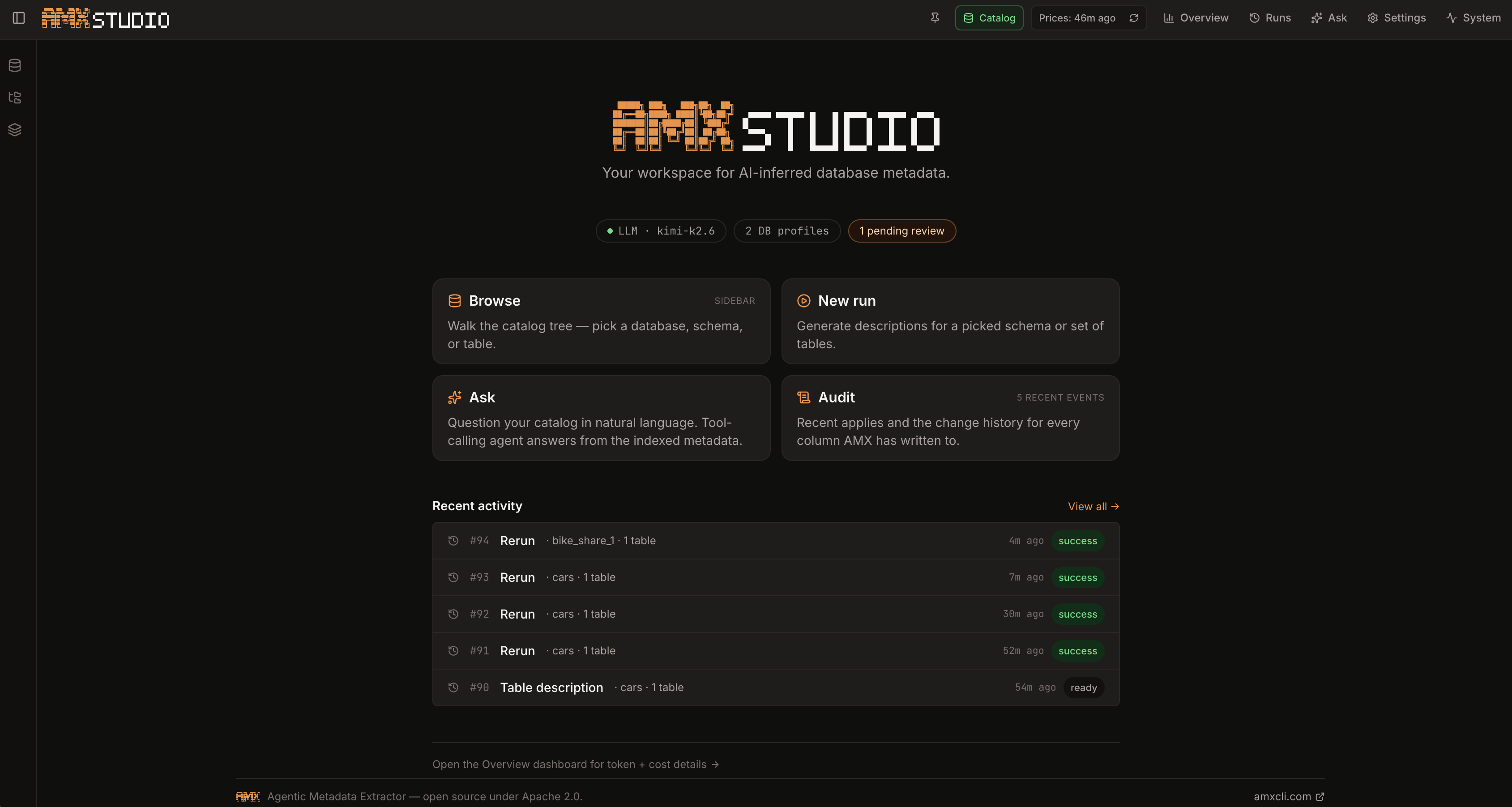
Full walkthrough at /studio.
How it works
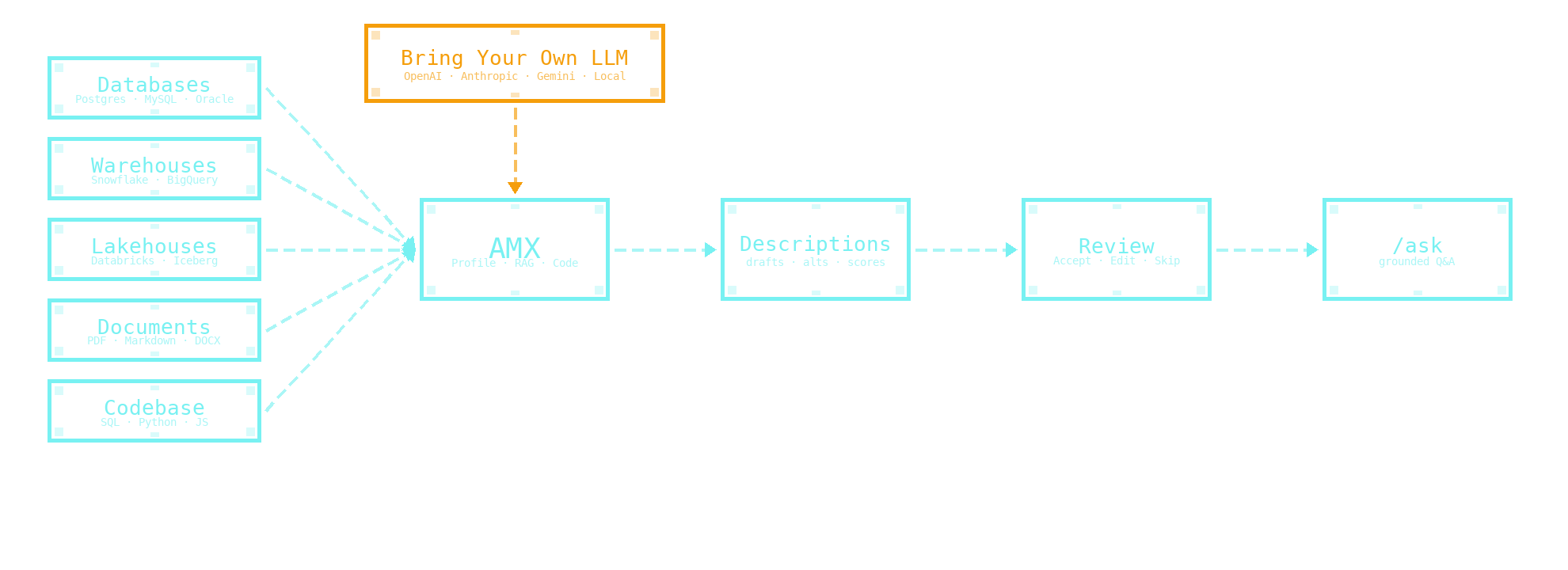
Each agent runs independently, surfaces its own evidence, and assigns its own confidence. The orchestrator picks the narrower, defensible description and ranks up to N alternatives. You never apply anything you didn't approve.
A column, before and after
A typical column in orders, the kind every analytics codebase has:
orders.shipped_dt DATE NULL -- (no comment)
What AMX produces, after you approve:
COMMENT ON COLUMN orders.shipped_dt IS
  'Date the carrier scanned the package at origin. Distinct from
   order_dt (when the customer placed the order) and delivered_dt
   (when the carrier recorded proof of delivery).';

confidence: high · logprob: 0.91
sources: code (3 refs) · docs · db profile
Every approval is recorded in local run history — re-evaluate later with /history review to see how the same column scores under a different model, prompt detail, or evidence mix.
Supported database backends
PostgreSQL · Snowflake · Databricks (Unity Catalog) · BigQuery · MySQL / MariaDB · Oracle · SQL Server · Redshift · ClickHouse · DuckDB
Per-backend setup, connection details, and the capability matrix live in the Backends section.
Supported LLM providers
OpenAI · Anthropic · Google Gemini · DeepSeek · OpenRouter · Ollama · vLLM / LM Studio · any OpenAI-compatible endpoint
Provider-specific guides (including OpenAI / Anthropic Batch mode and local-model setups) live in the LLM providers section.
Next up
- dbt integration — Connect dbt projects so the AMX code agent extracts table and column metadata from the transformation layer.
- MCP integration for docs and repo — Expose the AMX repo and docs over the Model Context Protocol so LLM clients can query them as live context.
- CDC integration — Detect schema changes in upstream sources and keep AMX metadata in sync.
See the full roadmap for details.
Documentation
Full user, operator, and contributor docs live at amxcli.com — concepts, the slash-command map, configuration, data sources, collaboration, troubleshooting, and the Python API for headless use. Release notes are in CHANGELOG.md and on the GitHub Releases page.
Recent: Studio Lineage & Variations, Confidence Scoring, and explicit cache controls — see the changelog.
Recent: Studio Lineage & Variations, Confidence Scoring, and explicit cache controls — see the changelog.
Contributing & support
- Contributing guide — development setup, branching, commit format, release process
- Security policy — how to report a vulnerability
- Open an issue — bugs, questions, feature requests
License
Apache-2.0 — see LICENSE.
This project is developed with the help of multiple AI coding agents.
Project details
Verified details
These details have been verified by PyPIProject links
GitHub Statistics
Maintainers
Release history Release notifications | RSS feed


Download files
Download the file for your platform. If you're not sure which to choose, learn more about installing packages.
Source Distribution
Built Distribution
Filter files by name, interpreter, ABI, and platform.
If you're not sure about the file name format, learn more about wheel file names.
Copy a direct link to the current filters
File details
Details for the file amx_cli-0.17.0.tar.gz.
File metadata
- Download URL: amx_cli-0.17.0.tar.gz
- Upload date:
- Size: 3.2 MB
- Tags: Source
- Uploaded using Trusted Publishing? Yes
- Uploaded via: twine/6.1.0 CPython/3.13.12
File hashes
| Algorithm | Hash digest | |
|---|---|---|
| SHA256 |
86bdf4beaddb9b67ccf2280650c8489d42a3905447da41453a8dc11480644026
|
|
| MD5 |
9eda95b00f8f181787a646a6a0e4df9e
|
|
| BLAKE2b-256 |
a4b1b47ffafba946320a2e65b7d130967cb40a635970b50282522a91bad5a3fc
|
Provenance
The following attestation bundles were made for amx_cli-0.17.0.tar.gz:
Publisher:
release.yml on omeryasirkucuk/amx
-
Statement:
-
Statement type:
https://in-toto.io/Statement/v1 -
Predicate type:
https://docs.pypi.org/attestations/publish/v1 -
Subject name:
amx_cli-0.17.0.tar.gz -
Subject digest:
86bdf4beaddb9b67ccf2280650c8489d42a3905447da41453a8dc11480644026 - Sigstore transparency entry: 1572809703
- Sigstore integration time:
-
Permalink:
omeryasirkucuk/amx@a00ff058b561c1921cf0f7667f71a4b35ccc05d9 -
Branch / Tag:
refs/tags/v0.17.0 - Owner: https://github.com/omeryasirkucuk
-
Access:
public
-
Token Issuer:
https://token.actions.githubusercontent.com -
Runner Environment:
github-hosted -
Publication workflow:
release.yml@a00ff058b561c1921cf0f7667f71a4b35ccc05d9 -
Trigger Event:
push
-
Statement type:
File details
Details for the file amx_cli-0.17.0-py3-none-any.whl.
File metadata
- Download URL: amx_cli-0.17.0-py3-none-any.whl
- Upload date:
- Size: 3.0 MB
- Tags: Python 3
- Uploaded using Trusted Publishing? Yes
- Uploaded via: twine/6.1.0 CPython/3.13.12
File hashes
| Algorithm | Hash digest | |
|---|---|---|
| SHA256 |
28913fb52b3336ad63674cb7cea0369e1881c6b31f42dd47dbf6c586c43ae250
|
|
| MD5 |
b2dec4d83efc79a530413de71967afdf
|
|
| BLAKE2b-256 |
bb9138e01a71225779789403be240d0bfcb87f2db0672ddd71e88b789ad9a0bf
|
Provenance
The following attestation bundles were made for amx_cli-0.17.0-py3-none-any.whl:
Publisher:
release.yml on omeryasirkucuk/amx
-
Statement:
-
Statement type:
https://in-toto.io/Statement/v1 -
Predicate type:
https://docs.pypi.org/attestations/publish/v1 -
Subject name:
amx_cli-0.17.0-py3-none-any.whl -
Subject digest:
28913fb52b3336ad63674cb7cea0369e1881c6b31f42dd47dbf6c586c43ae250 - Sigstore transparency entry: 1572809711
- Sigstore integration time:
-
Permalink:
omeryasirkucuk/amx@a00ff058b561c1921cf0f7667f71a4b35ccc05d9 -
Branch / Tag:
refs/tags/v0.17.0 - Owner: https://github.com/omeryasirkucuk
-
Access:
public
-
Token Issuer:
https://token.actions.githubusercontent.com -
Runner Environment:
github-hosted -
Publication workflow:
release.yml@a00ff058b561c1921cf0f7667f71a4b35ccc05d9 -
Trigger Event:
push
-
Statement type:






