
analysis-video — turn video into AI-readable context
Convert lecture, screencast, and slide-based video into a single Markdown file an LLM can actually read: keyframes + timestamps + transcript, aligned screen by screen.



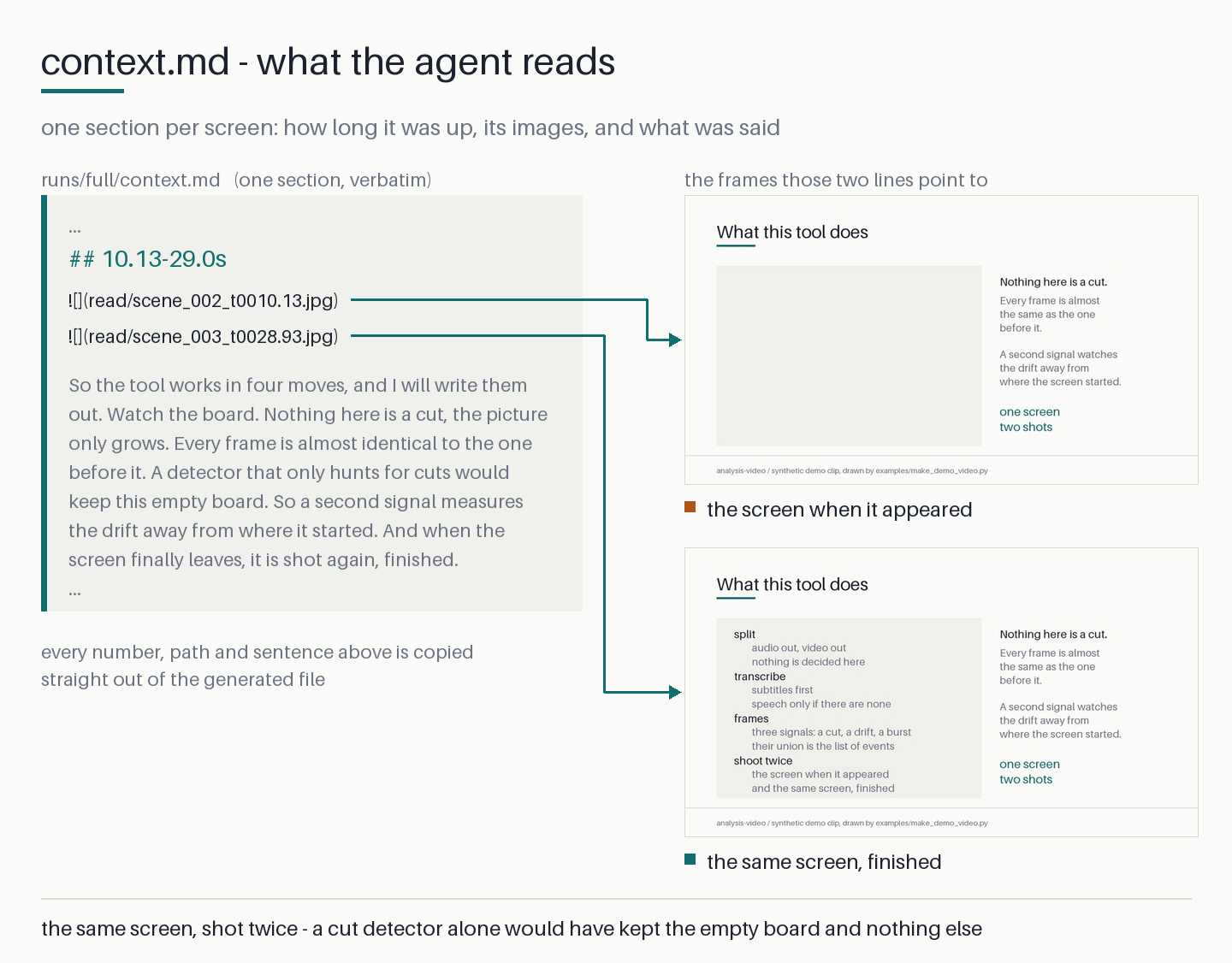
One screen of the demo clip. The Markdown on the left is verbatim output; the two images
are what its ![]() lines point to. That board was written line by line, so the tool keeps
both the empty board and the finished one — a cut detector alone would have kept only the
empty one. The clip is in the repository and everything above can be rebuilt from it:
examples/README.md.
Ask Claude to analyze a YouTube video and all it gets is the subtitles — the speech, and nothing that was written, drawn, coded, or shown on screen. Subtitles make a good transcript and a poor record of a video. This tool uses them as the transcript and adds back the missing half.
analysis-video samples frames by how much the screen changed rather than at a fixed
interval, and writes an image of every distinct screen, the time range it was on screen,
and the speech that happened during it as one Markdown file — one you can grep, index,
and hand to any model.
Built with AI agents as the primary consumer: one JSON object on stdout per call, decisions expressible through exit codes alone, absolute paths everywhere, resumable stages.
uvx analysis-video@latest analyze lecture.mp4
# → lecture.mp4.analysis/runs/full/context.md
No API key. No upload. Decoding, screen-change detection, and transcription all run on
your machine. The tool itself performs no interpretation — reading context.md and deciding
what the content means is your AI agent's job.
What the output looks like
## 63.13-87.73s


N1 없이 커지면 BN이라는 값도 당연히 1 없이 커지게 됩니다. ...
One entry = one screen. Two images means the screen's first and last appearance — for handwriting or progressively revealed slides, the second is the completed state. The transcript is distributed across screens exactly once, with nothing dropped. (The sample is a Korean lecture; the dialogue comes from a subtitle file when the video has a usable one, and otherwise from Whisper, which supports any major language.)
The links point at downscaled reading copies in read/; the full-resolution originals
keep the same filenames in frames/, and --read-long-edge sets the copy size. This is a
context-window measure, not a disk one — measured, a copy costs 4.17× fewer tokens than
the original frame. context.md opens by stating the copy size, the image count, and
roughly what opening all of them costs, and metadata.json carries the same as an images
block (count, tokens, long_edge, read_dir, rule).
Why frames and transcript
Slide-based teaching puts the claim on screen and the reasoning in speech. A subtitle track is an excellent record of that second half — a person wrote it, so the proper nouns and the numbers are right — which is exactly why this tool reads it when there is one. But it is still only the second half, and nothing in it records which sentence belonged to which slide. Frames alone lose the explanation. You need both, aligned.
What each approach leaves you with:
| Approach | What you get |
|---|---|
| Subtitles alone — the usual agent fallback for YouTube | speech only; slides, code, diagrams, handwriting all gone |
| Claude Messages API | images, not video — animated formats are read as their first frame only |
| Claude Cowork "Record a skill" | screenshots + input events + narration; the recording is converted first and not retained |
| Gemini native video input | fixed-rate frames + audio — ~3,600 frames per hour at the 1 fps default, re-sent every request |
ffmpeg frame dump every N seconds |
thousands of near-duplicates, unlinked to speech |
| Manual timestamp picking | requires a human to watch the video first |
| analysis-video | every distinct screen + its time range + its speech, as one Markdown file |
Frames are chosen by how much the screen changed — not a fixed interval, and not timestamps you supply. You do not need to know in advance which moments matter.
Install
uvx analysis-video@latest analyze lecture.mp4   # run without installing (the npx equivalent)
uv tool install analysis-video                  # install as a global command
pip install analysis-video                      # install into an existing environment
@latest is not decoration: uvx caches the version it resolved the first time and keeps
running that one until told otherwise.
No ffmpeg installation required — decoding uses PyAV, which ships its own binaries.
Speech recognition is a separate extra
The base install carries no whisper backend, and most videos never need one. The
dialogue is taken from a subtitle file beside the video, or from a text track inside the
container, whenever one exists — and that path loads no model, downloads no weights, and
opens no socket. Speech recognition lives behind the stt extra because it is almost the
entire install (measured below): adding it by default would make every user download a
backend that the majority of runs never call.
| Your video | What to install |
|---|---|
has a subtitle beside it (lecture.ko.srt) or a text track inside the container |
base install — analysed end to end, offline |
you name a subtitle yourself with --transcript FILE |
base install |
| has no usable subtitle anywhere | analysis-video[stt] |
uvx 'analysis-video[stt]@latest' analyze lecture.mp4
uv tool install 'analysis-video[stt]'
pip install 'analysis-video[stt]'
Starting without the extra costs you nothing: analysis-video doctor reports the missing
capability and still exits 0, because a machine with no backend can still analyse any
video that brings its own subtitles. The only thing that fails is a transcription that
actually reached whisper — stt-backend-missing, exit 4, with the install command in
error.hint and every reason the subtitle ladder came up empty in error.details.notes.
Read those before installing: putting a .srt next to the video is often the cheaper fix,
and it gives a better transcript than whisper would have.
Install from the repository
The package resolves from a Git URL as well as from the index — useful before a release is
published, or to run a fix that is on main but not yet on PyPI. Two packages share the
repository, so the subdirectory has to be named:
uvx --from 'git+https://github.com/hwanyong/analysis-video#subdirectory=packages/core' \
    analysis-video analyze lecture.mp4
uv tool install 'git+https://github.com/hwanyong/analysis-video#subdirectory=packages/core'
pip install 'git+https://github.com/hwanyong/analysis-video#subdirectory=packages/core'
With the extra, the URL becomes a PEP 508 direct reference (the extra goes on the name, not
on the URL) — this form works in uvx --from, uv pip install, and pip install alike:
pip install 'analysis-video[stt] @ git+https://github.com/hwanyong/analysis-video#subdirectory=packages/core'
Usage
analysis-video analyze /path/to/lecture.mp4
# → <video>.analysis/runs/full/context.md    ← the file the AI reads
One command finishes the job. The intermediate stages (split → transcribe →
frames) don't need to be called directly; --until can stop early. split writes a
video resource and any subtitle tracks — no audio file: Whisper decodes the original
video directly, bit-identical to decoding an extracted WAV and a third smaller on disk.
# Take the dialogue from this subtitle file instead of running Whisper
# (a sidecar named lecture.ko.srt is found on its own — no flag needed)
analysis-video analyze lecture.mp4 --transcript subs/lecture.ko.srt

# Analyze only parts — each range becomes an independent unit under runs/ (never merged)
analysis-video analyze lecture.mp4 --range 120-300 --range 900-1200

# After reading context.md, pull a frame the detector had no reason to pick
analysis-video frame lecture.mp4 --at 421.8 --reason "why this moment matters"

# Store the analysis your agent wrote from context.md (body on stdin)
analysis-video review lecture.mp4 --write - < analysis.md

# Reclaim space. With no --level it deletes nothing and only reports
analysis-video clean lecture.mp4 --level images

# Environment check — what this install can do, and whether weights are cached (no download)
analysis-video doctor
Commands: analyze · split · transcribe · frames · frame · review · clean ·
status · doctor · agent-guide · install-skill · debug-report
review is where the pipeline actually ends. context.md is the material; the
analysis written from it used to survive only in the chat. review … --write - takes that
text on stdin and keeps it at <video>.analysis/reviews/<run>.md — outside the analysis
unit, which is wiped whenever frames are re-extracted at another threshold. The tool owns
only the header (which context.md was read, and its sha256), which is what lets a later
call answer missing / unreadable / stale / current; re-detecting at a new threshold
makes the stored analysis mark itself stale. Writes report created / unchanged /
refreshed / updated, and overwriting a still-valid analysis with a different body needs
--force (review-exists, exit 2). --export-dir DIR adds a second copy elsewhere
without moving the original or recording where it went. Nothing here calls an LLM — the
body is your agent's text, start to finish.
clean removes only what can be rebuilt. Called without --level it deletes nothing
and reports what exists plus what each level frees and costs. Levels are cumulative:
cache drops video.mkv (no cost — extraction falls back to the original video, verified
byte-identical), images also drops runs/*/frames/ (you lose the GUI and pixel-level
checking; context.md still reads, since it points at read/). Never removed at any
level: reviews/, transcript.json, runs/*/read/, runs/*/requested/, the JSON and
Markdown records, and the detection caches. Worth knowing before you start: the analysis
directory runs 1.9–2.8× the size of the video, about 4.48MB per minute — roughly
0.27GB for a one-hour lecture. (5.85MB/min before the intermediate audio file was dropped,
which alone was 1.92MB/min; the reading copies add 0.55MB/min.) On a measured sample
--level images took 9.8MB down to 1.4MB.
Use it from an AI agent
uvx analysis-video@latest install-skill
Installs a short Claude Code personal skill at ~/.claude/skills/analysis-video/,
recognized from any project folder. No plugin, no marketplace, no MCP server to keep
running.
For harnesses without a skill mechanism (Codex, Cline, Cursor, anything reading
AGENTS.md):
analysis-video install-skill --agents-file AGENTS.md
This inserts the full guide between markers and replaces that block on re-run — unlike
agent-guide >> AGENTS.md, upgrading never leaves two copies claiming different defaults.
If the markers in that file are not a matched pair (exactly one BEGIN before exactly one
END), nothing is written and the command stops with agents-file-markers, exit 2,
naming how many of each it found and on what lines. Your own text is never at risk.
Either way, the single source of truth is analysis-video agent-guide. Every command,
flag, exit code, and default is injected from the actual code constants, so changing a
threshold changes the documentation with it.
Output contract
-
stdout — exactly one JSON object per call:
{"ok": true, ...}or{"ok": false, "error": {"kind", "message", "hint"}}. Argument errors use this shape too. (Exceptions:agent-guideprints Markdown;--help/--versionprint plain text.) -
stderr — human-readable progress logs. Do not parse.
-
exit codes —
0ok ·1internal ·2bad input ·3stage order violation ·4something the run needed is missing — raised where the need arises, not where the environment is inspected: a transcription that reached whisper with no backend installed (stt-backend-missing), weights that cannot be fetched (stt-model-unavailable), ordebug-reportwithout the[viz]extra.doctoritself exits 0 unless a required module is gone; an absent optional backend is reported as a capability, not a fault -
paths — always absolute. Call from any working directory, pass
<video>as a relative path; neither the output norstate.jsonrecords where you ran it, so a run started in one folder resumes from another. -
resume — cut off by a timeout? Call the same command again; completed stages are skipped. Two exceptions, both below: a directory from an older version does not resume at all, and rewriting the transcript sends
framesback to incomplete. -
format version —
state.jsonandmetadata.jsonrecord the format they were written in (currentlyanalysis-video/state@4andanalysis-video/metadata@3), and it is verified on every read. A directory written by an older version is refused withschema-mismatch(exit 2) —error.detailscarriespath,expected, andfound— and the hint is to pass a fresh--outor delete the directory and analyze again. There is no migration, on purpose: an unrecognized directory that got through would fail later and deeper, as exit 1, where the caller reads it as a tool bug rather than as something to act on. Nothing is deleted for you; the video is untouched. -
next— every<video>command closes with the same object, so a caller never has to branch on which command it just ran:{"do": "run", "command": "analysis-video analyze …", "why": "…"} {"do": "read", "read": ["/abs/runs/full/context.md"], "command": "analysis-video review … --run full --write -", "why": "…", "remaining": ["full"], "cost": {"images": 78, "image_tokens": 34476, "rule": "…"}} {"do": "done", "why": "…"}
rungives a command to execute;readgives the files to open plus the command that writes the result back, withcostpricing them before they are opened;donemeans answer the user.statusemits the same object next to aruns[]list holding each unit'scontext.mdpath and review state. -
artifacts —
context.mdis the AI entry point;metadata.jsonis the full detector audit record, not a document to read end to end.reviews/<run>.mdholds what the agent wrote and is the one thing in the directory that cannot be rebuilt from the video.
Where the transcript comes from
A subtitle written by a person beats any recognizer: the proper nouns, the jargon, and the
numbers are spelled the way the author meant, and the timings were already cut against the
video. So the dialogue is taken from the first source that works — transcribe and
analyze both take --transcript, --sub-lang, and --no-subtitles. --sub-lang CODE
names the language you want the subtitle in; with no flag the target comes from your system
locale, and it is that target — not the source — that ranks sidecars and container tracks
against each other ("Language in, language out").
| Source | If it can't be used | |
|---|---|---|
| 1 | --transcript FILE — an .srt / .vtt / .smi file you name |
stops: transcript-not-found or transcript-rejected, exit 2 |
| 2 | the subtitles the video already has — every sidecar beside it (lecture.ko.srt, lecture.srt, lecture.mp4.srt) and every text track split demuxed to <video>.analysis/subs/track<n>.srt, ranked as one list |
records the reason, opens the next candidate; falls through only when all are spent |
| 3 | Whisper, decoding the original video's audio directly — no intermediate file (no audio stream at all → empty transcript). Needs the [stt] extra |
stt-backend-missing / stt-model-unavailable, exit 4 |
Rung 2 is one rung on purpose. Its candidates are ordered by language first and by where they came from only afterwards, so a container track in the language you asked for beats a sidecar in a different one; ranking a whole pool ahead of the other would let "the right language" win only inside a pool.
Only --transcript is fatal, and deliberately so: you named that file, and quietly
substituting another source would hand back something other than what you asked for. The
automatic step treats "looked, can't use it" as a normal path.
Rejection rules. Not every subtitle file is a transcript. A candidate is refused when
it covers less than 30% of the duration (the signature of a forced track that only
translates foreign lines), has fewer than 5 cues, runs past the end of the video (a
subtitle belonging to some other file), or is more than 30% roll-up — each cue
restating the one before it and growing, which is what auto-generated captions look like.
Machine captions are refused on purpose: re-using another engine's speech recognition is
strictly worse than running Whisper, where you choose the model and the output records
which engine produced it. Embedded tracks are filtered before that — bitmap subtitles
(PGS, VobSub) carry no text, and tracks the container flags forced are never extracted.
What gets recorded. transcript.json gains a source object on every path, Whisper
included: kind (explicit · sidecar · embedded · whisper · none), path,
track, format, language, target_language (what was asked for — --sub-lang or the
system locale; it feeds the language_mismatch warning), n_cues, coverage, span, and
notes — one note per source that was passed over. The existing keys (text, segments, words, backend,
device, model) are unchanged in meaning; a subtitle run reports backend: "subtitle",
device: "none", and the format (srt / vtt / smi) in model. Word-level timestamps
are never derived from subtitles, so words is empty on that path.
Two more contract points: --no-subtitles skips the ladder entirely (and conflicts with
--transcript — conflicting-options, exit 2), and replacing the subtitle file re-runs
the transcription without --force, since the path and size of the subtitle used are
recorded as input to the stage. --force is still what you need to switch Whisper models.
Either way, actually writing a new transcript.json marks frames incomplete:
context.md and metadata.json hold the previous dialogue already distributed over the
screens, and nothing in them says which transcript that was. Only the completion mark is
dropped — the files stay on disk — so follow a re-transcription with frames or
analyze. Until then frame --at refuses with stage-order (exit 3) and names the
command to run. A transcript that was reused rather than rewritten changes nothing here.
Language in, language out
--sub-lang CODE ranks, it never rejects. The target language is the first key of
rung 2's ranking, and that ranking spans sidecars and container tracks together — so the
flag, not the source, decides what is opened first: the requested language, then
candidates declaring no language at all, then the rest. Source is only the tie-break
between candidates equal on language (a file you placed beside the video, then a track
that merely came with the container), and the old per-pool rules survive below it —
anything named forced last, the default bit the muxer set, srt > vtt > smi, then
stream index or filename. A candidate in another language only drops in the queue, because
a subtitle in the wrong language still beats no subtitle; if nothing matches, the best
remaining candidate is used. Matching treats ko and kor as one language (ISO 639-1 vs
639-2/T) and ignores region subtags (ko = ko-KR); the 639-2/B spellings (ger, fre,
chi) are not mapped.
Without the flag the target is the system locale — LC_ALL > LC_MESSAGES > LANG >
LANGUAGE, first one set wins, reduced to its primary subtag (ko_KR.UTF-8 → ko). A
Korean desktop therefore picks lecture.ko.srt over lecture.en.srt with no flag at all,
and the same command may resolve differently on another machine; both the locale-derived
target and the runners-up are written to source.notes. C, POSIX, or nothing set
means no language preference, which is not an error. --language is a different flag —
the language of the speech, consulted only when Whisper runs — and the two are kept
apart because they can disagree: an English lecture read with the Korean subtitle beside
it. Neither one substitutes for the other.
Nothing is translated, by design. The chosen subtitle — or Whisper's output — may be
in a different language than the one requested; the tool reports that and leaves the
dialogue as it is. Three fields carry it: source.language (what the transcript actually
is), source.target_language (what was asked for, by flag or locale), and
language_mismatch at the top level of the transcribe result and in
stages.transcribe.outputs. Consume the boolean rather than comparing the strings — it
applies the ko = kor rule. Translating is refused because the dialogue exists to be
lined up against the screen, where a translated line no longer matches the words in the
frame, and because Whisper's translate mode only ever emits English, so it could not serve
a request for any other language. One consequence worth knowing when a finished transcript
is reused: the result answers the invocation you just made (target and mismatch are
recomputed), while transcript.json keeps the request it was built with — the transcript
is not rewritten just because you asked about it in another language. The stage's input
fingerprint watches the top-ranked sidecar file, so a changed --sub-lang re-runs the
transcription by itself only when it promotes a different file beside the video; when the
language you now want lives in a container track — or there is only one sidecar — the
finished transcript is returned with that note and --force is what re-runs the choice.
If you downloaded the video
Downloading is out of scope — this tool reads local files and never fetches content. But
yt-dlp's default layout is already the one it looks for.
yt-dlp --write-subs --sub-langs ko --convert-subs srt <url>
# → lecture.mp4 + lecture.ko.srt      ← picked up with no extra flags
--write-subsonly — never--write-auto-subs. The two write the same filename (lecture.ko.vtt), so nothing in the name says which one you got. The roll-up check usually catches machine captions, but it is a content heuristic, not a guarantee; the reliable move is not to download them.--convert-subs srtis optional —.vttand.smiare read as they are..assis not supported.- The language tag is read as the first piece after the video's name, not the last piece
before the extension:
lecture.ko.srtdeclaresko, butlecture.720p.ko.srtdeclares720p— still a candidate, just with no language the picker can match. - Downloading several languages leaves several candidates, so say which one you mean:
--sub-lang ko— or leave it out and let the system locale decide, as above. (--languageis a different flag: the speech hint Whisper uses when it has to listen to the audio; it has no effect on subtitle choice.) The pick is deterministic either way — a match for the target language first, then an untagged file, thensrt>vtt>smi, with anything namedforcedlast — and the choice plus the runners-up are listed insource.notes.
Whisper's first run needs network
Video is read from local files only — nothing is ever fetched or uploaded. But the STT
model weights are not bundled: the first transcribe that reaches Whisper downloads
them from Hugging Face and caches them (tiny ≈ 74MB · default small ≈ 460MB · large
≈ 3.1GB). That download is separate from, and on top of, the [stt] install itself. On a
network-restricted machine such a run ends with stt-model-unavailable (exit code 4) —
whereas a video carrying a usable subtitle finishes offline, because nothing on that path
needs a model. analysis-video doctor reports cache state without touching the network.
Speech-to-text backends — selected per platform
Installed by the [stt] extra, and reached only when no usable subtitle exists.
| Environment | Backend | Note |
|---|---|---|
| macOS Apple Silicon | mlx-whisper (Metal) |
measured 37.6× realtime with tiny |
| NVIDIA GPU | faster-whisper (float16) |
[cuda] extra, not verified on real hardware |
| Intel Mac · Linux · Windows | faster-whisper (CPU int8) |
Force with --stt-backend or the ANALYSIS_VIDEO_STT environment variable. Requesting a
backend that is not installed exits with code 4 rather than silently falling back to the
other one. doctor does not treat an absent backend as a fault: it lists what this
install can do (capabilities."speech-recognition", with the install command in
install) and exits 0, because it cannot know whether the video you are about to analyze
brings its own subtitles — and if it does, no backend is needed at all.
Supported environments (install resolution verified)
Every cell below is the base install; the backend column is what [stt] yields there.
| 3.11 | 3.12 | 3.13 | 3.14 | |
|---|---|---|---|---|
| macOS Apple Silicon | ✅ MLX | ✅ MLX | ✅ MLX | ⚠️ no backend |
| macOS Intel | ✅ CPU | ✅ CPU | ✅ CPU | ⚠️ no backend |
| Linux x86_64 / ARM64 | ✅ CPU | ✅ CPU | ✅ CPU | ✅ CPU |
| Windows x64 | ✅ CPU | ✅ CPU | ✅ CPU | ✅ CPU |
| Windows ARM64 | ❌ cannot install | ❌ | ❌ | ❌ |
⚠️ = the base install works and analyses subtitled video end to end; [stt] resolves but
brings no backend on that combination (see Known limits). ❌ = the base install itself
cannot be resolved, which has nothing to do with speech recognition.
No external binary dependency (PyAV) — ffmpeg does not need to be installed separately.
Known limits
Stated plainly rather than hidden — all of these are upstream wheel-availability facts.
-
Install size. Measured on macOS Apple Silicon, Python 3.13, into an empty directory:
packages download (wheels) on disk base install 16 108MB 308MB analysis-video[stt]52 326MB 1,180MB Almost the whole difference is one package that is never imported:
torchis 106MB to download and 476MB on disk, and no code path in this tool loads it.mlx-whisperdeclares it as an unconditional dependency in every version, so there is no declarative way to exclude it (upstream issue). This is the measurement thesttextra exists for. Linux is far cheaper because it has no torch and no MLX — measured for the same Python, the base install downloads 165MB of wheels and[stt]235MB, so the extra costs about 70MB there rather than 218MB. Model weights (above) are a further download on first use. -
Python 3.14 + macOS: no backend exists. MLX publishes wheels only up to cp313 (as of 0.32), and faster-whisper needs onnxruntime, which has no macOS cp314 wheel — so
[stt]installs cleanly and gives you nothing.doctorreports the capability as absent and still exits 0; a video with no usable subtitle is what fails, with exit code 4. Use 3.13 or lower if you need speech recognition on macOS. -
Windows ARM64:
opencv-python-headlesshas nowin_arm64wheel (only win32 and win_amd64), so installation itself fails — the base install, not the extra.scenedetectis genuinely used, so this cannot be worked around. -
Older Linux: glibc 2.28 or newer. This is not an STT-only constraint — on Python 3.13 the base install already resolves manylinux_2_28 wheels for
opencv-python-headless,av, andscipy;[stt]addsonnxruntimeandctranslate2at manylinux_2_27. CentOS 7-era systems are limited to Python 3.11, where the resolver still finds older wheels. -
Not yet verified: transcription execution on Linux and Windows — install resolution is verified, and the backend code path itself is verified on macOS, but not end-to-end on those platforms. The
[cuda]GPU path is likewise unverified for lack of an NVIDIA GPU.
Optional extras
pip install 'analysis-video[stt]'           # speech recognition — see the Install section
pip install 'analysis-video[viz]'           # debug-report graphs (matplotlib)
pip install 'analysis-video[cuda]'          # NVIDIA GPU runtime (driver is all you need); implies [stt]
pip install 'analysis-video[stt-fwhisper]'  # faster-whisper on Apple Silicon, for cross-checking
A companion debugging GUI is published separately as
analysis-video-gui with an independent
version, so installing this CLI never pulls in Qt.
Links
- Source & issues: https://github.com/hwanyong/analysis-video
- 한국어 문서: https://github.com/hwanyong/analysis-video/blob/main/README.ko.md
- Changelog: https://github.com/hwanyong/analysis-video/blob/main/CHANGELOG.md
License
MIT
Keywords: video to markdown · video to text for LLM · lecture video analysis · screencast to text · slide extraction · keyframe extraction · scene detection · Whisper transcription CLI · SRT VTT SMI subtitle to transcript · local speech to text · offline video analysis · AI agent tool · LLM context from video · video RAG preprocessing · multimodal context · Claude Code skill
1 maintainer

Download files
Download the file for your platform. If you're not sure which to choose, learn more about installing packages.
Source Distribution
Built Distribution
Filter files by name, interpreter, ABI, and platform.
If you're not sure about the file name format, learn more about wheel file names.
Copy a direct link to the current filters
File details
Details for the file analysis_video-0.1.0.tar.gz.
File metadata
- Download URL: analysis_video-0.1.0.tar.gz
- Upload date:
- Size: 218.4 kB
- Tags: Source
- Uploaded using Trusted Publishing? Yes
- Uploaded via: twine/7.0.0 CPython/3.13.14
File hashes
| Algorithm | Hash digest | |
|---|---|---|
| SHA256 |
03ba247d8f918a8ad4377f00fbf098f5415876e9402d32fcaa189c77b627a581
|
|
| MD5 |
e8540aed73bf3bc9f6cc89719d53ac21
|
|
| BLAKE2b-256 |
89108099ed9d764f42ce60ba4163049daab85e0a076522319e88acb0c2084f04
|
Provenance
The following attestation bundles were made for analysis_video-0.1.0.tar.gz:
Publisher:
release.yml on hwanyong/analysis-video
-
Statement:
-
Statement type:
https://in-toto.io/Statement/v1 -
Predicate type:
https://docs.pypi.org/attestations/publish/v1 -
Subject name:
analysis_video-0.1.0.tar.gz -
Subject digest:
03ba247d8f918a8ad4377f00fbf098f5415876e9402d32fcaa189c77b627a581 - Sigstore transparency entry: 2465891515
- Sigstore integration time:
-
Permalink:
hwanyong/analysis-video@b98c760bac444f2362be69e7968e8f5c9cb45008 -
Branch / Tag:
refs/tags/core-v0.1.0 - Owner: https://github.com/hwanyong
-
Access:
public
-
Token Issuer:
https://token.actions.githubusercontent.com -
Runner Environment:
github-hosted -
Publication workflow:
release.yml@b98c760bac444f2362be69e7968e8f5c9cb45008 -
Trigger Event:
push
-
Statement type:
File details
Details for the file analysis_video-0.1.0-py3-none-any.whl.
File metadata
- Download URL: analysis_video-0.1.0-py3-none-any.whl
- Upload date:
- Size: 166.2 kB
- Tags: Python 3
- Uploaded using Trusted Publishing? Yes
- Uploaded via: twine/7.0.0 CPython/3.13.14
File hashes
| Algorithm | Hash digest | |
|---|---|---|
| SHA256 |
c87f469c52ad0c1ae45fd19fd34b21374e12c77e24ba6fc476889a206b439855
|
|
| MD5 |
cdd25521d0ec2567ec3db089d4c16856
|
|
| BLAKE2b-256 |
fe59bfd120faadb3a11c2214c9aec483eb5c3d94fddae7333dd3a972fdd301f7
|
Provenance
The following attestation bundles were made for analysis_video-0.1.0-py3-none-any.whl:
Publisher:
release.yml on hwanyong/analysis-video
-
Statement:
-
Statement type:
https://in-toto.io/Statement/v1 -
Predicate type:
https://docs.pypi.org/attestations/publish/v1 -
Subject name:
analysis_video-0.1.0-py3-none-any.whl -
Subject digest:
c87f469c52ad0c1ae45fd19fd34b21374e12c77e24ba6fc476889a206b439855 - Sigstore transparency entry: 2465891562
- Sigstore integration time:
-
Permalink:
hwanyong/analysis-video@b98c760bac444f2362be69e7968e8f5c9cb45008 -
Branch / Tag:
refs/tags/core-v0.1.0 - Owner: https://github.com/hwanyong
-
Access:
public
-
Token Issuer:
https://token.actions.githubusercontent.com -
Runner Environment:
github-hosted -
Publication workflow:
release.yml@b98c760bac444f2362be69e7968e8f5c9cb45008 -
Trigger Event:
push
-
Statement type:







