
Ancestree





Data lineage tracking for exploratory work. No server, no dependencies, one SQLite file.
Contents
- Why Ancestree
- Features
- Installation
- Quick start
- Recorded automatically
- Querying
- Explorers
- Development
- License
Why Ancestree
Iterative work gets messy. You run ten variations, tweak parameters, rerun branches, and two weeks later you are looking at final_v2_REAL.csv with no idea which preprocessing produced it or whether the code was committed. Once you are exploring several ideas at once, a folder naming convention stops being enough.
This applies to machine learning, but equally to simulation, optimisation, data engineering and document processing: anywhere steps build on each other and results branch. MLflow handles it well if you are doing ML and willing to run a server. Outside that, the options are thin.
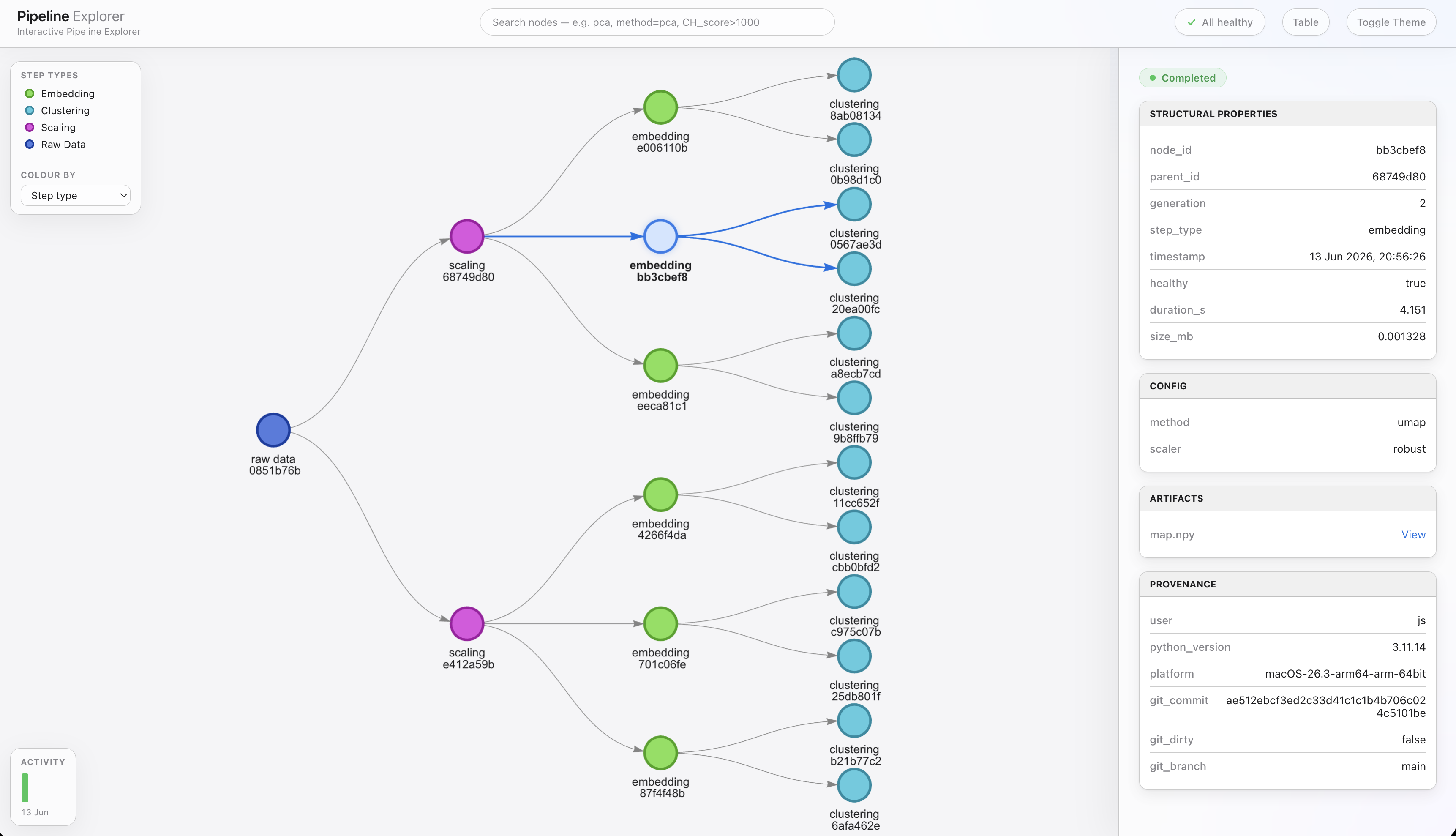
Ancestree models the pipeline as a directed acyclic graph. Each step is a node holding its artifacts, metadata and parents, stored in a local SQLite database.
Features
Enforced lineage rules. Rules are optional, but if you declare them (rules={"model": ["clean"]}) an illegal transition raises at creation time instead of being logged afterwards.
One SQLite file. Nodes are rows, not folders. Metadata, lineage and artifact bytes all live in <root>/ancestree.db. Back it up with store.backup(dest), query it with store.sql(...), or write meta.json sidecars with store.export_metadata(). Keep stores on local disk; SQLite locking over NFS is unreliable.
Two layers of deduplication. Rerunning a step that produces identical content returns the same node, not a copy. Below that, artifacts are split into content-defined chunks stored once, and near-identical artifacts are stored as deltas against existing ones. On a 70 MB corpus of six file types across six revisions, 3.9x less storage — 3.1x counting the whole database file, indexes included. Already-compressed data (PNG, parquet, zip) is stored verbatim. store.stats() reports the ratio on your own data, and the benchmarks record what each layer saves and what each operation costs.
Crash handling. A step that raises keeps its partial output, flagged healthy=False and searchable. A step that wrote nothing is discarded with a warning. After a hard kill, the next store open adopts whatever was written as an unhealthy node.
Provenance by default. Every node records user, platform, Python version, git commit and branch, and whether the worktree was dirty.
Your own vocabulary. Step types are arbitrary strings: ETL, simulation, lab protocol, report generation. No runs/experiments/models ontology is imposed.
Installation
Python 3.9+, no dependencies.
pip install ancestree-track
Quick start
import ancestree

# Rules declare which step types may follow which.
store = ancestree.LineageStore(
    root="./my_project",
    rules={"clean": ["ingest"], "model": ["clean"]},
)

# Write files with the / operator, attach metadata with add_meta.
with store.create_node(step_type="ingest") as node:
    df = do_process()

    df.to_csv(node / "raw.csv")
    node.add_meta("rows", len(df))

store.serve_graph()      # searchable explorer on localhost
store.export_graph()   # or a self-contained HTML snapshot
Recorded automatically
| Field | Purpose |
|---|---|
parent_id |
Where the step came from (a list, so joins work) |
generation |
Which generation the step belongs to |
step_type |
The step performed |
created_utc |
When it ran |
duration_seconds |
How long it took |
size_bytes |
Total size of the node's artifacts |
healthy |
Whether the step completed or raised |
provenance |
User, Python version, platform, git commit/branch, dirty flag |
Querying
store.find(step_type="model")                    # all model runs
store.find(accuracy=lambda a: a and a > 0.9)     # filter on metadata
store.latest(step_type="clean")                  # resume where you left off
store.lineage(best_model)                        # full ancestry, oldest first
store.ancestors(best_model, step_type="clean")   # which cleaning produced it
best_model.artifacts("*.bin")                    # locate its files
store.prune(bad_branch)                          # preview a deletion
store.prune(bad_branch, dry_run=False)           # delete and reclaim space
store.backup("./nightly")                        # consistent copy while open

store.sql("SELECT step_type, count(*) FROM node GROUP BY 1")
store.stats()                                    # counts, sizes, dedup ratio
Explorers
Live. store.serve_graph(), or python -m ancestree serve ./my_project. The graph is laid out by generation and coloured by step type. Search takes field=value, numeric filters like accuracy>0.9, and free text. Click a node for its metadata with images and tables inline, pin two for a diff, or sort the runs table. Light and dark themes. From a notebook the call returns immediately and serves in the background until the store closes; re-running the cell replaces it. The CLI form blocks until Ctrl+C.
Snapshot. store.export_graph() renders the store into one self-contained, view-only HTML file. Small images are embedded; larger artifacts are copied beside it so links work offline.
CLI: python -m ancestree serve|export|compact <root>.
Development
Issues and PRs welcome. For bugs or feature requests, open an issue or email 78921007+JS195@users.noreply.github.com.
git clone https://github.com/JS195/ancestree.git
cd ancestree
pip install -e ".[dev]"
python -m pytest tests/
License
MIT © Joshua Smith
1 maintainer

Release files for ancestree-track 0.2.0
For a detailed explanation of source distributions (sdists) and built distributions (wheels), please see the package formats documentation.
Source distribution (sdist)
| File | Size | Uploaded | |
|---|---|---|---|
| ancestree_track-0.2.0.tar.gz | 357.8 kB | Details |
Built distribution (wheel)
| File | Interpreter | ABI | Platform | Reset |
|---|---|---|---|---|
| ancestree_track-0.2.0-py3-none-any.whl | Python 3 | none | any | Details |
Total release size: 705.4 kB
Release files / ancestree_track-0.2.0.tar.gz
| Download URL | ancestree_track-0.2.0.tar.gz |
|---|---|
| Size | 357.8 kB |
| Tags | Source |
|
SHA-256 checksum How to use checksums |
8a0f5cf6676b5e81a81d760cfaf751fcce05e93be888a7b62eb44937cee257ec
|
|
BLAKE2b-256 checksum How to use checksums |
3fc5d7393c6590334fbb59b947cce32455a468f6410ce7da4d95670641ffccd7
|
| Upload date | |
|
Uploaded using Trusted Publishing? What is trusted publishing? |
No |
| Uploaded via |
twine/6.1.0 CPython/3.13.14
|
Release files / ancestree_track-0.2.0-py3-none-any.whl
| Download URL | ancestree_track-0.2.0-py3-none-any.whl |
|---|---|
| Size | 347.6 kB |
| Tags | Python 3 |
|
SHA-256 checksum How to use checksums |
b1ab5f75c63728857e8cb09390f780aeb38adad46eb7e131653d34c6f9b97069
|
|
BLAKE2b-256 checksum How to use checksums |
b947ae57028581c2eeb0a3a95a88117a02c002fcac566bb8b817d6223123d052
|
| Upload date | |
|
Uploaded using Trusted Publishing? What is trusted publishing? |
No |
| Uploaded via |
twine/6.1.0 CPython/3.13.14
|














