
Android-Notify
Android Notify is a Python library for effortlessly creating and managing Android notifications in Kivy and Flet apps.
Supports various styles and ensures seamless integration, customization and Pythonic APIs.


Features
-
Multiple Notification Styles: Support for various notification styles including:
- Simple text notifications
- Progress bar notifications (determinate and indeterminate)
- Large icon notifications
- Big picture notifications
- Combined image styles
- Custom notification Icon - images section
- Big text notifications
- Inbox-style notifications
- Colored texts and Icons
-
Rich Functionality:
- Add action Buttons with custom callbacks - Buttons section
- Update notification content dynamically
- Manage progress bars with fine-grained control
- Custom notification channels for Android 8.0+ (Creating and Deleting)
- Silent notifications
- Persistent notifications
- Click handlers and callbacks
- Cancel Notifications
- Use Custom Sound
- Vibration section
Quick Start
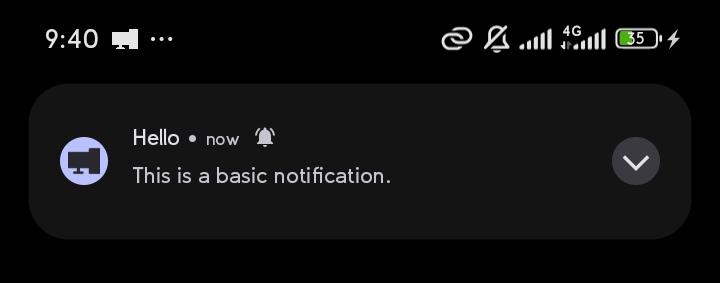
from android_notify import Notification

# Simple notification
Notification(
    title="Hello",
    message="This is a basic notification."
).send()
Sample Image:
Installation
Kivy apps:
In your buildozer.spec file, ensure you include the following:
# Add requirements list
requirements = python3, kivy, pyjnius, android-notify
# Add permission for notifications
android.permissions = POST_NOTIFICATIONS
Flet apps:
In your pyproject.toml file, ensure you include the following:
[tool.flet.android]
dependencies = [
  "pyjnius", "android-notify"
]

[tool.flet.android.permission]
"android.permission.POST_NOTIFICATIONS" = true
- example of complete flet pyproject.toml
On Pydroid 3
On the pydroid 3 mobile app for running python code you can test some features.
- In pip section where you're asked to insert
Libary namepasteandroid-notify - Minimal working example
from kivy.app import App
from kivy.uix.boxlayout import BoxLayout
from kivy.uix.button import Button
from android_notify import Notification, NotificationHandler


class AndroidNotifyDemoApp(App):
    def build(self):
        layout = BoxLayout(orientation='vertical', spacing=10, padding=20)
        layout.add_widget(Button(
            text="Ask Notification Permission",
            on_release=self.request_permission
        ))
        layout.add_widget(Button(
            text="Send Notification",
            on_release=self.send_notification
        ))
        return layout

    def request_permission(self, *args):
        NotificationHandler.asks_permission()

    def send_notification(self, *args):
        Notification(
            title="Hello from Android Notify",
            message="This is a basic notification."
        ).send()


if __name__ == "__main__":
    AndroidNotifyDemoApp().run()
Desktop
For IDE IntelliSense Can be installed via pip install:
pip install android_notify
android-notify -v
For Agents
Full Api Reference: https://android-notify.vercel.app/api/android-notify-v1.60-api.mdCommon Methods
For full visit documentation for more examples and advanced usage.
For Images
Source can be local file paths or complete URLs execpt setSmallIcon which only accepts local png files.
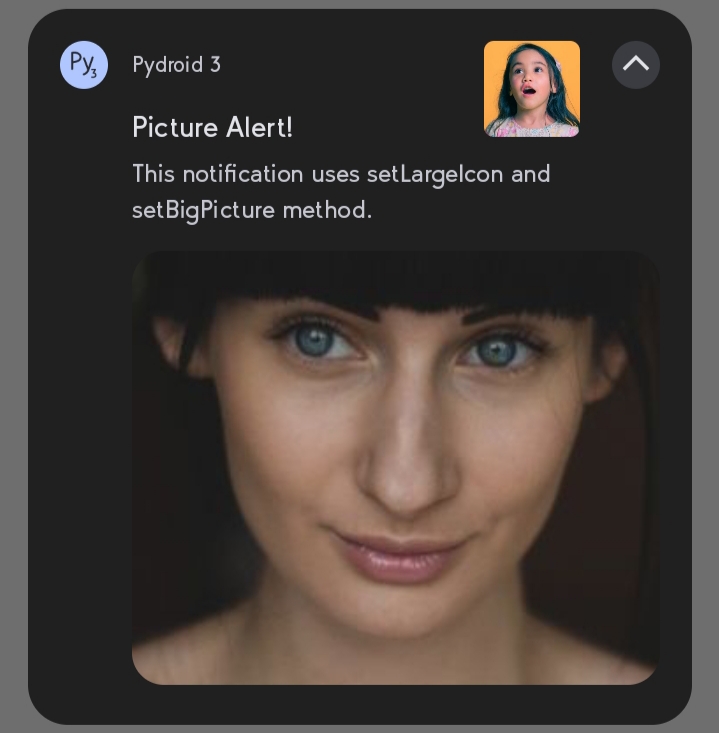
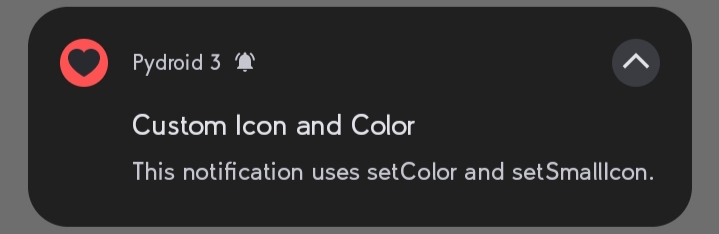
setBigPicture- shows below when user clicks drop buttonsetLargeIcon- appears at right side of notification contentsetSmallIcon- changes app icon to a custompngsetColor- changes app icon backgroud Color
For online images URL should with https:// and you need internet permission android.permissions = INTERNET in buildozer.spec or pyproject.toml
from android_notify import Notification

notification = Notification(
    title='Picture Alert!',
    message='This notification uses setLargelcon and setBig Picture method.'
)
notification.setBigPicture("imgs/photo.png")
notification.setLargeIcon("imgs/profile.png")
notification.send()
Sample Image:
from android_notify import Notification

notification = Notification(
    title='Custom Icon and Color',
    message='This notification uses setColor and setSmallIcon.'
)
notification.setColor("red")
notification.setSmallIcon("love.png")
notification.send()
Sample Image:
For ProgressBar
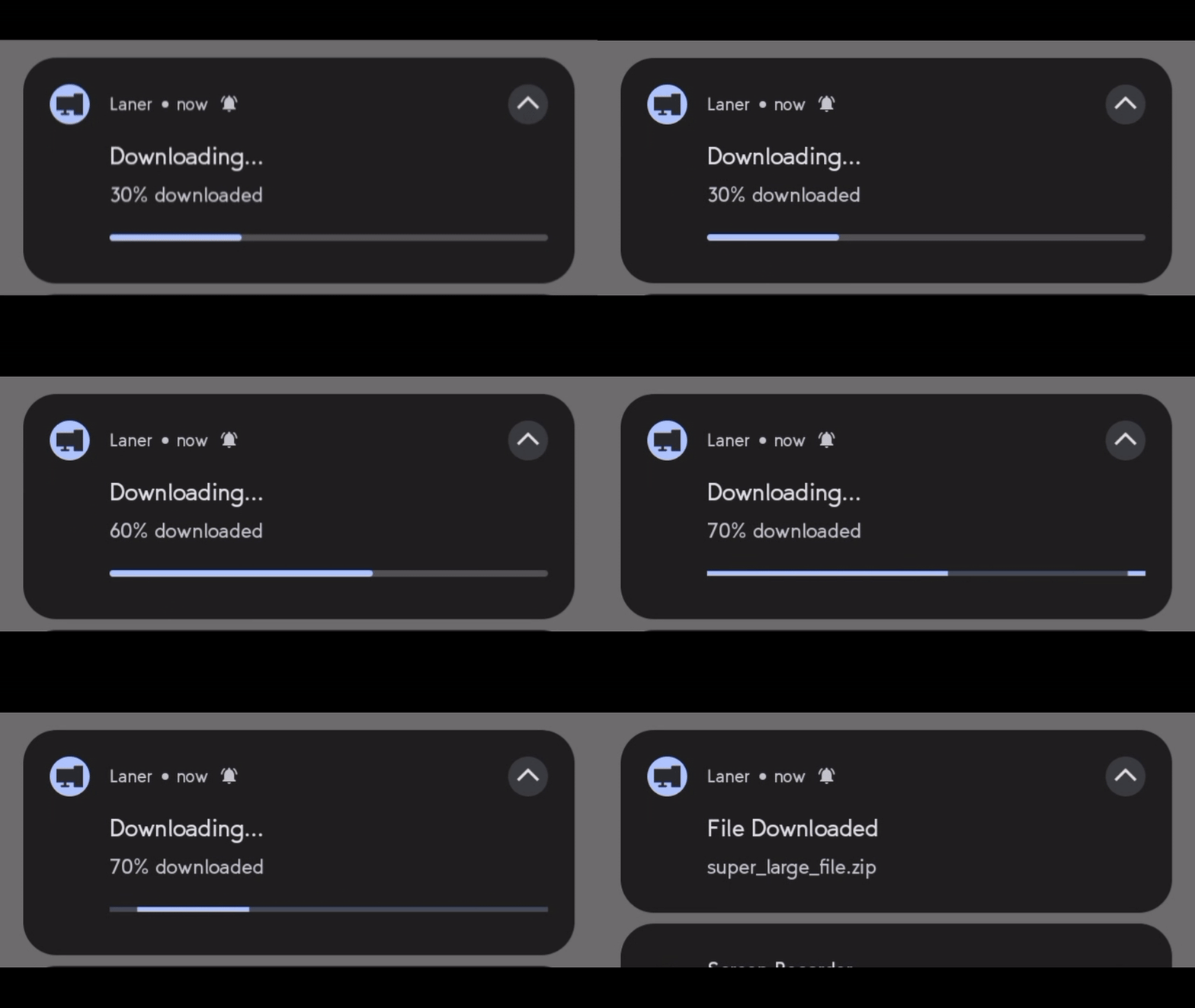
updateProgressBar(current_value, message, title)- update progress in real-timeshowInfiniteProgressBar- shows an infinite progress animation.removeProgressBar(message, show_on_update=True, title)- Cleanly remove the progress bar.
from android_notify import Notification
from kivy.clock import Clock

progress = 0

notification = Notification(
    title="Downloading...", message="0% downloaded",
    progress_current_value=0, progress_max_value=100
)
notification.send()

def update_progress(dt):
    global progress
    progress = min(progress + 10, 100)

    if progress==100:
        notification.removeProgressBar(title="File Downloaded", message="super_large_file.zip")
    elif progress >= 80:
        notification.showInfiniteProgressBar()
    else:
        notification.updateProgressBar(progress, f"{progress}% downloaded")

    return progress < 100  # Ends loop when reaching 100%

Clock.schedule_interval(update_progress, 3)
For texts
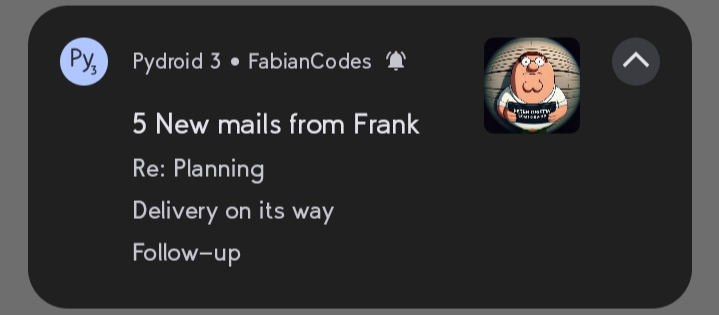
addLine- adds a line to the notification, useful for inbox stylesetSubText- sets a smaller text that appears at the side of app namesetBigText- sets a longer text that appears when the notification is expandedupdateTitle- updates the title text of the notificationupdateMessage- updates the main message text of the notification
from android_notify import Notification

notification = Notification(
    title="5 New mails from Frank",
    message="Check them out",
)
notification.setSubText("FabianCodes")
notification.setLargeIcon("imgs/profile.png")
notification.addLine("Re: Planning")
notification.addLine("Delivery on its way")
notification.addLine("Follow-up")
notification.send()
Documentation
For full documentation, examples, and advanced usage, API reference visit the documentation
For Dev Version usage
requirements = python3, kivy, pyjnius, https://github.com/Fector101/android_notify/archive/main.zip
Dev Features docs
To use Custom Sounds
Option 1: Audio files bundled in res/raw
- Put audio files in
res/rawfolder, - Then from
buildozer.specpoint to res folderandroid.add_resources = res - and includes it's format
source.include_exts = wav.
Lastly From the code
# Create a custom notification channel with a unique sound resource for android 8+
Notification.createChannel(
    id="weird_sound_tester",
    name="Weird Sound Tester",
    description="A test channel for custom sounds from the res/raw folder.",
    res_sound_name="sneeze" # file name without .wav or .mp3
)

# Send a notification through the created channel
n=Notification(
    title="Custom Sound Notification",
    message="This tests playback of a custom sound (sneeze.wav) stored in res/raw.",
    channel_id="weird_sound_tester" # important tells notification to use right channel
)
n.setSound("sneeze")# for android 7 below
n.send()
Option 2: Local file path or URI (sound_path)
You can use a local audio file, a content://, file://, or android.resource:// URI directly:
# Using a local file path
Notification.createChannel(
    id="local_sound",
    name="Local Sound",
    sound_path="/storage/emulated/0/Download/alert.mp3"
)

# Using a content URI (e.g., from media store)
Notification.createChannel(
    id="uri_sound",
    name="URI Sound",
    sound_path="content://media/external/audio/media/123"
)

# Send notification with custom sound path
n = Notification(
    title="Custom Sound",
    message="Playing from local path",
    channel_id="local_sound"
)
n.setSound(sound_path="/storage/emulated/0/Download/alert.mp3")
n.send()
Private files (e.g., in app's data/ directory) are automatically copied to external storage before playing.
Add Data to Notification
NotificationHandler.data_objectreturns adictof data in the clickednotificationsetDatacan also be called aftersendto changedata_objectstored- Use
nameif value is constantNotification(name="change page")
from android_notify import Notification, NotificationHandler

    def build(self):
        notification = Notification(title="Hello")
        notification.setData({"next wallpaper path": "test.jpg"})
        notification.send()

    def on_start(self):
        notification_data = NotificationHandler.data_object  # {"next wallpaper path": "test.jpg",...}
        print(notifcation_data)

    def on_resume(self):
        notification_data = NotificationHandler.data_object  # {"next wallpaper path": "test.jpg",...}
        print(notifcation_data)
How to control popups
from android_notify import Notification
import time

notification = Notification(
    title="Processing...",
    message="Starting task"
)

notification.send()
time.sleep(10)

# show heads-up when updated
notification.setOnlyAlertOnce(False)

notification.updateTitle("Processing Complete!")
notification.updateMessage("Task finished successfully")
☕ Support the Project
If you find this project helpful, consider buying me a coffee! 😊
Or Giving it a star on 🌟 GitHub Your support helps maintain and improve the project.

Bug Reports & Feature Requests
Found a bug or have an idea for a new feature?
Feel free to open an issue here
When reporting a bug, try to include:
- Device name
- Android version
- Steps to reproduce the issue
- Screenshots or logs (if possible)
Feature suggestions are also welcome.
1 maintainer

Download files
Download the file for your platform. If you're not sure which to choose, learn more about installing packages.
Source Distribution
Built Distribution
Filter files by name, interpreter, ABI, and platform.
If you're not sure about the file name format, learn more about wheel file names.
Copy a direct link to the current filters
File details
Details for the file android_notify-1.61.6.tar.gz.
File metadata
- Download URL: android_notify-1.61.6.tar.gz
- Upload date:
- Size: 100.8 kB
- Tags: Source
- Uploaded using Trusted Publishing? Yes
- Uploaded via:
twine/7.0.0 CPython/3.13.14
File hashes
| Algorithm | Hash digest | |
|---|---|---|
| SHA256 |
cc4d58be7e48a4a7b4fc8626807717bdb51c006d75e3e6c2ed10458a3050470c
|
|
| MD5 |
efed182d47a80c1338aa8fc4ee1c2b5e
|
|
| BLAKE2b-256 |
6dc7b4e4258c2bfa3bc74955164dc1e32b45a0ad8483190feb3ef4e89c589d0a
|
Provenance
The following attestation bundles were made for android_notify-1.61.6.tar.gz:
Publisher:
publish.yml on Fector101/android_notify
-
Statement:
-
Statement type:
https://in-toto.io/Statement/v1 -
Predicate type:
https://docs.pypi.org/attestations/publish/v1 -
Subject name:
android_notify-1.61.6.tar.gz -
Subject digest:
cc4d58be7e48a4a7b4fc8626807717bdb51c006d75e3e6c2ed10458a3050470c - Sigstore transparency entry: 2412424027
- Sigstore integration time:
-
Permalink:
Fector101/android_notify@8bcae26c766a2cf79a0602a81a6049570ac8e862 -
Branch / Tag:
refs/heads/main - Owner: https://github.com/Fector101
-
Access:
public
-
Token Issuer:
https://token.actions.githubusercontent.com -
Runner Environment:
github-hosted -
Publication workflow:
publish.yml@8bcae26c766a2cf79a0602a81a6049570ac8e862 -
Trigger Event:
workflow_dispatch
-
Statement type:
File details
Details for the file android_notify-1.61.6-py3-none-any.whl.
File metadata
- Download URL: android_notify-1.61.6-py3-none-any.whl
- Upload date:
- Size: 111.6 kB
- Tags: Python 3
- Uploaded using Trusted Publishing? Yes
- Uploaded via:
twine/7.0.0 CPython/3.13.14
File hashes
| Algorithm | Hash digest | |
|---|---|---|
| SHA256 |
5d1500b83026964df0dc4d690c65f99299e6bcec61641fecf5adac7c149a6080
|
|
| MD5 |
3402715e5211de962b07ee733a8c3fd5
|
|
| BLAKE2b-256 |
32822bbad4a5d8b773b10848d880785b092d5ffbf81e48809605d803b08c0658
|
Provenance
The following attestation bundles were made for android_notify-1.61.6-py3-none-any.whl:
Publisher:
publish.yml on Fector101/android_notify
-
Statement:
-
Statement type:
https://in-toto.io/Statement/v1 -
Predicate type:
https://docs.pypi.org/attestations/publish/v1 -
Subject name:
android_notify-1.61.6-py3-none-any.whl -
Subject digest:
5d1500b83026964df0dc4d690c65f99299e6bcec61641fecf5adac7c149a6080 - Sigstore transparency entry: 2412424124
- Sigstore integration time:
-
Permalink:
Fector101/android_notify@8bcae26c766a2cf79a0602a81a6049570ac8e862 -
Branch / Tag:
refs/heads/main - Owner: https://github.com/Fector101
-
Access:
public
-
Token Issuer:
https://token.actions.githubusercontent.com -
Runner Environment:
github-hosted -
Publication workflow:
publish.yml@8bcae26c766a2cf79a0602a81a6049570ac8e862 -
Trigger Event:
workflow_dispatch
-
Statement type:














