
Android-Notify
Android Notify is a Python library for effortlessly creating and managing Android notifications in Kivy and Flet apps.
Supports various styles and ensures seamless integration, customization and Pythonic APIs.


Features
-
Multiple Notification Styles: Support for various notification styles including:
- Simple text notifications
- Progress bar notifications (determinate and indeterminate)
- Large icon notifications
- Big picture notifications
- Combined image styles
- Custom notification Icon - images section
- Big text notifications
- Inbox-style notifications
- Colored texts and Icons
-
Rich Functionality:
- Add action Buttons with custom callbacks - Buttons section
- Update notification content dynamically
- Manage progress bars with fine-grained control
- Custom notification channels for Android 8.0+ (Creating and Deleting)
- Silent notifications
- Persistent notifications
- Click handlers and callbacks
- Cancel Notifications
- Use Custom Sound
- Vibration section
- Media notifications guide
Quick Start
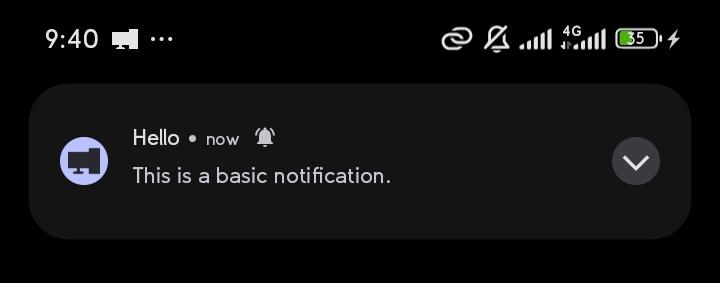
from android_notify import Notification

# Simple notification
Notification(
    title="Hello",
    message="This is a basic notification."
).send()
Sample Image:
Installation
Kivy apps:
In your buildozer.spec file, ensure you include the following:
# Add requirements list
requirements = python3, kivy, pyjnius, android-notify
# Add permission for notifications
android.permissions = POST_NOTIFICATIONS
Flet apps:
In your pyproject.toml file, ensure you include the following:
[tool.flet.android]
dependencies = [
  "pyjnius", "android-notify"
]

[tool.flet.android.permission]
"android.permission.POST_NOTIFICATIONS" = true
- example of complete flet pyproject.toml
On Pydroid 3
On the pydroid 3 mobile app for running python code you can test some features.
- In pip section where you're asked to insert
Libary namepasteandroid-notify - Minimal working example
from kivy.app import App
from kivy.uix.boxlayout import BoxLayout
from kivy.uix.button import Button
from android_notify import Notification, NotificationHandler


class AndroidNotifyDemoApp(App):
    def build(self):
        layout = BoxLayout(orientation='vertical', spacing=10, padding=20)
        layout.add_widget(Button(
            text="Ask Notification Permission",
            on_release=self.request_permission
        ))
        layout.add_widget(Button(
            text="Send Notification",
            on_release=self.send_notification
        ))
        return layout

    def request_permission(self, *args):
        NotificationHandler.asks_permission()

    def send_notification(self, *args):
        Notification(
            title="Hello from Android Notify",
            message="This is a basic notification."
        ).send()


if __name__ == "__main__":
    AndroidNotifyDemoApp().run()
Desktop
For IDE IntelliSense Can be installed via pip install:
pip install android_notify
android-notify -v
For Agents
Full Api Reference: https://android-notify.vercel.app/api/android-notify-v1.62-api.mdCommon Methods
For full visit documentation for more examples and advanced usage.
For Images
Source can be local file paths or complete URLs execpt setSmallIcon which only accepts local png files.
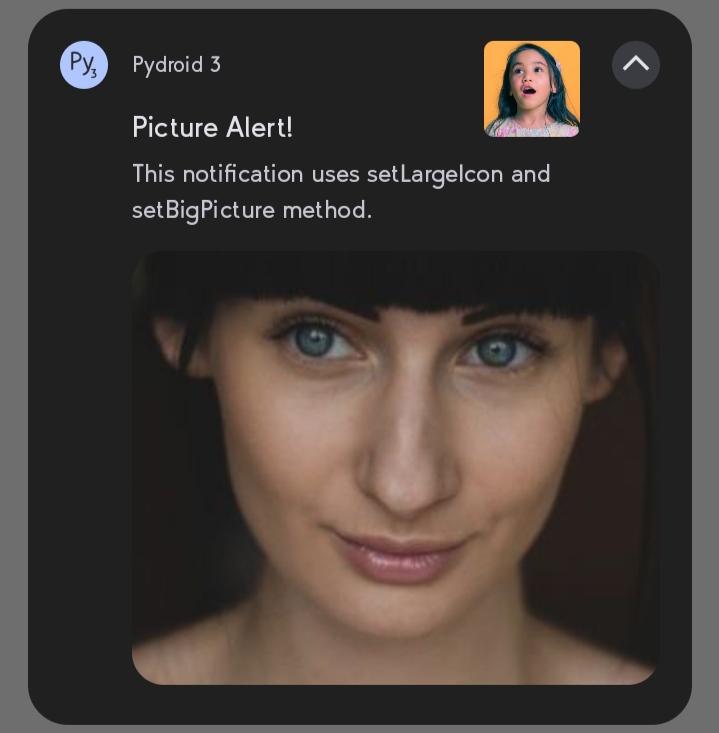
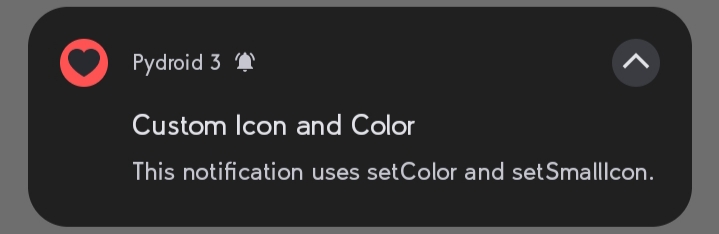
setBigPicture- shows below when user clicks drop buttonsetLargeIcon- appears at right side of notification contentsetSmallIcon- changes app icon to a custompngsetColor- changes app icon backgroud Color
For online images URL should with https:// and you need internet permission android.permissions = INTERNET in buildozer.spec or pyproject.toml
from android_notify import Notification

notification = Notification(
    title='Picture Alert!',
    message='This notification uses setLargelcon and setBig Picture method.'
)
notification.setBigPicture("imgs/photo.png")
notification.setLargeIcon("imgs/profile.png")
notification.send()
Sample Image:
from android_notify import Notification

notification = Notification(
    title='Custom Icon and Color',
    message='This notification uses setColor and setSmallIcon.'
)
notification.setColor("red")
notification.setSmallIcon("love.png")
notification.send()
Sample Image:
For ProgressBar
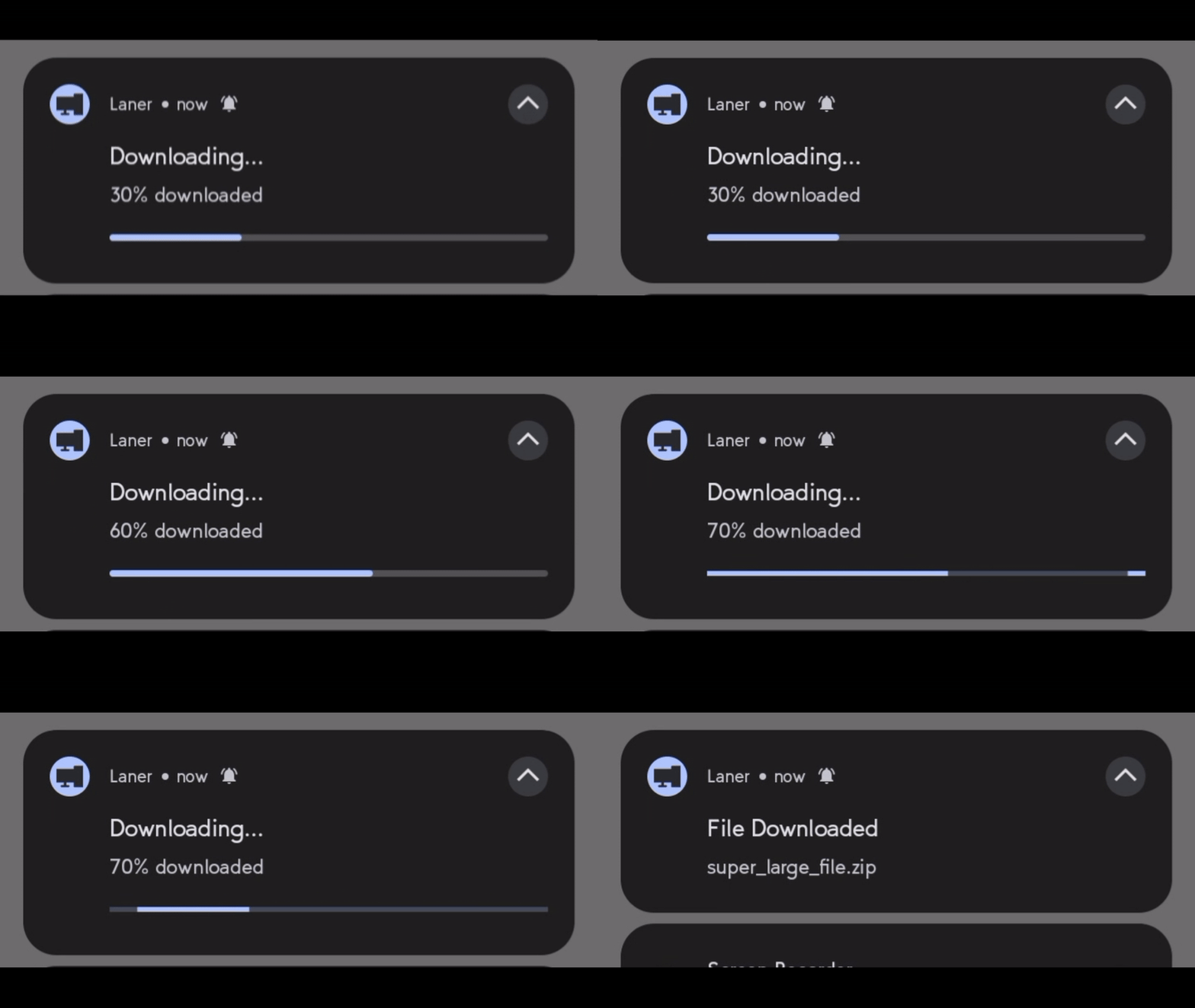
updateProgressBar(current_value, message, title)- update progress in real-timeshowInfiniteProgressBar- shows an infinite progress animation.removeProgressBar(message, show_on_update=True, title)- Cleanly remove the progress bar.
from android_notify import Notification
from kivy.clock import Clock

progress = 0

notification = Notification(
    title="Downloading...", message="0% downloaded",
    progress_current_value=0, progress_max_value=100
)
notification.send()

def update_progress(dt):
    global progress
    progress = min(progress + 10, 100)

    if progress==100:
        notification.removeProgressBar(title="File Downloaded", message="super_large_file.zip")
    elif progress >= 80:
        notification.showInfiniteProgressBar()
    else:
        notification.updateProgressBar(progress, f"{progress}% downloaded")

    return progress < 100  # Ends loop when reaching 100%

Clock.schedule_interval(update_progress, 3)
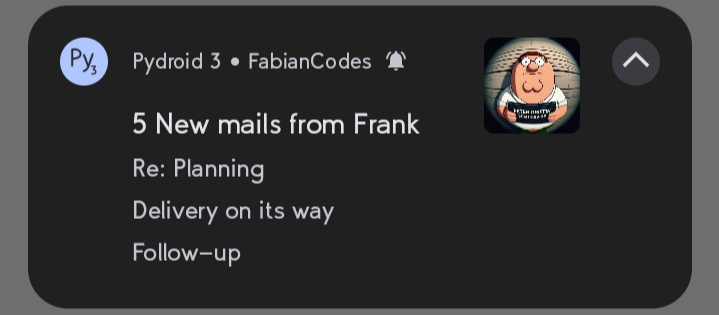
For texts
addLine- adds a line to the notification, useful for inbox stylesetSubText- sets a smaller text that appears at the side of app namesetBigText- sets a longer text that appears when the notification is expandedupdateTitle- updates the title text of the notificationupdateMessage- updates the main message text of the notification
from android_notify import Notification

notification = Notification(
    title="5 New mails from Frank",
    message="Check them out",
)
notification.setSubText("FabianCodes")
notification.setLargeIcon("imgs/profile.png")
notification.addLine("Re: Planning")
notification.addLine("Delivery on its way")
notification.addLine("Follow-up")
notification.send()
Documentation
For full documentation, examples, and advanced usage, API reference visit the documentation
For Dev Version usage
requirements = python3, kivy, pyjnius, https://github.com/Fector101/android_notify/archive/main.zip
Dev Features docs
Dynamic Broadcast Receiver - Make your buttons take actions without opening App, Useful for Foreground Services.
from android.broadcast import BroadcastReceiver
from android_notify import Notification
from android_notify.config import get_package_name

package = get_package_name() # package.domain + "." + package.name

# Recieves Broadcast on Button Click
def on_broadcast(context, intent):
    action = intent.getAction()
    print(f"BroadcastReceiver: action={action}, extras={intent.getExtras()}")
    # BroadcastReceiver: action=org.test.myapp.ACTION_SKIP, extras=...)
    notification.updateMessage(action)


# Keep a reference, an unreferenced receiver can be collected and stop delivering.
receiver = BroadcastReceiver(on_broadcast, actions=[package + '.ACTION_STOP', package + '.ACTION_SKIP'])
receiver.start()

# Sends BroadCast on Button Click
notification = Notification(title="Broadcast test")
notification.addButton("Stop", action=package + ".ACTION_STOP", dynamic=True)
notification.addButton("Skip", action=package + ".ACTION_SKIP", dynamic=True)
notification.send()
☕ Support the Project
If you find this project helpful, consider buying me a coffee! 😊
Or Giving it a star on 🌟 GitHub Your support helps maintain and improve the project.

Bug Reports & Feature Requests
Found a bug or have an idea for a new feature?
Feel free to open an issue here
When reporting a bug, try to include:
- Device name
- Android version
- Steps to reproduce the issue
- Screenshots or logs (if possible)
Feature suggestions are also welcome.
with great power comes great responsibility don't spam users notification tray
1 maintainer

Metadata
1 maintainer
Release files for android-notify 1.62.0
For a detailed explanation of source distributions (sdists) and built distributions (wheels), please see the package formats documentation.
Source distribution (sdist)
| File | Size | Uploaded | Provenance | Actions |
|---|---|---|---|---|
| android_notify-1.62.0.tar.gz | 114.5 kB | With provenance | Details for android_notify-1.62.0.tar.gz |
Built distribution (wheel)
| File | Interpreter | ABI | Platform | Actions Reset |
|---|---|---|---|---|
| android_notify-1.62.0-py3-none-any.whl | Python 3 | none | any | Details for android_notify-1.62.0-py3-none-any.whl |
Total release size: 223.5 kB
Release files / android_notify-1.62.0.tar.gz
| Download URL | android_notify-1.62.0.tar.gz |
|---|---|
| Size | 114.5 kB |
| Tags | Source |
|
SHA-256 checksum How to use checksums |
a2ecddc60deff636990cccd23649745071520444f0edc6a06179689384395912
|
|
BLAKE2b-256 checksum How to use checksums |
a5fcdacbb03196c3615bea6038be591266b94d8ef3da811c9fb14e9691319e65
|
| Upload date | |
|
Uploaded using Trusted Publishing? What is trusted publishing? |
Yes |
| Uploaded via |
twine/7.0.0 CPython/3.13.16
|
Provenance
Provenance describes where a file came from. On PyPI, provenance is shared via attestations, which provide a verifiable record of the build or publishing details. View details, limitations and caveats.


PyPI Publish Attestation
PyPI verified that this artifact, at this checksum, originated from the publisher listed below.
Signed by GitHub Actions, verified by PyPI on Nov 9, 2026.
Transparency logRelease files / android_notify-1.62.0-py3-none-any.whl
| Download URL | android_notify-1.62.0-py3-none-any.whl |
|---|---|
| Size | 109.0 kB |
| Tags | Python 3 |
|
SHA-256 checksum How to use checksums |
925f3d4436a30cbff10d6fa6888a69e5152de38165bbb8ba27e96aebc9f44809
|
|
BLAKE2b-256 checksum How to use checksums |
2c3d336d922f9b0f48888cf4bef523d571a5dd5f57f47dd7446f60313da815b6
|
| Upload date | |
|
Uploaded using Trusted Publishing? What is trusted publishing? |
Yes |
| Uploaded via |
twine/7.0.0 CPython/3.13.16
|
Provenance
Provenance describes where a file came from. On PyPI, provenance is shared via attestations, which provide a verifiable record of the build or publishing details. View details, limitations and caveats.
PyPI Publish Attestation
PyPI verified that this artifact, at this checksum, originated from the publisher listed below.
Signed by GitHub Actions, verified by PyPI on Nov 9, 2026.
Transparency logSecurity for android-notify 1.62.0
Provenance
Provenance describes where a file came from. On PyPI, provenance is shared via attestations, which provide a verifiable record of the build or publishing details. View details, limitations and caveats.
Full provenance
Both files in this release have been uploaded with provenance metadata.
Attestation for android_notify-1.62.0.tar.gz
PyPI Publish Attestation
PyPI verified that this artifact, at this checksum, originated from the publisher listed below.
Signed by GitHub Actions, verified by PyPI on Nov 9, 2026.
Transparency logA note on package security
PyPI is a repository for distributing packages, not a service for auditing them. While third-party security researchers and our staff do their best to detect and remove malicious packages, PyPI cannot guarantee the quality, security or suitability of any given package.
To learn more about protecting yourself from malicious actors, visit our package security documentation.














