
This would be used to auto gen XMLs for Android Home Screen widgets.

Project description
Kivy-androidwidgets
This repo contains how to create An Android Widget.
Complete Sample: working app
5 Steps For a simple widget
step 1: First you Design How you want the Widget to Look [it's Layout].
Store it in: res/layout/simple_widget.xml
This a simple widget with a text
<?xml version="1.0" encoding="utf-8"?>
<LinearLayout xmlns:android="http://schemas.android.com/apk/res/android"
    android:orientation="vertical"
    android:padding="10dp"
    android:background="#FFFFFF"
    android:gravity="center"
    android:layout_width="wrap_content"
    android:layout_height="wrap_content">

    <TextView
        android:id="@+id/widget_text"
        android:text="Loading..."
        android:textSize="18sp"
        android:textColor="#000"
        android:layout_width="wrap_content"
        android:layout_height="wrap_content"/>

</LinearLayout>
step 2: Create an xml containing the info about the widget.
Like: size, preview icon and others
path: res/xml/widgetproviderinfo.xml
<appwidget-provider xmlns:android="http://schemas.android.com/apk/res/android"
    android:minWidth="120dp"
    android:minHeight="60dp"
    android:updatePeriodMillis="1800000"
    android:initialLayout="@layout/simple_widget"
    android:previewImage="@drawable/ic_launcher_foreground"
    android:resizeMode="horizontal|vertical"
    android:widgetCategory="home_screen">
</appwidget-provider>
Create preview image png in right pathres/drawable/ic_launcher_foreground.png
step 3: Create a AppWidgetProvider it's used to receive events for widget.
path: src/SimpleWidget.java.
This will receive an event when widget is add to change it's text
package org.wally.waller; // Change here from buildozer.spec package.domain+package.name

import android.appwidget.AppWidgetManager;
import android.appwidget.AppWidgetProvider;
import android.content.Context;
import android.widget.RemoteViews;

import org.wally.waller.R; // Change here from buildozer.spec package.domain+package.name
import android.app.PendingIntent;
import android.content.Intent;

public class SimpleWidget extends AppWidgetProvider {

    @Override
    public void onUpdate(Context context, AppWidgetManager appWidgetManager, int[] appWidgetIds) {
        for (int appWidgetId : appWidgetIds) {

            RemoteViews views = new RemoteViews(context.getPackageName(), R.layout.simple_widget);

            // Example: Set text
            views.setTextViewText(R.id.widget_text, "Hello Widget!");

            // Update widget
            appWidgetManager.updateAppWidget(appWidgetId, views);
        }
    }
}
Step 4: Automate injecting Receiver in XML
path:p4a/hook.py
from pathlib import Path
from pythonforandroid.toolchain import ToolchainCL


def after_apk_build(toolchain: ToolchainCL):
    manifest_file = Path(toolchain._dist.dist_dir) / "src" / "main" / "AndroidManifest.xml"
    text = manifest_file.read_text(encoding="utf-8")

    package = "org.wally.waller"
    receiver_xml = f'''
    <receiver android:name="{package}.SimpleWidget"
              android:enabled="true"
              android:exported="false">
        <intent-filter>
            <action android:name="android.appwidget.action.APPWIDGET_UPDATE" />
        </intent-filter>
        <meta-data android:name="android.appwidget.provider"
               android:resource="@xml/widgetproviderinfo" />
    </receiver>
    '''

    if receiver_xml.strip() not in text:
        if "</application>" in text:
            text = text.replace("</application>", f"{receiver_xml}\n</application>")
            print("Receiver added")
        else:
            print("Could not find </application> to insert receiver")
    else:
        print("Receiver already exists in manifest")

    manifest_file.write_text(text, encoding="utf-8")
    print("Successfully_101: Manifest update completed successfully!")
Step 5: From buildozer.spec tell it you want to add resources, src and p4a hook
android.add_resources = res
android.add_src = src
p4a.hook = p4a/hook.py
Sample Image:
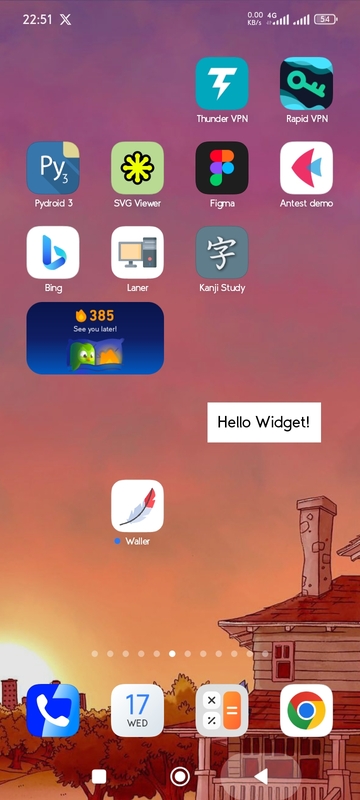
For More widget customisation check: How to Customise.md


Download files
Download the file for your platform. If you're not sure which to choose, learn more about installing packages.
Source Distribution
Built Distribution
Filter files by name, interpreter, ABI, and platform.
If you're not sure about the file name format, learn more about wheel file names.
Copy a direct link to the current filters
File details
Details for the file android_widgets-0.1.2.tar.gz.
File metadata
- Download URL: android_widgets-0.1.2.tar.gz
- Upload date:
- Size: 12.4 kB
- Tags: Source
- Uploaded using Trusted Publishing? No
- Uploaded via: twine/6.2.0 CPython/3.12.3
File hashes
| Algorithm | Hash digest | |
|---|---|---|
| SHA256 |
f0ce8565556c3916ad143d638167894afacd228b79e1d3c382a44639672f4ced
|
|
| MD5 |
a04542d8d63e167d2d713ad7ccde4b0e
|
|
| BLAKE2b-256 |
05f6289b2b1a1c448bfc4ca2fa264c4bb40e851115938694145604523a5d03b5
|
File details
Details for the file android_widgets-0.1.2-py3-none-any.whl.
File metadata
- Download URL: android_widgets-0.1.2-py3-none-any.whl
- Upload date:
- Size: 12.1 kB
- Tags: Python 3
- Uploaded using Trusted Publishing? No
- Uploaded via: twine/6.2.0 CPython/3.12.3
File hashes
| Algorithm | Hash digest | |
|---|---|---|
| SHA256 |
6faad9d1e0cff5f3693843a67a1155f1dc5675d764be074dbc32a519c36eb675
|
|
| MD5 |
db8b9533864a05139a24689dbb301bbe
|
|
| BLAKE2b-256 |
30a552b8150324b71c0bca225a0dc5854f2094b96f7285bdd3669bda2be2ffc2
|






