
🪽 Angel Claw
The Multi-Tenant Agent Operating System.
Isolated runtimes, tiered skills, and encrypted vaults for secure, high-density AI deployments.



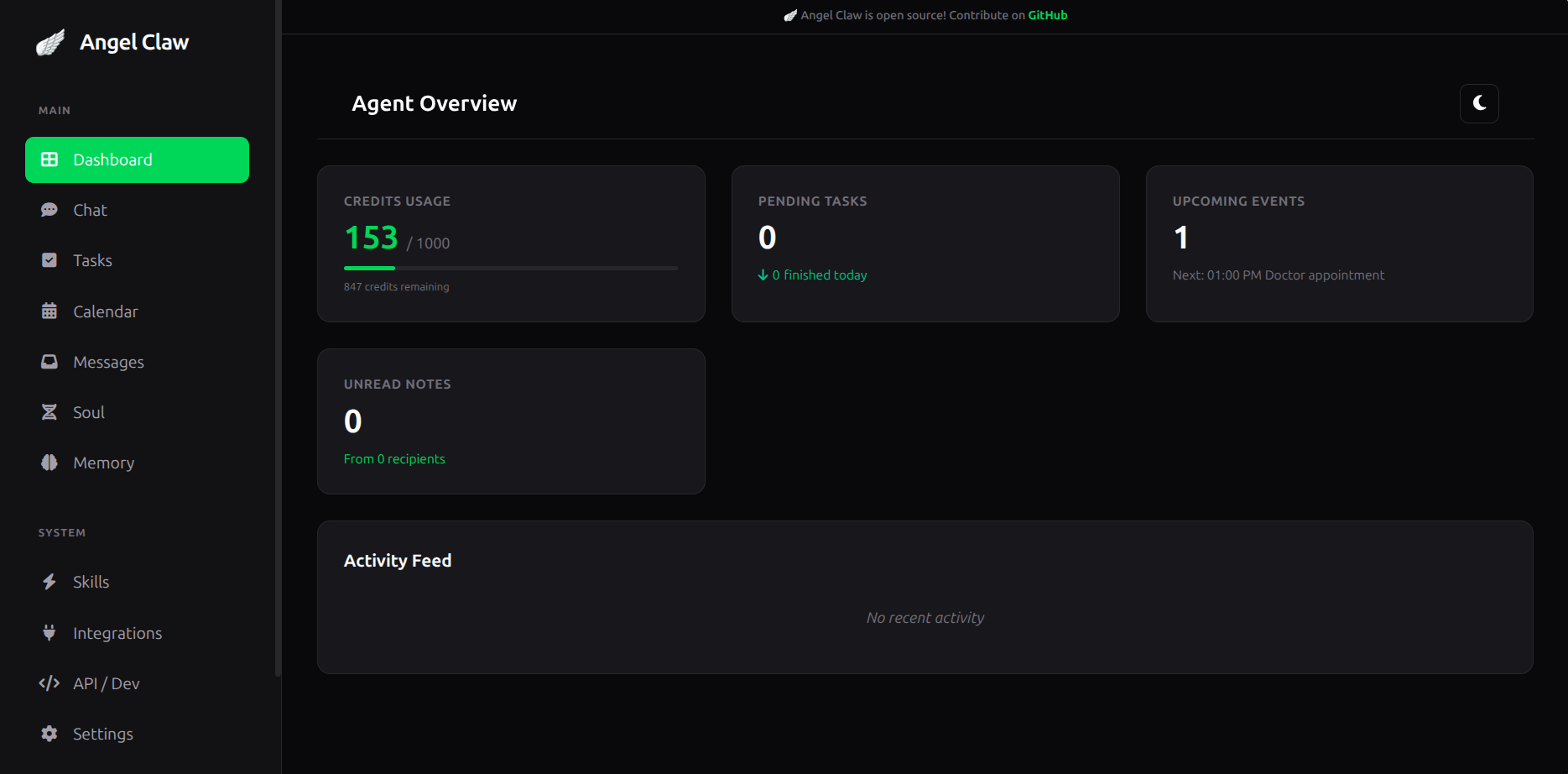
🚀 The Agent OS Vision
NEW: All configs can be configured via the agent UI
Angel Claw is a high-density Agent Operating System. Built for both personal productivity and enterprise multi-tenancy, it provides a "Shared-Nothing" architecture where every user operates within a fully isolated, secure environment.
- 🧠 Multi-Tenant Memory: Isolated, long-term memory for every user.
- ✉️ Peer-to-Peer Messaging: Users can send internal notes and messages to each other via the AI agent.
- 🛠 Tiered Skill Registry: Global Platform Skills + User-Uploaded Custom Skills in isolated workspaces.
- 🔌 MCP Host: Full support for Model Context Protocol external tools.
- 📅 Proactive Automation: Built-in scheduling (cron, at, every) with isolated Fair-Share execution lanes.
- 🛡️ Execution Sandboxing: Skills run in isolated thread pools with strict 30s timeouts.
- 🔐 Encrypted Vaults: Per-user secrets (API keys) are encrypted at rest using AES-128 (Fernet).
$ pip install angel-claw
$ angel-claw setup     # Initialize database and create admin account
$ angel-claw serve     # Starts the Agent OS Gateway + Web Dashboard
$ angel-claw chat      # Authenticated CLI mode
🚀 Quick Setup
To get started with a fresh installation:
-
Initialize the Environment:
angel-claw setupThis will create your database at
~/.angelclaw/angelclaw.db, run initial migrations, and prompt you to create your primary administrator account. -
Start the Services:
angel-claw serveThe web dashboard will be available at
http://127.0.0.1:5000. -
Configure LLMs: Login to the dashboard with your admin credentials and navigate to the Settings or Vault to add your
MODEL_KEY(OpenAI, Anthropic, etc.).
🛠️ CLI Reference
Angel Claw provides a powerful command-line interface for managing the OS, users, and bridges.
Core Commands
angel-claw setup: Interactive wizard to initialize the database and create the primary admin account.angel-claw serve: Starts the Flask Web Gateway and the background Bridge Worker in a single process.angel-claw chat: Launches an authenticated interactive chat session in your terminal.angel-claw bridges: Starts only the background bridge workers (Telegram, WhatsApp, Cron). Recommended for production.angel-claw tutorial: Runs the interactive "Guided Tour" of Angel Claw's features.
User Management
angel-claw list-users: Displays all registered users, their confirmation status, and admin privileges.angel-claw create-admin <email> <password>: Directly creates a new administrator account.angel-claw update-password <email> <new_password>: Updates the password for an existing user.angel-claw promote-user <email>: Grants administrative privileges to an existing user.angel-claw confirm-user <email>: Manually marks a user's email as confirmed.
Utilities & Diagnostics
angel-claw mcp list: Lists all tools discovered from connected MCP servers.angel-claw mcp test: Runs a diagnostic suite on your LLM and MCP connections.angel-claw login-whatsapp: Generates a QR code for linking your WhatsApp account.angel-claw locate-static: Prints the absolute path to the web static files (useful for Nginx configuration).
🚀 Key Features
| Feature | Description |
|---|---|
| 👥 Multi-User Support | Full identity management with Shopyo integration. |
| 🧠 Isolated Memory | User data stored securely in ~/.angelclaw/users/{user_id}. |
| ✉️ Internal Notes | Send peer-to-peer messages: "Send a note to alice@dev.com". |
| ⚡ Multi-Model | OpenAI, Anthropic, Ollama & more via litellm. |
| 🔒 Execution Sandbox | Safe execution of custom tools with resource timeouts. |
| ✅ Todo Management | Native task tracking with priorities and due dates. |
| 📅 Calendar Sync | Manage events and sync with Google Calendar. |
| 🌐 Web Dashboard | Modern UI with 🪽 branding and connection indicators. |
| 📱 Secure Pairing | Link Telegram/WhatsApp using time-limited secure tokens. |
| 🔑 Developer APIs | Create and manage scoped API keys for external integration. |
💬 Internal Messaging
Angel Claw supports secure, internal communication between users. The agent handles delivery and notification across all active bridges.
Commands:
- "Send an internal note to bob@example.com telling him the meeting is at 5"
- "Do I have any unread messages?"
- "Tell alice@dev.com that I finished the report"
🛠️ Built-in Skills
Angel Claw comes with high-quality native skills that integrate deeply with its memory.
✅ Todo Management
Keep track of your life without leaving the chat.
- "Add a high priority todo: Buy milk by Friday"
- "Show my pending todos"
- "Mark todo 1 as complete"
📅 Calendar Integration
Manage your schedule and sync with external providers.
- "Schedule a meeting with Sarah tomorrow at 2pm"
- "What's on my calendar for next week?"
- "Sync my events with Google Calendar"
📖 User Guides
🔑 Using the User Vault
Stop putting keys in .env. Users can securely add their own MODEL_KEY or BRAVE_API_KEY through the dashboard. The Agent OS automatically injects these into sandboxed skills on-demand.
🎭 Customizing Your Agent's Soul
Define a unique personality by creating a SOUL.md in your user directory (~/.angelclaw/users/{id}/SOUL.md). The OS prioritizes local souls over system defaults.
📦 Custom User Skills
Users can extend their agent by dropping Python files into their personal skills/ folder. They are loaded dynamically and executed behind the safety sandbox.
📱 Multi-Channel Bridges
Control your AI from anywhere with secure pairing.
Telegram & WhatsApp
- Generate a pairing token on the Web Dashboard.
- For WhatsApp: Run
angel-claw login-whatsappand scan the QR code. - Message your bot:
/pair <your-token>. - The bridge routes messages to your specific UserRuntime.
💬 Developer API
Generate an API key in the Dashboard and use it to build your own integrations:
curl -X POST http://localhost:5000/chat \
     -H "Authorization: Bearer ac_v1_..." \
     -H "Content-Type: application/json" \
     -d '{"message": "Remind me to call John tomorrow"}'
🛠️ Deployment
Angel Claw is designed for high-density, production-grade deployments. For a professional setup, we recommend separating the Web Gateway and the Bridge Worker.
1. Data Architecture
In production, all persistent user data is isolated from the application code:
- Database:
~/.angelclaw/angelclaw.db - User Vaults:
~/.angelclaw/vaults/ - Bridge Data:
~/.angelclaw/bridges/
2. Systemd Service Setup
Create two services to ensure the Web UI and background bridges run independently and reliably.
Web Gateway (/etc/systemd/system/angel-claw-web.service):
[Service]
ExecStart=/path/to/venv/bin/gunicorn -w 4 -b 127.0.0.1:5000 "angel_claw.app.app:create_app('production')"
Environment="USER_DATA_ROOT=/home/user/.angelclaw"
Restart=always
Bridge Worker (/etc/systemd/system/angel-claw-bridge.service):
[Service]
ExecStart=/path/to/venv/bin/angel-claw bridges
Environment="USER_DATA_ROOT=/home/user/.angelclaw"
Restart=always
3. Production Hardening
For public-facing instances, always:
- Use Nginx as a reverse proxy with SSL (Certbot/Let's Encrypt).
- Enable Docker Sandboxing: Set
DOCKER_SANDBOXING_ENABLED=Truein your.envto execute custom skills in gVisor-hardened containers. - Dedicated User: Run services under a low-privilege
angelclawuser.
🧪 Testing & Reliability
Angel Claw is hardened for "Diamond-Tier" reliability:
- Loop Defense: 10-turn reasoning limit per request.
- Recursion Shield: Detects and breaks agent-to-agent loops.
- Isolation Verification:
uv run python tests/test_multi_tenancy.py
🛠️ Creating Custom Skills
Skills are Python functions that the AI can call as tools. Angel Claw provides a built-in skill manager that automatically discovers and registers skills.
Basic Skill Structure
from angel_claw.skills.manager import skill

@skill
def my_skill(arg1: str, arg2: int = 10) -> str:
    """Description of what the skill does."""
    return f"Result: {arg1} x {arg2}"
Adding Configuration Fields
If your skill requires user-specific configuration (like API keys), define a SKILL_CONFIG:
SKILL_CONFIG = {
    "fields": [
        {
            "name": "API_KEY",
            "type": "password",
            "description": "Your API key from the provider"
        },
        {
            "name": "ENABLE_FEATURE",
            "type": "checkbox",
            "description": "Enable this feature"
        }
    ]
}

@skill
def my_api_skill(query: str, user_id: str = None) -> str:
    """Skill that uses user-specific config."""
    from angel_claw.utils import get_user_root
    import json

    # Load user's config
    if user_id:
        user_root = get_user_root(user_id)
        config_file = user_root / "skill_config.json"
        if config_file.exists():
            user_config = json.load(open(config_file))
            api_key = user_config.get("my_api_skill", {}).get("fields", {}).get("API_KEY")
            if not api_key:
                return "Error: Please configure API_KEY in Skills settings."

    # Your skill logic here
    return "Success!"
User Context Parameters
The runtime automatically injects these parameters if your function accepts them:
user_id: The current user's ID (for accessing user-specific data)session_id: The current chat session IDroles: User's role listis_admin: Boolean for admin status
Uploading Custom Skills
- Via Web Dashboard: Go to Skills tab → click Upload Skill button → select your
.pyfile - Manual Upload: Place Python files in
~/.angelclaw/users/{user_id}/skills/
Skill Types
| Type | Location | Visibility |
|---|---|---|
| Platform | src/angel_claw/skills/ |
All users |
| User | ~/.angelclaw/users/{user_id}/skills/ |
Single user |
📜 License
Apache 2.0 License.
Built for the next generation of autonomous infrastructure.
1 maintainer

Metadata
1 maintainer
Release files for angel-claw 0.15.0
For a detailed explanation of source distributions (sdists) and built distributions (wheels), please see the package formats documentation.
Source distribution (sdist)
| File | Size | Uploaded | |
|---|---|---|---|
| angel_claw-0.15.0.tar.gz | 130.1 kB | Details |
Built distribution (wheel)
| File | Interpreter | ABI | Platform | Reset |
|---|---|---|---|---|
| angel_claw-0.15.0-py3-none-any.whl | Python 3 | none | any | Details |
Total release size: 277.5 kB
Release files / angel_claw-0.15.0.tar.gz
| Download URL | angel_claw-0.15.0.tar.gz |
|---|---|
| Size | 130.1 kB |
| Tags | Source |
|
SHA-256 checksum How to use checksums |
a7f0fd53defc1d23d5bbaeecabcfbad76a07b4a840fcc4ef9283ca62c8272a6f
|
|
BLAKE2b-256 checksum How to use checksums |
866a70f01c2c0be456dad1eb673158e68040c2eee002944f0a23da2ea800637f
|
| Upload date | |
|
Uploaded using Trusted Publishing? What is trusted publishing? |
No |
| Uploaded via |
twine/6.2.0 CPython/3.12.3
|
Release files / angel_claw-0.15.0-py3-none-any.whl
| Download URL | angel_claw-0.15.0-py3-none-any.whl |
|---|---|
| Size | 147.4 kB |
| Tags | Python 3 |
|
SHA-256 checksum How to use checksums |
c2151b2a8b8399e31529413274cacc47b20b50a2e387b82084ac842b007e12ce
|
|
BLAKE2b-256 checksum How to use checksums |
84b9480598e55a71186df360ebf79901bd4aeea27ff2963ed19f7c765ef68e6b
|
| Upload date | |
|
Uploaded using Trusted Publishing? What is trusted publishing? |
No |
| Uploaded via |
twine/6.2.0 CPython/3.12.3
|














