
This release is a pre-release and may not be stable for production use.
NEW MAJOR UPDATE COMING IN LATE SUMMER
💖 Support This Open Source Project
Your support helps maintain the project and keeps the updates coming!

Terminal-based anime streaming with Arabic subtitles







📑 Navigation
Installation • Features • How to Use • Keyboard Shortcuts • Configuration • Contributors • License
لإختيار اللغة العربية اضغط على الزر:

https://github.com/user-attachments/assets/a6c6882a-7c50-4a8d-aa9c-e56a6d4ff7eb
📦 Installation
Requirements
Before installing, make sure you have:
- Python 3.8 or newer (Python 3.12 recommended)
- MPV or VLC media player (for streaming)
Method 1: One-Line Installer (Recommended)
curl -fsSL https://raw.githubusercontent.com/np4abdou1/ani-cli-arabic/main/install.sh | sh
This auto-detects your environment (Linux, macOS, Termux) and installs via pipx or pip.
Method 2: Install via pip / pipx
# Direct from GitHub (always latest)
pip install git+https://github.com/np4abdou1/ani-cli-arabic.git

# Or from PyPI (stable releases)
pip install ani-cli-ar

# Or with pipx (isolated environment, recommended)
pipx install ani-cli-ar
Launch the app:
ani-cli-ar
To update:
pip install --upgrade ani-cli-ar
Method 3: Arch Linux (AUR)
For Arch Linux users, install from the AUR:
yay -S ani-cli-ar
# or
paru -S ani-cli-ar
Method 4: From Source (Development)
git clone https://github.com/np4abdou1/ani-cli-arabic.git
cd ani-cli-arabic
pip install -e .
ani-cli-ar
🎯 What Can You Do?
Here's everything this tool offers:
Streaming & Playback
- Multiple Quality Options: Watch in 1080p, 720p, or 480p depending on your internet speed
- Batch Download: Download multiple episodes at once to watch offline
- Trailer Support: Watch YouTube trailers before committing to an anime
- Resume from History: Pick up exactly where you left off ( buggy )
Discovery & Browsing
- Search Anime: Find any anime and anime movie by name (supports both English and Japanese titles and arabic titles)
- Trending Now: See what's currently popular
- Top Rated: Browse the highest-rated anime of all time
- Browse by Genre: Filter by Action, Romance, Isekai, and 12 other genres
- Browse by Studio: Find anime from Toei Animation, MAPPA, Ufotable, and 20+ more studios
- Latest Releases: Stay updated with the newest anime
Personal Library
- Watch History: Keep track of everything you've watched with timestamps
- Favorites System: Bookmark your favorite anime for quick access
- Episode Tracking: The app remembers which episode you're on
Interface & Experience
- Rich TUI (Terminal User Interface): Beautiful terminal interface built with Rich library
- 17 Color Themes: Choose from blue, red, purple, sunset, mint, lavender, and more
- Discord Rich Presence: Show off what you're watching on Discord with anime posters
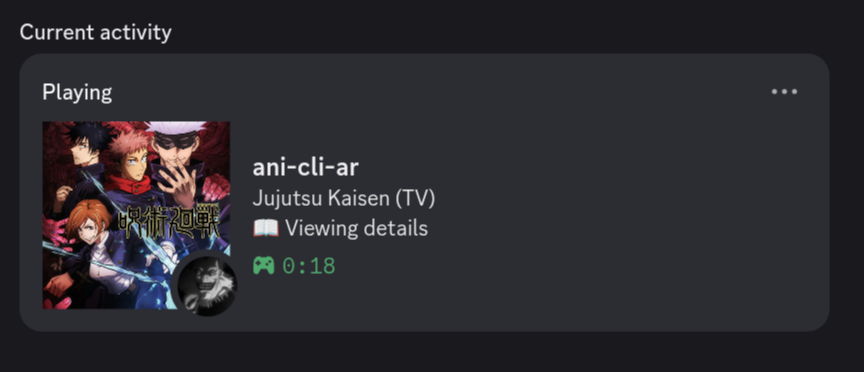
- Smooth Navigation: Intuitive keyboard controls
Technical Features
- Zero Ads: Clean streaming experience
- Automatic Updates: Built-in version checker notifies you of new releases, and yes this can be turned off.
- MPV/VLC Support: Choose your preferred media player
- Dependency Auto-installer: Automatically checks and installs missing dependencies, too lazy...
- CLI Mode: Simple command-line mode for quick searches (
ani-cli-ar -i "Naruto") interactive mode also runs if the terminal is too narrow - Cross-platform: Works on Windows and Linux
🎮 How to Use
- Launch the app: Run
ani-cli-arabicorani-cli-ar - Browse or Search: Use the main menu to search, view trending, or browse genres
- Select an Anime: Navigate with arrow keys and press Enter
- Pick an Episode: Choose which episode to watch
- Select Quality: Pick your preferred video quality
- Enjoy: MPV will launch and start streaming
You can also use interactive mode for quick searches:
ani-cli-ar -i "One Piece"
⌨️ Keyboard Shortcuts
| Key | What it Does |
|---|---|
| ↑ / ↓ | Navigate through lists |
| Enter | Select/Confirm choice |
| G | Jump directly to an episode number |
| B | Go back to previous screen |
| Q / Esc | Quit the application |
| Space | Pause/Resume video (in player) |
| ← / → | Rewind/Forward 5 seconds |
| F | Toggle fullscreen |
⚙️ Configuration
Settings are stored locally in ~/.ani-cli-arabic/database/config.json
Available Settings
Access the settings menu from the main screen to customize:
- Default Quality: Set your preferred quality (1080p, 720p, or 480p)
- Media Player: Choose between MPV or VLC
- Auto-next Episode: Toggle automatic episode continuation
- Discord Rich Presence: Show or hide Discord activity
- Theme Color: Pick from 17 beautiful color schemes:
- blue, red, green, purple, cyan, yellow, pink, orange, teal, magenta
- lime, coral, lavender, gold, mint, rose, sunset
- Analytics: Opt-in/out of anonymous usage stats - this is auto enabled by default.
- Update Checking: Toggle automatic update notifications
You can also manually edit the config file if you prefer.
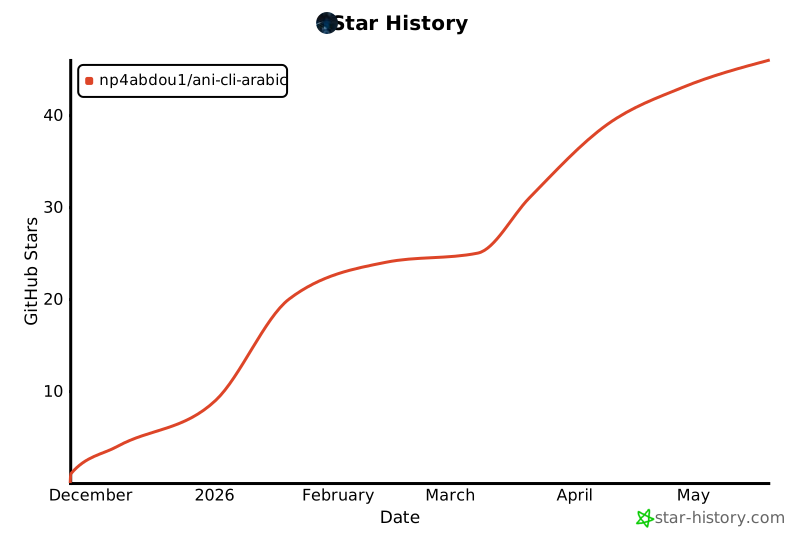
Star History
👥 Contributors
Special thanks to everyone who helped make this project happen:

Key Contributors:
- @np4abdou1 - Creator and main developer
- @Anas-Tou - Contributor
Want to contribute? Feel free to open issues or submit pull requests!
🔧 Build & Release (for maintainers)
Build the package
# Install build tools
pip install build twine

# Build source distribution and wheel
python -m build

# Check the package
twine check dist/*
Publish to PyPI
# Upload to PyPI
twine upload dist/*

# Or for test PyPI first:
# twine upload --repository-url https://test.pypi.org/legacy/ dist/*
Installing from a local build
pip install dist/ani_cli_arabic-*.whl
📄 License
This project is licensed under the GNU General Public License v3.0.
You're free to use, modify, and distribute this software under the terms of the GPL-3.0 license. See the LICENSE file for the full legal text.
In simple terms:
- ✅ Use it for personal or commercial purposes
- ✅ Modify the source code
- ✅ Distribute it to others
- ⚠️ Any modifications must also be open source under GPL-3.0
- ⚠️ Include the original copyright notice
[! CAUTION] By using this software you understand:
- Anonymous usage statistics are collected for the GitHub page stats banner (can be disabled in settings)
- The project is licensed under GPL-3.0 - see LICENSE for details
- We do not host any content; all streams are from third-party sources
- This tool is for personal use and educational purposes only
Made with ❤️ by the anime community
1 maintainer

Download files
Download the file for your platform. If you're not sure which to choose, learn more about installing packages.
Source Distribution
Built Distribution
Filter files by name, interpreter, ABI, and platform.
If you're not sure about the file name format, learn more about wheel file names.
Copy a direct link to the current filters
File details
Details for the file ani_cli_ar-1.9.5a2.tar.gz.
File metadata
- Download URL: ani_cli_ar-1.9.5a2.tar.gz
- Upload date:
- Size: 104.5 kB
- Tags: Source
- Uploaded using Trusted Publishing? No
- Uploaded via:
twine/7.0.0 CPython/3.12.3
File hashes
| Algorithm | Hash digest | |
|---|---|---|
| SHA256 |
9787a7df45515ddcda205ce86ba73ce9cb66bf6f51eaf1e2e7f0da269be5966c
|
|
| MD5 |
9050c14915dfbac665e871512d2d3288
|
|
| BLAKE2b-256 |
22b83974d5f09a2d90794ce1c0938c2d607e18c33fc9f0038afbf02ebec9f776
|
File details
Details for the file ani_cli_ar-1.9.5a2-py3-none-any.whl.
File metadata
- Download URL: ani_cli_ar-1.9.5a2-py3-none-any.whl
- Upload date:
- Size: 119.8 kB
- Tags: Python 3
- Uploaded using Trusted Publishing? No
- Uploaded via:
twine/7.0.0 CPython/3.12.3
File hashes
| Algorithm | Hash digest | |
|---|---|---|
| SHA256 |
f16a3e281db49019c945c0ecdbaf2dfae4c7b4c2cab8b7c3c9c30ee8ee4733e0
|
|
| MD5 |
7c6df267066e339cc2c37431ee2d0e37
|
|
| BLAKE2b-256 |
7a1f18ef74323eb90557649436260771d295509319c79db02d3ac2ea382212a2
|














